The Complete Guide to Building AI Agents That Actually Work in Production
After shipping 126 production AI systems, here is everything I have learned about building agents that survive real users, real scale, and real edge cases. Architecture patterns, RAG pipelines, tool use, multi agent orchestration, and cost optimization.


Table of Contents
A production AI agent is a reasoning loop wrapped in guardrails, and the guardrails are the part that takes the time. Every one of the 126 systems I have shipped has the same skeleton: a hard step ceiling, a token budget checked before each call, tool definitions precise enough that the model picks correctly, retrieval in 500 to 1000 token chunks with 100 token overlap, a confidence threshold that hands off to a human, and tracing on every request from day one. Getting the tool definitions right alone moved one call qualification agent from a 60% success rate to 95%.
The economics decide the architecture more than the model does. I run three tiers, routing 70% to 80% of requests to the cheapest one, and caching plus context pruning takes another 40% to 60% off token usage with no measurable quality loss. Simple tiered agents land near $0.002 per interaction; complex multi step agents on premium models run $0.50 to $2.00. Gartner puts AI projects reaching production at 48%, and in my experience the ones that fail did not fail on model quality. They failed because nobody capped the reasoning loop, and the bill or the latency arrived before the value did.
Most AI agent projects fail. Here is why.
Everyone is building AI agents right now. Most of them will never see production.
I know this because I have shipped 126 production AI systems and the pattern is always the same. Someone builds a demo that looks incredible. The CEO gets excited. Then the thing falls apart the moment it touches real users, real data, and real edge cases.
This is not a theoretical problem. Gartner found that at least 50% of generative AI projects get abandoned after the proof of concept, and separately that only 48% of AI projects reach production at all, taking about eight months to get there. The reasons are almost always the same: poor architecture decisions, missing error handling, no monitoring, and a fundamental misunderstanding of what AI agents actually are.
This guide is everything I have learned about building agents that actually survive production. Not theory. Not a research paper. Just hard won patterns from building voice agents, automation systems, RAG chatbots, and multi agent workflows that run 24/7 for paying customers.
If you want to see the results of these patterns in action, check out my case studies.
What AI agents actually are (and what they are not)
Let me clear something up because the terminology is a mess right now. Everyone calls everything an "AI agent" and it is causing real confusion for teams trying to build these systems.
A chatbot takes input, calls a language model, and returns a response. It is stateless. It does not take actions. It is a fancy text completion loop. Most "AI agents" you see on social media are actually chatbots with a good prompt. They generate text. That is all they do.
An automation is a predetermined workflow. If X happens, do Y. Maybe it uses AI for one step (classify this email, extract this data from a PDF), but the flow itself is fixed. There is no decision making. The path is predetermined before any data arrives.
An AI agent is fundamentally different. An agent observes its environment, decides what action to take, executes that action, and then observes the result to decide what to do next. The key word is decides. An agent has a loop: perceive, think, act, observe. It can choose between multiple tools. It can decide when to stop. It can recover from failures and try alternative approaches.
Here is the simplest way I explain it to clients: a chatbot answers questions. An automation follows rules. An agent owns a task.
When I build AI Employees for clients, the distinction matters enormously. An AI employee does not just respond to prompts. It takes ownership of an entire process, coordinates with other systems, makes judgment calls on edge cases, and delivers results with minimal supervision.
Most business problems do not need agents. They need well built automations with an AI step bolted on. Knowing which one you actually need saves months of wasted development. I will cover when to use which approach later in this post.
Why most AI agent projects fail
After consulting on dozens of failed agent projects (before clients hire me to fix them), I see the same five failure modes over and over.
1. The Demo Trap
The agent works beautifully on the 10 test cases the team tried during development. Then it hits production where users ask things nobody anticipated, data comes in malformed, APIs return unexpected errors, and network timeouts happen at the worst possible moment. The gap between "works on my machine" and "works for 10,000 users" is enormous.
I have seen teams spend three months building a beautiful agent demo, only to discover that it falls apart when a user sends a message in Spanish, or when the CRM API returns a 429 rate limit error, or when the user asks two questions in the same message. These are not edge cases. This is Tuesday.
2. No Error Recovery
The agent calls a tool and the tool fails. Now what? Most agent implementations just crash or return a generic "sorry, something went wrong" message. Production agents need retry logic with exponential backoff, fallback strategies when primary tools are unavailable, graceful degradation to simpler capabilities, and clear escalation paths to human operators.
I built a multi agent order processing system for 47 Shopify stores where the exception handling code was almost as large as the happy path code. That is normal for production systems. The happy path is easy. Handling every way it can fail is where the real engineering lives.
3. Ignoring State Management
Agents need memory. Not just conversation history, but working memory (what am I currently doing and what have I tried?), short term memory (what happened earlier in this session?), and long term memory (what patterns have I learned from previous interactions?). Most implementations dump the entire conversation into the context window and call it done. That works until you hit the token limit or the model starts hallucinating because it is confused by irrelevant context from 50 messages ago.
4. No Observability
You cannot fix what you cannot see. Production agents need structured logging, distributed tracing, performance metrics, quality metrics, and automated alerting. When an agent makes a bad decision at 2 AM, you need to reconstruct exactly what it saw, what it decided, why it chose that path, and what the alternatives were. Most teams skip this entirely and then wonder why their agent "randomly" stops working three weeks after launch.
5. Cost Blindness
An agent that calls GPT 4 class models in a loop can burn through hundreds of dollars per hour if you are not careful. I have seen teams rack up $15,000 in API costs during a single weekend because nobody put a cap on the agent's reasoning loops. Cost optimization is not optional. It is a launch requirement. Every production agent needs token budgets, daily cost caps, and model tiering from day one.
The architecture of a production AI agent
Every production agent I build follows the same core architecture. The details vary by project, but the structure is remarkably consistent across all 126 systems I have shipped.
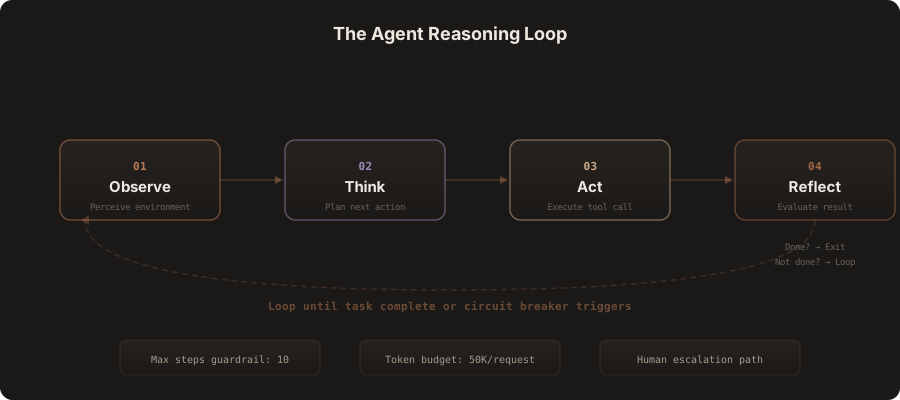
The Agent Loop: Observe, Think, Act, Reflect
The agent perceives its environment (incoming data, tool results, user messages), reasons about what to do next (using an LLM), executes an action (calling a tool, generating a response, updating state), evaluates the result, and decides whether to continue or stop. Every production agent has three hard guardrails: a maximum step count, a token budget, and a human escalation path.
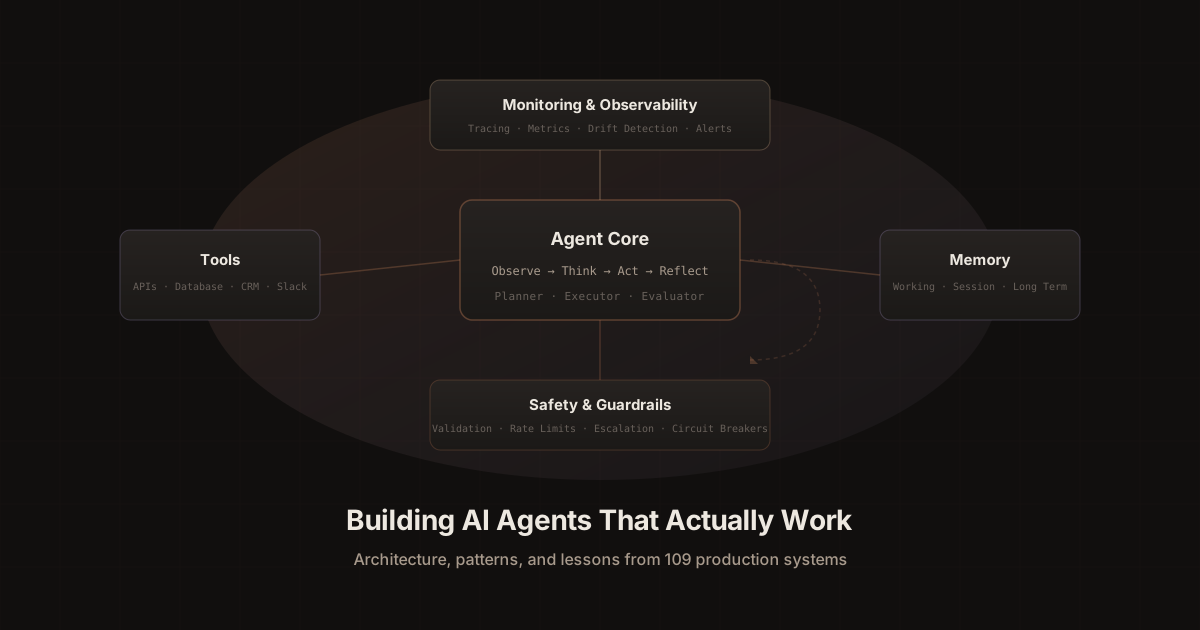
The system has five layers that work together:
- Agent Core contains the planner (decides what to do), executor (does it), and evaluator (checks the result). These three components run in a loop.
- Tools give the agent the ability to interact with the real world. APIs, databases, file systems, external services. Without tools, an agent is just a chatbot.
- Memory persists information across the loop. Working memory tracks the current task. Session memory tracks the conversation. Long term memory (often a vector database) stores patterns learned over time.
- Monitoring Layer captures every decision, every tool call, every LLM request, and every result. This runs alongside everything else, feeding data to dashboards and alerts.
- Safety Layer validates inputs, checks outputs for hallucinations and PII, enforces rate limits, and provides circuit breakers that stop runaway agents before they cause damage.
Here is what a minimal but production ready agent looks like in code:
# agent.py — Minimal production agent loop

class ProductionAgent:
    def __init__(self, model, tools, memory, monitor):
        self.model = model
        self.tools = tools
        self.memory = memory
        self.monitor = monitor
        self.max_steps = 10       # Hard guardrail
        self.token_budget = 50000  # Per-request limit

    async def run(self, task: str, trace_id: str) -> str:
        context = self.memory.get_relevant(task)
        messages = [
            {"role": "system", "content": self.system_prompt},
            {"role": "user", "content": task}
        ]
        tokens_used = 0

        for step in range(self.max_steps):
            response = await self.model.generate(
                messages=messages,
                tools=self.tools.definitions
            )
            tokens_used += response.usage.total_tokens

            # Cost guardrail
            if tokens_used > self.token_budget:
                self.monitor.alert(trace_id, "Token budget exceeded")
                return "This request is complex. Routing to a team member."

            if response.has_tool_calls:
                results = await self.tools.execute_safely(
                    response.tool_calls
                )
                messages.append(response.message)
                messages.append({"role": "tool", "content": results})
                self.memory.store(task, step, results)
                self.monitor.log_step(trace_id, step, response, results)
            else:
                self.memory.store_completion(task, response.text)
                self.monitor.log_completion(trace_id, tokens_used)
                return response.text

        self.monitor.alert(trace_id, "Max steps reached")
        return "This request needs human review. Escalating now."
Notice the max_steps and token_budget guardrails. Every production agent needs hard limits on iterations and spending. I have seen agents burn through thousands of dollars in API costs because they got stuck in reasoning loops. A simple counter and budget check prevents that entirely.
Tool use and function calling in production
Tools are what separate a useful AI agent from a fancy chatbot. The agent needs to interact with the real world: query databases, call APIs, read files, update CRM records, send notifications, book calendar slots.
Modern language models like Claude, GPT 4, and Gemini all support function calling natively. You define a set of tools with their parameters, and the model decides which tool to call and with what arguments. The pattern I use across all my automation agent projects:
// tools.ts — Production tool definitions with Zod validation
import { z } from "zod";

export const tools = {
  lookupCustomer: {
    description:
      "Look up a customer by email or account ID. " +
      "Use this when the user asks about their account, " +
      "order status, or billing. Always look up the customer " +
      "before answering account specific questions.",
    parameters: z.object({
      email: z.string().email().optional(),
      accountId: z.string().optional(),
    }).refine(
      (data) => data.email || data.accountId,
      { message: "Provide either email or accountId" }
    ),
    execute: async ({ email, accountId }) => {
      try {
        const customer = await db.customers.findFirst({
          where: email ? { email } : { id: accountId },
          include: { orders: { take: 5 }, subscription: true },
        });

        if (!customer) {
          return {
            found: false,
            suggestion: "Ask the user to verify their email",
          };
        }

        return {
          found: true,
          name: customer.name,
          plan: customer.subscription?.plan ?? "free",
          recentOrders: customer.orders.length,
          accountAge: daysSince(customer.createdAt),
        };
      } catch (error) {
        // Never expose internal errors to the agent
        logger.error("Customer lookup failed", { error, email });
        return {
          found: false,
          error: "Temporary lookup issue. Ask the user to try again.",
        };
      }
    },
  },
};
Three rules I follow for every tool definition:
- Clear, specific descriptions that tell the model WHEN to use the tool. "Always look up the customer before answering account specific questions" is a behavioral instruction disguised as a tool description. Vague descriptions lead to wrong tool selection, which leads to bad agent behavior.
- Structured error handling that returns guidance, not stack traces. When the database lookup fails, the agent gets a suggestion for what to tell the user. It never sees raw error messages. This prevents the model from exposing internal system details to users.
- Constrained parameters with strict validation. Use Zod schemas, enums, and required fields. The tighter the constraints, the fewer mistakes the agent makes. Loose parameter definitions are the number one cause of tool misuse in production.
For a real world example of how tool use powers complex interactions, look at how I built the real estate voice agent where tools handle CRM updates, calendar booking, and listing lookups during live phone calls. Getting tool definitions right was the difference between a 60% and 95% success rate on call qualification.
Understanding RAG: Retrieval Augmented Generation explained
RAG is one of the most important patterns in production AI, and it is the foundation of every chatbot and knowledge system I build. Let me explain exactly how it works and why it matters.
The problem RAG solves: Language models have a knowledge cutoff date. They do not know about your company's products, your internal documentation, your customer data, or anything that happened after their training data was collected. If you ask a raw model about your specific business, it will either hallucinate an answer or admit it does not know.
How RAG works: Instead of relying on the model's training data, you retrieve relevant information from your own data sources at query time and inject it into the prompt. The model then generates a response grounded in your actual data, not its parametric memory.
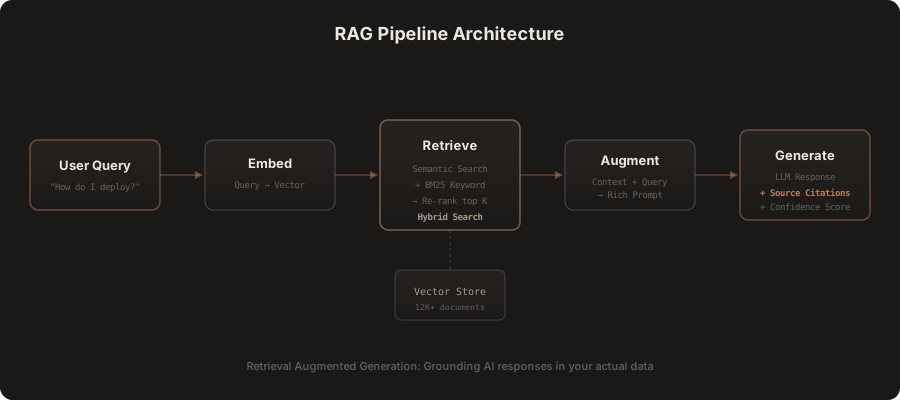
Here is the five step pipeline I use in production:
- Indexing (one time): Your documents (PDFs, web pages, database records, Confluence wikis, Notion pages, Slack messages) get chunked into smaller pieces, converted to vector embeddings, and stored in a vector database. I typically use chunk sizes between 500 and 1000 tokens with 100 token overlap between chunks.
- Query embedding: When a user asks a question, that question is converted to a vector embedding using the same embedding model.
- Hybrid retrieval: The system searches for relevant chunks using two methods simultaneously. Semantic search finds conceptually related content (useful when the user asks "how do I deploy" and the docs say "deployment instructions"). BM25 keyword search finds exact matches (essential for API names, error codes, product numbers). The results from both are merged and re-ranked.
- Augmentation: The top K retrieved chunks are injected into the prompt alongside the user's question, clearly delimited so the model knows what is context and what is the query.
- Generation: The model generates a response using the retrieved context. Every answer includes source citations so users can verify and go deeper. A confidence score below 85% triggers human handoff.
Here is a simplified implementation:
# rag_pipeline.py — Production RAG implementation

class RAGPipeline:
    def __init__(self, vector_store, embedding_model, llm):
        self.vector_store = vector_store
        self.embedding_model = embedding_model
        self.llm = llm
        self.confidence_threshold = 0.85

    async def answer(self, query: str) -> dict:
        # Step 1: Embed the query
        query_embedding = await self.embedding_model.embed(query)

        # Step 2: Hybrid retrieval
        semantic_results = await self.vector_store.search(
            embedding=query_embedding,
            top_k=10,
            method="cosine_similarity"
        )
        keyword_results = await self.vector_store.bm25_search(
            query=query,
            top_k=10
        )

        # Step 3: Merge and re-rank
        combined = self.reciprocal_rank_fusion(
            semantic_results, keyword_results
        )
        top_chunks = combined[:5]  # Top 5 after re-ranking

        # Step 4: Augment the prompt
        context = "\\n\\n".join([
            f"[Source: {chunk.metadata['source']}]\\n{chunk.text}"
            for chunk in top_chunks
        ])

        prompt = f"""Answer the user's question using ONLY the context below.
If the context does not contain the answer, say so honestly.
Always cite your sources.

Context:
{context}

Question: {query}"""

        # Step 5: Generate with confidence scoring
        response = await self.llm.generate(prompt)
        confidence = self.estimate_confidence(response, top_chunks)

        return {
            "answer": response.text,
            "sources": [c.metadata["source"] for c in top_chunks],
            "confidence": confidence,
            "needs_human": confidence < self.confidence_threshold,
        }
The critical design decisions that separate a production RAG system from a toy demo:
- Hybrid search (semantic + keyword) catches both conceptual matches and exact term matches. Using only semantic search fails on technical queries with specific terms. Using only keyword search fails when users phrase questions differently than the documentation.
- Re-ranking combines both result sets intelligently. I use reciprocal rank fusion which gives weight to items that appear in both result sets.
- Source citations on every response. Developers and business users need to verify answers. Without citations, trust erodes quickly.
- Confidence scoring with automatic human handoff. The system says "I am not confident enough to answer this one, routing to the team" instead of guessing. This was the single most important feature for my SaaS documentation chatbot that reduced support tickets by 45%.
RAG is not just for chatbots. It is the same pattern used for long term agent memory, internal knowledge search, document Q&A, and any system where the AI needs to work with your specific data rather than general knowledge.
Memory and state management for AI agents
Memory is where most agent implementations go from "cool demo" to "production disaster." Without proper memory management, agents forget context mid-task, repeat actions they already tried, and cannot learn from past interactions.
I use a three tier memory architecture in every production agent:
Working Memory: What Am I Doing Right Now?
Working memory tracks the current task state. What has the agent tried? What tools has it called? What results did it get? Is it waiting for external input? This is critical for multi-step tasks where the agent needs to maintain coherence across 5 to 10 tool calls.
# working_memory.py — Task state tracking
from dataclasses import dataclass, field
from enum import Enum

class TaskStatus(Enum):
    PLANNING = "planning"
    EXECUTING = "executing"
    WAITING = "waiting_for_input"
    COMPLETE = "complete"
    FAILED = "failed"
    ESCALATED = "escalated"

@dataclass
class WorkingMemory:
    task_id: str
    objective: str
    status: TaskStatus = TaskStatus.PLANNING
    steps_planned: list[str] = field(default_factory=list)
    steps_completed: list[str] = field(default_factory=list)
    tool_results: list[dict] = field(default_factory=list)
    retry_count: int = 0
    max_retries: int = 3

    def should_escalate(self) -> bool:
        """Escalate after repeated failures."""
        if self.retry_count >= self.max_retries:
            return True
        # Three consecutive failures on the same tool
        recent = self.tool_results[-3:]
        if len(recent) == 3 and all(not r["success"] for r in recent):
            return True
        return False

    def to_context(self) -> str:
        """Inject current state into the LLM prompt."""
        return (
            f"Task: {self.objective}\\n"
            f"Status: {self.status.value}\\n"
            f"Progress: {len(self.steps_completed)}/{len(self.steps_planned)}\\n"
            f"Retries used: {self.retry_count}/{self.max_retries}"
        )
Session Memory: Smart Conversation Windowing
The mistake most people make is dumping every message into the context window. At message 50, you have wasted half your context on irrelevant small talk from the beginning of the conversation. I use a sliding window with summarization: when the conversation exceeds a threshold, older messages get summarized by a fast, cheap model (like Claude Haiku) and the full text is only kept for the most recent exchanges.
Long Term Memory: Learning Over Time
Long term memory is what turns a stateless tool into something that genuinely improves over time. This is essentially RAG applied to the agent's own experience. User preferences, resolved issues, learned patterns, and successful strategies all get stored as embeddings in a vector database. Before handling a new query, the agent retrieves relevant memories from past interactions.
Multi agent orchestration at scale
Single agents hit a ceiling. When the task is complex enough, involves multiple domains, or requires different expertise at different stages, you need multiple specialized agents working together.
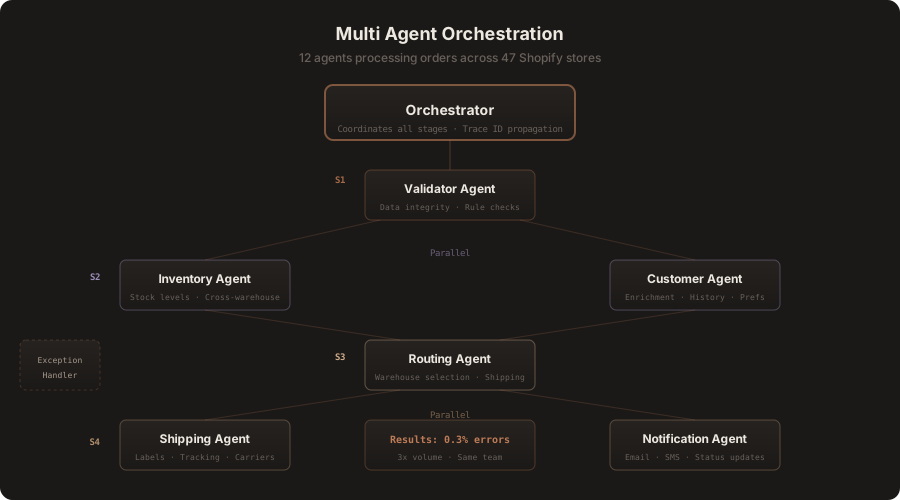
My multi agent workflow engine for 47 Shopify stores is the best example of this pattern. Instead of one monolithic agent trying to handle validation, inventory, routing, shipping, and notifications, I built 12 specialized agents coordinated by an orchestration layer.
If you are using n8n as your orchestration layer, the n8n AI agent workflow guide covers the exact node architecture, memory types, and tool patterns I use across production deployments.
// orchestrator.ts — Multi agent pipeline with parallel execution
class AgentOrchestrator {
  private agents: Map<string, AgentConfig>;
  private monitor: Monitor;

  async processOrder(order: Order): Promise<ProcessingResult> {
    const traceId = generateTraceId();

    try {
      // Stage 1: Sequential validation (must pass before anything else)
      const validation = await this.runAgent("validator", { order, traceId });
      if (!validation.success) {
        return this.handleException(order, "validation", validation, traceId);
      }

      // Stage 2: Parallel independent tasks (saves 40% time)
      const [inventory, customer] = await Promise.all([
        this.runAgent("inventory_checker", { items: order.lineItems, traceId }),
        this.runAgent("customer_enricher", { customerId: order.customerId, traceId }),
      ]);

      // Stage 3: Sequential routing (depends on stages 1 and 2)
      const routing = await this.runAgent("fulfillment_router", {
        order, inventory: inventory.data, customer: customer.data, traceId,
      });

      // Stage 4: Parallel execution and notification
      const [shipping] = await Promise.all([
        this.runAgent("shipping_agent", { route: routing.data, traceId }),
        this.runAgent("notification_agent", {
          customer: customer.data, orderStatus: "processing", traceId,
        }),
      ]);

      return { success: true, trackingNumber: shipping.data.trackingNumber };
    } catch (error) {
      return this.escalateToHuman(order, error, traceId);
    }
  }
}
Key design principles for multi agent systems:
- Narrow responsibilities. Each agent does one thing well. The validator validates. The inventory checker checks inventory. Narrow scope means easier testing, debugging, and optimization.
- Staged execution with parallelization. Map the dependency graph. Stages that depend on each other run sequentially. Independent stages run in parallel. This reduced order processing time from 2.5 hours per batch to 8 minutes.
- Exception handling is a first class agent. It understands common failure modes and can often auto-resolve issues like address formatting errors or inventory mismatches.
- Every execution is traced. A single trace ID flows through every agent call, making it possible to reconstruct the complete journey when something goes wrong.
The result: fulfillment errors dropped from 8% to 0.3%, and the same 6 person team now handles 3x the order volume.
Monitoring, observability, and drift detection
This is the section that separates production engineers from demo builders. If you cannot answer these five questions about your agent at any moment, you are not ready for production:
- How many requests is it handling per hour?
- What is the P50 and P95 latency?
- What percentage of requests require human escalation?
- How much are we spending per request?
- Is the agent's answer quality degrading over time?
That last question is about model drift, and it is the silent killer of production AI systems.
What causes drift in AI agents
Model provider updates can subtly change behavior. Your underlying data changes (new products, updated policies, new customer patterns). The types of questions users ask evolve seasonally. Your knowledge base gets stale. Any of these can make a previously excellent agent start performing poorly, and the degradation is often gradual enough that nobody notices until customers complain.
How to detect drift early
Automated quality metrics: Track confidence scores, tool call pattern distributions, response length distributions, error rates, and escalation rates over time. A sudden shift in any of these is an early warning signal. If your agent normally calls the search tool 40% of the time and suddenly it is calling it 80% of the time, something changed in the input distribution.
Weekly human sampling: Review a random 5% of agent interactions manually. Not just the failures. The successes too. You will catch quality issues that metrics miss, like subtly wrong answers that users accepted without flagging.
User feedback loops: A thumbs down button with a one click reason (wrong answer, too slow, irrelevant, rude) gives you ground truth data for measuring quality over time.
I offer ongoing agent optimization and monitoring as a service because drift detection and continuous improvement is genuinely hard to do well. Most teams underestimate the operational work required to keep an agent performing at launch quality.
Cost optimization strategies for AI agents
AI agents can be shockingly expensive if you are not deliberate about cost management. Here are the strategies I use across every production deployment.
1. Model Tiering (the biggest cost lever)
Not every decision needs your most powerful model. I use a three tier approach: a fast, cheap model (Haiku class, approximately $0.001 per call) for routing, classification, and simple lookups. A balanced model (Sonnet class, approximately $0.01 per call) for standard responses and moderate reasoning. A premium model (Opus class, approximately $0.10 per call) for complex multi step reasoning tasks. The routing layer decides which model to use based on request complexity. In practice, 70% to 80% of requests can be handled by the cheapest tier.
2. Semantic Caching
If someone asks "what are your business hours?" and someone else asks "what time do you close?", those should hit a cache, not a model call. I implement semantic caching using embedding similarity. If a new query is semantically similar enough to a recent query (above a 0.95 threshold), return the cached response. This typically reduces model calls by 20 to 30% for customer-facing agents.
3. Token Budget Enforcement
# cost_guard.py — Token budget and cost enforcement
from dataclasses import dataclass
from datetime import date

@dataclass
class CostGuard:
    max_tokens_per_request: int = 50_000
    max_tool_calls_per_request: int = 10
    max_cost_per_request_usd: float = 0.50
    daily_budget_usd: float = 100.0
    _daily_spend: float = 0.0
    _daily_reset: str = ""

    def check_budget(self, tokens: int, tool_calls: int) -> bool:
        today = date.today().isoformat()
        if today != self._daily_reset:
            self._daily_spend = 0.0
            self._daily_reset = today

        if tool_calls >= self.max_tool_calls_per_request:
            raise BudgetExceeded("Tool call limit reached")
        if tokens > self.max_tokens_per_request:
            raise BudgetExceeded("Token limit exceeded")

        estimated_cost = tokens * 0.000003
        if self._daily_spend + estimated_cost > self.daily_budget_usd:
            raise BudgetExceeded("Daily budget exhausted")
        return True

    def record_spend(self, actual_cost: float):
        self._daily_spend += actual_cost
4. Smart Context Pruning
Do not send the entire conversation history with every request. Summarize older context using a cheap model, drop irrelevant tool results that are no longer needed, and only include the information the agent actually needs for the current step. This alone can cut token usage by 40 to 60% without any measurable impact on quality.
On one project, combining model tiering with caching and context pruning reduced costs by 70% while actually improving response quality (because the agent had less irrelevant context to get confused by).
When to use agents vs simpler approaches
Not everything needs to be an AI agent. This is probably the most important lesson in this entire post, and the one that saves clients the most money.
Use a simple automation when: The workflow is predictable and linear. The same input always produces the same output. You can draw the complete flowchart before writing any code. Examples: data sync between systems, scheduled report generation, form processing with fixed validation rules.
Use an AI powered automation when: The workflow is mostly predictable but one step requires understanding natural language, classifying unstructured content, or extracting structured data from messy input. Examples: email triage with classification, invoice data extraction from PDFs, sentiment analysis on support tickets.
Use a single AI agent when: The task requires multi step reasoning, dynamic tool selection, and the ability to recover from unexpected situations. The problem space is bounded enough for one agent to handle. Examples: customer support with account access, RAG powered documentation search, scheduling assistant with calendar integration.
Use multi agent orchestration when: The problem has multiple distinct domains that interact. No single agent can hold all the necessary context. The system needs to scale by adding specialized agents. Examples: end to end order processing across multiple stores, complex approval workflows with multiple stakeholders, autonomous business operations.
Do not use AI at all when: The problem has a deterministic solution. If you can solve it with a SQL query, a regex, or a simple rule engine, do that. AI adds latency, cost, and unpredictability. Only introduce it when the problem genuinely requires flexibility and judgment.
I have talked clients out of building agents more times than I can count. Sometimes the right answer is a cron job and a database query. That is not a failure. That is engineering judgment. If you are not sure which approach fits your problem, let us talk about it.
The five mistakes that will cost you months
- No guardrails on iteration. Always cap the number of steps. Always cap the token budget. Always have a timeout. An unconstrained agent is a billing disaster waiting to happen.
- Skipping error handling. Every tool call can fail. Every API can timeout. Every model response can be malformed. Handle all of it explicitly, not with a generic catch all.
- Ignoring monitoring from day one. Do not add observability later. Instrument everything from the start. The cost of adding monitoring later is 10x higher because you have to retrofit it into existing code and you have already lost the data from the launch period.
- Over-engineering the first version. Ship a simple agent first. Add complexity only when the simple version fails at specific tasks. Premature abstraction kills more agent projects than bad AI models.
- Not testing with real data. Synthetic test data is worthless for agent evaluation. Use production data (sanitized of PII) from day one. Your test suite should include the weirdest, most malformed inputs your real users have ever sent.
Production deployment checklist
Before shipping any agent to production, I run through this checklist. Every single item.
Architecture: Clear scope definition of what the agent should and should not do. Tool definitions with detailed descriptions, Zod validation, and error handling. Memory strategy covering working, session, and long term tiers. Model selection with tiering for different complexity levels.
Safety: Input validation and sanitization. Output guardrails for PII detection, hallucination checks, and off topic responses. Rate limiting per user and globally. Circuit breakers on tool calls and total tokens. Human escalation path that is actually tested end to end.
Operations: Distributed tracing with unique request IDs. Structured logging of every decision point. Cost tracking per request and daily aggregates. Alerting on error rate spikes, latency degradation, and budget thresholds. Drift detection with automated metrics and weekly human sampling.
Testing: Unit tests for each tool. Integration tests for the 20 most common conversation flows. Adversarial testing for prompt injection, jailbreaking, and abuse. Load testing at 3x expected peak volume. Failover testing to verify behavior when external APIs are down.
Frequently asked questions
What is the difference between an AI agent and a chatbot?
A chatbot takes input and generates a text response. An AI agent can take autonomous actions in the real world: calling APIs, updating databases, sending messages, reading files, and making decisions about what to do next based on the results. The key distinction is autonomy and tool use. A chatbot follows a single request and response pattern. An agent runs in a reasoning loop, observing results and deciding its next move independently.
What is RAG and why does it matter for AI agents?
RAG stands for Retrieval Augmented Generation. It is a technique where you retrieve relevant information from your own data sources (documents, databases, knowledge bases) at query time and inject it into the language model's prompt. This grounds the model's responses in your actual data rather than its general training knowledge. RAG eliminates most hallucination problems and lets you build AI systems that answer questions about your specific business, products, or documentation accurately.
How much does it cost to run an AI agent in production?
It varies enormously based on complexity and volume. Simple agents with model tiering and caching cost around $0.002 per interaction. Complex multi step agents with premium models can cost $0.50 to $2.00 per interaction. For a typical customer support agent handling 1,000 interactions per day with smart tiering, expect $50 to $150 per day in model costs. Infrastructure costs (servers, databases, monitoring) are usually smaller than model costs.
Can AI agents replace human employees?
They replace specific tasks, not entire roles. The best results come from agents that handle the predictable 80% of work and escalate the complex 20% to humans. My patient onboarding agent handles 85% of intake autonomously, but human staff review exceptions that require empathy or judgment. Think of agents as multipliers for your team, not replacements.
What programming language should I use to build AI agents?
Python and TypeScript are the two dominant choices. Python has a richer ecosystem for ML and data processing (LangChain, LlamaIndex, CrewAI, DSPy). TypeScript has better tooling for web applications and serverless deployment (Vercel AI SDK, Next.js, Cloudflare Workers). I use both depending on the project. For AI apps and MVPs with web interfaces, I reach for TypeScript. For data heavy backend agents and ML pipelines, Python. The language matters far less than the architecture.
How long does it take to build a production AI agent?
A single purpose agent (support chatbot, scheduling assistant, data extraction) takes 2 to 4 weeks including testing and deployment. A multi agent system like the 47 store order processor took 6 weeks with a phased rollout. The biggest variable is not the AI component. It is the integration work: connecting to your CRM, database, ticketing system, phone system, and other external services. That integration work typically accounts for 60% of the total timeline. Check out my case studies for real timelines from shipped projects.
Start building
If you have read this far, you are serious about building AI agents that work in production. Not toys. Not demos. Real systems that handle real users and real money.
- Start simple. Pick the narrowest possible use case and build a single agent that does it well. Resist the urge to build a multi agent system until you have proven the concept with one.
- Instrument everything from day one. Logging and monitoring are not things you add later. They are part of the architecture.
- Plan for failure. Your agent will make mistakes. Design the system so mistakes are caught quickly, do not cascade, and are easy to recover from.
- Set cost guardrails before you launch. Not after you get a $5,000 bill from your model provider.
- Ship fast, iterate faster. The best agents get better over time because you are learning from production data. The sooner you ship, the sooner you start learning.
If you want help building your production AI system, I have done this 126 times and counting. Browse my services to see how I work, check out the case studies for real results, or just reach out and tell me what you are building.
I will tell you honestly whether you need an agent, an automation, or just a well written SQL query.
Jahanzaib Ahmed is an AI Systems Engineer who has shipped 126+ production AI systems across healthcare, fintech, ecommerce, SaaS, and logistics. He builds AI voice agents, automation systems, RAG chatbots, AI apps, and AI employees that work in the real world.
Related Posts

How to Set Up LangGraph Studio and Debug an Agent on Your Own Machine
How toAI AgentsLangGraph
OpenAI vs Claude for Small Business: I've Shipped 126 Systems on Both. Here Is How I Actually Choose.
ComparisonAI AgentsOpenai Vs Claude
How to Build Your Own AI Agent: 3 Self-Hosted Stacks Compared (2026)
How toAI AgentsAI Agents

Jahanzaib Ahmed
AI Systems Engineer & Founder
AI Systems Engineer with 126 production systems shipped. I run AgenticMode AI (AI agents, RAG systems, voice AI) and ECOM PANDA (ecommerce agency). I build AI that works in the real world for businesses across home services, healthcare, ecommerce, SaaS, and real estate.