How to Run Google's Harness2: What It Costs, What Breaks and What to Block
A step by step guide to Google Research's Harness2, with the demo run for real: install it, read its output, price a run with the 4k and 3k budget, block rubric leaks and plug in your own tasks.


Table of Contents
Google Research released Harness2 on October 8, 2026, an Apache 2.0 framework that rewrites the prompts, skills, scripts and plugins around a frozen model while it works on a task, then saves what it learned for the next one. The repo went from nothing to more than 2,600 stars in ten days, and its paper reports gains of up to 11.5 points on WorkBuddy-Bench. This guide covers a first run, what a run costs, what the release leaves unprotected and how to use it on your own tasks. I read the setup docs, the core modules, the paper and the open issues, and I ran the credential free demo, the help output, the setup dry run and the install check myself at commit 1cfe254e on October 18. I did not run a model backed benchmark, because that spends money. Where a result below comes from my own run, I say so, and one command the README tells you to run fails today (Step 2).
Requirements and costs before you start
Harness2 is a research release: documented for Linux, Vertex AI by default and heavy on third party benchmark code. The package itself has no runtime dependencies. The weight is in the benchmarks it drives.
| Need | For what | Source |
|---|---|---|
| Linux and Python 3.12 | Everything. Python 3.13 is also declared supported for the package | Setup guide |
| uv | Creating the environment and installing the package | README |
| Node.js 20 or newer, plus git, curl, unzip and ca-certificates | Setup uses npm to install a pinned Bun runtime and the Codex CLI. The setup guide lists the packages in an apt line | Setup guide |
| Google Cloud CLI | Application Default Credentials for Vertex AI models | Setup guide |
| Pandoc and Poppler | The LAB legal benchmark only | Setup guide |
| Docker Engine | WorkBuddy-Bench only, and you must be able to run docker info | Setup guide |
The README says to use Linux. The authors do not claim macOS support, but the install and the demo worked on my Mac (Apple silicon, Python 3.12.12 from uv). I did not try a benchmark install there. Each setup run downloads a pinned Bun runtime, clones two upstream repositories at fixed commits (OpenCode and the benchmark you chose), applies patches, builds a separate Python environment for the benchmark, and downloads task data. JobBench and WorkBuddy-Bench fetch theirs from Hugging Face, while LAB tasks come with its pinned checkout. I have no install time to report.
Runs cost money. Every model backed command spends credits on executor runs, improver sessions and judge calls, and the docs recommend starting with a small task selection. Step 7 shows the arithmetic: the repository documents exact counts of runs and sessions, though not prices.
Google Harness2 in plain terms
A harness is everything around a model that lets it act as an agent: the system prompt, tool guidance, memory, reusable skills, helper scripts, subagents and plugins. Most agent work holds the model fixed and tunes that scaffolding by hand. Harness2 automates the tuning per task, while the agent works on something it has not seen, and adds a persistent library on top. Its authors describe two connected loops.
The first loop works inside one task. The pipeline runs your current harness once to see how it behaves. Then it proposes two edited harnesses: an invariant one aimed at general weaknesses such as planning, tool use, context management or delegation, and a domain one aimed at the knowledge, procedures and constraints of the current field. It runs both edited harnesses on the same task and compares what happened against the reference run. Finally a composer session reads the diffs and the evidence and builds a successor harness, which it may do by merging edits, revising conflicts, adopting one candidate or keeping the original. The authors name the three phases Propose, Probe and Compose, and the key design choice is that no step sees a score or a rubric. Decisions have to be justified by observed behavior.
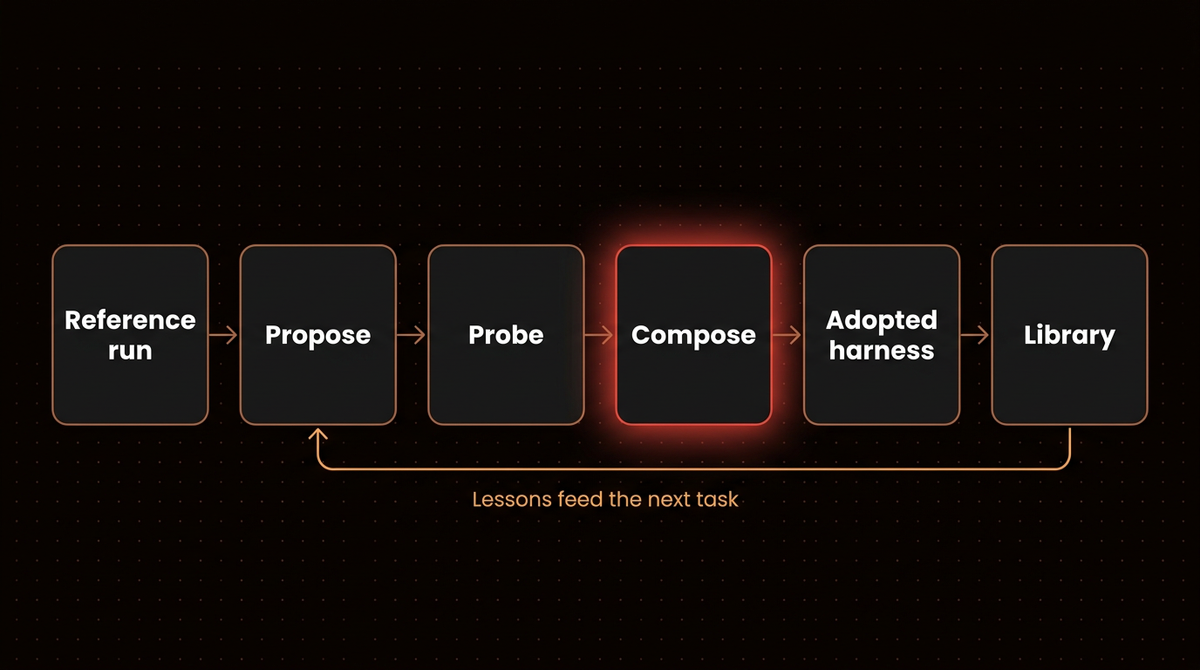
The second loop works across tasks. After each task, a reflection step reads the whole improvement record, keeps the adopted harness and writes down lessons that the execution contrasts support. Both go into a per task library, grouped by domain. A later task in the same domain can read earlier harnesses and lessons before it proposes anything. The paper calls the thing that does all this the improvement harness, to keep it apart from the execution harness that does the actual work.
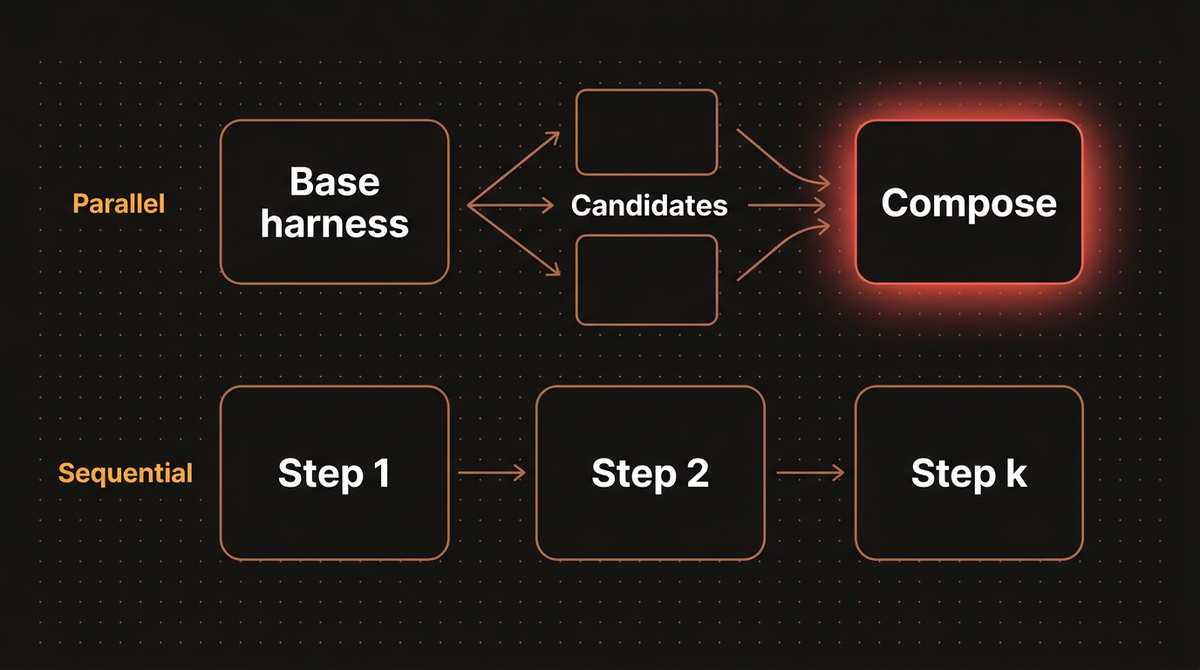
Two knobs control cost and quality. The budget k sets how much exploration each task gets. The mode picks how that exploration is spent. Parallel mode probes k invariant and k domain candidates and then writes k independent compositions from the whole pool. Sequential mode runs k Propose, Probe, Compose steps in a chain and carries the refined harness and the accumulated evidence from one step to the next. At k of 1 the two modes are the same single step.
The release supports two executors, OpenCode by default and Codex, and three benchmarks: JobBench for professional work, LAB for legal work and WorkBuddy-Bench for office, web and code tasks. It also contains the pieces you need to plug in something else, which Step 9 covers.
Step 1: Run the credential free demo
Start here, because it proves the plumbing without spending anything. The README gives these commands from the repository root. I ran them in a fresh clone at commit 1cfe254e:
uv venv --python 3.12 .venv
source .venv/bin/activate
uv pip install -e '.[render]'
harness2-demo --output runs/demo --k 2
The install pulled eight packages in a few seconds: Harness2 itself plus openpyxl, python-pptx, lxml, pillow, xlsxwriter, et-xmlfile and typing-extensions. The demo then finished in about 1.6 seconds and printed this:
  [accounting] 1/2 ok           ledger-1
  [accounting] 2/2 ok           ledger-2
Local demo: 2 tasks completed; 0 failed. .../runs/demo/demo.json
No model was called. The demo runs the real recursion and library code against a local adapter with scripted editors, and it executes real Python scripts as the agent. The task is a ledger reconciliation. The base harness ships scripts/summarize.py with a filter that keeps only positive amounts, so it drops credits. For the first ledger, the base run printed Total: 105.25. Every edited candidate printed Total: 85.15, which is the correct signed sum of 100.25, minus 20.10, plus 5.00. For the second ledger the base total was 35.50 and the candidates gave 20.25. The scripted editor removed the filter, the scripted selector picked an output whose total matched the source ledger, and reflection wrote down what happened.
The reflection step wrote an EXPERIENCE.md for each adopted harness. This is the one for the second task in parallel mode, trimmed and with the file's Markdown bold removed:
- adopted: `agg2`  (run `demo-oc-agg2/ledger-2/agg2`)
## Why this was chosen
The signed total matches the source ledger.
## Transferable lesson
- cue: When a ledger includes credits and debits
- lesson: Include both signs when summing in scripts/summarize.py.
- confidence: high for this observed arithmetic contrast
The result file demo.json also records "execution_count": 28 and "editor_calls": 32 for that run, and the first task shows library_entries_before of 0 in both modes while the second shows 1. That is the library working: the second task could read what the first one left. Those two counts are worth a closer look, and Step 7 does the arithmetic with more runs. You can restrict modes with --mode parallel or --mode sequential. The default is both.
Step 2: Set up models and credentials
The provided configuration targets Google Vertex AI. The README tells you to run cp .env.example .env. I ran it and got cp: .env.example: No such file or directory, because the file is missing from the repository at commit 1cfe254e. An open pull request reports the same failure. Until it lands, create .env yourself from the settings in the table below, with placeholders swapped for model IDs your project can use:
GOOGLE_CLOUD_PROJECT=your-project-id
HARNESS2_SOLVER_MODEL=google-vertex/<a Gemini model ID>
HARNESS2_IMPROVER_MODEL=<provider/model, in the same form as the solver>
HARNESS2_JUDGE_MODEL=<a bare Gemini model ID>
Then authenticate with Application Default Credentials:
gcloud auth application-default loginShell variables override the file. These are the settings that matter (the IDs above are placeholders because I will not guess which models your account can reach):
| Setting | Meaning |
|---|---|
GOOGLE_CLOUD_PROJECT | Your Vertex AI project. GOOGLE_CLOUD_LOCATION defaults to global |
HARNESS2_SOLVER_MODEL | The executor model, written in OpenCode's provider/model form |
HARNESS2_IMPROVER_MODEL | The model that edits and composes harnesses. Defaults to the executor |
HARNESS2_JUDGE_MODEL | A bare judge model ID. The adapter adds the Vertex prefix |
HARNESS2_RUNS_DIR | Where results go. Defaults to runs/ |
Three choices deserve a decision rather than a default. First, the improver. The paper ran its editor and selector on Claude Opus 4.8 at high reasoning effort, and its analysis section also tests the same model in both roles. With five models from GLM-5 to Claude Opus 5, every one improved on every benchmark at k of 2, which suggests a stronger improver is not required, though I would still not assume your cheapest model behaves the same. Second, the judge. Changing the judge model changes the measurement, so pick one and keep it for the whole experiment. Third, authentication. If you cannot open a browser on the machine, the docs list --no-browser login, a service account key through GOOGLE_APPLICATION_CREDENTIALS, and service account impersonation. Even with a key file, keep gcloud on your PATH, because the install check calls gcloud auth application-default print-access-token.
For a Codex executor you also need a Responses API endpoint. The release includes harness2-bridge, a local LiteLLM server that presents Gemini on Vertex AI that way, installed with uv pip install -e '.[render,bridge]'. The bridge prints the Codex settings to add to your .env and stores its port and generated key under dependencies/codex/. For WorkBuddy, which runs Codex inside Docker containers, the bridge must listen on 0.0.0.0, which exposes it on every network interface of the host. I come back to that in Step 6.
Step 3: Install one benchmark and dry run it
Install only the benchmark you plan to use, then check the install without calling a model:
harness2-setup lab
harness2-check --bench lab
Use jb for JobBench or wb for WorkBuddy-Bench. WorkBuddy also needs --subset office, web or code on every command after setup, and harness2-setup wb without a subset installs all three. Add --substrate cx to any command to use Codex instead of OpenCode. Setup clones the upstream repositories at pinned commits and refuses to overwrite a checkout at a different revision. The pin table in dependencies/PINNED.md lists them:
| Repository | Used for |
|---|---|
| harveyai/harvey-labs | LAB, the legal benchmark |
| Job-Bench/job-bench-eval | JobBench evaluation code |
| Tencent/workbuddy-bench | WorkBuddy-Bench |
| opencode | The default executor |
The release also carries four patch files. They fix a moving Git dependency in OpenCode, add judge changes for JobBench and LAB, and register the executor adapters for WorkBuddy while refreshing short lived credentials. Each benchmark gets its own virtual environment inside its upstream checkout, for example dependencies/harvey-labs/.venv. Harness2 picks those interpreters itself, so you keep the main environment active and never activate the others.
Run harness2-setup lab --dry-run first, especially if your machine sits behind a restrictive firewall. I ran it, and it prints the plan without changing anything. For LAB the plan is: initialise an OpenCode checkout, add github.com/anomalyco/opencode as its origin, fetch the pinned commit and apply a patch; install Bun 1.3.11 through npm; run bun install --frozen-lockfile --ignore-scripts; do the same clone, fetch and patch for harveyai/harvey-labs; copy the runner overlays in; run uv sync --locked --python 3.12; and add google-auth. There is no data download step for LAB, which matches the docs saying its tasks ship in the pinned checkout. Setup talks to github.com, registry.npmjs.org, huggingface.co and its CDN, a Docker registry for WorkBuddy, and astral.sh when it needs to fetch Python 3.12. Those hosts matter again in Step 6, because the list of hosts setup needs overlaps with the list you must block during evaluation.
The check command is worth understanding. On my fresh clone, before any setup, harness2-check --bench lab ended with Setup incomplete: 9 issue(s), and the list included the missing solver model setting, no LAB tasks, a missing OpenCode checkout, failed patches and a missing pandoc. It reads like a to do list, and one line still points you to the absent .env.example. It verifies installed dependencies, credentials and configuration. It does not test whether your account can reach a given model. That test happens the first time a model is called, so a clean check does not guarantee a clean run. A real refinement run repeats the same checks, including the judge configuration, before it starts any rollout. The code comment gives the reason: the namespace records the judge model and the judge command refuses to grade under a different one, so finding a missing judge after the sweep would mean paying for the sweep twice.
Two benchmark notes before you run anything. LAB needs Pandoc and Poppler. WorkBuddy-Bench has a custom Tencent license with a territorial limitation, and the docs tell you to read it before downloading or using the benchmark, since the derived runner files and patches keep that license. For WorkBuddy, setup refuses to run unless your solver model is a google-vertex/gemini ID and your judge a bare gemini ID with the project set. The fetch script it patches also requires a checksum file and will not unpack an archive it cannot verify.
Step 4: Run one small refinement
The README's example runs a single legal task:
harness2 --bench lab --k 1 --mode parallel \
  --only-domains antitrust-competition --max-tasks 1
Before you spend anything, add --dry-run. It prints the exact stream of domain and task pairs, the namespaces and the available domains, creates no model client and writes nothing. These are the flags you will use most:
| Flag | What it does |
|---|---|
--k | The task level recursion budget |
--mode (or --modes) | How that budget is spent. Takes parallel or sequential, or a comma list of both, and defaults to parallel |
--substrate cx | Use Codex instead of OpenCode |
--only-domains | Restrict the run to named domains |
--max-tasks | One cap per domain, with no global cap |
--subset | WorkBuddy only: office, web or code |
--workers N | Run N domains at once. Tasks inside a domain stay in order |
--seed N | Shuffle the task stream reproducibly. It does not control model sampling |
--split-file | Use a train and test partition made by scripts/split_tasks.py |
Watch the --max-tasks wording. It caps tasks per domain, so on a benchmark with many domains, a cap of 1 still means one task in every domain you did not exclude. Always pair it with --only-domains for a first run. If you forget the WorkBuddy subset, you get a clear message: error: --bench wb needs --subset from ('office', 'web', 'code'), got None. Running harness2 --bench lab --dry-run before setup stops with a similar one-line error telling you to run harness2-setup lab.
The order of tasks matters more than it seems. Tasks inside a domain run in sequence and each one can read the library entries from earlier ones, so the stream order is part of the experiment. With no seed, the stream uses a fixed domain order and sorted tasks. With a seed, domains and the tasks inside each domain are shuffled with a generator seeded from the seed and the domain name. That detail has a practical consequence: dropping one domain from a sweep leaves the order of every other domain unchanged, so your partial runs line up with later full ones.
Results go into a namespace built from the benchmark, executor, mode, budget and an optional seed and tag, such as lab-oc-agg1 for a parallel run at k of 1. On disk the parallel mode appears as agg and the sequential mode as seq. Repeating the same command resumes the run. The code marks a rollout complete only when it saw it return, and it fingerprints the harness that produced it, so a rollout from a different configuration is never reused. When you change models or task selection, use a fresh HARNESS2_RUNS_DIR. The saved configuration is meant to block incompatible resumes.
Step 5: Judge the run and read the report
Refinement produces harnesses and deliverables. Judging is separate, and it runs afterwards:
harness2-judge --bench lab --k 1 --mode parallel
harness2-report --bench lab --k 1 --mode parallel
The judge and report commands must use the same benchmark, executor, subset, k, mode and seed as the refinement run. The method never imports the judge module, as its docstring says. The judge only scores the one output that selection chose, after it chose, and a judge failure returns None instead of zero. A missing score is excluded from the denominator and reported as unscored. The repository's rule is that a broken evaluation should not look like a bad agent.
The headline figure depends on the benchmark. For LAB it is Partial, the fraction of criteria passed, alongside All-pass, where every criterion passed. For JobBench it is the weighted rubric score. For WorkBuddy-Bench it comes from the verifier's own score file. If you want to know whether the refinement helped at all, run harness2-judge --bases, which also scores the reference executions of the base harness and writes base_judged.json next to judged.json. The report command covers only the refined harness, so the baseline comparison is a separate file you read yourself. A failed judge writes its output to judge.log in the run directory. A Vertex 429 RESOURCE_EXHAUSTED there means quota, so wait and rerun the judge.
Step 6: Lock down the network before you trust a number
The docs treat this step as mandatory, and it is easy to skip. All three benchmarks are public. JobBench publishes each task's RUBRICS.json on Hugging Face. The release does not restrict executor network access, and Codex runs with its sandbox disabled. In a validation run of this release, a Codex rollout on JobBench downloaded its own task's rubric without being told to. A number produced that way measures how well the agent looks things up.
The docs list what to block for the executor after setup is finished:
huggingface.co,hf.coand*.hf.cogithub.comandraw.githubusercontent.com, for the benchmark repositories
Setup itself needs those hosts, so apply the restriction after installation. Because Codex has no sandbox here, do it at the network layer, with an egress firewall or a DNS policy on the executor host, and do not rely on a tool setting. The docs also ask you to report the restrictions you used next to your results. I would add one habit of my own: keep a note of the date and a copy of the firewall rules beside the runs/ folder, because a number without its conditions is hard to compare six months later.
Two more safety points come from the setup guide. The Codex bridge for WorkBuddy binds to all interfaces, so restrict who can reach it. And the executor is an agent with a shell, so run the whole thing on a machine or container that holds nothing you care about: no personal credentials, no company tokens, no mounted home directory. Pull request 37 describes subprocesses inheriting the runner's full environment, so credentials in your shell may reach processes the run starts. Give the process access to nothing it does not need. A guardrail file the agent can edit is advice to the agent, so treat sandboxing as a job for the machine, not the prompt. The OpenAI wiki egress case shows what an open route out allows.
Step 7: Price the run before you start it
The repository documents the cost structure exactly. For every task, each mode schedules 4k executor rollouts and 3k improver sessions, where the k base executions are counted inside the 4k. The breakdown is k base runs, 2k candidate runs (k invariant and k domain) and k final runs. The 3k sessions are k invariant proposals, k domain proposals and k compositions. A ledger in the code asserts this identity per task and raises an error if the counts or labels do not match, which catches a stage that silently overwrote another. Retries are counted separately, and selection and reflection sessions are recorded outside the ledger.
| Budget k | Rollouts per task | Improver sessions per task |
|---|---|---|
| 1 | 4 | 3 |
| 2 | 8 | 6 |
| 3 | 12 | 9 |
| 5 | 20 | 15 |
I checked these formulas against the demo, which logs how many executor runs and improver calls it makes. With two tasks and one mode, the counts were exactly what 4k and 3k predict:
| Demo run, 2 tasks | Executor runs | Editor calls | Reading |
|---|---|---|---|
| k of 1, one mode | 8 | 8 | 2 x 4 runs. 2 x (3 sessions + 1 reflection). No selection at k of 1 |
| k of 2, one mode | 16 | 16 | 2 x 8 runs. 2 x (6 sessions + 1 selection + 1 reflection) |
| k of 3, one mode | 24 | 22 | 2 x 12 runs. 2 x (9 + 1 + 1) |
| k of 5, one mode | 40 | 34 | 2 x 20 runs. 2 x (15 + 1 + 1) |
| k of 1, both modes | 14 | 16 | The base runs are shared: 16 minus 2 |
| k of 2, both modes | 28 | 32 | 32 minus 4 shared base runs |
The table also settles two questions the docs leave open. Selection and reflection are real extra calls on top of the 3k sessions, and running both modes costs a little less than double in executor runs because the base executions are shared. Editor calls simply add up. In a real run each of those calls is a model session, so the dollar figure is yours to work out. These are call counts from scripted editors, not prices.
Scale that by tasks. The docs say the full LAB stream has 1,143 tasks. My arithmetic: one mode at k of 1 is 4,572 rollouts and 3,429 improver sessions, and at k of 5 it is 22,860 rollouts and 17,145 improver sessions, before judging and before any retries. Multiply by what one rollout and one improver session cost on your models and you have a floor. It is a floor because above k of 1 an agentic selector session compares anonymized deliverables and picks one, and reflection runs after adoption. Neither is in the ledger. At k of 1 selection is skipped. In the paper's setup each rollout is capped at 200 model turns and 3,600 seconds, except WorkBuddy-Bench, which uses its container timeout at twice the benchmark default, so a single long rollout can be expensive.
By default the code runs two rollouts at a time per phase and allows two improver sessions at once, and WorkBuddy runs one job at a time with two trials. The --workers flag adds concurrency across domains. More concurrency shortens the wall clock time but does not change the bill. The repository has no spend cap yet. An open proposal asks for a --max-usd limit, so until that lands the only guard you have is your own task selection and a budget alert on your cloud project. Set that alert before the first run. The ledger in the code records realized dollars for improver sessions but logs executor rollouts without a cost, so take executor spend from your cloud billing. In the demo, each task's summary.json carries a ledger block with R, expected_R, P, expected_P and the dollar fields, all zero there because the editors are scripted. Run one real task at k of 1 first and compare that block with your billing.
The paper adds the quality side of the trade. Parallel recursion at k of 5 on Gemini 3.5 Flash under OpenCode raised the gain over the base harness from 4.5 to 7.5 points on JobBench and from 5.1 to 8.4 on WorkBuddy-Bench compared with k of 1. Both recursive forms at k of 2 beat every baseline the authors plotted at k of 5 on two WorkBuddy domains. The authors say they tested a bounded range of budgets and did not look for the best one. My read: start at k of 1, look at what the adopted harness changed, and only then decide whether a larger budget is worth four times the rollouts.
Step 8: Read the adopted harness and the library
Output lands under runs/lab/, runs/jb/ or runs/wb/<subset>/. The demo shows the layout, and benchmark runs may arrange the executor folders differently. Each run namespace, such as demo-oc-agg2, has one folder per task. In the parallel namespace each task folder holds a summary.json that covers both modes with one block per mode, a context/ folder per improver stage, the harnesses/ tried, a selection/ record and a reflection/ record. The sequential namespace keeps its own context/, selection and reflection folders but no separate summary. Executor runs live in a separate executions/ tree with the labels you would expect. In parallel mode for k of 2, each task got base1 and base2, inv1 and inv2 for the invariant candidates, dom1 and dom2 for the domain candidates, and agg1 and agg2 for the compositions. Sequential mode used c1 and c2 for its chained steps and reused the shared base runs. The adopted harness is the thing to read, because it shows what the improver decided mattered.
Two records are worth opening early. selection/agg2/selection.json (the folder is named after the final) shows the selector seeing anonymized candidates: in my run it mapped A to agg2 and B to agg1, chose A, recorded "chosen_is_base": false and gave its reason. And summary.json lists every stage with its dimension (such as INV, DOM or AGG), its attempts, any fallback and its notes, plus a similarity block. In my run mean_line_jaccard was 1.0 across the two finals, which is what you get when scripted editors make the same edit twice.
A harness here is a tree of eight components. The paper's description of the editable surface under OpenCode lists them, and the code's placeholder files label the last four as c5 to c8, which leaves c1 to c4 for the four always on files:
| Path | What it is | When it costs context |
|---|---|---|
systemprompt.md | Role and procedure | Always |
guardrails.md | Standing rules | Always |
LongTermMEMORY.md | Durable domain facts | Always |
tool_descriptions/tool_guidance.md | How to use the tools | Always |
sub_agents/<name>/AGENT.md | A delegated subagent in its own context | When called |
skills/<name>/SKILL.md | A reusable workflow loaded on demand | When invoked |
scripts/<name>.py | A deterministic helper run through the shell | When run |
plugin/<name>.ts | A plugin that acts inside the tool loop | Runs on tool calls |
Codex lays the surface out differently. The always on text lives in AGENTS.md, skills sit under .agents, and the plugin lever becomes a hooks file under .codex. The stock harness starts nearly empty, and each on demand folder holds only a placeholder that names the lever, which is how the editor learns the component exists. The code also guards the edit surface. Under OpenCode, always on text is capped at 24,000 characters, with the code noting that every token there competes with the agent's own output budget. Codex has a smaller cap. A skill needs a name that matches its folder and a description, and it must be named in the always on text so the model knows to load it. A script must compile, and a helper that a skill calls must ship with the skill. An invalid proposal gets one retry with the validator's message, and if it fails again the stage keeps the harness it started with and records that fallback. An adopted harness can therefore end up identical to the base one, either because validation failed twice or because the composer chose to preserve the current harness.
Look next at the library. In the demo the library sat at library/k2/agg/accounting/ and library/k2/seq/accounting/: one folder per mode and domain, with an INDEX.md listing earlier tasks, and for each task the full adopted harness tree plus an EXPERIENCE.md explaining why that harness was picked and what weakness it addressed. The code keeps the whole tree, not a prose summary, so executable pieces survive intact. Libraries are scoped per run and mode, so each sweep starts every domain empty and a library does not carry over between experiments by default. The paper studies transfer separately, and I did not dig into that part.
One more thing to read: the evidence the improver saw. It receives its inputs as files in a working directory: the task, full trajectories with no prompt budget truncation, deliverables, the current harness, the library and a mission file. Guards refuse to hand over a directory that contains a grader verdict, a rubric or a score. The paper reports a case where a baseline run scored 43.1 because it never reconciled data across source files and never reopened outputs to verify them. The invariant edit added a guardrail forcing an input inventory and a verification script. The domain edit added a skill for reconciliation. Read your own adopted harnesses with that lens: edits that fix process failures tend to be more portable than edits that restate domain facts.
Step 9: Plug in your own tasks with an adapter
The shipped command line only knows the three benchmarks. The release does include the seam you need for your own. The core method is written against a protocol called BenchmarkAdapter, and the docstring says that if you implement it, the whole method works. An open proposal on the repository asks for a --bench local mode that runs on a folder of tasks, so this may get easier, but today you write an adapter.
The adapter has to supply these pieces:
tasks(split), a stable ordered list of task ids, because library state must be reproducible.domain_of(task_id), the grouping unit such as practice area, occupation or customer type. Tasks in one domain share a library.task_prompt(task_id), the task as the agent saw it, with criteria and expected output stripped.task_files(task_id), optional source material.execute(task_id, harness_dir, run_id), which runs one rollout and returns its directory, idempotently by run id. A harness directory ofNonemeans the unmodified base harness.delivered(run_dir),trajectory(run_dir),deliverable_text(run_dir)and optionallydeliverable_files(run_dir), so the improver can read what happened and what was produced.base_harness(), a directory with your starting component tree, andvalidate_tree(), which raises an error whose message is fed straight back to the improver as retry feedback.score(run_dir, task_id), which only the judge calls, and which returnsNonewhen judging fails.
A static description, BenchSpec, tells the method your install mode, the proposer and selector model channels, glob patterns for files that must never reach the improver, and whether subagents are allowed. The code rejects measurement words in the BenchPrompts text, namely benchmark, evaluation, grader, rubric and score, which is a small piece of leak prevention I found clever. The shipped demo adapter is the best working reference, and it is short enough to read in one sitting. Here is a skeleton, an untested sketch based on the protocol and that demo adapter, not a working integration:
class MyAdapter:
    spec = BenchSpec(
        name="support-replies",
        runs_root=root / "runs",
        install_mode="workspace_config",
        prompts=BenchPrompts(work="answer customer questions from the help center"),
        channels={"proposer": channel, "selector": channel},
        leak_globs=("expected_reply.txt",),
    )
    substrate = OpencodeSubstrate()

    def tasks(self, split="all"): ...
    def domain_of(self, task_id): ...
    def task_prompt(self, task_id): ...
    def execute(self, task_id, harness_dir, run_id, *, timeout=None): ...
    def delivered(self, run_dir): ...
    def trajectory(self, run_dir, *, obs_trunc): ...
    def deliverable_text(self, run_dir): ...
    def base_harness(self): ...
    def validate_tree(self, tree): ...
    def score(self, run_dir, task_id): ...
Before you write it, ask one question the docs only imply: can your task be run several times safely? The Probe phase executes candidate harnesses on the same task, and k above 1 multiplies that. For analysis, document drafting or code that runs in a throwaway directory, that is fine. For a task that sends email, edits a live database, spends money or posts anywhere, repeated runs are repeated side effects, and with network access unrestricted and the Codex sandbox off, the blast radius is yours to contain. That is my judgment, not the authors' statement, and it is the main reason I would start with offline tasks.
Reading the paper's numbers
The paper, submitted on October 9, tests two models, GLM-5 and Gemini 3.5 Flash, under two executors, OpenCode and Codex, on the three benchmarks. The headline claims are one step gains of up to 11.5 points on WorkBuddy-Bench, 4.5 on JobBench and 11.8 percentage points on LAB's Partial pass rate. Those maxima come from different configurations, so do not read them as one setup's results. The authors' project page shows the Gemini 3.5 Flash numbers under OpenCode for the three WorkBuddy domains:
| Domain | Base harness | Meta-Harness | Harness2 at k of 5 |
|---|---|---|---|
| Code | 73.4 | 75.5 | 80.8 |
| Web | 69.9 | 75.1 | 78.3 |
| Office | 74.0 | 78.6 | 83.4 |
A weaker executor with a better harness can pass a stronger one with its original harness. After one step, GLM-5 reached 75.7 under OpenCode on WorkBuddy-Bench, above the base Gemini score of 72.4. Other methods were less steady. The authors report that ReasoningBank fell as much as 6.6 points below the base harness on coding tasks, and Harness Scaling underperformed the base in seven of twelve benchmark and configuration pairs. On LAB Partial, Meta-Harness led for Gemini 3.5 Flash under Codex, so the picture is not a clean sweep.
The ablations show what carries the weight. Removing the library lowered the WorkBuddy-Bench and JobBench scores by 3.1 and 1.8 points. Removing the invariant and domain scoping cost 2.9 and 3.7. Removing composition cost 1.6 and 1.9. Every component contributed, and scoping mattered most on JobBench. All of that was measured at k of 1 with Gemini 3.5 Flash under OpenCode.
Limits of these numbers: they are the authors' measurements, averaged over three runs with shuffled task order. The repository's pin file warns that historical paper runs may have used different tasks, model deployments and extra local tooling than the public workflow. The authors' own limitations section says the signals depend on execution variability and shared model biases, that they do not guarantee correctness, and that an adopted change may not transfer to another task. Cost is also real: every extra probe and composition is more inference. I treat the paper as strong evidence that the method works on these benchmarks and as no evidence yet about your tasks.
Troubleshooting
| Symptom | Likely cause | Fix |
|---|---|---|
cp: .env.example: No such file or directory | The file is missing from the repository | Create .env by hand, as in Step 2 |
harness2-check lists many failures on a fresh clone | Nothing is installed yet | Run harness2-setup <bench>, then check again |
--bench wb needs --subset | WorkBuddy needs a subset on every command | Add --subset office, web or code |
| Check reports stale Codex configuration | You changed the Codex endpoint or model after setup | Rerun harness2-setup <bench> --substrate cx |
Judge writes nothing and judge.log shows 429 | Vertex quota | Wait and rerun harness2-judge |
| WorkBuddy setup refuses to run | Model IDs are not in the required form, or the project is unset | Use a google-vertex/gemini solver ID, a bare gemini judge ID and set GOOGLE_CLOUD_PROJECT |
| Judge or report finds nothing, or refuses to grade | Arguments differ from the refinement run | Match benchmark, executor, subset, k, mode and seed exactly |
| Resume does not pick up a different setup | The saved configuration blocks incompatible resumes | Use a new HARNESS2_RUNS_DIR |
split_tasks.py is missing from a wheel install | The partitioner lives in the source tree | Work from a source checkout for splits |
| Docker errors on WorkBuddy | Your user cannot run Docker | Confirm docker info works first |
| Unscored tasks in the report | A judge or verifier result was missing | Rerun the judge. Unscored is not counted as zero |
The repository was ten days old when I read it, and its open pull requests show real rough edges. As of October 18, the issue list held 43 open items, most of them community fixes, and none had been merged. Several touch resume behavior, such as re-running tasks when prompt text changes, and one reports tracebacks for some invalid arguments to the judge and report commands. Expect early friction, pin the commit you used, and write it down with your results.
When Harness2 is the wrong tool
It fits best where you have a repeatable task type, a stream of similar tasks, a way to re-run safely and a measurement you trust. It is a poor fit in four cases.
- Your tasks have side effects you cannot repeat, as covered in Step 9.
- You need a hard security boundary. Nothing in the release provides one.
- You have one task type and one deployment. Hand tuning against a real eval harness with human review may cost less than a recursive search and be easier to explain.
- You cannot afford the multiplier. At k of 1 each task costs four rollouts and three improver sessions per mode, compared with one rollout for the plain agent.
Where it does fit, I would use it as a research instrument before production machinery. Run it on a held out set of your own tasks, read the adopted harnesses and keep the edits that make sense to a human. Process fixes, like inventory and verification steps, tend to port well, which is what agentic engineering work often comes down to.
If you would rather have someone build and measure this kind of agent setup for your business, I do that: see how I build AI agents.
Frequently asked questions
What is Google Harness2?
Harness2 is an open source research framework from Google Cloud AI Research. It refines the prompts, skills, scripts and plugins around a frozen model for each task, using a Propose, Probe, Compose step, then keeps adopted harnesses and lessons in a library to guide later tasks. Its paper is arXiv 2610.14224.
Is Harness2 an official Google product?
No. The README says it is not an officially supported Google product and is not eligible for Google's open source vulnerability rewards program. It is released under Apache 2.0, and third party code keeps its own licenses.
Can I run Harness2 without paying for models?
Only the local demo. It uses scripted editors and real Python executions and needs no credentials. It finished in about 1.6 seconds on my Mac. Every benchmark run calls executor, improver and judge models and costs money, so start with one task at k of 1.
Does Harness2 change the model's weights?
No. The README says model weights stay fixed, and the paper calls the executors frozen. Only the surrounding harness changes: the system prompt, guardrails, memory, tool guidance, skills, subagents, scripts and plugins. That makes the result easy to inspect, because the edits are readable files.
Is it safe to run on my work laptop?
I would not. The release leaves executor network access unrestricted and disables the Codex sandbox. Use an isolated machine with no credentials and block the benchmark hosts for the executor before you trust any score.
Published
October 18, 2026
Category
AI Agents
Jahanzaib Ahmed
AI Systems Engineer & Founder
AI Systems Engineer with 126 production systems shipped. I run AgenticMode AI (AI agents, RAG systems, voice AI) and ECOM PANDA (ecommerce agency). I build AI that works in the real world for businesses across home services, healthcare, ecommerce, SaaS, and real estate.
Want this built for your business? See AI Agent Development, or browse the free tools and guides.
Related articles

How to Evaluate the Manus AI Agent in October 2026: Owner, Cost and Risks
Who owns the Manus AI agent after the Meta deal was unwound, what its credits cost in October 2026, how its sandbox and security record look, and when to pick OpenClaw, Hermes Agent, Claude, OpenAI or n8n.
How toAI AgentsManus
Muse Spark Open Needs Two Mac Studios and Trails Kimi K3 at Coding
Meta released the weights for Muse Spark Open, an 816B model it says runs on two Mac Studios. The memory math, the license strings and Meta's own benchmark table tell a narrower story.
NewsAI AgentsMeta
Jev vs Laya on 16 Test Messages: Two Laya Mistakes and a Wording Fix
I ran TypeSafe's Jev and the free open source Laya on the same 16 test messages: speed, cost, a gift card scam scored 0.98 genuine, and code to try it on your own messages.
How toAI AgentsJev