Jev vs Laya on 16 Test Messages: Two Laya Mistakes and a Wording Fix
I ran TypeSafe's Jev and the free open source Laya on the same 16 test messages: speed, cost, a gift card scam scored 0.98 genuine, and code to try it on your own messages.


Table of Contents
I ran the Jev vs Laya test on the same 16 messages. Laya, the free one, scored a $1,000 gift card scam 0.98 genuine and an urgent SSO outage report 0.01 on my Mac. Jev, TypeSafe's hosted model, put neither in the wrong lane, at a 340 ms median. Rewording the question fixed the outage and sent the scam to the slow lane. On my 16 messages Jev made no costly mistake and Laya made at least two, so I would not ship Laya untuned.
Two caveats up front: Laya ran as the 421M ModernBERT checkpoint in early October, and I did not run Jev on the reworded question. The code below follows the current release, and I have not executed any of it.
My own numbers come from my recorded session in October 2026, in my video "Jev vs Laya: The Free AI Fell for a $1,000 Scam". Vendor figures are labeled as the vendor's.
What Jev and Laya are
Both are decision models, which return probabilities instead of writing text. The state is the thing you want judged, such as an email, a ticket or JSON. A choice question picks one option, a score question rates something on a scale you define, and a noul question is a yes or no that returns the probability of yes. A checkpoint is one downloadable set of model weights, and a lane is where a message goes next. For Jev's background, see what Jev AI is.
Jev is the hosted one, from TypeSafe AI, called through POST https://api.typesafe.ai/v1/systemone. The launch post lists $0.042 per million input tokens with free output, claims 40x to 200x faster and 70 to 500 ms end to end, and describes early access with a waitlist. My video said 20 to 200 times faster and 40 to 400 times cheaper; I could not find those ranges on TypeSafe's pages, so trust the launch post's wording over my video. Independent numbers are less dramatic: a benchmark repo by nibzard measured Jev's median latency at 264 to 276 ms in its historical runs (267 to 316 ms in a later one) against 303 to 346 ms for a Cerebras hosted open model, says its data do not support a general 40 to 200 times speed claim, confirms the 255 option limit, and scored Jev 98% on 50 spam items in a pilot. The absolute latency sits inside the 70 to 500 ms window.
Laya is the open one. I checked its GitHub repo, the Hugging Face model card and PyPI today. Weights are Apache 2.0, from Convai Innovations. The English checkpoint is a 421M parameter ModernBERT large encoder with a decision head and a 512 token context; a 322M multilingual checkpoint covers 100+ languages. PyPI shows a first release on 2026-09-18 and 0.4.2 on 2026-10-10.
Sixteen messages, one question, three lanes
Eight genuine customer messages (a Stripe webhook failure, a double charge, a demo request, an SSO outage) and eight junk ones (a gift card scam, a prince, a backlink seller, a phishing note, a bare "test"). I wrote all 16 as test messages, not from a live inbox, and the junk labels are my calls. Both models got the same statement to judge: this is a genuine request or question from a real customer or prospect that a person should answer, not spam, phishing, cold sales outreach or empty noise.
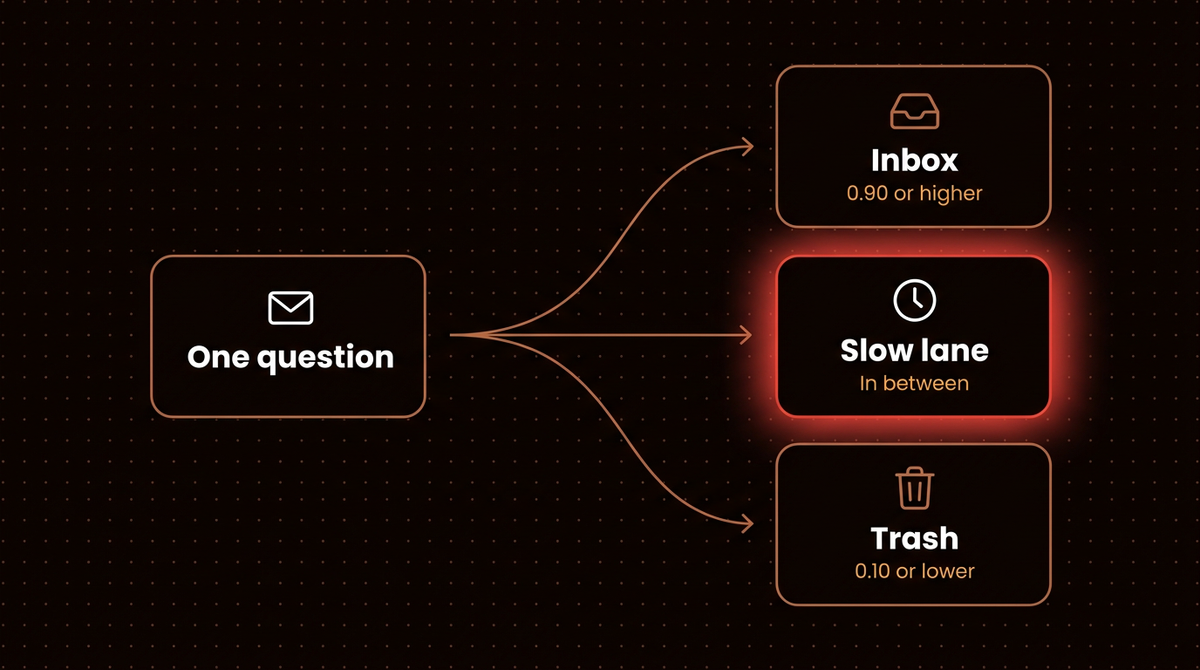
The answer is a probability, and a probability becomes a lane. These cutoffs are my picks: 0.90 or higher goes to the inbox, 0.10 or lower to the trash, and anything between to a slow lane where Claude or a person reads it. Same cutoffs for both models.
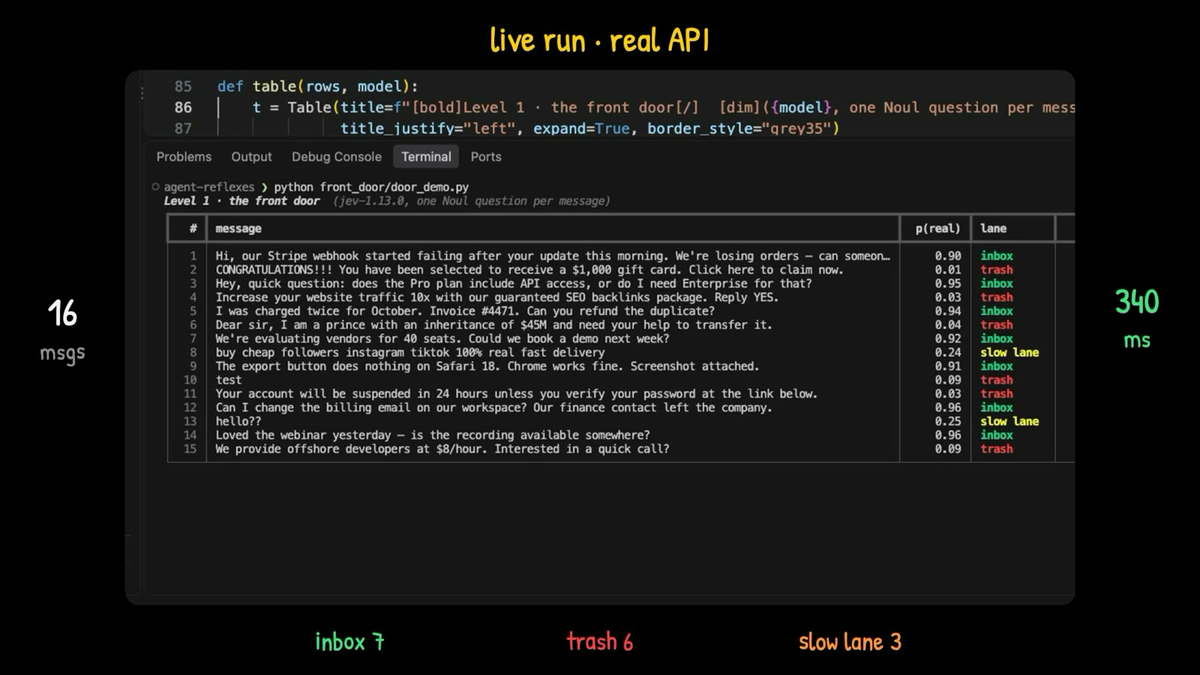
Jev's median was 340 ms over my own connection (after one untimed warm up call), and the batch used 5,044 input tokens, or $0.00021 at the listed price. Seven genuine messages reached the inbox and one the slow lane; six junk messages reached the trash and two the slow lane. The gift card scored 0.01. The slow lane held "hello??" (0.25), the follower seller (0.24) and the SSO outage (0.79). The Stripe report scored 0.90 on the table and only just made the inbox.
Where Laya went wrong
I ran Laya on my Mac with no network. Every decision took well under a tenth of a second (about 55 ms according to my video description). It was fast, and it put the scam in the inbox and the outage in the trash.
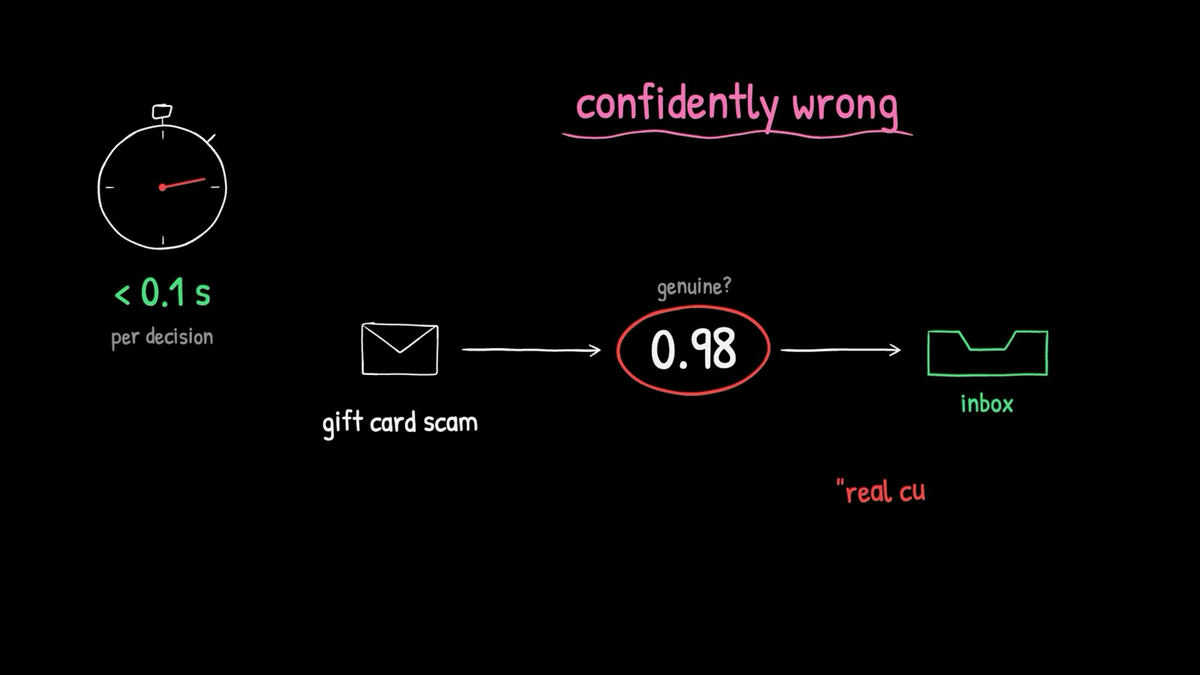
The SSO outage report, an entire team locked out, came back 0.01 genuine.
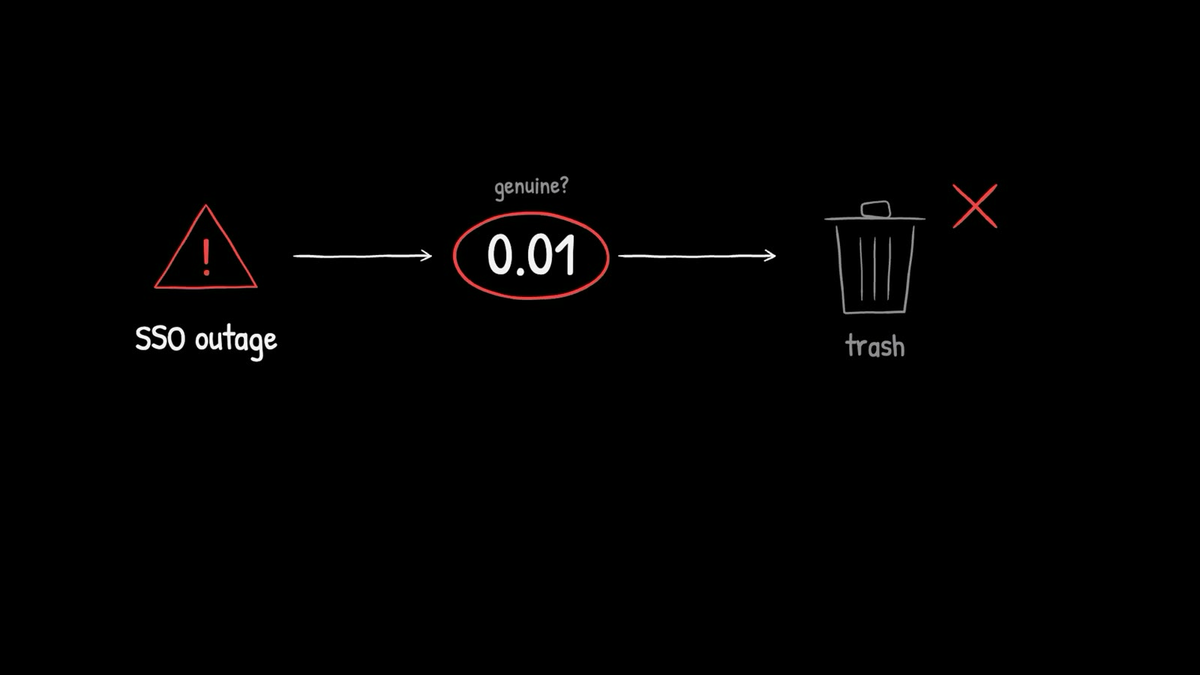
I called out those two on camera and did not record Laya's full table. Its model card adds that base checkpoints score 0.362 zero shot on its typed decisions benchmark, against 0.318 for random and 0.461 for always guessing the commonest answer. The card calls Laya a fast base to specialize, not a zero shot decision engine.
Rewording the question
Next I changed one thing: the question became "Is this message spam?"
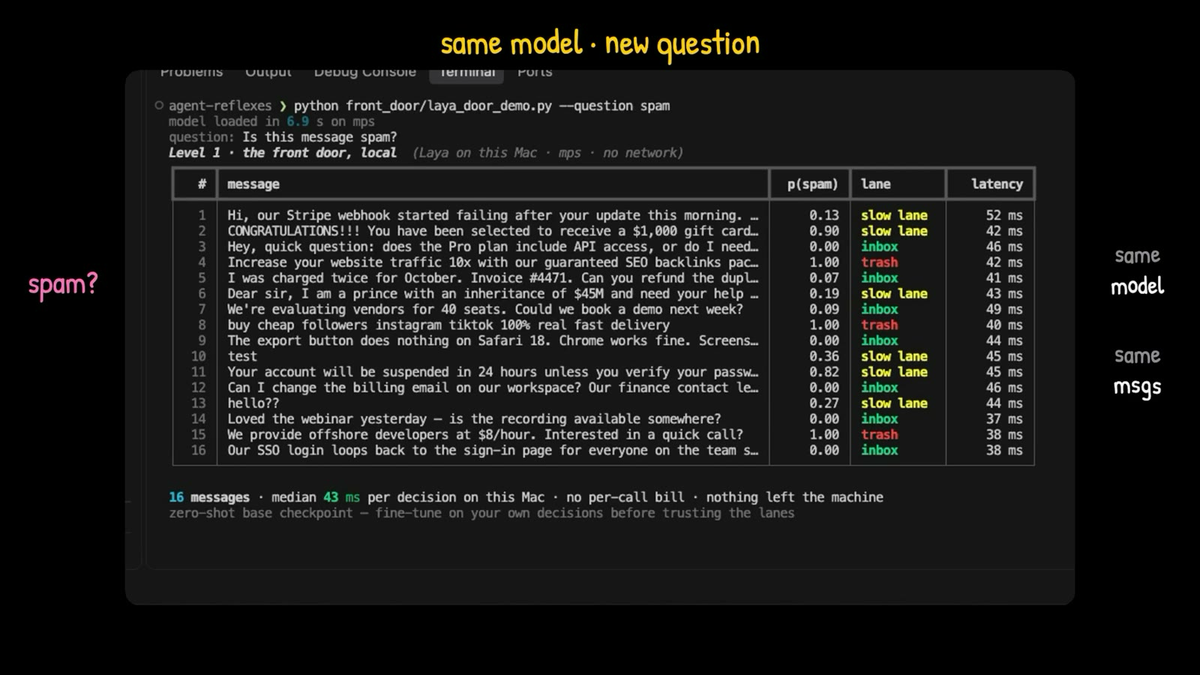
Laya's table: 7 messages to the inbox, 3 to the trash, 6 to the slow lane. No junk reached the inbox and no real customer reached the trash. Seven of the eight genuine messages were cleared. Five of the eight junk messages landed in the slow lane instead of the trash.
| Run | Lanes | Junk in inbox | Real in trash | Verdict |
|---|---|---|---|---|
| Jev, genuine wording | 7 / 6 / 3 | 0 | 0 | No costly mistake |
| Laya, genuine wording | Not recorded in full | At least 1 | At least 1 | Gift card in, outage out |
| Laya, spam wording | 7 / 3 / 6 | 0 | 0 | Safe, five junk unresolved |
Lanes read inbox, trash, slow lane. The Laya genuine wording row counts the two messages I called out on camera: the gift card at 0.98 and the SSO outage at 0.01.
The same scam scored 0.98 genuine and 0.90 spam, which contradict each other, so the score moved with the phrasing. I never ran Jev on the spam wording, so that row is missing.
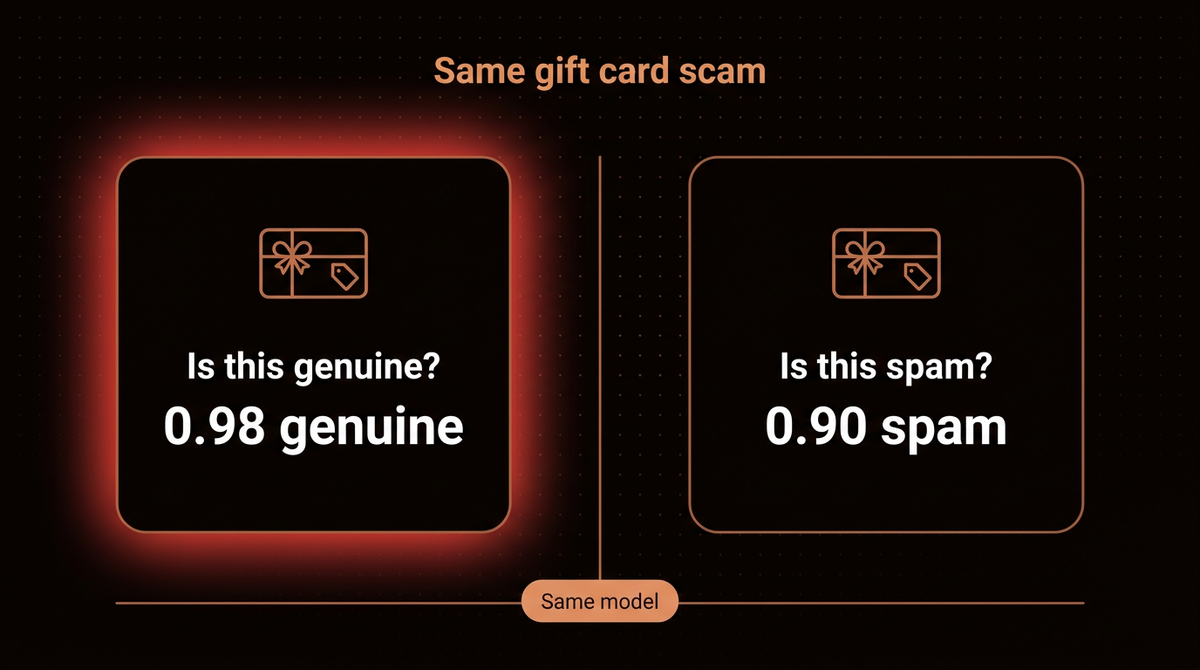
Here are four of the messages across the three runs. Every score comes from my own recorded tables, and Laya's spam column shows the probability that a message is spam.
| Message | Jev genuine | Laya genuine | Laya spam |
|---|---|---|---|
| Gift card scam | 0.01, trash | 0.98, inbox | 0.90, slow lane |
| SSO outage | 0.79, slow lane | 0.01, trash | 0.00, inbox |
| Prince offer | 0.04, trash | Not recorded | 0.19, slow lane |
| Stripe webhook failure | 0.90, inbox | Not recorded | 0.13, slow lane |
I do not know why Laya did this, and an earlier release may behave differently. Its README offers two candidates: both checkpoints are overconfident as shipped (refitting temperatures cut mean calibration error, the gap between stated confidence and real accuracy, from 0.466 to 0.081), and on the English checkpoint a yes or no question without criteria can be dominated by a generic label pair (issue 156). Both of my recorded runs lacked criteria. That README warning predicts a flat no for that case, which fits the 0.01 but not the 0.98, and the criteria free spam run discriminated well, so the 0.98 stays unexplained. TypeSafe's quickstart noul example has no criteria either.
Sixteen messages is a demonstration. RAXXO, another builder, hand wrote 27 items: Jev was right on 27 and Laya (English checkpoint, CPU) on 17, tied on 8 English routing items, and RAXXO warns against quoting the percentages.
Jev vs Laya side by side
| Topic | Jev | Laya | Pick it when |
|---|---|---|---|
| Where it runs | TypeSafe's hosted API | Your machine or server | Laya if text must stay local |
| Weights | Closed | Open, Apache 2.0 | Laya for offline work |
| Price per call | $0.042 per 1M input tokens, output free (vendor) | $0, plus your hardware | Jev if you run no servers |
| Input length (tokens) | About 64k (RAXXO) | 512 English, 8,192 multilingual | Jev for long inputs |
| Options in one choice | Up to 255 | Drops past about 20 by default | Jev for many options |
| Tuning on your data | Not offered (RAXXO) | Notebooks for Kaggle GPUs and Apple Silicon | Laya if you will tune |
| My 16 messages, genuine wording | Nothing damaging | Gift card to the inbox, outage to the trash | Jev, untuned |
Past about 20 options, Laya's README lists raising head_max_len and a tournament method that reaches 256 labels, and nibzard confirmed Jev's 255 option limit. Latency is where the sources spread out, so here is every figure with its setup.
| Source | Jev (ms) | Laya (ms) | Setup |
|---|---|---|---|
| My run | 340 median | 43 median | Jev over my network, Laya on an Apple GPU |
| My video description | Not stated | About 55 | Laya on my Mac |
| nibzard benchmark | 264 to 276 | Not run | Historical runs, hosted API |
| RAXXO test | 219 | 135 to 206 | Jev from Berlin, Laya on CPU |
| Laya README | Not run | 193 to 464 | CPU figures Laya lists |
Laya's 43 ms excludes a 6.9 second model load, and the Jev figure includes a network round trip.
Laya's README reports numbers in its own favor, labeled here as Laya's. Routed Laya is shown ahead of Jev's published figures on AG News (0.950 against 0.910, a task in its training mix) and DAIR Emotion (0.595 against 0.480), and the fine tuned checkpoint ahead on typed decisions (0.766 against 0.727, tuned on that benchmark's own split). Laya did not run Jev itself. Jev leads on many labels: 0.870 on 72 Banking77 labels against Laya's 0.425 on 77, and nibzard measured 79.2% on the full test set (different subsets and protocols).
| Benchmark | Laya | Jev | Caveat |
|---|---|---|---|
| AG News | 0.950 (routed) | 0.910 | In Laya's training mix |
| DAIR Emotion | 0.595 (routed) | 0.480 | Jev's published figure |
| Typed decisions | 0.766 (fine tuned) | 0.727 | Tuned on that benchmark's own split |
| Banking77 | 0.425 (77 labels) | 0.870 (72 labels) | Different subsets |
A million messages on Jev
5,044 tokens over 16 messages is about 315 each, question text included. At $0.042 per million, 100,000 messages cost about $1.32 and a million about $13. At about $13 per million messages, the choice turns on where the text may go and whether you can tune.
| Messages | Input tokens | Jev cost ($) | Laya cost |
|---|---|---|---|
| 16 (my batch) | 5,044 | 0.00021 | $0, plus hardware |
| 100,000 | 31,525,000 | 1.32 | $0, plus hardware |
| 1,000,000 | 315,250,000 | 13.24 | $0, plus hardware |
Step 1: Install Laya and load a checkpoint
These steps follow Laya's README for 0.4.2. I cannot show output; my recorded run used an earlier release. Put steps 2 to 4 in one file, laya_demo.py, in order, and run it with .venv/bin/python laya_demo.py.
python3 -m venv .venv
.venv/bin/python -m pip install laya
.venv/bin/python -I -c "import laya; print(laya.__version__)"
The last line should print 0.4.2 or newer, and you need Python 3.10 or newer (on Windows the interpreter is .venv\Scripts\python.exe). The install pulls in PyTorch, and RAXXO measured a 1.6 GB download. Pass device="cpu", "mps" (Apple's GPU) or "cuda" to Router to choose where it runs.
Step 2: Ask your question and read the probability
from laya import Router

router = Router()

QUESTIONS = {
    "genuine": {
        "type": "noul",
        "instructions": (
            "This is a genuine request or question from a real customer or "
            "prospect that a person should answer (not spam, phishing, cold "
            "sales outreach, or empty noise)."
        ),
        "criteria": {
            "true": "a real customer or prospect who needs an answer from a person",
            "false": "spam, phishing, cold sales outreach or empty noise",
        },
    }
}

def p_genuine(state: str) -> float:
    result = router.predict(state, QUESTIONS, model="english")
    return result["answers"]["genuine"]["noul"]

print(p_genuine("Our SSO login loops back to the sign-in page for everyone on the team since 9am."))
The first call downloads and loads the checkpoint (131 seconds for RAXXO) and the first prediction is slower still, so it can look hung. The printed number is the probability, from 0 to 1, that the statement is true. The instructions text is the exact wording I used in my recording. The criteria block is the one addition; it supplies the text for the yes and no sides.
Step 3: Turn the number into a lane and run all 16
def lane(p_real: float) -> str:
    if p_real >= 0.90:
        return "inbox"
    if p_real <= 0.10:
        return "trash"
    return "slow lane"

MESSAGES = [
    "Hi, our Stripe webhook started failing after your update this morning. We're losing orders, can someone look today?",
    "CONGRATULATIONS!!! You have been selected to receive a $1,000 gift card. Click here to claim now.",
    "Hey, quick question: does the Pro plan include API access, or do I need Enterprise for that?",
    "Increase your website traffic 10x with our guaranteed SEO backlinks package. Reply YES.",
    "I was charged twice for October. Invoice #4471. Can you refund the duplicate?",
    "Dear sir, I am a prince with an inheritance of $45M and need your help to transfer it.",
    "We're evaluating vendors for 40 seats. Could we book a demo next week?",
    "buy cheap followers instagram tiktok 100% real fast delivery",
    "The export button does nothing on Safari 18. Chrome works fine. Screenshot attached.",
    "test",
    "Your account will be suspended in 24 hours unless you verify your password at the link below.",
    "Can I change the billing email on our workspace? Our finance contact left the company.",
    "hello??",
    "Loved the webinar yesterday, is the recording available somewhere?",
    "We provide offshore developers at $8/hour. Interested in a quick call?",
    "Our SSO login loops back to the sign-in page for everyone on the team since 9am.",
]

for m in MESSAGES:
    p = p_genuine(m)
    print(f"{p:.2f}  {lane(p):9}  {m[:60]}")
Those are my 16 messages; I replaced two dashes in the originals with commas. If your table differs from my recording, expect that: the release is newer and the question now has criteria.
Step 4: Run the wording flip before you trust it
SPAM = {"spam": {
    "type": "noul",
    "instructions": "Is this message spam?",
    "criteria": {
        "true": "spam, phishing, cold sales outreach or empty noise",
        "false": "a real message from a customer or prospect",
    },
}}

def p_spam(state: str) -> float:
    result = router.predict(state, SPAM, model="english")
    return result["answers"]["spam"]["noul"]

for m in MESSAGES:
    a, b = lane(p_genuine(m)), lane(1 - p_spam(m))
    flag = "" if a == b else "  <-- wordings disagree"
    print(f"{a:9} {b:9} {m[:50]}{flag}")
Both wordings now carry criteria, so the comparison isolates the wording; my recording used neither. Here p_spam is the probability the message is spam, so 1 - p_spam is the probability it is genuine, which is what lane expects. Send any message where the two wordings disagree to the slow lane. If a yes or no question looks stuck, the README also suggests a two option choice with neutral keys such as A and B; that is untested.
Calling Jev on the same messages
Get a key as TypeSafe's quickstart describes (early access applies, so you may have to wait), export it as TYPESAFE_API_KEY, and add this to the same file. It is the pattern from my script, trimmed: one connection is opened and reused, which is why my 340 ms excludes connection setup.
import http.client, json, os

JEV_QUESTION = {"genuine": {"type": "noul", "instructions": QUESTIONS["genuine"]["instructions"]}}
conn = http.client.HTTPSConnection("api.typesafe.ai", timeout=30)

def p_genuine_jev(state: str) -> float:
    body = json.dumps({"state": state, "model": "jev-latest", "questions": JEV_QUESTION})
    conn.request("POST", "/v1/systemone", body=body, headers={
        "Authorization": "Bearer " + os.environ["TYPESAFE_API_KEY"],
        "Content-Type": "application/json",
    })
    return json.loads(conn.getresponse().read())["answers"]["genuine"]["noul"]

p_genuine_jev("warm up")  # opens the connection, not timed

for m in MESSAGES:
    p = p_genuine_jev(m)
    print(f"{p:.2f}  {lane(p):9}  {m[:60]}")
How I would pick between them
On my 16 messages Jev made no costly mistake untuned and Laya did; I do not know why, and its docs name two candidates. So the deciding question is whether you will do the tuning and calibration work. Speed is a weaker reason than it looks: 340 ms against 43 to 55 ms is six to eight times, but Jev's figure includes my network path and Laya's was on an Apple GPU. On CPU Laya lists 193 to 464 ms.
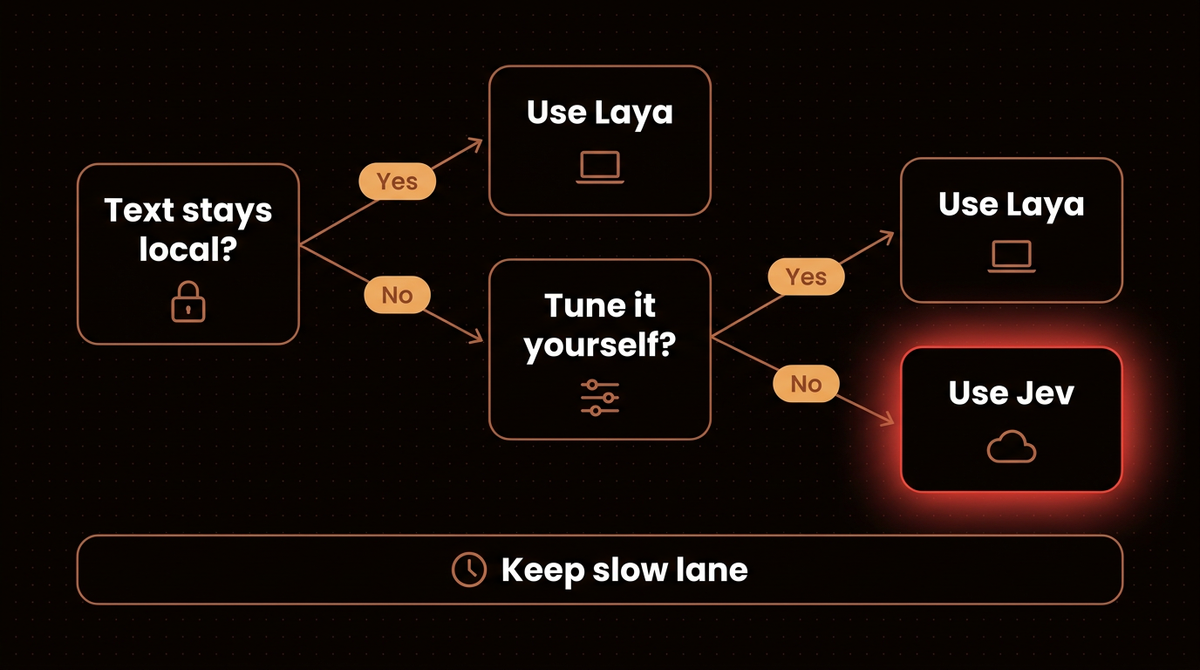
I would run Laya when the message text cannot leave your network, when the code must work offline, or when you will fine tune it. I would run Jev when you have no labeled data, or a question has many options. Either way, keep a slow lane behind it and set the cutoffs on your own traffic (see confidence scoring). How I set up agentic email without letting it send covers what happens after the decision.
Swapping one for the other
Laya ships an HTTP server that speaks the same POST /v1/systemone protocol as Jev, so an existing Jev client mostly needs its base URL repointed. Run laya-serve after installing "laya[serve]". It binds 0.0.0.0:8000 by default, so set LAYA_API_KEY before exposing it.
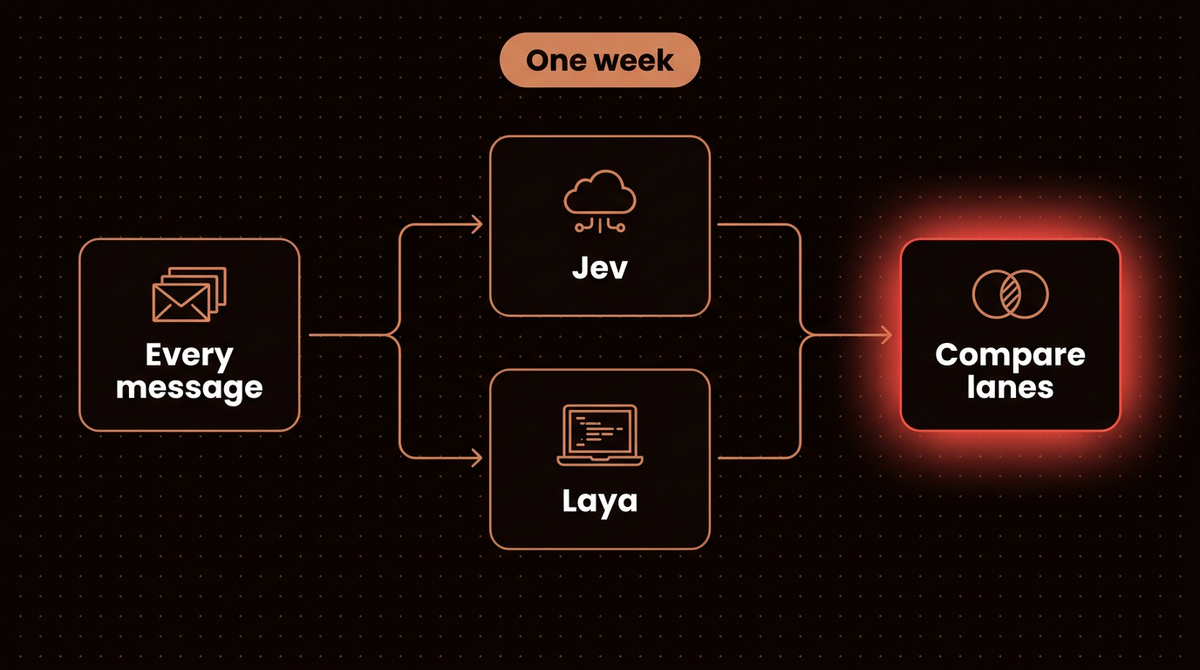
The catch is confidence, and two other differences. The server rejects choice questions with more than 100 options where Jev allows 255, and the README does not say how it treats the model string jev-latest, so test that. Laya's confidence on choice and score answers is one minus normalized entropy and Jev's is a different formula, so a threshold carried over from Jev does not transfer. My noul lanes cut on probabilities, so calibration is the issue there. Laya points you to answer_confidence, and 0.4.2 adds an x_jev_confidence field to the server for direct comparison. My plan, not yet run: send every message to both for a week and compare lanes before moving anything.
Training Laya on Claude's decisions
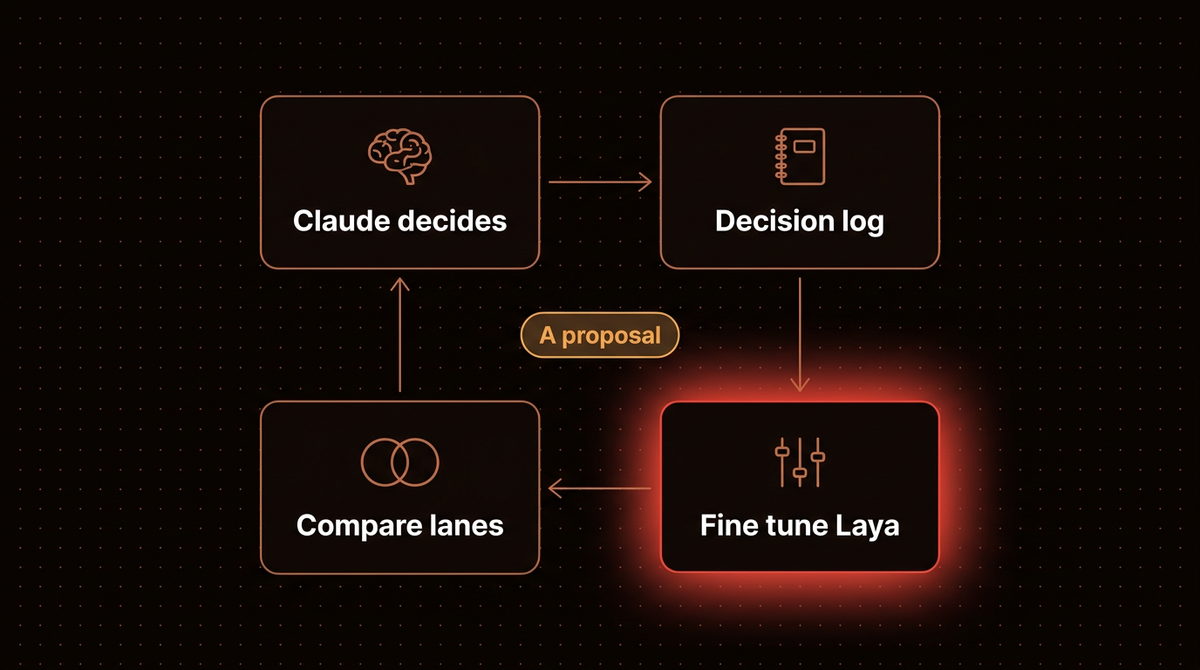
This is a proposal, not a result. Let Claude make your triage decisions for a few weeks and log each one as a label. Then fine tune Laya on the log and compare its lanes with Claude's on messages it has never seen. Laya's notebooks build their own dataset format and I found no documented path from a log like this, so read the notebook first.
import json, time

def log_decision(state, question_id, claude_label, path="decisions.jsonl"):
    with open(path, "a") as f:
        f.write(json.dumps({
            "t": time.time(),
            "state": state,
            "question": question_id,
            "label": claude_label,
        }) + "\n")
The README includes a Kaggle notebook for two T4 GPUs and a script for Apple Silicon. Its fine tuned laya-typed-decisions checkpoint scores 0.766 against 0.362 for the base, though that figure comes from tuning on the benchmark's own training split. See small language models and fine tuning.
If you want a front desk like this built on your own inbox, see how I build AI agents.
For the bigger picture of where a fast decision model sits inside an agent, see how to choose an LLM router for AI agents.
Frequently asked questions
Is Laya a free alternative to Jev?
Not zero shot; after tuning on your data, possibly. In my recorded test it put a scam in the inbox and an outage in the trash, and its answers changed with the question wording. Tune and calibrate it on your own data first.
Is Laya faster than Jev?
On my Mac GPU, yes: 43 to 55 ms per decision against Jev's 340 ms median, which includes my network path. On CPU Laya lists 193 to 464 ms and RAXXO measured 135 to 206 ms, close to Jev's 219 ms from Berlin.
Why did Laya score a gift card scam as 98% genuine?
I do not know. Laya's README says both checkpoints are overconfident as shipped and near chance zero shot on its typed decisions benchmark, my question had no criteria field, and the same scam scored 0.90 spam when I reworded it.
Can I swap Jev for Laya without changing my code?
Mostly. Laya's server speaks the same POST /v1/systemone protocol, so a client needs a new base URL. The confidence formulas differ, though, so thresholds tuned for Jev will not transfer. Refit your cutoffs on held out data.
Published
October 10, 2026
Category
AI Agents
Jahanzaib Ahmed
AI Systems Engineer & Founder
AI Systems Engineer with 126 production systems shipped. I run AgenticMode AI (AI agents, RAG systems, voice AI) and ECOM PANDA (ecommerce agency). I build AI that works in the real world for businesses across home services, healthcare, ecommerce, SaaS, and real estate.
Related articles

What Is Jev AI? TypeSafe's System One Decision Model, Tested
Jev AI is TypeSafe's decision model: it never writes text, it returns typed probabilities. What it is, my 16 message front door test, the Python to build it, and where it breaks.
How toAI AgentsJev
Microsoft Decision-1 Matches Jev on Price and API Shape
Microsoft's new decision model charges exactly what Jev charges and accepts nearly the same request. Microsoft times it at 85 ms; the first independent run measured 459 ms. Here is what a port changes.
NewsAI AgentsMicrosoft
How to Choose an LLM Router for AI Agents
An LLM router picks the model, tool or subagent for each request. Compare rules, classifiers, Jev style decision models and LLMs, with confidence lanes, cache math and a Claude Code sketch.
How toAI AgentsLLM Router