How to Set Up Hermes Agent and Lock Down the Defaults First
What Hermes Agent from Nous Research is, how to install it, which models it works with, how to lock it down, what it costs to run, and when to pick it over OpenClaw.

Table of Contents
Hermes Agent is an open source AI agent from Nous Research that runs on your own machine, remembers what you tell it, writes reusable skills from work it has finished, and answers you in a terminal or in chat apps such as Telegram and Slack. It is MIT licensed, so the software is free and you pay only for the model behind it. Install is one command. The part most guides skip is what to change before you connect it to a chat app, and that is where I spend most of this one.
What Hermes Agent is, and who makes it
The project lives at github.com/NousResearch/hermes-agent, published by Nous Research under the MIT license, with docs at hermes-agent.nousresearch.com. As of October 17, 2026 the repository showed 254,401 stars and the latest release was v0.22.2, tagged October 15. That was five releases in eight days (October 8, 12, 14 twice, and 15), so version specific advice ages quickly.
One naming trap catches people. Nous Research also trains language models called Hermes, and the agent is separate software. The Nous Portal docs say the Hermes 4 chat models are tuned for chat and reasoning rather than the rapid tool calling loop the agent depends on, and point you to other models for agent work. So "Hermes Agent" does not mean "runs on a Hermes model".
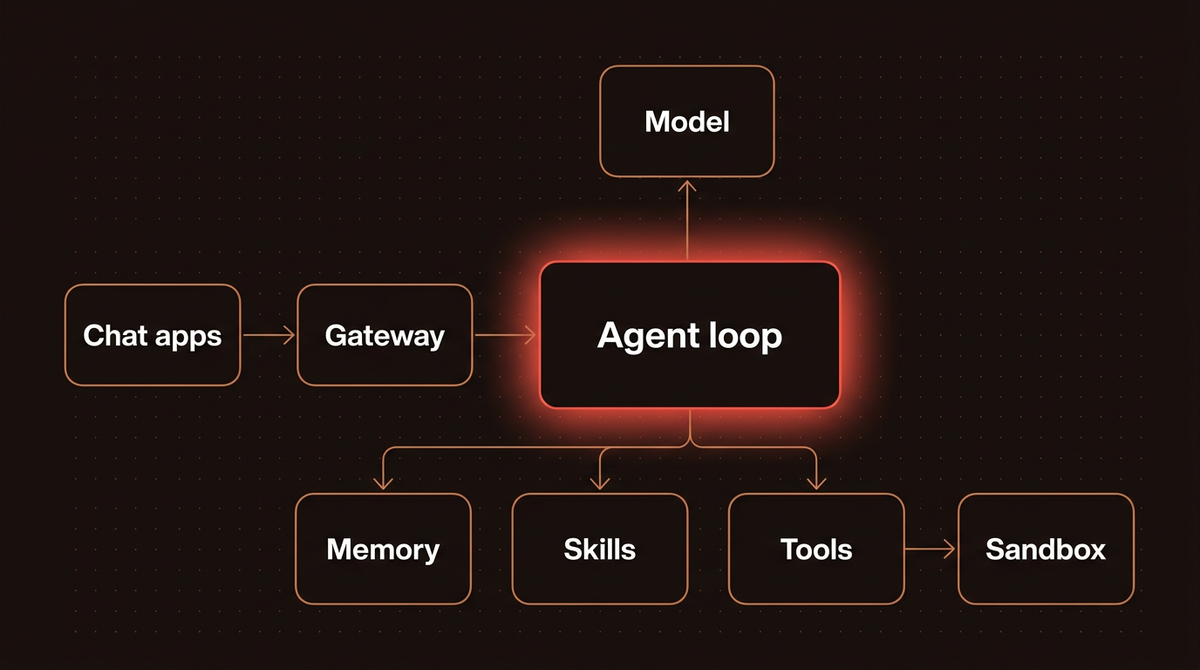
According to the README and docs, the box contains:
- Interfaces: a CLI, a terminal UI (
hermes --tui), a desktop app, and a messaging gateway for Telegram, Discord, Slack, WhatsApp, Signal, email and more. - Tools: 40 plus built in tools, and support for outside tool servers over MCP.
- Memory and skills: persistent memory, search over past conversations, and skills the agent can write and reuse.
- Automation: scheduled jobs delivered to a chat, and delegation to subagents.
The README calls the learning loop its defining feature and says no other agent has one, which I read as marketing. The mechanics are plainer. Memory is two small files: MEMORY.md for the agent's notes, capped at 2,200 characters, and USER.md for your profile, capped at 1,375, per the memory docs. Both load into the system prompt as a frozen snapshot when a session starts. Nothing I read says model weights change. The "learning" is notes and skill files that grow on disk.
Before you start
- A machine. The platform support page lists macOS on Apple Silicon, Windows 10 and 11, Linux and WSL2, and Docker as Tier 1. Intel Macs are not supported.
- Git, curl, tar and a SHA 256 tool on Linux and macOS. The installer fetches Python 3.14, Node.js, ripgrep and FFmpeg itself.
- Docker, if you follow Step 5 and use the container backend.
- A model: an API key, a Nous Portal subscription, or a local server with a 64,000 token context window.
Note: I did not install Hermes Agent for this post. Every command below comes from the official README and docs as of October 17, 2026, and I say where a step rests on something I could only read.
Step 1: Decide where Hermes will run
Decide this first, because every later setting assumes it. Hermes can run shell commands, write files and read credentials. The simplest terminal backend, local, runs commands directly on your host with no isolation. The security docs compare the backends:
| Backend | Isolation | Dangerous command check | Best for |
|---|---|---|---|
| local | None, runs on host | Yes | Development, trusted users |
| ssh | Remote machine | Yes | A separate server |
| docker | Container | Skipped, the container is the boundary | Production gateway |
| modal | Cloud sandbox | Skipped | Scalable cloud isolation |
| others | singularity, daytona and vercel_sandbox also isolate | Skipped | HPC and cloud workspaces |
My judgment: if you only chat and read files, a laptop with the local backend is fine. The moment you connect a chat app or schedule jobs, move to a spare machine, a VM or the Docker backend. And read that table twice, because it hides a trap. With Docker, the approval prompt for dangerous commands is skipped, since the container counts as the safety boundary. If you mount your home directory into it, I would assume both protections are gone. See my glossary entry on sandboxing.
Step 2: Install Hermes Agent
On Linux, macOS or WSL2, per the installation docs:
curl -fsSL https://hermes-agent.nousresearch.com/install.sh | bash
source ~/.zshrc   # macOS or Linux; or ~/.bashrc
hermes
On native Windows, run this in PowerShell:
iex (irm https://hermes-agent.nousresearch.com/install.ps1)A desktop app also exists for Apple Silicon Macs and Windows (the MSIX package needs Windows 11 22H2 or later). Docker installs do not support hermes update.
Warning: Piping a script into bash runs whatever it contains. I downloaded install.sh and read its header and option list without running it. It clones the GitHub repository, bootstraps uv, and accepts --channel stable|main, --dir, --hermes-home and --non-interactive. Download it first and read it. The default channel is stable, so do not pass --channel main.
On POSIX the docs put the code in ~/.hermes/hermes-agent/, a launcher at ~/.local/bin/hermes, and your data in ~/.hermes/. Run hermes doctor afterwards.
Step 3: Pick a model provider
Run hermes model to choose interactively, and switch later with the same command or /model inside a chat. The providers page covers Nous Portal, OpenRouter, Anthropic, OpenAI Codex, GitHub Copilot, z.ai, Kimi, MiniMax, xAI and any OpenAI compatible endpoint. Create the key in the provider's own console; keys and other environment variables live in ~/.hermes/.env. Five routes matter most:
| Route | Setup | You pay | Catch |
|---|---|---|---|
| Nous Portal | hermes setup --portal | A Nous subscription covering 300 plus models and the Tool Gateway | Price not verified; routing per model can change |
| Anthropic API key | hermes model | Standard per token API pricing | None beyond normal key hygiene |
| Anthropic OAuth | hermes model | Claude Max extra usage credits only | Claude Pro plans cannot use it |
| OpenRouter | OPENROUTER_API_KEY in ~/.hermes/.env | Per token through OpenRouter | One more middleman in the loop |
| Local model | Custom endpoint, such as Ollama at http://localhost:11434/v1 | Your own hardware | Needs at least a 64,000 token context |
Two catches deserve spelling out. The Anthropic OAuth route only works on a Claude Max plan with purchased extra usage credits, and the base Max allowance is not consumed by Hermes. Without that, use an ANTHROPIC_API_KEY. And Hermes rejects any model with under 64,000 tokens of context at startup. That bites Ollama users, because Ollama defaults to 4,096 tokens on machines with under 24 GB of VRAM, so a model that loads fine still fails until you raise the context size. The docs show context_length: 64000 in config.yaml plus a matching server setting.
For agent work the Portal docs point to Claude Sonnet 4.6, GPT 5.5 Pro, Gemini 3 Pro and DeepSeek V4 Pro. Lineups move monthly, so check the provider's current list.
Step 4: Run your first chat
Start with hermes, or hermes --tui. Use a prompt you can check, such as "Summarize this repo in 5 bullets and tell me what the main entrypoint is." Success, per the quickstart, means the banner shows your model, Hermes replies without error, it uses a tool when it needs one, and the chat holds past one turn. If replies are empty or broken, rerun hermes model before adding anything else.
Step 5: Lock it down before you connect a chat app
A terminal session has you watching. A Telegram bot does not. The security docs describe eight layers, and these settings do the most work.
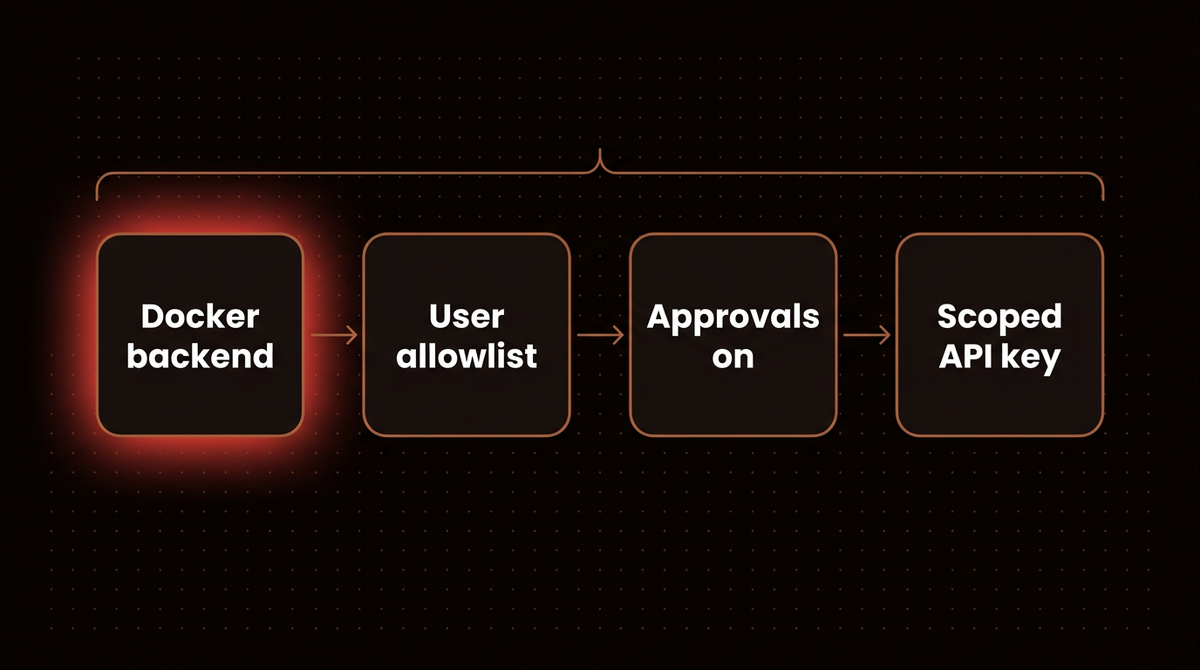
- Use a container backend. Run
hermes config set terminal.backend docker(or edit~/.hermes/config.yaml), and setterminal.cwdso the agent does not start in a sensitive directory. - Set explicit allowlists. Authorization checks run in a fixed order and end in deny. Use something like
TELEGRAM_ALLOWED_USERS=12345,67890, which takes numeric Telegram user IDs, and never setGATEWAY_ALLOW_ALL_USERS=truein production. - Pair new people. An unknown sender gets an 8 character code, and you approve it with
hermes pairing approve <platform> <code>. - Keep approvals on.
approvals.modeacceptssmart(the default),manualandoff. Avoid--yolo,/yoloandHERMES_YOLO_MODE=1, which bypass every approval prompt and persist with the session. - Use a dedicated API key that exists only for this agent, with a spend limit set at the provider, which caps the damage from a runaway loop or a leak.
- Run as a normal user. The docs say never to run the gateway as root.
Know what the installer adds, too. Per the installation docs it also installs browser tools (agent-browser and a pinned Chromium) and the cua computer use driver by default. Pass --skip-browser and --skip-computer-use to leave them out.
Unattended runs have their own switches. Under approvals the docs list cron_mode, single_query_mode and unattended_mode (webhook and API sessions), and the sample config sets all three to deny. One detail to audit: anything in your command_allowlist, including commands you once approved with "always", still runs unattended.
Messages are the bigger risk. Anything the agent reads, whether an email, a web page or a pasted file, can carry prompt injection. OpenClaw's comparison page summarizes Hermes's security policy as treating authorized callers within an adapter as equally trusted, with configured tools that can include shell access.
Step 6: Connect a chat app
Get a clean CLI chat working first, then add the gateway:
hermes gateway setup
hermes gateway start
hermes gateway status
Setup asks for the platform's bot token. If the gateway starts but nobody can message it, the quickstart blames an incomplete bot token, allowlist or platform setup, so rerun hermes gateway setup and read the status output. After that, /new, /model, /retry, /compress and /usage work in chat the same way as in the CLI.
Step 7: Add memory habits, skills, schedules and MCP
Memory. The snapshot is frozen at session start, so a fact saved mid session appears in the next session, not the current one. The docs advise running /new at natural boundaries such as a finished task or a new day, and warn against two agent processes sharing one Hermes home.
Skills. Skills live in ~/.hermes/skills/ and each becomes a slash command. /learn turns a doc page, a folder or a workflow you just walked through into a skill.
Schedules. hermes cron create "every 2h" "Check server status" sets up a recurring job whose results can be delivered to a chat.
MCP. Add a server to config.yaml and restart:
mcp_servers:
  filesystem:
    command: "npx"
    args: ["-y", "@modelcontextprotocol/server-filesystem", "/home/user/projects"]
Point it at a narrow folder. For the protocol itself, see my guide to building MCP servers for production.
Hermes Agent vs OpenClaw
Both are MIT licensed open source agents that run on your hardware and talk to you in chat apps. I have covered the other one already: what OpenClaw is and how to install it. Here is the side by side, with numbers I checked on October 17, 2026:
| Property | Hermes Agent | OpenClaw |
|---|---|---|
| Publisher | Nous Research | OpenClaw Foundation, a 501(c)(3) |
| License | MIT | MIT |
| GitHub stars | 254,401 | 392,192 |
| Latest release | v0.22.2, October 15, 2026 | v2026.10.4, October 16, 2026 |
| Runtime | Python 3.14, managed by the installer | Node.js 24.16 or later, or 26.1 or later; the installer provisions it |
| Chat channels | Telegram, Discord, Slack, WhatsApp, Signal, SMS, email, Matrix, Teams, iMessage through BlueBubbles or Photon, and more | Discord, iMessage, Slack, Teams, Telegram, WhatsApp and 20 plus more, plus native apps for macOS, iOS, Android, Windows and Linux |
| Default tool execution | The local backend has no isolation; docker, ssh and cloud sandboxes are options | On the host for the main session unless you configure sandboxing |
| Paid tier | Optional Nous Portal subscription | None, per its README |
| Published GitHub advisories | 0 | 722 |
The OpenClaw README supplies its install requirements, channels, sandbox default and paid tier statement. The GitHub API supplied stars, releases and advisory counts.
When I would choose Hermes Agent
- You live in a terminal and want an agent that builds up skills and notes about your projects.
- You want one subscription for models and tools, or you are on native Windows and would rather not collect five API keys. The Tool Gateway bundles web search, image generation, text to speech and a cloud browser.
- You already run OpenClaw and want to try the other.
hermes claw migrate, with--dry-runto preview, imports your SOUL.md persona, memories, skills, command allowlist, messaging settings and allowlisted API keys. The setup wizard also detects a~/.openclawfolder and offers it.
When I would choose OpenClaw
- You want native companion apps on phones and desktops, which its README highlights. I found no equivalent in Hermes's docs, other than its desktop app.
- You want a project with no paid tier and a nonprofit steward.
Stars measure attention, and OpenClaw has more of it.
The security record: what the numbers show and miss
OpenClaw's repository had 722 published security advisories when I queried GitHub, 14 of them critical and 249 high. Hermes Agent's repository had none published. Those two numbers are not comparable, and here is why.
Hermes does have recorded vulnerabilities, just not through its own advisory page. The National Vulnerability Database lists CVE-2026-7113, a missing authentication flaw in the webhook endpoint of version 0.8.0 (CVSS 3.1 score 5.6, medium), and CVE-2026-14625, affecting versions up to 0.15.2 (score 6.3, medium). The second record says the vendor did not respond to the disclosure. That is the reporter's account, and both entries show a status of Deferred, so I treat them as signals worth watching.
OpenClaw has the larger audience and has drawn far more scrutiny, and my post on its security crisis covers what that scrutiny found. A short advisory list is not proof of fewer flaws. The biggest risks in both come from deployment: who can message the agent, what it can run, and where. The OpenClaw comparison page I cited is written by one side, though it labels its Hermes findings as review observations.
Running Hermes Agent: what it costs
The software is free. The bill comes from tokens, and agents spend more of them than chat does, because every step resends the conversation so far. I computed one scenario with a script, using per million token prices from Anthropic's pricing page as of October 17, 2026. The usage numbers are my assumptions, not measurements: 40 model calls a day, 30,000 input tokens and 1,000 output tokens per call, for 30 days. That is 36 million input and 1.2 million output tokens a month. I ignored cache write fees.
| Model | Price per million tokens, input and output | Monthly, no caching | Monthly, 90% cache hits |
|---|---|---|---|
| Claude Haiku 5.5 | $0.10 and $0.50 | $4.20 | $1.28 |
| Claude Sonnet 5.5 | $2 and $10 | $84.00 | $22.44 |
| Claude Opus 5.5 | $4 and $20 | $168.00 | $44.88 |
Model choice moves the bill by up to 40 times, and caching cuts it three to four times if your provider honors it. Hermes freezes its memory snapshot at session start to preserve the prefix cache, per its docs. Measure your real hit rate with /usage. Plug your own numbers into my AI agent cost calculator. I did not verify Nous Portal subscription prices, so check the Portal directly.
Troubleshooting
| Symptom | Likely cause | Fix |
|---|---|---|
hermes not found after install | Shell not reloaded | Run source ~/.zshrc or source ~/.bashrc, then hermes doctor |
| Local model rejected at startup | Context under 64,000 tokens | Raise the server context and set context_length |
| Anthropic login fails | OAuth needs Max plus extra usage credits | Use an ANTHROPIC_API_KEY |
| Claude Code and Hermes log each other out | Shared single use refresh tokens | Give Hermes its own login and set auth.adopt_external_logins: false |
When Hermes Agent is the wrong tool
A personal agent with shell access is a poor foundation for a customer facing workflow. If a mistake emails the wrong client, you want fixed tools, evaluation tests and logs, not a general agent that picks its own next step. My comparison of self hosted agent stacks shows alternatives. If nobody on your side can read a config file and a log, skip self hosting. And if you would rather have a production agent built, tested and monitored for a business process, that is what I do: see how I build AI agents.
Frequently asked questions
What is Hermes Agent?
Hermes Agent is an open source AI agent from Nous Research, released under the MIT license. It runs on your own machine or server, uses a language model you choose, remembers preferences across sessions, writes reusable skills, and talks to you through a terminal or chat apps like Telegram, Discord and Slack. The software is free and you pay for the model.
Is Hermes Agent free?
The code is free under the MIT license. Running it is not: every model call costs money unless you use a local model on your own hardware. You pay per token through a provider API, or buy a Nous Portal subscription. I did not verify Portal prices.
Which models work with Hermes Agent?
Most hosted and local models work, including Claude, GPT, Gemini, DeepSeek, Qwen, Kimi and GLM, through providers such as Nous Portal, OpenRouter and Anthropic, or any OpenAI compatible endpoint. The hard rule is a context window of at least 64,000 tokens. Nous points agent users away from its own Hermes 4 chat models.
Is Hermes Agent better than OpenClaw?
It depends on your workflow. Both list Teams and iMessage today. I would pick Hermes for a terminal workflow where the agent accumulates skills and notes, and OpenClaw when I want native phone apps. Both need careful sandboxing.
Is Hermes Agent safe to run?
It can be, if you configure it. Use the Docker backend, keep command approvals on, set explicit user allowlists and give it a dedicated API key with a spend limit. Its local backend has no isolation, and an authorized messaging user is trusted equally, shell access included. Two medium severity CVEs (CVSS 3.1) exist in NVD for older versions.
Published
October 16, 2026
Category
AI Agents
Jahanzaib Ahmed
AI Systems Engineer & Founder
AI Systems Engineer with 126 production systems shipped. I run AgenticMode AI (AI agents, RAG systems, voice AI) and ECOM PANDA (ecommerce agency). I build AI that works in the real world for businesses across home services, healthcare, ecommerce, SaaS, and real estate.
Want this built for your business? See AI Agent Development, or browse the free tools and guides.
Related articles
How to Install OpenClaw in 2026: Complete Setup Guide for Every Method
Step-by-step OpenClaw installation guide covering the official installer, Railway, DigitalOcean, Docker VPS and local Mac setup. Commands checked against OpenClaw docs in October 2026, security hardening and troubleshooting included.
How toOpenClawOpenClaw
What Is OpenClaw? Everything You Need to Know About the World's Most Starred AI Agent
OpenClaw is the open source AI agent with 391,000+ GitHub stars and an independent foundation behind it. What it is, how it works, what it costs, and the security record, checked October 11, 2026.
GuideOpenClawOpenClaw
How to Evaluate the Manus AI Agent in October 2026: Owner, Cost and Risks
Who owns the Manus AI agent after the Meta deal was unwound, what its credits cost in October 2026, how its sandbox and security record look, and when to pick OpenClaw, Hermes Agent, Claude, OpenAI or n8n.
How toAI AgentsManus