
How to set up agentic email without letting it send
Most teams should let an email agent read, sort and draft, then stop there. Here is how I set that up, which scopes to grant, and how to promote it one level at a time without a customer finding the bug first.

Table of Contents
Agentic email is a mailbox where an arriving message starts work instead of waiting for a human. There are four useful levels of autonomy, and almost every business between 5 and 50 people should start on level two, where the agent reads, classifies and drafts and a person still presses send. Pick the level first and the stack picks itself. Level two runs on the assistant already inside your Gmail or Microsoft 365, until volume or regulated mail pushes you to a custom build. Google appears to agree: its own Gmail MCP server shipped in Developer Preview with 9 tools and not one sends.
Two ordinary setups show what that order protects against. An OpenClaw agent, by one account, deleted more than 200 messages from a security researcher's real inbox while she was telling it to wait. And a production n8n autoreply sent one lead the same message 50 times. Version one takes an afternoon. A build I'd hand a client takes about three weeks. Acting alone is earned after that, against a pass bar. I don't run this on my own inbox, so the method below is client work.
How to set up agentic email in one paragraph
Choose one address and three job types, then write down how a human does each one today. Pick your autonomy level before you open a vendor page, because the level decides the stack. Give the agent its own mailbox on the smallest scope that works. Build a triage schema that emits a confidence score, split the thing that reads from the thing that acts, and replay your own old mail against a pass bar before every promotion. Then build the log, the three alerts and the stop, and pull the stop once while nothing is wrong. Start at level two.
3 failures that decide how you set this up
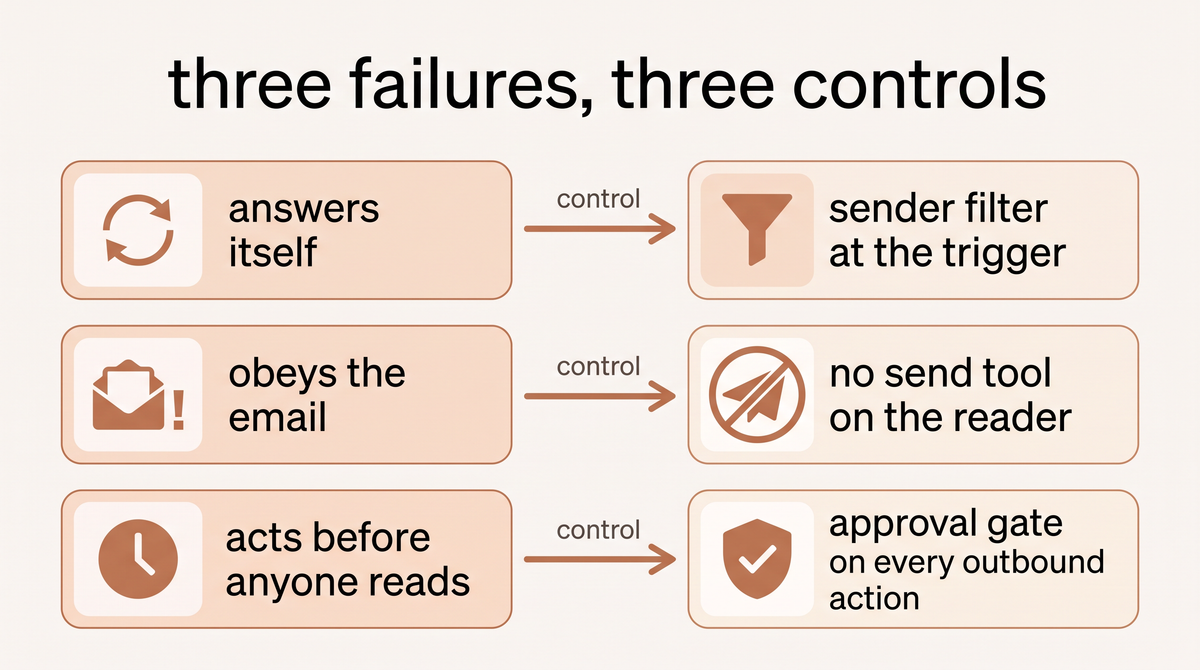
Simon Willison's lethal trifecta is access to private data, exposure to untrusted content and the ability to communicate externally. An inbox hands an agent the first two on the same wire, two thirds of the way there before you've configured anything. Each has one setting that removes it.
The agent that answers itself
An n8n customer success agent started answering its own sent replies; the poster's read was that the Gmail trigger took them for fresh inbound mail. A separate production autoreply sent the same message to one lead 50 times. The control is unglamorous. An If node right after the trigger dropping anything from the agent's own address, the fix the poster confirmed, plus a cap on replies per thread and per recipient.
The agent that does what the email tells it
EchoLeak needed nothing from the victim but a sent email from any address, and Microsoft 365 Copilot retrieves across the whole organisational graph, so mailbox, OneDrive, Office files, SharePoint and Teams history were reachable. Microsoft as CNA rated CVE-2025-32711 9.3 Critical while NIST's own analysis scores it 7.5 High, and NVD prints both. Fixed service side. The control is no send tool and no fetch tool on the reading path.
The agent that acts before anyone reads
A Meta AI security researcher attributes the deletion in the opening to context compaction triggered by her inbox volume, which appears to have dropped her instruction not to act. Her reading, not a finding. And exactly the argument for a gate over a better prompt, because a prompt is state the model can lose and a gate is not. Stopping is the other half. That n8n operator had deactivated his nodes, and deactivating nodes does not stop an n8n trigger. Only unpublishing the workflow does. So the sends kept going: not a runaway agent, just a verb that meant something else. The control is an approval gate on every outbound action, plus a stop that reaches the credentials.
What agentic email actually changes
A filter moves mail. An agent reads it, pulls what it needs from another system, and proposes or takes an action inside a limit somebody set. Hostinger's own product page calls it infrastructure built for agents rather than a passive inbox. The difference is the trigger: a webhook fires on arrival, where a poller runs on a schedule you configure. Two ideas matter: the autonomy limit, what it may do alone, and the escalation path, who sees what it would not. If a rule can do the job, a rule should stay a rule.
The four autonomy levels, and how to pick your first one
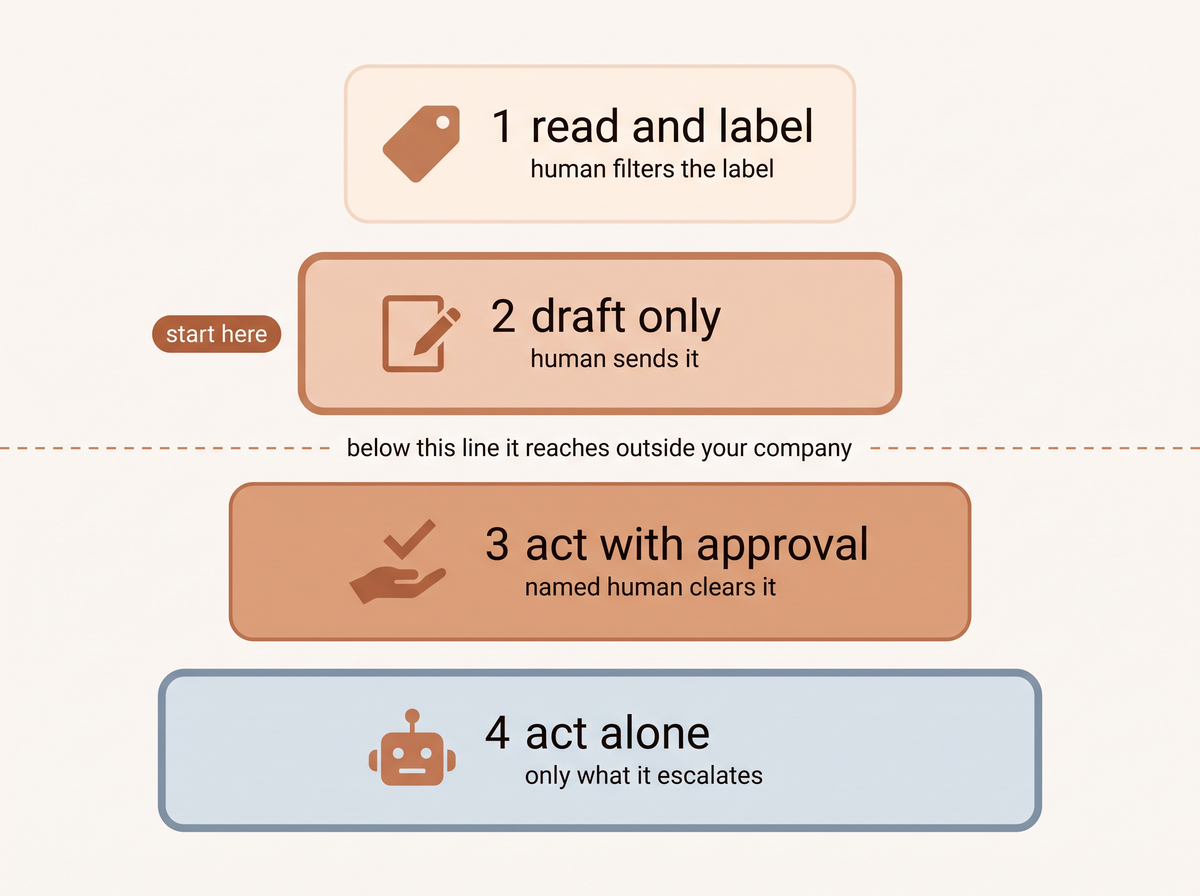
Level 1, read and label. Labels only, and escalation is a label a human filters on. Microsoft's Copilot triage acts on the mailbox from natural language commands, pinning, flagging, archiving, moving and creating inbox rules, with a confirmation card above five emails and English only today. On Gmail that's one scope, gmail.modify, because labelling a message is a write.
Level 2, draft only. Start here. Fyxer writes the reply and the human sends it, and its own pricing FAQ says outright that it never sends. Microsoft's help page has Copilot in Outlook drafting for you to review, keep, discard or regenerate, Send left to you.
Level 3, act with approval. Lindy markets an explicit gate: nothing with consequences goes out without your approval. Anthropic's Gmail connector requires explicit approval per send, reply and forward by default, and on Team and Enterprise plans owners decide whether members may run those actions without asking. Google ships a contextual user confirmation framework for the same reason.
Level 4, act alone for one named class. Zendesk's agentic AI for advanced email AI agents went generally available on April 20 2026, resolving end to end and escalating when it can't confidently resolve the request. AgentMail's seed announcement frames its inboxes as running with no human in the loop: fine for machine to machine mail, bad for customer mail. The ceiling is the Five Eyes agencies, whose May 2026 guidance says never grant agentic AI broad or unrestricted access, and use it only for low risk, non sensitive tasks.
How to pick your starting level
Two inputs. What an unrecoverable mistake costs you, and whether the category is closed. Order status is closed. "Anything a customer sends" is not. My rule, cited to nothing but my own builds. Level 2 for any mail a customer sent, level 1 for anything with money or a contract in it, never level 3 or 4 in month one.
Step one, choose the inbox and the three jobs
Scope beats ambition. On client builds week 1 is sitting with whoever does the work now, writing down every step, every exception and every gut feel decision, signed off before anything gets built.
Fig and Bloom is the cautionary shape. Returns ran through emails and spreadsheets with no consistent process, so requests were missed and replies averaged over 24 hours, because every one needed a human to look up the order first. What I built there is Slack based with full Shopify integration, not an email agent. Same architecture, different trigger. The full build is here, and the triage work is what I describe in automating customer service.
hello@ and info@ work, forwarded into the agent's own mailbox rather than the other way round.
Step two, pick one of three stacks, not one of thirty tools
Lane A, the assistant already in your suite. Gemini in Gmail comes with all four Workspace plans, Business Standard at $14.00 per user per month on the annual commitment toggle as of September 2026. Microsoft 365 Copilot Business lists $18.00 per user per month paid yearly and $25.20 billed monthly, so name the billing period or you'll understate it. Copilot in Outlook became agentic on April 27 2026 through the Frontier preview, where Allow actions is on by default. The ceiling: Microsoft warns bulk automation over large sets of emails may not cover everything.
Lane B, a workflow tool wired to the mailbox. n8n's Gmail Trigger polls rather than pushes, Max Emails per Poll defaulting to 10, capping at 50, the rest queued. Its AI Agent node needs at least one tool sub node, and agent type is deprecated since 1.82.0, so everything is a Tools Agent. Zapier gives you Gmail triggers and a Create Draft Reply action, and meters Agents in activities: 400 a month free with tests counted, 1,500 on Pro at $33.33 billed annually. Longer notes in my n8n practitioner guide.
Lane C, your own inbound email API. Six options, every price as of September 2026.
- Resend. Parses inbound, POSTs a webhook. Free to 3,000 emails a month, $20 on Pro, inbound on the same quota.
- Postmark. Inbound on Pro at $16.50 and Platform, not Basic. Attachments capped at 35 MB.
- Mailgun. Inbound by tier: 1 route free, 5 on Basic at $15, full routing at Foundation $35. Routes are filter plus action, by priority.
- Cloudflare Email Routing. Each message goes to a Worker that can reply, forward or setReject. 25 MiB cap, 200 rules per domain.
- AgentMail. Free at 3 inboxes and 3,000 emails with no card, $20 on Developer. Signs its webhooks, retries on non 2xx.
- Hostinger Agentic Mail. Two warnings. The headline $0.39 is a 48 month prepay divided by 48, excludes VAT, names no currency, covers one mailbox and renews at $1.59. And its comparison table sells a REST API and an MCP server the FAQ calls still coming.
| Lane | What you configure | Time to first run (my estimate) | Cost as of September 2026 | Risk it leaves with you |
|---|---|---|---|---|
| A. Native assistant | Admin toggles, prompts | An afternoon | $14.00 Workspace Business Standard annual, or $18.00 Copilot Business paid yearly ($25.20 monthly) | It already acts inside your live mailbox |
| B. Workflow tool | Trigger, filters, agent node, gate | 2 to 5 days | Zapier Agents free at 400 activities, Pro $33.33 monthly billed annually | Loops and rate caps are yours to build |
| C. Inbound email API | MX or domain, webhook, your own worker | 1 to 3 weeks | Resend free to 3,000 then $20, Postmark Pro $16.50, Mailgun Foundation $35, AgentMail free to 3 inboxes then $20 | All of it, plus DNS |
My decision rule. Under about 50 messages a day, take the native assistant at level 1 or 2. Between 50 and 500 with two or more systems to touch, take the workflow tool. Above that, or if the mail is regulated, build on an inbound API.
Step three, give the agent its own mailbox and the smallest scope that works
Lane A can skip to step four. The assistant inside Workspace or Microsoft 365 runs on your existing identity, so there's no consent screen, no OAuth app and no Graph permission.
Steps four to eight are build instructions for Lane B, so here is what they collapse to on a native assistant. The schema, the split path and the log become one escalation label and a named person who works it, and the confirmation card is your approval gate, so leave it on. The stop is the admin toggle or removing the licence, and you still pull it once while nothing is wrong. What you can't have is the measurement: there's no shadow mode and no replay harness inside Gemini in Gmail or Copilot in Outlook, so Lane A buys level 2 without the evidence that you're at it.
On Gmail
Here's the inversion nobody mentions. Google's scope reference sorts scopes into three tables by sensitivity. gmail.modify sits in restricted, which requires restricted scope OAuth app verification, while gmail.send is only sensitive. So the reader trips the heavier review and the sender trips the lighter one. An Internal Use app owned by your own Workspace or Cloud Identity organisation is the escape hatch: no unverified app screen, no 100 user cap.
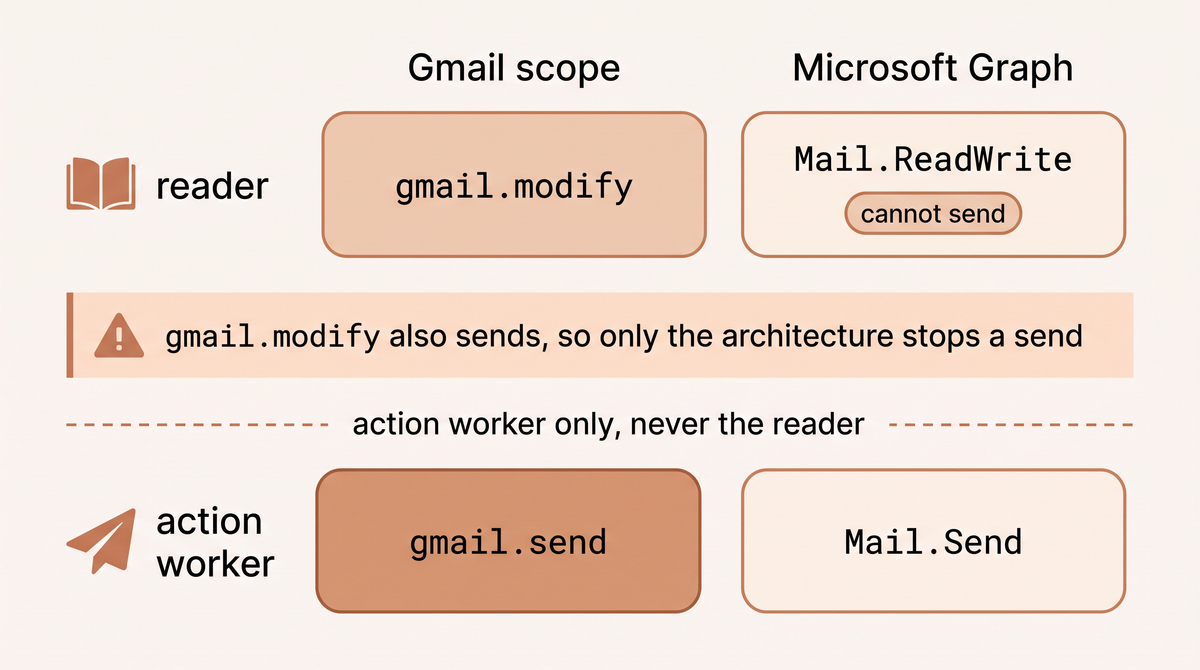
Then the part that decides the architecture. Putting a label on a message is users.messages.modify, which accepts mail.google.com, gmail.modify or gmail.modify.restricted and nothing else. gmail.labels covers the label objects rather than the mail, so it can't label a message. And gmail.modify is read, compose, and send. gmail.modify.restricted is the one scope that labels without sending, but Google documents it for a service account using domain wide delegation and it appears in none of the scope reference's tier tables, so it isn't the ordinary path.
So give the two paths two credentials. The reader holds gmail.modify, which reads mail and labels a message. It also permits sending, which is exactly why the reader process is handed no send tool. The action worker holds gmail.send only, so it can't read a mailbox at all. Nobody holds both. On ordinary delegated OAuth the scope that labels also sends, so cannot send is a property you build in step five rather than one you're granted. Graph's Mail.ReadWrite genuinely can't send, so Graph hands you the property Gmail makes you build.
On Microsoft 365
Mail.Read delegated reads the signed in user's mailbox with no admin consent; the application form reads every mailbox in the tenant and needs it. Level 1 still takes Mail.ReadWrite, not Mail.Read, because applying a category is a write on Graph exactly as labelling is on Gmail. And the load bearing sentence is on the same page: Mail.ReadWrite, in both forms, explicitly does not include permission to send mail. So the Graph reader is structurally incapable of sending, and you don't have to build it. Scope it to named mailboxes with Exchange Online RBAC for Applications, which replaces Application Access Policies, and remove the unscoped Entra grant, because permissions are the union of both. Otherwise a triage bot for hello@ reads the founder's mailbox and nobody notices.
Why a separate mailbox, not your own
The Five Eyes guidance uses an email assistant with write access to any inbox as its worked example of overly broad permissions. Microsoft's July 2026 least privilege note adds the compounding argument: mail plus files plus tickets plus a repository looks low risk per integration and is not fine as a whole. So give each agent its own inbox, on a stable agent identity with just in time elevation scoped to one workflow.
| Level | Gmail scope this level adds | Google tier | Graph permission this level adds | What stops it sending |
|---|---|---|---|---|
| 1. Read and label | gmail.modify, on the reader | Restricted | Mail.ReadWrite (delegated) | Gmail: no send tool on the reader. Graph: the permission |
| 2. Draft only | Nothing new | Unchanged | Nothing new | Gmail: your workflow. Graph: the permission |
| 3. Act with approval | gmail.send, on a second credential | Sensitive | Mail.Send | A named human clears every action |
| 4. Act alone, one class | Nothing new | Unchanged | An RBAC resource scope on Mail.Send | The one named class |
Each level holds every row above it.
7 fields your triage schema has to emit
Step four is the schema. On every message the classifier returns intent, urgency, sender_class, data_needed, confidence, proposed_action and escalate_to. Thread and message identifiers ride alongside as plumbing, not schema. A missing field is itself an escalation.
Prior art. LangChain's Executive AI Assistant splits triage into three buckets: ignore, notify a human with no draft, draft a reply. Its owner archived the repo on July 27 2026, so treat it as a pattern, not a dependency.
Set the confidence threshold before you tune the prompt
The threshold is a product decision, not a model decision, and it belongs in the routing table before anyone writes a prompt. My rule: anything below threshold routes to escalate_to whatever proposed_action says, and the threshold starts high enough that week one's escalation rate is uncomfortable. Money, legal and address changes never sit above level 2. Idempotency, also mine: an action key of message identifier plus intent, and no acting twice on it. The level column below is a ceiling the agent earns, not where it starts.
| Intent | Example subject | Level allowed | Confidence to act | Below that | Escalates to |
|---|---|---|---|---|---|
order_status | Where is my order | 3 | 0.90 | Draft for review | Support owner |
refund_or_money | Please refund me | 2 | Never acts | Draft only | Finance owner |
return_exchange | Wrong size received | 3 | 0.90 | Draft for review | Support owner |
booking_change | Can I move Thursday | 2 | Never acts | Draft only | Scheduler |
new_lead | Quote for 40 units | 2 | Never acts | Draft only | Founder |
supplier_invoice | Invoice 20418 attached | 1 | Never acts | Label and notify | Finance owner |
legal_or_complaint | Formal complaint | 1 | Never acts | Label and notify | Founder |
unknown_sender | Anything off allowlist | 1 | Never acts | Quarantine | Support owner |
Step five, split the reading path from the acting path
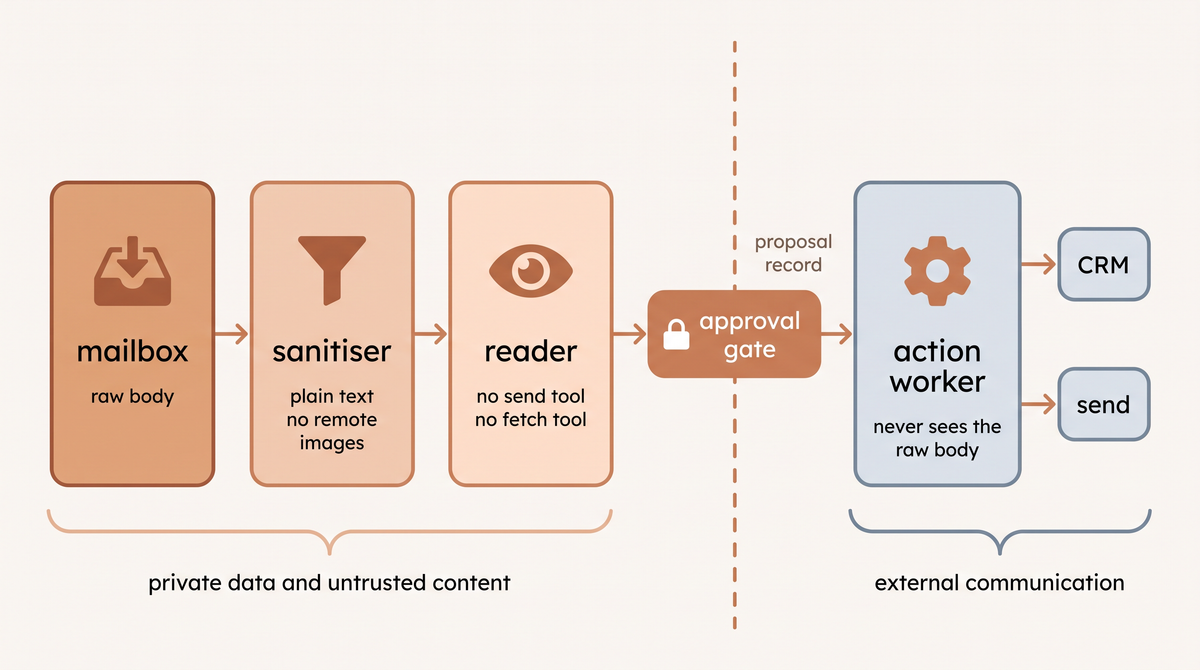
This removes failures two and three. The classifier that reads mail holds no tool that can send, forward or reach the internet. It emits a proposal record, and a separate worker that never sees the raw body executes approved proposals against your systems.
Anthropic's guidance names an inbound email body as untrusted third party content, and tells builders to scope narrowly so a successful injection does minimal damage. OWASP's LLM01 lists the same headings: human approval for high risk actions, least privilege, segregating external content, constraining model behavior.
The gate is a component, not a checkbox: a queue, a named owner, a service level, and a default on timeout that has to be do nothing. Loop breakers belong here too: stop dead on a third message in a chain with no human in it. Zapier's free plan caps agents at 10 activities per run, and Cloudflare's reply method throws above 100 References entries.
Step six, treat every arriving email as hostile input
Google defines indirect prompt injection as hidden instructions inside external data, and names emails, documents and calendar invites as carriers. The Five Eyes guidance opens its inherited risk section with email monitoring agents: prompts in phishing mail can convince one to download malware. Six configurations, none exotic.
- Strip to plain text first. Google's own stack includes markdown sanitisation and suspicious URL redaction for this reason.
- Never load remote images, never auto fetch a URL out of a body. GeminiJack, found by Noma Labs and since fixed, exfiltrated through an auto loading image in a forwarded email. CoSnitch, CVE-2026-24301, did it through Copilot's own fetch capability. The proof of concept exfiltrated an email title, and the wider reach across Gmail, Drive, Calendar and OneDrive is what Varonis lists as possible impact. Reported December 2025, patched eight months later on 18 August 2026.
- Keep attachments away from the model by default. Filenames included.
- Allowlists both directions, senders and recipients, against wrong recipients, phishing and bot to bot loops.
- Quarantine rather than block. AgentMail's Agent Armor is a beta screening layer starting in observe only mode, and Google is rolling out injection classifiers of its own.
- Keep a hostile test set, which feeds the next step.
Researchers have described RAGworm, a self replicating prompt that spreads between AI email assistants through retrieval and forwarding. Forwarding is a feature. That's the problem.
The hostile test set
Twenty messages of mine, written before go live.
- Instructions in the body.
- Instructions buried down in a quoted reply chain.
- Instructions in an attachment filename.
- A fake internal sender.
- A bank detail change.
- A request for another customer's data.
- And one that simply says ignore your rules.
The honest counterweight: Willison relayed a self reported 6,000 emailed attempts at one public challenge to extract a secret from an OpenClaw test instance, and nobody got it out. The volume got the Google account suspended, because volume is a failure mode too.
Step seven, replay real mail and set a pass bar per level
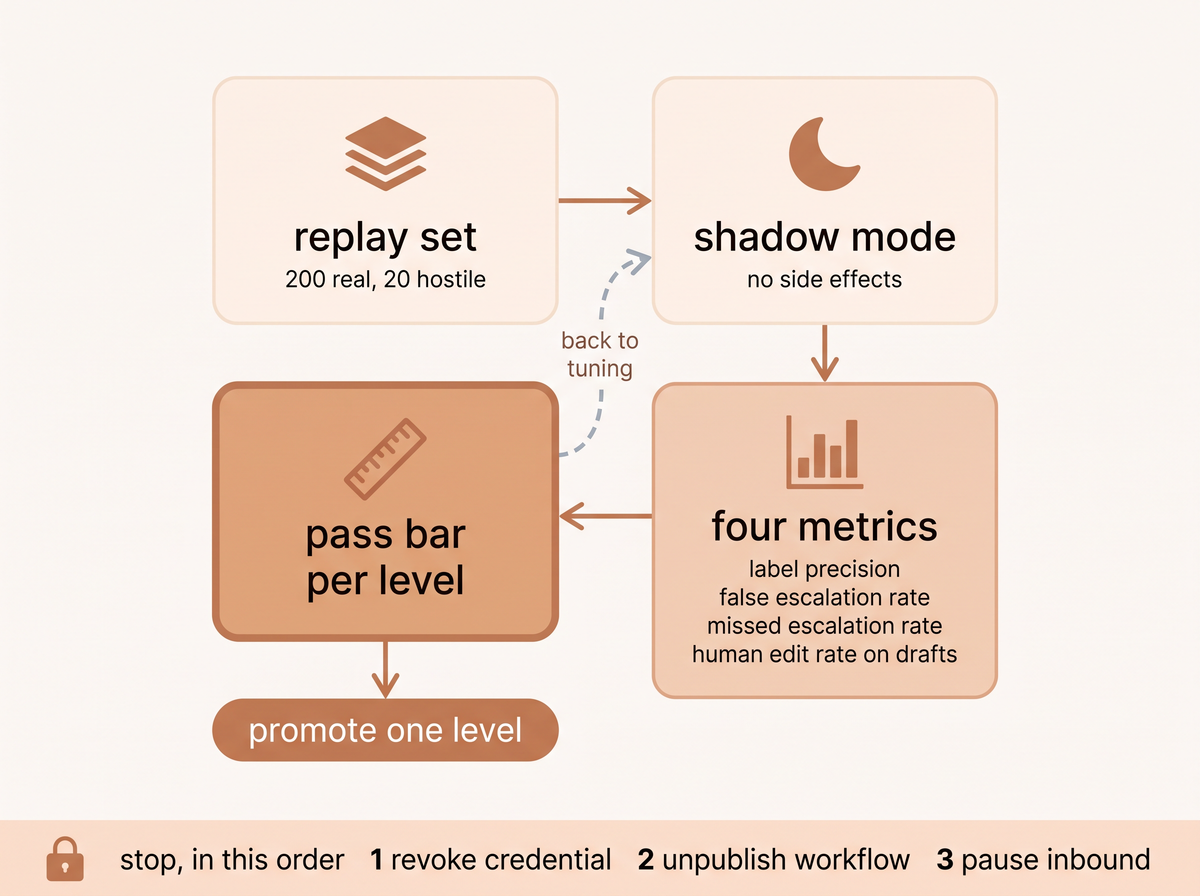
Build the replay set from your own mail. Two hundred messages from the last 90 days plus the 20 hostile ones, hand labelled once, stratified so each of the three jobs has at least 25 and the escalation class at least 10. That's half a day of real work. Then run the modes in order. Shadow mode feeds the candidate the same live inbound mail and records its proposed action with no mailbox side effects, not even a draft. Then advisory, drafts a human owns. Then limited autonomy for one category narrow enough to state in a sentence, kill switch kept.
Four metrics and a pass bar per level, all mine. Label precision, false escalation rate, missed escalation rate, human edit rate on drafts. Level 1 promotes at 95% label precision with zero mislabels in money and legal. Level 2 when a human sends 8 of 10 drafts with light edits. Level 3 after two weeks of clean approvals. Level 4 is one named class, after the hostile set runs clean. Missed escalation has no tolerance, because it's the only failure the agent causes on its own. On client builds that's week 3's shadow run, and the 95%+ accuracy I quote for Operations Autopilot lands after 30 days of tuning.
Step eight, logs, alerts, and a stop you have actually pulled
One log row per message, stored outside the mailbox so deleting mail doesn't delete evidence: message identifier, received at, sender and class, intent, confidence, classifier JSON, model version, tools called with arguments, gate decision and who cleared it, final action, latency, reason string. Three alerts. Same recipient more than twice in an hour. Any action on a sender off the allowlist. And escalation rate falling week over week, which means the agent got confident rather than correct. Both lists are mine.
The stop is three lines, in my order and for my own reason: revoking the OAuth token or app credential first stops every path at once, in flight runs included. Unpublish the workflow or disable the webhook, and mind the verb: deactivating n8n nodes doesn't stop the trigger, only unpublishing does. Pause or redirect inbound delivery. On Microsoft, remove the RBAC resource scope. Test it before you need it. More in running agents in production.
Where this fails, and what I'd do differently
What I got wrong early was treating the written workflow as paperwork. No amount of model quality fixes a process that only exists in somebody's head. Fig and Bloom went live in 3 months, not the 21 days I quote now, and the reason was never the model.
The opinion with stakes: I would not give a 5 to 50 person business's main inbox an autonomous send tool in 2026.
The failure a confidence score can't catch is the invented fact. Cursor's front line support bot, signing as Sam, told a customer device logouts were expected under a login policy that did not exist, and the cofounder acknowledged the incorrect response. Grounding and an approval gate catch that.
Who should not set this up yet
- Under about 20 messages a day of the same type. My threshold, and the reason is arithmetic: the replay set won't exist and tuning costs more than the hours it returns. Same logic as choosing an agent over plain automation.
- Nobody owns the escalation queue by name.
- The work has never been written down. That's a reason I turn projects away.
- Every case needs real human judgement. Legal review, medical triage.
- You're in the EU and counting on native Outlook, since the agentic Copilot default isn't available there.
- Regulated mail with no data processing agreement covering the model provider.
- You need the vendor to exist in a year. Notion Mail closes on September 22 2026, though Notion says its Gmail connected agents keep working.
Frequently asked questions
Can an AI agent send an email?
Yes, and mostly it shouldn't yet. Levels 1 and 2 never send, level 3 only after a named human clears it, level 4 alone for one named category.
How much do AI email assistants cost?
Budget about $30 a seat a month, all September 2026. Fyxer is $30 per user per month monthly or $22.50 billed annually, Superhuman Business $33 per member per month billed annually, and neither page names a currency, so don't assume US dollars. The assistant already inside your suite is cheaper, from $14.00.
Can I build my own AI email agent for free?
Yes, up to level 2. Zapier Agents free at 400 activities a month, AgentMail at 3 inboxes and 3,000 emails, Resend to 3,000, Cloudflare Routing plus a Worker at nothing. The unpaid cost is the process.
What happens when the agent gets an email that tells it to do something?
It obeys, unless you built it so it can't. That's what EchoLeak was: one email from any address was enough. The defence is the split path, allowlists and plain text, not a better system prompt.
What is the best email service for AI agents?
Answer by lane. AgentMail gives each agent a real inbox in one API call, no OAuth, no user account. Cloudflare if you want a Worker that can setReject on the way in.
Do the agents work with both Gmail and Outlook?
Yes, and the setup differs where it counts. Gmail puts labelling in restricted and sending in sensitive, so the reader trips the heavier review. Graph's Mail.ReadWrite excludes send in both forms.
What happens if an AI agent sends the wrong response?
Three controls keep it a draft: level 2 by default, a confidence threshold routing anything uncertain to a named human, and grounding from your systems. Cursor's support bot is what happens without them.
Week two, write the level next to the mailbox name and the escalation owner, on one line, where somebody will read it. If you'd rather not build it yourself, that's what Operations Autopilot does for clients. Tell me what your inbox looks like and I'll tell you where to start.
Published
September 6, 2026
Category
Implementation
Jahanzaib Ahmed
AI Systems Engineer & Founder
AI Systems Engineer with 126 production systems shipped. I run AgenticMode AI (AI agents, RAG systems, voice AI) and ECOM PANDA (ecommerce agency). I build AI that works in the real world for businesses across home services, healthcare, ecommerce, SaaS, and real estate.
Want this built for your business? See Workflow Automation, or browse the free tools and guides.
Related articles
How to Automate Workflow for Small Business Owners: What Actually Works in 2026
A plain-English guide to workflow automation for small business owners. Learn what to automate first, which tools to use, and how to get ROI without hiring a developer.
How toImplementationWorkflow Automation
n8n 2.0 AI Agents: The Workflow Architecture I Use Across Every Client Deployment
How I build n8n AI agent workflows for clients on n8n 2.42: the AI Agent node, memory, tool nodes, a multi agent orchestrator example, and cost control.
GuideImplementationn8n
5 AI Automations Every Small Business Should Deploy Before 2027
Five proven AI automations that pay for themselves within months: AI receptionist, lead scoring, RAG chatbot, automated reporting, and AI onboarding. Real ROI numbers for businesses with 5 to 50 employees.
GuideImplementationAI Automation