What Is Jev AI? TypeSafe's System One Decision Model, Tested
Jev AI is TypeSafe's decision model: it never writes text, it returns typed probabilities. What it is, my 16 message front door test, the Python to build it, and where it breaks.


Table of Contents
What is Jev AI? It's a model from TypeSafe AI that never writes a word. You give it a piece of text and a typed question, and it returns a choice, a score or a yes or no probability that your code can branch on. In October 2026 I ran it on 16 test messages: a median of 340 ms per call, $0.00021 for the whole batch, and three messages sent to a slow lane (a second opinion from a bigger model or a person) because it wasn't sure.
What is Jev AI?
Jev is the first System One model, made by TypeSafe AI, a San Francisco startup that left stealth on September 15, 2026 with a $40 million seed round led by DCVC. Its CEO, Diogo Almeida, is a former OpenAI researcher, and The Register and VKTR both describe him as a co-inventor of RLHF, the training method behind ChatGPT.
The docs are blunt about the limits: Jev does not generate text, write code, or hold a conversation. An LLM writes its answer one token after another. Jev reads your input once, evaluates every attached question against it in parallel, and sends back typed values with probabilities. There's nothing to parse.
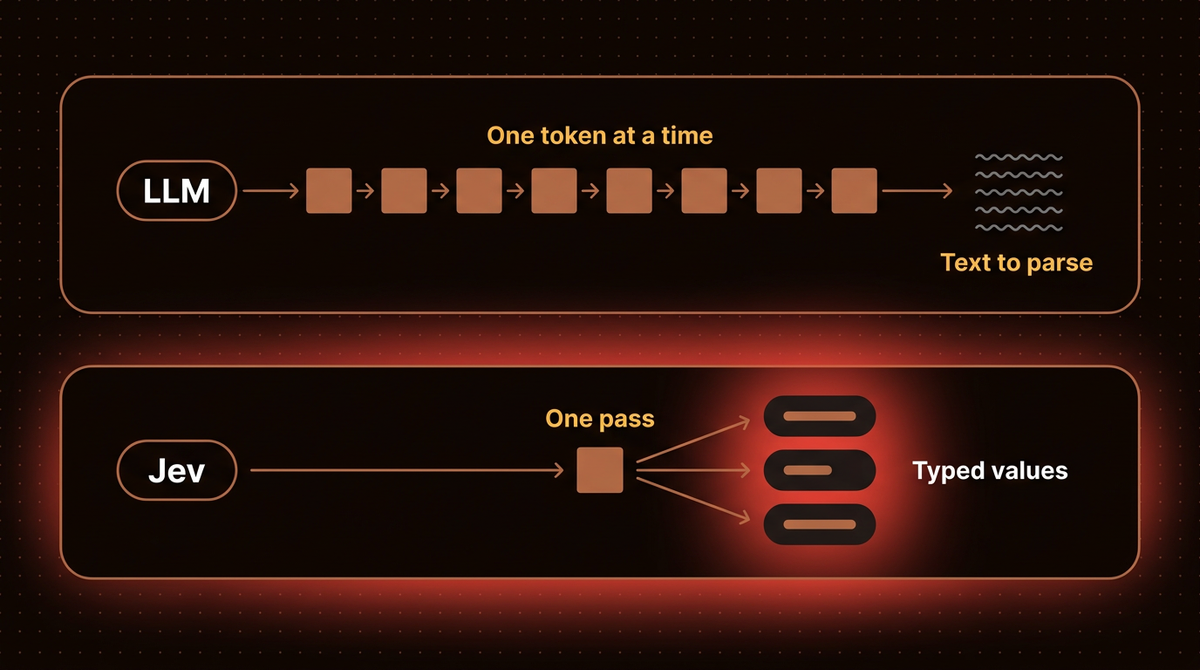
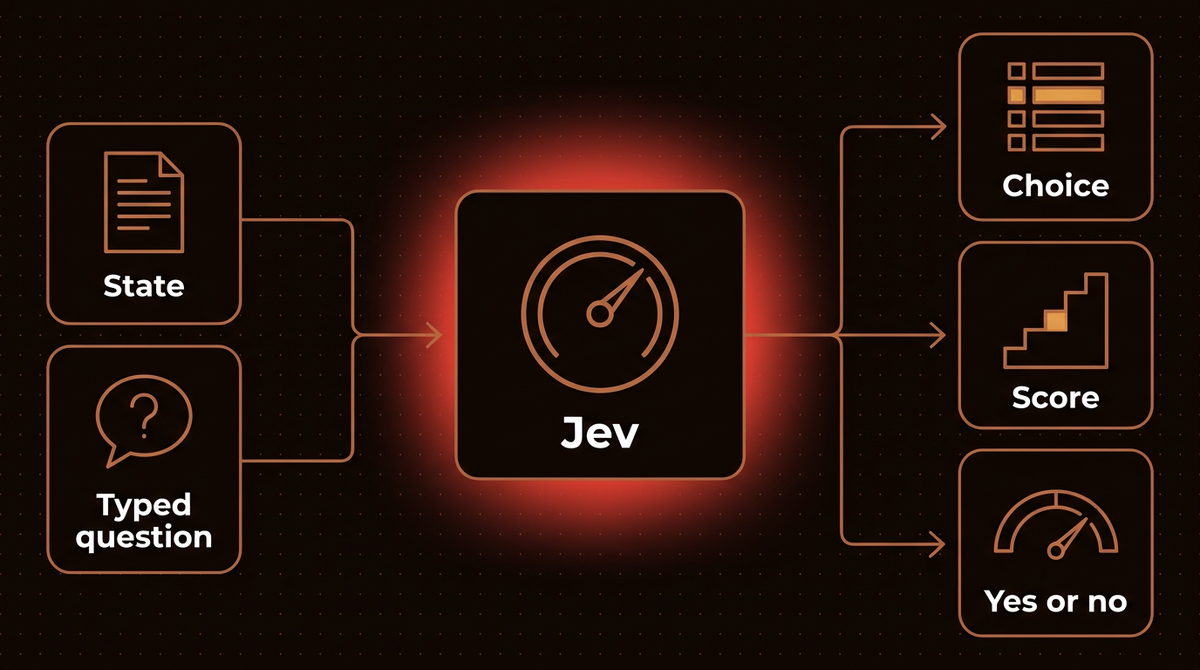
Every request has three parts. The state is the content to judge: a support message, a JSON record, an array of text values. The questions are what you want decided. The model field picks the version. Questions come in exactly three shapes, described on the primitives page and the API reference.
| Type | You give it | You get back | Example |
|---|---|---|---|
| Choice | Options with short descriptions, up to 255 | The winning option, a probability for every option, and a confidence value | Which team handles this ticket: billing, technical or sales |
| Score | Ordered, described levels, up to 10 | A score, a probability for every level, and a confidence value | How frustrated does the customer sound |
| Noul (yes or no) | A yes or no question or statement | One number from 0 to 1, the probability of yes | Is this a genuine request a person should answer |
Noul is Jev's name for a yes or no probability, and it's the shape my test below uses.
State goes in, typed probabilities come out, and your code decides what to do with them. My own walkthrough, published on October 7, 2026, covers the same ground with the live runs on screen.

The fast half of an agent
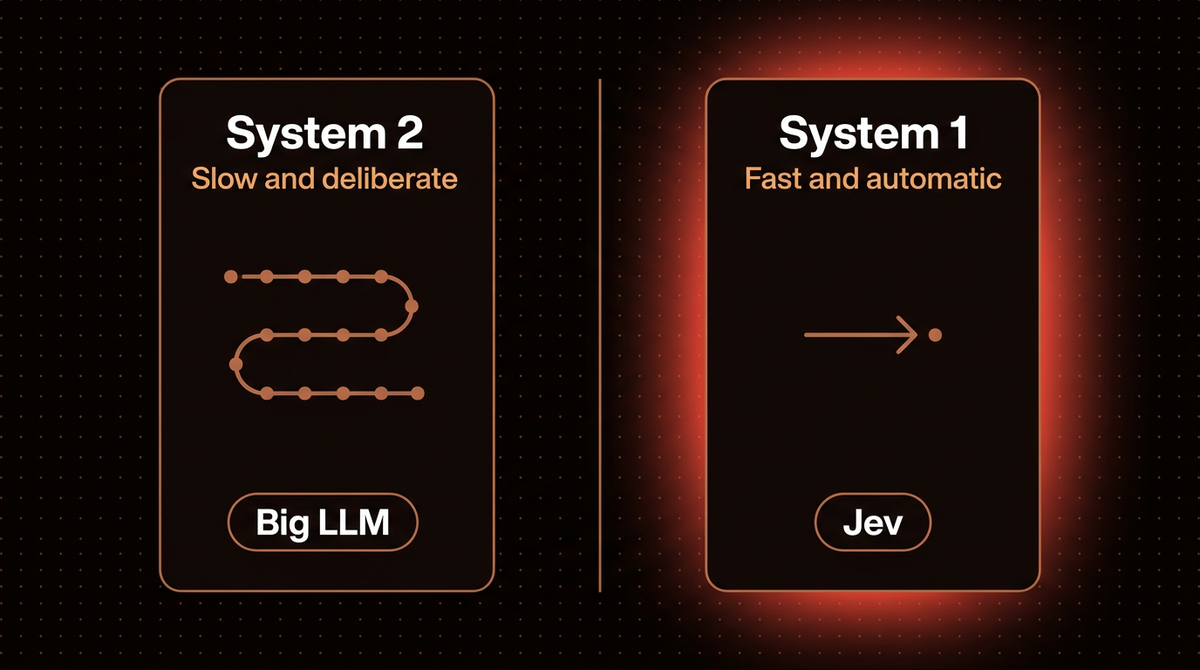
The label comes from Daniel Kahneman. System Two is slow, deliberate and effortful: the thinking you do on your taxes, and the thinking you pay Claude Opus 5.5 or Sonnet 5.5 for when you ask it to design a system. System One is fast and automatic: you glance at a message and know it's junk.
Choosing the next tool, waking a subagent, reading a failed command's output and triaging an email are all System One work, and today most agents send them to a frontier model that reasons for seconds before it answers. Those are the calls Jev is built to take over. TypeSafe's docs say as much about the boundary: if you wanted to swap the model powering a coding agent, Jev isn't the tool for that. Keep the LLM for thinking and put Jev in front of it for the calls that don't need thought.
To put numbers on the loop, my breakdown of why per token prices mislead on an agent loop shows where the money goes, the AI agent cost calculator takes your own step counts, and the model price board lists what a frontier call costs today.
Confidence lanes: acting on the probability
A probability only matters once code branches on it. If a model says 80% and is calibrated, it should be right about eight times in ten, so you can proceed when it's sure and escalate when it isn't. TypeSafe says Jev is trained for exactly that, and its docs treat "I don't know" as a useful signal you route on.
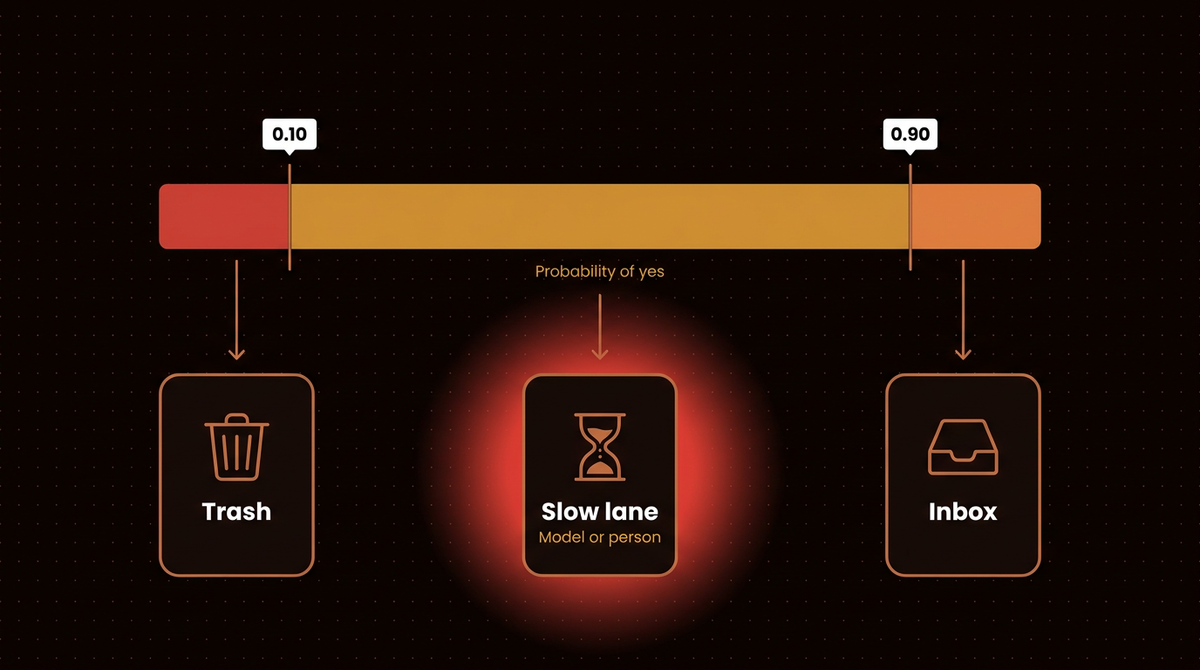
The pattern I used is three lanes behind one Noul question, which is Jev's name for a yes or no probability. At 90% or more the message goes to the inbox. At 10% or less it goes to the trash. Everything between goes to the slow lane, where a frontier model or a person takes a proper look. The fast model clears the obvious cases, and the expensive one only sees what needs thought.
Vendor claims against independent measurements
The launch numbers are vendor numbers, and "calibrated" is one of them. TypeSafe's homepage demo shows a decision in 0.114 seconds against 8.566 seconds for an LLM, with headline multiples of 193.6 times faster and 444.6 times cheaper. In my video I quoted the launch range of 20 to 200 times faster and 40 to 400 times cheaper, while The Register reported the speed range as 40 to 200 times. Here's what can be checked independently.
| Claim | Source | Verdict | What I found |
|---|---|---|---|
| $0.042 per 1M input tokens | TypeSafe Models page | Holds | Output tokens are free. Matches the docs today. My batch used 5,044 input tokens, about $0.00021. |
| 70 to 500 ms end to end | TypeSafe launch material, repeated by VKTR | Holds | Median 340 ms in my run, round trip included. A public benchmark by nibzard measured medians of 267 to 316 ms across three suites, and AbdelStark measured 236 to 256 ms from France. |
| Accuracy | Independent benchmarks | Depends on the task | Two public benchmarks, tabulated below. |
| About 97% on 49 tasks | Cited in my video | Unverified | I can't point to a public source for this figure, so don't lean on it. Use the numbers in the next table. |
| Calibrated confidence | TypeSafe | Mixed | nibzard writes that Jev's native confidence is a provider defined score, not a calibrated probability of correctness. In AbdelStark's pilot Jev put zero probability on the true label for 16% of emotion examples. |
Accuracy is where the independent numbers disagree most, so here they are side by side.
| Task | Score | Source |
|---|---|---|
| Spam, September 26 pilot (50 messages) | 98% | nibzard |
| Spam, another run in the same README | 93.0% | nibzard |
| AG News (100 examples) | 0.910 | AbdelStark |
| CLINC150 | 88.6% | nibzard, September 29, 2026 |
| Banking77 (100 examples) | 0.870 | AbdelStark |
| Banking77, full test set (3,080 messages) | 79.2% | nibzard, September 29, 2026 |
| Emotion dataset (100 examples) | 0.480 | AbdelStark |
| NLU++, micro intent F1 | 48.3% | nibzard, September 29, 2026 |
| NLU++, messages with every label right | 4.3% | nibzard, September 29, 2026 |
My read: the speed and price claims hold up. Accuracy depends on the task. Jev is strong on spam, middling on fine grained intent sets, and weak when a message carries several labels. That's why the lanes exist. You don't need the model to be right every time, only its uncertainty to be a usable signal on your traffic, and that's something you can measure. The steps below do.
Step 1: Get a key and pin the model
You need Python 3.10 or newer, which the quick start lists as the SDK requirement, and an API key. At launch, access was early access with developers brought off a waitlist on a rolling basis. The quick start now just says to create a key in the console, and the docs don't say whether signup is still gated, so expect a possible wait.
Install the SDK and export the key. The package on PyPI is typesafe-sdk:
pip install typesafe-sdk
export TYPESAFE_API_KEY="your key here"
Then pin the model version. The alias jev-latest currently points at jev-1.13.0, but an alias moves when a new release ships, and the Models page says that if you've tuned confidence thresholds against a specific version, you should pin that version's ID. The listed limits are 80 requests per second, 100K tokens per second and a 64k token context. Go over a limit and you get a 429, which the SDKs retry with backoff by default. TypeSafe also warns that the limits are adjusting dynamically while it lets in more users.
Step 2: Write one literal question
My test asks a single Noul question of every message: is this a genuine request from a real customer that a person should answer? That's the wording I recorded. Steps 2 to 4 build one file, front_door.py. Here's the first half, with the SDK:
from typesafe_sdk import Noul, TypeSafeClient

client = TypeSafeClient()  # reads TYPESAFE_API_KEY

REAL_REQUEST = Noul(
    instructions=(
        "This is a genuine request or question from a real customer or prospect "
        "that a person should answer (not spam, phishing, cold sales outreach, "
        "or empty noise)."
    )
)

def p_real(message: str) -> float:
    response = client.system_one(
        model="jev-1.13.0",
        state=message,
        questions={"real_request": REAL_REQUEST},
    )
    return response.answers["real_request"].noul
Note: The script I recorded called the HTTP endpoint directly with jev-latest, and the terminal shows it resolved to jev-1.13.0. The SDK version above follows the pattern in TypeSafe's Noul docs, which pass model to system_one the same way. I haven't run this exact snippet, so try it on one throwaway message first.
A Noul answer is one number under the question id you chose, plus the model and a token count:
{
  "model": "jev-1.13.0",
  "answers": {
    "real_request": { "type": "noul", "noul": 0.96 }
  },
  "usage": { "input_tokens": 312, "output_tokens": 30 }
}
The shape follows the docs and the values are illustrative. Only input_tokens counts toward the bill. If the SDK call fails, the quick start also has a plain curl example, and an authentication error almost always means TYPESAFE_API_KEY isn't set in the shell you ran the script from.
Write the question the way you'd explain the rule to a new hire, as literally as you can. TypeSafe's own list of known weak spots says Jev answers the question you wrote, not the one you meant. If a wrong answer makes you start explaining what you really meant, that explanation is the missing half of the instruction. And ask several questions per request when you can. Questions over the same state run in parallel, so adding is_urgent or is_phishing beside real_request doesn't add a round trip, and your code can combine the answers.
Step 3: Turn the probability into three lanes
A threshold is just a cutoff you pick: above it you act on the model's answer, below it you ask for help. The routing is plain code, so a person can read the cutoffs and change them. Append this to front_door.py:
INBOX_AT = 0.90   # at least 90% sure it is real
TRASH_AT = 0.10   # at most 10% chance it is real

def lane(p: float) -> str:
    if p >= INBOX_AT:
        return "inbox"
    if p <= TRASH_AT:
        return "trash"
    return "slow_lane"   # a frontier model or a person looks at it
For an inbox it might be a person. For an agent it might be Claude Sonnet 5.5 reading the message with full context. The expensive reader sees only a fraction of the traffic. For email, my guide to setting up agentic email without letting it send covers what the agent may do with whatever comes through.
Step 4: Run it on real messages
These are the 16 messages from my recorded run in October 2026, which I haven't repeated for this post. They're the kind that land in a business inbox: support tickets, a pricing question, a customer charged twice, and the usual junk, including a gift card scam, a prince with an inheritance, a backlink seller and a fake account suspension warning. Two messages had a dash swapped for a comma so the list pastes cleanly. Add this to the end of front_door.py and run python front_door.py:
MESSAGES = [
    "Hi, our Stripe webhook started failing after your update this morning. We're losing orders, can someone look today?",
    "CONGRATULATIONS!!! You have been selected to receive a $1,000 gift card. Click here to claim now.",
    "Hey, quick question: does the Pro plan include API access, or do I need Enterprise for that?",
    "Increase your website traffic 10x with our guaranteed SEO backlinks package. Reply YES.",
    "I was charged twice for October. Invoice #4471. Can you refund the duplicate?",
    "Dear sir, I am a prince with an inheritance of $45M and need your help to transfer it.",
    "We're evaluating vendors for 40 seats. Could we book a demo next week?",
    "buy cheap followers instagram tiktok 100% real fast delivery",
    "The export button does nothing on Safari 18. Chrome works fine. Screenshot attached.",
    "test",
    "Your account will be suspended in 24 hours unless you verify your password at the link below.",
    "Can I change the billing email on our workspace? Our finance contact left the company.",
    "hello??",
    "Loved the webinar yesterday, is the recording available somewhere?",
    "We provide offshore developers at $8/hour. Interested in a quick call?",
    "Our SSO login loops back to the sign-in page for everyone on the team since 9am.",
]

if __name__ == "__main__":
    import statistics, time
    counts, times = {"inbox": 0, "trash": 0, "slow_lane": 0}, []
    for message in MESSAGES:
        start = time.perf_counter()
        p = p_real(message)
        times.append((time.perf_counter() - start) * 1000)
        name = lane(p)
        counts[name] += 1
        print(f"{p:.2f}  {name:9}  {message[:60]}")
        if name == "slow_lane":
            pass  # hand the message to Claude or a person here
    print(counts, f"median {statistics.median(times):.0f} ms")
Your numbers will differ a little from mine. Scores move between runs, and a score of 0.90 sitting on a 0.90 cutoff can land either side.
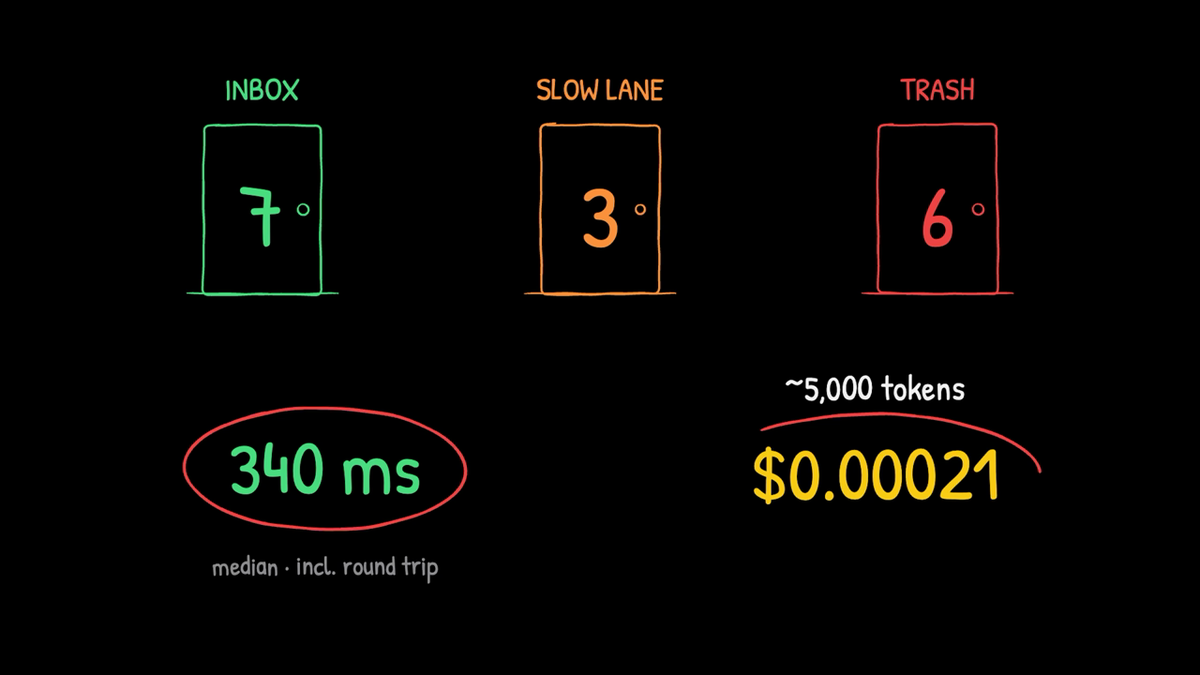
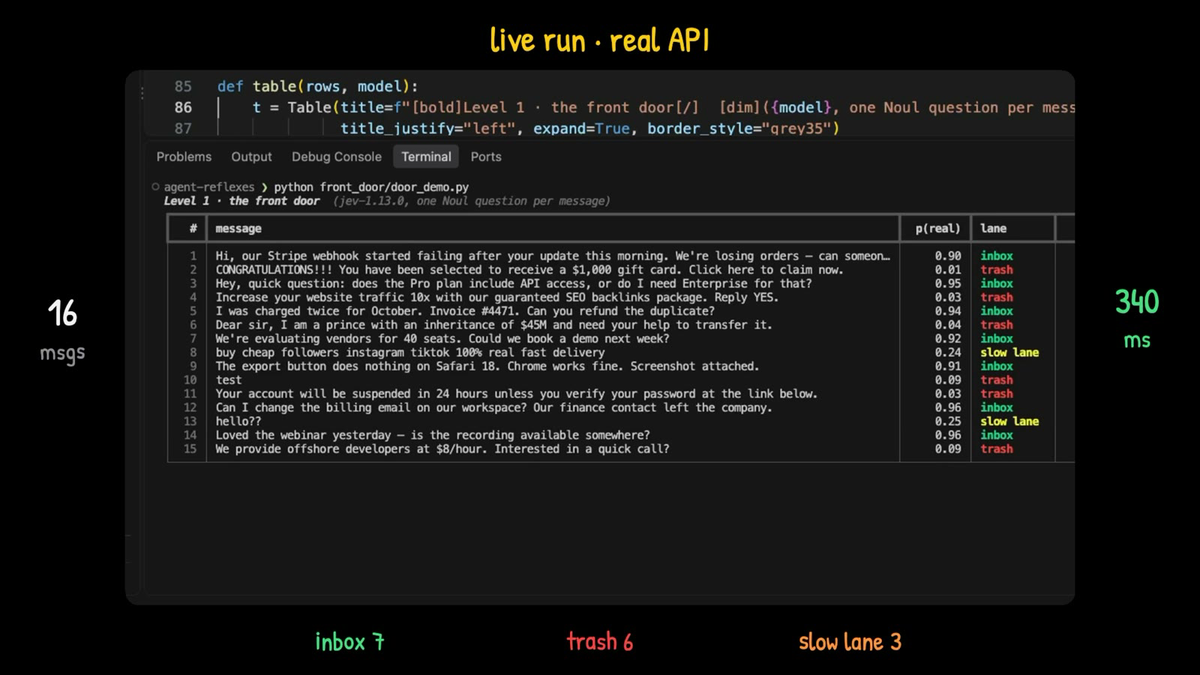
Here is how the 16 messages landed, then the five that taught me the most.
| Lane | Rule | Messages | Goes to |
|---|---|---|---|
| Inbox | p at least 0.90 | 7 | A person |
| Slow lane | Between the two | 3 | A frontier model or a person |
| Trash | p at most 0.10 | 6 | The trash |
| Message | p(real) | Lane | Why it matters |
|---|---|---|---|
| $1,000 gift card congratulations | 0.01 | Trash | The obvious scam, cleared in one call |
| Stripe webhook failing, losing orders | 0.90 | Inbox | Right at the threshold. A slightly stricter cutoff would have sent it to the slow lane |
| "hello??" | 0.25 | Slow lane | Ambiguous input, correctly left undecided |
| Instagram followers seller | 0.24 | Slow lane | Junk, but not junk enough to bin automatically at these cutoffs |
| SSO login looping for the whole team | about 0.79 | Slow lane | A real, urgent customer. Jev was unsure and said so instead of guessing |
The SSO row is why the lanes exist. A model that trashed that message automatically would have buried a real customer's outage report. Because the lanes only act at 90% or more or at 10% or less, the one real message Jev was unsure about went to something that could think. The Stripe row is the reverse lesson: a real report only just made the inbox, so pick your inequality signs on purpose.
The cost arithmetic is mine, from the docs price: 5,044 tokens across 16 messages is about 315 tokens per message at my prompt length, so a million messages would be roughly 315 million input tokens, around $13. Measure your own token usage before you budget.
| Volume | Input tokens | Cost ($) |
|---|---|---|
| 16 messages (my batch) | 5,044 | 0.00021 |
| 1,000 messages | 315,250 | 0.013 |
| 1,000,000 messages | 315,250,000 | 13.24 |
Only the first row is measured. The other two assume the same 315.25 tokens per message at $0.042 per million.
Step 5: Tune the thresholds on your own traffic
0.90 and 0.10 were my starting cutoffs. Sixteen messages can't tell you your real error rate. To set cutoffs you can defend:
- Log everything. Store the message, the probability, the lane and what a human eventually did, for a few weeks.
- Plot confidence against correctness. TypeSafe's own advice is to test thresholds by plotting confidence against accuracy on your data.
- Scale the cutoffs with the cost of a mistake. As an illustration, trashing a newsletter signup could happen at 0.15, while anything that might be a refund request should need 0.03 or lower.
- Read the trash lane. Sample it weekly, like an audit of a new hire's work. Wrong trashes won't announce themselves, so you have to go looking.
- Rerun after any model change. That's why Step 1 pinned the version.
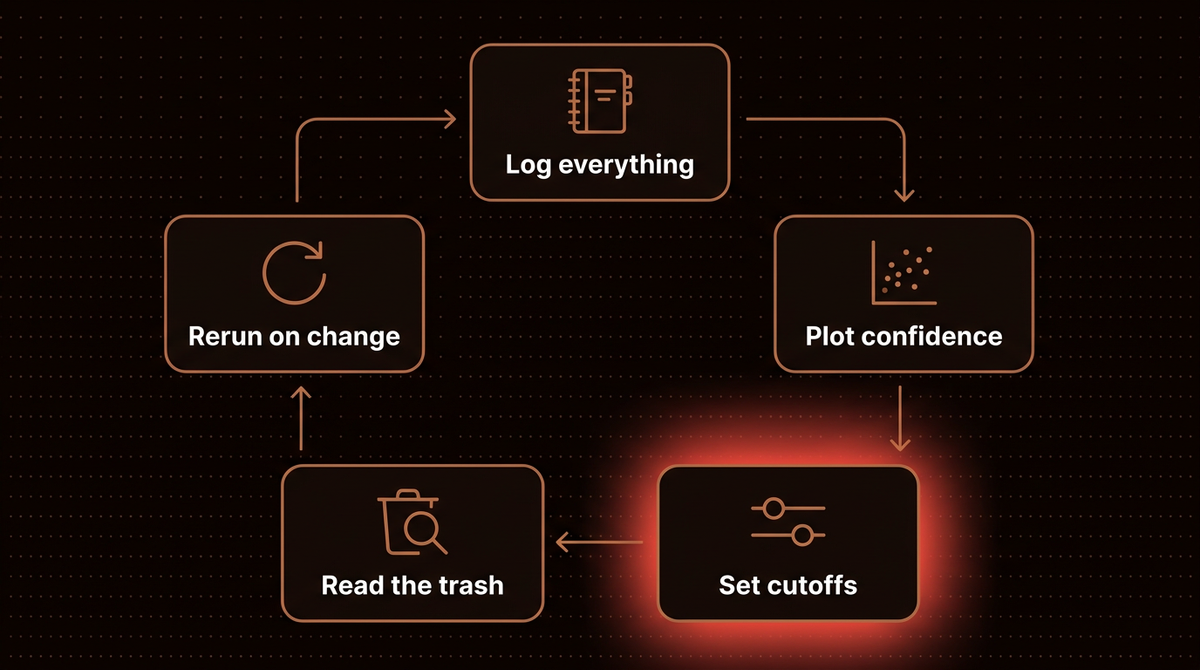
A minimal log is enough to start:
import csv, time

def log_decision(message: str, p: float, lane_name: str, path="decisions.csv"):
    with open(path, "a", newline="") as f:
        csv.writer(f).writerow([time.time(), p, lane_name, message])
Add a column for the human's final call later, then check how often each probability band was right. For Choice and Score questions, Jev also returns a confidence value computed from how flat the probability distribution is. For Choice the confidence docs give it as (p_max - 1/n) / (1 - 1/n), and they suggest trying the top probability or the ratio of the top two options alongside it. A Noul has no separate confidence field, so the probability itself is the signal. The general idea has a glossary entry on confidence scoring.
How Jev fails, and what to build around
TypeSafe publishes a "jaggedness" page for jev-1.13, last reviewed October 2, 2026. I find it the most useful page in their docs, and each item changes how you build:
- Text only. No images, audio or video. English is the main training language, and other languages, including CJK scripts, currently have lower accuracy.
- Literal reading. Negations and scoping words are taken at face value, so write the exact condition.
- Math, counting and dates. Keep arithmetic and date comparison in code, and use Jev to extract the parts.
- Noisy state. Accuracy falls as unrelated detail grows, so filter first and send only what the question needs.
- Adversarial content. State is data, and Jev doesn't treat it as hostile. Text written to steer the answer, including an injected instruction, can move it. That matters for a front door, because spammers write to be believed. Test with real scam wording before you trust the trash lane.
- Option order. Choice can lean toward the first option, so shuffle the order and check the answer holds.
One more limit sits outside that list: a Choice question tops out at 255 options, and nibzard's September 26 pilot saw Jev reject requests at 256, 384 and 512 options.
Decision models are now a crowded field
Jev is no longer alone. By October 10, 2026, The Register counted more than 100 decision models competing for attention, among them OpenAI's Decisions API in public beta, Perplexity's Decisions API, Cloudflare's Clef and Microsoft's new Microsoft-Decision-1.
The one I tested next to Jev is Laya, a free, Apache 2.0 licensed decision model you run locally, whose HTTP server accepts the same request shape as Jev. In my recording it decided in about 55 ms on my Mac with no network and no bill (its README quotes about 33 ms on a GPU), yet scored the gift card scam 0.98 as a genuine customer and the real SSO outage 0.01. Reworded as "is this spam?", it flagged most of the junk, though a prince scam only reached 0.19. It was fast but wrong on my wording, and I wouldn't trust it before tuning it on my own data. Its README also says its confidence value is computed differently from Jev's, so a threshold tuned on one doesn't carry over to the other. I'm writing that comparison up separately, and the numbers are in the last third of the video above.
Start with one decision
Pick one place in your agent where a frontier model makes a call a person would make in a blink. Put a single Noul question in front of it, log every probability for two weeks, and only then choose cutoffs. Building and monitoring AI agents like this is the work I do, and you can see how I approach AI agent development.
Two follow ups go deeper: Jev vs Laya on 16 test messages puts the free local model through the same test, and how to choose an LLM router for AI agents shows where a decision model fits next to rules, classifiers and frontier models.
Frequently asked questions
What is Jev AI in one sentence?
Jev is TypeSafe AI's System One model: you send it text and a typed question, and it returns a choice, a score or a yes or no probability instead of writing text. It launched on September 15, 2026, and it's built for software to act on rather than for people to read.
Is Jev an LLM like Claude or GPT?
No. The docs state that it doesn't generate text, write code or hold a conversation. It reads your state once, answers typed questions with probabilities, and stops. Keep an LLM for writing and reasoning, and use Jev for the quick, repeatable decisions in front of it.
How much does Jev cost?
TypeSafe's Models page lists $0.042 per million input tokens for jev-1.13.0, with output tokens free. My 16 message batch used 5,044 input tokens, about $0.00021. Check the page before you budget, because TypeSafe says limits are still changing.
Can I use Jev inside Claude Code?
Not as the model behind it. TypeSafe's docs say there's no setting that turns a coding agent into a Jev powered one, and they offer an agent skill that helps Claude Code write correct Jev integrations instead. You can also call the API from your agent's own scripts, for example to route a request before the big model reads it.
How accurate is Jev?
It depends on the task. A public benchmark by nibzard measured 79.2% on Banking77 and 88.6% on CLINC150, only 4.3% of NLU++ messages had every intent label right, and spam came out between 93% and 98% depending on the run. Test on your own traffic and keep a slow lane for what it's unsure about.
Is there a free alternative to Jev?
Laya is a free, Apache 2.0 licensed decision model you can run on your own machine, and its HTTP server accepts the same request shape as Jev. In my test it was fast but confidently wrong on one question wording, so fine tune it on your own decisions before trusting its lanes.
Published
October 10, 2026
Category
AI Agents
Jahanzaib Ahmed
AI Systems Engineer & Founder
AI Systems Engineer with 126 production systems shipped. I run AgenticMode AI (AI agents, RAG systems, voice AI) and ECOM PANDA (ecommerce agency). I build AI that works in the real world for businesses across home services, healthcare, ecommerce, SaaS, and real estate.
Related articles

Jev vs Laya on 16 Test Messages: Two Laya Mistakes and a Wording Fix
I ran TypeSafe's Jev and the free open source Laya on the same 16 test messages: speed, cost, a gift card scam scored 0.98 genuine, and code to try it on your own messages.
How toAI AgentsJev
Microsoft Decision-1 Matches Jev on Price and API Shape
Microsoft's new decision model charges exactly what Jev charges and accepts nearly the same request. Microsoft times it at 85 ms; the first independent run measured 459 ms. Here is what a port changes.
NewsAI AgentsMicrosoft
How to Choose an LLM Router for AI Agents
An LLM router picks the model, tool or subagent for each request. Compare rules, classifiers, Jev style decision models and LLMs, with confidence lanes, cache math and a Claude Code sketch.
How toAI AgentsLLM Router