How to Get a Claude API Key and Cap What It Can Spend
Create a Claude API key in the Console the safe way: prepaid credits, a workspace with its own spend limit, the right key type, a free check that it works, and a first request that costs a fraction of a cent.


Table of Contents
A Claude API key created in the Default Workspace can spend up to your organization's whole monthly tier cap, because Anthropic doesn't let you put a limit on that workspace. Here's how to create one that can't. In about ten minutes you'll buy credits, open a workspace with its own spend limit, scope a key to it, check it for free and send a first request that costs a fraction of a cent.
You need a browser, a terminal, a payment card and billing rights in the Console. The one thing that changes from the usual walkthrough is the order: the limit exists before the key does.
Before you start
- A Claude Console account. A Claude Pro, Max, Team or Enterprise subscription does not include API access; Anthropic's help center says the two are separate products billed separately.
- A payment card, and the Admin or Billing role in the Console organization (an organization admin can grant it).
- A terminal with
curl. For the Python check, Python 3.10 or later, which the official Python SDK requires. - A few dollars of budget. Every request in this guide together costs a fraction of a cent.
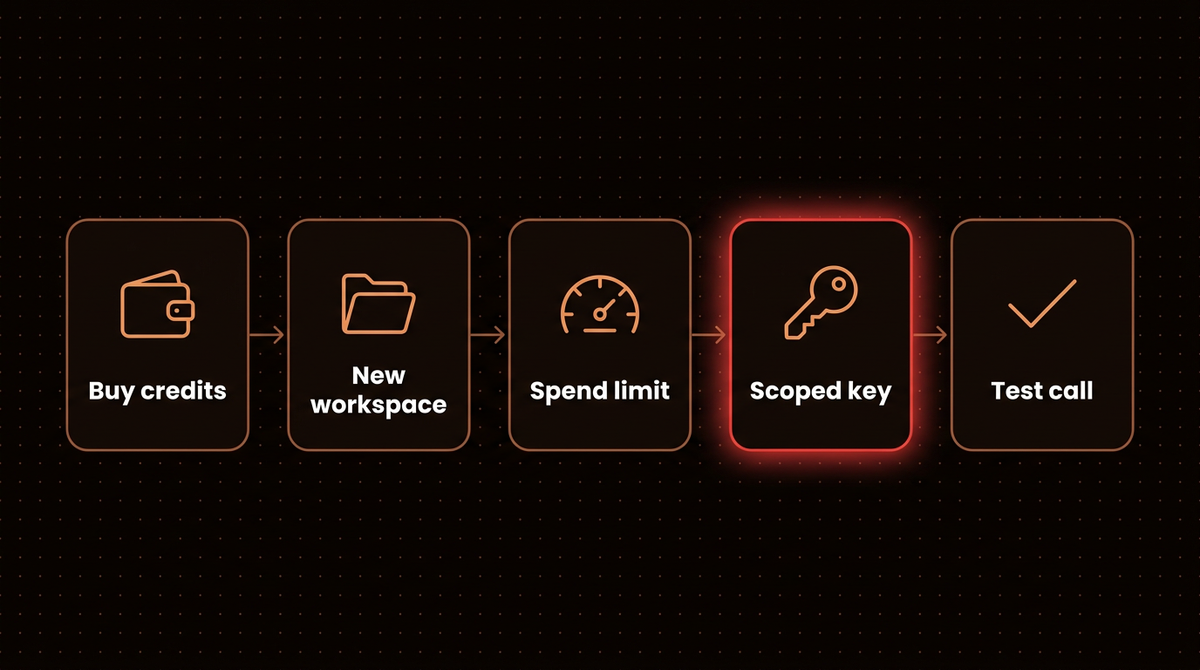
Step 1: Create a Console account and buy credits
Go to platform.claude.com and sign in or sign up. The Console is where API billing, keys and limits live, separate from the claude.ai chat app.
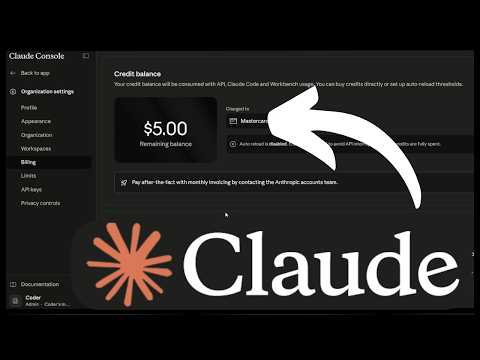
The API runs on prepaid credits. Open Settings > Billing, click Buy credits, enter an amount and confirm. According to Anthropic's billing article, purchased credits are available immediately, expire one year after purchase and are non refundable. When they run out, API calls stop until you add more.
Leave Auto-reload off for now. It's handy in production, but on day one a key mistake plus auto reload is how a test bill becomes a real one. I switch it on only after a workload has run for a couple of weeks and I know its normal daily spend.
Step 2: Create a workspace for this project
Every organization starts with a Default Workspace, and the workspaces documentation states that you cannot set limits on the Default Workspace. A key living there is bounded only by the organization's tier cap.
- Open Settings > Workspaces. Then click Create workspace.
- Name it after the project and environment, for example
invoice-bot-dev, and pick a color. - Click Create. The new workspace appears in the list with an ID that starts with
wrkspc_. Copy that ID; you'll check against it in step 7.
One workspace per project and environment is the pattern I use on every build. A leak or a runaway loop then stops at that workspace's cap instead of the organization's.
Step 3: Put a spend limit on the workspace
Open the new workspace and go to its Spend limits tab. Set a monthly cap that matches what you expect to spend while building, plus headroom, and add an alert threshold so you get an email before the cap bites. For a first prototype, a cap of $10 to $20 is plenty; you can raise it in seconds later.
Doing this before the key exists matters because organization tiers carry large monthly caps: $500 on Start, $1,000 on Build and $200,000 on Scale, per the rate limits page. A workspace limit is the layer that stops one leaked or looping key from eating the whole tier. You can also cap requests and tokens per minute on the Rate limits tab, which I cover under rate limiting.
Note: When a workspace hits a spend limit you set, requests fail with HTTP 400 and the message You have reached your specified workspace API usage limits. Your code is fine; raise the limit and the same request goes through.
Step 4: Choose the key type and how long it lives
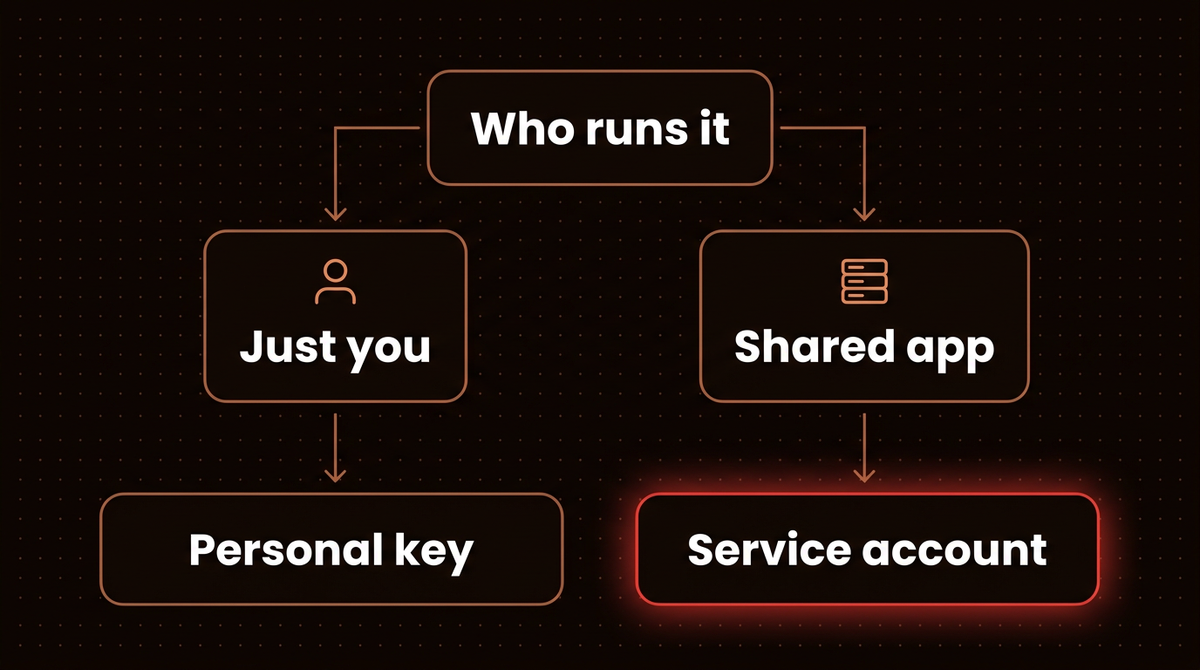
The Console now asks two questions when you create a key: who the key acts as, and when it expires. The authentication docs describe three key types.
| Key type | Acts as | Stops working when | Use it for |
|---|---|---|---|
| Personal key | You, with your role and permissions | You lose access to the organization or its workspace | Your own scripts and local development |
| Service account key | A service account an admin created | The service account is archived or removed from the workspace | Anything shared: CI, production apps, agents |
| Workspace key (legacy) | Nobody; it belongs to the workspace | It expires, is deleted, or the workspace is archived | Nothing new; Anthropic calls it legacy |
For expiration, the Console offers 3 hours, 1 day, 7 days, 30 days, a custom duration, or Never. Expiration is fixed at creation and can't be changed. Anthropic emails the creator 7 days before expiry for keys that live at least 14 days, and 1 day before for keys that live at least 7 days; shorter keys expire silently and start returning 401.
My rule: a personal key for learning gets 30 days. A key that goes into a deployed system gets Never only if it sits in a secrets manager with a rotation reminder; otherwise it gets 30 days and a calendar entry. Anthropic's own key safety guidance suggests rotating on a schedule such as every 90 days.
Step 5: Create the Claude API key
- Open Settings > API keys (the direct address is
platform.claude.com/settings/keys) and click Create key. - Name it so a stranger could tell what it's for:
invoice-bot-dev-laptopbeatstest. - Set Linked account to yourself for a personal key, or to a service account. A service account only works in workspaces it has been added to, so an admin adds it to the workspace from step 2 first.
- Pick the expiration you chose in step 4.
- Scope it to the workspace from step 2. A single workspace key never needs a workspace header, and it can only spend inside that workspace's limit.
- Copy the key now. It starts with
sk-ant-, and the Console shows it only once. If you lose it, you create a new one; the Console can't show it again.
If Create key is greyed out, your role doesn't allow key creation in that workspace, as the Get your API key page explains. Ask an organization admin to change your role or to create a service account key for you.
Step 6: Store the key where code can read it and git can't
The SDKs read the key from the ANTHROPIC_API_KEY environment variable, so your code never needs to contain it. For a quick session in a terminal:
export ANTHROPIC_API_KEY="sk-ant-api03-..."For a project, put it in a .env file and make sure git ignores that file before you write the key into it:
echo ".env" >> .gitignore
echo 'ANTHROPIC_API_KEY=sk-ant-api03-...' > .env
git check-ignore .env   # prints ".env" when it is ignored (run inside the repo)
A .env file does nothing on its own: neither curl nor the SDK reads it. Load it into your shell before the next two steps, or in Python use python-dotenv as Anthropic's key safety article shows:
# shell: export every variable in .env for this session
set -a; source .env; set +a

# Python: pip install python-dotenv, then at the top of your script
from dotenv import load_dotenv
load_dotenv()
On Windows, run the commands in this guide from WSL or Git Bash. PowerShell treats curl, the $ANTHROPIC_API_KEY syntax, the quoted JSON and grep differently, and every one of them breaks the examples as written.
In production, use your platform's secret store (AWS Secrets Manager, Vercel or Heroku environment settings, GitHub Actions secrets) rather than a file. Anthropic's guidance compares a leaked key to a leaked credit card number, because whoever holds it runs up charges on your account. I wrote about how attackers resell stolen keys in my breakdown of Anthropic's threat report.
Warning: Never paste the key into a browser app, a shared doc or a support ticket, and never ship it inside a mobile or frontend bundle. Anyone who can read the bundle can read the key. Call Claude from your server instead.
Step 7: Check the key without spending anything
Before sending a prompt, confirm three things: the key authenticates, it can see models, and it resolved to the workspace you meant. The List Models endpoint answers all three, and it doesn't send a prompt or generate tokens.
curl -s -D - https://api.anthropic.com/v1/models \
  -H "x-api-key: $ANTHROPIC_API_KEY" \
  -H "anthropic-version: 2023-06-01" \
  -o models.json | grep -i -E "^HTTP|anthropic-workspace-id"
When it worked, you see two lines: a status line ending in 200 and anthropic-workspace-id: wrkspc_01..., with that ID matching the one you copied in step 2. A 401 status line with no workspace line means the key didn't authenticate; the header is absent on a 401, and models.json holds the error message. The models.json file lists the model IDs your key can call, newest first.
This header check is the step I'd keep even on a rushed build. The workspaces docs say every response carries the ID of the workspace the key resolved to, including the Default Workspace. If you see an ID you don't recognize, the key was created in the wrong place, and your spend limit isn't protecting it. Delete it and redo step 5.
Step 8: Send your first message and read the cost
Now the real call, Anthropic's quickstart request adapted to the cheapest current model so a typo in a loop costs as little as possible:
curl https://api.anthropic.com/v1/messages \
  -H "content-type: application/json" \
  -H "x-api-key: $ANTHROPIC_API_KEY" \
  -H "anthropic-version: 2023-06-01" \
  -d '{
    "model": "claude-haiku-4-5-20251001",
    "max_tokens": 300,
    "messages": [{"role": "user", "content": "Reply with one sentence confirming you received this."}]
  }'
A successful response is JSON with "type": "message", your reply inside content, and a usage block showing input_tokens and output_tokens. Those two numbers are your bill for the call.
The same call in Python. Install the SDK inside a virtual environment, since Homebrew and system Python often refuse a global install: python3 -m venv .venv && source .venv/bin/activate && pip install anthropic python-dotenv.
import anthropic
from dotenv import load_dotenv

load_dotenv()  # pulls ANTHROPIC_API_KEY from .env (step 6)
client = anthropic.Anthropic()  # reads ANTHROPIC_API_KEY

try:
    message = client.messages.create(
        model="claude-haiku-4-5-20251001",
        max_tokens=300,
        messages=[{"role": "user", "content": "Reply with one sentence confirming you received this."}],
    )
    print(message.content[0].text)
    print(message.usage)
except anthropic.AuthenticationError:
    print("401: the key is wrong, expired, disabled or deleted")
except anthropic.PermissionDeniedError:
    print("403: the key can't use this model or workspace")
except anthropic.BadRequestError as e:
    print("400: often the spend limit from step 3:", e)
Your one sentence reply will use a few dozen output tokens and cost a small fraction of a cent. For a more realistic answer, take the sample in Anthropic's quickstart: 21 input tokens and 305 output tokens, from an open question that drew a longer answer, with max_tokens at 1000. At the prices on Anthropic's models overview, that same exchange costs:
| Model (API ID) | Price per million tokens, in / out | One call (21 in, 305 out) | 1,000 such calls |
|---|---|---|---|
Haiku 4.5 (claude-haiku-4-5-20251001) | $1 / $5 | $0.0015 | $1.55 |
Sonnet 5.5 (claude-sonnet-5-5) | $2 / $10 | $0.0031 | $3.09 |
Opus 5.5 (claude-opus-5-5) | $4 / $20 | $0.0062 | $6.18 |
Output tokens cost five times input tokens on all three models, so the length of Claude's answer drives a small bill far more than the length of your question. The per call cost is so low that the real risk is volume, which is exactly what the workspace limit from step 3 caps. For how the choice between Claude and OpenAI plays out on real projects, see OpenAI vs Claude for small business.
Troubleshooting
These are the errors a new key actually runs into, mapped from Anthropic's error reference to the likely cause in this setup.
| You see | What it usually means here | Fix |
|---|---|---|
401 authentication_error | Key mistyped, truncated when copied, expired, disabled or deleted. Also check the variable is set in the same shell that runs the request. | Run echo ${#ANTHROPIC_API_KEY} to confirm it isn't empty, then create a fresh key if needed. Expired keys can't be reactivated. |
402 billing_error | A problem with the payment method | Update the card under Settings > Billing. |
403 permission_error | The key's identity can't use that resource or workspace | Check the key's workspace and your role in it. |
400 with "You have reached your specified ... usage limits" | Your own organization or workspace spend limit | Raise the limit on the workspace's Spend limits tab, or wait for the reset date in the message. |
429 with enforced_spend_limit_reached and no retry-after | The organization hit its tier's monthly cap | Retrying won't help. Request a higher limit on the Rate limits page, or wait until 00:00 UTC on the first of next month. |
429 with a retry-after header | A normal per minute rate limit | Back off and retry; the SDKs retry twice by default. |
| Every call fails on a brand new organization even though the key is valid | No prepaid credits yet; Anthropic's billing article says calls stop when credits run out | Check the balance under Settings > Billing and buy credits; they apply immediately. |
If a key ever lands in a public GitHub repository, you may find it already switched off. Anthropic takes part in GitHub's secret scanning partner program, per its key safety article: GitHub reports exposed keys, Anthropic deactivates them automatically and emails the owner. Treat that email as a real incident. Create a replacement key, then check usage for anything you didn't run.
Going further: keys in production
A personal key on a laptop is fine for building. Before anything goes live, I change three things.
Move shared workloads to a service account. A shared personal key acts as one person and breaks when they leave. Have an admin create a service account under Settings > Service accounts, add it to the project's workspace, and issue the production key from it. This is the key level version of least privilege.
Replace static keys where your platform allows it. For workloads on AWS, Google Cloud, Azure, CI pipelines or Kubernetes, the authentication docs recommend Workload Identity Federation, which swaps the long lived sk-ant- secret for short lived tokens issued from your cloud identity. There is no key to leak.
Split keys by environment and by job. Separate dev, staging and production workspaces, each with its own limits and key, means a leak takes out one environment, and usage per workspace shows you which feature is spending. Once volume grows, prompt caching is the next lever on cost; I walked through the math on agent loops in this pricing comparison.
When not to bother with any of this: if you only want Claude inside tools like n8n or Claude Code on your own machine, a single personal key in a limited workspace is enough. My guide to connecting Claude to n8n's MCP server starts from exactly that setup, and building your own AI agent is where I'd take this key next.
If you'd rather have the agent itself built, monitored and kept inside a budget for you, that's the work I do: see how I build AI agents.
Frequently asked questions
Is the Claude API key free?
Creating a key costs nothing, but using it does. The Claude API runs on prepaid credits that you buy in the Console under Settings, Billing, and each request is charged per input and output token. An exchange of 21 tokens in and 305 out costs about $0.0015 on Haiku 4.5, so a few dollars of credit covers a lot of experimenting.
Does my Claude Pro or Max subscription include an API key?
No. Anthropic treats the Claude apps and the Claude Console as separate products. A Pro, Max, Team or Enterprise plan covers chatting with Claude on web, desktop and mobile, while API access needs its own Console account and prepaid credits. You can hold both at once.
Where do I find my Claude API key after I create it?
You can't view the full key again. The Console shows it once at creation and can't display it afterwards. If you lost it, create a new key under Settings, API keys, update wherever your code reads it, then delete the old one so it can't be misused.
What is the difference between a personal key and a service account key?
A personal key acts as you, with your permissions, and stops working if you lose access to the organization. A service account key acts as a service account an admin creates, so it keeps working when people come and go. Use personal keys for your own development and service account keys for anything shared, like CI or production apps.
How do I limit how much my Claude API key can spend?
Put the key in its own workspace and set a monthly cap on that workspace's Spend limits tab, plus an alert threshold. Limits can't be set on the Default Workspace, so create a new one first. You can also set an organization wide limit under Settings, Billing, which must stay below your usage tier's monthly cap.
What should I do if my Claude API key leaks?
Delete it immediately from the API keys page, create a replacement, and update your app. Then review usage in the Console for requests you didn't make. Store the replacement in a secrets manager, never in version control. A workspace spend limit caps the damage while you respond.
Published
September 30, 2026
Category
Implementation
Jahanzaib Ahmed
AI Systems Engineer & Founder
AI Systems Engineer with 126 production systems shipped. I run AgenticMode AI (AI agents, RAG systems, voice AI) and ECOM PANDA (ecommerce agency). I build AI that works in the real world for businesses across home services, healthcare, ecommerce, SaaS, and real estate.
Related articles
Anthropic's Opus 5.5 Hands Flagged Cyber Work to Opus 4.8. On the API, It Hands You Nothing.
Opus 5.5 is cheaper and faster, but flagged cyber, biology and frontier ML requests get answered by an older model, and on the raw API they come back empty unless you opt in to fallback.
NewsAI AgentsAnthropic
Anthropic Deleted the Cowork Tab. That Tab Was the Permission Prompt.
A breakdown of Anthropic's Cowork merge, why the tab nobody liked was also the last place a person consciously handed an agent their files, and where consent should bind instead.
NewsAI AgentsAI Agents
Anthropic's Agents Never Coordinated. OpenAI's Found a Package Cache.
Dario Amodei wants the industry to slow down. The two incidents that convinced him were a writable package cache and a network misconfiguration, and both are the kind of thing already sitting in your agent stack.
NewsAI AgentsAI Agents