How to Connect Claude to n8n's MCP Server Without Exposing Every Workflow
Connect Claude to your n8n instance through n8n's own MCP server, then scope what it can see, test workflows with pinned data before any live run, and let it build workflows you still publish yourself.


Table of Contents
The n8n MCP server that ships inside n8n lets Claude find, test, run and edit the workflows you choose, and stay blind to the rest. I budget half an hour for the setup below. It costs nothing extra if you already run n8n (self hosted is free; n8n Cloud starts at $20 a month billed annually) and works on every Claude plan, including Free. It's for people with a few n8n workflows who want Claude to operate them without handing over everything.
Pasting the URL takes two minutes. Whether it's safe depends on three details in n8n's docs. Every connected client sees every workflow you expose. A discovery tool can preview workflows you never exposed. And the run tool executes your live, published version unless told otherwise. The steps below are built around them.
What you need first
- n8n 2.33.0 or newer for the Connect a client dialog and callback URL controls used below. Workflow building and editing over MCP needs 2.13.0 or newer. The current stable release is n8n 2.40.7, published 25 September 2026.
- Owner or admin rights on the n8n instance. Only those roles can switch MCP access on.
- A publicly reachable instance if you use claude.ai or Claude Desktop connectors, since n8n's troubleshooting notes say cloud based clients need a publicly accessible instance. A local install at
http://localhost:5678only works with a client on the same machine, such as Claude Code. - Any Claude plan. Anthropic's help center lists custom connectors on Free, Pro, Max, Team and Enterprise, with Free limited to one custom connector.
- One low risk workflow with a webhook or form trigger.
Which of the four routes you need
"Connect Claude to n8n" can mean four different things, and search results mix them freely. The Model Context Protocol is only the transport. The real question is which side acts as the server, and what it exposes.
| Route | What Claude gets | Use it when |
|---|---|---|
| Instance level MCP server (this guide) | Search, run, test, create and edit workflows you enable, one URL for the whole instance | You want Claude to operate and build in your own n8n |
| MCP Server Trigger node | Only the tools you wire into one workflow | You're designing a narrow tool surface for other people or other agents |
| Community n8n-mcp server | Node documentation for 2,864 nodes, plus optional API access | You mostly want better workflow authoring advice, or run an older n8n |
| MCP Client Tool node | Nothing. This is the reverse direction | An n8n AI Agent node needs to call someone else's MCP server |
n8n's docs describe instance level access as one connection per instance with central authentication. The trigger node is closer to the hand built servers in my guide to MCP servers in production.
Step 1: Decide which n8n user Claude acts as
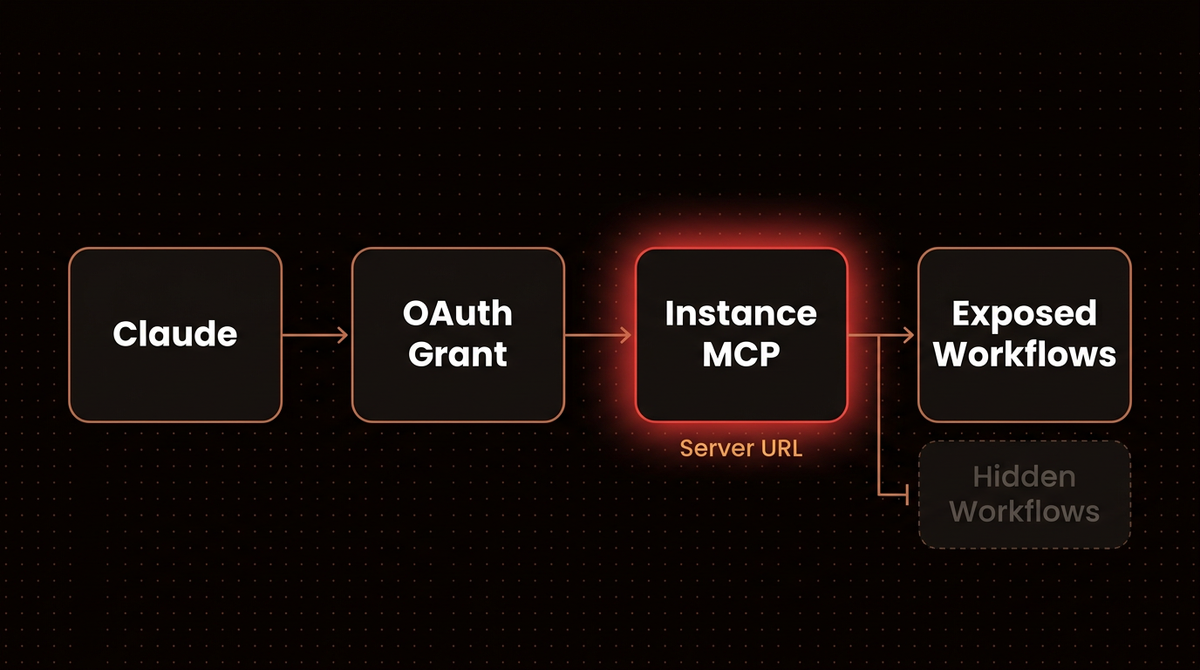
I don't approve the connection as the instance owner. Whatever you connect acts as the n8n user who approved it, and the API key n8n generates is a personal access token tied to that user. The search_workflows tool can return previews of every workflow that user can view, exposed or not. And the set of exposed workflows is shared: connect Claude Desktop today and ChatGPT next month, and both see every workflow you've enabled.
You get two levers against that. The first is the user. Visibility stays user scoped, so a separate member account that can only reach the right workflows becomes the real boundary, the least privilege idea applied to n8n. How you give that account its workflows depends on your edition:
- Paid plans with sharing or projects: share the chosen workflows and credentials with the member account, or put them in a project it belongs to.
- Free self hosted community edition: sharing and projects aren't included, and only the owner and the creator can access a workflow or credential. So sign in as the member account and create or import the workflows there, and add its own copies of the credentials they need. That means a second copy of those secrets, so give it only the ones Claude's workflows use. If the member can't flip Available in MCP on its workflows, the owner can do it from Workflows exposed.
The second lever is the grant itself. Each OAuth client only gets the permissions you approve when it connects, for example reading workflows without running them. For a first connection I'd approve the narrowest grant that covers what you want to try, and widen it later.
Note: Only an owner or admin can switch the feature on in Step 2. Do that as the owner, then sign in as the member account for the client approval in Step 5.
Step 2: Enable the n8n MCP server and lock the callback URLs
- Open Settings. Go to Settings > Instance-level MCP.
- Turn it on. Select Enable MCP access. The page now shows three sections: Connection details, Access and Connected clients.
- Restrict OAuth redirects. In Access, open Allowed callback URLs, choose Only trusted URLs, and list only the callback URLs of clients you actually connect. By default n8n accepts any callback URL, which its own docs describe as less secure.
- Leave auto expose off. Auto-expose new workflows is rolling out gradually from n8n 2.36.0, so you may not see it yet. It's off by default. Keep it that way, or every workflow anyone creates later becomes reachable by every connected client.
When it worked, Connection details shows the MCP status as enabled and a Connect button. On a self hosted instance you can later remove the whole feature with N8N_DISABLED_MODULES=mcp, which deletes the endpoints and the UI.
Step 3: Expose one workflow and describe it well
n8n only lets you enable MCP access for published workflows that start with a webhook, form, schedule or chat trigger. A workflow with only a manual trigger won't appear in the list, and it's the first thing I check when Claude says it can't see a workflow.
- Open the workflow. Click the Workflow menu (
...) in the top right. - Toggle it. Select Settings and switch on Available in MCP.
- Write the description. From the same menu choose Edit description.
n8n added descriptions to help MCP clients identify workflows, so write one like a function docstring, not a label. "Creates a HubSpot contact from name, email and company. Input: webhook POST body with those three fields. Side effect: writes to the live CRM." tells Claude far more than "HubSpot sync". Name any side effect you can't undo, so it's in front of the model before it calls the workflow.
You can check what's live on Access > Workflows exposed, which lists every enabled workflow and lets you revoke access per row.
Step 4: Copy the right server URL
In Connection details, select Connect. The Connect a client dialog opens on the OAuth (recommended) tab. Pick your client from the Your client dropdown: Claude Code sits under CLI, Claude.ai under Web. For Claude.ai the dialog also offers One-click setup. The manual route below also works in Claude Desktop.
Copy the Server URL. It ends in /mcp-server/http, so it looks like:
https://your-instance.app.n8n.cloud/mcp-server/httpn8n's client examples warn about this specifically: it isn't the address of your n8n editor, so don't copy what's in your browser's address bar. For a local install, the prefix is http:// instead of https://.
Step 5: Connect Claude
Claude.ai and Claude Desktop
- Open connectors. Go to Customize > Connectors, click +, then Add custom connector.
- Paste the Server URL from Step 4 and name it something like n8n MCP.
- Click Add. Claude sends you to n8n to approve. Sign in as the member account from Step 1 and approve.
Claude Code
One command, taken from n8n's client examples:
claude mcp add --transport http n8n https://your-n8n-domain/mcp-server/httpThen run /mcp inside Claude Code, select n8n, and finish the OAuth sign in in your browser.
If you must use an API key
Some headless setups can't do an OAuth redirect. Switch the dialog to the API key tab, copy the token (n8n shows it once, then only a redacted value), and pass it as a header:
claude mcp add --transport http n8n-mcp https://your-n8n-domain/mcp-server/http \
  --header "Authorization: Bearer YOUR_N8N_MCP_TOKEN"
I prefer OAuth for one practical reason: OAuth clients show up in Connected clients with their granted permissions and a Revoke access button. API key clients don't appear there at all, and rotating the key revokes the old one for every client that used it. A leaked token is harder to contain, and my notes on what stolen AI API keys get used for cover why.
What you should see: Connected clients in n8n counts one client, and the n8n tools appear under the connector in Claude.
Step 6: Run a staged first session
Separate tools for reading, testing and running let you climb to a live run one rung at a time.
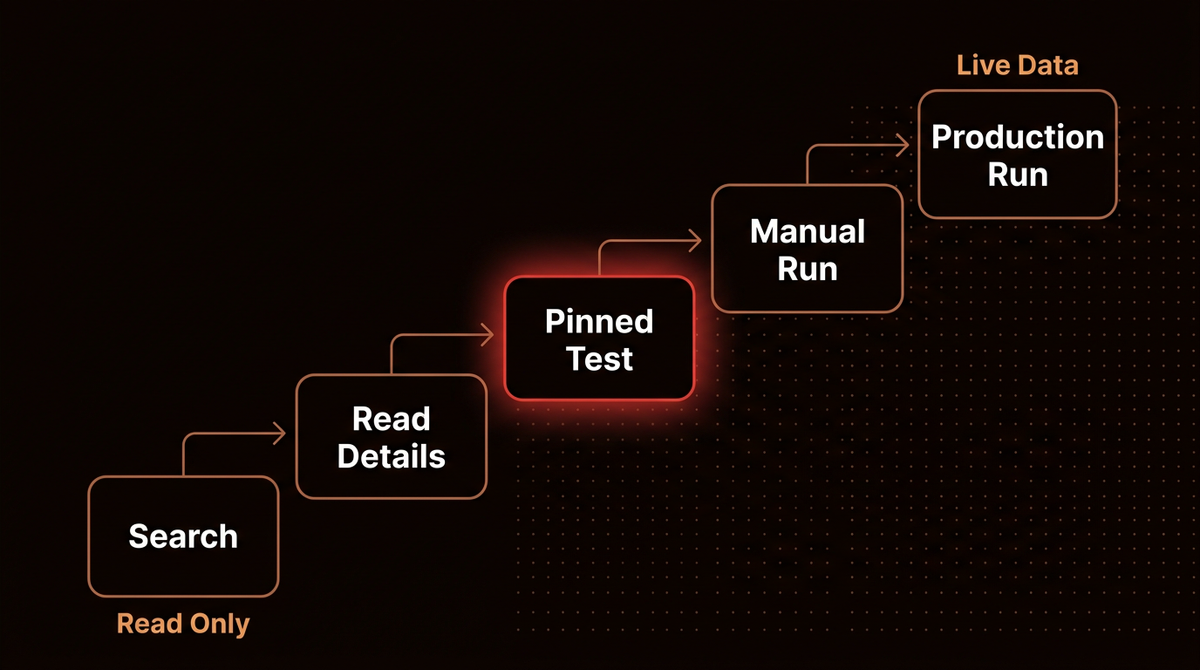
- Search. Ask: "List the n8n workflows you can see and tell me which ones you can run." Claude calls
search_workflows. If it lists workflows you didn't expose, that's the preview behavior from Step 1, and a sign the approving user can see too much. - Read details. Ask it to open your exposed workflow and describe its trigger and nodes. This uses
get_workflow_detailsand confirms Claude reads the same thing you see on the canvas. - Pinned test. Ask: "Prepare pin data for this workflow, fill it with realistic sample values for name, email and company, then test it." Claude first calls
prepare_workflow_pin_data, which returns the expected data shape for every node that needs simulated output. Thentest_workflowruns with trigger nodes, nodes with credentials and HTTP Request nodes pinned to that sample data, while Set, If and Code nodes run for real. It waits for the result and times out after 300 seconds unless Claude passes a largertimeout, up to 3,600. - Manual run. Ask for an execution in manual mode with a body such as
{"name": "Ada Test", "email": "ada@example.com", "company": "Test Co"}. That runs the current, unpublished version against real services. Because webhook, form and chat triggers need input,execute_workflowneeds the trigger's name too; ask Claude to read it from the workflow details first. - Production run. Only now ask for production mode, which runs the published version.
Warning: the pinned test is not a full sandbox. n8n's tool reference says credential free I/O nodes such as Execute Command and file read or write nodes still execute during a test. If your workflow has one, a "test" can still change something on the host.
Before a live run, know that execute_workflow returns an execution ID immediately, so ask Claude to check get_workflow_execution before it reports success. And the mode matters: the docs describe production as the published version, so a fix you made on the canvas but didn't publish won't be in a production run.
Step 7: Let Claude build and edit workflows
From n8n 2.13.0 the same connection can create and edit workflows. The server exposes a small build pipeline, and I ask Claude to follow it in order:
- Look up nodes with
search_nodesandget_node_typesinstead of guessing parameter names. - Validate first.
validate_workflowchecks the workflow SDK code for errors, and n8n's reference says to always run it before creating or updating. - Create with
create_workflow_from_code, into a specific project and folder if you use them. - Edit with
update_workflow, which applies a batch of 1 to 100 targeted operations atomically: if one fails, nothing is saved. - Review the change with
get_workflow_versions_diffbefore you publish anything.
n8n's docs suggest a coding agent such as Claude Code over a chat client for building, and recommend its official skills repository: 13 capability skills plus hooks that load node specific guidance before the agent makes high impact MCP calls. Separately, ask Claude to call list_credentials to reference existing credentials by ID. That tool never returns secret values, so Claude wires up your Slack or HubSpot credential without ever seeing it.
Publishing stays a human decision in my setups. A publish_workflow tool exists, but a person should read the canvas before anything goes live, the same human in the loop rule I use for agentic email that never sends on its own.
Step 8: Review access every month
Once a month, open Settings > Instance-level MCP and check three things: Connected clients (revoke any OAuth client nobody uses; revocation disconnects it at once), Workflows exposed (remove anything that shouldn't be callable anymore), and whether an API key is still in use anywhere. If it isn't, rotate it so the old value dies.
Troubleshooting
"You do not have sufficient permissions to authorize this request"
This page appears during OAuth approval when MCP access is off for the instance. The wording doesn't say so, but n8n's docs state there's no other cause. Have an owner or admin enable it in Step 2, then reconnect.
Claude connects but can't see or run your workflow
Check that the workflow is published, starts with a webhook, form, schedule or chat trigger, and has Available in MCP switched on. Then check the approving user can open it. Visibility is per user.
Connection fails or falls back behind a proxy
If n8n sits behind a reverse proxy, load balancer or web application firewall that allowlists headers, add MCP-Protocol-Version, Mcp-Method and Mcp-Name. Otherwise clients may fail to connect or drop to an older protocol version.
claude.ai asks you to sign in to an MCP Server Trigger with no auth
This one is for the trigger node route, not the instance server. The n8n docs note claude.ai asks for an n8n sign in even when the node's authentication is set to None, and it's the only client known to do this. Set Bearer auth on the node and use that.
Costs, scale, and when to skip this
Cost at scale. The MCP server itself has no separate price. What you pay for is executions: on n8n's pricing page Starter is $20 a month billed annually for 2,500 executions, Pro is $50 for 10,000, and the self hosted community edition has unlimited executions. If Claude runs tests and manual runs during every build conversation, a busy Starter plan can hit its cap faster than your production traffic alone would suggest. Watch the execution count for the first month.
When not to use this. Claude only acts while you're in a conversation with it. It won't react to a new lead at 3 a.m. Your n8n triggers still do that. Use it to operate and build, and keep scheduled or event driven work in n8n, including any AI agent workflows running inside n8n. And if you need different clients to see different workflows, the instance server can't do it today. Build separate MCP Server Trigger workflows instead.
If you'd rather have a setup like this designed, scoped and monitored for you, that's the kind of AI agent work I do.
Frequently asked questions
Does the n8n MCP server work with the free Claude plan?
Yes. Anthropic lists custom connectors on the Free plan, but Free accounts can add only one custom connector. If n8n is the only remote MCP server you use, that's enough. If you already use another custom connector, you'll need to remove it or move to a paid plan such as Pro before adding n8n.
Is the n8n MCP server available on self hosted n8n?
Yes. Instance level MCP works on both n8n Cloud and self hosted instances, and self hosted owners can also manage its settings through environment variables or remove it entirely with N8N_DISABLED_MODULES=mcp. For cloud based clients such as claude.ai, the instance must be reachable from the public internet.
Can Claude see all my n8n workflows?
It can see previews of every workflow the approving user can view through the search tool, but it can only read full details, run or edit workflows you've enabled for MCP. Exposure isn't per client, so every connected client sees the same enabled set. Approving as a limited member account, and granting each OAuth client only the permissions it needs, are the two ways to shrink that.
What is the difference between the n8n MCP server and the MCP Server Trigger node?
The instance MCP server is one endpoint for the whole instance that exposes the workflows you enable and adds building tools. The MCP Server Trigger node lives inside one workflow and exposes only the tools you attach to it, with its own Bearer or header authentication. Use the trigger node when you want a narrow, hand designed tool set.
Can Claude publish n8n workflows by itself?
The server includes publish and unpublish tools, so a connected client with the right permissions can. Whether it should is your call. I keep publishing manual and let Claude validate, create, edit and test, then review the version diff before a person publishes. Revoking the client in Connected clients removes its access immediately.
Sources
- Connect to n8n MCP server, n8n Docs, accessed 26 September 2026.
- MCP client connection examples, n8n Docs, accessed 26 September 2026.
- MCP server tools reference, n8n Docs, accessed 26 September 2026.
- MCP Server Trigger, n8n Docs, accessed 26 September 2026.
- Compare editions, n8n Docs, accessed 26 September 2026.
- n8n releases, GitHub, 25 September 2026.
- n8n Plans and Pricing, n8n, accessed 26 September 2026.
- Get started with custom connectors using remote MCP, Claude Help Center, accessed 26 September 2026.
- n8n-io/skills, GitHub, accessed 26 September 2026.
- n8n-mcp, GitHub, accessed 26 September 2026.
Related Posts
Zapier Agents vs n8n AI Agents: What 40+ Deployments Taught Me About the Real Choice
ComparisonAI AgentsZapier Agents
n8n vs Zapier in 2026: After 126 Production Systems, Here Is My Honest Verdict
ComparisonTrends & Insightsn8n
How to Automate Workflow for Small Business Owners: What Actually Works in 2026
How toImplementationWorkflow Automation

Jahanzaib Ahmed
AI Systems Engineer & Founder
AI Systems Engineer with 126 production systems shipped. I run AgenticMode AI (AI agents, RAG systems, voice AI) and ECOM PANDA (ecommerce agency). I build AI that works in the real world for businesses across home services, healthcare, ecommerce, SaaS, and real estate.