How to Choose an AI Agent Platform for Automating Merchant Tasks
A buyer's guide for Shopify merchants: which tasks to automate, which type of AI agent platform fits each, what they cost in October 2026, and how to start small.


Table of Contents
Choose an AI agent platform for automating merchant tasks by task, not by brand. For most Shopify stores that means Shopify's Sidekick for admin work, a support agent such as Gorgias, Zendesk, Tidio Lyro or Intercom Fin for customer messages, a workflow builder such as n8n or Make for anything that crosses systems, and a custom agent only when your rules are unusual. Prices below come from vendor pages, checked on October 17, 2026, and the guide ends with a 30 day pilot.
It is written for store owners who have more tickets, spreadsheets and reports than hours. I will not rank the tools. Each bills a different unit (an outcome, a resolution, a conversation, an execution, a credit), and that decides which is cheap for you.
Step 1: List the merchant tasks and score the risk of each
Write down every repeated task, then mark how often it happens and what a wrong action costs. A wrong product description costs a rewrite. A wrong refund costs money you cannot always get back. That cost decides how much freedom an agent gets, so fill it in before you look at any vendor.
Here is how I would score seven common tasks. The last column is my judgment, not a vendor claim.
| Task | What the agent does | Cost of a wrong action | Where it usually fits |
|---|---|---|---|
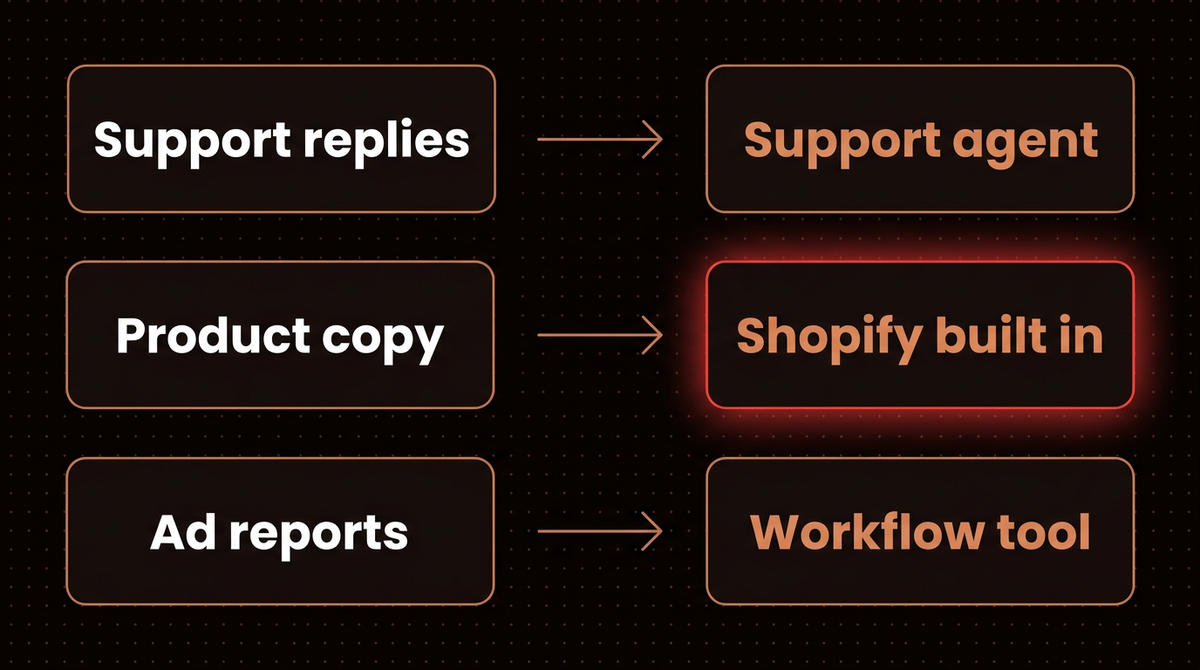
| Support replies | Answers questions from your policies | Medium, a wrong promise can bind you | Support agent |
| Order status and returns | Looks up an order, starts a return | Low to look up, high to refund | Support agent with order access |
| Product data and descriptions | Drafts titles, copy, attributes | Low, you review before publish | Shopify built in, or a workflow |
| Inventory alerts | Watches stock, pings a person | Low, it only sends a message | Workflow builder |
| Abandoned cart and flows | Triggers recovery messages | Medium, customers see every message | Shopify built in, or your email tool |
| Reviews | Drafts replies, flags unhappy ones | Medium, replies are public | Workflow with human approval |
| Ad reporting | Pulls numbers, writes a summary | Low, read only | Workflow builder |
My post on ecommerce AI use cases covers which of these pay back and which I would skip.
Step 2: Pick the AI agent platform type for each merchant task
Built in tools from Shopify
Shopify's help center describes Sidekick as an AI assistant inside the admin that handles tasks such as analyzing data, managing orders or editing products, and writes blog posts and product descriptions. The line that matters for risk: it presents changes for your review before applying them.
On the Shopify pricing page, Sidekick appears in the plan feature lists, with plans at $25, $65 and $399 a month on monthly billing ($19, $49 and $299 paid yearly). I found no separate Sidekick fee there. Shopify Flow is a free app on the Basic, Grow, Advanced and Plus plans, and the Send HTTP Request action needs Grow or higher, which matters if you want it to call an outside service. In the legacy abandoned checkout experience, Shopify can email a recovery link automatically, for the Online Store and Buy Button channels only. The page points to a newer automation in the Shopify Messaging app.
Shopify's developer tools, such as the AI Toolkit for coding agents and the agentic commerce tooling built on the Universal Commerce Protocol (UCP), are for building agents or letting shoppers' agents buy from your store. They do not run your back office, so skip them unless you have a developer.
Warning: If a tutorial points your agent at the old Storefront MCP catalog and cart tools, they no longer work. Shopify's migration page says those tools on /api/mcp were removed in favor of UCP at /api/ucp/mcp. The policy and FAQ search tool and the Customer Accounts MCP server are listed as unchanged.
Support agents
If customer messages are your biggest time sink, buy a support agent that sits on a helpdesk, because it already holds your tickets, macros and handoff rules. I compare these in depth in my post on the best AI chatbot software for customer service and in AI chatbot pricing. This table is the October 2026 price check.
| Platform | What it bills | Price on its page | Note |
|---|---|---|---|
| Gorgias | Automated interaction, each also counts as a ticket | With AI Agent: Starter $40, Basic $90 ($77 annual), Pro $550 ($471 annual) a month | Starter includes 50 tickets and 30 automated interactions, Pro 2,000 and 190; treat both as ceilings |
| Zendesk | Automated resolution, no human escalation | $1.50 committed or $2.00 pay as you go per resolution | Suite Team is $55 per agent a month paid yearly, $69 monthly |
| Tidio Lyro | Lyro conversation, any chat with at least one AI reply | Lyro from $32.50 a month for 50 conversations, annual billing | Platform Starter $24.17, Growth from $49.17 a month, annual billing |
| Intercom Fin | Outcome, once per conversation | $0.99 per outcome | Seats $19, $85 or $132 a month billed annually; Fin alone has no seats |
Intercom counts an outcome when a customer confirms the issue is resolved, or does not ask for more help after Fin responds, or Fin completes a workflow, as its outcomes help article explains. Fin can bill you for a conversation where the customer simply stopped replying. For Fin on its own, the pricing page says a minimum monthly commitment applies, for example 50 outcomes, and the Fin help center describes a $49 a month base plan that includes 50 resolutions. Zendesk's resolution excludes escalations to a human. Tidio's Lyro conversation is any chat where the AI replied once, resolved or not. Gorgias adds a second wrinkle: its billing docs say one ticket can count toward both helpdesk tickets and automated interactions when AI Agent resolves it alone, and its pricing data lists $1.50 per interaction above the allowance.
Gorgias lists Actions such as cancel, discount and apply in its comparison table, and Intercom says Fin takes action on external systems. Those actions move money, so Step 5 covers them.
Workflow builders
Inventory alerts, ad reports, review triage and product data jobs do not need a conversation. They need a trigger, a few steps and a message to a person. That is a workflow builder. n8n has a Shopify node that can create, update, delete and get orders and products. I compare the two main tools in Make.com vs n8n for AI agents.
| Platform | What it bills | Price on its page | Note |
|---|---|---|---|
| n8n | One execution per full workflow run, any number of steps | Starter 20 euros for 2.5K executions, Pro 50 euros for 10K, billed annually | Business is 667 euros for 40K, self hosted only; Community Edition is self hosted from GitHub |
| Make | One credit per module action, most actions | At 10,000 credits a month: Core $9, Pro $16, Teams $29 | Free plan has 1,000 credits; I could not confirm whether the page default was annual billing |
n8n showed euros to my location, so you may see dollars. The unit difference is the real story. Say an order status workflow runs 3,000 times a month with six steps. n8n counts 3,000 executions, which is over the Starter limit of 2,500 and fits Pro. Make counts a credit per module action, so the same runs use about 18,000 credits, 8,000 over the 10,000 credit tier priced above. Step counts move your bill on Make and not on n8n, and I would size one real workflow before trusting either headline price. Do this sum for your own volumes before you pick.
A custom agent
Build custom only when your rules do not fit a vendor's, such as returns that differ by product line, a carrier you must call directly, or one agent spanning support, scheduling and reporting. My Fig and Bloom case study describes that route. The page says the first build was a Slack based AI agent in about three months, connected to Shopify, Deputy, shipping carrier APIs and support channels, and that it expanded to 12 systems over more than three years. It is a long partnership, so I would not start there. My AI agent development and custom workflow automation pages describe how I scope that work.
A decision rule
These if/then rules are my judgment, not vendor guidance.
- If the task is a conversation with a customer and you already run a helpdesk, then add that helpdesk's agent first. If you have no helpdesk, price one of the four in the table above.
- If the task has no conversation (alerts, reports, data cleanup), then try Shopify Flow first, and move to n8n or Make when it needs a second system.
- If the task edits your store (copy, product fields), then use Sidekick, because it shows changes for your review.
- If you run a one person store, then start with Sidekick and Flow, where I found no extra fee, and add a support agent once tickets outgrow your time.
- If your rules fit none of these, such as returns that differ by product line, then consider a custom build.
Step 3: Price each option on your own volume
Start with your own ticket export or the helpdesk's count for last month. Tag each conversation by type, then multiply each type by the share you would trust an agent to finish without a person. As an illustration, say 500 tickets split into 160 order status, 100 returns, 80 product questions and 160 other. If the agent finishes 75 percent of order status, 40 percent of returns and 50 percent of product questions, and none of the rest, that is 120 plus 40 plus 40, or 200 resolved conversations. The pilot in Step 6 replaces these guesses. The table below prices that 200 in each vendor's own unit.
| Setup | Unit price | 200 resolved a month | Caveat |
|---|---|---|---|
| Intercom Fin on your own helpdesk | $49 base with 50 outcomes, then $0.99 | $197.50 | No seat fee |
| Intercom Fin plus Essential, 2 seats | $0.99 plus $19 per seat | $236.00 | Annual seat price; a base plan may apply |
| Zendesk AI agents, committed | $1.50 per resolution | $300.00 | List price, about $15 less with 2 Suite Team agents |
| Zendesk AI agents, pay as you go | $2.00 per resolution | $400.00 | List price, 10 included resolutions come off with 2 Suite Team agents |
| Zendesk Suite Team, 2 agents, committed | $55 per agent plus $1.50 after 10 included | $395.00 | Annual billing, 10 resolutions included |
| Gorgias Pro, annual billing | $300 helpdesk plus 190 interactions at $0.90, then $1.50 | $486.00 | Includes the helpdesk, 10 interactions over allowance |
I left Tidio out because its Lyro unit is a conversation, not a resolution, so cost depends on how many chats the AI touched. Gorgias includes the helpdesk, Fin on its own does not, and Suite Team includes 5 resolutions per agent a month, so 2 agents take about $15 off the Zendesk rows. The same 200 conversations land far apart once the unit changes. My AI agent cost calculator can take your volumes, and the chatbot pricing guide has the surrounding costs.
Step 4: Ask each vendor what the agent can read and change
A demo that answers a FAQ proves little. Put these questions to every vendor, and to yourself if you are building.
- Which Shopify permissions does it request? Read access to orders is a different ask from the ability to refund. Shopify's refundCreate mutation lists an orders access scope as required, so ask whether the app wants read access or the right to change orders, and refuse more than the task needs.
- Where do policy answers come from? You want one maintained source, such as your help center.
- What happens at handoff? A human should see the conversation, the order and what the agent already said.
- Can I see every action? You need a log of what it looked up and changed.
- Can I switch one action off? Turning off refunds while keeping lookups should take one setting.
- What do I take with me if I leave? Ask about export of conversations, knowledge content and automation logic.
Step 5: Cap refunds and discounts, and fix the policy source
Two failure types matter. The first is a hallucination that invents a policy. In 2024 a Canadian tribunal ordered Air Canada to pay a customer after its chatbot gave wrong bereavement fare information. The tribunal said the chatbot is part of the airline's website and the airline is responsible for it, and the award was C$650.88 plus interest and fees, as The Guardian reported. A customer will hold your store to what its agent told them.
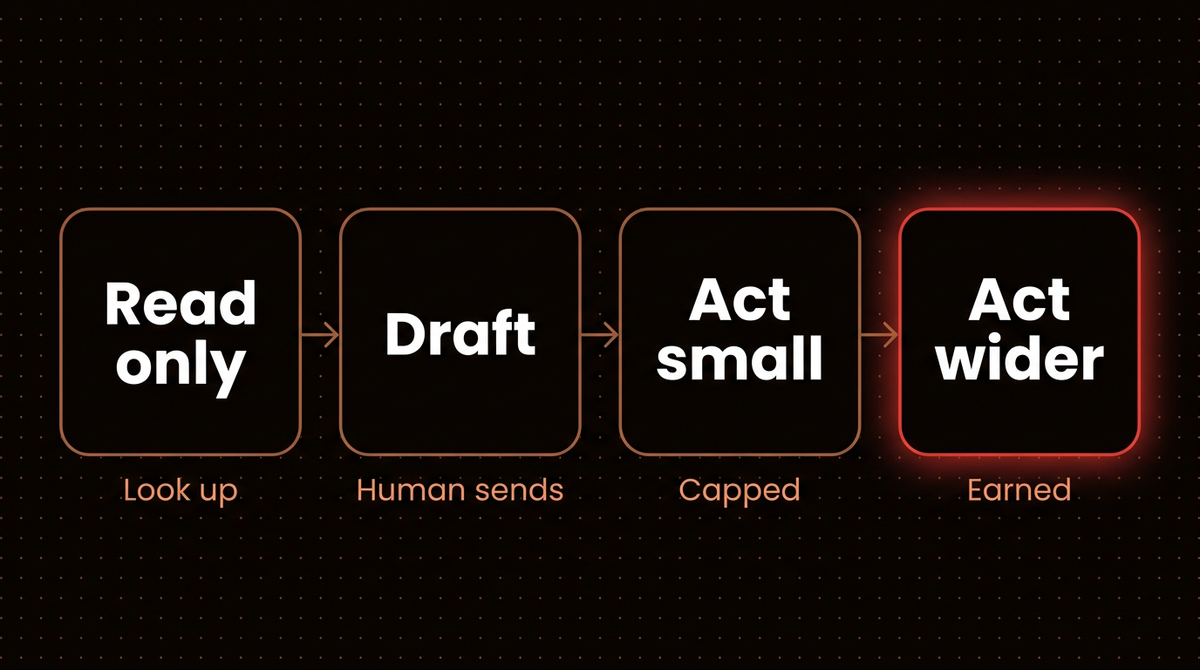
The second is authority. An agent that can issue refunds or discount codes can be talked into it. I would use the ladder in the diagram, and these are my rules of thumb, not vendor settings:
- Start read only. Order lookups and policy answers first.
- Then drafts. The agent writes, a person sends. My post on agentic email without letting it send shows the same pattern.
- Then small actions with a cap, such as a refund under a fixed amount or one pre made discount code, with everything above it routed to a person.
- Widen the cap only after the logs show the agent was right, and keep a human in the loop for the rest.
Never let an agent invent discount codes. Give it a short list of approved codes and a rule for when each applies. When you set guardrails in a support agent, write the exceptions down too, such as final sale items and gift orders.
Step 6: Start with one task and a 30 day pilot
Pick one task from Step 1 that is high volume and low risk, usually order status or ad reporting. Then run it in four stages.
- Week 1, shadow. The agent drafts or computes; nothing goes out. A person compares its output with what they would have sent.
- Week 2, review. A person approves each draft. Tally how often they edit it and why.
- Week 3, narrow send. Let the agent send only for one clean category, such as shipping status for orders with tracking. Everything else still goes to a person.
- Week 4, decide. Compare cost with the bill you built in Step 3, and look at the wrong or awkward answers one by one, not as an average.
My go signal: wrong answers are rare, harmless and explainable. If one invented a policy or a discount, I would stop and fix the source material before widening anything.
When it goes wrong
- The agent states a policy you do not have. Remove or fix the source document, then add the exception as an explicit rule. Check any answer it gave in the meantime.
- The bill is higher than the table. Check the unit. Fin charges for conversations that end without a complaint, Lyro for any chat it answered, and Gorgias counts interactions as tickets too.
- A workflow stops mid month. Make's pricing FAQ says scenarios stop once credits run out and incoming webhooks queue until credits return. On n8n, check executions against the plan limit.
- An MCP or API example from a tutorial fails. Check whether it targets the removed Storefront MCP catalog and cart tools, and read Shopify's UCP migration page.
Going further
In my judgment, if you handle under about 50 tickets a month, a good macro library may beat any agent. That is not a vendor rule, though Gorgias Starter includes 50 tickets and Fin's base plan includes 50 resolutions. Once volume grows, mix the layers: a support agent for conversations, n8n or Make for alerts and reports, Sidekick for admin chores.
If you would rather have this scoped and built for you, see how I scope that work.
Frequently asked questions
What is the best AI agent platform for a Shopify store?
There is no single best one. Use Sidekick for admin work inside Shopify, a support agent such as Gorgias, Zendesk, Tidio Lyro or Intercom Fin for customer messages, and n8n or Make for alerts, reports and cross system jobs. Choose by task, then compare each vendor's billing unit against your own monthly volume.
How much does an AI support agent cost per month?
It depends on the unit. As of October 2026, Intercom Fin is $0.99 per outcome, Zendesk is $1.50 or $2.00 per automated resolution, and Gorgias bills per automated interaction. For 200 resolved conversations, my calculation gives roughly $198 to $486 a month depending on setup and what the helpdesk includes.
Can an AI agent process refunds safely?
Only with limits. Let it look up orders and draft refund decisions first. Then allow small refunds under a fixed cap and route everything above it to a person. Check what level of order access the agent asks for, and refuse any permission the task does not need.
Do I need n8n or Make if I already have a support agent?
Often yes. Support agents work on conversations, while stock alerts, ad reports and review triage need triggers and scheduled steps. n8n bills per full run and Make per module action, so size the workflow first.
Is Shopify Sidekick enough on its own?
For admin tasks such as analyzing data, editing products and drafting descriptions, it may be. It does not replace a helpdesk for customer conversations or schedule cross system alerts. Shopify says it shows changes for your review before applying them, which suits first tests.
How do I stop an AI agent from inventing store policies?
Give it one maintained policy source, write exceptions as explicit rules, and review a sample of answers weekly. Keep refunds and discounts behind a cap with human approval above it, because the Air Canada ruling shows a business can be held to what its chatbot says.
Published
October 16, 2026
Category
Industry Guides
Jahanzaib Ahmed
AI Systems Engineer & Founder
AI Systems Engineer with 126 production systems shipped. I run AgenticMode AI (AI agents, RAG systems, voice AI) and ECOM PANDA (ecommerce agency). I build AI that works in the real world for businesses across home services, healthcare, ecommerce, SaaS, and real estate.
Want this built for your business? See AI Agent Development, or browse the free tools and guides.
Related articles
Zapier Agents vs n8n AI Agents: What 40+ Deployments Taught Me About the Real Choice
Both Zapier and n8n shipped major AI updates in 2026. I've deployed both across 40+ client projects. Here is my honest comparison of cost, reliability, and AI agent capability.
ComparisonAI AgentsZapier Agents
n8n 2.0 AI Agents: The Workflow Architecture I Use Across Every Client Deployment
How I build n8n AI agent workflows for clients on n8n 2.42: the AI Agent node, memory, tool nodes, a multi agent orchestrator example, and cost control.
GuideImplementationn8n
How to Build AI Invoice Processing in n8n That Catches Bad Totals
A step by step n8n build that reads invoice PDFs from Gmail with Claude Haiku 4.5, checks the arithmetic in code, skips duplicates, and sends anything that doesn't add up to a review tab.
How toIndustry Guidesn8n