How to Build AI Invoice Processing in n8n That Catches Bad Totals
A step by step n8n build that reads invoice PDFs from Gmail with Claude Haiku 4.5, checks the arithmetic in code, skips duplicates, and sends anything that doesn't add up to a review tab.

Table of Contents
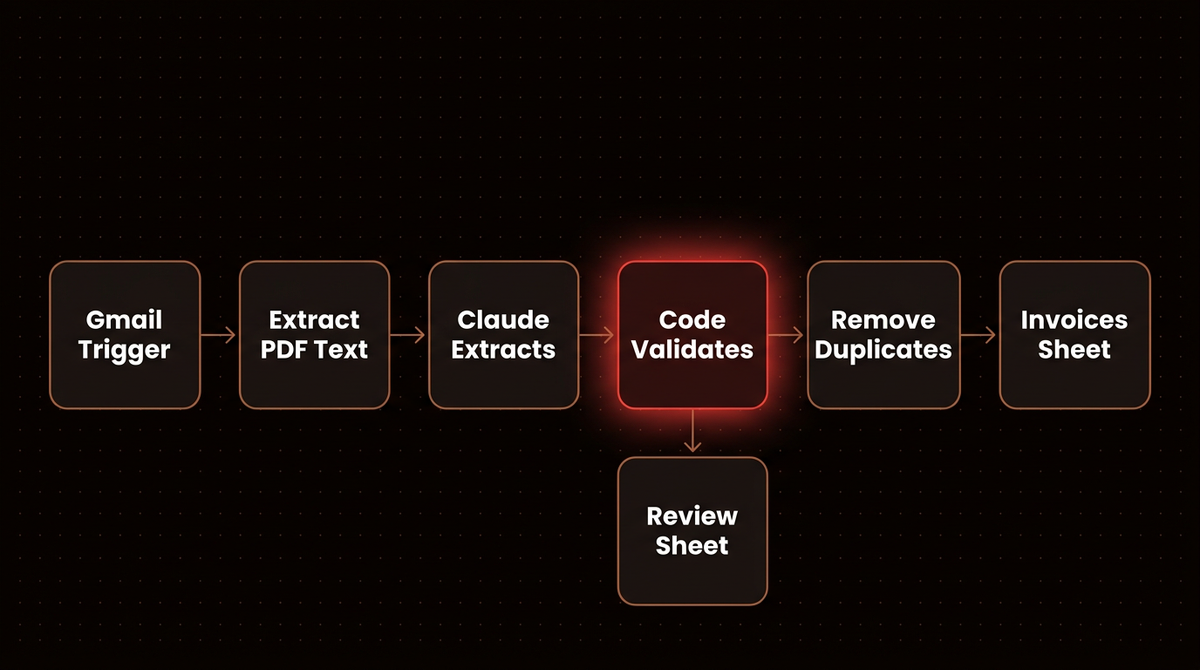
I let a model read invoices. I don't let it decide whether $1,240.00 plus $99.20 tax equals $1,339.20. This guide builds AI invoice processing in n8n on that rule: invoice PDFs arrive in Gmail, Claude Haiku 4.5 pulls out the vendor, dates, line items and totals, a short Code node checks the arithmetic, and each invoice becomes a row in Google Sheets or lands in a review tab with the reason it failed. Plan on an hour or two to build it. By my math below, the model costs roughly half a cent per two page invoice.
If you type invoices into a spreadsheet today, this removes that job without handing your bookkeeping to a model.
Before you start
- n8n, either n8n Cloud or self hosted. The Starter plan is 20 euros a month billed annually and includes 2,500 workflow executions, which is plenty for a few hundred invoices a month.
- An Anthropic API key with a spend limit on it. If you don't have one yet, follow my guide on getting a Claude API key and capping what it can spend. On n8n Cloud you can also run Anthropic nodes on n8n's own Gateway credits instead of your own key.
- A Google account with Gmail and Google Sheets, connected to n8n through a Google credential.
- Five real invoice PDFs from different vendors, plus one you deliberately break. You'll need them in Step 7.
- No coding background. You'll paste two short Code node snippets, and I explain what each line does.
Step 1: Set up the sheet and the Gmail label
Create a Google Sheet called Invoices with two tabs. The first tab, Invoices, gets this header row, spelled exactly like this because n8n will match columns by name:
invoice_key | vendor_name | invoice_number | invoice_date | due_date | currency | subtotal | tax | total | line_item_countThe second tab, Review, gets a shorter header row:
invoice_key | file_name | vendor_name | invoice_number | total | problemsThen, in Gmail, create a label called invoices and a filter that applies it to mail from your vendors, or to anything sent to a dedicated address like bills@yourdomain. A label is a better gate than a keyword search on the subject line. Vendors write "Your statement", "Payment due" and "Rechnung" in subjects, and you don't want a marketing email with "invoice" in it reaching the model.
It worked if a test email with a PDF attached shows up in Gmail under the invoices label.
Step 2: Trigger on invoice emails and keep only the PDFs
Add a Gmail Trigger node. Set Poll Times to every 15 minutes, and under Filters set Search to:
label:invoices has:attachment filename:pdfAlso set Read Status to Unread and read emails. The default is unread only, so any invoice someone opens before the next poll would be skipped without a trace. If an email is ever picked up twice, the dedupe in Step 6 catches it.
Turn Simplify off. While it's on, the attachment options are hidden: in the Gmail Trigger source code, the whole Options collection is hidden when Simplify is on, and that's where Download Attachments lives. Turn it on. Files arrive as binary fields named attachment_0, attachment_1 and so on. The Gmail Trigger docs also note that Max Emails per Poll defaults to 10 with a ceiling of 50, and the rest queue for the next poll.
Don't assume attachment_0 is the invoice. Plenty of vendors put a logo image in their signature, and some attach two invoices to one email. Add a Code node named Pick PDFs, leave it on Run Once for All Items, and paste this:
// One output item per PDF, with the file moved to the "data" field
const out = [];
for (const item of $input.all()) {
  const files = item.binary ?? {};
  for (const file of Object.values(files)) {
    if (file.mimeType === 'application/pdf') {
      out.push({ json: { file_name: file.fileName }, binary: { data: file } });
    }
  }
}
return out;
Every PDF becomes its own item, so an email with three invoices produces three rows later, and the signature images simply drop out.
It worked if clicking Execute step on Pick PDFs shows one item per PDF, each with a data binary you can open.
Step 3: Pull the text out of each PDF
Add an Extract From File node, set the operation to Extract From PDF, and leave Input Binary Field on its default, data. That default is why Pick PDFs renamed the field. The Extract From File node also takes a Password option for encrypted PDFs and keeps Join Pages on by default, which is what you want here.
An invoice exported from accounting software carries a real text layer, and sending the model plain text costs far less than sending page images.
A scanned invoice has no text layer, so the output is empty. Add an If node right after it with the condition {{ ($json.text ?? '').trim().length }} is greater than 50. Send the false branch to a Google Sheets node that appends to the Review tab with Mapping Column Mode set to Map Each Column Manually, map file_name to {{ $json.file_name }} (Extract From File keeps the input JSON by default, so the name from Pick PDFs is still there), and type no text layer, probably a scan into problems. Leave the other columns empty. The cost section below covers a scan route.
It worked if the output shows a text field containing the vendor name and the totals you can see on the PDF.
Step 4: Have Claude fill a strict schema
Add an Information Extractor node to the true branch. Set Text to {{ $json.text }}, which is exactly the pattern the Information Extractor docs give for input coming from Extract from PDF. Attach an Anthropic Chat Model sub node, pick Claude Haiku 4.5, and under options set Sampling Temperature to 0 so the same invoice gives the same output on every run.
Set Schema Type to Define using JSON Schema and paste:
{
  "type": "object",
  "properties": {
    "vendor_name":    { "type": ["string", "null"] },
    "invoice_number": { "type": ["string", "null"] },
    "invoice_date":   { "type": ["string", "null"], "description": "YYYY-MM-DD" },
    "due_date":       { "type": ["string", "null"], "description": "YYYY-MM-DD" },
    "currency":       { "type": ["string", "null"], "description": "ISO code, e.g. USD" },
    "subtotal":       { "type": ["number", "null"] },
    "tax":            { "type": ["number", "null"] },
    "total":          { "type": ["number", "null"] },
    "line_items": {
      "type": "array",
      "items": {
        "type": "object",
        "properties": {
          "description": { "type": "string" },
          "quantity":    { "type": ["number", "null"] },
          "unit_price":  { "type": ["number", "null"] },
          "amount":      { "type": ["number", "null"] }
        },
        "required": ["description", "amount"]
      }
    }
  },
  "required": ["vendor_name", "invoice_number", "invoice_date", "due_date",
               "currency", "subtotal", "tax", "total", "line_items"]
}
Why JSON Schema and not Generate From JSON Example? The example route treats every field as mandatory and can't express "null when the invoice doesn't say". Many invoices have no due date, and I want a visible null there.
Then open Options, add System Prompt Template, and replace the default. The node's source ships a default that tells the model it "may omit the attribute's value" when unsure. For bookkeeping that's backwards. A missing value should be loud, so use this instead:
You extract data from supplier invoices. Copy values exactly as printed.
Return null for any field the invoice does not state. Never estimate,
calculate or infer a value. Convert dates to YYYY-MM-DD. Write numbers
without currency symbols or thousands separators. If a line shows tax
per line, put the pre tax amount in "amount".
"Never calculate" matters most. If the model is allowed to fill a missing subtotal by adding the lines, your arithmetic check in the next step would be checking the model against itself. An invented subtotal is the expensive kind of hallucination here.
It worked if the node output shows an output object with your fields filled. The extractor puts everything under $json.output, which the next step relies on.
Step 5: Check the arithmetic in code
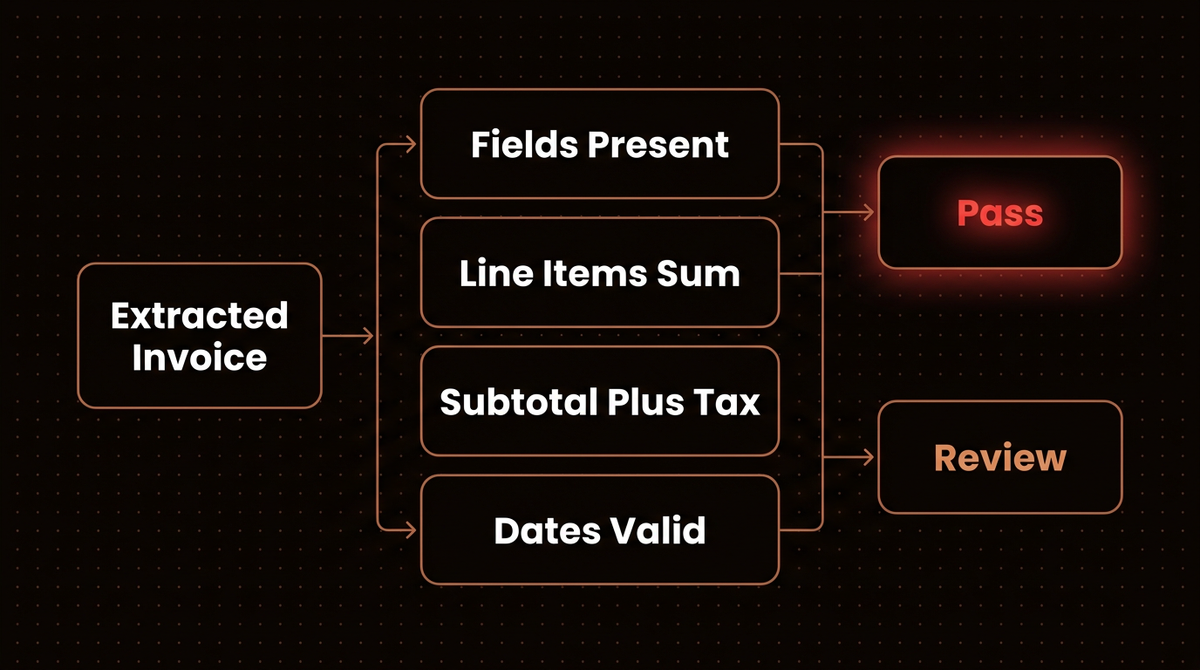
Add a Code node named Validate and switch it to Run Once for Each Item, one of the two modes described in the Code node docs. Paste:
const inv = $input.item.json.output ?? {};
const problems = [];
const cents = (n) => Math.round(Number(n ?? 0) * 100);

if (!$input.item.json.output) problems.push('extraction failed');
for (const f of ['vendor_name', 'invoice_number', 'invoice_date', 'currency', 'total']) {
  if (inv[f] == null || inv[f] === '') problems.push(`missing ${f}`);
}

const lines = Array.isArray(inv.line_items) ? inv.line_items : [];
if (lines.length && inv.subtotal != null) {
  const sum = lines.reduce((s, li) => s + cents(li.amount), 0);
  // allow one cent of rounding per line
  if (Math.abs(sum - cents(inv.subtotal)) > Math.max(1, lines.length)) {
    problems.push(`lines add to ${sum / 100}, subtotal says ${inv.subtotal}`);
  }
}

if (inv.subtotal != null && inv.total != null) {
  const expected = cents(inv.subtotal) + cents(inv.tax);
  if (Math.abs(expected - cents(inv.total)) > 1) {
    problems.push(`subtotal plus tax is ${expected / 100}, total says ${inv.total}`);
  }
}

const issued = Date.parse(inv.invoice_date);
const due = inv.due_date ? Date.parse(inv.due_date) : null;
if (Number.isNaN(issued)) problems.push('invoice_date is not a date');
if (issued > Date.now() + 86400000) problems.push('invoice_date is in the future');
if (due !== null && Number.isNaN(due)) problems.push('due_date is not a date');
if (due !== null && due < issued) problems.push('due_date is before invoice_date');

const norm = (s) => String(s ?? '').toLowerCase().replace(/[^a-z0-9]/g, '');
return {
  json: {
    invoice_key: `${norm(inv.vendor_name)}|${norm(inv.invoice_number)}`,
    vendor_name: inv.vendor_name,
    invoice_number: inv.invoice_number,
    invoice_date: inv.invoice_date,
    due_date: inv.due_date,
    currency: inv.currency,
    subtotal: inv.subtotal,
    tax: inv.tax,
    total: inv.total,
    line_item_count: lines.length,
    valid: problems.length === 0,
    problems: problems.join('; '),
  },
};
Everything runs in whole cents, because floating point sums like 0.1 plus 0.2 don't come out exact, and a check that fails on rounding gets ignored within a week. The line tolerance grows with the number of lines since some vendors round each line separately. The invoice_key squashes "ACME Ltd." and "Acme Ltd" into one vendor, and "INV-0042" and "inv 0042" into one number, so the duplicate check in the next step isn't fooled by formatting.
It worked if a correct invoice comes out with valid: true and an empty problems string.
Step 6: Route passes to the sheet and failures to review
Add an If node with the condition {{ $json.valid }} is true.
On the false branch, add a Google Sheets node with Append Row pointed at the Review tab. Set Mapping Column Mode to Map Each Column Manually. n8n lists your header columns, and you fill each with the matching field, for example {{ $json.problems }} for problems. Manual mapping keeps the extra fields, like valid and subtotal, out of a tab that has no column for them. This tab is your human in the loop: someone opens it once a day, fixes the row and moves it over.
On the true branch, add two Remove Duplicates nodes in a row before the sheet. The Remove Duplicates docs explain why two: the cross run check only compares against earlier executions, so two copies arriving in the same poll would both get through.
- First node: operation Remove Items Repeated Within Current Input, Compare set to Selected Fields, and the field
invoice_key. - Second node: operation Remove Items Processed in Previous Executions, Keep Items Where set to Value Is New, and Value to Dedupe On set to
{{ $json.invoice_key }}. It remembers 10,000 values by default.
Then append to the Invoices tab with Map Each Column Manually, mapping each of the ten columns to the field with the same name.
Warning: Put the dedupe on the passing branch only. If it sits before validation, an invoice that fails gets its key remembered, and when the vendor sends a corrected copy with the same invoice number, n8n drops it without a trace. Even in the right place, a vendor who reissues an already logged invoice under the same number will be dropped, so treat a "revised invoice" email as a manual job.
It worked if the same invoice sent in two separate emails produces one row in the Invoices tab.
Step 7: Test with real invoices, including a broken one
- Point the trigger at a test label. Change the search to
label:invoices-test has:attachment filename:pdfso real vendor mail stays out of your test. - Activate the workflow and send yourself the five sample invoices in separate emails, each with the test label applied. A polling trigger is easiest to test live, since every email then goes through exactly as it will in production.
- Make a broken copy. Open one invoice's source (a Google Doc or Word file works), change the total by $10 without touching the lines, export it to PDF and send it.
- Read each run in the Executions list, and compare every sheet row against its PDF by eye.
- Clear the test history. Deactivate the workflow, switch the second Remove Duplicates node's operation to Clear Deduplication History, click Execute step on it once, then switch it back and check that Value to Dedupe On still reads
{{ $json.invoice_key }}. Executing that step also runs the nodes above it, so expect one email to go through Claude again. A separate node won't do it, because each node keeps its own history by default.
You're looking for three things. All five good invoices land in Invoices with correct numbers. The broken one lands in Review with "subtotal plus tax is ..., total says ..." in the problems column. And no row has a value you can't find printed on its PDF. If the third one fails, tighten the system prompt before anything else.
Step 8: Switch to live mail and watch the first week
Set the search back to label:invoices and reactivate. For the first week, check the Review tab every day and keep a tally of why rows land there. Ten rows of "missing due_date" from one vendor means they never print one, so relax that rule for them. Rows where the lines don't add up usually mean tax inclusive line prices, which is a prompt fix. My rule: don't widen a tolerance until the same failure shows up on three invoices. One odd invoice is a reason to look.
Troubleshooting
The trigger fires but there is no binary data. Simplify is still on, or Download Attachments is off. With Simplify on, the attachment options aren't even shown.
Extract From File fails on some emails. Without the Pick PDFs step, attachment_0 is often a signature image. If the error mentions a password, the vendor sends encrypted PDFs: fill the node's Password option, or ask them to stop.
The Information Extractor throws a parse error. The node already asks the model to repair malformed output once before failing, so a persistent error usually means the text was garbage, such as a scan with a junk text layer. In the node's Settings tab, set On Error to Continue (using error output) and wire that extra output into the Validate node. Validate turns a missing output into an "extraction failed" problem and routes it to Review, so one bad file doesn't stop the whole run.
Every invoice from one vendor fails the line sum. Their line amounts include tax. Either add that vendor's pattern to the system prompt, or compare the line sum against the total instead of the subtotal for that vendor.
European number formats come through wrong. "1.234,56" can be read as 1.234. The prompt says no thousands separators, which fixes most cases, and the total check catches the rest because the arithmetic stops matching.
A big backlog hits API errors. The Information Extractor sends items in batches of 5 by default, and its batching option can add a delay between batches. Turn that delay up before you point the workflow at months of old invoices.
What AI invoice processing costs per invoice
Claude Haiku 4.5 is priced on the Anthropic pricing page at $1 per million input tokens and $5 per million output tokens. My working assumptions for a text layer invoice are about 1,000 tokens of text per page, about 700 tokens of instructions and schema, and about 400 tokens of JSON coming back. That's an estimate, so check it against the usage figures in your Anthropic Console after the first week.
| Invoices per month | Model cost (two page text PDFs) | If 5% need a second, repair call at the same cost |
|---|---|---|
| 100 | $0.47 | $0.49 |
| 500 | $2.35 | $2.47 |
| 2,000 | $9.40 | $9.87 |
The n8n plan is the bigger line item. On Starter, 2,500 executions at 20 euros works out to under a cent each.
Scanned invoices. The Anthropic app node has an Analyze Document operation that sends the PDF itself, and Claude reads each page as an image plus text. Anthropic's PDF support docs put the text alone at 1,500 to 3,000 tokens per page with image tokens on top, so keep scans on their own branch and feed the result into the same Validate node. This walkthrough tests a vision model on messy receipts inside n8n:

Posting to accounting software. Once the Invoices tab has been clean for a month, swap the sheet for the QuickBooks Online or Xero node and create draft bills. A draft keeps a person between the model and a payment.
| Approach | Best for | Watch out for |
|---|---|---|
| This build: n8n, text extraction, Claude Haiku 4.5, code checks | Digital PDFs, under a few thousand a month, one person reviewing | Scans need the separate branch |
| Anthropic Analyze Document for every invoice | Mostly scanned or photographed invoices | Several times the token cost per page |
| A dedicated accounts payable platform | Purchase order matching, approval chains, audit trails | Monthly subscription that a small volume may not justify |
When not to build this. If you need three way matching against purchase orders and goods receipts, multi step approvals by amount, or an audit trail your accountant signs off on, buy a dedicated platform. Vendors like Nanonets argue that LLMs lack validation rules. That's true of a bare model call, and it's exactly the gap Step 5 closes. It doesn't give you approval chains, though. For a business with a few hundred invoices and one person who used to type them, this workflow is the right size. The same pattern of a model drafting and code checking runs through my guide to setting up agentic email without letting it send, and how to use AI to automate a small business covers where else it pays off.
If you're new to AI nodes in n8n, my n8n AI agent workflow architecture explains the patterns this build uses. And if you'd rather have this built and monitored for you, that's what I do: see how I build AI agents.
Frequently asked questions
What is AI invoice processing?
AI invoice processing means using a language model to read invoices and pull out structured data like the vendor, invoice number, dates, line items and totals, so nobody types them in. A reliable setup pairs the model with rule checks and a review queue. The model reads the layout, and fixed code decides whether the numbers add up before anything reaches your books.
How accurate is a language model at reading invoices?
It depends on the documents more than the model. Clean PDFs from accounting software extract well, and scans, photos and unusual layouts do worse. Even Nanonets, which sells this, says human review is typically needed for 5 to 15% of invoices. That's why this build checks the arithmetic in code and routes failures to a review tab instead of trusting every extraction.
Will this work on scanned or photographed invoices?
Not on the main branch. A scan has no text layer, so text extraction returns nothing and the invoice goes to review. To handle scans automatically, add a branch with the Anthropic node's Analyze Document operation, which sends the PDF itself, and pass its output through the same Validate node. Expect several times the token cost per page.
Can this post invoices straight to QuickBooks or Xero?
Yes. n8n has QuickBooks Online and Xero nodes, so you can replace the Google Sheets step once the review tab has been quiet for a few weeks. Create draft bills rather than approved ones, so a person still signs off before money moves.
Published
October 1, 2026
Category
Industry Guides
Jahanzaib Ahmed
AI Systems Engineer & Founder
AI Systems Engineer with 126 production systems shipped. I run AgenticMode AI (AI agents, RAG systems, voice AI) and ECOM PANDA (ecommerce agency). I build AI that works in the real world for businesses across home services, healthcare, ecommerce, SaaS, and real estate.
Related articles

How to Connect Claude to n8n's MCP Server Without Exposing Every Workflow
Connect Claude to your n8n instance through n8n's own MCP server, then scope what it can see, test workflows with pinned data before any live run, and let it build workflows you still publish yourself.
How toAI Agentsn8n
How to Automate Workflow for Small Business Owners: What Actually Works in 2026
A plain-English guide to workflow automation for small business owners. Learn what to automate first, which tools to use, and how to get ROI without hiring a developer.
How toImplementationWorkflow Automation
How to Automate My Business (Without Breaking Everything)
A non-technical guide for small business owners who want to automate their operations. Learn what to automate first, how it works in practice, what it costs, and when NOT to bother.
How toIndustry GuidesBusiness Automation