How to Add a Custom MCP Connector to Claude
Add a remote MCP server to Claude as a custom connector, choose the right sign in option, and fix the Couldn't reach the MCP server error with a two minute check first.

Table of Contents
When Claude says "Couldn't reach the MCP server", the usual reason is that no request ever left Anthropic's cloud, so your server logs show nothing. This guide adds a two minute check you run before touching Claude's settings, then walks through adding a custom MCP connector: paste a remote server URL, pick how people sign in, and switch it on in a chat. It works on every plan, Free included (one connector), and takes about five minutes once the server is reachable.
Before you start
- A Claude account on any plan. Free allows one custom connector, according to Anthropic's connector docs.
- The HTTPS URL of a remote MCP server, for example
https://mcp.example.com/mcp. If the server only runs on your laptop, this guide is the wrong route; the Claude Code setup with claude mcp add handles local servers. - Node 18 or newer for the check script in Step 2 (it uses the built in
fetchand top levelawait). If you would rather use curl, the equivalent iscurl -iwith a POST of the same JSON body, plusdig A your-hostfor the DNS part. - On Team or Enterprise, an Owner has to add the connector first (Step 4 covers it).
Step 1: Know where Claude connects from
Start here, because the rest depends on it. When you add a custom connector, the call comes from Anthropic's servers and never from your laptop. Per Anthropic's help center, the connection comes from Anthropic's cloud infrastructure, and that holds for claude.ai, Claude Desktop, Cowork and the mobile apps alike.
So a server that works in Claude Code or in your browser can still fail here. A server behind a VPN, on a private network, or behind a firewall that blocks Anthropic's address range will not connect. Once you know the path, the error messages read differently.
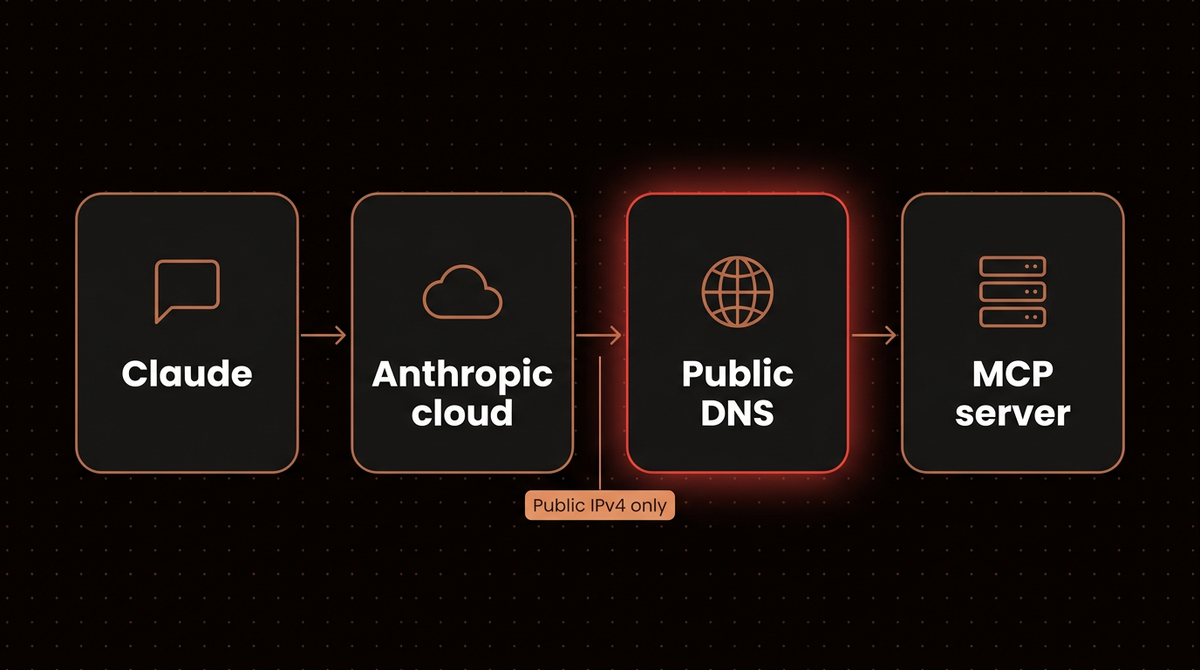
Note: Anthropic's troubleshooting page says Claude resolves your hostname first and rejects the connection if any returned address is private, loopback, carrier grade NAT, or missing a public A record. Connectors are IPv4 only, so an AAAA only hostname fails.
Step 2: Run a two minute check on your server
Save this as preflight.mjs. It does what Claude will do in its first seconds: resolve the hostname, then send an MCP initialize request without following redirects. The protocol version is a date string for the MCP revision, and it reads only the first chunk of the reply so a streaming server cannot hang it.
import dns from 'node:dns/promises'
const url = new URL(process.argv[2])
const out = {}
try { out.A = await dns.resolve4(url.hostname) } catch (e) { out.A = 'none: ' + e.code }
try { out.AAAA = await dns.resolve6(url.hostname) } catch (e) { out.AAAA = 'none' }
try {
  const r = await fetch(url, {
    method: 'POST', redirect: 'manual', signal: AbortSignal.timeout(10000),
    headers: { 'content-type': 'application/json', accept: 'application/json, text/event-stream' },
    body: JSON.stringify({ jsonrpc: '2.0', id: 1, method: 'initialize', params: {
      protocolVersion: '2025-06-18', capabilities: {}, clientInfo: { name: 'preflight', version: '0.1' } } }),
  })
  out.status = r.status
  out.location = r.headers.get('location')
  out.wwwAuth = r.headers.get('www-authenticate')
  const reader = r.body.getReader()
  const first = await reader.read()
  out.bodyHead = new TextDecoder().decode(first.value || new Uint8Array()).slice(0, 200)
  await reader.cancel()
} catch (e) {
  out.error = String(e.cause?.code || e.name + ': ' + e.message)
}
console.log(JSON.stringify(out, null, 2))
Run node preflight.mjs https://your-server.example.com/mcp from a network that is not your office (a phone hotspot works), because Claude sees your server from the outside. An A record is just the DNS entry that maps a hostname to an IPv4 address; AAAA is the IPv6 version. I ran the script against two public servers on 2026-10-18 to show what the two healthy outcomes look like.
| Server | Status | What it tells you |
|---|---|---|
mcp.deepwiki.com/mcp | 200, text/event-stream | Open server. The body starts with a JSON result naming the server "DeepWiki". Pick No sign in. |
mcp.linear.app/mcp | 401 with a WWW-Authenticate header | OAuth server. The header points to /.well-known/oauth-protected-resource/mcp and asks for scope "read write". Pick a sign in option. |
A 401 is not a failure here: Anthropic's authentication docs say Claude needs that 401 to start sign in, and it ignores a WWW-Authenticate header sent on a 200.
Now read your own output against this list:
Ais "none" or private: fix DNS before anything else. Nothing else matters until a public IPv4 record exists.locationis set to another host: register the URL in thelocationheader. Claude drops theAuthorizationheader on a cross host redirect, so an apex to www redirect turns a working OAuth server into an authorization failure.- On a 403 or 429, a firewall (WAF) or CDN is blocking requests. Allowlist Anthropic's published IP range.
- A 200 with an HTML body means you reached a web page. Check the path (
/mcpversus/sseor the root).
Step 3: Add the connector on a Free, Pro or Max plan
On an individual plan, Anthropic's help article gives these steps. Labels shift a little between accounts, so match by meaning.
- Open Customize, then Connectors. Click + Add, then Add custom connector.
- Name it and paste the URL. The name is what you see in the connectors list. Paste the exact URL your check passed, then click Continue.
- Review the authentication settings Claude detected. A second screen shows Authentication, OAuth client and, if available, Request headers. Compare them with your Step 2 result and change anything that does not match, then click Continue.
- Click Add. If the server uses OAuth, a sign in window opens. Approve the scopes.
One account layout shows only a name, a URL and an Advanced settings link on a single screen. In that layout the OAuth client ID and secret go under Advanced settings, per the Claude docs.
Step 4: Choose how people sign in to your Claude MCP connector
Pick this wrong and either sign in fails or the connector is open to anyone with the URL. The same docs describe three Authentication choices and, for OAuth, three OAuth client choices.
| Your Step 2 result | Authentication | OAuth client |
|---|---|---|
| 200, no auth at all | No sign in | Not shown |
| 200, but some tools need an account | Sign in when needed | Use Claude's published identity |
401 with WWW-Authenticate | Sign in now | Use Claude's published identity, or Register automatically if the server rejects that |
| Server gave you a client ID and secret | Sign in now | Use your own OAuth client |
| Server wants an API key or bearer token | No sign in, plus a request header (a beta feature that may be missing on your account) | Not shown |
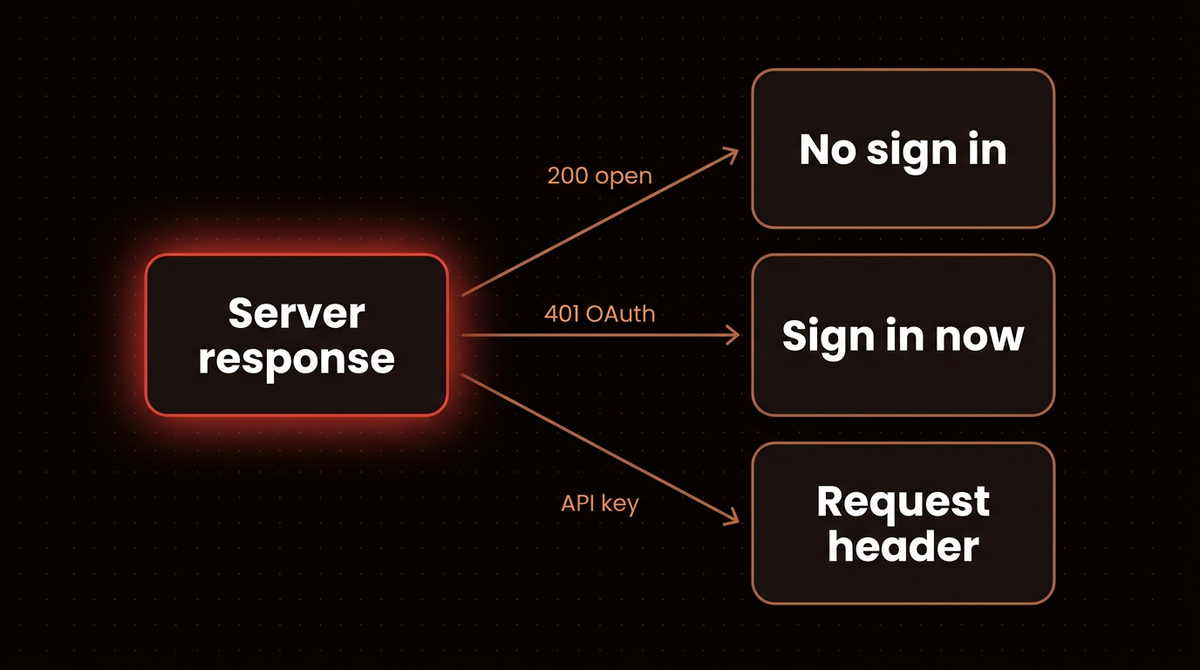
The published identity option is the one Anthropic recommends: the server reads Claude's client details from a metadata document Anthropic hosts, so you set nothing up, but the server must support that method. Register automatically uses Dynamic Client Registration and works with most servers.
Warning: No sign in means anyone holding the URL can use the connector. With an API key in a request header, Anthropic notes that on Team and Enterprise plans everyone using the connector reaches the service with that same credential. My advice, not Anthropic's: use a key scoped to read only access and rotate it if the URL ever leaks.
Team and Enterprise: an Owner goes to Organization settings, then Connectors, clicks Add, hovers Custom and picks Web. The settings screens match Step 3. Members then find the connector marked "Custom" and click Connect to sign in with their own account.
Step 5: Turn it on and test it with a harmless prompt
Adding a connector does not enable it everywhere. In a chat, click + at the lower left, open Connectors, and flip the toggle for this one. Use the Search and tools menu to switch off tools you do not want in play.
Then ask for something read only and verifiable, such as "List the tools the connector gives you and what each one does." If Claude names tools that match your server's docs, the handshake worked. Run read only requests first and allow anything that writes only after you have seen what the tools do.
Read each approval prompt. Anthropic's guidance is to click Allow always only for a server and tool you trust to run unsupervised, and the same page warns that a malicious server can embed hidden instructions meant to push Claude into unintended actions. For the security side of handing Claude tools, see the Playwright MCP setup and connecting Claude to n8n's MCP server.
Troubleshooting
Anthropic's troubleshooting page splits failures into three messages. Each failed attempt also shows a reference ID starting with ofid_ in the error and the page URL. Copy it right after a failure if you plan to file a report.
"Couldn't reach the MCP server"
This is not always a network failure. If your server's access logs show no request at all, suspect the private address rejection from Step 1, because Claude rejects those before any HTTP request leaves Anthropic's network. Rerun the check and look at the A line. The classic version is a hostname that resolves to a public address on the internet and a private one inside your network (split horizon DNS): it works from your desk and fails from Claude.
"Authorization with the MCP server failed"
Work through these in order, all from Anthropic's page:
- A redirect to a different host, as in Step 2.
- No way to find the authorization server: if the 401 has no
resource_metadatapointer, Claude looks at the/.well-known/paths on your origin, and a 404 there stops it. With a path like/mcp, the path is appended:/.well-known/oauth-protected-resource/mcp. - Claude sends a PKCE challenge with S256 on every authorization request, so a server without S256 support fails at the token endpoint.
- An audience or issuer mismatch between your tokens and your metadata.
- Slow endpoints: Claude gives discovery, registration and token endpoints 10 seconds to respond.
If the flow worked once and then broke, disconnect and reconnect the connector under Customize, then Connectors, to force a fresh OAuth flow.
"Unexpected error while invoking tool"
The connection works and one tool call returned an error. Reproduce the same call directly against your server and read its logs.
Still stuck after the checklist? Report it on the anthropics/claude-ai-mcp tracker with the ofid_ ID, your server URL and your access logs.
Going further
There are other routes. For a server on your own machine, Claude Desktop accepts a desktop extension, and Claude Code adds servers from the command line. For a server inside a private network, Anthropic documents MCP tunnels as a separate route. If you want to build the server rather than connect one, start with how I build MCP servers that run in production, and for agent frameworks see using MCP servers in LangGraph.
When this is the wrong tool: anything where one shared credential would let every member of a team touch data they should not. Fix the credential scoping first. If you would rather hand the build and monitoring to someone, the agents page shows what I build.
Frequently asked questions
Can I add a custom connector on the free Claude plan?
Yes, but only one. Anthropic's connector docs say custom connectors are added to your own account and the Free plan allows a single one. Pro, Max, Team and Enterprise plans are not limited that way in the docs I read, though plan rules change, so check your own Customize page.
Why does my MCP server work in Claude Code but not on claude.ai?
Claude Code connects from your machine, while claude.ai connects from Anthropic's cloud. A server on localhost, a private IP, a VPN, or a hostname that resolves differently inside your network fails from the cloud. Run the Step 2 check from outside your network to see what Claude sees.
How do I connect a server that uses an API key instead of OAuth?
Choose No sign in, then add the key under Request headers, for example an Authorization header with a bearer token. Anthropic marks static credentials as a beta feature, so the option may not appear for every account. Use a key limited to the access you want Claude to have.
What does the ofid_ number in the error mean?
It is a reference ID Anthropic uses to trace a failed connection or sign in. It appears in the error message and the page URL. Copy it right after the failure and include it when you report the problem.
Do I need to know OAuth to add a connector?
No. If the server supports it, leave the OAuth client on Claude's published identity and sign in when the window opens. You only need OAuth details when you run the server yourself or when it hands you a client ID and secret.
Published
October 18, 2026
Category
Implementation
Jahanzaib Ahmed
AI Systems Engineer & Founder
AI Systems Engineer with 126 production systems shipped. I run AgenticMode AI (AI agents, RAG systems, voice AI) and ECOM PANDA (ecommerce agency). I build AI that works in the real world for businesses across home services, healthcare, ecommerce, SaaS, and real estate.
Want this built for your business? See Workflow Automation, or browse the free tools and guides.
Related articles
How to Add MCP Servers to Claude Code With claude mcp add
Every way to run claude mcp add on the current Claude Code release: remote and local servers, JSON configs, scopes, sign in, and the real error text for the flag order mistakes that break most setups.
How toImplementationClaude Code
How to Connect Claude to n8n's MCP Server Without Exposing Every Workflow
Connect Claude to n8n's own MCP server, then scope what it can see, test workflows with pinned data before any live run, and add a narrow MCP Server Trigger endpoint, checked on n8n 2.42.5.
How toAI Agentsn8n
Claude Got Past a Fetch Tool's URL Limit With a Link Shortener
Anthropic's Oct 9 report says Claude models used link shorteners to beat a fetch tool's URL cap and submitted a form they were told to stop at. Here is where the check belongs.
NewsAI AgentsAnthropic