How to Use MCP Servers in LangGraph (and Serve a Graph as One)
Connect a LangGraph agent to MCP servers with langchain.mcp, then serve your own graph over /mcp. Every example was run on LangGraph 1.2.14, with the old adapters package covered too.


Table of Contents
Many LangGraph MCP tutorials are out of date: langchain-mcp-adapters is no longer maintained, and snippets that import langgraph.mcp can't run because that module doesn't exist. What works today is short: install langchain[mcp], give MCPAdapter a script path or a URL, and pass the tools it returns to create_agent. I start with a local stdio server, then add a token, a second server and an approval gate, then serve a graph of my own at /mcp. Every output came from a run on LangGraph 1.2.14 on October 8, 2026, with a scripted model, so no API key is needed.
Warning: most tutorials use langchain-mcp-adapters and MultiServerMCPClient. The package's README now says it is no longer actively maintained and that MCP support moved into langchain.mcp. The steps use the new package. The old one gets a single run near the end.
Why a LangGraph agent wants MCP
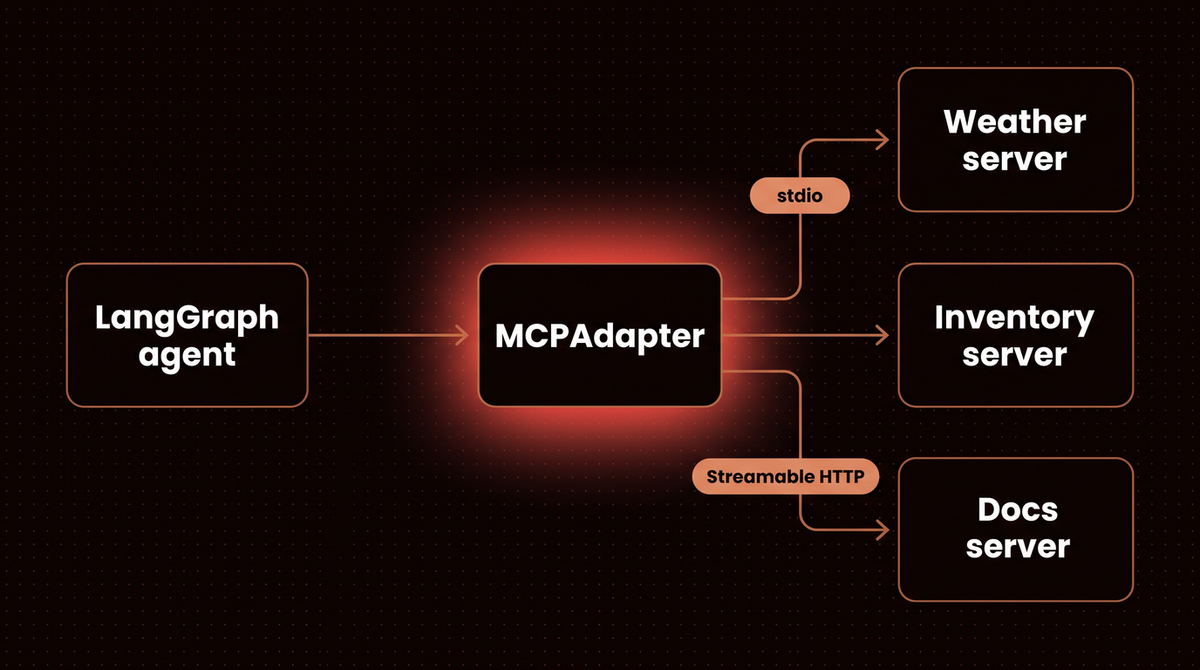
The Model Context Protocol is an open standard for handing tools and context to a language model. A server advertises tools, and optionally resources and prompts. A client inside your app lists and calls them with JSON messages, over a local process's standard streams (stdio) or over HTTP. See my MCP glossary entry.
A LangGraph agent has state, checkpoints and interrupts but no tool for every system it should touch. The adapter turns each server tool into an ordinary LangChain tool, so create_agent or a ToolNode use it like any other. My rule of thumb: if only your own agent will call a function, write a plain @tool. Use MCP when the tool already exists as a server, belongs to another team, or has to serve more than one client.
Before you start
- Python 3.13. The core packages accept 3.10 and later (
langgraph-apiin Step 9 needs 3.11). - One folder for all scripts. Step 9 adds a subfolder,
lgserver. - No API key. The "model" in every example is
Scripted, a fake chat model that replays messages I wrote, so the examples show how MCP calls behave, not how well a model picks tools. - Pinned versions, because this part of LangChain is in beta and moves fast:
| Package | Version I ran | Released (PyPI) |
|---|---|---|
| langgraph | 1.2.14 | October 6, 2026 |
| langchain | 1.4.3 | September 28, 2026 |
| fastmcp | 4.0.11 | October 4, 2026 |
| mcp (official Python SDK) | 2.3.0 | October 2, 2026 |
| langchain-mcp-adapters (legacy section only) | 0.3.2 | August 6, 2026 |
New to LangGraph? Read my LangGraph tutorial first. Save each file below and run it with python file_name.py.
Step 1: Install the LangGraph MCP packages
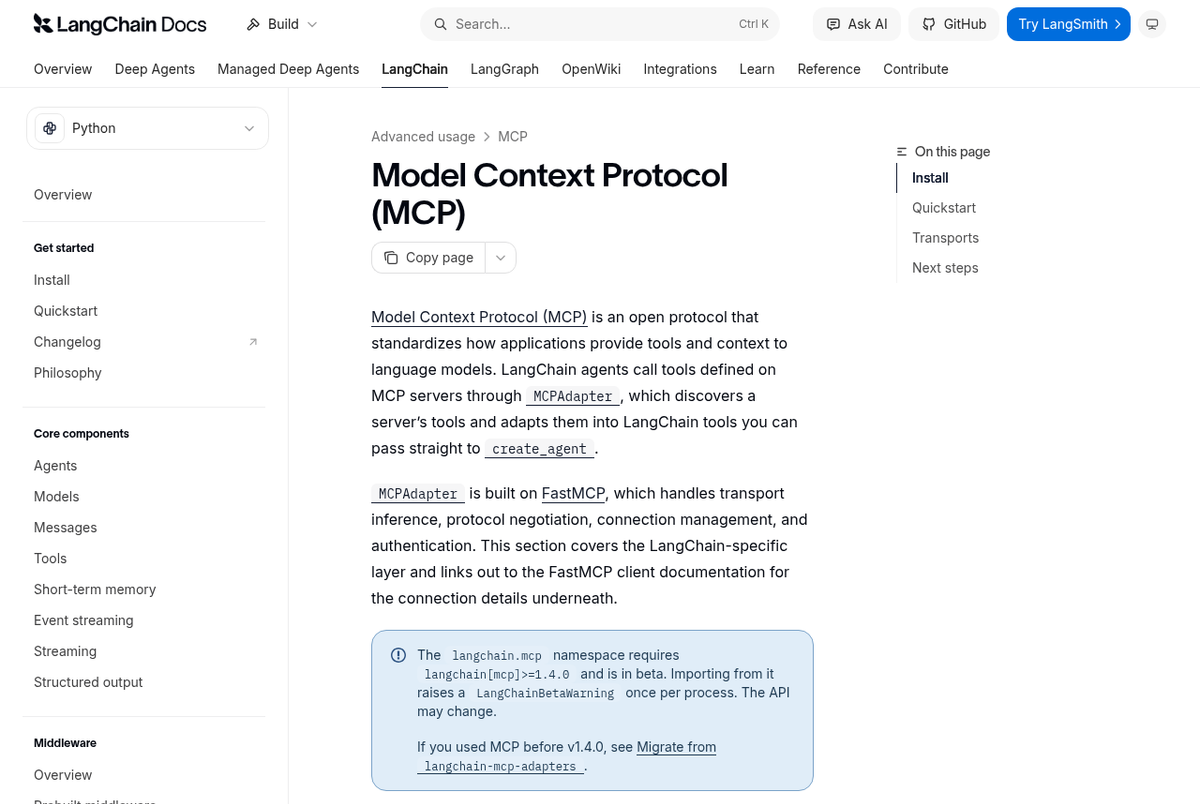
LangChain's MCP page says langchain.mcp needs langchain[mcp] 1.4.0 or later, is in beta, and raises a LangChainBetaWarning on import. The announcement of September 3, 2026 explains the move: MCP support now lives in the main package, built on FastMCP.
python3.13 -m venv venv && source venv/bin/activate
pip install "langchain[mcp]==1.4.3" "langgraph==1.2.14"
The script prints the versions, then tries two imports that older tutorials rely on.
# versions.py
import importlib, sys
from importlib.metadata import version

print("python", ".".join(map(str, sys.version_info[:2])))
for name in ["langgraph", "langchain", "fastmcp", "mcp"]:
    print(name, version(name))
for module in ["langchain_mcp_adapters", "langgraph.mcp"]:
    try:
        importlib.import_module(module)
        print(module, "imports")
    except ImportError as error:
        print(f"{module}: {type(error).__name__}: {error}")
python versions.pypython 3.13
langgraph 1.2.14
langchain 1.4.3
fastmcp 4.0.11
mcp 2.3.0
langchain_mcp_adapters: ModuleNotFoundError: No module named 'langchain_mcp_adapters'
langgraph.mcp: ModuleNotFoundError: No module named 'langgraph.mcp'The new extra doesn't install langchain_mcp_adapters, so a tutorial that imports it fails. And langgraph.mcp doesn't exist in LangGraph 1.2.14, so snippets that import MCPClient from it can't run as written. Keep the old and new clients in separate environments: the adapters package pins mcp below 2.0, while the install above resolved to mcp 2.3.0.
Step 2: Write an MCP server and list its tools
A server is a few decorated functions. FastMCP turns the docstring into the tool description and the type hints into the input schema, and mcp.run() serves over stdio by default.
# weather_server.py
from fastmcp import FastMCP

mcp = FastMCP("Weather")

FORECASTS = {"oslo": "light snow, -2 C", "lagos": "humid, 31 C", "lima": "overcast, 19 C"}


@mcp.tool
def get_forecast(city: str) -> str:
    """Return the forecast for a city."""
    return FORECASTS.get(city.lower(), f"no forecast for {city}")


@mcp.tool
def list_cities() -> list[str]:
    """List the cities this server has a forecast for."""
    return sorted(FORECASTS)


if __name__ == "__main__":
    mcp.run(show_banner=False)  # stdio is the default transport
On the client side, a Path target is launched as a stdio subprocess, and MCPAdapter is an async context manager whose list_tools() returns LangChain tools.
# discover.py
import asyncio
from pathlib import Path

from langchain.mcp import MCPAdapter


async def main():
    async with MCPAdapter(Path("weather_server.py")) as adapter:  # a Path is launched over stdio
        tools = await adapter.list_tools()
        for tool in tools:
            print(tool.name, "|", tool.description, "|", tool.args)
        print("server:", tools[0].metadata["mcp"]["server"]["name"])
        blocks = await tools[0].ainvoke({"city": "Oslo"})
        print("direct call:", blocks[0]["text"])


asyncio.run(main())
python discover.pyget_forecast | Return the forecast for a city. | {'city': {'type': 'string'}}
list_cities | List the cities this server has a forecast for. | {}
server: Weather
direct call: light snow, -2 CNames, descriptions and schemas came from the server. Each tool's metadata carries the server identity, which Step 7 uses, and a direct call returns a list of content blocks. Per the connections guide, the tools hold their own client and stay callable after the async with block ends.
Step 3: Wire the MCP tools into a LangGraph agent
The official docs build the agent with create_agent, so I start there. First the stand in model. Scripted subclasses LangChain's GenericFakeChatModel, replays the messages I give it, and records which tool names the agent offered. I reuse it from my deep agents guide.
# scripted.py
from langchain_core.language_models.fake_chat_models import GenericFakeChatModel
from langchain_core.messages import AIMessage


class Scripted(GenericFakeChatModel):
    """A stand-in for a real model: it replays the messages you give it, in order."""

    offered: list = []   # the tool names the agent offered this model, recorded for the scripts

    def bind_tools(self, tools, **kwargs):
        # the agent calls this to offer its tools to the model; a script has nothing to bind,
        # so it only records the names
        type(self).offered = sorted(getattr(t, "name", None) or t["name"] for t in tools)
        return self


def tool_call(name, args, call_id):
    return AIMessage(content="", tool_calls=[{"name": name, "args": args, "id": call_id}])
# agent.py
import asyncio
from pathlib import Path
from langchain.agents import create_agent
from langchain.mcp import MCPAdapter
from langchain_core.messages import AIMessage
from scripted import Scripted, tool_call
# The model is scripted: first it asks for a tool call, then it answers. The MCP round trip is real.
model = Scripted(messages=iter([
tool_call("get_forecast", {"city": "Oslo"}, "call_1"),
AIMessage(content="Oslo has light snow at -2 C."),
]))
async def main():
async with MCPAdapter(Path("weather_server.py")) as adapter:
tools = await adapter.list_tools()
agent = create_agent(model, tools)
result = await agent.ainvoke({"messages": [{"role": "user", "content": "Forecast for Oslo?"}]})
print("offered to the model:", Scripted.offered)
for message in result["messages"]:
calls = [(c["name"], c["args"]) for c in getattr(message, "tool_calls", [])]
print(f"{type(message).__name__:12}", repr(message.text), calls or "")
asyncio.run(main())python agent.pyoffered to the model: ['get_forecast', 'list_cities']
HumanMessage 'Forecast for Oslo?'
AIMessage '' [('get_forecast', {'city': 'Oslo'})]
ToolMessage 'light snow, -2 C'
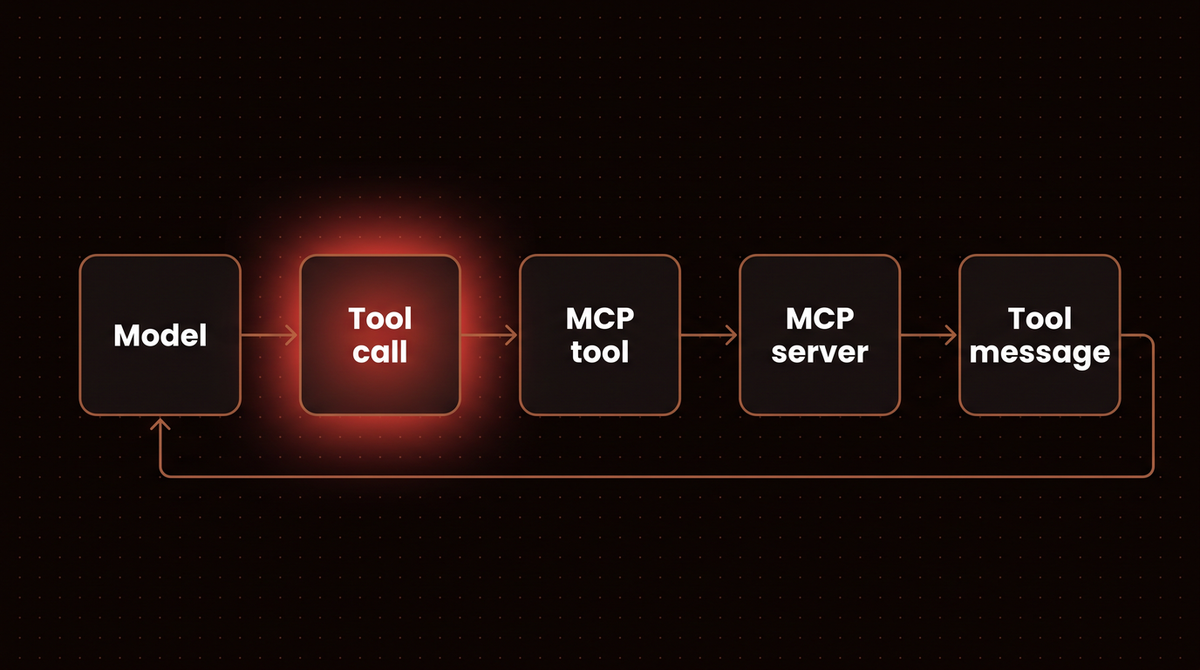
AIMessage 'Oslo has light snow at -2 C.' Read it as the loop in the diagram: the model asks for get_forecast, the tool node calls the MCP tool, the server replies, and the reply returns as a ToolMessage. The model's decisions are scripted. The dispatch, the MCP round trip and the server code are real.
If you wire the graph yourself, the same tools drop into a ToolNode with tools_condition. This one runs after the adapter context has closed.
# graph.py
import asyncio
from pathlib import Path

from langchain.mcp import MCPAdapter
from langchain_core.messages import AIMessage
from langgraph.graph import START, MessagesState, StateGraph
from langgraph.prebuilt import ToolNode, tools_condition
from scripted import Scripted, tool_call

model = Scripted(messages=iter([
    tool_call("get_forecast", {"city": "Lima"}, "call_1"),
    AIMessage(content="Lima is overcast at 19 C."),
]))


async def main():
    async with MCPAdapter(Path("weather_server.py")) as adapter:
        tools = await adapter.list_tools()

    def call_model(state: MessagesState):
        return {"messages": model.bind_tools(tools).invoke(state["messages"])}

    builder = StateGraph(MessagesState)
    builder.add_node(call_model)
    builder.add_node(ToolNode(tools))
    builder.add_edge(START, "call_model")
    builder.add_conditional_edges("call_model", tools_condition)
    builder.add_edge("tools", "call_model")
    graph = builder.compile()
    # the adapter context is already closed here: the tools hold their own client
    result = await graph.ainvoke({"messages": "Forecast for Lima?"})
    print([message.text for message in result["messages"]])


asyncio.run(main())
python graph.py['Forecast for Lima?', '', 'overcast, 19 C', 'Lima is overcast at 19 C.']To use a real model, pass a model string, as the docs do, with the provider's package and API key set (here pip install langchain-anthropic and ANTHROPIC_API_KEY). I did not run this:
# real_model.py (not run)
agent = create_agent("claude-sonnet-5", tools)  # tools come from adapter.list_tools(), as above
For pauses and resumes, see my LangGraph human in the loop guide. More patterns are in LangGraph examples.
Step 4: Connect to a remote server over streamable HTTP
stdio suits a tool on your own machine. A shared server needs HTTP. The MCP specification's transports page lists two standard transports, stdio and Streamable HTTP. Its Streamable HTTP page says that transport arrived in the 2025-03-26 revision as a replacement for HTTP+SSE, so SSE as a stand alone transport is deprecated. LangChain's migration guide says an old SSE server still works through FastMCP's SSETransport. I did not run that.
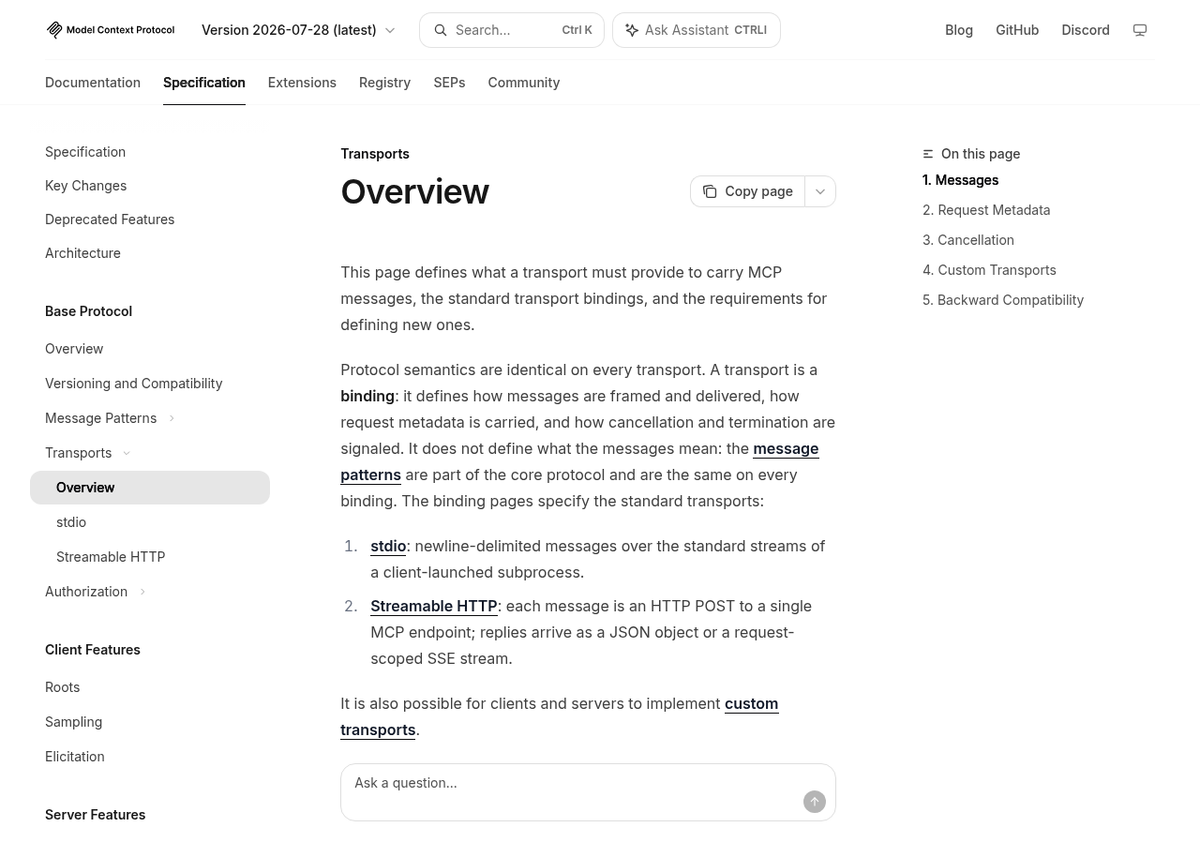
2026-07-28, captured October 8, 2026.| stdio | Streamable HTTP | |
|---|---|---|
| Adapter target | Path("server.py") | "https://host/mcp" |
| Who starts it | your client, as a subprocess | someone else, as a service |
| Auth | none, it runs as you | bearer token, OAuth 2.1, any httpx.Auth |
| Fits | local tools, tests, one user | shared tools, many clients |
I need a server that demands a token, so this one uses FastMCP's StaticTokenVerifier, whose docstring says never to use it in production because tokens sit in plain text. It also has a destructive tool, a resource and a prompt for later steps.
# inventory_server.py
import sys
from fastmcp import FastMCP
from fastmcp.exceptions import ToolError
from fastmcp.server.auth.providers.jwt import StaticTokenVerifier

# A throwaway token for local testing. Real servers verify tokens issued by an authorization server.
auth = StaticTokenVerifier(tokens={"demo-token": {"client_id": "demo-client", "scopes": []}})
mcp = FastMCP("Inventory", auth=auth)

STOCK = {"A100": 12, "B200": 0}


@mcp.tool
def stock_level(sku: str) -> int:
    """Units in stock for a SKU."""
    return STOCK.get(sku, 0)


@mcp.tool(annotations={"destructiveHint": True})
def reserve(sku: str, quantity: int) -> str:
    """Reserve units of a SKU."""
    if STOCK.get(sku, 0) < quantity:
        raise ToolError(f"only {STOCK.get(sku, 0)} units of {sku} in stock")
    STOCK[sku] -= quantity
    return f"reserved {quantity} of {sku}, {STOCK[sku]} left"


@mcp.resource("inventory://skus")
def sku_list() -> str:
    """Every SKU the server knows."""
    return ", ".join(sorted(STOCK))


@mcp.prompt
def restock_email(sku: str) -> str:
    """Draft a restock request."""
    return f"Write a short email asking the supplier to restock {sku}."


if __name__ == "__main__":
    port = int(sys.argv[1])
    mcp.run(transport="http", host="127.0.0.1", port=port, show_banner=False)
The helper starts that server on a free port of 127.0.0.1 and stops it afterwards. The Streamable HTTP page says servers must validate the Origin header and local servers should bind to localhost only. My helper binds to 127.0.0.1, and I did not test Origin validation.
# httpserver.py
import contextlib, pathlib, socket, subprocess, sys, time

HERE = pathlib.Path(__file__).parent


@contextlib.contextmanager
def running(script="inventory_server.py"):
    """Start an MCP server on a free port of 127.0.0.1, yield its URL, stop it afterwards."""
    with socket.socket() as s:
        s.bind(("127.0.0.1", 0))
        port = s.getsockname()[1]
    proc = subprocess.Popen([sys.executable, str(HERE / script), str(port)],
                            stdout=subprocess.DEVNULL, stderr=subprocess.DEVNULL)
    try:
        for _ in range(100):
            with contextlib.suppress(OSError):
                socket.create_connection(("127.0.0.1", port), timeout=0.2).close()
                break
            time.sleep(0.1)
        yield f"http://127.0.0.1:{port}/mcp"
    finally:
        proc.terminate()
        proc.wait(timeout=10)
# http_auth.py
import asyncio
import httpx
from fastmcp.client import Client
from fastmcp.client.transports import StreamableHttpTransport
from langchain.mcp import MCPAdapter
from httpserver import running
async def tool_names(target):
async with MCPAdapter(target) as adapter:
return [tool.name for tool in await adapter.list_tools()]
async def main():
with running() as url: # starts inventory_server.py on a free port of 127.0.0.1
try:
await tool_names(url)
except Exception as error:
print("no token:", type(error).__name__, "-", error)
raw = httpx.post(url, json={}, headers={"Accept": "application/json, text/event-stream"})
print("raw POST:", raw.status_code, raw.headers["www-authenticate"])
print("bearer:", await tool_names(Client(url, auth="demo-token")))
headers = {"Authorization": "Bearer demo-token"}
print("headers:", await tool_names(Client(StreamableHttpTransport(url, headers=headers))))
try:
await tool_names(Client(url, auth="wrong-token"))
except Exception as error:
print("wrong token:", type(error).__name__, "-", error)
asyncio.run(main())python http_auth.pyno token: MCPError - Server returned an error response
raw POST: 401 Bearer
bearer: ['stock_level', 'reserve']
headers: ['stock_level', 'reserve']
wrong token: MCPError - Server returned an error responseA bare URL meets a 401, which arrives as the vague MCPError: Server returned an error response. The raw POST line is what I'd run first: the status and www-authenticate header name the real problem. A token works two ways: Client(url, auth="demo-token") sets the Authorization: Bearer header, and a transport with a headers dict sets it by hand. The auth guide adds that auth="oauth" runs a full OAuth 2.1 flow, which I did not run.
Step 5: Connect several MCP servers at once
An MCPConfig dict, the mcpServers shape other MCP clients use, puts several servers behind one adapter, and the transport is inferred per entry. A ClientGroup keeps one connection per server, which the connections guide recommends for different auth or protocol versions.
# multi.py
import asyncio, sys

from fastmcp.client import Client
from fastmcp.client.group import ClientGroup
from langchain.mcp import MCPAdapter
from httpserver import running


async def main():
    with running() as url:
        config = {"mcpServers": {
            "weather": {"command": sys.executable, "args": ["weather_server.py"]},
            "inventory": {"url": url, "headers": {"Authorization": "Bearer demo-token"}},
        }}
        async with MCPAdapter(config) as adapter:  # one aggregate connection
            tools = {tool.name: tool for tool in await adapter.list_tools()}
            print("config:", list(tools))
            print("from inventory:", (await tools["inventory_stock_level"].ainvoke({"sku": "A100"}))[0]["text"])
            print("from weather:", (await tools["weather_get_forecast"].ainvoke({"city": "Lima"}))[0]["text"])

        group = ClientGroup({  # one connection per server
            "weather": Client({"mcpServers": {"w": {"command": sys.executable, "args": ["weather_server.py"]}}}),
            "inventory": Client(url, auth="demo-token"),
        })
        async with MCPAdapter(group) as adapter:
            print("group:", [tool.name for tool in await adapter.list_tools()])


asyncio.run(main())
python multi.pyconfig: ['weather_get_forecast', 'weather_list_cities', 'inventory_stock_level', 'inventory_reserve']
from inventory: 12
from weather: overcast, 19 C
group: ['weather_get_forecast', 'weather_list_cities', 'inventory_stock_level', 'inventory_reserve']Both routes prefix every tool with its server name, so two servers that each expose search can't collide. The prefix is part of the name the model sees, which matters for prompts and for code that looks tools up by name.
Step 6: Decide how long the connection stays open
The docs say each tool call opens the client, makes the MCP call and releases it, unless you keep the adapter's context open around the agent run. That is easy to measure. This server records the MCP method of every request, and a tool reads the log back.
# recorder_server.py
import sys
from fastmcp import FastMCP
from fastmcp.server.middleware import Middleware

seen = []


class Recorder(Middleware):
    async def on_message(self, context, call_next):
        seen.append(context.method)  # the MCP method of every incoming request
        return await call_next(context)


mcp = FastMCP("Recorder", middleware=[Recorder()])


@mcp.tool
def ping() -> str:
    return "pong"


@mcp.tool
def seen_methods() -> list[str]:
    return list(seen)


if __name__ == "__main__":
    mcp.run(transport="http", host="127.0.0.1", port=int(sys.argv[1]), show_banner=False)
# lifecycle.py
import asyncio
from fastmcp.client import Client
from langchain.mcp import MCPAdapter
from httpserver import running
async def methods(target, keep_open):
"""Discover the tools, call ping twice, then ask the server which MCP methods it received."""
with running("recorder_server.py") as url:
target = target(url)
if keep_open:
async with MCPAdapter(target) as adapter:
tools = {tool.name: tool for tool in await adapter.list_tools()}
for _ in range(2):
await tools["ping"].ainvoke({})
seen = await tools["seen_methods"].ainvoke({})
else:
async with MCPAdapter(target) as adapter:
tools = {tool.name: tool for tool in await adapter.list_tools()}
for _ in range(2): # the context is closed, so every call opens its own connection
await tools["ping"].ainvoke({})
seen = await tools["seen_methods"].ainvoke({})
return seen[0]["text"]
async def main():
print("closed after discovery:", await methods(lambda url: url, keep_open=False))
print("held open:", await methods(lambda url: url, keep_open=True))
print("legacy era:", await methods(lambda url: Client(url, mode="legacy"), keep_open=False))
asyncio.run(main())python lifecycle.pyclosed after discovery: ["server/discover","tools/list","server/discover","tools/call","tools/list","server/discover","tools/call","tools/list","server/discover","tools/call"]
held open: ["server/discover","tools/list","tools/call","tools/call","tools/call"]
legacy era: ["initialize","notifications/initialized","tools/list","initialize","notifications/initialized","tools/call","tools/list","initialize","notifications/initialized","tools/call","tools/list","initialize","notifications/initialized","tools/call"]With the context closed, the server logged ten requests for one discovery and three calls: a server/discover before every tools/call, plus tools/list entries in between. Held open, it logged five: one discover, one list, three calls. The last line pins the older protocol era, where every connection starts with initialize and notifications/initialized instead of server/discover.
So keep the adapter open around agent.ainvoke when a run makes many tool calls. There is no session ID to pin either way, since LangChain's announcement says the new spec made the core stateless. Keep state in graph state and a checkpointer, as in my Postgres checkpointer guide.
Step 7: Intercept tool calls and gate destructive tools
The old tool_interceptors argument is gone. LangChain's @wrap_tool_call middleware wraps every tool the agent runs, and each MCP tool's metadata says where it came from. Servers can also annotate tools, and the adapter exposes those hints under metadata["mcp"]["tool"]["annotations"], as the tools guide documents, so an approval rule can follow what the server declares. The tools specification says clients must treat annotations as untrusted unless the server is trusted, so I do this only for servers I trust.
# gate.py
import asyncio

from fastmcp.client import Client
from langchain.agents import create_agent
from langchain.agents.middleware import HumanInTheLoopMiddleware, wrap_tool_call
from langchain.agents.middleware.human_in_the_loop import InterruptOnConfig
from langchain.mcp import MCPAdapter
from langchain_core.messages import AIMessage
from langgraph.checkpoint.memory import InMemorySaver
from langgraph.types import Command
from scripted import Scripted, tool_call
from httpserver import running


@wrap_tool_call
async def log_calls(request, handler):  # async, because MCP tools are async only
    server = request.tool.metadata["mcp"]["server"]["name"]
    print(f"  interceptor: {request.tool_call['name']}({request.tool_call['args']}) on {server}")
    return await handler(request)


def is_destructive(tool):
    annotations = tool.metadata["mcp"]["tool"].get("annotations", {})
    return annotations.get("destructive_hint", False)


async def main():
    with running() as url:
        async with MCPAdapter(Client(url, auth="demo-token")) as adapter:
            tools = await adapter.list_tools()
        print("destructive:", [tool.name for tool in tools if is_destructive(tool)])
        destructive = {tool.name for tool in tools if is_destructive(tool)}
        gate = InterruptOnConfig(allowed_decisions=["approve", "reject"],
                                 when=lambda request: request.tool_call["name"] in destructive)
        model = Scripted(messages=iter([
            tool_call("stock_level", {"sku": "A100"}, "c1"),
            tool_call("reserve", {"sku": "A100", "quantity": 5}, "c2"),
            tool_call("reserve", {"sku": "B200", "quantity": 1}, "c3"),
            AIMessage(content="Reserved 5 of A100; B200 is out of stock."),
        ]))
        agent = create_agent(model, tools, checkpointer=InMemorySaver(),
                             middleware=[log_calls, HumanInTheLoopMiddleware(interrupt_on={t.name: gate for t in tools})])
        config = {"configurable": {"thread_id": "demo"}}
        result = await agent.ainvoke({"messages": [{"role": "user", "content": "Reserve stock."}]}, config)
        while "__interrupt__" in result:
            request = result["__interrupt__"][0].value["action_requests"][0]
            print("paused before:", request["name"], request["args"])
            result = await agent.ainvoke(Command(resume={"decisions": [{"type": "approve"}]}), config)
    for message in result["messages"]:
        if message.type == "tool":
            print("tool message:", message.status, "-", message.text)


asyncio.run(main())
python gate.pydestructive: ['reserve']
interceptor: stock_level({'sku': 'A100'}) on Inventory
paused before: reserve {'sku': 'A100', 'quantity': 5}
interceptor: reserve({'sku': 'A100', 'quantity': 5}) on Inventory
paused before: reserve {'sku': 'B200', 'quantity': 1}
interceptor: reserve({'sku': 'B200', 'quantity': 1}) on Inventory
tool message: success - 12
tool message: success - reserved 5 of A100, 7 left
tool message: error - only 0 units of B200 in stockThe interceptor logged each call with the server name from metadata. Only reserve, which the server marked destructive, paused for approval. After my scripted approvals the first reservation succeeded. The second asked for stock that doesn't exist, and the server's error text reached the model as a ToolMessage with status error instead of crashing the run, as the tools guide describes.
Tip: make the interceptor async. MCP tools are async only, and a sync @wrap_tool_call fails under ainvoke. The exact error is in the troubleshooting table.
A server can also ask a question mid call. The docs call it elicitation, and the adapter surfaces it as a LangGraph interrupt that you resume with an answer keyed by the server's request key. It needs a checkpointer so the paused run has somewhere to wait.
# booking_server.py
from fastmcp import FastMCP, Context
from mcp.types import ElicitRequest, ElicitRequestFormParams, InputRequiredResult

mcp = FastMCP("Booking")


@mcp.tool
async def book_table(party_size: int, ctx: Context) -> str | InputRequiredResult:
    """Book a table. Asks the caller for a date when the model did not supply one."""
    responses = ctx.input_responses
    if responses is None:  # first round: ask, and finish this round with the question
        ask = ElicitRequest(
            method="elicitation/create",
            params=ElicitRequestFormParams(
                message="Which date?",
                requested_schema={"type": "object", "properties": {"date": {"type": "string"}}, "required": ["date"]},
            ),
        )
        return InputRequiredResult(result_type="input_required", input_requests={"date": ask})
    answer = responses["date"]
    if answer.action != "accept":
        return "Booking cancelled."
    return f"Booked a table for {party_size} on {answer.content['date']}"


if __name__ == "__main__":
    mcp.run(show_banner=False)
# elicit.py
import asyncio
from pathlib import Path
from langchain.agents import create_agent
from langchain.mcp import MCPAdapter
from langchain_core.messages import AIMessage
from langgraph.checkpoint.memory import InMemorySaver
from langgraph.types import Command
from scripted import Scripted, tool_call
model = Scripted(messages=iter([
tool_call("book_table", {"party_size": 4}, "call_1"),
AIMessage(content="Your table is booked."),
]))
async def main():
async with MCPAdapter(Path("booking_server.py")) as adapter:
tools = await adapter.list_tools()
agent = create_agent(model, tools, checkpointer=InMemorySaver())
config = {"configurable": {"thread_id": "booking-1"}}
paused = await agent.ainvoke({"messages": [{"role": "user", "content": "Book a table for 4."}]}, config)
[interrupt] = paused["__interrupt__"]
[question] = interrupt.value["requests"]
print("the server asks:", question["message"], "| key:", question["key"])
answer = {"action": "accept", "content": {"date": "2026-10-20"}} # in an app, the user types this
result = await agent.ainvoke(Command(resume={"responses": {question["key"]: answer}}), config)
print([message.text for message in result["messages"] if message.type == "tool"])
asyncio.run(main())python elicit.pythe server asks: Which date? | key: date
['Booked a table for 4 on 2026-10-20']The docs warn that resuming reruns the tool from the start, so keep work before the question safe to repeat. The server uses FastMCP's modern elicitation pattern.
Step 8: Read MCP prompts and resources
The new adapter doesn't wrap prompts or resources, and the migration guide points to the FastMCP client, so I use that against the inventory server.
# prompts_resources.py
import asyncio

from fastmcp.client import Client
from httpserver import running


async def main():
    with running() as url:
        async with Client(url, auth="demo-token") as client:  # the plain FastMCP client, no LangChain
            resource = await client.read_resource("inventory://skus")
            print("resource:", resource[0].text)
            prompt = await client.get_prompt("restock_email", {"sku": "B200"})
            print("prompt:", prompt.messages[0].content.text)


asyncio.run(main())
python prompts_resources.pyresource: A100, B200
prompt: Write a short email asking the supplier to restock B200.Step 9: Serve your own LangGraph graph as an MCP server
Everything so far made LangGraph an MCP client. The other direction needs no extra code. LangChain's MCP endpoint page says the Agent Server speaks MCP over streamable HTTP at /mcp and exposes each graph as a tool, with langgraph-api 0.2.3 or later and langgraph-sdk 0.1.61 or later. The tool name is the graph id, the description comes from langgraph.json, and the input schema is the graph's input. I ran the local server from langgraph-cli 0.4.33, which loads langgraph-api 0.15.3. I did not deploy to LangSmith.
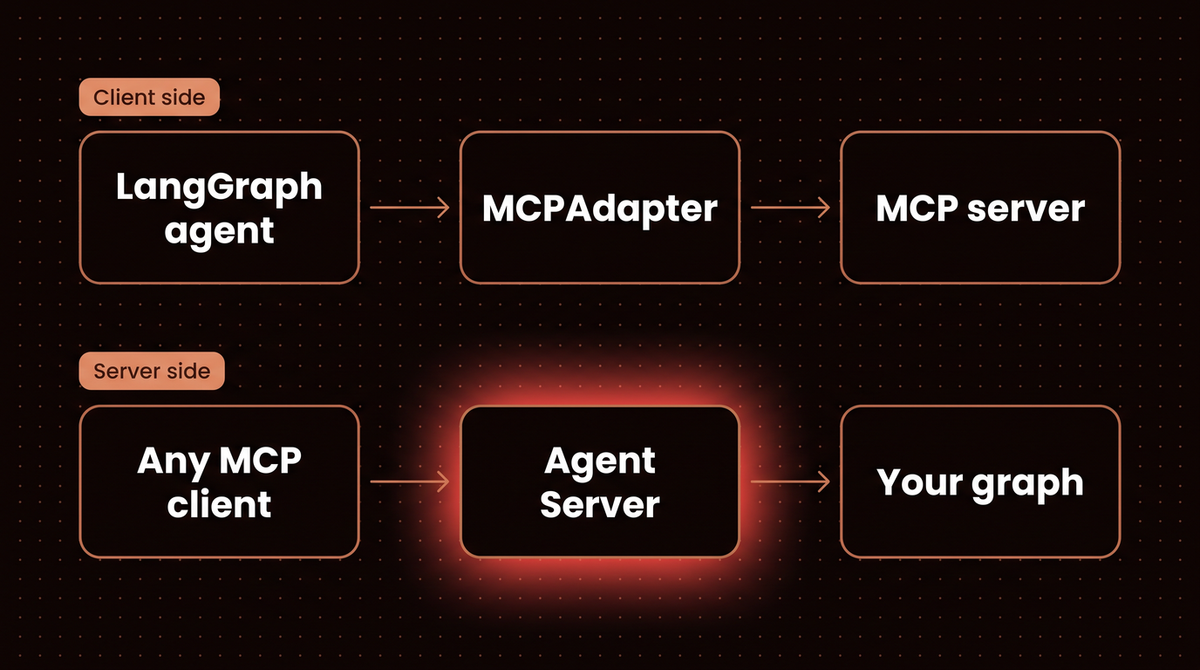
pip install "langgraph-cli[inmem]==0.4.33"The docs advise typed input and output schemas over raw message state, so the graph takes a city and returns a forecast. Its one node calls the weather server from Step 2, so this graph is an MCP client and, once served, an MCP tool. Both files live in a folder called lgserver next to the weather server.
# lgserver/forecast_graph.py
from pathlib import Path

from langchain.mcp import MCPAdapter
from langgraph.graph import END, START, StateGraph
from typing_extensions import TypedDict

SERVER = Path(__file__).parent.parent / "weather_server.py"


class InputState(TypedDict):
    city: str


class OutputState(TypedDict):
    forecast: str


class OverallState(InputState, OutputState):
    pass


async def lookup(state: InputState):
    # This graph is an MCP client of the weather server AND, once served, an MCP tool itself.
    async with MCPAdapter(SERVER) as adapter:
        tools = {tool.name: tool for tool in await adapter.list_tools()}
        blocks = await tools["get_forecast"].ainvoke({"city": state["city"]})
    return {"forecast": blocks[0]["text"]}


builder = StateGraph(OverallState, input_schema=InputState, output_schema=OutputState)
builder.add_node("lookup", lookup)
builder.add_edge(START, "lookup")
builder.add_edge("lookup", END)
graph = builder.compile()
The second file is lgserver/langgraph.json:
{
  "dependencies": ["."],
  "graphs": {
    "forecast": {
      "path": "./forecast_graph.py:graph",
      "description": "Look up the forecast for a city"
    }
  }
}
The script starts langgraph dev from that folder on a free port, connects to /mcp with the same MCPAdapter, calls the tool and stops the server. It runs twice, because the first run fails.
# serve.py
import asyncio, contextlib, os, re, socket, subprocess, sys, tempfile, time
from pathlib import Path

import httpx
from langchain.mcp import MCPAdapter

LANGGRAPH = Path(sys.executable).parent / "langgraph"


@contextlib.contextmanager
def langgraph_dev(*flags):
    """Run `langgraph dev` from ./lgserver on a free local port and stop it afterwards."""
    with socket.socket() as s:
        s.bind(("127.0.0.1", 0))
        port = s.getsockname()[1]
    env = {**os.environ, "LANGSMITH_TRACING": "false"}
    log = tempfile.NamedTemporaryFile("w+", suffix=".log")
    proc = subprocess.Popen([str(LANGGRAPH), "dev", "--no-browser", "--host", "127.0.0.1", "--port", str(port), *flags],
                            cwd="lgserver", env=env, stdout=log, stderr=subprocess.STDOUT)
    try:
        for _ in range(300):
            with contextlib.suppress(httpx.HTTPError):
                if httpx.get(f"http://127.0.0.1:{port}/ok").status_code == 200:
                    break
            time.sleep(0.2)
        yield f"http://127.0.0.1:{port}/mcp"
    finally:
        proc.terminate()
        proc.wait(timeout=20)
        log.seek(0)
        for line in re.findall(r"Blocking call to \S+|run 'langgraph dev --allow-blocking'", log.read())[:2]:
            print("dev server log:", line)


async def ask(url):
    async with MCPAdapter(url) as adapter:  # the deployed graph is an MCP tool, a URL is all that is needed
        [tool] = await adapter.list_tools()
        print(f"tool: {tool.name} | {tool.description} | {tool.args}")
        blocks = await tool.ainvoke({"city": "Oslo"})
        print("result:", blocks[0]["text"])


print("-- default flags")
with langgraph_dev() as url:
    asyncio.run(ask(url))
print("-- with --allow-blocking")
with langgraph_dev("--allow-blocking") as url:
    asyncio.run(ask(url))
python serve.py-- default flags
tool: forecast | Look up the forecast for a city | {'city': {'title': 'City', 'type': 'string'}}
result: BlockingError
dev server log: Blocking call to ScandirIterator.__next__
dev server log: run 'langgraph dev --allow-blocking'
-- with --allow-blocking
tool: forecast | Look up the forecast for a city | {'city': {'title': 'City', 'type': 'string'}}
result: {'forecast': 'light snow, -2 C'}The graph shows up as one tool, forecast, with my description and schema. The first call returns BlockingError as the tool's text. The script also prints two lines from the dev server's log. They show that it flags blocking calls inside async code, naming ScandirIterator.__next__, and that the development only override is --allow-blocking. I believe the trigger is the stdio subprocess launch, but the log line doesn't say so. I used the flag. For a deployment, point the graph at an HTTP MCP server instead. The output state comes back as text, so a client that wants JSON must parse it.
I did not run the docs' JavaScript client, custom authentication, user scoped tools or disable_mcp. Per the docs, each /mcp request is stateless and uses the API's normal authentication.
If you are still on langchain-mcp-adapters
The old package still works. This runs MultiServerMCPClient 0.3.2 in a second environment with mcp 1.30.0, including the interceptor, prompt and resource helpers the new adapter lacks. Its server uses the SDK's built in FastMCP, because FastMCP 4 can't share that environment.
python3.13 -m venv venv_legacy
venv_legacy/bin/pip install "langchain-mcp-adapters==0.3.2" "langgraph==1.2.14" "mcp==1.30.0"
# legacy_server.py
from mcp.server.fastmcp import FastMCP
mcp = FastMCP("Weather")
@mcp.tool()
def get_forecast(city: str) -> str:
"""Return the forecast for a city."""
return {"oslo": "light snow, -2 C"}.get(city.lower(), f"no forecast for {city}")
@mcp.prompt()
def forecast_email(city: str) -> str:
"""Draft a forecast email."""
return f"Write a two line email with the forecast for {city}."
@mcp.resource("weather://cities")
def cities() -> str:
"""Cities with a forecast."""
return "oslo"
if __name__ == "__main__":
mcp.run(transport="stdio")# legacy.py (runs in an environment with langchain-mcp-adapters==0.3.2 and mcp==1.30.0)
import asyncio, sys
from langchain_mcp_adapters.client import MultiServerMCPClient
from langchain_mcp_adapters.interceptors import MCPToolCallRequest
async def log_calls(request: MCPToolCallRequest, handler):
print("interceptor:", request.name, request.args)
return await handler(request)
async def main():
client = MultiServerMCPClient(
{"weather": {"command": sys.executable, "args": ["legacy_server.py"], "transport": "stdio"}},
tool_interceptors=[log_calls],
)
tools = await client.get_tools()
print("tools:", [tool.name for tool in tools])
print("call:", (await tools[0].ainvoke({"city": "Oslo"}))[0]["text"])
prompt = await client.get_prompt("weather", "forecast_email", arguments={"city": "Oslo"})
print("prompt:", prompt[0].content)
resources = await client.get_resources("weather")
print("resource:", resources[0].as_string())
asyncio.run(main())python legacy.pytools: ['get_forecast']
interceptor: get_forecast {'city': 'Oslo'}
call: light snow, -2 C
prompt: Write a two line email with the forecast for Oslo.
resource: osloThis is the mapping I'd use to move over, from the migration guide. I ran each side separately, not the conversion itself.
| langchain-mcp-adapters | langchain.mcp |
|---|---|
MultiServerMCPClient({...}), get_tools() | MCPAdapter({"mcpServers": {...}}), list_tools() |
get_prompt, get_resources | no wrapper yet, use the FastMCP client |
| SSE and WebSocket connections | SSETransport works but is deprecated, no WebSocket |
Troubleshooting: the errors I hit
These are real messages from my runs. This script reproduces three of them, and the rest appear in the outputs above.
# errors.py
import asyncio, re, socket
from pathlib import Path

from langchain.agents import create_agent
from langchain.agents.middleware import wrap_tool_call
from langchain.mcp import MCPAdapter
from langchain_core.messages import AIMessage
from scripted import Scripted, tool_call


def say(label, error):
    text = re.sub(r"127\.0\.0\.1:\d+", "127.0.0.1:PORT", str(error)).replace("\n", " ")
    print(f"{label}: {type(error).__name__}: {text.split(' \u2014 ')[0].split('. You')[0]}")  # first part only


async def main():
    try:  # 1. a string target must be a URL
        async with MCPAdapter("weather_server.py"):
            pass
    except Exception as error:
        say("script path as a string", error)

    with socket.socket() as s:  # 2. nothing is listening on this port
        s.bind(("127.0.0.1", 0))
        dead_url = f"http://127.0.0.1:{s.getsockname()[1]}/mcp"
    try:
        async with MCPAdapter(dead_url) as adapter:
            await adapter.list_tools()
    except BaseException as error:
        say("server not running", error)

    @wrap_tool_call
    def sync_log(request, handler):  # 3. a sync interceptor on an async only MCP tool
        return handler(request)

    model = Scripted(messages=iter([tool_call("get_forecast", {"city": "Oslo"}, "c1"), AIMessage(content="done")]))
    async with MCPAdapter(Path("weather_server.py")) as adapter:
        agent = create_agent(model, await adapter.list_tools(), middleware=[sync_log])
        try:
            await agent.ainvoke({"messages": [{"role": "user", "content": "Oslo?"}]})
        except Exception as error:
            say("sync @wrap_tool_call", error)


asyncio.run(main())
python errors.pyscript path as a string: ValueError: MCP target 'weather_server.py' is not a valid URL. To run a local MCP server over stdio, ask for it explicitly with `Path('server.py')`, a `fastmcp` transport, or an `MCPConfig`
server not running: RuntimeError: Client failed to connect: All connection attempts failed
sync @wrap_tool_call: NotImplementedError: Asynchronous implementation of awrap_tool_call is not available| Symptom | Cause and fix |
|---|---|
ModuleNotFoundError: No module named 'langchain_mcp_adapters' | An old tutorial on the new install. Use langchain.mcp, or install the legacy package in its own environment. |
ValueError: MCP target ... is not a valid URL | A bare string is read as a URL. Pass a Path for stdio. |
MCPError: Server returned an error response | In my run, a 401. POST to the URL yourself and read the status and www-authenticate. |
RuntimeError: Client failed to connect | Nothing is listening there. Check the port, the /mcp path and that the server started. |
NotImplementedError: Asynchronous implementation of awrap_tool_call | A sync interceptor on an async agent. Use async def and await handler(request). |
BlockingError from langgraph dev | A blocking call in an async node. Use an async path, a thread, or --allow-blocking in development. |
| Old and new packages in one environment | The adapters pin mcp below 2.0 and the new install resolved to 2.3.0. Use separate environments. |
Security: what to trust
An MCP server is code and text you let into your agent's loop, so treat it like a dependency. The first three points restate the specification. The last is my judgement.
- Local servers run with your privileges. The security best practices warn about malicious startup commands in client configuration. A stdio entry in an
MCPConfigis a command line, so read it before you run it. - Keep secrets in the Authorization header. The authorization spec requires
Authorization: Beareron every HTTP request and forbids tokens in the URL query string. Clients must not send a server any token except those issued by that server's authorization server. - Keep a human in the loop. The tools spec says a human should always be able to deny tool invocations, and tells clients to show inputs before calling, validate results before they reach the model, set timeouts and log usage. Step 7's gate covers the first.
- Treat tool results as untrusted text. Whatever a remote server returns lands in the model's context, so a hostile server can try to steer the agent. Limit which servers you connect and which tools they may run.
Two videos to watch
Two LangChain videos cover the idea. Both predate langchain.mcp, so expect the older client in the code.


Limits of this guide and next steps
I did not run the shared connection pool, caching, OAuth, mixed era groups, sampling and roots, or image results, so check those in the connections guide first. For approvals that survive a restart, pair this with a Postgres saver. For the framework choice, see LangChain vs LangGraph.
I build agents like this for clients: see how I build AI agents.
Frequently asked questions
Does LangGraph support MCP?
Yes, in both directions. An agent loads tools from MCP servers through MCPAdapter in langchain.mcp, and LangGraph's Agent Server exposes your graphs as MCP tools at /mcp. There is no langgraph.mcp module. The client code lives in LangChain, and that import failed on LangGraph 1.2.14.
Should I use langchain-mcp-adapters or langchain.mcp?
Use langchain.mcp for new work. The old README says that package is no longer actively maintained, and LangChain's docs present the new namespace as its replacement. It is still beta and needs langchain[mcp] 1.4.0 or later, so pin versions.
Is SSE still an MCP transport?
Not as a standard one. The specification's standard transports are stdio and Streamable HTTP, which replaced HTTP with SSE in the 2025-03-26 revision. A Streamable HTTP response can still stream as server sent events within one request. FastMCP keeps an SSETransport for old servers, but LangChain recommends migrating.
Can MCP tools keep state between calls?
Not through the protocol. The 2026-07-28 spec removed protocol level sessions, and the adapter opens a connection per call unless you hold the context open. Keep conversation state in LangGraph state and a checkpointer. A server can keep its own state, but that lives in its process or database.
How do I send an API key to a remote MCP server?
Send it as a bearer token: pass auth="token" on a fastmcp.Client, or set an Authorization header on the transport, then hand the client to MCPAdapter. The spec forbids tokens in the URL query string. Keep the key in an environment variable.
Can I swap the scripted model for a real one?
Yes, and the MCP side doesn't change. Pass a model string such as "claude-sonnet-5" to create_agent and install the provider's package and set its key. I didn't run a real model here, so this shows plumbing, not tool choice.
Published
October 8, 2026
Category
AI Agents
Jahanzaib Ahmed
AI Systems Engineer & Founder
AI Systems Engineer with 126 production systems shipped. I run AgenticMode AI (AI agents, RAG systems, voice AI) and ECOM PANDA (ecommerce agency). I build AI that works in the real world for businesses across home services, healthcare, ecommerce, SaaS, and real estate.
Related articles

How to Choose Between LangChain and LangGraph for a Python Agent
Five scripts, tested on LangChain 1.4 and LangGraph 1.2, show when to use create_agent, when to write a StateGraph and how to combine them in one agent.
How toAI AgentsLangChain
LangGraph Tutorial: How I Build Production AI Agents With It
A hands-on LangGraph tutorial covering state schemas, nodes, edges, checkpointing, human-in-the-loop patterns, streaming, and real production cost data from 23 deployed systems.
GuideImplementationLangGraph
How to Use the LangGraph CLI to Build and Run an Agent Server in Docker
Every LangGraph CLI command run for real on version 0.4.33, from langgraph new to a Docker image, plus the two traps the docs skip: a build that copies your .env file and a Python 3.11 default base image.
How toAI AgentsLangGraph