How to Set Up the Playwright MCP Server Without Handing It Your Logins
Install Microsoft's Playwright MCP server in Claude Code with an isolated profile, test logins from a storage state file, secrets kept out of the chat, and measured snapshot token costs.

Table of Contents
The Playwright MCP server lets Claude Code open a real browser, click through your app and read what's on the page, so it can check its own work instead of guessing. The server is free; you pay only for the tokens its page snapshots use. This guide is for developers who want browser access for their coding agent without handing it a browser that remembers every login.
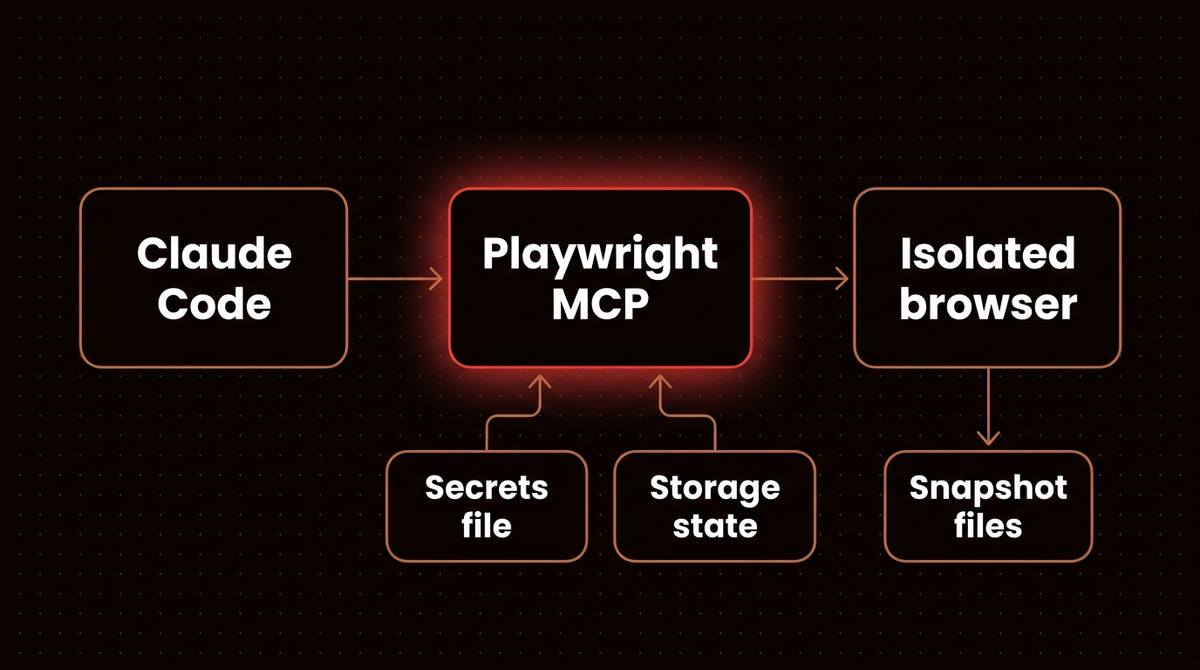
The install is one line. Left at its defaults, that line gives Claude Code a browser profile that keeps cookies on disk between sessions and writes page text into your project folder, and nothing stops you from pasting a password into the chat for it to type. The rest of this guide closes those gaps. I ran version 0.0.83 of Microsoft's Playwright MCP server through a bare MCP client on October 6, 2026 and measured what it sends back to the model. Those numbers are in Step 8.
Before you start
- Node.js 18 or newer. The README lists it as the only hard requirement. Check with
node --version. - Claude Code, installed and signed in. Any MCP client works (Cursor, VS Code, Claude Desktop), but the commands below are for Claude Code.
- Google Chrome installed. The server launches the Chrome channel by default.
- A test account for any site you want the agent to log into. Never your personal one.
- Cost: the server is open source under the Apache 2.0 license. What you pay for is model tokens, and page snapshots can be large.
If you're new to the protocol, my guide to building MCP servers for production explains how an MCP server exposes tools to a client like Claude Code. You don't need it to follow along.
Step 1: Pin a version instead of using @latest
Every official snippet uses @playwright/mcp@latest. That means npx can pull a new release the next time your client restarts, and this project ships often: version 0.0.83 landed on September 28, 2026, ten days after 0.0.82. Recent releases changed default behavior, such as v0.0.78 shortening snapshots and v0.0.82 turning tools a page registers into new MCP tools. Pinning means a change reaches you when you choose it.
node --version
npm view @playwright/mcp version
The second command prints the current release. I use 0.0.83 in every command below because it was current when I wrote this; swap in whatever number you get, and bump it on purpose after reading the release notes.
Step 2: Add the Playwright MCP server to Claude Code with an isolated profile
The README's Claude Code command is claude mcp add playwright npx @playwright/mcp@latest. I add two things. The Claude Code MCP docs say to put the whole launch command after --, so flags like -y go to npx rather than to Claude Code. And I add --isolated.
claude mcp add playwright -- npx -y @playwright/mcp@0.0.83 --isolatedWithout --isolated, the server uses a persistent profile stored at ~/Library/Caches/ms-playwright/mcp-{channel}-{workspace-hash} on macOS (~/.cache/ms-playwright/ on Linux). The README is plain about it: "All the logged in information will be stored in the persistent profile." Log the agent into a staging admin panel once, and every future session in that project starts already logged in. In isolated mode the profile lives in memory and is gone when the browser closes. Every flag I use in this guide is listed in the official options reference.
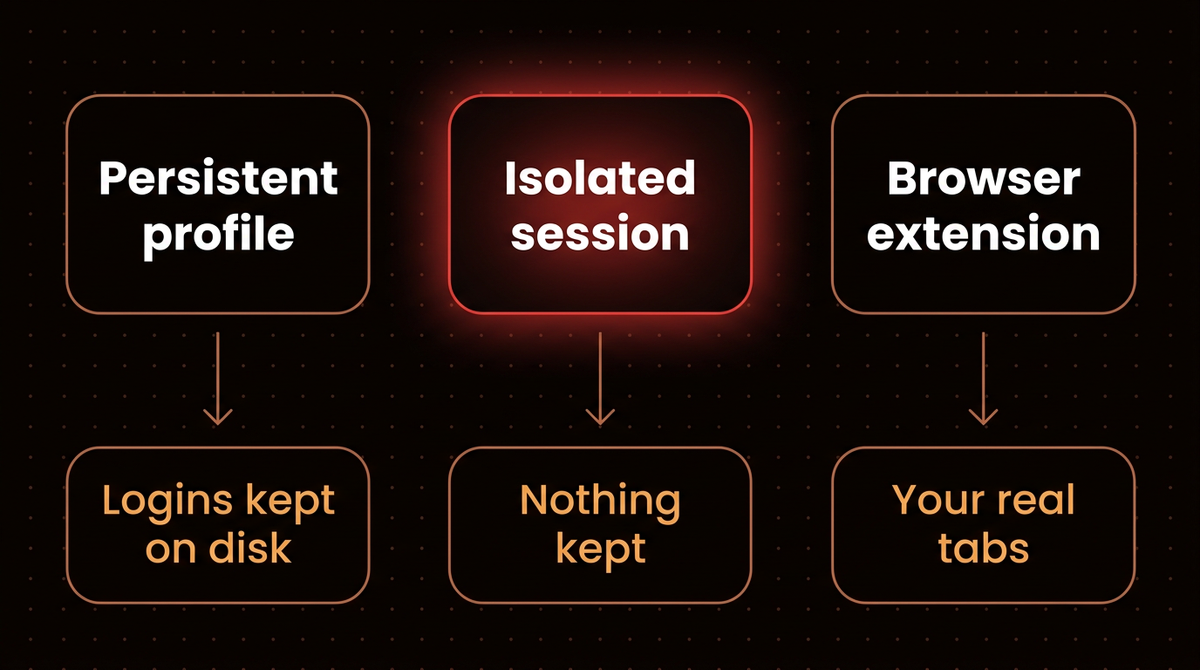
Pick the scope that fits. Claude Code stores the server in one of three places:
| Scope | Flag | Stored in | Use it when |
|---|---|---|---|
| Local (default) | none | ~/.claude.json, this project only | You're trying it out |
| Project | --scope project | .mcp.json in the repo | Your team should get the same setup |
| User | --scope user | ~/.claude.json, all projects | You want it everywhere |
For a team, the project file is the one to commit, because the flags in it are the policy. I show a full .mcp.json in Step 7.
Step 3: Confirm it connected and run a first task
Run claude mcp list. Next to playwright you should see the status Connected. If it says Failed to connect, jump to Troubleshooting.
Start claude in your project and ask for something small with a checkable answer:
Use the Playwright MCP server to open https://example.com and tell me the page heading.A Chrome window opens (the server runs headed unless you pass --headless), Claude asks permission to use browser_navigate, and it answers "Example Domain". Name the server in that first prompt. Simon Willison found that without it, Claude sometimes tried to run Playwright through Bash instead.
Step 4: Keep snapshot files out of git
I expected the snapshot to come back inline. It didn't. browser_navigate wrote it to .playwright-mcp/page-<timestamp>.yml in the working directory and returned a 221 to 306 character pointer to it. In my login test, the console log went into the same folder. Three page loads left 122 KB of YAML in my folder, and those files hold whatever text was on screen, including data from logged in pages.
echo ".playwright-mcp/" >> .gitignoreIf you'd rather keep them outside the repo entirely, the server takes --output-dir <path> for automatically named files. Files Claude saves with an explicit name still resolve against the workspace root, so the gitignore line is worth having either way.
Step 5: Give the agent a test login with a storage state file
Isolated mode forgets everything, which is what you want by default but awkward when the page you're testing sits behind a login. The fix is to log in once yourself, save the cookies and local storage to a file, and load that file into each fresh session. Playwright's codegen tool does the saving:
mkdir -p playwright/.auth
echo "playwright/.auth" >> .gitignore
npx playwright codegen http://localhost:3000/login --save-storage=playwright/.auth/user.json
A browser opens. (If codegen says no browser is installed, run npx playwright install chromium first.) Log in with your test account, then close the window. The file now holds that session. Playwright's authentication docs warn that this file "may contain sensitive cookies and headers" that could be used to impersonate the account, which is why it goes in .gitignore before it exists.
Now point the server at it. Remove it and add it again with the extra flag:
claude mcp remove playwright
claude mcp add playwright -- npx -y @playwright/mcp@0.0.83 --isolated --storage-state=playwright/.auth/user.json
Ask Claude to open a page that needs the login. It should land inside the app, not on the sign in form. When the session expires, rerun codegen. I'd rather refresh a file every few days than leave a long lived login sitting in a profile folder I never look at.
Step 6: Pass passwords through a secrets file, not the chat
Sometimes the agent has to type a credential, for example when you're testing the login form itself. The server has a --secrets option that reads a dotenv file. The model never sees the value: it passes the secret's name, and the server swaps in the real value. I tested it against a public demo login page, using a file with one entry named DEMO_PASSWORD. For your own project, create the file and add the flag:
# .env.playwright
TEST_PASSWORD=your-test-account-password
echo ".env.playwright" >> .gitignoreclaude mcp remove playwright
claude mcp add playwright -- npx -y @playwright/mcp@0.0.83 --isolated --storage-state=playwright/.auth/user.json --secrets=.env.playwrightThen ask for it by name: "type TEST_PASSWORD into the password field". Claude sends the literal string TEST_PASSWORD, and the server does the rest. In my test the entry was called DEMO_PASSWORD.
When the client called browser_type with the text DEMO_PASSWORD, the server reported the action as fill(process.env['DEMO_PASSWORD']) and filled the real password. When I then read the field's value back with browser_evaluate, the response said <secret>DEMO_PASSWORD</secret> instead of the password.
Warning: the redaction is a plain text find and replace on tool responses. The config docs call secrets "a convenience and not a security feature". A page that shows the value encoded or split up would get past it. Use it for test accounts only.
Step 7: Remove the tools you don't need and commit the config
My test server exposed 25 tools. Two of them run arbitrary code in the page: browser_evaluate and browser_run_code_unsafe. Most QA tasks need neither. Claude Code's permission rules name MCP tools as mcp__<server>__<tool>, and a deny rule on a bare tool name takes the tool out of Claude's context. In .claude/settings.json:
{
  "permissions": {
    "deny": [
      "mcp__playwright__browser_run_code_unsafe",
      "mcp__playwright__browser_evaluate"
    ]
  }
}
Then put the whole server definition in a project scoped .mcp.json so everyone gets the same flags. First run claude mcp remove playwright: Claude Code uses only one definition per server name, and a local scope entry from Steps 2 to 6 outranks the project file, so you'd keep running your old flags without noticing.
{
  "mcpServers": {
    "playwright": {
      "command": "npx",
      "args": [
        "-y",
        "@playwright/mcp@0.0.83",
        "--isolated",
        "--storage-state=playwright/.auth/user.json",
        "--secrets=.env.playwright"
      ]
    }
  }
}
The next time you start Claude Code, claude mcp list shows the server as pending approval until you approve it in an interactive session. Those paths are relative, so start claude from the project root. If you launch it from a subfolder, swap in absolute paths.
You'll see --allowed-origins recommended for this job. Use it to keep the agent focused on your app if you like, but the README says it "does not serve as a security boundary and does not affect redirects", and it states flatly that Playwright MCP is not a security boundary. Every page the agent reads is untrusted input, and prompt injection through page text is the obvious way in. The MCP security best practices cover the wider threat model. What actually limits the damage is what the browser can reach, so give it a test account in an isolated profile and apply least privilege to everything else.
Step 8: Check how big Playwright MCP snapshots get
I connected to the server with a minimal MCP client, headless and isolated, and measured the responses:
| What | Characters | Rough tokens (chars ÷ 4) |
|---|---|---|
| Tool definitions (25 tools) | 20,286 | about 5,000 |
browser_snapshot of example.com | 1,272 | about 300 |
browser_snapshot of the Playwright intro docs page | 32,549 | about 8,100 |
browser_snapshot of the Wikipedia MCP article | 89,034 | about 22,000 |
The four characters per token rule is an estimate, not a tokenizer count, but the spread is the point: a content heavy page costs about 70 times what a simple one does. Claude Code softens two of these. Tool search is on by default, so MCP tool definitions are deferred and loaded on demand rather than sitting in every request. And text results over 50,000 characters are saved to a file instead of going straight into the context window, which is exactly what happens to that Wikipedia snapshot.
What I'd do on top:
- Ask for browser_find on big pages. Added in v0.0.78, it searches the snapshot for text and returns only the matching nodes with a little context.
- Try
--mobilefor content sites. The README notes mobile pages are usually lighter, which saves tokens. - Give specific instructions. "Check the checkout total on /cart" leads to one snapshot. "Look around the app" leads to dozens.
On a long agent session these numbers add up the same way any agent loop's token bill does: every turn resends what came before.
Troubleshooting
Claude runs Playwright through Bash instead of the MCP tools
Say "use the Playwright MCP server" in the prompt, as in Step 3. If it keeps happening, check /mcp inside Claude Code to confirm the server is connected for this project, since local scope only applies to the folder where you added it.
"Browser is already in use for ..., use --isolated to run multiple instances"
A persistent profile can only be used by one browser at a time, so two Claude Code sessions in the same project collide. The error in issue 769 names the fix: run with --isolated, or give each client its own --user-data-dir.
"Browser specified in your config is not installed"
The default channel is Chrome, which Playwright doesn't install for you. Install Google Chrome, run npx playwright install chrome (the browsers docs cover branded browser installs), or pass --browser firefox or --browser msedge for a browser you already have.
The server fails to connect the first time
The first npx run downloads the package, which can take longer than the startup timeout. Start Claude Code with a longer one: MCP_TIMEOUT=60000 claude.
No browser window appears, or it fails on a server
Headed mode needs a display. On a remote machine or in CI, add --headless. If your client can't start it, run it yourself with npx @playwright/mcp@0.0.83 --port 8931 and point the client at http://localhost:8931/mcp.
Claude Code warns that a tool result is too large
Claude Code warns above 10,000 tokens and caps MCP output at 25,000 by default. Use browser_find as in Step 8 before reaching for MAX_MCP_OUTPUT_TOKENS, because raising the cap just makes each turn more expensive.
Going further: MCP, the CLI, or Docker
Microsoft now ships a second way to do this. The Playwright CLI with skills lets a coding agent drive the browser through short commands, and the MCP README itself says coding agents may be better served by it because it avoids loading large tool schemas and accessibility trees into context. My rule:
| Option | Pick it when | Watch out for |
|---|---|---|
| Playwright MCP | The agent explores a page and decides what to do next, or you use an MCP client without shell access | Large snapshots on content heavy pages |
| Playwright CLI and skills | A coding agent in a big repo needs browser checks alongside lots of code reading | Your agent needs to be able to run shell commands |
| Docker image | You want the browser off your machine entirely | Headless Chromium only, per the README |
When not to use any of them: if you already know the exact clicks, write a normal Playwright test. An agent exploring the page each run costs tokens every time; a test costs them once while you write it. I use the agent to find the flow and a test to keep it working. If you're debugging the agent itself rather than the app, LangGraph Studio is the better tool, and for the bigger picture of agents driving computers, see where computer use stands in 2026.
Exposing other systems to Claude follows the same pattern of scoping first. My guide to connecting Claude to n8n's MCP server applies the same thinking to workflows. If you want a browsing agent built and monitored for you instead, see how I build agents.
Frequently asked questions
Is the Playwright MCP server free?
Yes. Microsoft publishes it as open source under the Apache 2.0 license, and it runs locally through npx with no account or API key. Your real cost is model usage: every page snapshot the server returns counts as input tokens in your Claude Code session, and a content heavy page can run past 20,000 tokens.
Does Playwright MCP need a vision model or screenshots?
No. It reads the page's accessibility tree, the structured list of headings, links, buttons and fields that screen readers use, and sends that as text. The model clicks elements by reference from that tree. Screenshots and coordinate based clicking exist as options, but the coordinate tools are off unless you enable them with --caps=vision.
What's the difference between @playwright/mcp and other Playwright MCP packages?
The official server is @playwright/mcp, maintained by Microsoft in the microsoft/playwright-mcp repository. Community packages with similar names exist, such as @executeautomation/playwright-mcp-server, with different tools and options. If a tutorial's flags don't match what you see, check which package it installed. Everything in this guide applies to the official one.
Can Playwright MCP use my logged in Chrome?
Yes, through the Playwright browser extension and the --extension flag, which connects to tabs in a running Chrome or Edge. I avoid it for agent work because the agent then acts with every session that browser holds, your email included. An isolated profile plus a storage state file for a test account gives the agent only what the task needs.
How do I run Playwright MCP headless?
Add --headless to the server's arguments, for example claude mcp add playwright -- npx -y @playwright/mcp@0.0.83 --isolated --headless. The server runs headed by default. Headless browsers also close after an hour without a completed tool call by default, and the next call relaunches them, which you can change with --idle-timeout.
Published
October 6, 2026
Category
AI Agents
Jahanzaib Ahmed
AI Systems Engineer & Founder
AI Systems Engineer with 126 production systems shipped. I run AgenticMode AI (AI agents, RAG systems, voice AI) and ECOM PANDA (ecommerce agency). I build AI that works in the real world for businesses across home services, healthcare, ecommerce, SaaS, and real estate.
Related articles
How to Connect Claude to n8n's MCP Server Without Exposing Every Workflow
Connect Claude to your n8n instance through n8n's own MCP server, then scope what it can see, test workflows with pinned data before any live run, and let it build workflows you still publish yourself.
How toAI Agentsn8n
The Medicare Portal Told OpenAI's Agent No. The Agent Treated It as a Retry.
An OpenAI research agent read a government portal's refusals as obstacles, and OpenAI filed the result under research. Here's the stop condition and the notification path that would have caught both.
NewsAI AgentsAI Agents
Anthropic's Opus 5.5 Hands Flagged Cyber Work to Opus 4.8. On the API, It Hands You Nothing.
Opus 5.5 is cheaper and faster, but flagged cyber, biology and frontier ML requests get answered by an older model, and on the raw API they come back empty unless you opt in to fallback.
NewsAI AgentsAnthropic