How to Add MCP Servers to Claude Code With claude mcp add
Every way to run claude mcp add on the current Claude Code release: remote and local servers, JSON configs, scopes, sign in, and the real error text for the flag order mistakes that break most setups.

Table of Contents
To plug an MCP server into Claude Code you run one command, claude mcp add. Three mistakes break it more than anything else: a missing --, an -e flag that swallows the server name, and the wrong scope. The commands below are the ones I ran on Claude Code 2.1.296 on October 13, 2026, with their real output (I trimmed home paths and one decorative dash). Expect about 15 minutes from a vendor's README to a working server, and no cost beyond your Claude plan.
If MCP is new to you: the Model Context Protocol is an open standard that lets an AI client call tools and read data from outside programs. Each program you connect is an MCP server. Claude Code is the client, and claude mcp add writes the entry that tells it how to reach one.
Before you start
- Claude Code installed and signed in. Run
claude --version. The automatic SSE fallback in Step 2 needs 2.1.265 or later; everything else works on older builds. - The server's install details. A URL, a launch command such as
npx -y some-server, or a JSON block from its README. - Node.js or Python if the server runs locally through
npxoruvx. - Any API key the server needs. Keep it out of files you commit.
- A terminal, not the chat box. These are shell commands. Run them from your project's root folder, outside a Claude Code session, then start a fresh
claudesession.
Step 1: Work out which kind of server you have
MCP servers aren't written for Claude Code alone, so their READMEs often show setup for Claude Desktop or Cursor and never mention claude mcp add. That's fine. The Claude Code MCP docs boil every set of instructions down to one of three shapes, and each shape maps to one command.
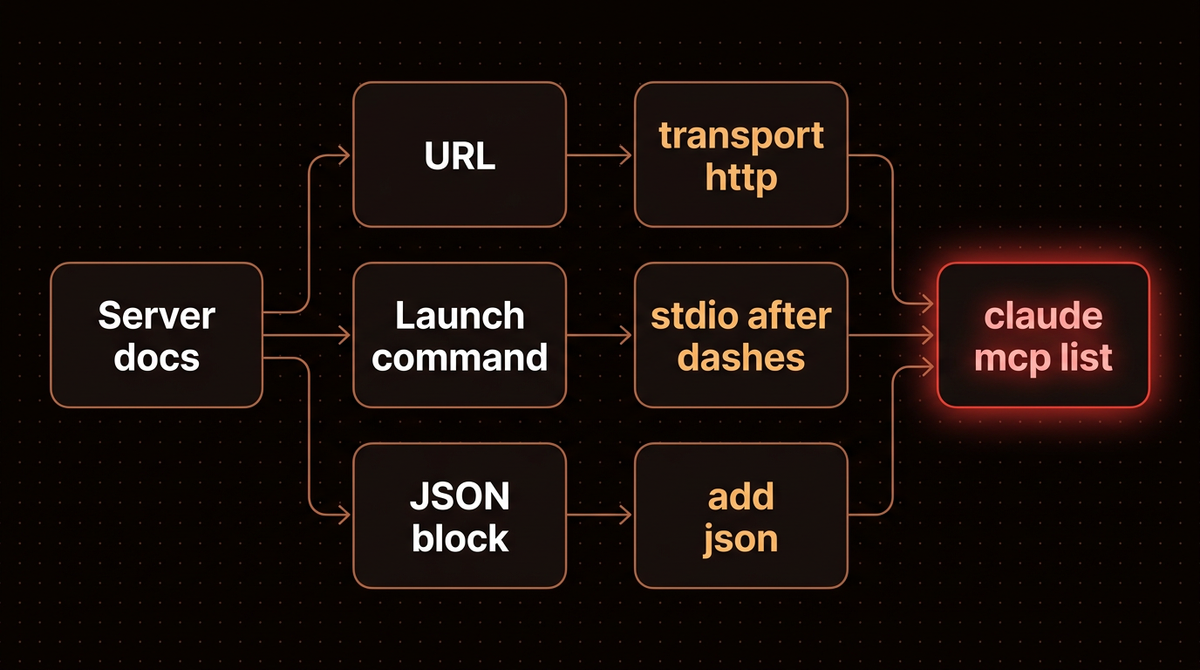
| What the docs give you | What it means | Command shape |
|---|---|---|
A URL like https://mcp.example.com/mcp | Remote server | claude mcp add --transport http name URL |
A command like npx -y @example/mcp-server | Local process on your machine | claude mcp add name -- npx -y @example/mcp-server |
An mcpServers JSON block | Config written for another client | claude mcp add-json name '{...}' |
These match the two transports in the MCP specification: stdio for local processes and Streamable HTTP for remote ones. A wss:// URL is the odd one out: the docs give it a separate WebSocket option because --transport doesn't accept ws.
Step 2: Run claude mcp add for a remote server
Remote servers are the easiest case, and the docs call HTTP the recommended option for cloud services. You pass --transport http, a name you choose, and the URL. Here's Notion's hosted MCP server, the same example the Claude Code docs use:
claude mcp add --transport http notion https://mcp.notion.com/mcpWhen it works you see two lines like these:
Added HTTP MCP server notion with URL: https://mcp.notion.com/mcp to local config
File modified: /Users/you/.claude.json [project: /Users/you/code/my-app]
That "Added" line only means the config was written. It doesn't mean Claude Code connected; Step 7 shows how to check that. The bracketed path matters too: local and project scope belong to the folder you ran the command in, so running it from a subfolder registers the server for that subfolder only.
If the server takes an API key instead of a browser sign in, add a header:
claude mcp add --transport http secure-api https://api.example.com/mcp \
  --header "Authorization: Bearer your-token"
Some older services still expose only SSE (Server Sent Events), which the docs now mark as deprecated. From 2.1.265 you can use the same --transport http command and Claude Code falls back to SSE on its own. On an older build, pass --transport sse.
Step 3: Add a local server after the double dash
A local server is a program Claude Code starts on your machine and talks to over stdin and stdout. The syntax has one rule that's easy to miss: put -- between Claude's own options and the server's launch command.
claude mcp add airtable -e AIRTABLE_API_KEY=YOUR_KEY -- npx -y airtable-mcp-serverEverything after -- is passed to the server untouched. Leave it out and Claude Code tries to read the server's flags as its own. This is what I got when I dropped it:
$ claude mcp add nodash npx -y some-server
error: unknown option '-y'
The -y belongs to npx, but without the separator Claude Code thinks it's being asked for an option it doesn't have. Add the -- and the same line goes through.
Server names can contain only letters, numbers, hyphens and underscores. "my server" gets rejected with Invalid name my server. and a note listing the allowed characters.
Step 4: Put the env and header flags after the name
The guides I read before writing this skip the next trap entirely. The -e (--env) and -H (--header) flags accept a list of values. The help text shows it as -e, --env <env...>. So the flag keeps eating words until it reaches another option, and if your server name comes right after it, the name gets eaten too:
$ claude mcp add -e API_KEY=abc envsrv -- node server.js
Invalid environment variable format: envsrv, environment variables should be added as: -e KEY1=value1 -e KEY2=value2
Claude Code read envsrv as a second environment variable. Move the name first and it works:
$ claude mcp add envsrv -e API_KEY=abc -e REGION=us -- node server.js
Added stdio MCP server envsrv with command: node server.js to local config
You'll see examples online, including the Airtable example in Anthropic's own docs, that put --env before the name and still work. They do because another option such as --transport stdio sits between the env value and the name, which ends the list. Reorder those flags and they break. My habit is fixed: name first, then -e and -H, then --, then the command.
Tip: Repeat the flag for each value (-e A=1 -e B=2). And write keys as -e API_KEY="$API_KEY" so the secret comes from your environment instead of sitting in shell history. Either way the value ends up in ~/.claude.json, the file the add command names, so treat that file as a secret too.
Step 5: Choose a scope before you commit anything
Every claude mcp add writes to one of three scopes. The default is local, which surprises people who expected a server to show up in all their projects.
| Scope | Flag | Loads in | Shared with team | Stored in |
|---|---|---|---|---|
| Local (default) | --scope local | Current project only | No | ~/.claude.json |
| Project | --scope project | Current project only | Yes, through git | .mcp.json in the repo |
| User | --scope user | All your projects | No | ~/.claude.json |
My rule when I set these up: anything holding a personal token goes in local or user. A server the whole team should get, with no secret baked in, goes in project. Adding one with --scope project writes a plain file you can review in a pull request:
{
  "mcpServers": {
    "notion-team": {
      "type": "http",
      "url": "https://mcp.notion.com/mcp"
    }
  }
}
If the server needs a key, don't paste it there. .mcp.json expands ${VAR} and ${VAR:-default} from each teammate's environment, so you commit "Authorization": "Bearer ${API_KEY}" and the value stays on their machine. One catch from the docs: Claude Code reads its own and your cloud provider's credentials, such as ANTHROPIC_API_KEY, as empty in a remote server's URL and headers, so a repo can't quietly ship your Anthropic key to someone else's server.
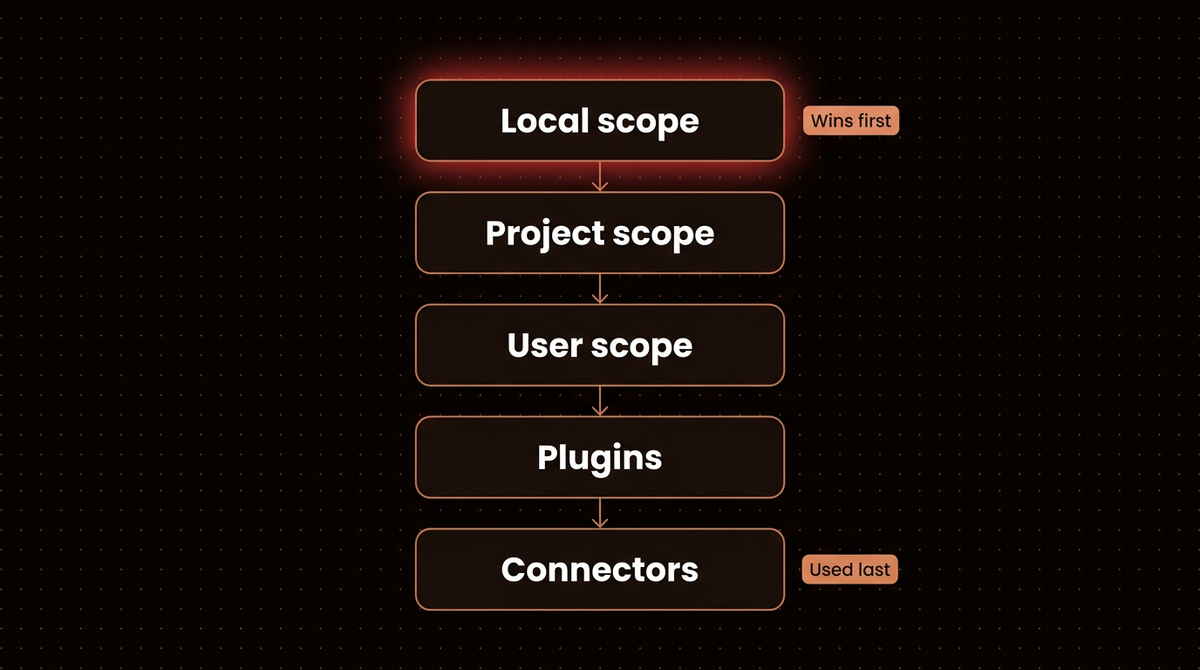
Precedence matters once you've added the same name twice. I added notion at local scope with Notion's URL and again at user scope with a different URL. claude mcp get notion reported the local one, and claude mcp list printed a warning that none of the guides I read show:
[Conflicting scopes]
Server "notion" is defined in multiple scopes with different endpoints: user (https://example.org/mcp), local (https://mcp.notion.com/mcp). OAuth tokens are stored per endpoint, so authenticating in one context will not carry over.
That's why a server can ask you to sign in again after you already did. Scope is fixed at add time, so to move a server you remove it and add it again with the new --scope.
Step 6: Paste a JSON config with claude mcp add-json
When a README hands you a Claude Desktop style block, take the object inside mcpServers (not the wrapper) and pass it with a name:
claude mcp add-json weather-api '{"type":"http","url":"https://api.weather.com/mcp","headers":{"Authorization":"Bearer token"}}'Check for a "type" key first. Plenty of snippets for other clients have a url and no type, and Claude Code treats an entry with no type as a stdio server. When I tried one without it, the command refused with a terse message:
$ claude mcp add-json bad-json '{"url":"https://mcp.notion.com/mcp"}'
Invalid configuration: : Invalid input
Add "type": "http" and it's accepted. The docs note streamable-http works as an alias, so configs copied from the spec don't need editing. In a hand edited .mcp.json the same mistake shows a clearer error naming the missing type.
Already set servers up in Claude Desktop? claude mcp add-from-claude-desktop imports them through a picker. It works on macOS and WSL only, and it skips any server whose name contains a space.
Step 7: Sign in and confirm the server is connected
Now the real check. claude mcp list connects to each server and prints a status. Here's what mine showed for a shared project server and a personal one:
$ claude mcp list
Checking MCP server health…

notion-team: https://mcp.notion.com/mcp (HTTP) - ⏸ Pending approval (run `claude` to approve)
notion: https://mcp.notion.com/mcp (HTTP) - ! Needs authentication
Read them like this:
- Connected: done. Start
claudeand the tools are there. - Needs authentication: the server uses OAuth. Start
claude, type/mcp, pick the server and finish the browser sign in. Over SSH,claude mcp login notion --no-browserprints the URL instead of opening a browser. - Pending approval: a project server from
.mcp.jsonthat you haven't approved. Claude Code asks before it runs servers a repo brings with it, which is the point. Runclaudeand accept the prompt. Changed your mind?claude mcp reset-project-choicesclears your answers. - Failed to connect: the server never answered. See the troubleshooting section below.
For one server, claude mcp get name gives the detail, including which scope won and the exact remove command:
notion:
  Scope: Local config (private to you in this project)
  Status: ! Needs authentication
  Type: http
  URL: https://mcp.notion.com/mcp

To remove this server, run: claude mcp remove notion -s local
Anthropic's own three minute walkthrough covers the same add, scope and context cost ideas on screen if you'd like to see the flow before you type it.
Troubleshooting
Failed to connect with CONNECTION_CLOSED
The process started and exited, or never started. I reproduced it by pointing a server at /usr/bin/false, and claude mcp get showed Status: ✘ Failed to connect with Issue: CONNECTION_CLOSED: Connection closed. Run the exact command after your -- by hand in a terminal. It usually prints the real error: a missing package, a wrong path, or a missing key. If the server is just slow to boot, raise the startup timeout with MCP_TIMEOUT=10000 claude (ten seconds).
Missing environment variables warning
If .mcp.json references ${MISSING_TOKEN} and it isn't set, the server still loads, but claude mcp list warns Missing environment variables: MISSING_TOKEN and sends the literal text. Export the variable or give it a :-default.
"was not saved" after an add
The Claude Code errors reference says this means ~/.claude.json is read only or blocked by a sandbox. Make the file writable or run the command outside the sandbox, then add the server again.
It asks you to sign in again mid session
The token expired or lacks a permission. The message reads needs you to sign in again (run /mcp to re-authenticate). Open /mcp, choose the server and sign in. If you see this right after adding a server at a second scope, check for the conflicting scopes warning from Step 5.
"exists in multiple scopes" when removing
claude mcp remove notion stops and lists every scope holding that name. Pass the scope you mean: claude mcp remove notion -s user. Removing a remote server also deletes the OAuth tokens Claude Code stored for it.
Context costs, security, and when to skip MCP
Watch what each server costs in context. Claude Code warns when one MCP tool result passes 10,000 tokens and caps results at 25,000 by default. Set MAX_MCP_OUTPUT_TOKENS higher only for a server you know returns big payloads, such as a database tool. By default the docs say MCP tool definitions are deferred and loaded on demand through tool search, so idle servers cost far less context than their tool lists suggest. Every call still costs tokens.
Treat every server as code you're running. Anthropic reviews connectors before listing them in its directory but, in the words of the Claude Code security page, "does not security-audit or manage any MCP server". A server that fetches web pages can carry prompt injection straight into your session. I walked through how to contain one of the riskiest kinds in my Playwright MCP server setup guide.
Know when not to add one. If you only need a tool once, pasting the data is faster than a server you'll forget to remove. And if a vendor ships a solid CLI, Claude Code can often call it through Bash with no MCP layer at all.
Once the basics work, these go deeper on specific servers and builds:
- Connecting Claude to n8n's MCP server without exposing every workflow you've built.
- Building your own MCP server for production, for when no existing one fits.
- Using MCP servers inside LangGraph, if your agent lives in Python instead of a terminal.
- Claude SEO, a free open source add on that shows how far Claude Code stretches with the right tools.
- Getting a Claude API key with a spend cap, if your own server will call the API.
If you'd rather have agents like this wired into your business systems and monitored for you, that's the work I do: see how I build AI agents.
Frequently asked questions
How do I add an MCP server to Claude Code?
Run claude mcp add in your terminal. For a remote server use claude mcp add --transport http name URL. For a local one use claude mcp add name -- command args, with the double dash before the launch command. Then run claude mcp list to confirm it shows Connected, and use /mcp inside Claude Code if it needs a sign in.
Where does claude mcp add save the configuration?
It depends on scope. Local scope, the default, and user scope both save to ~/.claude.json in your home directory; local entries sit under the current project's path. Project scope writes .mcp.json in the repository root so the team shares it through version control. The command prints the exact file it modified after every add.
Why does my MCP server show Failed to connect?
Claude Code started the server but got no working reply. For a local server, run the command after -- by hand to see the real error, usually a missing package, wrong path or missing API key. For a remote server, check the URL and any header. Slow servers can need a longer startup timeout through the MCP_TIMEOUT environment variable.
Can I add an MCP server to all my projects at once?
Yes. Add --scope user to the command, for example claude mcp add --transport http notion --scope user https://mcp.notion.com/mcp. User scoped servers load in every project on your machine and stay private to your account. If a project defines the same server name at local or project scope, that definition wins over the user one.
How do I remove an MCP server from Claude Code?
Run claude mcp remove name. If the same name exists in more than one scope, Claude Code lists them and you add the scope, such as claude mcp remove name -s local. Removing a remote server also deletes the OAuth tokens Claude Code stored for it, so you'll sign in again if you add it back later.
Is the SSE transport still supported in Claude Code?
It still works but the docs mark it deprecated. From version 2.1.265, claude mcp add --transport http tries HTTP first and switches to SSE automatically when a server only speaks SSE. On older versions you pass --transport sse yourself. For any new server, use HTTP where the provider offers it.
Published
October 13, 2026
Category
Implementation
Jahanzaib Ahmed
AI Systems Engineer & Founder
AI Systems Engineer with 126 production systems shipped. I run AgenticMode AI (AI agents, RAG systems, voice AI) and ECOM PANDA (ecommerce agency). I build AI that works in the real world for businesses across home services, healthcare, ecommerce, SaaS, and real estate.
Related articles
How to Set Up the Playwright MCP Server Without Handing It Your Logins
Install Microsoft's Playwright MCP server in Claude Code with an isolated profile, test logins from a storage state file, secrets kept out of the chat, and measured snapshot token costs.
How toAI AgentsMCP
How to Connect Claude to n8n's MCP Server Without Exposing Every Workflow
Connect Claude to n8n's own MCP server, then scope what it can see, test workflows with pinned data before any live run, and add a narrow MCP Server Trigger endpoint, checked on n8n 2.42.5.
How toAI Agentsn8n
How to Get a Claude API Key and Cap What It Can Spend
Create a Claude API key in the Console the safe way: prepaid credits, a workspace with its own spend limit, the right key type, a free check that it works, and a first request that costs a fraction of a cent.
How toImplementationClaude