Microsoft Copilot Pricing in October 2026: The Seat Is $30, The Agents Run on a Credit Meter
Microsoft 365 Copilot costs $30 per user per month and Copilot Business $21. Agents bill in Copilot Credits. What each plan costs and how to track Copilot cost per department.

Explore with AI
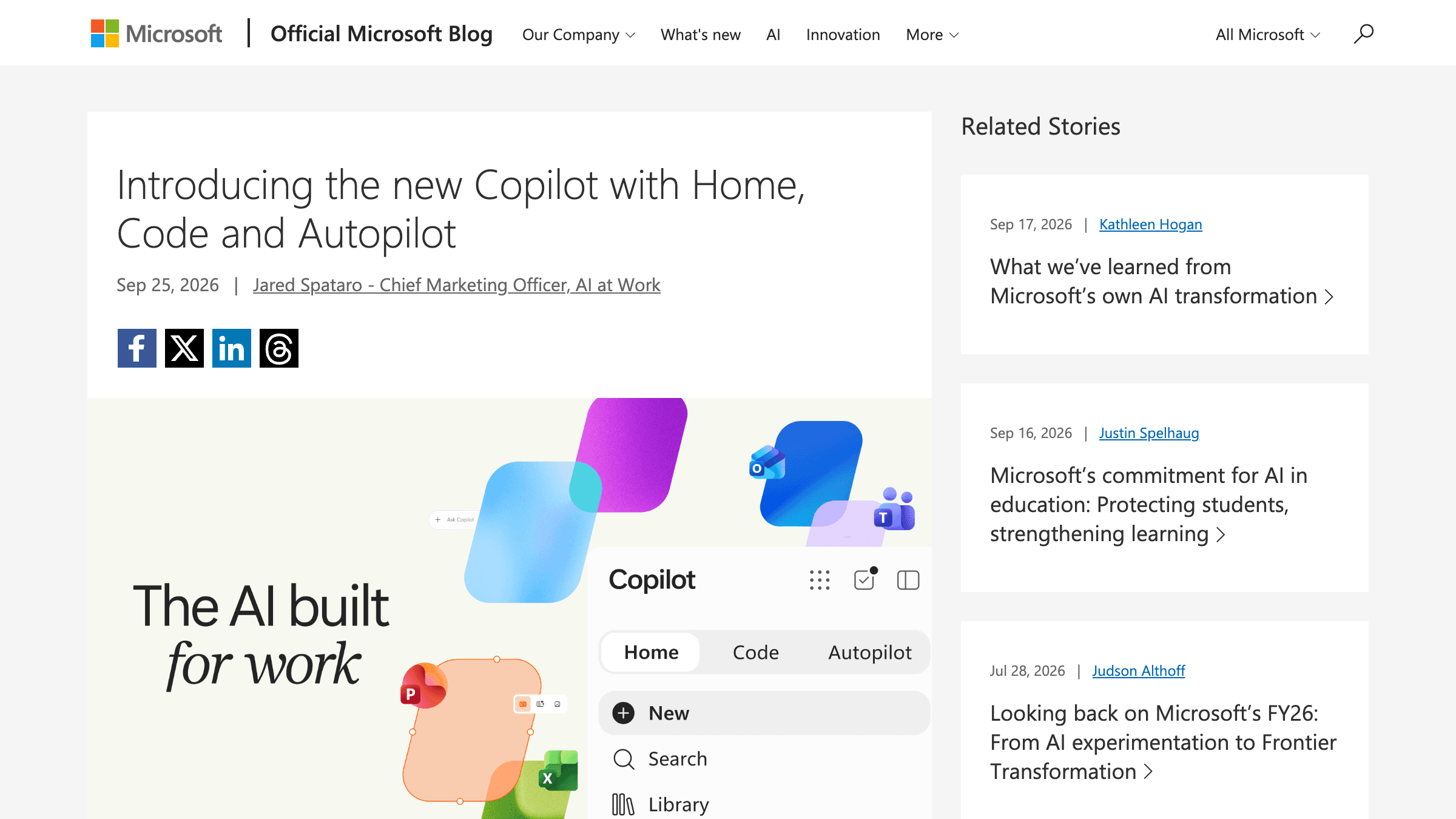
Table of Contents
Microsoft 365 Copilot costs $30 per user per month on an annual plan, as of October 2026, and it needs a qualifying Microsoft 365 plan underneath it. A business with up to 300 users can add Microsoft 365 Copilot Business instead at $21 per user per month, or $18 on a promotion that runs through December 31, 2026 (first year only). Copilot Chat on the web is free with an eligible work account, the consumer Copilot app has a free tier, and the agent features (Cowork, Code, Autopilot and custom agents) are billed on top by usage in Copilot Credits, which Microsoft prices at $0.01 each on the Copilot Studio pay as you go meter. Microsoft has not published an Autopilot credit count. Prices are from Microsoft's pricing page, checked October 17, 2026.
Two years ago Microsoft wanted you to buy a laptop with a 40 TOPS neural chip so AI could run on your own desk. On Friday it launched an agent that runs on its own computer in Microsoft's cloud, keeps working while you sleep, and is billed by the unit. That is the real Microsoft Copilot pricing story from September 25, and it's bigger than the three new tabs everyone wrote about.
The chat part of Copilot has a price. The agent part has a meter, a set of spending controls, and a published price per credit, but no published credit count for Autopilot. Here's what shipped, what it costs, and what I'd set up before a single agent gets switched on.
What does Microsoft Copilot cost in October 2026?
Prices below are in USD, as Microsoft lists them for the Americas on its pricing pages, checked October 17, 2026. They vary by market, and annual plans auto renew.
| Plan | Who it is for | Price in USD | Billing | What to know |
|---|---|---|---|---|
| Copilot Chat (work account) | Anyone on an eligible Microsoft 365 work plan | $0 | No extra cost | Web grounded chat. Agents your organization builds run on a metered basis. |
| Microsoft 365 Copilot Business | Businesses up to 300 users with a Business plan | $21 ($18 promo) | Per user per month, paid yearly. $25.20 paying monthly. | Copilot in Word, Excel, PowerPoint, Outlook and Teams, plus Researcher, Analyst and Facilitator. The $18 price runs July 1 to December 31, 2026, first year only. |
| Microsoft 365 Copilot | Business and enterprise plans | $30 | Per user per month, paid yearly | Add on. Needs a qualifying Microsoft 365 plan. |
| Microsoft 365 Business Standard with Copilot | Small teams that want one bundle | $23.50 | Per user per month, paid yearly. $28.20 paying monthly. | Bundle price as Microsoft lists it. |
| Microsoft 365 Business Premium with Copilot | Small teams that also want security | $32 | Per user per month, paid yearly. $38.40 paying monthly. | Bundle price as Microsoft lists it. |
| Copilot Studio capacity pack | Organizations publishing agents | $200 | Per pack per month | 25,000 Copilot Credits per pack, which is $0.008 per credit. |
| Copilot Studio pay as you go | Variable or early usage | $0.01 | Per credit, billed at month end through Azure | No upfront commitment. |
| Copilot app (personal) | Individuals | $0 | Free tier | Limited usage, subject to capacity. |
| Microsoft 365 Personal | One person | $9.99 | Per month, or $99.99 per year | Copilot in Word, Excel, PowerPoint and Outlook with higher usage than free. |
| Microsoft 365 Family | Up to 6 people | $12.99 | Per month, or $129.99 per year | AI features are for the subscription owner only. |
| Microsoft 365 Premium | Heavier personal use | $19.99 | Per month, or $199.99 per year | Extensive usage, plus limited usage of agentic AI. |
| Microsoft 365 Pro | Highest personal limits | $99.99 | Monthly billing only | 5 TB of shared storage and the highest usage limits. |
For a rough budget, 100 seats on annual billing come to $21,600 a year on the $18 Copilot Business promotion, $25,200 at $21, and $36,000 at the $30 Microsoft 365 Copilot price, before any agent usage. Paying monthly instead of yearly adds 20% on the plans where Microsoft lists both prices.
How do Copilot Credits and agent pricing work?
A Copilot Credit is the unit Microsoft meters agent work in. On the pay as you go meter it costs $0.01, billed in arrears at the end of the month through an Azure subscription. A prepaid Copilot Studio pack gives 25,000 credits for $200 a month, which is $0.008 each, so a pack is cheaper than pay as you go once you use more than 20,000 credits in a month. Microsoft also sells a one year prepurchase plan with discounts from 5% at 300,000 credits up to 20% at 300 million, per Microsoft's Copilot Credits licensing guidance.
Microsoft's Copilot Studio billing page lists the rates per feature: a classic answer is 1 credit ($0.01), a generative answer 2 credits ($0.02), an agent action 5 credits ($0.05), and tenant graph grounding 10 credits ($0.10). Its own example is a support agent that gives four classic answers and two generative answers per average run for 900 customers a day. That is 7,200 credits a day, or $72 a day on pay as you go and about $2,160 over 30 days. On packs, the same 216,000 credits need 9 packs, or $1,800.
The same page marks these features as no charge when an agent runs for a user who holds a Microsoft 365 Copilot license, subject to fair usage limits. So the seat price buys the chat and in app Copilot, and the credits pay for agents used by people without a seat or for the long running agent features. Cowork also runs on credits. Microsoft's guide puts building a small app in Cowork at 250 to 450 credits and a large one at 700 to 1,350 or more, and hosting a departmental app at 300 to 500 credits a month. At the Copilot Studio rate of $0.01 per credit that is $2.50 to $4.50, $7 to $13.50 and $3 to $5, though Microsoft's page lists the credits, not dollars. Microsoft calls these rough planning estimates.
How do I track Copilot cost per department?
For Cowork and Code, admins work in the Microsoft 365 admin center under Copilot, then Cost Management. A spending policy is scoped to a security group, covers the agents and services you pick, and carries a monthly limit per user plus alert thresholds. Microsoft asks for at least 2,000 credits per user per month in a policy, which is $20 at the pay as you go price. A Global or Billing administrator can also override the billing method per policy, so each department bills to its own Azure subscription or resource group, which Microsoft describes as cost accountability through the same Azure billing constructs organizations use today. Usage reports break spend down by user, group, workload, policy and payment method.
Copilot Studio agents are tracked separately. In the Power Platform admin center you link each environment to an Azure subscription through a billing policy, and prepaid capacity can be allocated per environment. Microsoft's FinOps post says Copilot Studio support in Agent 365 cost management is planned to start in October. Copilot Chat agents on pay as you go use billing policies in the Microsoft 365 admin center, up to 50 per tenant, and a budget there only sends email notifications. It does not stop spend. If a user moves between groups mid month, their consumption carries over, so moving departments does not reset an allowance.
Is Copilot expensive?
The seat is the predictable part. At $30 it is a fixed line, and the agent features sit outside it and scale with use. A spending policy limit at Microsoft's 2,000 credit minimum per user caps Cowork and Code spend at $20 a month per user on top of the seat, so that part of the bill tops out at $38 per user per month on the $18 Copilot Business promotion, $41 at $21, and $50 at $30. For 50 users, that Cowork and Code ceiling alone is $1,000 a month. Copilot Studio agents and Copilot Chat pay as you go sit outside that policy. I'd write that cap before switching anything on, as the list below says.
What did Microsoft actually launch on September 25?
A single Copilot app with three tabs: Home, Code and Autopilot. Home merges the old Chat and Cowork modes into one box, Code lets anyone build small internal apps, and Autopilot is the renamed Scout agent, now running in the cloud. Home and Code go to Microsoft's Frontier early access program first, and Microsoft said Autopilot would expand to private preview at the end of September, which I could not confirm has happened.
The details matter more than the tabs. Microsoft's launch post, written by Jared Spataro, describes Cowork as the mode where "you define the task and it runs end-to-end to return a completed result." It also adds Office in Copilot, so a request can produce a real Word document or Excel workbook next to the conversation instead of a paste job.
It's also one app for both audiences. The interface is identical whether you sign in with a personal or a work account; a work account simply reaches company data through Microsoft's Work IQ APIs. Jacob Andreou, the Copilot executive VP, said in recorded launch remarks that about 90 million people pay for Microsoft 365 themselves, as ZDNET reported. That's Microsoft's argument for not shipping consumers a cut down version.
Code is the surprise. It's built on the same technology as GitHub Copilot, runs in a sandbox, and hosts what you make inside your own Microsoft 365 tenant. The Verge's Tom Warren called it "not one you'd typically associate with an app designed for knowledge workers", which is fair. Microsoft's ambition isn't small either. Spataro's line, quoted by The Verge: "Just as Office defined work for the PC era, the new Copilot is built to define it for the AI era."
And Autopilot is the piece I'd watch. Microsoft calls it "a persistent, proactive and personal agent that keeps working even when you're not." It watches channels, follows up on threads and runs recurring work "without waiting for a prompt."
How does Microsoft Copilot pricing work now?
There are now two billing models inside one app. A user subscription license covers chat, Copilot inside the Office apps and model selection at a fixed monthly price. Anything that behaves like an agent (Cowork, Code, Autopilot and the long running agentic features) moves to usage based billing instead.
Ed Bott at ZDNET laid this split out most clearly, and the ZDNET piece is the one to read if you only read one. Here's the split, rebuilt from ZDNET, The Verge and Microsoft's own FinOps post:
| Capability | How it's billed | Where that comes from |
|---|---|---|
| Chat with your work data | Fixed monthly license | ZDNET, The Verge |
| Copilot Chat on the web | No extra cost with an eligible Microsoft 365 plan | Microsoft pricing page |
| Copilot in Word, Excel, PowerPoint, Outlook and Teams | Fixed monthly license | The Verge |
| Model selection | Fixed monthly license | ZDNET |
| Cowork | Usage based, in Copilot Credits (Copilot Studio pay as you go is $0.01 each) | ZDNET, The Verge, Microsoft licensing guidance |
| Code | Usage based | ZDNET, The Verge |
| Autopilot | Usage based | ZDNET, The Verge |
| Copilot Managed Runtime (hosting for built apps) | Tracked in Agent 365 cost management | Microsoft FinOps post |
| Copilot Studio agents | Billed in Copilot Credits. Agent 365 cost management support planned from October | Microsoft FinOps post, Copilot Studio pricing page |
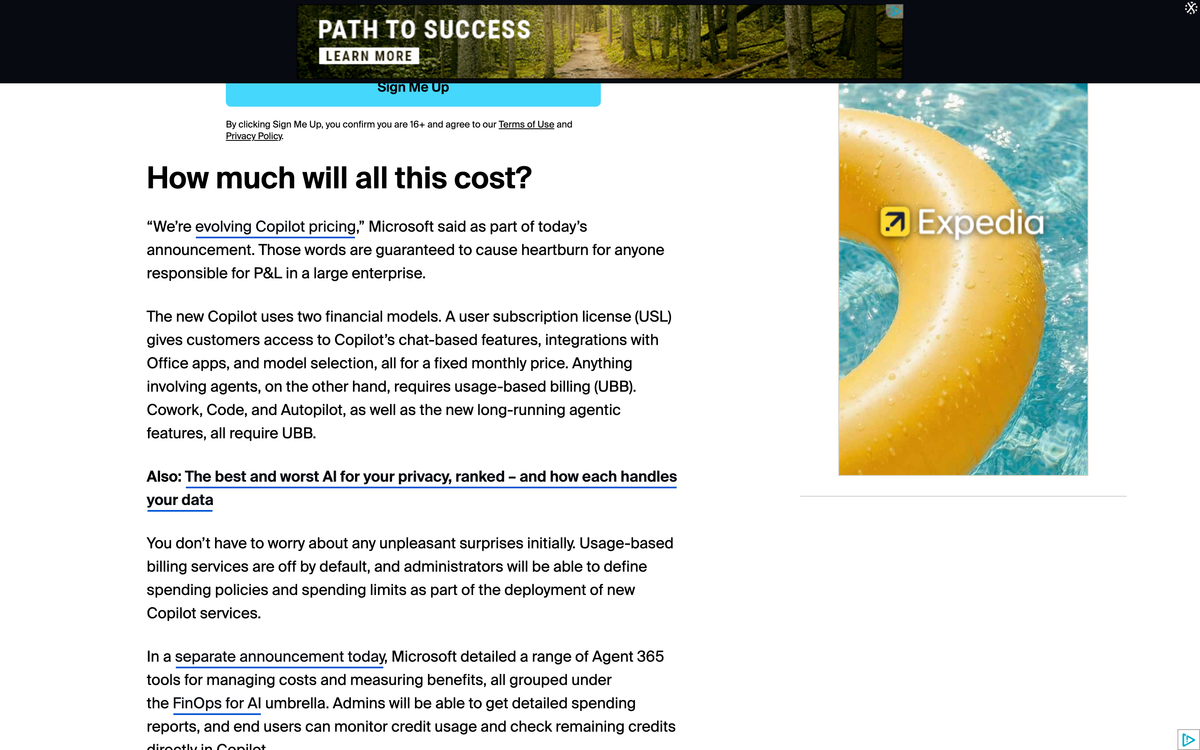
The Verge adds one detail ZDNET didn't: usage of newer models like Astra and Fable also lands on the meter. So the model you pick changes the bill too, not just the mode.
What do the Copilot agents cost per credit?
Microsoft published the controls first and the unit price somewhere else. Its FinOps for AI post lists spending policies, caps and reports in detail, and none of the three launch posts states a price per credit. The price is in Microsoft's licensing guidance instead: $0.01 per Copilot Credit on the pay as you go meter, with Cowork and Work IQ APIs on credits since they became generally available in June 2026. What I couldn't find, as of October 17, 2026, is how many credits Autopilot or Code uses for a finished task. The company's own framing was "We're evolving Copilot pricing."
Bott's verdict on the big questions (what this costs and what it pays back) was blunt: "no one knows." For Autopilot I agree, and I'd go further. When a vendor ships a spending dashboard and a Graph API for spend policies before it ships a credits per task table for its newest agent, it's telling you where it expects the arguments to happen. Not in procurement. In the monthly bill review.
That's not automatically sinister. Agent cost genuinely is hard to quote, because it depends on how long the task runs and which model does the work. I priced a real agent loop against two frontier models when OpenAI cut GPT-6 Sol's price, and the cheaper per token model wasn't the cheaper one per finished task. Per token prices already mislead. A per credit price with no published credit count for a finished Autopilot task tells you even less.
What happens when Copilot picks the mode for you?
Right now you choose Chat or Cowork. Microsoft says that's temporary: "simply state what you need to accomplish, and Copilot will route the work to Chat, Cowork or Code." Once that ships, the router is choosing between the flat license and the meter on every request, and the person typing won't see which one they got.
None of the launch coverage I read connected those two facts, and it's the part I'd flag to any finance lead. Chat sits on the fixed license. Cowork and Code sit on usage billing. A router that decides whether a request counts as chat or Cowork is, in effect, deciding whether that request costs extra. Microsoft hasn't said the router will surface that choice to the user.
Anthropic made the same merge on September 16, and I argued at the time that the old Cowork tab was quietly acting as a permission prompt. Microsoft's version has a second consequence. The tab was also the price tag.
Model choice works the same way. The Verge reports Copilot uses an automatic model picker, and Microsoft's FinOps post says admins can now restrict model families by group: "This also impacts which models Auto can select in Cowork." That's a real control, and it's the right one. It's also a default Microsoft makes for you until someone changes it. I've written about why routing defaults are worth real money, and this is the same lever inside an office suite.
Why does an agent that works while you sleep change the cost math?
Because a chat bill tracks what people ask, and an always on agent's bill tracks what it watches. Autopilot follows Teams channels, chases threads and reruns recurring work on its own schedule. Its usage grows with the activity around it, not with how often its owner opens the app.
Microsoft says Autopilot "lives in your tenant with its own identity, memory, computer and workspace." Andreou, quoted by ZDNET, called autonomous agents like this "absolutely terrifying to an IT admin or somebody who's trying to maintain a business posture." Microsoft's answer is to treat the agent like an employee, with permissions and an audit trail.
Here's the open question I'd put to a Microsoft account team this week. The FinOps controls describe caps at the tenant, group and user level. Autopilot has its own identity. So whose cap does it spend against: the person who created it, or its own? None of the launch material I read answers that. Microsoft's Learn page on spending policies says policies cover users and resource accounts through security groups, but it doesn't say how Autopilot's identity is treated. It matters, because a per user cap that an agent can sidestep by having a separate identity isn't much of a cap. I made a related argument about why an agent needs its own nameable identity. Microsoft has given it one. Now the billing has to follow it.
Are Microsoft's FinOps for AI controls enough?
They're better than most vendors ship on day one. Usage billing is off by default, so nobody gets an agent until an admin writes a spend policy. Caps work at the tenant, group and user level with threshold alerts, costs can be charged to departmental Azure subscriptions, and end users can see their own remaining credits inside Copilot.
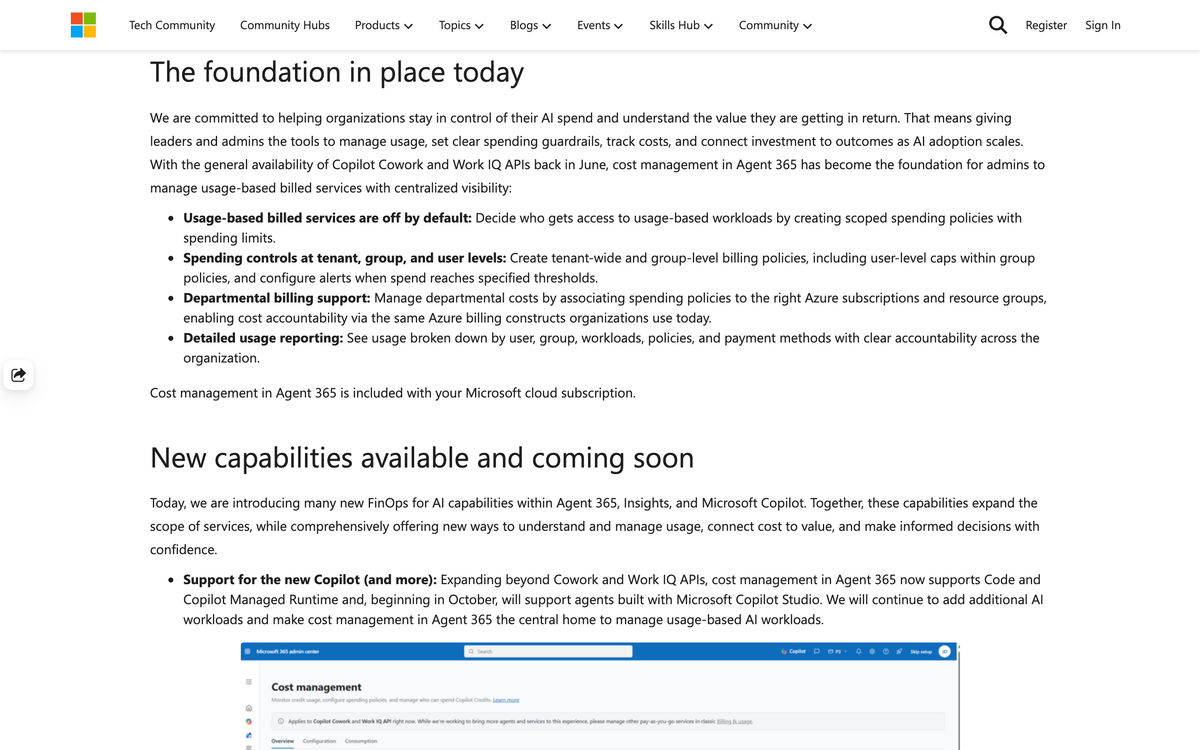
Two more are genuinely useful. Spend policies can be managed through the Microsoft Graph API, so they can live in the same tooling as the rest of your finance automation. And credit requests from users can be redirected to a custom URL, which means they can land in an approval flow you already run.
Microsoft does now state what happens to a person at the cap. Per its spending policy documentation, a user who hits the limit loses access to the agents and services in that policy until credits reset on the first of the month, and can request more. On Copilot Studio prepaid capacity, enforcement starts at 125% of what you bought: custom agents are disabled, a conversation already in progress isn't interrupted, and new invocations are rejected. What's still missing is the behavior for a long running agent halfway through a supplier review. Does it pause and hold its state? Stop and leave a half finished job? I'd want that answered before Autopilot goes anywhere near a real process.
I built my own version of this problem at a much smaller scale, and I learned the hard way that the cap is not the design decision. The failure mode is. My backlink tracker calls a paid scraping API on a schedule. It has a $15 a month cap, a $2 a day circuit breaker and a kill file on disk, and it fails closed if it can't read its own spend ledger. It runs at about $5 a month. I wrote those numbers up when Rippling audited its own AI bill and found roughly 10 to 15% of employees drove about 60% of the total, with token spend compounding at 80% month over month. That concentration is why per user caps matter more than the tenant total. In my experience a tenant cap only tells you the month went wrong after it already has.
Why did Microsoft drop the Copilot+ PC label the same week?
Microsoft's new Surface laptops, announced the same week, don't carry Copilot+ PC branding even though they meet its bar. Surface VP Brett Ostrum told Windows Central they "are not called Copilot+ PCs." Ars Technica, which covered the change, lists several possible reasons, including Recall's security baggage and Nvidia's upcoming RTX Spark chips.
I won't claim the two announcements are connected by design. But the contrast is worth sitting with. Copilot+ PCs needed an NPU rated at 40 TOPS or better, and the new Surface models ship with an 80 TOPS chip, according to Ars Technica. Satya Nadella once said Copilot+ PCs made up 15 percent of premium laptop sales in the United States over a holiday season. That was a pitch for AI you buy once and run locally.
This week's pitch runs the other way. The agent gets its own cloud computer. ZDNET draws the sharpest contrast with Anthropic's Claude Code, which it describes as running locally in containers or virtual machines, while Microsoft's Code runs in a sandbox hosted inside the tenant. Anthropic's own product page puts it plainly: Claude Code "runs locally in your terminal and talks directly to model APIs." For regulated companies that's a real advantage, because the data doesn't leave the managed cloud. It's also compute you pay for every time it runs, instead of once at purchase.
What should IT and finance do before switching agents on?
Write the spend policy first, because under this model the policy is the rollout. Then cap per user and per group rather than just per tenant, and decide in advance what an agent does when it hits a limit. Everything else is tuning.
Here's the order I'd do it in, as someone who has shipped agents that spend money unattended:
- Get the credit math in writing. The credit price is public at $0.01 on pay as you go. Ask the account team for credits per task for Cowork, Code and Autopilot, and how a credit converts to model usage. If they can't give it, run the pilot with caps low enough that not knowing is survivable.
- Put every Autopilot instance in its own group with its own cap. Don't let an agent with a separate identity spend against a human's allowance by accident, and don't assume the reverse either until Microsoft documents it.
- Restrict Auto's model families for Cowork. Microsoft's model profiles, which need at least two models each, currently apply to Cowork only. Start with the cheaper families and widen access per group once you've seen real usage.
- Decide the failure behavior. For anything a long running agent touches, write down whether hitting the cap should pause the job or stop it, and test that it actually does.
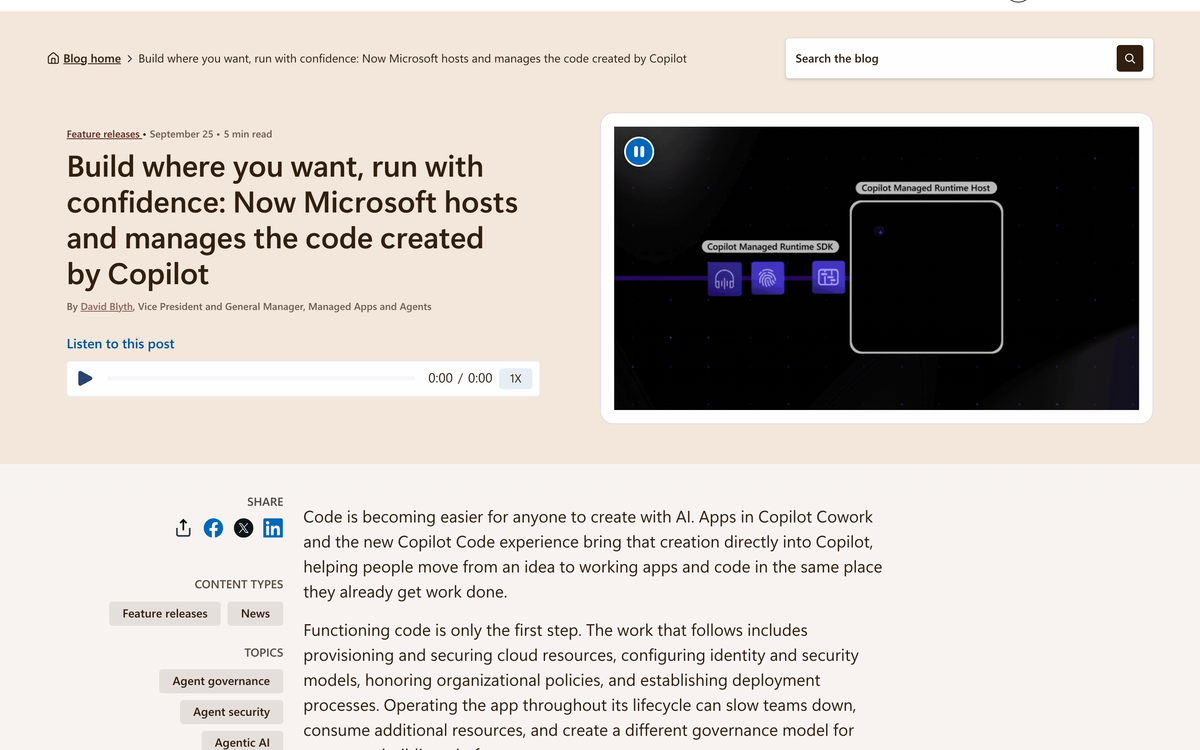
- Watch the app inventory, not just the bill. Apps hosted through Copilot Managed Runtime, whether built in Code, Cowork or Copilot Studio, show up in one inventory in the Microsoft 365 admin center, and Microsoft says even an app made with Lovable can run inside the tenant through its SDK. Apps outlive their builders. Review them quarterly.
If the account team can't tell you what a credit buys, the cap you set is your price. Set it like one.
If you're earlier than that and still working out which processes are worth handing to an agent at all, the AI readiness assessment is a quicker place to start than a Frontier pilot. To compare a Copilot seat plus credits against an agent built for one process, the AI agent cost calculator and my post on ChatGPT for business versus custom AI agents put numbers on both sides. For the engineering side of running agents with real budgets, I keep the long version in my guide to agents in production.
Frequently asked questions
Is Microsoft Copilot chat still a flat monthly price?
Mostly. Chat with your work data, Copilot inside Word, Excel, PowerPoint, Outlook and Teams, and model selection sit under the user subscription license at a fixed monthly price, $30 per user per month for Microsoft 365 Copilot as of October 2026. Copilot Chat on the web is free with an eligible Microsoft 365 work plan. Usage billing applies to Cowork, Code, Autopilot and long running agentic features.
How much does Microsoft 365 Copilot cost per month?
$30 per user per month on an annual plan. Microsoft 365 Copilot Business, for organizations up to 300 users, is $21 per user per month paid yearly, $18 on the promotion running through December 31, 2026, or $25.20 paying monthly. Checked October 17, 2026.
Is Copilot free?
Partly. Copilot Chat is free with an eligible Microsoft 365 work plan, and the personal Copilot app has a free tier with limited usage. Copilot inside Word, Excel and PowerPoint needs a Microsoft 365 Copilot license for work, or a Microsoft 365 Personal ($9.99 a month), Family ($12.99) or Premium ($19.99) subscription for personal use.
How much does Copilot Studio cost?
$200 per month for a pack of 25,000 Copilot Credits, or $0.01 per credit on the pay as you go meter, billed through an Azure subscription. Agents used by people who hold a Microsoft 365 Copilot license are no charge for most features.
How much does Copilot Autopilot cost?
Microsoft hasn't published how many credits Autopilot uses. Autopilot is billed by usage, and the one public credit price is $0.01 per Copilot Credit on the pay as you go meter that covers Cowork and Copilot Studio. I haven't seen Microsoft confirm that Autopilot uses the same meter. Microsoft said Autopilot would expand to private preview at the end of September, so expect pricing detail to arrive through account teams first.
Will my users get agent features automatically?
No. Microsoft ships usage billing switched off. An admin has to create a spending policy that grants access before anyone can use Cowork, Code or Autopilot on the usage meter.
What is Copilot Code?
Code is a tab in the new Copilot app that builds small apps, trackers, dashboards and automations from a plain language description. It runs on the same technology as GitHub Copilot, works in a sandbox and hosts what it builds inside your Microsoft 365 tenant through Copilot Managed Runtime.
What was Scout, and how is Autopilot different?
Scout was the personal AI assistant Microsoft showed at Build, first as a desktop app. Autopilot is its renamed cloud version. It has its own identity, memory and computer in your tenant, so it keeps running when your laptop is closed.
Can admins control which AI models Copilot uses?
Partly. Microsoft's FinOps for AI update lets admins restrict model family access by group, which also limits which models Copilot's automatic picker can choose in Cowork. It's rolling out for Cowork first, with other workloads planned.
Sources: Official Microsoft Blog, Jared Spataro (Sep 25, 2026) · Microsoft Tech Community FinOps for AI Blog, Ryan Jones (Sep 25, 2026) · Microsoft Copilot Blog, David Blyth (Sep 25, 2026) · ZDNET, Ed Bott (Sep 25, 2026) · The Verge, Tom Warren (Sep 25, 2026) · Ars Technica, Scharon Harding (Sep 25, 2026) · Microsoft Copilot plans and pricing (checked Oct 17, 2026) · Microsoft Copilot Studio pricing (checked Oct 17, 2026) · Microsoft Copilot Credits licensing guidance (checked Oct 17, 2026).
Last updated
October 16, 2026
Category
Trends & Insights
Jahanzaib Ahmed
AI Systems Engineer & Founder
AI Systems Engineer with 126 production systems shipped. I run AgenticMode AI (AI agents, RAG systems, voice AI) and ECOM PANDA (ecommerce agency). I build AI that works in the real world for businesses across home services, healthcare, ecommerce, SaaS, and real estate.
Want this built for your business? See The AI Audit, or browse the free tools and guides.
Related articles

Microsoft Decision-1 Matches Jev on Price and API Shape
Microsoft's new decision model charges exactly what Jev charges and accepts nearly the same request. Microsoft times it at 85 ms; the first independent run measured 459 ms. Here is what a port changes.
NewsAI AgentsMicrosoft
Microsoft Wrote Down What Its Models Must Never Do. No Microsoft Model Is Trained on It Yet.
A breakdown of Microsoft's draft Humanist AI Code of Conduct, why the human control rules read like agent security controls but are model behavior promises, and what an operator still has to build.
NewsAI AgentsAI Agents
GPT-6 Sol Costs Half of Opus 5.5 Per Token. On an Agent Loop, It Doesn't.
OpenAI halved API prices for GPT-6 Sol and Luna ninety minutes after Anthropic shipped Opus 5.5. I priced a real agent loop on both, and checked whose benchmark table was already stale.
NewsTrends & InsightsLLM Pricing