How to Use an n8n Workflow Template Without Inheriting Someone Else's Setup
Pull any n8n workflow template from the public library, audit its JSON for leftover IDs, emails and pinned data, import and test it on your own account, then share a clean template of your own.

Table of Contents
An n8n workflow template saves you an afternoon of wiring nodes together, but it arrives with someone else's account baked into it: their label IDs, their sample data, sometimes their email address. This guide takes about 30 minutes. You'll pull a template from n8n's public library, run a small audit script that lists every value you need to replace, import it, test it on your own data and publish it. The last step turns one of your own workflows into a clean template other people can use. The library is free, the script needs only Node, and it all works on n8n Cloud or a self hosted instance.
Before you start
- An n8n instance you can edit, Cloud or self hosted. I checked everything here against the docs for n8n 2.43, released October 6, 2026.
- Node.js 18 or later on your machine for the two scripts. They use the built in
fetchand no packages. - Logins for the apps the template touches (Gmail, Google Sheets, Slack, an LLM provider). You'll create your own credentials for each.
- Basic comfort with the n8n canvas: opening a node, picking a credential, running a test execution.
If you've never built anything in n8n, read my n8n AI agent workflow architecture guide first. It explains the node types you'll meet in most templates.
Step 1: Find an n8n workflow template worth starting from
The n8n template library lists 13,300 workflows today, filterable by category (AI, Sales, IT Ops, Marketing, Document Ops, Support) and by app. Inside the editor, the Templates button opens the same library, as the templates docs describe.
There are too many to browse. A search for Gmail alone returns over 3,000. So I filter hard before I open anything:
- Read the trigger first. A template triggered by a webhook needs a URL the sending service can reach. One triggered by a schedule or an app poll doesn't. Pick the one that fits how your data actually arrives.
- Check the Last update line on the template page. AI nodes change often, and a year old agent template may name models your provider has retired.
- Count the apps. Every extra app is another credential to create and another account to grant access to. When two templates do the same job, take the one with fewer.
- Prefer verified creators, listed on the n8n creators page, when you have a choice.
Note the template's number. It's in the page URL, for example n8n.io/workflows/3912. You need it for the next step.
Step 2: Read the template JSON before you import it
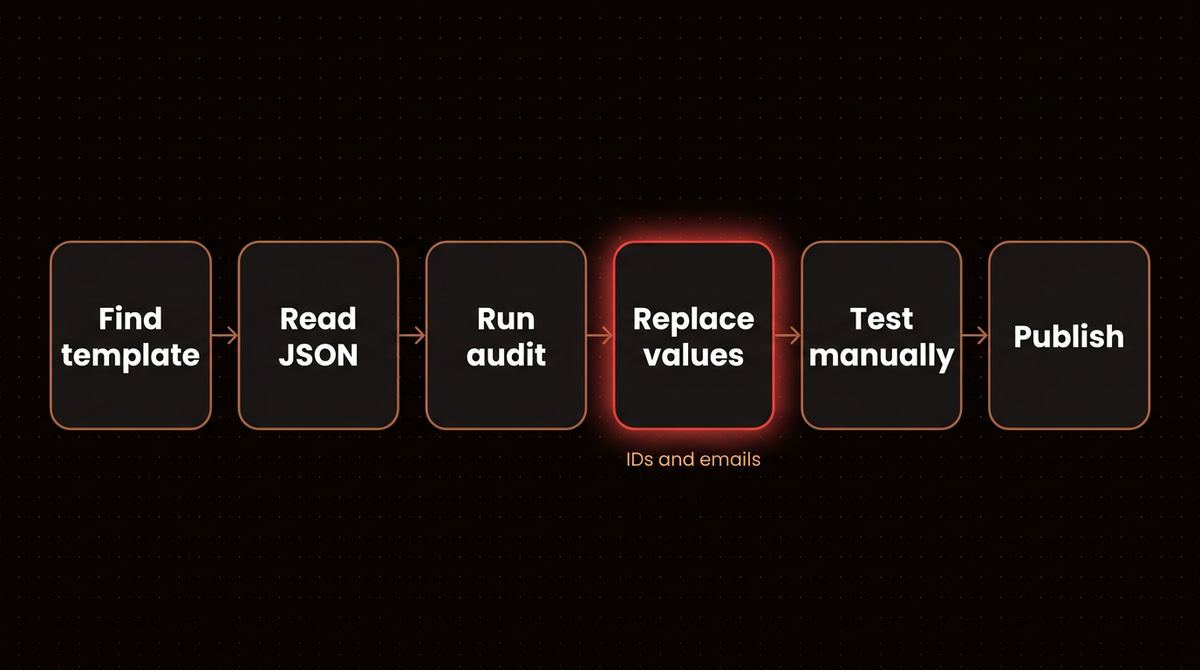
Every n8n workflow is a JSON file: a list of nodes, the connections between them, optional pinned sample data and a little metadata. The template library serves that file from a public API, the same one the editor reads from (its base URL is the default value of N8N_TEMPLATES_HOST in the deployment variables). Open this in a browser, swapping in your template number:
https://api.n8n.io/workflows/templates/3912You'll see an object with id, name and a workflow key holding nodes, connections, pinData and meta. That outer wrapper matters: n8n imports the inner workflow, not the wrapper, so don't save this page and try to import it. Reading it by eye is slow. The script in the next step reads it for you and saves an importable copy.
Step 3: Run an audit script on the template
Save this as audit-template.mjs. Give it a template number and it downloads the template, saves the workflow as template-<id>.json and lists every place you'll need to touch. Give it a JSON file path instead and it audits that file, which you'll use again in step 8.
// audit-template.mjs: list what to change in an n8n template before you publish it.
// Usage: node audit-template.mjs <template id | workflow.json>   (Node 18 or later, no packages)
import { readFileSync, writeFileSync } from 'node:fs';

const arg = process.argv[2];
if (!arg) { console.error('Usage: node audit-template.mjs <template id | workflow.json>'); process.exit(1); }

let name, workflow;
if (/^\d+$/.test(arg)) {
  const res = await fetch(`https://api.n8n.io/workflows/templates/${arg}`);
  if (!res.ok) throw new Error(`Template ${arg}: HTTP ${res.status}`);
  ({ name, workflow } = await res.json());
  // The API wraps the workflow; save just the workflow so you can import the file
  writeFileSync(`template-${arg}.json`, JSON.stringify({ name, ...workflow }, null, 2));
} else {
  const raw = JSON.parse(readFileSync(arg, 'utf8'));
  workflow = Array.isArray(raw) ? raw[0] : raw;   // CLI exports can be an array
  name = workflow.name;
}

const out = { name, nodes: 0, triggers: [], credentials: [], models: [], code: [], http: [], pinned: [], fixedValues: [], emails: new Set() };

for (const node of workflow.nodes) {
  if (node.type === 'n8n-nodes-base.stickyNote') continue;
  out.nodes++;
  const p = node.parameters ?? {};
  if (/(Trigger|\.webhook)$/.test(node.type)) out.triggers.push(node.name);
  for (const [type, cred] of Object.entries(node.credentials ?? {})) out.credentials.push(`${node.name}: ${type} (named "${cred.name}")`);
  const model = p.model ?? p.modelName ?? p.modelId;
  if (model) out.models.push(`${node.name}: ${model.cachedResultName ?? model.value ?? model}`);
  if (/\.code$/.test(node.type)) out.code.push(node.name);
  if (/httpRequest/.test(node.type)) out.http.push(`${node.name}: ${p.url}`);

  // Values picked from a list in the author's account: sheets, channels, calendars, labels
  const walk = (obj, path) => {
    for (const [k, v] of Object.entries(obj ?? {})) {
      if (v && typeof v === 'object' && v.__rl && v.mode !== 'expression' && v.value && v.value !== '=') {
        out.fixedValues.push(`${node.name} > ${path}${k} = ${v.cachedResultName ?? v.value}`);
      } else if (Array.isArray(v) && v.length && v.every((x) => typeof x === 'string')) {
        out.fixedValues.push(`${node.name} > ${path}${k} = ${v.join(', ')}`);
      } else if (v && typeof v === 'object' && k !== 'conditions') {
        walk(v, `${path}${k}.`);
      }
    }
  };
  walk(p, '');

  // Email addresses typed into parameters or expressions (example.com ones are placeholders)
  for (const email of JSON.stringify(p).match(/[\w.+-]+@[\w-]+\.[\w.]+/g) ?? []) out.emails.add(`${node.name}: ${email}`);
}
out.pinned = Object.keys(workflow.pinData ?? {});
out.emails = [...out.emails];
console.log(JSON.stringify(out, null, 2));
Run it with node audit-template.mjs 3912. I ran it on October 15, 2026 against that template, a RetellAI phone agent that qualifies leads from Google Sheets. Here's the output with the seven credential entries cut for space (the code list was empty):
{
  "name": "Automate lead qualification with RetellAI Phone Agent, OpenAI GPT & Google Sheet",
  "nodes": 14,
  "triggers": [
    "Detect new lead in Google Sheets",
    "Receive inbound call from RetellAI (webhook)",
    "Receive post-call data from RetellAI (webhook)"
  ],
  "models": [ "Generate call summary with OpenAI: GPT-4.1" ],
  "http": [ "Call new lead using RetellAI: https://api.retellai.com/v2/create-phone-call" ],
  "pinned": [],
  "fixedValues": [
    "Update lead record in Google Sheets > columns.matchingColumns = UUID",
    "Generate call summary with OpenAI > modelId = GPT-4.1"
  ],
  "emails": [
    "Send call summary email: user@example.com",
    "Send confirmation email to lead: user@example.com"
  ]
}
That one is fairly clean. Three triggers means three entry points to test, two of them webhooks RetellAI must be able to reach. Your sheet needs a column called UUID. Both email nodes still point at a placeholder address, and the HTTP node that calls RetellAI sends an Authorization header reading Bearer YOUR_TOKEN_HERE. Replace that with a proper credential; n8n's template guidelines warn against storing keys directly in the HTTP node. And the model is fixed at GPT-4.1, which you should check against your own cost and quality needs instead of inheriting it.
The second template I audited, number 15369, a Gmail triage workflow built on Gemini, was messier. The script found six Gmail label IDs that only exist in the author's mailbox, a calendar timezone fixed at Europe/Paris, a real email address typed into an expression in the node that writes drafts, ten credential references named after a person, and pinned data on the trigger holding a real inbound email. None of that is malicious. It's what happens when someone exports the workflow they actually run. But imported as is, the label step fails and your manual tests replay a stranger's email.
Warning: n8n's own export docs warn that exported JSON includes credential names and that HTTP Request nodes imported from cURL may carry authentication headers. If the audit's http list isn't empty, open those nodes and read their headers before you run anything.
Step 4: Import the template into n8n
The quickest route is Use for free on the template page. If you'd rather import the file the script saved, open a blank workflow, select the three dot Workflow menu in the canvas header and choose Import from File. The saved file uses the same top level keys (name, nodes, connections, meta, pinData) as the sample workflow n8n's import docs link to. You can also copy the file's contents and paste them straight onto the canvas with Ctrl+V (Cmd+V on a Mac).
On a self hosted instance, templates only show while N8N_TEMPLATES_ENABLED is true, which is the default. If you move workflows between instances from the command line, n8n import:workflow --input=template-3912.json works too, and the CLI docs note that it deactivates every imported workflow by default. That's the safe behavior you want here.
When it worked, you'll see the full canvas with its sticky notes, and most app nodes will show a warning icon because they have no credential yet.
Step 5: Replace credentials and every account specific value
Work down the audit output. The canvas hides values inside collapsed options, and the list doesn't.
- Credentials. Open each node in the
credentialslist and pick or create your own credential. The credential name in the template points at the author's account and won't exist on your instance. - Fixed values. For each
fixedValuesline, open the node and reselect the sheet, channel, calendar or label from your own account. A raw list of IDs, like those six Gmail labels, has to be cleared and rebuilt with your own labels. - Emails. Replace every address the script printed. Example.com addresses are placeholders the author left for you; anything else is probably theirs. Pay special attention to addresses inside expressions, such as a filter that drops the author's address from a CC list. Nothing errors when you miss one of those.
- Models. Confirm the model in each AI node is one you want to pay for. Template authors pick whatever they had on hand.
- Code nodes. Read every node in the
codelist line by line. That's where signatures, hardcoded business rules and outbound calls to fixed URLs hide.
Better still, pull every value a user must set into one Edit Fields (Set) node at the start of the workflow and reference it everywhere else. n8n's own template guidelines recommend the same.
Step 6: Clear pinned data and test with your own data
If the audit's pinned list has entries, the template shipped with saved sample output. Per the pin and mock data docs, pinned data is a development feature and is never used by production executions. So it won't break the live workflow, but it will make your manual tests misleading: the trigger replays the author's sample instead of fetching yours. Open the pinned node and unpin it.
Then run a manual execution with one real record and click through each node's output. Webhook triggers need one extra step. n8n gives every Webhook node a Test URL and a Production URL; while testing, select Listen for test event and send your request to the test URL, which stays registered for 120 seconds, per the Webhook node docs. A self hosted instance on localhost can't receive calls from a service like RetellAI unless you run n8n in tunnel mode or behind a public URL.
For a workflow with several triggers, test each entry point separately. If it branches with a Switch or If node, push one record down each branch before you trust it. A working test shows green checks on every node in the path, with output that matches your account.
Step 7: Publish it and watch the first real runs
In n8n 2.x, edits save automatically as drafts, and nothing runs in production until you select Publish. Publishing switches webhook triggers to their production URLs, starts schedules and turns on app event triggers, as the save and publish docs explain. Remember to give any external service the production webhook URL, not the test one.
For the first day, check the Executions list after each run. Template bugs tend to surface on data the author never saw, like an empty field or a hand typed sheet row.
If the workflow sends messages or moves money, put a human approval step in front of the final action until you trust it, even when the template doesn't have one. My agentic email setup guide shows that pattern with drafts instead of sends. If the template grows past 20 or so nodes, split the repeated parts out the way I describe in how to build an n8n sub workflow.
Step 8: Turn your own workflow into a template
Once you've built something that works, the same audit applies in reverse. Your export carries your credential names, your IDs, your pinned data and your instance ID. To prepare one for sharing:
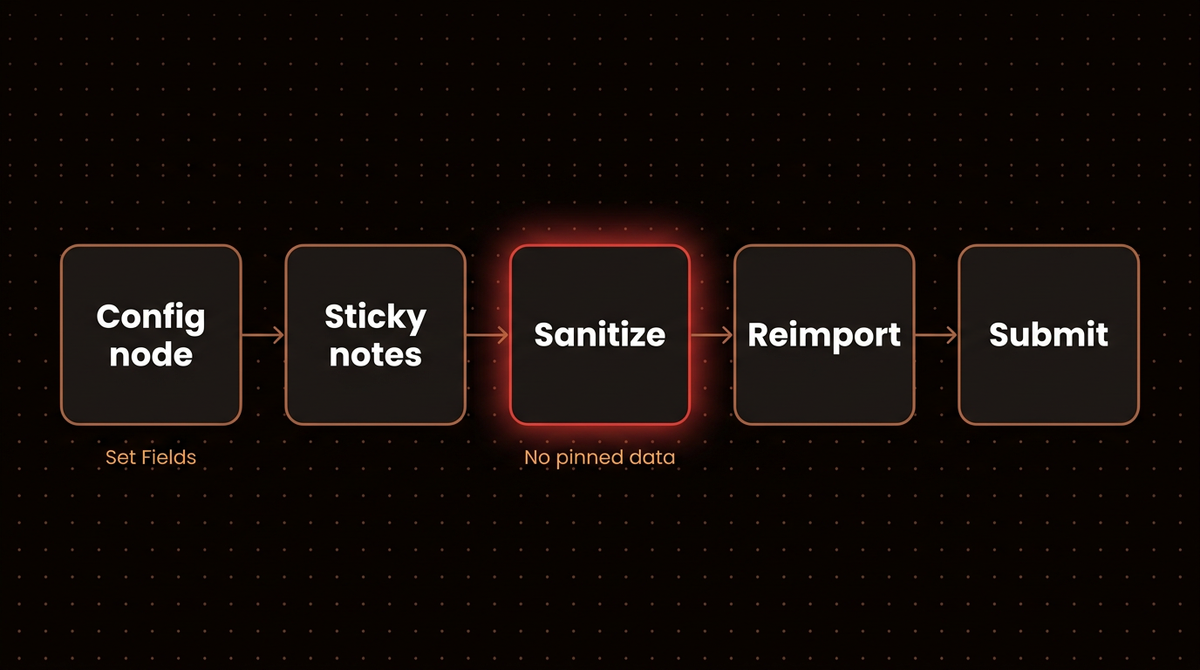
- Add a config node. Move every value a user must set into one Edit Fields (Set) node near the trigger.
- Rename every node to say what it does. "Check if phone number exists in Google Sheets" beats "Google Sheets2".
- Add sticky notes. n8n's template submission guidelines make them mandatory: one sticky, preferably yellow, explaining the whole template, plus neutral or white ones that outline individual steps. Sticky notes take Markdown, per the sticky note docs.
- Download the JSON from the Workflow menu with Download, or export by ID with
n8n export:workflow --id=<ID> --output=export.json. Either way, call the fileexport.json. - Sanitize it with the script below.
- Audit the cleaned file with
node audit-template.mjs template.json, then import it into a fresh workflow and run it once. If the audit still prints your email or a sheet name, you missed one. If the workflow has a Webhook trigger, unpublish your original before testing the copy on the same instance, or test on a second instance, so the two don't compete for the same path.
Save this as sanitize-template.mjs:
// sanitize-template.mjs: clean an exported n8n workflow before you share it.
// Usage: node sanitize-template.mjs export.json > template.json
import { readFileSync } from 'node:fs';

if (!process.argv[2]) { console.error('Usage: node sanitize-template.mjs export.json > template.json'); process.exit(1); }
const raw = JSON.parse(readFileSync(process.argv[2], 'utf8'));
const wf = Array.isArray(raw) ? raw[0] : raw;   // CLI exports can be an array
const warnings = [];

delete wf.pinData;                       // sample executions often hold real customer data
delete wf.id;                            // instance specific
if (wf.meta) delete wf.meta.instanceId;

for (const node of wf.nodes) {
  // Keep the credential type so importers know what to connect, drop the name you gave it
  for (const cred of Object.values(node.credentials ?? {})) {
    cred.id = '';
    cred.name = 'Replace me';
  }
  // Sheets, channels, calendars and labels picked from your own account
  const walk = (obj) => {
    for (const v of Object.values(obj ?? {})) {
      if (v && typeof v === 'object' && v.__rl && v.mode !== 'expression' && v.value && v.value !== '=') {
        warnings.push(`${node.name}: fixed value from your account: ${v.cachedResultName ?? v.value}`);
      } else if (Array.isArray(v) && v.length && v.every((x) => typeof x === 'string')) {
        warnings.push(`${node.name}: fixed list: ${v.join(', ')}`);
      } else if (v && typeof v === 'object') walk(v);
    }
  };
  walk(node.parameters);
  if (/\.webhook$/.test(node.type)) warnings.push(`${node.name}: webhook path ${node.parameters?.path}, unpublish your original before testing this copy on the same instance`);
  const text = JSON.stringify(node.parameters ?? {});
  if (/authorization|x-api-key|bearer /i.test(text)) warnings.push(`${node.name}: possible auth header or key in parameters`);
  for (const email of new Set(text.match(/[\w.+-]+@[\w-]+\.[\w.]+/g) ?? [])) {
    if (!email.endsWith('@example.com')) warnings.push(`${node.name}: real looking email ${email}`);
  }
}

console.log(JSON.stringify(wf, null, 2));
for (const w of warnings) console.error('WARN', w);
It writes the cleaned workflow to stdout and warnings to stderr, so node sanitize-template.mjs export.json > template.json leaves the warnings on your screen. I tested it on template 15369, wrapped in an array the way a CLI export can be. It removed the pinned email and the instance ID, blanked all ten credential names, and warned about the real address in the draft node, the six label IDs, the INBOX filter, the Europe/Paris timezone and the calendar. That last one is already a user@example.com placeholder, so you can leave it. The script can't fix the others for you. Replace them with placeholders or fields from your config node, because n8n's guidelines say to remove personal identifiers such as Google Sheets IDs, Telegram channels and real email addresses.
To submit, follow the guidelines: a title in the form "action verb, thing, to or from where" (their example is "Sync contacts from Pipedrive to HubSpot"), a description of about 200 words in Markdown, and no reposting of anyone else's workflow, which gets accounts banned. Creators become eligible to sell paid templates after submitting at least three high quality ones.
Template, build from scratch, or package?
| Situation | Best start | Why |
|---|---|---|
| Common job, apps you already use | Library template | Someone already solved the wiring; you only replace values |
| Core business process, money or customer messages | Build from scratch, template as reference | You need to understand every branch you'll be on call for |
| Moving your own workflows between instances | n8n package (.n8np) or CLI export | No sharing involved, so no sanitizing; packages also carry the folders and references a workflow needs |
| Same workflow for many clients or teams | Your own template with a config node | Each copy only changes one Set node |
n8n packages are still in Preview, and the export docs say they may change, so treat them as a convenience between instances you control for now.
Troubleshooting
Every app node shows a warning after import
Expected. Templates carry credential references, so open each node and connect your own, as in step 5.
The Templates button is missing on a self hosted instance
Someone set N8N_TEMPLATES_ENABLED to false, or pointed N8N_TEMPLATES_HOST at a private library. The custom library docs cover both settings.
Test runs keep showing data you don't recognize
The trigger still has pinned data from the author. Unpin it and run again.
A dropdown shows a sheet or channel name you don't have
That's a cached name from the author's account, stored next to the real ID. Reselect the value from your own list; editing the visible name changes nothing.
The webhook never fires
Either the service is calling the test URL after its 120 second window closed, or it's calling the production URL of a workflow you haven't published. Match the URL to the state you're in.
An imported workflow won't run on n8n Cloud
Check for community nodes. n8n's guidelines ask authors to label templates that use them as self hosted only, but older templates don't always say so.
Going further
Teams that reuse the same internal workflows can run their own library. Set N8N_TEMPLATES_HOST to an API that serves the same endpoints as n8n's (search, categories, collections and the two workflow endpoints), and the Templates button shows your workflows instead of the public ones. For version control, n8n export:workflow --backup --output=backups/latest/ writes one file per workflow, and the sanitizer runs fine over each file in a loop.
Running a template still costs money even when the template is free: every AI node bills your model provider on each run. If you're weighing platforms for this kind of work, my n8n vs Zapier comparison covers how the two price at volume. And when the template is the starting point for an agent that talks to Claude, connecting Claude to n8n's MCP server is the next guide to read.
If you want me to build and run a workflow like this for you, that's the n8n work I do.
Frequently asked questions
Are n8n workflow templates free?
Most are. Templates in the public library show a "Use for free" button, and the library API reported a price of zero for every one I checked. Paid templates exist too: creators become eligible to sell them after submitting at least three high quality templates, and they handle delivery themselves. Either way, running a template still costs whatever its apps and AI models charge.
Where is the n8n workflow library?
It lives at n8n.io/workflows, and the Templates button inside the n8n editor opens the same library. You can filter by category or by app. Self hosted teams can point the button at their own private library instead by setting the N8N_TEMPLATES_HOST environment variable to an API that matches n8n's endpoints.
How do I export an n8n workflow?
Open the workflow, select the three dot Workflow menu in the canvas header and choose Download to save it as JSON. On a self hosted instance you can also run n8n export:workflow with an ID or the all flag. Before you share the file, remove pinned data, credential names and any personal IDs or email addresses it contains.
Can I import a template into self hosted n8n?
Yes. Templates work the same on Cloud and self hosted instances, as long as templates are enabled, which is the default. You can use the Templates button, paste the JSON onto the canvas, import from a file or URL, or use the command line import. Templates that rely on community nodes may only work on self hosted n8n.
Is it safe to use an n8n template from the library?
Generally yes, but read it before you run it. Templates are exports of real workflows, so they can carry the author's label IDs, email addresses, pinned sample data or, in HTTP Request nodes, authentication headers. Audit the JSON, connect your own credentials, unpin any sample data and test with one record before you publish it.
How do I submit my own n8n template?
Follow n8n's template submission guidelines on its creator hub. Rename every node, add one yellow sticky note explaining the workflow plus notes for each step, remove personal identifiers and hardcoded keys, and write a description of about 200 words in Markdown. Submit through the creator hub linked from n8n's creators page.
Published
October 15, 2026
Category
Implementation
Jahanzaib Ahmed
AI Systems Engineer & Founder
AI Systems Engineer with 126 production systems shipped. I run AgenticMode AI (AI agents, RAG systems, voice AI) and ECOM PANDA (ecommerce agency). I build AI that works in the real world for businesses across home services, healthcare, ecommerce, SaaS, and real estate.
Related articles
How to Build an n8n Sub Workflow and Handle What Goes Wrong
Build an n8n sub workflow step by step, then see what the parent really receives when it fails, returns nothing or gets the wrong type. Every step tested on n8n 2.43.4.
How toImplementationn8n
How to Automate Workflow for Small Business Owners: What Actually Works in 2026
A plain-English guide to workflow automation for small business owners. Learn what to automate first, which tools to use, and how to get ROI without hiring a developer.
How toImplementationWorkflow Automation
n8n 2.0 AI Agents: The Workflow Architecture I Use Across Every Client Deployment
How I build n8n AI agent workflows for clients on n8n 2.42: the AI Agent node, memory, tool nodes, a multi agent orchestrator example, and cost control.
GuideImplementationn8n