How to Use Pydantic AI Output Types Now That result_type Is Gone
What replaced result_type and result.data in Pydantic AI, tested on three releases, plus what tool, native and prompted output actually send to OpenAI and Claude, with runnable code and real output.


Table of Contents
The Pydantic AI output type is set with output_type now, the value lives on result.output, and on the current 2.56.0 release even the replacement retry argument output_retries is gone. If result_type just threw an error in old tutorial code, this is the fix. This guide takes about 30 minutes, costs nothing because every example runs on a stub model with no API key, and is for Python developers moving an agent off old tutorial code or choosing between tool, native and prompted output.
I ran every snippet below in a fresh Python 3.13 virtual environment on pydantic-ai-slim 2.56.0, released on October 13, 2026, and pasted the printed output as it came out. I set PYDANTIC_AI_NO_BANNER=1 first, because 2.56.0 prints an ASCII banner with an observability notice on every run unless you turn it off or set up tracing. For the wider picture of building agents with the library (dependency injection, tools, Bedrock, testing), start with my Pydantic AI tutorial for production agents. This page goes deep on one thing it only touches: what comes back from a run, and how it gets there.
Before you start
- Python 3.11 or newer. PyPI lists
requires_python >=3.11for the current release. - The library.
pip install "pydantic-ai-slim==2.56.0"is enough for every example here. Add the[openai,anthropic]extras only if you want to run the request capture in Step 4. - No API key. I use
TestModelandFunctionModel, the stub models that ship with Pydantic AI, so nothing is billed. - Basic Pydantic. You should know what a
BaseModelis and what a validation error looks like.
Step 1: Replace result_type and result.data
Old Pydantic AI code fails in a different way depending on which version you install, which is why one tutorial written on 1.88.0 in April 2026 labels the rename a 1.88.0 breaking change (the error it quotes is exactly what 1.x raises) while older guides still run the old names without errors. So I installed three versions side by side (the last 0.5 release, the last 1.x release and today's 2.56.0) and ran the same old and new names against each one.
| Name in your code | 0.5.1 (Aug 2025) | 1.107.7 (Sep 2026) | 2.56.0 (Oct 2026) |
|---|---|---|---|
Agent(result_type=...) | Works, DeprecationWarning | UserError: Unknown keyword arguments | TypeError: unexpected keyword argument |
result.data | Works, DeprecationWarning | AttributeError | AttributeError |
Agent(output_retries=2) | Works | Works, deprecated, removed in v2.0 | TypeError: unexpected keyword argument |
result.usage() | Works | Works, deprecated, now a property | TypeError: RunUsage object is not callable |
output_type, result.output | Works | Works | Works |
The upgrade guide dates the hard removal: version 0.6.0, released August 6, 2025, deleted result_type, result_tool_name, result_tool_description, result_retries, Agent.result_validator and AgentRunResult.data. So any code that still uses them was written against 0.5 or earlier. The row people miss is output_retries: that was the replacement for result_retries, and V2 removed it as well. The 1.107.7 warning says so directly: Agent(output_retries=...) "is deprecated and will be removed in v2.0", and it points to retries={'output': ...}.
Here is what the old pattern looked like:
# Pydantic AI 0.x, fails on every release since 0.6.0
agent = Agent('openai:gpt-4o', result_type=Invoice, result_retries=2)
result = agent.run_sync('Acme Ltd, total due 1,240.50 GBP')
print(result.data)
print(result.usage())
And here is the same agent on 2.56.0, with a stub model so you can run it right now:
# migrate_after.py
from pydantic import BaseModel
from pydantic_ai import Agent
from pydantic_ai.models.test import TestModel


class Invoice(BaseModel):
    vendor: str
    total: float
    currency: str


# TestModel stands in for a real model: no API key, no tokens billed
model = TestModel(custom_output_args={'vendor': 'Acme Ltd', 'total': '1240.50', 'currency': 'GBP'})

agent = Agent(
    model,                       # swap for 'anthropic:claude-sonnet-4-6' in production
    output_type=Invoice,         # was result_type=Invoice
    retries={'output': 2},       # was result_retries=2, then output_retries=2
)

result = agent.run_sync('Acme Ltd, total due 1,240.50 GBP')
print(repr(result.output))       # was result.data
print(type(result.output.total)) # the string '1240.50' was validated into a float
print(result.usage)              # was result.usage()
Invoice(vendor='Acme Ltd', total=1240.5, currency='GBP')
<class 'float'>
RunUsage(input_tokens=58, output_tokens=11, requests=1)The stub returned total as the string '1240.50', and Pydantic coerced it to a float before your code saw it. Validation is what output_type buys you. If you are on a large V1 codebase, the V1 to V2 migration map recommends upgrading to the latest 1.x first and clearing every deprecation warning, because each one names its replacement. My probe agrees: on 1.107.7 the warnings named the exact replacement for both deprecated rows above.
Step 2: See what each Pydantic AI output type registers
The output documentation lists what output_type accepts: scalars, lists and dicts, TypedDict, dataclasses, Pydantic models, unions, a list of alternatives, and plain functions. What matters more in practice is what Pydantic AI registers with the model for each of those choices, because that is what the model sees. I asked TestModel to report the request parameters it received:
# modes.py (first half)
from pydantic import BaseModel
from pydantic_ai import Agent, NativeOutput, PromptedOutput, ToolOutput
from pydantic_ai.exceptions import UnexpectedModelBehavior, UserError
from pydantic_ai.models.test import TestModel
from pydantic_ai.profiles import ModelProfile


class Fruit(BaseModel):
    name: str
    color: str


class Vehicle(BaseModel):
    name: str
    wheels: int


JSON_SCHEMA_OK = ModelProfile(supports_json_schema_output=True)
BANANA = '{"name": "banana", "color": "yellow"}'


def show(label, output_type, **test_model_kwargs):
    model = TestModel(**test_model_kwargs)
    print(label)
    try:
        result = Agent(model, output_type=output_type).run_sync('What is a banana?')
    except (UserError, UnexpectedModelBehavior) as e:
        print(f'  {type(e).__name__}: {e}')
        return
    p = model.last_model_request_parameters
    print(f'  mode={p.output_mode} output_tools={[t.name for t in p.output_tools]} text_allowed={p.allow_text_output}')
    print(f'  output={result.output!r}')


show('Fruit', Fruit)
show('Fruit | Vehicle', Fruit | Vehicle)
show('[Fruit, str]', [Fruit, str])
show('ToolOutput with names', [ToolOutput(Fruit, name='return_fruit'), ToolOutput(Vehicle, name='return_vehicle')])
Fruit
mode=tool output_tools=['final_result'] text_allowed=False
output=Fruit(name='a', color='a')
Fruit | Vehicle
mode=tool output_tools=['final_result_Fruit', 'final_result_Vehicle'] text_allowed=False
output=Fruit(name='a', color='a')
[Fruit, str]
mode=tool output_tools=['final_result'] text_allowed=True
output='success (no tool calls)'
ToolOutput with names
mode=tool output_tools=['return_fruit', 'return_vehicle'] text_allowed=False
output=Fruit(name='a', color='a')Three rules fall out of that output:
- A union becomes one output tool per member (
final_result_Fruit,final_result_Vehicle). The docs say this keeps each schema small, which raises the odds a model fills it correctly. I prefer it to one big model with optional fields for the same reason. - Adding
strflipstext_allowedto true, so the run can end on plain text. That is useful for "answer or ask a follow up question" agents. It also means the model can skip your schema entirely, and here the stub did exactly that. - A list (
[Fruit, Vehicle]) and a union (Fruit | Vehicle) behave the same at run time. The list form spares you a# type: ignoreunder mypy (the docs say mypy still wants explicit generic parameters onAgentfor lists), and it is the only way to combine severalToolOutput(...)objects with custom tool names.
Step 3: Pick an output mode
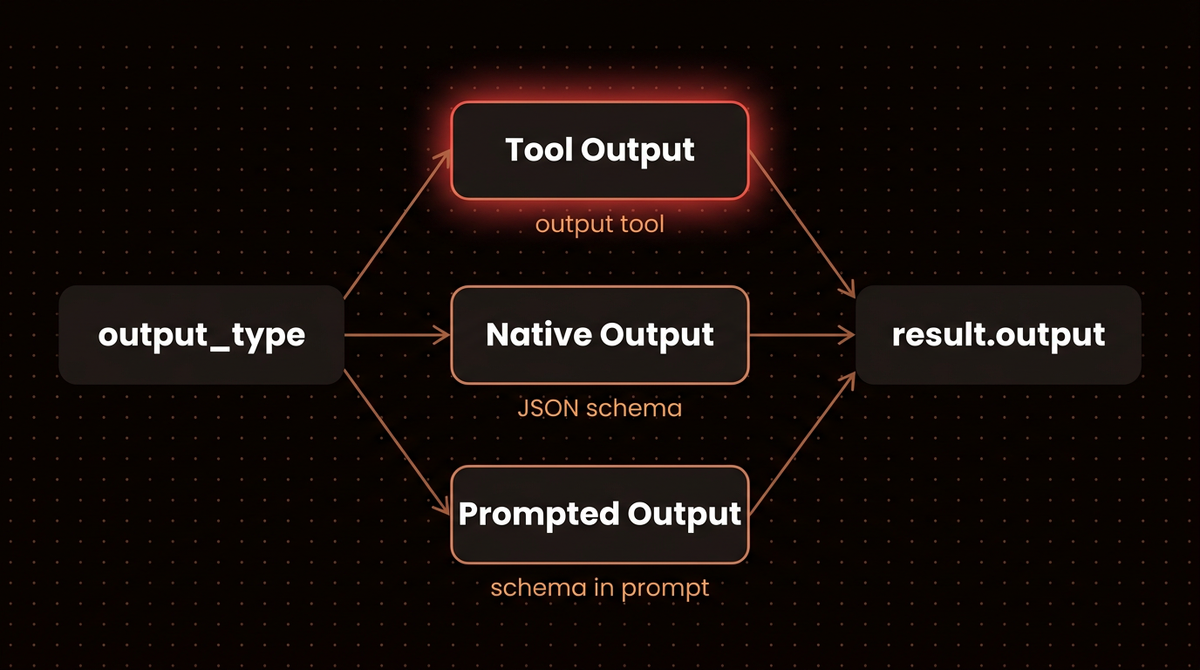
Pydantic AI has three ways to get structured data out of a model, and you choose by wrapping the type in a marker class:
- Tool Output (the default, or
ToolOutput(...)): the schema becomes the parameters of an output tool and the model is pushed to call it. This rides on function calling, which the docs describe as supported by virtually all models. - Native Output (
NativeOutput(...)): the schema goes into the provider's own structured output feature, so the model is constrained to emit JSON matching it. - Prompted Output (
PromptedOutput(...)): the schema is pasted into the instructions and Pydantic AI parses the text that comes back. The docs call it the least reliable option and the only one for models without tool calling or structured output.
Whatever mode you pick, you still read result.output and still get a validated object. Native and prompted modes with a union wrap each member in a {"result": {"kind": ..., "data": ...}} envelope, which I saw in the schema a FunctionModel received. You never touch that envelope; Pydantic AI unwraps it.
My default: leave Tool Output alone unless I have a reason. I reach for NativeOutput when the agent has no other tools and the provider enforces schemas, and for PromptedOutput only on a model that cannot do either.
Step 4: Check what each provider actually receives
The mode names hide real differences in the HTTP request, and the docs spread them over several provider pages. So I built the real OpenAIChatModel and AnthropicModel classes with a fake key and a mock HTTP transport that records the request body and answers 401. Nothing left my machine. Here is the smallest version, for one Claude model:
# wire_core.py
import json
import httpx2
from pydantic import BaseModel
from pydantic_ai import Agent
from pydantic_ai.models.anthropic import AnthropicModel
from pydantic_ai.providers.anthropic import AnthropicProvider


class Fruit(BaseModel):
    name: str
    color: str


sent = {}

def handler(request: httpx2.Request) -> httpx2.Response:
    sent['body'] = json.loads(request.content)
    return httpx2.Response(401, json={'error': {'type': 'authentication_error', 'message': 'stub'}})

def anthropic(name):
    client = httpx2.AsyncClient(transport=httpx2.MockTransport(handler))
    return AnthropicModel(name, provider=AnthropicProvider(api_key='sk-stub', http_client=client))

try:
    Agent(anthropic('claude-opus-5-5'), output_type=Fruit).run_sync('What is a banana?')
except Exception:
    pass  # the stub 401 lands here after the body is recorded
print(sorted(sent['body']))
print(json.dumps(sent['body']['output_config']))
['max_tokens', 'messages', 'model', 'output_config', 'stream']
{"format": {"type": "json_schema", "schema": {"type": "object", "properties": {"name": {"type": "string"}, "color": {"type": "string"}}, "additionalProperties": false, "required": ["name", "color"]}}}Both provider SDKs in this release use httpx2, not httpx, so the mock transport has to come from that package. I looped the same idea over both providers and several output types (wire.py, which also summarizes each body). Here is what each combination sent:
openai gpt-5.2                       bare Fruit      tools=['final_result'] tool_choice="required" format=None schema_in_prompt=False
openai gpt-5.2                       NativeOutput    tools=[] tool_choice=null format=response_format.json_schema schema_in_prompt=False
openai gpt-5.2                       PromptedOutput  tools=[] tool_choice=null format=response_format.json_object schema_in_prompt=True
anthropic claude-sonnet-4-6          bare Fruit      tools=['final_result'] tool_choice={"type": "any"} format=None schema_in_prompt=False
anthropic claude-sonnet-4-6          NativeOutput    tools=[] tool_choice=null format=output_config.format.json_schema schema_in_prompt=False
anthropic claude-sonnet-4-6          PromptedOutput  tools=[] tool_choice=null format=None schema_in_prompt=True
anthropic claude-opus-5-5            bare Fruit      tools=[] tool_choice=null format=output_config.format.json_schema schema_in_prompt=False
anthropic claude-opus-5-5            ToolOutput      tools=['final_result'] tool_choice={"type": "auto"} format=None schema_in_prompt=False
anthropic claude-3-5-haiku-20241022 NativeOutput UserError: Native structured output is not supported by this model.| Mode | OpenAI Chat (gpt-5.2) | Anthropic (Claude) | When I use it |
|---|---|---|---|
| Tool Output (default) | Output tool, tool_choice required | Output tool, tool_choice any; on Opus 5.5 a bare type switches to native | Agents that also call other tools |
| Native Output | response_format json_schema, strict | output_config.format json_schema; UserError on models outside the supported list | Extraction with no other tools |
| Prompted Output | Schema in a system message plus json_object mode | Schema in the system prompt, no JSON mode sent | Models with neither tools nor schemas |
Two of those lines surprised me. First, on claude-opus-5-5 a bare output_type=Fruit did not send an output tool at all; it sent native structured output. The Anthropic model page explains why: models that think by default (Claude Opus 5 and later, Sonnet 5, Haiku 5.5) cannot think through a forced tool call, so Pydantic AI uses native output where it can. Wrapping the type in ToolOutput on the same model sent the output tool with tool_choice auto rather than forcing it, so the model is free to answer in text first. The docs say to pass thinking=False, where the model allows it, if you need the forced tool back, but Opus 5.5 is not one of those models: its profile marks thinking as always on and forced tool choice as unsupported, so an output tool on Opus 5.5 is never forced. On Claude Opus 5, Sonnet 5 and Haiku 5.5, thinking=False does bring the forced tool back. Second, Anthropic's native mode is gated by a hard coded list of model name prefixes in the Anthropic profile source, so an older id like Claude 3.5 Haiku fails before any request is made. Anthropic's structured outputs page and OpenAI's structured outputs guide cover what each provider enforces on its side.
Two more provider rules from the docs are worth knowing before you ship. Self hosted Ollama from v0.5.0 enforces JSON schemas, but Ollama Cloud accepts them without enforcing, so Pydantic AI turns native output off there and NativeOutput raises a UserError. And on Bedrock, the Anthropic page notes that some Claude models with structured output on the direct API, such as Claude Sonnet 5, do not get it there, and the Bedrock page describes how thinking models fall back between modes, so the same agent can change modes when you move it to AWS.
Step 5: Turn the output into an action with an output function
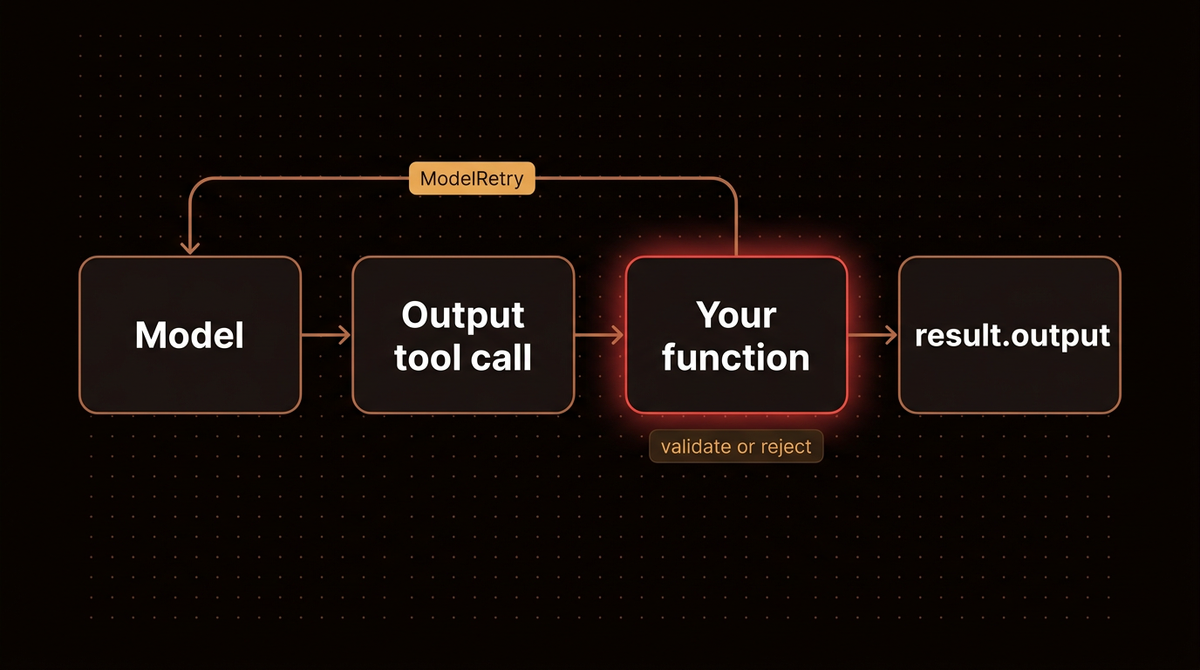
Sometimes the thing you want back is not the model's data but the result of doing something with it: a database row, a lookup, a hand off to another agent. Pass a function as the output type and the model is forced to call it; whatever it returns becomes result.output, and raising ModelRetry sends the model back with your message. I scripted the model with FunctionModel so it guesses a wrong order id first (a letter O instead of a zero) and corrects itself after the retry:
# retry.py
from pydantic import BaseModel
from pydantic_ai import Agent, ModelRetry, RunContext
from pydantic_ai.messages import ModelResponse, RetryPromptPart, ToolCallPart
from pydantic_ai.models.function import AgentInfo, FunctionModel

ORDERS = {'A-100': 'shipped', 'A-101': 'packing'}


class Order(BaseModel):
    order_id: str
    status: str


class NeedsHuman(BaseModel):
    """Use when the customer needs a person, not an order lookup."""
    reason: str


def lookup_order(order_id: str) -> Order:
    """Look up an order by its id and return its status."""
    if order_id not in ORDERS:
        raise ModelRetry(f'No order {order_id!r}. Known ids look like A-100.')
    return Order(order_id=order_id, status=ORDERS[order_id])


# A scripted stand in for the LLM: guesses a wrong id first, then corrects itself
def scripted_model(messages, info: AgentInfo) -> ModelResponse:
    if not hasattr(scripted_model, 'shown'):
        print('output tools offered:', [t.name for t in info.output_tools])
        scripted_model.shown = True
    retries = [p for m in messages for p in getattr(m, 'parts', []) if isinstance(p, RetryPromptPart)]
    if retries:
        print('model was told:', retries[-1].content)
        return ModelResponse(parts=[ToolCallPart('final_result_lookup_order', {'order_id': 'A-100'})])
    return ModelResponse(parts=[ToolCallPart('final_result_lookup_order', {'order_id': 'A-1OO'})])


agent = Agent(FunctionModel(scripted_model), output_type=[lookup_order, NeedsHuman])


@agent.output_validator
def check_output(ctx: RunContext, output: Order | NeedsHuman) -> Order | NeedsHuman:
    print(f'validator saw {output!r} (retry {ctx.retry})')
    return output


result = agent.run_sync('Where is order A-100?')
print('final output:', repr(result.output))
print('requests:', result.usage.requests)
output tools offered: ['final_result_lookup_order', 'final_result_NeedsHuman']
model was told: No order 'A-1OO'. Known ids look like A-100.
validator saw Order(order_id='A-100', status='shipped') (retry 1)
final output: Order(order_id='A-100', status='shipped')
requests: 2Two things in that script need a word. The output tool for a function in a list is named final_result_ plus the function name, which is why the scripted model calls final_result_lookup_order. And the scripted_model.shown attribute only stops the tool list from printing twice. The function's docstring becomes the tool description and its signature becomes the schema, so write both for the model, not for yourself. Do not also register the same function with @agent.tool; the docs warn that it confuses the model about which one to call. If you want the model to answer in plain text and still run your function on it, wrap the function in TextOutput(...).
Step 6: Add an output validator for checks that need IO
Field validators on the Pydantic model cover shape and ranges. An @agent.output_validator covers the checks that need the outside world, like running EXPLAIN on generated SQL or confirming an id exists, and it can be async. In the run above the validator printed retry 1, because the output function had already used one retry on the same output.
Warning: when an output function and an output validator reject the same output, they draw on the same retry budget, and it defaults to 1. When I made the validator above raise ModelRetry once (probe_budget.py), the run failed with UnexpectedModelBehavior: Exceeded maximum output retries (1). With retries={'output': 2} the same run succeeded on the third request.
Each retry is another model request you pay for, and the retries page shows how output retries multiply with SDK and transport retries underneath. I keep the output budget at 2 or 3 and let a failure surface rather than loop. A validator that has to reject the same output more than twice usually means the schema or the instructions are wrong, and another round of tokens will not fix that.
Step 7: Test every mode without an API key
TestModel builds valid data from your schema, which works well for Tool Output. Native and prompted modes need extra setup on 2.56.0, and the testing guide does not mention it. Here is the second half of modes.py:
show('NativeOutput, default TestModel', NativeOutput(Fruit))
show('NativeOutput, schema profile, no JSON text', NativeOutput(Fruit), profile=JSON_SCHEMA_OK)
show('NativeOutput, schema profile + JSON text', NativeOutput(Fruit), profile=JSON_SCHEMA_OK, custom_output_text=BANANA)
show('PromptedOutput + JSON text', PromptedOutput(Fruit), custom_output_text=BANANA)
NativeOutput, default TestModel
UserError: Native structured output is not supported by this model.
NativeOutput, schema profile, no JSON text
UnexpectedModelBehavior: Exceeded maximum output retries (1)
NativeOutput, schema profile + JSON text
mode=native output_tools=[] text_allowed=True
output=Fruit(name='banana', color='yellow')
PromptedOutput + JSON text
mode=prompted output_tools=[] text_allowed=True
output=Fruit(name='banana', color='yellow')So a test for a native output agent needs two things: a ModelProfile(supports_json_schema_output=True) so the stub claims the feature, and custom_output_text holding valid JSON, because the stub's default text (success (no tool calls)) is not JSON. Prompted output only needs the JSON text. For anything conditional, like the retry above, use FunctionModel and script the responses yourself. My Pydantic AI testing guide covers both stub models and evals in more depth.
Troubleshooting
TypeError: Agent.__init__() got an unexpected keyword argument 'result_type': rename tooutput_type. On 1.x the same mistake shows up asUserError: Unknown keyword arguments: `result_type`.AttributeError: 'AgentRunResult' object has no attribute 'data': readresult.output. On a streamed run, the migration map listsvalidate_response_outputas the replacement forvalidate_structured_output.TypeError: ... unexpected keyword argument 'output_retries': you followed a V1 era guide. Useretries={'output': N}, orToolOutput(MyType, max_retries=N)for one output tool.UserError: Native structured output is not supported by this model.: the model's profile says no JSON schema support. DropNativeOutputfor the default, or pick a model the provider page lists.UnexpectedModelBehavior: Exceeded maximum output retries (1): the output failed validation once more than the budget allows. There is no result object after the exception, so wrap the run inwith capture_run_messages() as messages:and read the lastRetryPromptPartto see what was rejected before you raise the budget.- A structured agent suddenly returns text:
stris in youroutput_type, or you are on a model that thinks by default with an explicitToolOutput, where the tool is not forced. Passthinking=Falsewhere the model allows it (Opus 5, Sonnet 5 and Haiku 5.5 do; Opus 5.5 and Sonnet 5.5 never force a tool, so use the default bare type and let it go native).
Edge cases: StructuredDict, Choices and decision models
A few output types the steps above did not need. StructuredDict(schema) takes a JSON schema you only have at run time; the docs are clear that Pydantic AI does not validate the result, so pair it with an output validator. Choices(...) lets the model pick from options built at run time, each with a description. str | None lets a tool calling agent finish without saying anything, which saves a pointless closing message. And when you stream, output functions and validators run on every partial output, so guard side effects with ctx.partial_output.
One model class needs special care. Decision models such as TypeSafe's Jev cannot produce text at all, so per the output docs any output_type that allows text, including the default str and PromptedOutput, is a UserError before the request is sent. Give them a model or a union of models.
On cost, watch the retries: each one is a full extra model request. If you are weighing Pydantic AI against a graph framework for a bigger system, I compared the options in how to build your own AI agent, and the Pydantic AI production tutorial covers testing, Bedrock and observability around the output layer. To run these agents against a real Claude model instead of a stub, install the [anthropic] extra and set ANTHROPIC_API_KEY; my guide on getting a Claude API key with a spend cap covers the setup.

If you want me to build an agent like this for you, see how I build AI agents.
Frequently asked questions
What replaced result_type in Pydantic AI?
The output_type argument on Agent replaced it, and result.output replaced result.data. Version 0.6.0, released August 6, 2025, removed the old names. On 2.56.0, passing result_type raises a TypeError and reading result.data raises an AttributeError. Earlier 0.5 releases still accepted both with a deprecation warning, which is why old tutorials appear to work for some readers.
What is the default output mode in Pydantic AI?
Tool Output. Your schema becomes the parameters of an output tool, named final_result for a single type or final_result_<Name> per union member, and the model is pushed to call it. One exception I captured on 2.56.0: Claude models that think by default, like Opus 5.5, get native structured output for a bare output type instead, because they cannot think through a forced tool call.
Should I use NativeOutput or ToolOutput?
Use the default Tool Output when the agent also calls other tools or when you switch providers often, since nearly every model supports tool calling. Use NativeOutput for pure extraction on a model whose provider enforces JSON schemas, such as current OpenAI and recent Claude models. On an unsupported model it raises a UserError before any request is sent, so you find out in testing.
How do I set output retries in Pydantic AI V2?
Pass retries={'output': N} to Agent or to a single run, or set max_retries on one ToolOutput. The output_retries argument from V1 raises a TypeError on 2.56.0. The budget defaults to 1, and everything that rejects the same output (a validation error, an output function or an output validator raising ModelRetry) spends from it.
Can output_type be a union of a model and a string?
Yes. output_type=[Box, str] or Box | str lets the run end with either a validated Box or plain text, which suits agents that sometimes need to ask a follow up question. Check the type with isinstance before using it. Under mypy, the list form avoids a # type: ignore, though the docs still recommend explicit generic parameters on Agent.
Published
October 14, 2026
Category
AI Agents
Jahanzaib Ahmed
AI Systems Engineer & Founder
AI Systems Engineer with 126 production systems shipped. I run AgenticMode AI (AI agents, RAG systems, voice AI) and ECOM PANDA (ecommerce agency). I build AI that works in the real world for businesses across home services, healthcare, ecommerce, SaaS, and real estate.
Related articles

How to Test a Pydantic AI Agent Without API Calls and Turn Failures Into Evals
A pytest suite that checks a Pydantic AI agent's tools, structured output and retries with no model calls, plus a pydantic-evals dataset that turns a failed production run into a CI gate.
How toAI AgentsPydantic AI
How to Build Pydantic AI Multi Agent Apps Without Losing Track of Usage
Five tested ways to coordinate Pydantic AI agents on 2.56.0: delegation, hand offs, output functions, SubAgents and pydantic-graph, plus the one line that keeps usage limits covering every agent.
How toAI AgentsPydantic AI
Pydantic AI Tutorial: How I Build Type-Safe AI Agents That Actually Work in Production
A production Pydantic AI tutorial refreshed for V2: structured output, dependency injection, async, AWS Bedrock, human approval, testing and a booking agent, with every offline example run on 2.55.0 and its real output shown.
GuideImplementationPydantic AI