How to Build Pydantic AI Multi Agent Apps Without Losing Track of Usage
Five tested ways to coordinate Pydantic AI agents on 2.56.0: delegation, hand offs, output functions, SubAgents and pydantic-graph, plus the one line that keeps usage limits covering every agent.


Table of Contents
Once a Pydantic AI app grows a second agent, the multi agent design choice that matters is who picks the next one: the model, your code, or a graph. This guide builds five working versions on Pydantic AI 2.56.0 (delegation through a tool, a hand off in plain Python, an output function, the new SubAgents capability and a pydantic-graph loop) with scripted test models, so nothing here needs an API key or costs a cent. Budget about an hour if you already have one agent working.
If you are new to Pydantic AI, start with my Pydantic AI tutorial for production agents, which covers single agents, structured output, dependency injection and Bedrock. This page picks up where that one stops: what changes when several agents share one request, and how usage limits and dependencies travel between them. I ran every script below on October 15, 2026. Each code block is the complete file, and each output block is pasted from that run.
Before you start
- Python 3.11 or newer. I used Python 3.13.12 in a fresh virtual environment.
- Pydantic AI 2.56.0, released October 13, 2026 according to PyPI, plus
pydantic-ai-harness0.56.0 andpydantic-graph2.56.0. All three are MIT licensed. - No model account. Every example swaps the real model for
FunctionModel, a fake model you script yourself. To go live, put a model string such as'anthropic:claude-sonnet-4-6'as the first argument of eachAgent(), delete theoverride()lines and theALLOW_MODEL_REQUESTSline, install the fullpydantic-aipackage and set the provider key. - Comfort with async Python. Delegation has to happen inside
async deffunctions, as Step 9 shows.
Step 1: Install Pydantic AI and block real model calls
Create the environment and pin the versions, so the APIs on this page match what you have:
python3.13 -m venv venv
venv/bin/pip install "pydantic-ai-slim==2.56.0" "pydantic-ai-harness==0.56.0" "pydantic-graph==2.56.0"
I installed pydantic-ai-slim because the scripted models need no provider SDK. The full pydantic-ai package adds the OpenAI, Anthropic and Google clients; install that one when you go live.
Every script on this page sets one flag from the official testing guide:
from pydantic_ai import models

models.ALLOW_MODEL_REQUESTS = False  # fail loudly if a real model is ever hit
With four agents in one process, it is easy to override three and forget the fourth. This flag turns that mistake into an exception instead of a bill.
The first run prints a large ASCII banner pointing at Logfire. It goes away once observability is configured, or when you set PYDANTIC_AI_NO_BANNER=1, which is how I ran every script: PYDANTIC_AI_NO_BANNER=1 venv/bin/python delegation.py.
Step 2: Choose a pattern by who picks the next agent
The multi agent applications page in the official docs lists five levels of complexity: a single agent, agent delegation, programmatic agent hand off, graph based control flow, and Deep Agents. Delegation can be written by hand or handled by the Harness SubAgents capability, and an output function gives you a one way hand off. I sort the options by a single question: which part of the system picks the next step?

| Pattern | Who picks the next agent | Control returns to the first agent? | Reach for it when |
|---|---|---|---|
| Delegation through a tool | The parent model | Yes | One coordinator needs specialist answers mid conversation |
| Programmatic hand off | Your Python code | No, your code moves on | Routing rules are known in advance, or a human sits between steps |
| Output function hand off | The first model, once | No, the run ends | A router should pass the request on and get out of the way |
SubAgents capability | The parent model | Yes | You want delegation with budgets and timeouts without writing the tool |
pydantic-graph | Typed edges between nodes | Defined by the graph | Loops, branches and resumable state are the hard part |
My default is the programmatic hand off. An if statement costs nothing and a unit test covers it; nobody has to read a trace to learn why the refund went to the wrong agent. I add delegation only where the routing decision needs language understanding. Anthropic's experiment with 80 agents on one codebase, which I covered in what happened when agents had to cooperate, shows what coordination costs once agents share work.
Step 3: Delegate to a specialist agent from a tool
In agent delegation, the parent agent calls another agent inside one of its tools, then carries on with the answer. Here a triage agent sends billing questions to a billing agent that has its own invoice lookup tool. Both receive the same dependency object, which stands in for a database pool. This is the first half of delegation.py; it runs once you paste the second half from Step 4 below it:
import asyncio
from dataclasses import dataclass

from pydantic_ai import (
    Agent,
    ModelMessage,
    ModelResponse,
    RunContext,
    TextPart,
    ToolCallPart,
    UsageLimitExceeded,
    UsageLimits,
    models,
)
from pydantic_ai.models.function import AgentInfo, FunctionModel

models.ALLOW_MODEL_REQUESTS = False  # fail loudly if a real model is ever hit


@dataclass
class SupportDeps:
    customer_id: str
    invoices: dict[str, float]  # stands in for a database pool or API client


# The delegate: answers billing questions with its own tool.
billing_agent = Agent(
    name='billing_agent',
    deps_type=SupportDeps,
    instructions='Answer billing questions using the lookup_invoice tool.',
)


@billing_agent.tool
async def lookup_invoice(ctx: RunContext[SupportDeps], invoice_id: str) -> str:
    amount = ctx.deps.invoices.get(invoice_id)
    if amount is None:
        return f'No invoice {invoice_id} for {ctx.deps.customer_id}'
    return f'Invoice {invoice_id} for {ctx.deps.customer_id}: ${amount:.2f}'


# The parent: decides when billing needs to answer.
triage_agent = Agent(
    name='triage_agent',
    deps_type=SupportDeps,
    instructions='Route billing questions to ask_billing, then answer the customer.',
)


@triage_agent.tool
async def ask_billing(ctx: RunContext[SupportDeps], question: str) -> str:
    """Ask the billing specialist a question."""
    result = await billing_agent.run(
        question,
        deps=ctx.deps,  # same deps object, same connections
        usage=ctx.usage,  # roll the delegate's usage into the parent run
    )
    return result.output
The tool is async def and awaits billing_agent.run(), because run_sync() raises inside a tool. The agents are module level globals rather than dependencies, which the docs recommend because agents are stateless. And it passes both deps=ctx.deps and usage=ctx.usage, which Step 4 tests. Setting name= is optional, since Pydantic AI infers it from the variable name, but it labels each trace span and keeps working when agents live in a list or dict.
Step 4: Prove the parent's budget sees the delegate's requests
The docs tell you to pass ctx.usage to the delegate so its usage counts toward the parent run. They do not show what happens to your budget when that line goes missing, so the second half of delegation.py adds a copy of the parent without it, scripts all three models with FunctionModel, and makes four runs:
# The same parent with one line missing, for comparison in Step 4.
leaky_triage_agent = Agent(name='leaky_triage_agent', deps_type=SupportDeps)


@leaky_triage_agent.tool
async def ask_billing_leaky(ctx: RunContext[SupportDeps], question: str) -> str:
    result = await billing_agent.run(question, deps=ctx.deps)  # usage not forwarded
    return result.output


# Scripted test models, so the run is free and deterministic.
def triage_model(messages: list[ModelMessage], info: AgentInfo) -> ModelResponse:
    last = messages[-1].parts[-1]
    if last.part_kind == 'tool-return':
        return ModelResponse(parts=[TextPart(f'Here is what billing found: {last.content}')])
    tool = info.function_tools[0].name  # ask_billing or ask_billing_leaky
    return ModelResponse(parts=[ToolCallPart(tool, {'question': 'How much is INV-1042?'})])


def billing_model(messages: list[ModelMessage], info: AgentInfo) -> ModelResponse:
    last = messages[-1].parts[-1]
    if last.part_kind == 'tool-return':
        return ModelResponse(parts=[TextPart(last.content)])
    return ModelResponse(parts=[ToolCallPart('lookup_invoice', {'invoice_id': 'INV-1042'})])


async def main():
    deps = SupportDeps(customer_id='cus_88', invoices={'INV-1042': 129.0})
    limits = UsageLimits(request_limit=3)
    with (
        triage_agent.override(model=FunctionModel(triage_model)),
        leaky_triage_agent.override(model=FunctionModel(triage_model)),
        billing_agent.override(model=FunctionModel(billing_model)),
    ):
        result = await triage_agent.run('Why was I charged?', deps=deps)
        print('1.', result.output)
        print('  ', result.usage)

        result = await leaky_triage_agent.run('Why was I charged?', deps=deps)
        print('2. without usage=ctx.usage:', result.usage)

        try:
            await triage_agent.run('Why was I charged?', deps=deps, usage_limits=limits)
        except UsageLimitExceeded as e:
            print('3. request_limit=3:', e)

        result = await leaky_triage_agent.run('Why was I charged?', deps=deps, usage_limits=limits)
        print('4. request_limit=3, usage not forwarded:', result.usage.requests, 'requests counted')


asyncio.run(main())
A FunctionModel receives the message list and returns whatever a real model would have sent, so you control every tool call. The output:
1. Here is what billing found: Invoice INV-1042 for cus_88: $129.00
   RunUsage(input_tokens=228, output_tokens=43, requests=4, tool_calls=2)
2. without usage=ctx.usage: RunUsage(input_tokens=114, output_tokens=27, requests=2, tool_calls=1)
3. request_limit=3: The next request would exceed the request_limit of 3. Consider raising the limit, or see the docs on usage limits for budget-aware patterns: https://pydantic.dev/docs/ai/core-concepts/agent/#usage-limits
4. request_limit=3, usage not forwarded: 2 requests counted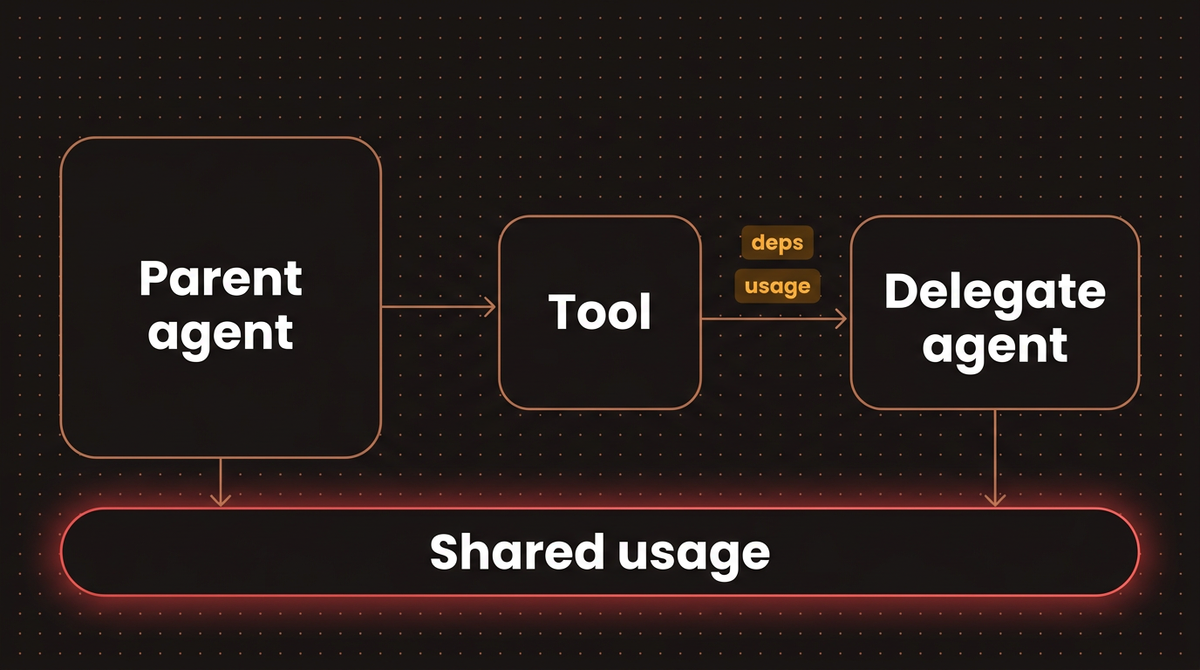
Run 1 made four requests: two from the triage agent (the tool call, then the final answer) and two from the billing agent. Run 4 is the trap. The same work happened, the parent counted two requests, and a limit of three let it through. A delegate that loops can burn requests your parent budget never sees. With usage=ctx.usage, the limit trips before the parent's final request, as run 3 shows. The token counts are the scripted model's own estimate, so read them as placeholders, not a price.
Warning: Forwarding ctx.usage shares the counter, not the limit. The delegate's run still checks its own UsageLimits, whose default allows 50 requests in 2.56.0. Pass usage_limits= to the delegate run too if one runaway delegate should stop sooner.
UsageLimits also accepts cost_limit, total_tokens_limit and tool_calls_limit. The docs flag one exception: inside a Temporal activity the tool receives a copy of the run context, so usage=ctx.usage does not carry the delegate's usage back to the parent.
Dependencies follow a similar rule. The delegate should take the same deps_type as the parent or a subset of it, so the tool can pass ctx.deps straight through and reuse open connections. You can build fresh dependencies inside the tool, but the docs warn that this can be much slower.
Step 5: Hand off between agents in your own code
In a programmatic hand off, no agent calls another. Your application runs one agent, reads its typed output and decides what runs next. The agents do not need matching dependencies, and you can share the conversation so far with message_history. Here an intake agent classifies a message and plain Python routes it. This is all of handoff.py:
import asyncio
from typing import Literal

from pydantic import BaseModel

from pydantic_ai import (
    Agent,
    ModelMessage,
    ModelResponse,
    RunUsage,
    TextPart,
    ToolCallPart,
    UsageLimits,
    models,
)
from pydantic_ai.models.function import AgentInfo, FunctionModel

models.ALLOW_MODEL_REQUESTS = False


class Ticket(BaseModel):
    category: Literal['refund', 'technical']
    summary: str


class Failed(BaseModel):
    """The message is not a support request."""


intake_agent = Agent[None, Ticket | Failed](
    name='intake_agent',
    output_type=Ticket | Failed,
    instructions='Classify the customer message into a support ticket.',
)

refund_agent = Agent(
    name='refund_agent',
    instructions='You handle refunds. Reply in two sentences.',
)

tech_agent = Agent(
    name='tech_agent',
    instructions='You handle technical issues. Ask for logs first.',
)

LIMITS = UsageLimits(request_limit=10)  # one budget for the whole conversation


async def handle(message: str) -> str:
    usage = RunUsage()  # shared across every agent this request touches
    intake = await intake_agent.run(message, usage=usage, usage_limits=LIMITS)
    if isinstance(intake.output, Failed):
        return 'Sorry, I can only help with orders and the app.'

    # Your code picks the next agent. No model decides this.
    specialist = refund_agent if intake.output.category == 'refund' else tech_agent
    reply = await specialist.run(
        f'Ticket: {intake.output.summary}',
        message_history=intake.new_messages(),  # optional: share the conversation so far
        usage=usage,
        usage_limits=LIMITS,
    )
    print(f'   routed to {specialist.name}, usage so far: {usage}')
    return reply.output


def intake_model(messages: list[ModelMessage], info: AgentInfo) -> ModelResponse:
    text = messages[-1].parts[-1].content.lower()
    names = [t.name for t in info.output_tools]  # ['final_result_Ticket', 'final_result_Failed']
    if 'refund' in text or 'charged twice' in text:
        return ModelResponse(parts=[ToolCallPart(names[0], {'category': 'refund', 'summary': 'Double charge on order 5521'})])
    if 'crash' in text:
        return ModelResponse(parts=[ToolCallPart(names[0], {'category': 'technical', 'summary': 'App crashes on login'})])
    return ModelResponse(parts=[ToolCallPart(names[1], {})])


def specialist_model(messages: list[ModelMessage], info: AgentInfo) -> ModelResponse:
    # Show what the receiving agent actually sends: its own instructions, plus the shared history.
    return ModelResponse(
        parts=[TextPart(f'[instructions: {info.instructions!r}; messages in context: {len(messages)}]')]
    )


async def main():
    with intake_agent.override(model=FunctionModel(intake_model)), refund_agent.override(
        model=FunctionModel(specialist_model)
    ), tech_agent.override(model=FunctionModel(specialist_model)):
        for msg in ['I was charged twice for order 5521', 'The app crashes when I log in', 'What is the capital of France?']:
            print('>', msg)
            print('  ', await handle(msg))


asyncio.run(main())
The budget works differently from Step 4. There is no parent run, so you create one RunUsage() per request and pass it, with the same UsageLimits, to every agent. I scripted the specialists to echo the instructions their model actually received, because the message history docs say a receiving agent sends its own instructions, not the ones stored in borrowed history:
> I was charged twice for order 5521
   routed to refund_agent, usage so far: RunUsage(input_tokens=124, output_tokens=35, requests=2)
   [instructions: 'You handle refunds. Reply in two sentences.'; messages in context: 3]
> The app crashes when I log in
   routed to tech_agent, usage so far: RunUsage(input_tokens=123, output_tokens=34, requests=2)
   [instructions: 'You handle technical issues. Ask for logs first.'; messages in context: 3]
> What is the capital of France?
   Sorry, I can only help with orders and the app.
That matches the docs. The three messages in context are the intake request, its output tool call and the tool return. Tool call and tool return parts travel with the history, so only share history with an agent that can make sense of them, or pass a filtered list.
The Ticket | Failed union gives the model a legal way out. Each member becomes its own output tool, so the model can say "this is not a support request" instead of forcing a category. The flight booking example in the official docs uses the same union trick.
Step 6: Hand off for good with an output function
Sometimes a model should choose the specialist, but you never want control back. An output function does that: the model must call one, the call ends the run, and its result is not passed back to the model. This is output_handoff.py:
import asyncio

from pydantic import BaseModel

from pydantic_ai import Agent, ModelMessage, ModelResponse, RunContext, TextPart, ToolCallPart, models
from pydantic_ai.models.function import AgentInfo, FunctionModel

models.ALLOW_MODEL_REQUESTS = False

refund_agent = Agent(name='refund_agent', instructions='You handle refunds.')


async def hand_off_to_refunds(ctx: RunContext, summary: str) -> str:
    """Send refund requests to the refund specialist."""
    # Drop the router's own output tool call before passing history on.
    result = await refund_agent.run(summary, message_history=ctx.messages[:-1], usage=ctx.usage)
    return result.output


class NoMatch(BaseModel):
    """No specialist fits this message."""

    reason: str


router = Agent[None, str | NoMatch](
    name='router',
    output_type=[hand_off_to_refunds, NoMatch],
    instructions='Never answer yourself. Pass the message on.',
)


def router_model(messages: list[ModelMessage], info: AgentInfo) -> ModelResponse:
    print('router output tools:', [t.name for t in info.output_tools])
    return ModelResponse(parts=[ToolCallPart(info.output_tools[0].name, {'summary': 'Refund order 5521'})])


def refund_model(messages: list[ModelMessage], info: AgentInfo) -> ModelResponse:
    return ModelResponse(parts=[TextPart(f'Refund issued ({len(messages)} messages of context)')])


async def main():
    with router.override(model=FunctionModel(router_model)), refund_agent.override(model=FunctionModel(refund_model)):
        result = await router.run('I want my money back for order 5521')
        print('output:', result.output)
        print('usage:', result.usage)
        print('last message kinds:', [p.part_kind for p in result.all_messages()[-1].parts])


asyncio.run(main())
router output tools: ['final_result_hand_off_to_refunds', 'final_result_NoMatch']
output: Refund issued (2 messages of context)
usage: RunUsage(input_tokens=119, output_tokens=13, requests=2)
last message kinds: ['tool-return']Two requests in total: one for the router, one for the refund agent. The router never got a second turn. Look at the tool names on the first line. With more than one output type, the function reaches the model as final_result_hand_off_to_refunds, not hand_off_to_refunds. My first version of router_model called the bare name, and the run died with Unknown tool name once the tool's single retry was used up. Read info.output_tools in tests instead of hard coding names.
Step 7: Let SubAgents write the delegation tool
The newest option sits outside the core package. SubAgents ships in pydantic-ai-harness, which describes itself as the official capability library for Pydantic AI. Add it to an orchestrator agent with a list of named agents, and the orchestrator gets one delegate_task(agent_name, task) tool. The capability forwards dependencies, shares usage by default and lists the roster in the system prompt. This is subagents_demo.py:
import asyncio
from dataclasses import dataclass

from pydantic_ai import Agent, ModelMessage, ModelResponse, RunContext, TextPart, ToolCallPart, models
from pydantic_ai.models.function import AgentInfo, FunctionModel
from pydantic_ai_harness import SubAgent, SubAgents

models.ALLOW_MODEL_REQUESTS = False


@dataclass
class SupportDeps:
    customer_id: str


billing = Agent(name='billing', deps_type=SupportDeps, description='Answers invoice and refund questions')
shipping = Agent(name='shipping', deps_type=SupportDeps, description='Tracks parcels and delivery dates')

orchestrator = Agent(
    name='orchestrator',
    deps_type=SupportDeps,
    instructions='Delegate each part of the question to the right specialist.',
    capabilities=[SubAgents(agents=[SubAgent(billing), SubAgent(shipping, max_calls=1)])],
)


@billing.instructions
def who(ctx: RunContext[SupportDeps]) -> str:
    return f'Customer id: {ctx.deps.customer_id}'


def orchestrator_model(messages: list[ModelMessage], info: AgentInfo) -> ModelResponse:
    returns = [p for m in messages for p in m.parts if p.part_kind == 'tool-return']
    if not returns:
        print('tool schema:', [(t.name, list(t.parameters_json_schema['properties'])) for t in info.function_tools])
        print('roster in instructions:\n', info.instructions)
        return ModelResponse(
            parts=[
                ToolCallPart('delegate_task', {'agent_name': 'billing', 'task': 'Is INV-1042 paid?'}),
                ToolCallPart('delegate_task', {'agent_name': 'shipping', 'task': 'Where is parcel P-9?'}),
                ToolCallPart('delegate_task', {'agent_name': 'shipping', 'task': 'And parcel P-10?'}),
            ]
        )
    return ModelResponse(parts=[TextPart(' | '.join(str(r.content) for r in returns))])


def specialist_model(messages: list[ModelMessage], info: AgentInfo) -> ModelResponse:
    task = messages[-1].parts[-1].content
    return ModelResponse(parts=[TextPart(f'done: {task} ({info.instructions})')])


async def main():
    with orchestrator.override(model=FunctionModel(orchestrator_model)), billing.override(
        model=FunctionModel(specialist_model)
    ), shipping.override(model=FunctionModel(specialist_model)):
        result = await orchestrator.run('Two questions about my account', deps=SupportDeps('cus_88'))
        print('output:', result.output)
        print('usage:', result.usage)


asyncio.run(main())
The scripted orchestrator delegates three tasks in one turn, two of them to shipping, which is capped at one call. Each specialist echoes its task and the instructions it received:
tool schema: [('delegate_task', ['agent_name', 'task'])]
roster in instructions:
 Delegate each part of the question to the right specialist.

You can delegate self-contained tasks to these sub-agents using the `delegate_task` tool. Each runs in its own fresh context and does not see this conversation, so pass everything it needs.

Available sub-agents:
- billing: Answers invoice and refund questions
- shipping: Tracks parcels and delivery dates
output: done: Is INV-1042 paid? (Customer id: cus_88) | done: Where is parcel P-9? (None) | Delegate budget for 'shipping' is exhausted for this run (1 call(s)). Synthesize from existing evidence and choose the next action; do not delegate to 'shipping' again.
usage: RunUsage(input_tokens=257, output_tokens=111, requests=4, tool_calls=3)
The billing agent's dynamic instructions read cus_88 from the forwarded deps. Shipping prints None because I gave it no instructions. The second shipping call came back as a soft message the parent can reason about, not an exception, and usage rolled up to four requests across three agents. Each SubAgent also takes usage_limits, timeout_seconds, on_failure and contain_errors. Two cautions from its docs: delegates never see the parent conversation, so each task must stand alone, and the harness is on 0.x releases, so its API may change between minor versions. Pin it.
Step 8: Move to pydantic-graph when control flow is the hard part
The graph docs open by warning that graphs are a nail gun and most projects need a hammer. I agree. Use one when you have explicit states, loops and transitions you want typed and diagrammed. Here a writer and a reviewer loop until the reviewer approves, capped at three rounds, with one RunUsage kept in graph state. This is graph_demo.py:
from __future__ import annotations

import asyncio
from dataclasses import dataclass, field

from pydantic import BaseModel

from pydantic_ai import Agent, ModelMessage, ModelResponse, RunUsage, TextPart, ToolCallPart, models
from pydantic_ai.models.function import AgentInfo, FunctionModel
from pydantic_graph import BaseNode, End, GraphBuilder, GraphRunContext, StepContext

models.ALLOW_MODEL_REQUESTS = False


class Revise(BaseModel):
    feedback: str


class Approve(BaseModel):
    pass


writer = Agent(name='writer', instructions='Write a short refund reply.')
reviewer = Agent[None, Revise | Approve](name='reviewer', output_type=Revise | Approve)


@dataclass
class State:
    usage: RunUsage = field(default_factory=RunUsage)
    rounds: int = 0


@dataclass
class Draft(BaseNode[State]):
    feedback: str | None = None

    async def run(self, ctx: GraphRunContext[State]) -> Review:
        ctx.state.rounds += 1
        prompt = f'Rewrite using this feedback: {self.feedback}' if self.feedback else 'Write the reply.'
        result = await writer.run(prompt, usage=ctx.state.usage)
        return Review(result.output)


@dataclass
class Review(BaseNode[State, object, str]):
    text: str

    async def run(self, ctx: GraphRunContext[State]) -> Draft | End[str]:
        result = await reviewer.run(self.text, usage=ctx.state.usage)
        if isinstance(result.output, Revise) and ctx.state.rounds < 3:
            return Draft(result.output.feedback)
        return End(self.text)


g = GraphBuilder(state_type=State, output_type=str)


@g.step
async def start(ctx: StepContext[State, None, None]) -> Draft:
    return Draft()


g.add(g.node(Draft), g.node(Review), g.edge_from(g.start_node).to(start))
reply_graph = g.build()


def writer_model(messages: list[ModelMessage], info: AgentInfo) -> ModelResponse:
    prompt = messages[-1].parts[-1].content
    return ModelResponse(parts=[TextPart('Refund sent, thanks.' if 'feedback' in prompt else 'Refund sent.')])


def reviewer_model(messages: list[ModelMessage], info: AgentInfo) -> ModelResponse:
    draft = messages[-1].parts[-1].content
    revise, approve = info.output_tools
    if 'thanks' in draft:
        return ModelResponse(parts=[ToolCallPart(approve.name, {})])
    return ModelResponse(parts=[ToolCallPart(revise.name, {'feedback': 'Thank the customer.'})])


async def main():
    with writer.override(model=FunctionModel(writer_model)), reviewer.override(model=FunctionModel(reviewer_model)):
        state = State()
        output = await reply_graph.run(state=state)
        print('output:', output)
        print('rounds:', state.rounds, '| usage:', state.usage)


asyncio.run(main())
output: Refund sent, thanks.
rounds: 2 | usage: RunUsage(input_tokens=219, output_tokens=16, requests=4)Keep the from __future__ import annotations line: Draft.run names Review before that class exists. Edges come from the return type hints, so print(reply_graph) emits a Mermaid state diagram for free. If you find a snippet that builds Graph(nodes=[...]) from a list of node classes, it will not run as written on 2.56.0. I tried it and got a TypeError listing nine missing arguments, because Graph is now the object GraphBuilder.build() returns. If you are weighing frameworks for this shape, my guide to building a LangGraph supervisor agent covers the same coordinator idea in LangGraph.
Step 9: Test the whole agent tree without tokens
The scripted models above are already a test suite. These habits keep it honest when several agents share a request:
- Override every agent in the tree. Nest the
override()context managers as in Step 4, and keepALLOW_MODEL_REQUESTS = Falseso a missed one fails instead of calling a provider. - Assert on
result.usage.requests. Four requests for one delegation is a contract. If a refactor dropsusage=ctx.usage, the count falls to two and the test catches it. - Keep
TestModelfor smoke tests. It calls every tool with generated arguments, which is fine for one agent. For routing between agents I useFunctionModel, because the arguments decide which branch runs.
One failure is worth seeing once. In a short script (sync_in_tool.py), a parent agent's sync tool calls a child agent with run_sync():
UserError : `Agent.run_sync()` and `Agent.run_stream_sync()` cannot be used inside a synchronous tool, output function, or other function called during an agent run, as they can deadlock the run. Make the function `async def` and use `await agent.run(...)` or `async with agent.run_stream(...)` instead.Troubleshooting Pydantic AI multi agent runs
UserErroraboutrun_sync()inside a tool. Make the delegating functionasync defand awaitagent.run(). The parent may still start withrun_sync(). For blocking work inside the tool, the docs suggestasyncio.to_thread().Unknown tool namein aFunctionModeltest. With several output types, output tools are namedfinal_result_<Name>. Readinfo.output_tools.- A usage limit never fires. The delegate run is missing
usage=ctx.usage, so its requests never reach the parent counter (run 4 in Step 4). - A delegate answers without context. Delegates start with an empty history. Put everything they need in the prompt, or pass a filtered
message_history. WithSubAgents, thetaskstring is all the delegate sees. - Usage looks too low under Temporal. Tools run in activities with a copy of the context, so forwarded usage does not flow back. Track it at the workflow level.
- A cancelled delegate did not stop the parent. That is by design: cancellation is run scoped, and a delegate cancelling itself surfaces as a failed tool return. Share one
CancellationTokento stop the whole tree.
Going further
The fifth level in the docs, Deep Agents, adds planning, file operations, sandboxed code execution, context summarization, approvals and durable execution around delegation. The docs point to pydantic-deep by Vstorm for an opinionated community package. Cole Medin's video on the 2.0 capability model explains the design SubAgents is built on; the harness section starts at 12:36:
On cost, each request bills at the price of the model whose agent made it, so a cheap delegate under an expensive parent is the main lever. A cost_limit only works when Pydantic AI has pricing data for every model in the tree; without it, the library warns that the limit cannot be enforced, so keep a request_limit as the backstop. And when not to do any of this: if one agent with five tools answers correctly, a second agent adds latency and a new place to fail. I compare that trade off across frameworks in three self hosted agent stacks, and the CrewAI Flows guide shows the role based alternative.
For the single agent foundations under all of this (dependency injection, structured output, Bedrock setup and FastAPI serving), go back to the Pydantic AI production tutorial. If you want a multi agent system built for your own workflows, here is how I build AI agents.
Frequently asked questions
Does Pydantic AI support multi agent systems?
Yes. The official docs describe agent delegation through tools, programmatic hand off in your own code, graph based control flow with pydantic-graph, and Deep Agents. The pydantic-ai-harness package adds a SubAgents capability that writes the delegation tool for you. All of these ran on Pydantic AI 2.56.0, the release I tested on October 15, 2026.
What is the difference between agent delegation and hand off in Pydantic AI?
With delegation, the parent agent calls another agent inside a tool and gets control back to finish the answer. With a programmatic hand off, your code runs one agent, reads its output and decides which agent runs next, so no model makes the routing call. An output function sits between them: the model picks the next agent once and the first run ends.
How do usage limits work across multiple Pydantic AI agents?
Pass usage=ctx.usage when a tool runs a delegate, so its requests and tokens add to the parent's counter and the parent's limit trips before its next request. Give the delegate its own usage_limits to stop a looping delegate sooner. In my test, leaving it out made one delegation report two requests instead of four, and a limit of three never fired. For a programmatic hand off, share one RunUsage object across every run.
Do delegate agents need the same dependencies as the parent?
Generally the same type or a subset, so the tool can pass ctx.deps straight through and reuse open connections. You can build new dependencies inside the tool, but the docs warn it can be much slower. Agents in a programmatic hand off can use completely different dependency types, because your code calls each one separately.
Should I use pydantic-graph or plain delegation?
Start with delegation or a hand off. The Pydantic docs themselves call graphs a nail gun most projects do not need. Move to pydantic-graph when you have real loops, branches and state you want typed and drawn, like a writer and reviewer loop with a round limit. Graph nodes can call agents and share one usage counter through graph state.
How do I test a Pydantic AI multi agent app without API calls?
Override every agent with FunctionModel or TestModel using agent.override(model=...), and set models.ALLOW_MODEL_REQUESTS = False so a missed override fails loudly. FunctionModel suits routing tests because you choose the tool arguments. Assert on result.usage.requests to catch a dropped usage=ctx.usage.
Published
October 14, 2026
Category
AI Agents
Jahanzaib Ahmed
AI Systems Engineer & Founder
AI Systems Engineer with 126 production systems shipped. I run AgenticMode AI (AI agents, RAG systems, voice AI) and ECOM PANDA (ecommerce agency). I build AI that works in the real world for businesses across home services, healthcare, ecommerce, SaaS, and real estate.
Related articles

How to Use Pydantic AI Output Types Now That result_type Is Gone
What replaced result_type and result.data in Pydantic AI, tested on three releases, plus what tool, native and prompted output actually send to OpenAI and Claude, with runnable code and real output.
How toAI AgentsPydantic AI
How to Test a Pydantic AI Agent Without API Calls and Turn Failures Into Evals
A pytest suite that checks a Pydantic AI agent's tools, structured output and retries with no model calls, plus a pydantic-evals dataset that turns a failed production run into a CI gate.
How toAI AgentsPydantic AI
How to Use Pydantic AI Dependency Injection With deps_type and RunContext
Pass a database, an HTTP client and per user config into Pydantic AI tools, instructions and output validators, override them in tests with TestModel, and catch the five deps mistakes with pyright.
How toAI AgentsPydantic AI