Pydantic AI Tutorial: How I Build Type-Safe AI Agents That Actually Work in Production
A production Pydantic AI tutorial refreshed for V2: structured output, dependency injection, async, AWS Bedrock, human approval, testing and a booking agent, with every offline example run on 2.55.0 and its real output shown.

Explore with AI
Table of Contents
Pydantic AI is a Python agent framework from the Pydantic team that returns a validated Pydantic model instead of a string you hope parses. That one property removes the failure I got tired of debugging at midnight, where a malformed JSON response silently crashed an order processing pipeline. As of October 15, 2026 the current release is 2.56.0, and V2 went stable on June 23, 2026, so a lot of tutorials you will find still show code that no longer runs.
Three things make it hold up in production. Dependency injection passes database connections, API clients and user context into tools without global state, async is first class so agent.run() handles concurrent requests without blocking the event loop, and the testing tools let you run the whole agent offline. It works with AWS Bedrock through BedrockConverseModel. For a single agent with typed output, start here. Add LangGraph when you want explicit state machines and checkpointed graph state across many steps.
The fourth time a LangChain agent returned malformed JSON in client work, I decided I was done patching type errors. Since then I've built production systems on Pydantic AI, and none of them has broken in the same way.
I last checked this guide on October 11, 2026, against Pydantic AI 2.55.0 on Python 3.13. Every complete script below ran, with its output pasted underneath, and the offline ones printed identical output on 2.54.0 and on 2.55.0. Three of them call a model. I ran those live against Claude Haiku 4.5 on October 7, and on October 11 I ran them again against the test model to confirm the code still works on 2.55.0. The short code snippets without output (nested models, the CRM tools, the knowledge base tool and the usage line) are illustrative and were not run. This refresh also corrected things the earlier version got wrong, such as attribute names, the tool error behavior and the testing code, and the notes where that matters are marked.
The guide builds in this order, and the last section puts every piece into one working project:
- Install the package and run a first agent.
- Return structured output and see the validation retries.
- Pass dependencies into tools, then define tools and handle their errors.
- Run agents async and behind a FastAPI route, and keep message history.
- Connect to AWS Bedrock.
- Add human approval, durable execution and tracing.
- Test everything offline, then build a complete booking agent.
What Is Pydantic AI and Why I Started Using It
Most agent frameworks treat the LLM's output as a string you then parse. You prompt engineer your way to something that looks like JSON, then write a parser, then add error handling for when the JSON is broken, then add retry logic for when the retry produces equally broken JSON. I've done this. It's terrible.
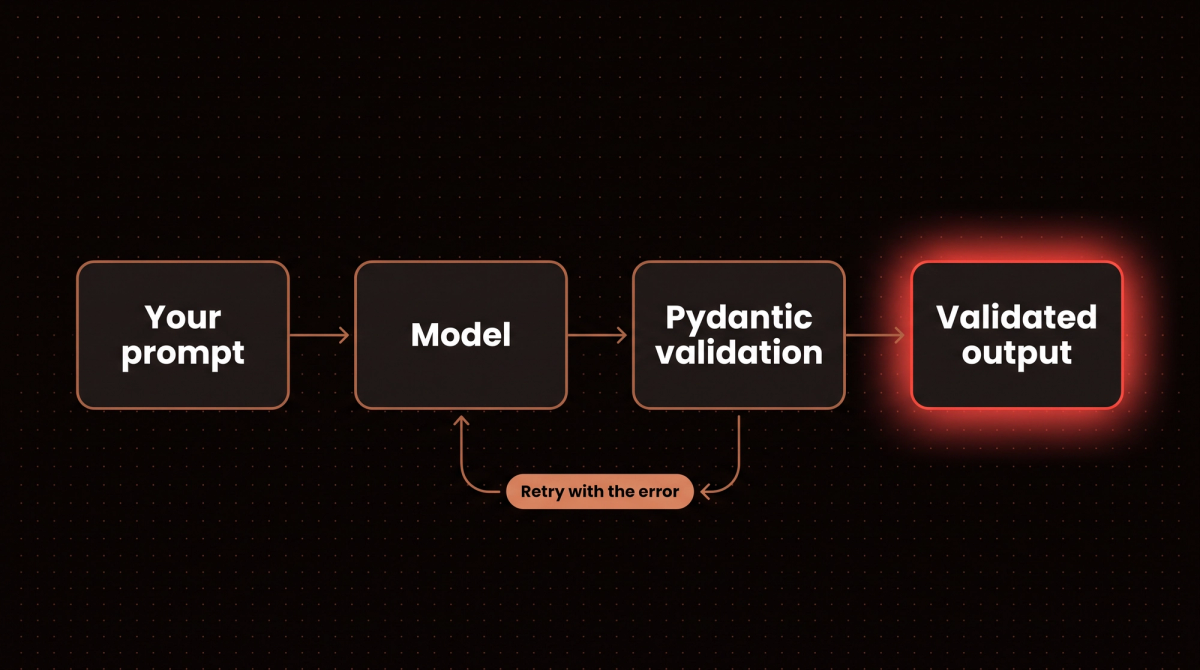
Pydantic AI flips this. You define what you want the agent to return, a Pydantic model, a list, a typed dict, even a primitive, and the framework handles the validation loop. If the model returns something that doesn't match your schema, Pydantic AI sends the validation error back to the model and asks again. You get a validated result or an exception. No silent failures.
The second reason I use it is the developer experience. Because everything is typed, your IDE completes result.output, catches type errors before runtime, and makes refactoring safe.
Where the project stands in October 2026
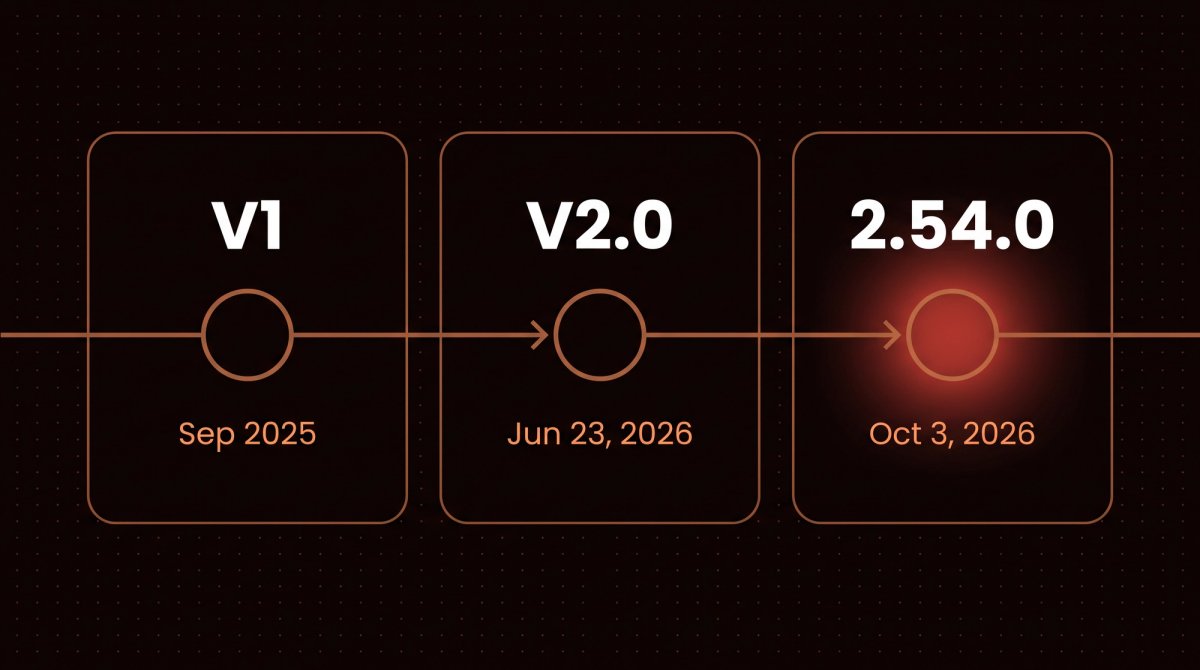
The project reached V1 in September 2025 and V2.0 on June 23, 2026. Under the version policy, minor releases carry no intentional breaking changes, and V1 gets security fixes for at least six months after V2. The GitHub repository had 20,535 stars on October 11, 2026, and the latest release was v2.55.0 from October 9. The package needs Python 3.11 or newer, according to its PyPI metadata.
V2 organizes the framework around capabilities, which bundle tools, hooks, instructions and model settings into one reusable unit. The upgrade guide lists every change. Four affect code in this guide:
- A plain
pip install pydantic-ainow installs frontier providers and minimal integrations. Bedrock, Groq, Mistral and others are extras you add yourself. result.usageis a property now, soresult.usage()raises aTypeError.- A model name without a provider prefix, such as
Agent('gpt-5'), raises an error. The bareopenai:prefix now uses the OpenAI Responses API. - The default
end_strategybecame'graceful'. If a model calls function tools in the same response as a successful output, those tools now run instead of being skipped.
Installing Pydantic AI and Building Your First Agent
Installation is a single command, and I pin the version for anything that ships:
pip install "pydantic-ai==2.55.0"For AWS Bedrock you add the extra:
pip install "pydantic-ai[bedrock]"A minimal agent looks like this. It needs an ANTHROPIC_API_KEY in your environment.
# first_agent.py
from pydantic_ai import Agent

agent = Agent(
    "anthropic:claude-haiku-4-5-20251001",
    instructions="You are a concise assistant. Answer in 2 sentences max.",
)

result = agent.run_sync("What is dependency injection?")
print(result.output)
This is one live run against Claude Haiku 4.5. A model's wording changes from run to run, so yours will differ.
Dependency injection is a design pattern where an object receives its dependencies from external sources rather than creating them itself. This makes code more modular, testable, and flexible by decoupling components.The answer lives in result.output. Older tutorials use result.data, which raises an AttributeError on current releases. For a plain string output type it's just a string. The real power comes when you tell the agent what shape you want back.
A note on the model id. Claude Haiku 5.5 (claude-haiku-5-5) is Anthropic's current Haiku. It was released on October 7, 2026, and the pricing page lists it at $0.10 per million input tokens and $0.50 per million output tokens for prompts up to 100,000 tokens (checked October 11, 2026). Haiku 4.5 is still listed as Active on Anthropic's deprecations page, but with a tentative retirement date of not sooner than October 15, 2026, so a new project should start on Haiku 5.5. I kept the Haiku 4.5 id in these scripts because their pasted outputs came from it. Moving to the new one is a one string change, "anthropic:claude-haiku-5-5". Anthropic says Haiku 5.5 counts about 30% more tokens for the same text than Haiku 4.5, so compare cost per finished task, not per token. My model comparison covers the other current models.
Official Examples and More Code Snippets
Pydantic ships runnable examples with the package. Install the extra with pip install "pydantic-ai[examples]" and run one with python -m pydantic_ai_examples.pydantic_model, which builds a typed model from a sentence. The examples page lists the rest and says to set a model API key first, and that example reads its model name from the PYDANTIC_AI_MODEL environment variable. Every script in this guide is complete as well, with its file name in the first comment, so you can paste one into a file and run it. Most of the ones without a model call need no API key.
Structured Output: The Feature That Changes Everything
Here's where Pydantic AI earns its name. Instead of parsing strings, you define a Pydantic model and pass it as output_type. The older name, result_type, no longer exists (my Pydantic AI output types guide covers the migration, the three output modes and the errors each old name now raises):
# structured.py
from typing import Literal
from pydantic import BaseModel, Field
from pydantic_ai import Agent


class CompetitorAnalysis(BaseModel):
    company_name: str
    main_strength: str
    main_weakness: str
    pricing_tier: Literal["budget", "mid", "enterprise"]
    verdict: str = Field(description="One sentence, plain language")


agent = Agent(
    "anthropic:claude-haiku-4-5-20251001",
    output_type=CompetitorAnalysis,
    instructions="Analyze the company described. Be specific and honest.",
)

result = agent.run_sync(
    "Analyze Zapier as a competitor to a custom n8n deployment for enterprise clients."
)
analysis = result.output          # a validated CompetitorAnalysis, not a string
print(type(analysis).__name__, "|", analysis.pricing_tier)
print(analysis.verdict)
print("model requests:", result.usage.requests)
One live run, again against Claude Haiku 4.5:
CompetitorAnalysis | enterprise
Zapier wins for rapid deployment and compliance requirements, but n8n self-hosting wins for cost control, customization freedom, and long-term ROI on high-volume automation workloads.
model requests: 1
Two details are worth copying. pricing_tier is a Literal, so the schema the model sees lists the allowed values, and anything else fails validation. The Field(description=...) on verdict goes into the schema too, which is how I keep a free text field to one sentence without a paragraph of prompt.
I used this pattern for a B2B SaaS client building a competitive intelligence tool. Their previous implementation used GPT-4 with a JSON prompt and a custom parser, and it worked about 80% of the time. With Pydantic AI a response either validates or raises a clear exception you can handle explicitly.
What the Validation Loop Does
When the model returns pricing_tier: "mid-market", Pydantic raises a ValidationError, Pydantic AI sends that error back to the model as a retry prompt, and the model tries again. The budget for that is small by default: one retry for tools and one for output. The script below uses a scripted stand in model so the failures are deterministic. It answers with an invalid tier on its first turn, then a valid one.
# retry_demo.py
from typing import Literal
from pydantic import BaseModel
from pydantic_ai import Agent, UnexpectedModelBehavior
from pydantic_ai.messages import ModelResponse, TextPart, ToolCallPart
from pydantic_ai.models.function import AgentInfo, FunctionModel


class CompetitorAnalysis(BaseModel):
    company_name: str
    pricing_tier: Literal["budget", "mid", "enterprise"]
    verdict: str


GOOD = {"company_name": "Zapier", "pricing_tier": "mid", "verdict": "Broad, but costly at volume"}
BAD = {**GOOD, "pricing_tier": "mid-market"}      # not one of the allowed values


def scripted(bad_turns):
    """A stand in model that answers through the output tool: bad_turns invalid answers, then a valid one."""
    calls = []

    def respond(messages, info: AgentInfo) -> ModelResponse:
        calls.append(1)
        args = BAD if len(calls) <= bad_turns else GOOD
        return ModelResponse(parts=[ToolCallPart(info.output_tools[0].name, args)])
    return FunctionModel(respond)


agent = Agent(scripted(1), output_type=CompetitorAnalysis)
result = agent.run_sync("Analyze Zapier")
print("output:", result.output)
print("model requests:", result.usage.requests)
retry = [part for message in result.all_messages() for part in message.parts if part.part_kind == "retry-prompt"][0]
print("retry prompt sent back:", retry.content[0]["msg"], "| input:", retry.content[0]["input"])

for bad_turns, retries in ((2, None), (2, {"output": 3})):
    kwargs = {} if retries is None else {"retries": retries}
    agent = Agent(scripted(bad_turns), output_type=CompetitorAnalysis, **kwargs)
    label = "default retries" if retries is None else "retries={'output': 3}"
    try:
        print(f"two bad answers, {label}: requests =", agent.run_sync("Analyze Zapier").usage.requests)
    except UnexpectedModelBehavior as e:
        print(f"two bad answers, {label}:", type(e).__name__ + ":", e)
output: company_name='Zapier' pricing_tier='mid' verdict='Broad, but costly at volume'
model requests: 2
retry prompt sent back: Input should be 'budget', 'mid' or 'enterprise' | input: mid-market
two bad answers, default retries: UnexpectedModelBehavior: Exceeded maximum output retries (1)
two bad answers, retries={'output': 3}: requests = 3The retry prompt carries Pydantic's own message and the bad input, which is why the model usually fixes it on the second try. With the default budget, two bad answers in a row end the run with UnexpectedModelBehavior, and retries={'output': 3} allowed a third request. The retries documentation covers both budgets.
Rules the Schema Cannot Express
Some rules need code, such as a number that must sit between 0 and 1. An output validator runs after the schema check, and raising ModelRetry from it sends your message back to the model like any other validation failure.
# validator_demo.py
from pydantic import BaseModel
from pydantic_ai import Agent, ModelRetry
from pydantic_ai.messages import ModelResponse, ToolCallPart
from pydantic_ai.models.function import AgentInfo, FunctionModel


class Score(BaseModel):
    confidence: float
    reasoning: str


answers = iter([{"confidence": 7, "reasoning": "very sure"}, {"confidence": 0.7, "reasoning": "fairly sure"}])


def model(messages, info: AgentInfo) -> ModelResponse:
    return ModelResponse(parts=[ToolCallPart(info.output_tools[0].name, next(answers))])


agent = Agent(FunctionModel(model), output_type=Score)


@agent.output_validator
def check_range(result: Score) -> Score:
    if not 0 <= result.confidence <= 1:                    # a rule the schema alone cannot express
        raise ModelRetry("confidence must be between 0 and 1")
    return result


run = agent.run_sync("Score this lead")
print("final:", run.output)
print("requests:", run.usage.requests)
final: confidence=0.7 reasoning='fairly sure'
requests: 2The first answer, a confidence of 7, passed the type check and failed the rule, so the run made a second request. Keep these validators free of network calls, because they run again on every retry.
Complex Nested Models
You're not limited to flat models. Nested structures work the way you'd expect:
from pydantic import BaseModel

class Action(BaseModel):
    step: int
    description: str
    owner: str  # 'human', 'agent', 'system'
    estimated_minutes: int

class ProjectPlan(BaseModel):
    title: str
    total_hours: float
    risk_level: str  # 'low', 'medium', 'high'
    actions: list[Action]
    blockers: list[str]
I've deployed this kind of multi level output for project scoping agents, where a client describes what they want to build and the agent returns a structured work breakdown. The downstream code that reads plan.actions never has to guess whether it's a list or a string.
Under the hood it asks for structured output through a tool call, the provider's native structured output, or a prompt that describes the schema. The output documentation explains how to choose with ToolOutput, NativeOutput and PromptedOutput.
Dependency Injection: Production Grade Context Passing
This is the feature most tutorials gloss over, and it's the one that makes Pydantic AI usable in real systems. Your tools need context: database connections, API clients, the current user's ID, rate limiter instances. The wrong way to handle this is global variables or environment lookups inside tool functions. The right way is dependency injection.
You declare a deps type, any dataclass or typed dict, pass an instance into agent.run(), and tools receive it through RunContext. This example uses a fake database so it runs anywhere, and a live Claude Haiku 4.5 call to choose and use the tool:
# deps_tools.py
from dataclasses import dataclass
from pydantic_ai import Agent, RunContext


class FakeDB:
    """Stands in for a real database client."""

    async def balance(self, user_id: str, account_type: str) -> float:
        return {("usr_abc123", "checking"): 1240.50}.get((user_id, account_type), 0.0)


@dataclass
class Deps:
    user_id: str
    db: FakeDB


agent = Agent(
    "anthropic:claude-haiku-4-5-20251001",
    deps_type=Deps,
    instructions="Help users look up their account information. Be brief.",
)


@agent.tool
async def get_account_balance(ctx: RunContext[Deps], account_type: str) -> dict:
    """Get the balance for one account type: checking or savings."""
    balance = await ctx.deps.db.balance(ctx.deps.user_id, account_type)
    return {"balance": balance, "currency": "USD"}


deps = Deps(user_id="usr_abc123", db=FakeDB())          # built per request, from the JWT and the pool
result = agent.run_sync("What is my checking account balance?", deps=deps)
print(result.output)
Your checking account balance is **$1,240.50**.In production you build Deps from your request context: the user ID from the JWT, the connection from your pool, a rate limiter for that user. The agent and its tools get exactly what they need, with no global state and no test pollution. In unit tests you swap in a fake client without monkey patching anything.
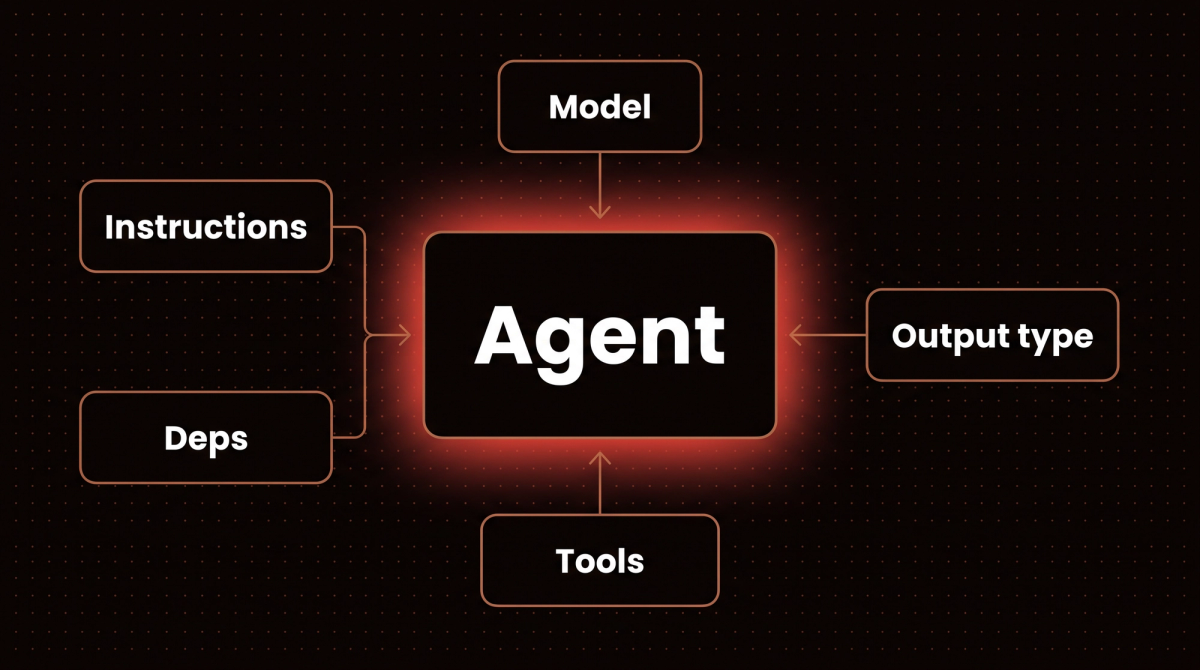
The official dependencies page says the same deps object reaches three places: dynamic instructions functions, tools and output validators. In every one of them it arrives as the first parameter, a RunContext[YourDepsType], and ctx.deps is your object. The context also carries state for the current run. On 2.55.0 its fields include prompt, messages, usage, retry, run_step and tool_name, which is how a tool can tell that the model is on its second attempt. You pass the type with deps_type, which only exists for type checking, and the instance with deps= on each run. The booking agent near the end of this guide uses deps in a dynamic instructions function and in two tools.
One V2 detail for type checkers: an Agent without a deps type now infers Agent[object, str] instead of Agent[None, str], so explicit RunContext[None] annotations deserve a second look when you upgrade. For deps in instructions and validators, overriding them in tests and the mistakes pyright catches, see my Pydantic AI dependency injection guide.
Real Client Example: CRM Enrichment Agent
One of my real estate clients needed an agent that looks up a lead in their CRM, enriches it with publicly available property data, and writes a personalized follow up draft. The deps object carries the CRM client, the property data API client, and the user's email for tone calibration:
@dataclass
class CRMDeps:
    crm: CRMClient
    property_api: PropertyAPIClient
    agent_email: str
    agent_name: str

@crm_agent.tool
async def lookup_lead(ctx: RunContext[CRMDeps], lead_id: str) -> dict:
    """Look up lead details from the CRM."""
    lead = await ctx.deps.crm.get_lead(lead_id)
    return {
        'name': lead.full_name,
        'property_interest': lead.property_type,
        'budget': lead.budget_range,
        'last_contact': lead.last_contact_date
    }

@crm_agent.tool
async def get_market_data(
    ctx: RunContext[CRMDeps],
    zip_code: str,
    property_type: str
) -> dict:
    """Get current market data for a specific location and property type."""
    data = await ctx.deps.property_api.market_summary(zip_code, property_type)
    return {
        'median_price': data.median,
        'days_on_market': data.avg_dom,
        'inventory': data.active_listings
    }
This agent runs on every new CRM lead. The output is a FollowUpDraft Pydantic model with subject, body, and recommended call time. There is no global state, it is fully testable, and the type system means nobody on the team can accidentally pass the wrong client type.
Tool Definition: Giving Your Agent Real Capabilities
The @agent.tool decorator turns a regular Python function into a tool the model can call, and @agent.tool_plain does the same for functions that don't need RunContext. Pydantic validates the arguments the model passes before your function runs, so you don't write argument validation inside your tools.
@agent.tool
async def search_knowledge_base(
    ctx: RunContext[Deps],
    query: str,
    max_results: int = 5,
    category: str | None = None
) -> list[dict]:
    """
    Search the internal knowledge base for relevant articles.

    Args:
        query: The search query string
        max_results: Maximum number of results to return (1-20)
        category: Optional category filter ('support', 'billing', 'technical')
    """
    results = await ctx.deps.search_client.query(
        query,
        limit=min(max_results, 20),  # still good to cap on our side
        category=category
    )
    return [{'title': r.title, 'excerpt': r.excerpt, 'url': r.url} for r in results]
The docstring is extracted and sent to the model as the tool description, and the parameter descriptions become schema descriptions. Your documentation and your tool contract are the same text, so changing one changes the other. The function tools documentation covers the supported docstring styles.
Error Handling Inside Tools
A common assumption, which this guide used to repeat, is that any exception a tool raises is passed back to the model. It is not, and the difference matters. Only three things become feedback for the model: a ValidationError on the tool's arguments, a ModelRetry you raise, and a ToolFailed you raise. Any other exception propagates out of the run and lands in your code. The script below raises each of the three from the same tool.
# tool_errors.py
from pydantic_ai import Agent, ModelRetry, ToolFailed
from pydantic_ai.messages import ModelResponse, ToolCallPart
from pydantic_ai.models.function import AgentInfo, FunctionModel


def model_calling(tool_name, args_per_turn):
    turns = iter(args_per_turn)

    def respond(messages, info: AgentInfo) -> ModelResponse:
        args = next(turns, None)
        if args is None:
            from pydantic_ai.messages import TextPart
            return ModelResponse(parts=[TextPart("done")])
        return ModelResponse(parts=[ToolCallPart(tool_name, args)])
    return FunctionModel(respond)


def run(raise_what):
    agent = Agent(model_calling("get_weather", [{"city": "Springfield"}, {"city": "Springfield, US"}]))

    @agent.tool_plain
    def get_weather(city: str) -> str:
        if "," not in city:
            raise raise_what(f"{city!r} is ambiguous, add the country code")
        return "18C and clear"

    return agent.run_sync("weather?")


for exception in (ModelRetry, ToolFailed, ValueError):
    try:
        result = run(exception)
        tool_returns = [p.content for m in result.all_messages() for p in m.parts if p.part_kind in ("retry-prompt", "tool-return")]
        print(exception.__name__, "-> run finished; what the model saw:", tool_returns)
    except Exception as e:
        print(exception.__name__, "-> run raised", type(e).__name__ + ":", e)
ModelRetry -> run finished; what the model saw: ["'Springfield' is ambiguous, add the country code", '18C and clear']
ToolFailed -> run finished; what the model saw: ["'Springfield' is ambiguous, add the country code", '18C and clear']
ValueError -> run raised ValueError: 'Springfield' is ambiguous, add the country codeUse ModelRetry when the model should try again with corrections, such as an ambiguous city name. Use ToolFailed when the call is finished and the result is a failure, such as a missing file. ModelRetry consumes the tool's retry budget and ToolFailed does not, so bound runaway loops with usage limits. Raise a plain exception for cases you want in your own error handling, like a rate limit.
Async Agents: Handling Production Load
In production you're almost never running a single agent synchronously. You're handling concurrent user requests, batch processing, or parallel subagent calls. agent.run() is a coroutine, and agent.run_sync() is a thin wrapper for scripts and the REPL. This script runs three lead drafts concurrently and keeps one failure from taking down the batch. It uses the offline test model, so the output is deterministic.
# async_batch.py
import asyncio
from pydantic_ai import Agent
from pydantic_ai.models.test import TestModel

agent = Agent(TestModel(custom_output_text="draft ready"))


async def draft(lead_id: str) -> str:
    if lead_id == "bad":
        raise RuntimeError("CRM lookup failed")
    return (await agent.run(f"Follow up with lead {lead_id}")).output


async def main():
    ids = ["l1", "bad", "l3"]
    results = await asyncio.gather(*(draft(i) for i in ids), return_exceptions=True)
    for lead_id, result in zip(ids, results):
        print(lead_id, "->", f"failed: {result}" if isinstance(result, Exception) else result)


asyncio.run(main())
l1 -> draft ready
bad -> failed: CRM lookup failed
l3 -> draft readyFor a logistics client I work with, the same shape processes 40 to 60 inbound shipment notifications at once. Each call checks carrier APIs, validates delivery windows, and generates exception reports. The batch finishes in a few seconds because the I/O waits overlap instead of stacking.
Using Agents in a FastAPI App
The most common production shape is an agent behind an HTTP route. An async def route awaits agent.run(), and a plain def route can use run_sync() because FastAPI runs it in a worker thread. The last lines show what happens if you call run_sync() from inside async code.
# fastapi_route.py
from fastapi import FastAPI
from fastapi.testclient import TestClient
from pydantic import BaseModel
from pydantic_ai import Agent
from pydantic_ai.models.test import TestModel


class Reply(BaseModel):
    answer: str
    needs_human: bool


# in production: Agent("anthropic:...", output_type=Reply); TestModel keeps the example offline
agent = Agent(TestModel(custom_output_args={"answer": "Your order shipped.", "needs_human": False}), output_type=Reply)
app = FastAPI()


@app.post("/ask")
async def ask(question: str) -> Reply:
    result = await agent.run(question)        # awaited, so other requests keep being served
    return result.output


@app.post("/ask-sync")
def ask_sync(question: str) -> Reply:
    return agent.run_sync(question).output     # fine in a plain def route: FastAPI runs it in a thread


with TestClient(app) as client:
    print("async route:", client.post("/ask", params={"question": "Where is my order?"}).json())
    print("sync route:", client.post("/ask-sync", params={"question": "Where is my order?"}).json())

import asyncio


async def inside_a_running_loop():
    agent.run_sync("hi")                       # run_sync inside async code

try:
    asyncio.run(inside_a_running_loop())
except RuntimeError as e:
    print("run_sync inside async code:", type(e).__name__ + ":", e)
async route: {'answer': 'Your order shipped.', 'needs_human': False}
sync route: {'answer': 'Your order shipped.', 'needs_human': False}
run_sync inside async code: RuntimeError: This event loop is already runningMessage History and Multi Turn Conversations
For conversational context across turns, you pass the previous messages into the next call with message_history. The part worth knowing is how to store them. ModelMessagesTypeAdapter serializes a history to plain JSON and reads it back, and the version policy tells you to use it because message formats can grow new fields between releases.
# history_demo.py
from pydantic_ai import Agent
from pydantic_ai.messages import ModelMessagesTypeAdapter
from pydantic_core import to_jsonable_python
from pydantic_ai.models.test import TestModel

agent = Agent(TestModel(custom_output_text="Noted."), instructions="You are a support assistant.")
first = agent.run_sync("My order is A1")
stored = to_jsonable_python(first.all_messages())            # what you would save in a database
restored = ModelMessagesTypeAdapter.validate_python(stored)    # what you load on the next request
second = agent.run_sync("Any update?", message_history=restored)
print("messages after turn 1:", len(first.all_messages()))
print("messages after turn 2:", len(second.all_messages()))
print("only turn 2:", len(second.new_messages()))
messages after turn 1: 2
messages after turn 2: 4
only turn 2: 2all_messages() returns the whole conversation including tool calls, and new_messages() returns only the latest run's. The message history documentation also covers trimming and summarizing a long history, and it says history serialized with V1 still loads in V2.
Pydantic AI with AWS Bedrock
Most tutorials use OpenAI or Google Gemini. My production deployments mostly run on AWS Bedrock because my clients are already in AWS and the spend counts against their existing AWS commitments. Pydantic AI's Bedrock support works well, with a few details that tripped me up.
Setting Up BedrockConverseModel
# bedrock_config.py
from pydantic_ai import Agent
from pydantic_ai.models.bedrock import BedrockConverseModel
from pydantic_ai.providers.bedrock import BedrockProvider

# string shorthand: credentials and region come from the standard boto3 chain
shorthand = Agent("bedrock:us.anthropic.claude-haiku-4-5-20251001-v1:0")

# explicit region, and a cross region inference profile id (the "us." prefix)
model = BedrockConverseModel(
    "us.anthropic.claude-haiku-4-5-20251001-v1:0",
    provider=BedrockProvider(region_name="us-east-1"),
)
agent = Agent(model, instructions="You are a concise assistant.")
print(type(agent.model).__name__, "|", agent.model.model_name)

# the current Haiku: no snapshot date and no -v1:0 suffix, called through a us. profile
current = BedrockConverseModel(
    "us.anthropic.claude-haiku-5-5",
    provider=BedrockProvider(region_name="us-east-1"),
)
print(type(current).__name__, "|", current.model_name)
BedrockConverseModel | us.anthropic.claude-haiku-4-5-20251001-v1:0
BedrockConverseModel | us.anthropic.claude-haiku-5-5I built these objects with dummy credentials to confirm the imports and ids parse on 2.55.0. I did not call Bedrock during this refresh, so check the model ids against your account. Five details:
- Install the extra. Without
pydantic-ai[bedrock], importing the Bedrock model fails with an error that names the missingboto3package. This used to come with the default install. - Use the full model id, and know which style your model uses. Anthropic's model id page says models before the 4.6 generation carry a snapshot date, and on Bedrock they end in
-v1:0, which is easy to leave off. From Claude Sonnet 4.6 on, the date is gone and so is the Bedrock-v1suffix, which is why the base id of the current Haiku is plainanthropic.claude-haiku-5-5. On the Converse API that bare id has no in region endpoint, so you pass a profile such asus.anthropic.claude-haiku-5-5. The table below shows both styles. - Cross region profiles use a prefix. A prefix such as
us.selects a cross region inference profile for the Americas, and the package's own model name list also haseu.,au.,jp.andglobal.variants of the Haiku 5.5 id. Whether your account can call one depends on its region and model access. For cost tracking, the Bedrock page documents application inference profiles through abedrock_inference_profilesetting. - Credentials come from the standard boto3 chain. Environment variables, instance profile or assumed role all work, and the docs also describe a Bedrock API key in
AWS_BEARER_TOKEN_BEDROCK. - Two Bedrock routes exist. The
bedrock:prefix always uses the Converse API, which covers Anthropic, Amazon, Cohere, Meta, Mistral and more. A separatebedrock-mantle:prefix, installed with thebedrock-mantleextra, serves OpenAI GPT models through Bedrock's OpenAI compatible endpoint. For Claude you wantbedrock:.
| Model | Base model id | Id style |
|---|---|---|
| Claude Haiku 4.5 | anthropic.claude-haiku-4-5-20251001-v1:0 |
Snapshot date and a -v1:0 suffix |
| Claude Haiku 5.5 | anthropic.claude-haiku-5-5 |
No date and no suffix, released October 7, 2026 |
| Claude Sonnet 5.5 | anthropic.claude-sonnet-5-5 |
No date and no suffix, released September 28, 2026 |
The base ids come from Anthropic's model pages (checked October 11, 2026). AWS's model cards list no in region endpoint for these ids on the Converse API that bedrock: uses, so put a us., eu., au., jp. or global. prefix in front, for example bedrock:us.anthropic.claude-haiku-5-5.
Structured Output on Claude via Bedrock
Some write ups say structured streaming with Claude on Bedrock arrives as one chunk at the end, and this guide used to say so. I have not tested that again on 2.55, and the current Bedrock page does not list it as a limitation. It does document how structured output is chosen: a bare output_type uses native structured output where Bedrock supports it for the model, and otherwise tool output. When a Claude model is thinking, Pydantic AI does not force the output tool, because a forced tool choice and thinking do not mix on Claude. The page lists Claude Opus 5 and later, Claude Sonnet 5, Claude Haiku 5.5 and Claude Fable 5 as models that think by default, so for Haiku 5.5 this applies without any setting. To keep forced tool output, it says to turn thinking off with thinking=False where the model allows it. Test run_stream() with your model before you build a UI on partial output. The same page covers prompt caching with CachePoint markers.
Human Approval, Durable Execution and Observability
Three production needs used to push me toward other tools. Pydantic AI now covers them, and the first one is simple enough to run offline.
Human in the Loop Approval
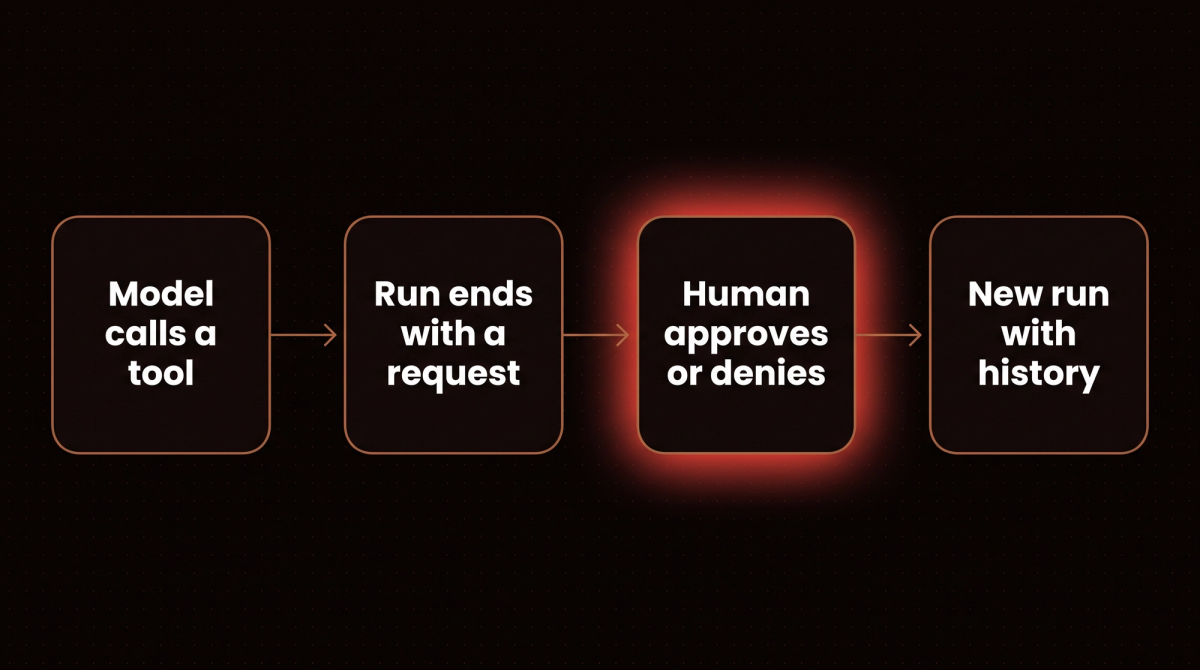
Mark a tool with requires_approval=True and include DeferredToolRequests in the output type. When the model calls the tool, the run ends with a request object instead of executing it. You collect a decision, then start a new run with the original history plus the decision.
# approval_demo.py
from pydantic_ai import Agent, DeferredToolRequests, DeferredToolResults, ToolDenied
from pydantic_ai.messages import ModelResponse, TextPart, ToolCallPart
from pydantic_ai.models.function import AgentInfo, FunctionModel


def model(messages, info: AgentInfo) -> ModelResponse:
    if len(messages) == 1:
        return ModelResponse(parts=[ToolCallPart("send_refund", {"order_id": "A1", "amount": 40})])
    return ModelResponse(parts=[TextPart("Refund handled.")])


agent = Agent(FunctionModel(model), output_type=[str, DeferredToolRequests])


@agent.tool_plain(requires_approval=True)
def send_refund(order_id: str, amount: int) -> str:
    print("   (send_refund really ran)")
    return f"refunded {amount} for {order_id}"


first = agent.run_sync("Refund order A1")
requests = first.output
print("run ended with:", type(requests).__name__, [(c.tool_name, c.args) for c in requests.approvals])

for decision in (True, ToolDenied("Not approved by finance")):
    results = DeferredToolResults(approvals={requests.approvals[0].tool_call_id: decision})
    second = agent.run_sync(message_history=first.all_messages(), deferred_tool_results=results)
    returned = [part.content for m in second.new_messages() for part in m.parts if part.part_kind == "tool-return"]
    print("decision:", "approved" if decision is True else "denied", "-> tool result the model saw:", returned)
run ended with: DeferredToolRequests [('send_refund', {'order_id': 'A1', 'amount': 40})]
(send_refund really ran)
decision: approved -> tool result the model saw: ['refunded 40 for A1']
decision: denied -> tool result the model saw: ['Not approved by finance']The tool ran only after approval, and a denial reaches the model as a tool result with your message. The approval can come days later from a different process, because it is just message history plus a decision. If the approver lives in the same process, the HandleDeferredToolCalls capability resolves calls inline, and the deferred tools documentation shows both flows. My LangGraph human in the loop guide covers the same idea with graph checkpoints.
Durable Execution
For runs that must survive a crash or an API failure, Pydantic AI integrates with durable execution engines. The durable execution overview lists Temporal, DBOS, Prefect and Restate, with more pages for Airflow and AWS Lambda durable functions. Temporal runs model requests and tool calls as activities, and DBOS checkpoints them to Postgres or SQLite so a workflow resumes from its last completed step. I did not run any of these for this refresh. Reach for one when a restart in the middle of a long run would cost you.
Observability
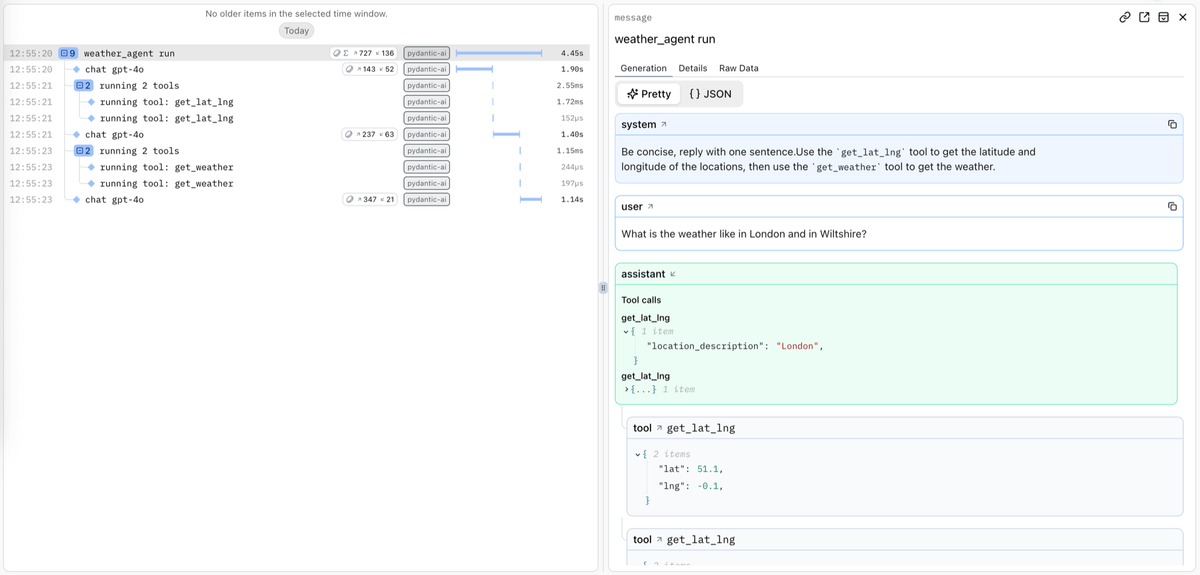
Pydantic's observability product is Logfire, and the setup is two lines at your entry point. The observability article on the Pydantic blog makes the case: an agent can return a confident wrong answer with no exception and clean logs, and only the trace shows a tool called with the wrong argument three steps earlier.
import logfire

logfire.configure()
logfire.instrument_pydantic_ai()
I did not run this one, because it needs a Logfire account. It is optional, and the observability docs say any OpenTelemetry backend works. V2 moved the default instrumentation format to version 5 and reports run token usage under gen_ai.aggregated_usage.*, so dashboards built on V1 attribute names need a look after you upgrade.
Logfire and Prompt Optimization
A common question is whether Logfire can improve an agent's prompts from its production traces. In part it can, but it proposes and you decide. I have not run any of this, because it needs a Logfire account with real traffic, so what follows is what Pydantic's own material says.
- The Optimize tab. According to Pydantic's July 17, 2026 article, the optimizer reads an agent's recent production traces, up to a hundred conversations from the last five days with failures weighted highest, and proposes a small edit to the prompt, at most one error fix and one quality change per run. Each claim in the proposal cites specific traces, shown beside the diff, and nothing changes until you accept it. It reads the traces any framework sends, not only Pydantic AI.
- Managed prompts. The ManagedPrompt capability, from the separate Pydantic AI Harness package, backs an agent's instructions with a prompt stored in Logfire. You version it, move labels such as production and canary, and roll back without a deploy. The default stays in your code. The docs say Harness is on 0.x releases, so its API can change between minor releases.
- Offline optimization. A February 2, 2026 article on GEPA shows Pydantic Evals scoring candidate prompts for the GEPA optimizer, with
Agent.override()injecting each candidate. That runs against a dataset you supply, not production traffic.
Pydantic's pricing page (checked October 11, 2026) lists a free Personal plan with 10 million records a month, Team at $49 a month and Growth at $249 a month. I did not check which plan includes the Optimize tab, so confirm that before you plan around it.
Evaluating Agents with Pydantic Evals
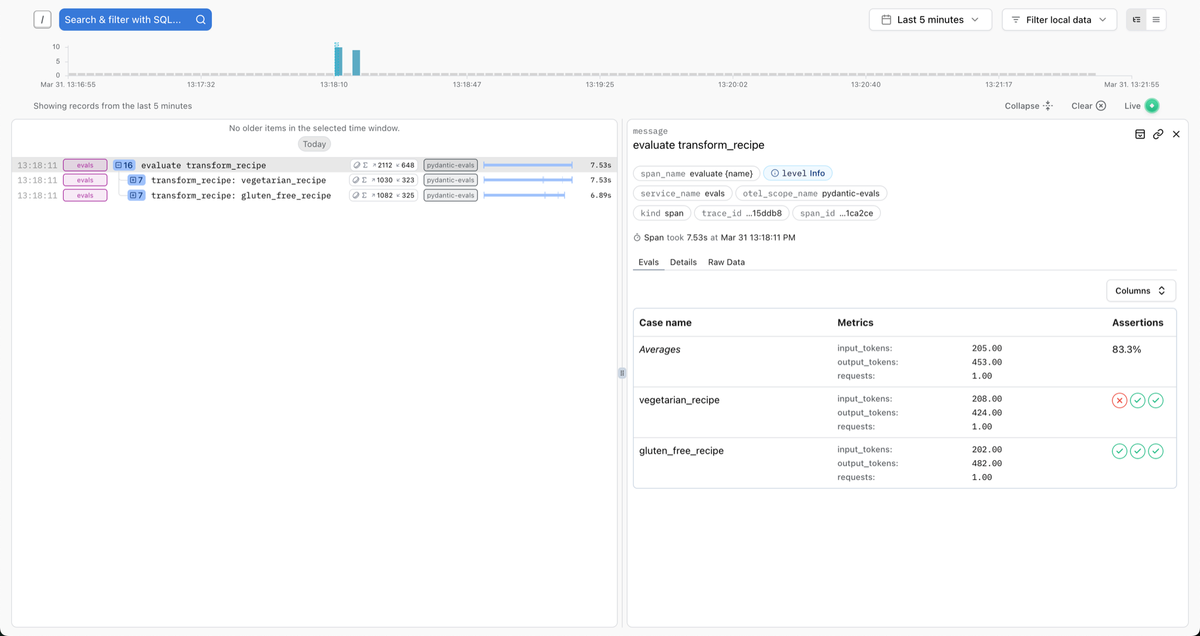
Unit tests prove the wiring. An evaluation checks the answers: Pydantic Evals runs your agent over a Dataset of Case objects and scores every output with evaluators. It installs as pydantic-evals and ships with the same version number as Pydantic AI. The smallest useful version is a booking intent classifier backed by a FunctionModel, so it runs offline with no API key. The third case is what a production failure looks like once it becomes a test: the real input, and the answer the agent should have given.
# evals_demo.py
from pydantic_ai import Agent, models
from pydantic_ai.messages import ModelResponse, TextPart
from pydantic_ai.models.function import AgentInfo, FunctionModel
from pydantic_evals import Case, Dataset
from pydantic_evals.evaluators import EqualsExpected

models.ALLOW_MODEL_REQUESTS = False      # no real model call can slip through


def fake_model(messages, info: AgentInfo) -> ModelResponse:
    text = messages[-1].parts[-1].content.lower()
    return ModelResponse(parts=[TextPart('cancel' if 'cancel' in text else 'book')])


intent_agent = Agent(FunctionModel(fake_model), instructions='Reply with one word: book, cancel or reschedule.')


async def classify(message: str) -> str:
    result = await intent_agent.run(message)
    return result.output


dataset = Dataset(
    name='booking_intent',
    cases=[
        Case(name='new_booking', inputs='A table for two on Friday at 7?', expected_output='book'),
        Case(name='cancel', inputs='Please cancel my 3pm appointment', expected_output='cancel'),
        # copied from a failed production trace: the agent answered "book"
        Case(name='prod_move_to_monday', inputs='Can we move Thursday to Monday?', expected_output='reschedule'),
    ],
    evaluators=[EqualsExpected()],
)

report = dataset.evaluate_sync(classify)
report.print(include_input=True, include_output=True, include_durations=False)
I ran it on October 15, 2026 with pydantic-evals 2.56.0 and pydantic-ai-slim 2.56.0 on Python 3.13. Version 2.56.0 came out on October 13, after the rest of this guide was checked on 2.55.0, and 2.55.0 and 2.54.0 print the identical report. This is the report it printed:
                          Evaluation Summary: classify
┏━━━━━━━━━━━━━━━━━━━━━┳━━━━━━━━━━━━━━━━━━━━━━━━━━━━━━━━━━┳━━━━━━━━━┳━━━━━━━━━━━━┓
┃ Case ID             ┃ Inputs                           ┃ Outputs ┃ Assertions ┃
┡━━━━━━━━━━━━━━━━━━━━━╇━━━━━━━━━━━━━━━━━━━━━━━━━━━━━━━━━━╇━━━━━━━━━╇━━━━━━━━━━━━┩
│ new_booking         │ A table for two on Friday at 7?  │ book    │ ✔          │
├─────────────────────┼──────────────────────────────────┼─────────┼────────────┤
│ cancel              │ Please cancel my 3pm appointment │ cancel  │ ✔          │
├─────────────────────┼──────────────────────────────────┼─────────┼────────────┤
│ prod_move_to_monday │ Can we move Thursday to Monday?  │ book    │ ✗          │
├─────────────────────┼──────────────────────────────────┼─────────┼────────────┤
│ Averages            │                                  │         │ 66.7% ✔    │
└─────────────────────┴──────────────────────────────────┴─────────┴────────────┘
The production case stays red until the agent handles reschedules, and it reruns on every later prompt or model change. EqualsExpected is the simplest built in evaluator, an exact match against expected_output. For free text there is LLMJudge, which calls a model, so it is no longer free or offline.
In Logfire, the route from a failed trace to a case is a few clicks. The datasets docs (checked October 15, 2026) say to open the span in Live view, select the database icon in its details, pick or create a hosted dataset, then review the extracted input, expected output and metadata before saving. The case keeps a link to its source trace. You then fetch that dataset back into code and run it like the one above; with Logfire configured, each run shows up there to compare against a baseline. The Python client for hosted datasets sits under logfire.experimental, so its API can change, and I have not run the hosted side because it needs a Logfire account. My Pydantic AI testing guide takes this further, with a larger eval dataset, tool call evaluators and a CI gate built from a failed production run.
Pydantic AI vs LangGraph: When to Use Which
I use both. The choice isn't about which is better. It's about what your workflow needs. The table below reflects what both libraries offer today, and where I say how they differ it is my own comparison.
| Need | Pydantic AI | LangGraph |
|---|---|---|
| Single agent with tools | The natural fit | More structure than you need |
| Structured validated output | Native, with retries on validation failure | Supported, for example through a response format option or your own parsing |
| Dependency injection | First class, through RunContext |
Through run context, config and state |
| Explicit branching and loops | Possible with pydantic-graph, a typed graph library in the same project |
The core feature, with the most tooling |
| Resume after a crash | Durable execution engines such as Temporal, DBOS, Prefect and Restate | Checkpointers that save graph state |
| Human approval | Deferred tools with approval, ended and resumed through message history | interrupt() with a checkpointer |
| Multi agent orchestration | Agents calling agents, or a graph | The core feature |
| Learning curve | Low if you know FastAPI | Medium, because of graph concepts |
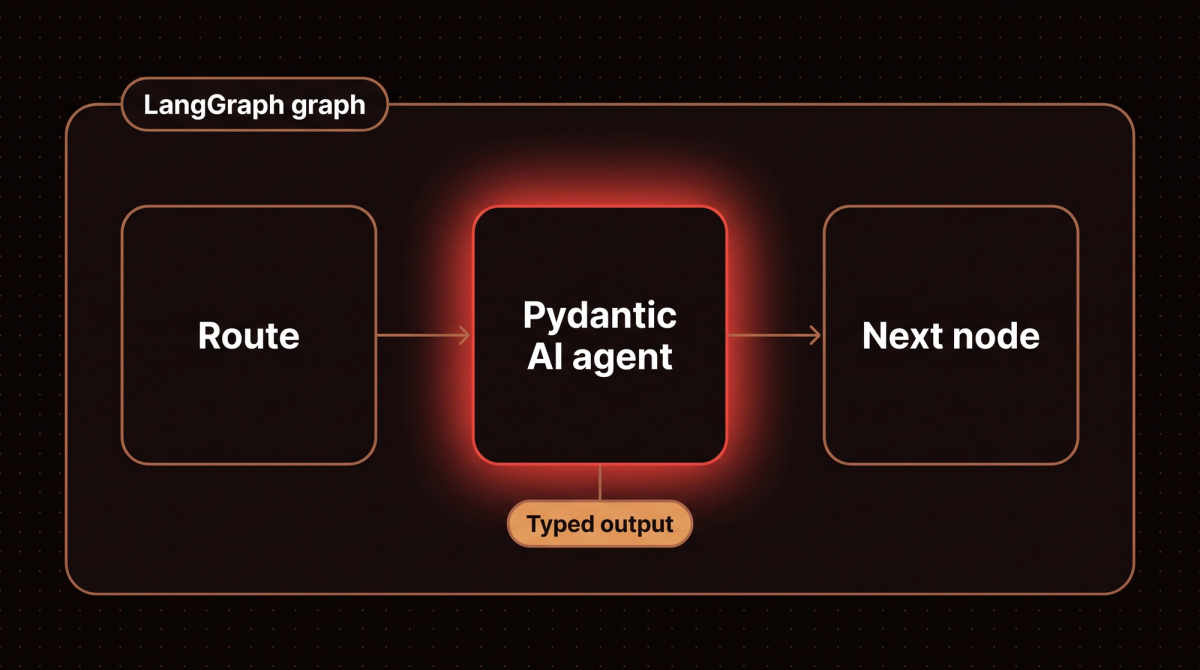
The pattern I reach for most: use a Pydantic AI agent as a worker node inside a LangGraph graph. LangGraph owns the routing and the saved state, and each node calls an agent with typed input and output. This version runs offline, with the test model standing in for the real one:
# langgraph_node.py
from typing import TypedDict
from pydantic import BaseModel
from pydantic_ai import Agent
from pydantic_ai.models.test import TestModel
from langgraph.graph import StateGraph, START, END


class Triage(BaseModel):
    action: str
    confidence: float


# in production this is Agent("anthropic:...", output_type=Triage); TestModel keeps the example offline
triage_agent = Agent(TestModel(custom_output_args={"action": "escalate", "confidence": 0.62}), output_type=Triage)


class State(TypedDict, total=False):
    ticket: str
    triage: Triage


def triage_node(state: State):
    result = triage_agent.run_sync(state["ticket"])      # typed in, typed out
    return {"triage": result.output}


graph = StateGraph(State)
graph.add_node("triage", triage_node)
graph.add_edge(START, "triage")
graph.add_edge("triage", END)
app = graph.compile()

final = app.invoke({"ticket": "Refund not received"})
print(type(final["triage"]).__name__, final["triage"].action, final["triage"].confidence)
Triage escalate 0.62If you are weighing the two frameworks more broadly, my LangChain versus LangGraph comparison and the LangGraph tutorial go deeper on the LangGraph side.
Pydantic AI vs the Claude Agent SDK
A newer question is whether to build on Pydantic AI or the Claude Agent SDK. Pydantic's article on the comparison, published October 5, 2026, argues from the Pydantic AI side, so read it with that in mind. Its point is about who owns the agent loop. The Claude Agent SDK installs a Python client with a bundled Claude Code executable and starts it as a subprocess per session, while Pydantic AI runs the loop in your process with the instructions, tools and model you choose. If you are building a coding product on Claude Code's behavior, the article agrees the SDK is the direct choice. For an application that defines its own agent, the control argument matches why I wanted typed output and explicit dependencies in the first place. A separate package, Pydantic AI Harness, adds file, shell, subagent and sandbox capabilities, and I did not run it for this refresh.
Testing Pydantic AI Agents Without Burning API Credits
This section doesn't exist in most tutorials. Testing agents is different from testing regular functions because the model's response is non deterministic. Pydantic AI has a built in answer: replace the model with TestModel or FunctionModel (my Pydantic AI testing guide goes further, into pytest structure and turning failed runs into evals). Three details trip people up here. agent.override() is a context manager and does not return a new agent, the function model's second argument is an AgentInfo, and there is no ModelContext. This script is the corrected version:
# testing_demo.py
import json
from dataclasses import dataclass
from pydantic_ai import Agent, RunContext, models
from pydantic_ai.messages import ModelResponse, TextPart, ToolCallPart
from pydantic_ai.models.function import AgentInfo, FunctionModel
from pydantic_ai.models.test import TestModel

models.ALLOW_MODEL_REQUESTS = False      # any accidental real model call now raises


@dataclass
class Deps:
    kb: dict


support_agent = Agent(
    "anthropic:claude-haiku-4-5-20251001", deps_type=Deps, output_type=str,
    defer_model_check=True,        # do not build the real provider (and demand an API key) until a run needs it
)


@support_agent.tool
def search_knowledge_base(ctx: RunContext[Deps], query: str, max_results: int = 3) -> list[str]:
    """Search the knowledge base."""
    return [text for key, text in ctx.deps.kb.items() if query in key][:max_results]


def mock_model(messages, info: AgentInfo) -> ModelResponse:
    if len(messages) == 1:                                   # first turn: the "model" decides to call the tool
        return ModelResponse(parts=[ToolCallPart("search_knowledge_base", json.dumps({"query": "refund"}))])
    tool_result = messages[-1].parts[0].content              # second turn: answer from the tool result
    return ModelResponse(parts=[TextPart(f"Found: {tool_result}")])


deps = Deps(kb={"refund policy": "Refunds within 30 days."})
with support_agent.override(model=FunctionModel(mock_model)):      # a context manager, not a new agent
    print("FunctionModel:", support_agent.run_sync("What is your refund policy?", deps=deps).output)

with support_agent.override(model=TestModel()):
    result = support_agent.run_sync("anything", deps=deps)
    print("TestModel called the tool and answered:", result.output)
FunctionModel: Found: ['Refunds within 30 days.']
TestModel called the tool and answered: {"search_knowledge_base":[]}FunctionModel lets you script exactly what the model does, here a search tool call followed by an answer built from the tool result. TestModel calls every tool with generated arguments and returns plausible data, which is enough to exercise your code paths. Two settings keep tests honest. models.ALLOW_MODEL_REQUESTS = False makes a missing override raise an error instead of spending money, and defer_model_check=True stops the agent from needing an API key at import time. Without it, importing a module that builds Agent('anthropic:...') fails in CI.
For checks against the real model, Pydantic Evals scores outputs and tool call sequences on datasets of cases, and it ships in the default install. Pydantic's comparison article suggests running a fixed set before and after you bump a dependency or change a prompt, so a behavior change shows up in a report during review. I did not run an eval suite against a real model for this refresh. The offline example under Evaluating Agents with Pydantic Evals above uses a FunctionModel.
Putting It Together: A Booking Agent
The sections above each show one feature. This one combines them in a booking agent, a common first project. A customer asks for an appointment, the agent checks availability, books a slot and returns a typed result. It uses structured output, dependencies, two tools, a dynamic instructions function, a tool that asks the model to retry, and the offline test setup from the last section. The calendar is an in memory stand in, so you can run the whole thing without an API key.
# booking_agent.py
from dataclasses import dataclass
from typing import Literal

from pydantic import BaseModel, Field
from pydantic_ai import Agent, ModelRetry, RunContext, models
from pydantic_ai.messages import ModelResponse, ToolCallPart
from pydantic_ai.models.function import AgentInfo, FunctionModel


class Calendar:
    """In memory stand in for your real booking system."""

    def __init__(self):
        self.free = {"2026-10-20": ["09:00", "10:30", "14:00"]}
        self.booked = {}

    async def free_slots(self, day: str) -> list[str]:
        return list(self.free.get(day, []))

    async def book(self, day: str, slot: str, name: str) -> str:
        self.free[day].remove(slot)                         # KeyError or ValueError if the slot is gone
        reference = f"BK-{len(self.booked) + 1:03d}"
        self.booked[reference] = (day, slot, name)
        return reference


@dataclass
class BookingDeps:
    calendar: Calendar
    customer_name: str


class BookingResult(BaseModel):
    status: Literal["booked", "no_availability", "needs_info"]
    reference: str | None = None
    day: str | None = None
    slot: str | None = None
    message: str = Field(description="One or two plain sentences for the customer")


booking_agent = Agent(
    "anthropic:claude-haiku-4-5-20251001",
    deps_type=BookingDeps,
    output_type=BookingResult,
    instructions="You book appointments. Check availability before you book. Never invent a slot.",
    defer_model_check=True,        # the real provider is only built when a run needs it
)


@booking_agent.instructions
def customer_line(ctx: RunContext[BookingDeps]) -> str:
    return f"The customer is {ctx.deps.customer_name}. Today is 2026-10-12."


@booking_agent.tool
async def check_availability(ctx: RunContext[BookingDeps], day: str) -> list[str]:
    """List the free appointment slots (HH:MM) for one day, given as YYYY-MM-DD."""
    return await ctx.deps.calendar.free_slots(day)


@booking_agent.tool
async def book_slot(ctx: RunContext[BookingDeps], day: str, slot: str) -> str:
    """Book one slot for the customer and return the booking reference."""
    try:
        return await ctx.deps.calendar.book(day, slot, ctx.deps.customer_name)
    except (KeyError, ValueError):
        raise ModelRetry(f"{slot} on {day} is not free. Call check_availability again and pick a listed slot.")


def scripted(steps):
    """A stand in model that plays back tool calls, then answers through the output tool."""
    turns = iter(steps)

    def respond(messages, info: AgentInfo) -> ModelResponse:
        name, args = next(turns)
        if name == "final_result":
            name = info.output_tools[0].name
        return ModelResponse(parts=[ToolCallPart(name, args)])

    return FunctionModel(respond)


# Everything below is the offline test. In production you drop the override and the scripted model.
models.ALLOW_MODEL_REQUESTS = False      # a stray real model call now raises instead of spending money

# Run 1: the model first tries a slot that is not free, gets the retry message, then books a listed one.
calendar = Calendar()
deps = BookingDeps(calendar=calendar, customer_name="Sam")
steps = [
    ("check_availability", {"day": "2026-10-20"}),
    ("book_slot", {"day": "2026-10-20", "slot": "11:00"}),
    ("book_slot", {"day": "2026-10-20", "slot": "10:30"}),
    ("final_result", {"status": "booked", "reference": "BK-001", "day": "2026-10-20", "slot": "10:30",
                      "message": "You are booked for 10:30 on 20 October."}),
]
with booking_agent.override(model=scripted(steps)):
    result = booking_agent.run_sync("Book me something on 20 October, mornings suit me", deps=deps)
print("status:", result.output.status, "|", result.output.reference, result.output.slot)
print("calendar now:", calendar.booked, "| still free:", calendar.free["2026-10-20"])
retry = [part.content for m in result.all_messages() for part in m.parts if part.part_kind == "retry-prompt"][0]
print("retry sent back to the model:", retry)
print("model requests:", result.usage.requests)

# Run 2: a day with nothing free, to check that the no availability path returns a clean result.
steps = [
    ("check_availability", {"day": "2026-10-21"}),
    ("final_result", {"status": "no_availability", "message": "Nothing is free on 21 October. Would another day work?"}),
]
with booking_agent.override(model=scripted(steps)):
    result = booking_agent.run_sync("Anything on 21 October?", deps=BookingDeps(Calendar(), "Sam"))
print("status:", result.output.status, "|", result.output.message)
status: booked | BK-001 10:30
calendar now: {'BK-001': ('2026-10-20', '10:30', 'Sam')} | still free: ['09:00', '14:00']
retry sent back to the model: 11:00 on 2026-10-20 is not free. Call check_availability again and pick a listed slot.
model requests: 4
status: no_availability | Nothing is free on 21 October. Would another day work?The scripted model plays back a fixed sequence, so this run tests my code and not the model's judgment. It shows four things. The tool raised ModelRetry for the slot that was not free, and the message went back to the model as a retry prompt. The model then booked a listed slot, the calendar changed, and the run ended with a validated BookingResult. Four model requests covered three tool calls and the final answer. The no availability path also returned a typed result instead of a made up time.
To go live, remove the two override blocks and the ALLOW_MODEL_REQUESTS line, set your provider key, and call await booking_agent.run(...) from your route with a BookingDeps built per request. I have not run this agent against a live model, so test it against your own calendar before you rely on it. Replace Calendar with a thin client for your booking system's API, and keep it behind the same two async methods so the tools do not change. Booking is a side effect, so if a person must confirm it, mark book_slot with requires_approval=True as in the approval section above. Bound runaway loops with usage limits, and read result.usage.requests across real traffic as the cost section below describes.
Cost Optimization in Production
Three things eat your token budget with Pydantic AI agents.
1. Retry loops. Every validation failure triggers another request, as the retry script above showed. If your output type is too strict or your prompt is ambiguous, you can pay for several model calls per user request. Track result.usage across a sample of real calls. My rule of thumb is that an average well above one request per run means the schema or prompt needs work.
result = await agent.run(user_message, deps=deps)
usage = result.usage          # a property in V2, not a method
print(f"Requests: {usage.requests}, Input tokens: {usage.input_tokens}")
2. Tool definitions. Every registered tool's name, description and schema is sent to the model on each request. Twelve tools with 200 word docstrings can add around three thousand tokens to every call, so keep docstrings short. With dozens of tools, the docs list a tool search capability that loads tools on demand, which I have not tried.
3. Message history growth. Passing history means tokens grow with conversation length. For most business workflows, conversations beyond 10 turns are rare, so I add a hard limit or a summarization step around the eighth turn. The docs list history processing and compaction capabilities if you want the framework to do it.
To budget a whole agent rather than one model call, my AI agent cost calculator turns request volume and model choice into a monthly figure.
Three Real Client Deployments
1. Legal Document Classifier (Legal Tech Client)
A legal tech startup needed to classify inbound contract documents by type, jurisdiction, and risk flags before routing to the right attorney. The previous approach was keyword matching with 200 rules, at 67% accuracy. My implementation was a Pydantic AI agent with a DocumentClassification output type: a type enum, a jurisdiction string, a risk flags list, and a confidence float. It ran on Bedrock with Claude Haiku 4.5 and reached 94% accuracy at under 2 seconds per document.
The key was the confidence field. When the agent returns confidence < 0.8, the document goes to a human review queue instead of auto routing. Before Pydantic AI, getting a usable confidence score out of an LLM took three layers of prompt engineering. With structured output it's a float field in the model.
2. Ecommerce Customer Support Triage (DTC Brand)
An e-commerce client had 800 to 1,200 support tickets per day. They wanted to auto resolve the 40% of tickets that were standard order status inquiries. I built a Pydantic AI agent with tools for order lookup, shipping carrier API calls, and CRM history. The TriageResult model includes an action (auto resolve, escalate, or needs info), a response draft, a confidence score, and an escalation reason.
The dependency injection pattern meant the agent got the customer's order history and past tickets from the request context, with no separate retrieval step. The agent resolves 38% of tickets automatically, slightly under target because of some edge cases, with a 96% customer satisfaction rate on auto resolved tickets. Their support team handles 750 fewer tickets per day.
3. CRM Lead Scoring (Real Estate Agency)
A real estate agency wanted AI lead scoring that integrates with their custom CRM. The agent takes a lead profile, calls property interest lookup and local market data tools, and returns a LeadScore object with a numeric score from 0 to 100, a tier (hot, warm, cold), a one paragraph reasoning, and a list of recommended next actions. The scoring runs on every new lead and on weekly rescores of the existing pipeline. Putting the agent's own contact info into Deps means the same code generates recommendations personalized to different agents on their team.
Common Mistakes I See
Copying code from an older tutorial. The names that changed matter most: result.data became result.output, result_type became output_type, and result.usage() became the property result.usage. The V1 to V2 migration map in the docs lists every renamed symbol. Run your tests with warnings visible on the latest 1.x first, as the upgrade guide recommends.
Assuming tool exceptions become retries. Only validation errors, ModelRetry and ToolFailed reach the model. Any other exception ends the run, as the tool error script showed.
Calling run_sync() from async code. It's fine in scripts and in plain def routes. Inside an async def handler it raises RuntimeError because the event loop is already running, so use await agent.run() there. The next section shows both.
Putting business logic inside output validators. Validators run on every retry. If one makes a database call, it runs again each time validation fails. Put database calls in tools, not validators.
Over specifying the system prompt. Models are good at inference. You don't need to explain JSON format or add 500 words of rules. Your output type already constrains the format.
Pinning a model id and never checking its retirement date. Anthropic lists Claude Haiku 4.5 with a tentative retirement date of not sooner than October 15, 2026 on the Claude API, and Amazon Bedrock sets its own schedule. Keep model ids in one config value, read the provider's deprecations page when you pin one, and run a few real cases whenever you change it.
Tuning retries without measuring. The default budget is one retry for tools and one for output, which is tight, not generous. If a schema fails validation twice in a row, raise the budget only after you check whether the schema or the prompt is the real problem. Set retries explicitly and handle UnexpectedModelBehavior in your caller.
Pydantic AI reached V1 in September 2025 and V2.0 on June 23, 2026, according to the official version policy. The GitHub repository showed 20,535 stars and a latest release of v2.55.0 (October 9, 2026) when I checked on October 11, 2026. Pydantic's February 2026 announcement covers the parent library passing 10 billion downloads, and AWS publishes a sample for hosting Pydantic AI agents on Bedrock AgentCore.
Frequently Asked Questions
Is Pydantic AI production ready in 2026?
Yes. It reached a stable V1 in September 2025 and V2.0 in June 2026. The version policy promises no intentional breaking changes in minor releases and six months of V1 security fixes after V2. V2 itself changed several defaults and removed deprecated names, so pin the version and read the upgrade guide before you move a deployed agent between major versions.
Does Pydantic AI work with AWS Bedrock?
Yes, through BedrockConverseModel or the bedrock: prefix. Install it with pip install "pydantic-ai[bedrock]", because the default install no longer includes Bedrock. Use the full model id in the style your model uses, which is a dated id ending in -v1:0 for Haiku 4.5 and plain anthropic.claude-haiku-5-5 for the current Haiku, and on Converse you call either one through a profile such as us. or global.. Credentials come from the standard boto3 chain.
What is the difference between Pydantic AI and LangChain?
LangChain is a broad ecosystem covering prompt templates, integrations and agent frameworks. Pydantic AI is narrower: type checked agents with validated outputs, dependency injection and a small API. LangChain has more integrations. For new single agent projects I start with Pydantic AI and add LangChain pieces only for a specific integration I need.
How does Pydantic AI handle tool errors?
A validation error on a tool's arguments, a ModelRetry and a ToolFailed all go back to the model as a tool result, so it can correct itself or react. Any other exception propagates out of the run into your code. The default budget is one retry per tool, and exhausting it raises UnexpectedModelBehavior.
Can Pydantic AI agents call other Pydantic AI agents?
Yes. You can call one agent from inside another agent's tool, or use agents as node functions inside a LangGraph graph, as the example above does. Each agent gets its own dependencies. This works well for orchestrator and worker setups where one agent decides what to delegate. My Pydantic AI multi agent guide runs all five patterns and shows how to keep one usage budget across them.
How do I test Pydantic AI agents without making real API calls?
Use TestModel or FunctionModel inside with agent.override(model=...). Set models.ALLOW_MODEL_REQUESTS = False so an accidental real call fails, and build agents with defer_model_check=True so imports need no API key. Pydantic Evals covers higher level checks against real models.
What models does Pydantic AI support?
The docs list OpenAI, Anthropic, Google, Bedrock, Azure AI Foundry, Groq, Mistral, xAI, Ollama and dozens more, swappable with a model string. Since V2 the model string needs a provider prefix, and the bare openai: prefix uses the Responses API. You can also write a custom model class for any provider with an HTTP API.
Is Pydantic AI free to use?
Yes. It is open source under the MIT license, and you pay only for the model calls through whichever provider you configure. Logfire, the Pydantic team's observability product, is optional, and the docs say any OpenTelemetry backend works as well.
If you want to see how I decide between Pydantic AI and full agent orchestration with state management, read my LangGraph tutorial. For understanding when you even need agents versus simpler automation, the agents vs automation guide covers my full decision framework. If you are ready to build something and want a second opinion on your architecture, the AI readiness assessment is a good starting point, or just reach out directly. If you would rather have the agent built for you, that is what my AI agent development service does.
Related reading
- Production multi agent systems with CrewAI Flows: the same job in a different framework.
- Building AI agents that work in production: the wider checklist around any framework.
- How to get a Claude API key and cap what it can spend: the key and the spend limit before your first agent run.
- The Google Harness2 setup guide: how an automated search rewrites an agent's prompts and skills, with a real run and its cost.
Last updated
November 1, 2026
Category
Implementation
Jahanzaib Ahmed
AI Systems Engineer & Founder
AI Systems Engineer with 126 production systems shipped. I run AgenticMode AI (AI agents, RAG systems, voice AI) and ECOM PANDA (ecommerce agency). I build AI that works in the real world for businesses across home services, healthcare, ecommerce, SaaS, and real estate.
Want this built for your business? See Workflow Automation, or browse the free tools and guides.
Related articles

How I Build Production Multi-Agent Systems With CrewAI Flows
A practitioner guide to production multi agent systems with CrewAI Flows: state, routing, timeouts, monitoring, memory and persistence, with every example run on crewai 1.15.27.
GuideImplementationCrewAI
LangGraph Tutorial: How I Build Production AI Agents With It
A hands on LangGraph tutorial covering state schemas, nodes, edges, checkpointing, human in the loop patterns, streaming, and real production cost data from 23 deployed systems.
GuideImplementationLangGraph
How to Use Pydantic AI Output Types Now That result_type Is Gone
What replaced result_type and result.data in Pydantic AI, tested on three releases, plus what tool, native and prompted output actually send to OpenAI and Claude, with runnable code and real output.
How toAI AgentsPydantic AI