How to Remove an MCP Server From Claude Code When It Keeps Coming Back
Claude Code lists the same MCP server in up to five places, so one remove command often leaves it running. Here is how to find every copy, remove it by scope and confirm it is gone.

Table of Contents
I ran claude mcp remove demo, and demo was still listed. That is the usual ending to a claude remove mcp search: the server stays, loads anyway, or returns the next morning. The fix is usually two or three commands once you know which copy is winning. Below is how I find every copy and remove it, or switch it off with its settings kept.
I tested every command below on Claude Code 2.1.296 on October 20, 2026, in a throwaway home directory so I could not damage a real setup. The servers were dummy entries that point at /usr/bin/true. The behavior is real, and the output you see is what the CLI printed for me, with the paths shortened.
Before you start
- Claude Code installed, version 2.1.283 or newer. Older versions could report a successful add or remove even when nothing was written to disk, as the error reference explains.
- A terminal opened in the project where the server misbehaves (the folder that holds, or would hold, a
.mcp.jsonfile). That matters more than it sounds, and Step 2 shows why. - Write access to
~/.claude.jsonand to the project folder. - No money and no accounts. Everything here is local configuration.
If you have not added a server yet, my guide to adding MCP servers with claude mcp add covers the other direction. And if the term is new, an MCP server is the program that exposes tools to an MCP client such as Claude Code.
Step 1: List what Claude Code actually loads
Do not remove anything yet. First find out how many copies of the server exist, because that is what breaks removal. Run the first command, then the second with your own server name in place of demo, which is just the name I used in my test:
claude mcp list
claude mcp get demo
Claude Code keeps MCP servers in three scopes. Local is the default, stays private and applies to one project, stored in ~/.claude.json. Project lives in a .mcp.json file at the project root and is shared through version control. User applies to all your projects and also sits in ~/.claude.json. Two more sources exist, plugins and claude.ai connectors, and I cover those in Step 6.
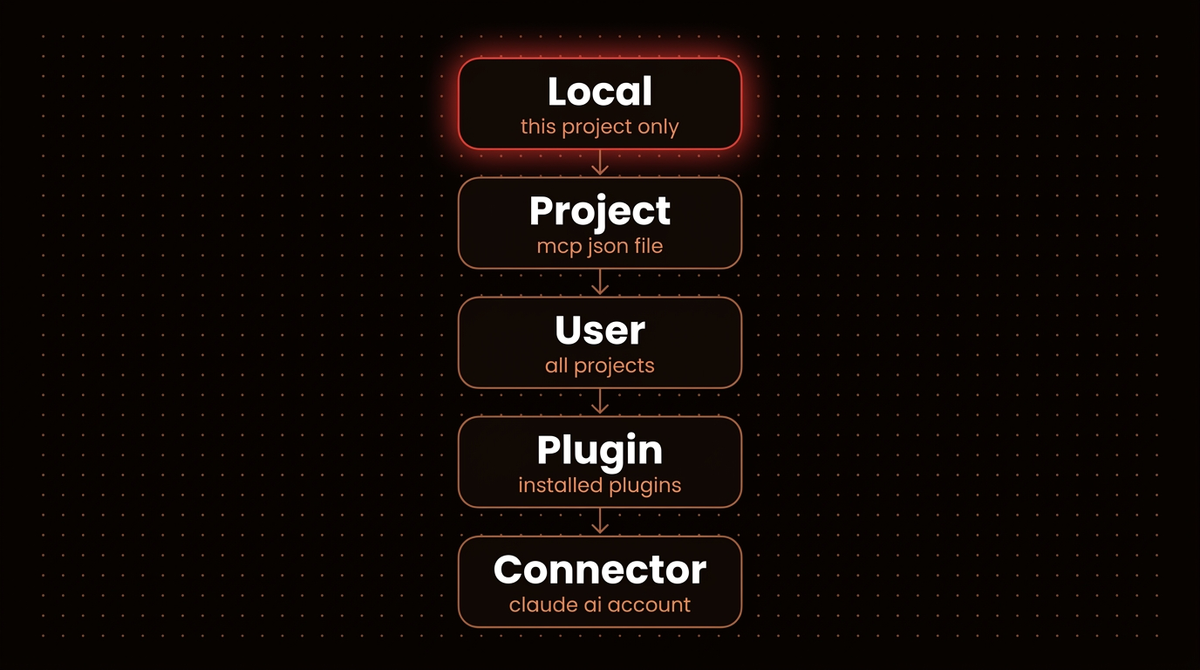
Precedence is what trips most removals. The docs state that Claude Code connects to the highest precedence definition and uses that whole entry. Fields are not merged. So if you remove the copy that wins, a lower copy takes over and the "removed" server is back.
To prove it I added the same name in all three scopes with different commands. Then I ran claude mcp list:
[Conflicting scopes]
Server "demo" is defined in multiple scopes with different endpoints:
user (/usr/bin/false), project (/usr/bin/env), local (/usr/bin/true).
OAuth tokens are stored per endpoint, so authenticating in one context
will not carry over.
Keep the correct endpoint and remove the others:
`claude mcp remove demo -s user` or `claude mcp remove demo -s project`
or `claude mcp remove demo -s local`
Read that warning as a list of what is left to remove. If you see it, you have duplicates, and one removal will not be enough.
Step 2: Run claude mcp remove with the right scope
The plain form is claude mcp remove <name>. When the name exists in exactly one place, it just works. When the name exists in several, it refuses to guess. This is what I got with my three copies:
MCP server "demo" exists in multiple scopes:
  - Local config (private to you in this project)
  - Project config (shared via .mcp.json)
  - User config (available in all your projects)

To remove from a specific scope, use:
  claude mcp remove demo -s local
  claude mcp remove demo -s project
  claude mcp remove demo -s user
So pass the scope with -s (short for --scope), choosing local, project or user. Each removal prints which file it edited:
$ claude mcp remove demo -s local
Removed MCP server demo from local config
File modified: ~/.claude.json [project: /path/to/your/project]

$ claude mcp remove demo -s user
Removed MCP server demo from user config
File modified: ~/.claude.json
The bracketed project path on the local line is the detail to read. Local scope is tied to the directory you ran the command in. I added a server called pg in one folder, then ran claude mcp list and claude mcp remove pg from a sibling folder. Both reported nothing:
No MCP servers configured. Use `claude mcp add` to add a server.
No MCP server named "pg". Run `claude mcp add` to add one.
That is not a bug and it does not mean the server is gone. It means you are standing in the wrong directory. cd back to the project where you added it, or look at the path printed by claude mcp get.
Note: Removing a remote server also deletes the OAuth tokens and client registration Claude Code stored for it, according to the MCP docs. If you plan to add it back later, expect to sign in again.
Step 3: Confirm it is gone, not just shadowed
After the first two removals I ran claude mcp list again. The server was still there:
demo: /usr/bin/env - Pending approval (run `claude` to approve)That is the project scope copy from .mcp.json, which I had not removed yet. It shows "Pending approval" because Claude Code asks before it trusts a project file; the approval prompt appears the next time you start claude in that folder. Running claude mcp get demo prints the scope and a ready made hint, To remove this server, run: claude mcp remove demo -s project.
Run the final removal, then list again:
$ claude mcp remove demo -s project
Removed MCP server "demo" from project config
File modified: /path/to/your/project/.mcp.json

$ claude mcp list
No MCP servers configured. Use `claude mcp add` to add a server.
That last line is the only proof I trust. I do not treat a removal as done until claude mcp list shows nothing for that name from the project folder, and from a second terminal opened in a different project for anything user scoped.
Step 4: Clean up the project file and its approvals
The .mcp.json change is a file edit in your repository, so a normal git add .mcp.json and git commit applies. It is only gone for your teammates after you commit it and they pull. Until then their Claude Code keeps loading the old entry.
Claude Code also remembers whether you approved or rejected each project server. To clear those choices for the current project, run:
claude mcp reset-project-choicesIt printed: "Project-scoped (.mcp.json) server approvals and rejections stored for this project have been reset." Use it when you removed a server and later re-added one with the same name but want the approval prompt again.
If you cannot edit the file, for example because it belongs to a repo you do not control, you can keep a server out without deleting it. The docs list disabledMcpjsonServers as the setting that blocks a named .mcp.json server in every permission mode. One warning from the same page: in claude -p runs, Agent SDK sessions and cloud sessions, Claude Code cannot show the approval prompt and loads project servers without asking. For scripted use, the settings entry matters more than the prompt.
Step 5: Disable a server instead of removing it
Sometimes you do not want the server gone. You want it quiet for this project, with its config intact. Start claude, type /mcp and toggle the server off. Per the docs, Claude Code then stops connecting to it and keeps it listed as disabled, and it records your choice per project in ~/.claude.json under disabledMcpServers. I did not drive the interactive panel in my test, so this part comes from the docs, not my own run.
After a toggle, claude mcp list shows the status Disabled for this project (re-enable via /mcp). My rule: disable when the server is useful somewhere else or you will want it next week, remove when you cannot say why it is installed.
Step 6: Remove servers that arrived from plugins and claude.ai
This is the case where claude mcp remove cannot help, because the entry never lived in your config files. Match where the server came from to the way out:
| Where it came from | How to get rid of it |
|---|---|
| Local scope | claude mcp remove <name> -s local from that project folder |
Project scope (.mcp.json) | claude mcp remove <name> -s project, then commit the file |
| User scope | claude mcp remove <name> -s user, from any folder |
| A plugin | Uninstall the plugin, or toggle the server off in /mcp |
| A claude.ai connector | Disconnect it in your claude.ai connector settings, or use the per project toggle in /mcp |
For plugins, the docs say you add and remove plugin servers by installing or uninstalling the plugin, not with /mcp commands. A plugin server also registers under a scoped name such as plugin:my-plugin:database-tools, which is the name to look for in /mcp. How plugins bundle servers is described in the plugin components reference.
For connectors, there is a trap. A server you added yourself outranks a claude.ai connector that points at the same URL, and /mcp then lists the connector as hidden. Remove your own entry and the connector shows up in Claude Code automatically. Some Anthropic hosted connectors, such as Gmail and Google Calendar, do not support local OAuth from Claude Code at all, so a hand added copy of those can only fail. The fix there is the same: remove your entry and connect the service on claude.ai. If you manage connectors for a team, see how I add one in adding a custom MCP connector to Claude.
Organizations can also push servers through managed MCP configuration. On Claude Code 2.1.259 or newer those rank above everything on your machine, so a server that returns no matter what you remove may not be yours to remove. Ask whoever administers your Claude account.
Troubleshooting when claude remove mcp does not stick
Work down this list. It follows the order I check things in.
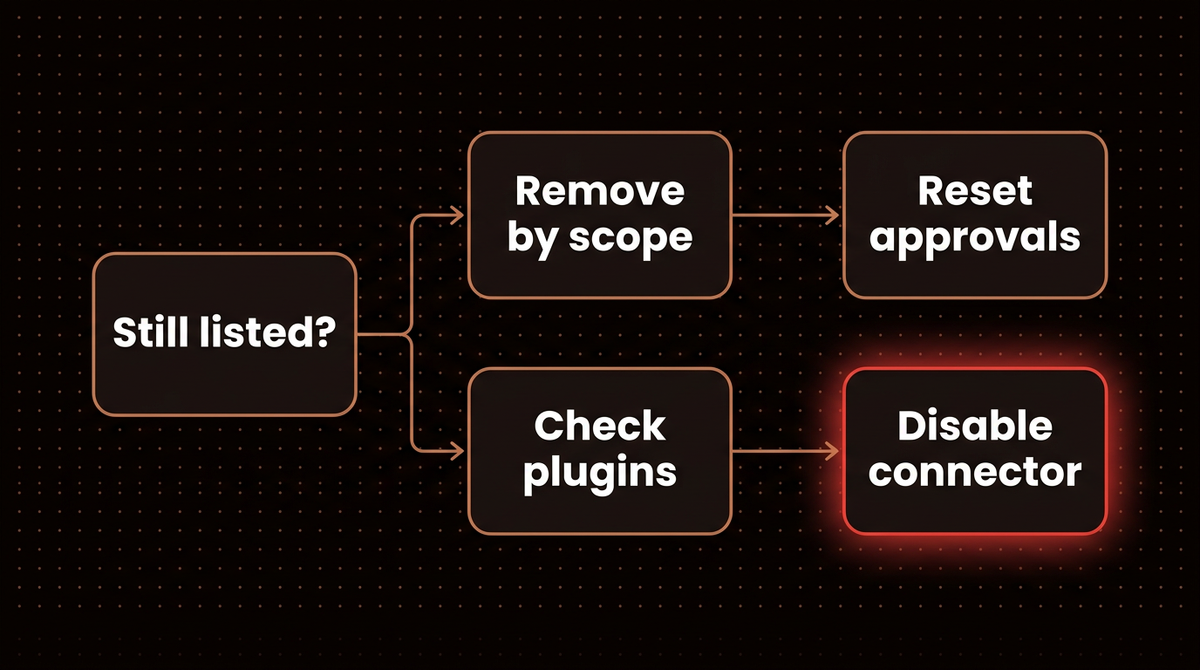
"exists in multiple scopes" and nothing gets removed
The name lives in more than one scope. Pick one with -s local, -s project or -s user, and repeat until claude mcp list is clean.
"No MCP server named" but you can see it in a session
You are in the wrong directory for a local scope entry, as tested in Step 2. Otherwise the entry comes from a plugin or a claude.ai connector, so use Step 6.
"was not removed from" a file
Claude Code printed this because the file did not change when it read it back. Per the error reference, the usual cause is a read only file or a sandbox. Make the file named in the message writable, or run the command outside the sandbox, then run the same removal again.
The server returns after a restart or a git pull
Someone committed the entry in .mcp.json, or your branch still has it. Remove it with -s project, commit, and make sure the other branches pick up the commit.
It says Pending approval or Rejected
Those are approval states, not connection errors. Run claude in the folder and answer the prompt, or reset the choices with claude mcp reset-project-choices.
What to remove next
A server you never call still adds tool names to every session and one more thing to secure. Claude Code defers MCP tools and finds them on demand by default, so the damage is smaller than it used to be. A short audit is worth doing at the start of a project: claude mcp list, remove anything you cannot name a reason for, and move shared servers into .mcp.json only when the whole team needs them.
Be careful about removing a server you only half understand. If a workflow depends on it, such as connecting Claude to n8n through MCP or the Playwright MCP server, check what breaks before you delete it. Disable first, use Claude for a day, then remove. If you are building servers rather than cleaning them up, my guide to MCP servers that run in production covers the design side, and the Model Context Protocol site has the spec.
If you would rather have this audited and monitored for you across a team, that is part of what I do: see how I build AI agents.
Frequently asked questions
How do I remove an MCP server from Claude Code?
Run claude mcp list to find the name, then claude mcp remove <name>. If the name exists in more than one scope, Claude Code stops and asks you to choose with -s local, -s project or -s user. Run claude mcp list again afterward to confirm nothing remains.
Why does my MCP server keep coming back after I remove it?
Usually a copy in another scope took over, such as a project .mcp.json entry behind a removed user entry. It can also come from a plugin, a claude.ai connector, or a managed organization setting. Check each source in Step 6, and commit changes to .mcp.json.
What is the difference between removing and disabling an MCP server?
Removing deletes the configuration, and for remote servers the stored sign in too. Disabling in the /mcp panel keeps the configuration but stops Claude Code from connecting, and the choice is saved per project. Disable when you may want it back.
Where does Claude Code store MCP servers?
Local and user scope servers are stored in ~/.claude.json, and project scope servers in .mcp.json at the project root. Plugin servers come from the plugin, and claude.ai connectors from your account. The official scope table lists all three file locations.
Does claude mcp remove uninstall the server software?
It edits the configuration only. In my test it printed the file it modified and nothing else. If you installed a package or container for the server, remove that yourself with the tool you used to install it.
Published
October 20, 2026
Category
Implementation
Jahanzaib Ahmed
AI Systems Engineer & Founder
AI Systems Engineer with 126 production systems shipped. I run AgenticMode AI (AI agents, RAG systems, voice AI) and ECOM PANDA (ecommerce agency). I build AI that works in the real world for businesses across home services, healthcare, ecommerce, SaaS, and real estate.
Want this built for your business? See Workflow Automation, or browse the free tools and guides.
Related articles
How to Add MCP Servers to Claude Code With claude mcp add
Every way to run claude mcp add on the current Claude Code release: remote and local servers, JSON configs, scopes, sign in, and the real error text for the flag order mistakes that break most setups.
How toImplementationClaude CodeHow to Add a Custom MCP Connector to Claude
Add a remote MCP server to Claude as a custom connector, choose the right sign in option, and fix the Couldn't reach the MCP server error with a two minute check first.
How toImplementationClaude
How to Set Up the Playwright MCP Server Without Handing It Your Logins
Install Microsoft's Playwright MCP server in Claude Code with an isolated profile, test logins from a storage state file, secrets kept out of the chat, and measured snapshot token costs.
How toAI AgentsMCP