How to Inspect LangGraph Deep Agents: What create_deep_agent Adds
See what LangGraph deep agents add to a graph, tested offline on deepagents 0.7.22: the default tools, files in state, subagents, approvals, and the planning tool that is now opt in.

Table of Contents
LangGraph deep agents come from a separate package called deepagents, and its create_deep_agent function returns an ordinary compiled LangGraph graph with tools already attached.
This guide inspects what create_deep_agent adds. I ran version 0.7.22 on LangGraph 1.2.14. Steps 1 to 5 use a scripted fake model, so they need no API key, and Step 6 runs a real model. For a full build, start with the Deep Agents quickstart. Two findings matter if an older tutorial taught you deep agents. From version 0.7 the write_todos planning tool is opt in. And under the default harness profile the model is offered eight tools, not the nine the tool node registers, because execute is hidden.
Before you start
- I used Python 3.13 and
pip install "deepagents==0.7.22" "langgraph==1.2.14" "langchain==1.4.3", from PyPI. Pinning all three keeps the output below reproducible, andtools.pyprints the versions. The package is still at version 0.x, and its own docstring schedules removals for 1.0.0, so pin the version and read the release notes before you upgrade. - Save the scripts in one folder and run each with
python file_name.py. The four scripts are independent of each other, but each imports the smallscripted.pyhelper, so save all five files. - A deep agent normally needs a chat model. To keep this runnable offline,
scripted.pydefines a fake model that replays messages you give it, in order, so I can script exactly which tools the "model" calls. It also records the tool names the agent offers it. A scripted model can't show whether a real model plans well, delegates sensibly or writes good notes. It shows which tools exist and how state and approvals behave. The last section lists everything I left untested. - If LangGraph itself is new, start with the LangGraph glossary entry and the LangGraph tutorial.
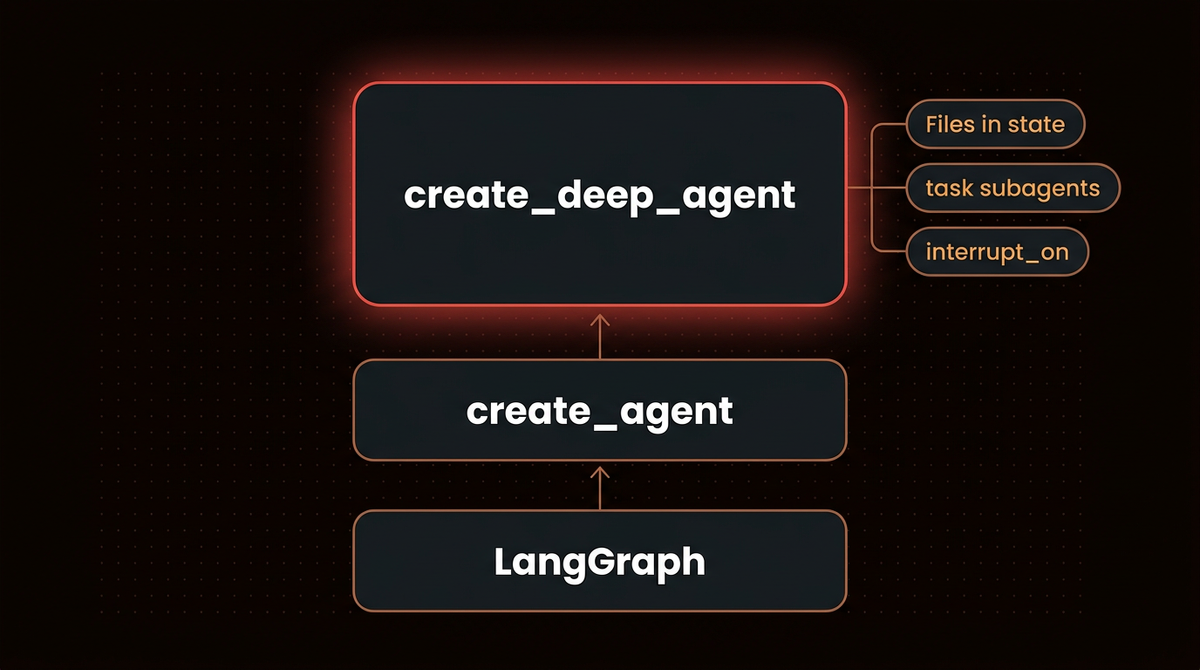
create_deep_agent sits on LangChain's create_agent, which builds a LangGraph graph. The chips are the three features the steps below run.Step 1: Install deepagents and list the tools
The scripted model lives in a helper file, so I show that first. The first script then builds a deep agent and reports what is inside: versions, the type of the returned object, the keys of its state after one run, the tools registered on the tool node, the tools actually offered to the model, and what the planning middleware adds.
# scripted.py
from langchain_core.language_models.fake_chat_models import GenericFakeChatModel
from langchain_core.messages import AIMessage


class Scripted(GenericFakeChatModel):
    """A stand-in for a real model: it replays the messages you give it, in order."""

    offered: list = []   # the tool names the agent offered this model, recorded for the scripts

    def bind_tools(self, tools, **kwargs):
        # the agent calls this to offer its tools to the model; a script has nothing to bind,
        # so it only records the names
        type(self).offered = sorted(getattr(t, "name", None) or t["name"] for t in tools)
        return self


def tool_call(name, args, call_id):
    return AIMessage(content="", tool_calls=[{"name": name, "args": args, "id": call_id}])
# tools.py
from importlib.metadata import version
from langchain.agents.middleware import TodoListMiddleware
from langchain_core.messages import AIMessage
from deepagents import create_deep_agent
from scripted import Scripted
def run_once(**options):
model = Scripted(messages=iter([AIMessage(content="ok")]))
agent = create_deep_agent(model=model, tools=[], **options)
result = agent.invoke({"messages": [{"role": "user", "content": "hi"}]})
return agent, result, list(Scripted.offered)
def registered_tools(agent):
# reads the compiled graph's internals, which is not a documented API
for name in agent.get_graph().nodes:
by_name = getattr(getattr(agent.nodes.get(name), "bound", None), "tools_by_name", None)
if by_name:
return sorted(by_name)
print("deepagents", version("deepagents"), "| langgraph", version("langgraph"),
"| langchain", version("langchain"))
agent, result, offered = run_once()
print("type:", type(agent).__name__)
print("state keys:", sorted(result))
print("recursion_limit on the agent:", agent.config.get("recursion_limit"))
print("registered on the tool node:", registered_tools(agent))
print("offered to the model:", offered)
_, _, offered_with_planning = run_once(middleware=[TodoListMiddleware()])
print("added by TodoListMiddleware:", sorted(set(offered_with_planning) - set(offered)))python tools.pydeepagents 0.7.22 | langgraph 1.2.14 | langchain 1.4.3
type: CompiledStateGraph
state keys: ['files', 'messages']
recursion_limit on the agent: 9999
registered on the tool node: ['delete', 'edit_file', 'execute', 'glob', 'grep', 'ls', 'read_file', 'task', 'write_file']
offered to the model: ['delete', 'edit_file', 'glob', 'grep', 'ls', 'read_file', 'task', 'write_file']
added by TodoListMiddleware: ['write_todos']The agent is a CompiledStateGraph, the type LangGraph returns from compile(), so everything you know about LangGraph graphs applies. After one run its state holds two keys, messages and files, and Step 3 uses the second.
Compare the two tool lists. The tool node registers nine tools, but the model is offered eight, and execute is the missing one. The Deep Agents docs explain it: execute and delete are dropped from the tool surface whenever the configured backend does not support them, and the default backend supports delete but cannot run shell commands. So nine is the registered count and eight is what the model can call. The registered nine come from the compiled graph's internals, which isn't a documented API, so that line may break on an upgrade. The offered eight are recorded by the bind_tools override in scripted.py.
| Tools | What the package docstring says they do |
|---|---|
ls, read_file, write_file, edit_file, glob, grep | File operations |
execute | Run shell commands. The docstring says it returns an error message on a non sandbox backend, but in this run the model was never offered it |
task | Call subagents |
The docstring's list does not name delete, though the model is offered it. write_todos is missing from both lists. The Deep Agents docs say that starting in v0.7 task planning is opt in only, and that earlier versions included the planning middleware by default. The last line of output shows the fix: passing LangChain's TodoListMiddleware through the middleware argument adds exactly one tool, write_todos.
One caveat comes from the source. The package registers that middleware in a built in harness profile for three OpenAI Codex model specs (openai:gpt-5.1-codex, gpt-5.2-codex and gpt-5.3-codex), so those models get planning by default. Everything above holds for the default profile, which is what the scripted model uses. If a tutorial says the agent plans out of the box, check the version it was written for and the model.
Step 2: See what it is built on
The deepagents repository says Deep Agents is built on LangGraph, and the installed package agrees: its graph.py imports create_agent from langchain.agents and returns what that builds. LangChain's comparison of Deep Agents, LangChain and LangGraph describes LangGraph as the agent runtime: a graph framework with a durable engine behind human in the loop and fault tolerance. LangGraph's own render of the agent shows how small the graph is.
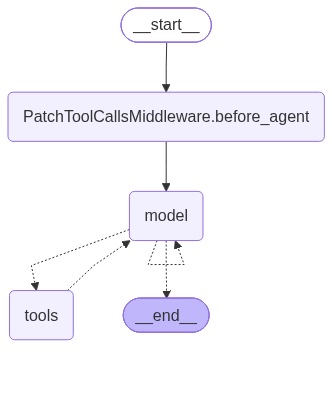
get_graph().draw_mermaid_png(), which calls a web service by default. It is a middleware step, a model node, a tools node and the loop between them.A deep agent is the familiar model and tools loop with extra tools and middleware. The render shows only one middleware node, but graph.py references more: summarization, prompt caching and unsupported content handling among them. It also sets a recursion_limit of 9,999 on the agent it returns, and tools.py prints it. That is about the same as LangChain's create_agent, which sets 9,999 as well, and as the 10,007 that the installed LangGraph 1.2.14 source gives as its own default. So don't count on the limit to stop a runaway loop on any of them. The next three steps run three of the features.
Step 3: Keep files in agent state
In this script the file tools work on a virtual file system. With the default backend, which is a state backend, it lives in the graph state under the files key. The docs list other backends, such as disk and store backends, and I only ran the default. The script has the scripted model write a note, read it back and then answer.
# files.py
from langchain_core.messages import AIMessage
from deepagents import create_deep_agent
from scripted import Scripted, tool_call

model = Scripted(messages=iter([
    tool_call("write_file", {"file_path": "/notes.md", "content": "# Notes\nLangGraph is the runtime.\n"}, "c1"),
    tool_call("read_file", {"file_path": "/notes.md"}, "c2"),
    AIMessage(content="I saved the note and read it back."),
]))
agent = create_deep_agent(model=model, tools=[], system_prompt="You keep notes.")
result = agent.invoke({"messages": [{"role": "user", "content": "save a note"}]})

for message in result["messages"]:
    text = message.content or message.tool_calls[0]["name"]
    print(f"{type(message).__name__:<13}", text.replace("\n", " | "))
print("files in state:", sorted(result["files"]))
print("content:", repr(result["files"]["/notes.md"]["content"]))
python files.pyHumanMessage save a note
AIMessage write_file
ToolMessage Updated file /notes.md
AIMessage read_file
ToolMessage @@ lines 1-2 of 2 @@ | # Notes | LangGraph is the runtime.
AIMessage I saved the note and read it back.
files in state: ['/notes.md']
content: '# Notes\nLangGraph is the runtime.\n'The first AIMessage is a write_file call, the ToolMessage confirms the update, the next AIMessage is a read_file call, and its result comes with a header saying which lines you got, followed by the two lines I wrote. After the run, files in the returned state holds /notes.md with its content. The overview describes the file system as one of the capabilities for context management, alongside subagent spawning and long term memory. The files are part of the graph state, so I expect a checkpointer to save them, but I did not test that, and I did not look for the files on disk.
Step 4: Delegate with the task tool
The task tool starts a subagent: a separate run that gets a description, works on it, and returns a result to the parent. Its arguments in the script are a description of the job and a subagent_type, here the built in general-purpose type. One scripted model feeds both agents. The parent's first message calls task, the subagent calls write_file and then answers, and the parent finishes. A second agent with interrupt_on set runs the same script.
# subagent.py
from langchain_core.messages import AIMessage
from langgraph.checkpoint.memory import InMemorySaver
from deepagents import create_deep_agent
from scripted import Scripted, tool_call


def script():
    # one script feeds both models: the parent hands off a task, the subagent writes a file and
    # answers, and the parent finishes
    return Scripted(messages=iter([
        tool_call("task", {"description": "Draft a note called sub.md", "subagent_type": "general-purpose"}, "t1"),
        tool_call("write_file", {"file_path": "/sub.md", "content": "draft\n"}, "w1"),
        AIMessage(content="The subagent wrote /sub.md."),
        AIMessage(content="Parent: the note is ready."),
    ]))


agent = create_deep_agent(model=script(), tools=[], system_prompt="Delegate small jobs.")
result = agent.invoke({"messages": [{"role": "user", "content": "draft the note"}]})
for message in result["messages"]:
    text = message.content or message.tool_calls[0]["name"]
    print(f"{type(message).__name__:<13}", text)
print("parent files after the subagent wrote one:", sorted(result["files"]))

# approvals set on the parent also apply to a write made by the subagent
guarded = create_deep_agent(model=script(), tools=[], system_prompt="Delegate small jobs.",
                            interrupt_on={"write_file": True}, checkpointer=InMemorySaver())
paused = guarded.invoke({"messages": [{"role": "user", "content": "draft the note"}]},
                        {"configurable": {"thread_id": "sub-1"}})
print("with interrupt_on, the subagent's write pauses:", "__interrupt__" in paused,
      "| files so far:", sorted(paused.get("files", {})))
python subagent.pyHumanMessage draft the note
AIMessage task
ToolMessage The subagent wrote /sub.md.
AIMessage Parent: the note is ready.
parent files after the subagent wrote one: ['/sub.md']
with interrupt_on, the subagent's write pauses: True | files so far: []The parent's messages hold only the task call and its result, so the parent treats the answer like any other tool output. The subagent's steps stay out of the parent's conversation. The file the subagent wrote appears in the parent's files, so isolation applies to messages and not to files. And the approval rule set on the parent also paused the built in general-purpose subagent's write, because the last line shows a pause and no files yet. The subagent made one tool call, so this script can't show how much context a long search would save. It ran on the same model object as the parent, since it consumed the second scripted message. create_deep_agent also has a subagents argument for defining your own, and its docstring says compiled and remote async subagents don't inherit interrupt_on. I ran neither.
Step 5: Pause before a write and resume
interrupt_on names the tools that need approval, and a checkpointer lets the paused run wait. The package adds LangChain's human in the loop middleware to the stack when you set the option. This script pauses before every write_file, shows what the agent wants to do, and then approves it.
# approve.py
from langchain_core.messages import AIMessage
from langgraph.checkpoint.memory import InMemorySaver
from langgraph.types import Command
from deepagents import create_deep_agent
from scripted import Scripted, tool_call

model = Scripted(messages=iter([
    tool_call("write_file", {"file_path": "/report.md", "content": "draft\n"}, "w1"),
    AIMessage(content="Report written."),
]))
agent = create_deep_agent(
    model=model, tools=[], system_prompt="Write reports.",
    interrupt_on={"write_file": True},   # pause before every write_file call
    checkpointer=InMemorySaver(),        # a paused run needs somewhere to wait
)
config = {"configurable": {"thread_id": "report-1"}}

paused = agent.invoke({"messages": [{"role": "user", "content": "write the report"}]}, config)
request = paused["__interrupt__"][0].value["action_requests"][0]
print("paused before:", request["name"], request["args"]["file_path"])
print("allowed decisions:", paused["__interrupt__"][0].value["review_configs"][0]["allowed_decisions"])
print("files while paused:", sorted(paused.get("files", {})))

done = agent.invoke(Command(resume={"decisions": [{"type": "approve"}]}), config)
print("files after approval:", sorted(done["files"]))
print("last message:", done["messages"][-1].content)

# a reviewer can also reject: the write never happens and the reviewer's message goes back to the agent
reject_model = Scripted(messages=iter([
    tool_call("write_file", {"file_path": "/report.md", "content": "draft\n"}, "w1"),
    AIMessage(content="Understood, I will not write it."),
]))
reject_agent = create_deep_agent(model=reject_model, tools=[], system_prompt="Write reports.",
                                 interrupt_on={"write_file": True}, checkpointer=InMemorySaver())
config2 = {"configurable": {"thread_id": "report-2"}}
reject_agent.invoke({"messages": [{"role": "user", "content": "write the report"}]}, config2)
rejected = reject_agent.invoke(
    Command(resume={"decisions": [{"type": "reject", "message": "not yet"}]}), config2)
print("after reject, files:", sorted(rejected.get("files", {})))
print("after reject, tool message:", rejected["messages"][-2].content)

# without a checkpointer the first call still stops, but the resume has nothing to find
bare_model = Scripted(messages=iter([
    tool_call("write_file", {"file_path": "/report.md", "content": "draft\n"}, "w1"),
    AIMessage(content="Report written."),
]))
bare = create_deep_agent(model=bare_model, tools=[], system_prompt="Write reports.",
                         interrupt_on={"write_file": True})
first = bare.invoke({"messages": [{"role": "user", "content": "write the report"}]})
print("no checkpointer, first call has __interrupt__:", "__interrupt__" in first)
try:
    bare.invoke(Command(resume={"decisions": [{"type": "approve"}]}), config)
except RuntimeError as e:
    print("no checkpointer, resume ->", type(e).__name__ + ":", e)
python approve.pypaused before: write_file /report.md
allowed decisions: ['approve', 'edit', 'reject', 'respond']
files while paused: []
files after approval: ['/report.md']
last message: Report written.
after reject, files: []
after reject, tool message: User rejected the tool call for `write_file` with reason: not yet
no checkpointer, first call has __interrupt__: True
no checkpointer, resume -> RuntimeError: Cannot use Command(resume=...) without checkpointerWhile the agent was paused, the file did not exist yet. The pause payload lists the pending tool call and the decisions a reviewer may make: approve, edit, reject or respond. After Command(resume={"decisions": [{"type": "approve"}]}) the write went through and the run finished. The script then rejects a second write with a message. The file never appears, and the agent receives a tool message saying the user rejected the call and why. The edit and respond decisions are untried. The last two lines show a deep agent built without a checkpointer. Its first call still stops with an __interrupt__ entry, and the resume raises a RuntimeError. InMemorySaver keeps state in the process, so for an approval that must survive a restart, use a database saver. My LangGraph human in the loop guide shows that pattern with plain LangGraph.
Step 6: Run it against a real model
With a key, you drop the scripted model and pass a model string. This script uses Claude Sonnet 5.5 through the Anthropic API, adds TodoListMiddleware so planning is on, and asks for a plan, a subagent that writes a file, and a read back. It needs an ANTHROPIC_API_KEY in your environment, and the provider package comes with deepagents.
# real.py
from langchain.agents.middleware import TodoListMiddleware
from deepagents import create_deep_agent

agent = create_deep_agent(
    model="anthropic:claude-sonnet-5-5",
    tools=[],
    middleware=[TodoListMiddleware()],
)
task = ("Plan this with your todo list. Have a subagent write /summary.md with two short "
        "sentences on why LangGraph checkpointers matter. Then read the file back and reply "
        "with its first sentence.")
result = agent.invoke({"messages": [{"role": "user", "content": task}]})

for message in result["messages"]:
    if message.type == "ai":
        for call in message.tool_calls:
            if call["name"] == "write_todos":
                print("write_todos:", [(todo["status"], todo["content"]) for todo in call["args"]["todos"]])
            elif call["name"] == "task":
                print("task:", call["args"]["subagent_type"], "|", call["args"]["description"][:90])
            else:
                print(call["name"], call["args"])
        if not message.tool_calls:
            print("AIMessage:", message.content)
print("files in state:", sorted(result["files"]))
This is the output of one live run. I ran the script twice and kept both outputs. The sequence of tool calls was the same both times, with the todo and subagent wording slightly different and a differently worded final sentence, so unlike the other outputs here this one is not replayed, and yours will differ in the details.
write_todos: [('in_progress', 'Have subagent write /summary.md'), ('pending', 'Read /summary.md back'), ('pending', 'Reply with first sentence')]
task: general-purpose | Write the file /summary.md containing exactly two short sentences explaining why LangGraph
read_file {'file_path': '/summary.md'}
write_todos: [('completed', 'Have subagent write /summary.md'), ('completed', 'Read /summary.md back'), ('completed', 'Reply with first sentence')]
AIMessage: LangGraph checkpointers matter because they persist graph state after each step, enabling runs to resume after failures and to retain memory across sessions.
files in state: ['/summary.md']
Each line is one model turn, or one tool call within it. The agent opened with write_todos and a three item plan, delegated the file to the general-purpose subagent with task, read the file back, marked all three items completed and answered. The parent made no write_file call of its own, and /summary.md is in its files, so the subagent wrote it, as Step 4 showed with the scripted model. The prompt told the agent to plan and delegate, so this run shows the tools working with a real model and nothing about whether it would choose them.
The second script asks for the same file without those instructions, with planning still switched on. I ran it twice.
# real_neutral.py
from langchain.agents.middleware import TodoListMiddleware
from deepagents import create_deep_agent

agent = create_deep_agent(
    model="anthropic:claude-sonnet-5-5",
    tools=[],
    middleware=[TodoListMiddleware()],
)
task = "Save two short sentences on why LangGraph checkpointers matter to /summary.md, then tell me the first sentence."
result = agent.invoke({"messages": [{"role": "user", "content": task}]})

for message in result["messages"]:
    if message.type == "ai":
        for call in message.tool_calls:
            print("tool call:", call["name"])
        if not message.tool_calls:
            print("AIMessage:", message.content)
print("files in state:", sorted(result["files"]))
tool call: write_file
AIMessage: I saved both sentences to `/summary.md`. The first one is:
"LangGraph checkpointers matter because they persist graph state after each step, enabling agents to resume from failures or interruptions without losing progress."
files in state: ['/summary.md']Both runs made one write_file call and answered. With planning available the model made no plan and no subagent for a two sentence file, and both runs ended with /summary.md in files. That is the practical difference between having the tools and needing them, and I'd expect a longer task to behave differently, which I didn't test. The second run's wording differed and its tool sequence matched, so I show only the first.
The docs show the same call with OpenRouter and Baseten model strings too, and the Deep Agents models page covers the options. Pass the model explicitly. The create_deep_agent docstring says that relying on the default model is deprecated since 0.5.3 and will be removed in 1.0.0. The package ships harness profiles for specific models: Haiku 4.5, Opus 4.7, Sonnet 4.6, Codex and one NVIDIA model. There is none for Sonnet 5.5, so that run used no model specific profile. The Codex profile adds planning, as Step 1 noted, so the tool surface can differ by model. Before you assume your model sees the same tools, run a task like Step 6 and watch which tool names it calls. I didn't record what Sonnet 5.5 was offered.
Troubleshooting LangGraph deep agents
- The agent has no
write_todostool. That is expected from 0.7 on for most models. Passmiddleware=[TodoListMiddleware()], as Step 1 shows. - The model has no
executetool. The default backend cannot run shell commands, so the tool is registered but not offered, as the first script shows. I did not test a sandbox backend. - An approval never resumes. A paused run needs a checkpointer, and LangGraph's persistence setup also uses a
thread_idin the config. Step 5 shows theRuntimeErroryou get without a checkpointer. - A scripted agent raises a
RuntimeErroron its second call. The fake model replays a fixed list and runs out. Build a fresh model for each run, as the scripts do.
When a deep agent is the wrong choice
LangChain's own comparison of the three layers says that a deep agent is the core LangChain agent plus a bundle of middleware, and its rule of thumb is to start with Deep Agents. It suggests plain create_agent when you want less built in context management and finer control over the loop. Its example is a docs question and answer bot that searches a vector store, which needs no subagents or file system. That fits the neutral run in Step 6: a two sentence job used one file write and nothing else.
| Your task | Start with |
|---|---|
| Long notes, independent subtasks or human approval of writes | create_deep_agent |
| A short tool loop that needs fine control of each step | create_agent |
| A fixed workflow with set branches | A LangGraph graph |
On either one, set your own cap before the agent touches paid APIs: pass a lower recursion_limit in the invoke config, or add LangChain's ModelCallLimitMiddleware. I haven't tested either cap here. For the tradeoff in more depth, read my LangChain versus LangGraph comparison.
What I did not test
- Any provider other than Anthropic, more than one real task, and the streaming API.
- Sandbox backends, custom subagents, skills, memory and MCP tools.
- The async API, other Python versions, and deepagents versions other than 0.7.22.
- Summarization, large result offloading, file permissions and the other backends.
- Cost, latency and the step caps suggested in the last section.
Going further
Use the LangGraph Studio setup guide to inspect a graph while you debug it.
Frequently asked questions
What are LangGraph deep agents?
Deep Agents is a Python package, deepagents, whose create_deep_agent returns a compiled LangGraph graph with built in file tools, a task tool for subagents and middleware for approvals. In my test of 0.7.22 the model was offered eight tools.
Is write_todos built into deep agents?
Not by default since version 0.7. The Deep Agents docs say task planning became opt in, and the model was not offered it in 0.7.22. Pass TodoListMiddleware() in the middleware argument and it gains exactly one tool, write_todos. The exception is three OpenAI Codex model specs, whose built in profile adds it.
Do deep agents need a LangGraph checkpointer?
Not to run, as far as I tested. Steps 1 to 3 ran without one, and the subagent script's guarded agent and the approval script used an InMemorySaver so a paused run could wait, and an agent built without one raised a RuntimeError on resume. Pausing and resuming is where one is required. Whether it also saves the files across restarts I did not test.
Can I run a deep agent without an API key?
Yes, for Steps 1 to 5, which use a scripted model that replays fixed messages. That tests the tools, state and approvals. Step 6 needs an Anthropic key, because only a real model shows what tools an agent actually chooses.
If you want an agent like this built for your systems, see how I build AI agents.
Published
October 7, 2026
Category
AI Agents
Jahanzaib Ahmed
AI Systems Engineer & Founder
AI Systems Engineer with 126 production systems shipped. I run AgenticMode AI (AI agents, RAG systems, voice AI) and ECOM PANDA (ecommerce agency). I build AI that works in the real world for businesses across home services, healthcare, ecommerce, SaaS, and real estate.
Related articles
How to Run LangGraph Examples With Real Output
Seven small LangGraph examples that run offline on 1.2.14: routing, a loop with a limit, Send, human approval, an agent with tools, a subgraph with streaming, and Command with memory, with real output.
How toAI AgentsLangGraph
How to Set Up the LangGraph Checkpointer on Postgres With a Connection Pool
Set up the LangGraph checkpointer on Postgres with a checked connection pool, resume a paused graph from a new process, reproduce five early errors, and delete old threads. Every script ran on LangGraph 1.2.14.
How toAI AgentsLangGraph
How to Add Human Approval to a LangGraph Workflow and Resume It After a Restart
Add a human approval step to a LangGraph workflow with interrupt() and Command(resume=...). Eight tested steps, including a restart mid approval and four failure modes triggered on purpose.
How toAI AgentsLangGraph