How to Add Human Approval to a LangGraph Workflow and Resume It After a Restart
Add a human approval step to a LangGraph workflow with interrupt() and Command(resume=...). Eight tested steps, including a restart mid approval and four failure modes triggered on purpose.


Table of Contents
To add LangGraph human in the loop approval to a workflow, call interrupt() inside a node. The run pauses, saves itself and hands your app a payload, and Command(resume=...) continues it later. The catch is that when the person answers, the node doesn't pick up from that line. It runs again from its first line. I ran everything below on LangGraph 1.2.13 on October 7, 2026, including stopping the process in the middle of an approval and resuming from a fresh one.
The guide is eight short steps and takes about 14 minutes to read. It costs nothing, because the nodes are plain Python with no model or API key, and it's for Python developers who want a workflow to wait for a person without losing its place. It covers human in the loop on any graph. If your agent comes from LangChain's create_agent, a middleware may do the job for you, and the section after Step 8 covers it. I also triggered four failure modes on purpose: a side effect before the pause ran twice, a bare try/except approved a refund by itself, a changed condition saved a city as an age, and a typo in the thread id started a brand new run.
Before you start
- Python 3.10 or newer, which is what langgraph declares on PyPI. I ran everything on 3.13. Install with
pip install langgraph==1.2.13. I pinned the version because the outputs and error messages below come from it. Step 4 also needs langgraph-checkpoint-sqlite, and Step 7 needspip install fastapi httpx(I ran 0.142.2 and 0.28.1). - No API key. Every node here is a plain function. Where a model would sit (Step 7), a scripted placeholder plays its part, and a real model call can replace it because a node is just a function.
- Save each snippet under the file name on its first line and run it with
pythonand that name.
Step 1: Pause a node with interrupt()
Start with the smallest working version: a refund that waits for a yes before paying. The approval node calls interrupt() with a dictionary describing what the person should decide.
# step1.py
from typing import TypedDict
from langgraph.graph import StateGraph, START, END
from langgraph.checkpoint.memory import InMemorySaver
from langgraph.types import interrupt, Command

class State(TypedDict, total=False):
    order_id: str
    amount: int
    decision: str
    status: str

def approval(state):
    answer = interrupt({"question": "Approve this refund?",
                        "order_id": state["order_id"], "amount": state["amount"]})
    return {"decision": answer}

def pay(state):
    return {"status": "refunded" if state["decision"] == "approve" else "declined"}

graph = StateGraph(State)
graph.add_node("approval", approval)
graph.add_node("pay", pay)
graph.add_edge(START, "approval")
graph.add_edge("approval", "pay")
graph.add_edge("pay", END)
app = graph.compile(checkpointer=InMemorySaver())

config = {"configurable": {"thread_id": "refund-A1"}}

result = app.invoke({"order_id": "A1", "amount": 30}, config=config)
pending = result["__interrupt__"][0]
print("paused with:", pending.value)
print("waiting at:", app.get_state(config).next)

result = app.invoke(Command(resume="approve"), config=config)
print("final status:", result["status"])
print("waiting at:", app.get_state(config).next)
paused with: {'question': 'Approve this refund?', 'order_id': 'A1', 'amount': 30}
waiting at: ('approval',)
final status: refunded
waiting at: ()The checkpointer saves the paused run. The first call pauses without one, but resuming needs it. The thread_id names that saved run, so it's the handle you'll store next to the approval request. The pause appears in the result under __interrupt__ as a list of Interrupt objects, each with your payload in .value and a unique .id that Step 6 puts to use. (total=False on the state just makes every key optional, so a node can return only the keys it sets.)
app.get_state(config).next tells you which node is waiting, which is all an approvals inbox needs to answer "what's pending on this thread?" After the resume it's an empty tuple again. Whatever you pass to Command(resume=...) becomes the return value of interrupt() inside the node. The LangGraph interrupts docs say the payload can be any JSON serializable value.
Step 2: Expect the node to run twice
The interrupts docs state this in one paragraph. Everything below depends on it. When you resume, LangGraph restarts the entire node from the beginning, and on that second pass interrupt() returns the saved answer instead of pausing.
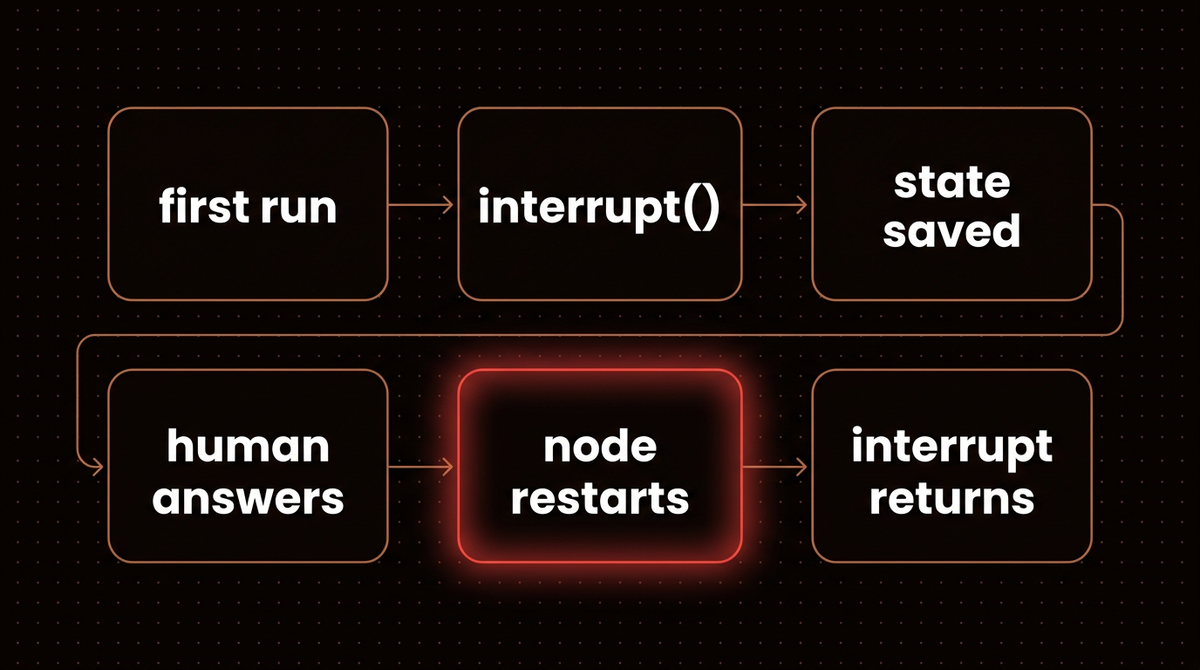
That's harmless for a database read and expensive for an email. Here are both cases:
# step2.py
from typing import TypedDict
from langgraph.graph import StateGraph, START, END
from langgraph.checkpoint.memory import InMemorySaver
from langgraph.types import interrupt, Command

class State(TypedDict, total=False):
    decision: str

emails = []

def ask_risky(state):
    emails.append("pending approval email")   # side effect BEFORE the interrupt
    return {"decision": interrupt("Approve?")}

def ask_safe(state):
    return {"decision": interrupt("Approve?")}

def notify(state):
    emails.append("approved email")           # side effect in its own node, AFTER the answer
    return {}

def build_risky():
    graph = StateGraph(State)
    graph.add_node("ask", ask_risky)
    graph.add_edge(START, "ask")
    graph.add_edge("ask", END)
    return graph.compile(checkpointer=InMemorySaver())

def build_safe():
    graph = StateGraph(State)
    graph.add_node("ask", ask_safe)
    graph.add_node("notify", notify)
    graph.add_edge(START, "ask")
    graph.add_edge("ask", "notify")
    graph.add_edge("notify", END)
    return graph.compile(checkpointer=InMemorySaver())

def run(app, thread_id):
    config = {"configurable": {"thread_id": thread_id}}
    app.invoke({}, config=config)                  # runs until the interrupt
    app.invoke(Command(resume="yes"), config=config)

run(build_risky(), "risky")
print("side effect before interrupt ran", len(emails), "times:", emails)

emails.clear()
run(build_safe(), "safe")
print("side effect in its own node ran", len(emails), "time:", emails)
side effect before interrupt ran 2 times: ['pending approval email', 'pending approval email']
side effect in its own node ran 1 time: ['approved email']The risky version sent the pending approval email twice, once on the way to the pause and once on the way back. The safe version moved the side effect into its own node after the answer, so it ran once. The docs give three ways out: make the earlier call idempotent, place the side effect after the interrupt, or give it its own node. I default to the separate node, because it also makes the graph easier to read. Even then, treat side effects as at least once. I didn't test a crash between the side effect and the saved checkpoint, but in that window the node would run again, so give payments and emails an idempotency key.
Step 3: Route on the person's answer
An approval is rarely a bare yes or no. People edit the amount or decline with a reason, and the graph should branch on that. A node can return a Command that names the next node and updates state in one move.
# step3.py
from typing import TypedDict, Literal
from langgraph.graph import StateGraph, START, END
from langgraph.checkpoint.memory import InMemorySaver
from langgraph.types import interrupt, Command

class State(TypedDict, total=False):
    amount: int
    note: str
    status: str

def review(state) -> Command[Literal["pay", "decline"]]:
    reply = interrupt({"amount": state["amount"], "choices": ["approve", "edit", "decline"]})
    if reply["action"] == "approve":
        return Command(goto="pay")
    if reply["action"] == "edit":
        return Command(goto="pay", update={"amount": reply["amount"]})
    return Command(goto="decline", update={"note": reply.get("reason", "")})

def pay(state):
    return {"status": f"refunded {state['amount']}"}

def decline(state):
    return {"status": f"declined: {state.get('note', '')}"}

graph = StateGraph(State)
graph.add_node("review", review)
graph.add_node("pay", pay)
graph.add_node("decline", decline)
graph.add_edge(START, "review")
graph.add_edge("pay", END)
graph.add_edge("decline", END)
app = graph.compile(checkpointer=InMemorySaver())

replies = [
    {"action": "approve"},
    {"action": "edit", "amount": 20},
    {"action": "decline", "reason": "outside policy"},
]
for i, reply in enumerate(replies):
    config = {"configurable": {"thread_id": f"refund-{i}"}}
    app.invoke({"amount": 45}, config=config)
    result = app.invoke(Command(resume=reply), config=config)
    print(reply["action"], "->", result["status"])
approve -> refunded 45
edit -> refunded 20
decline -> declined: outside policy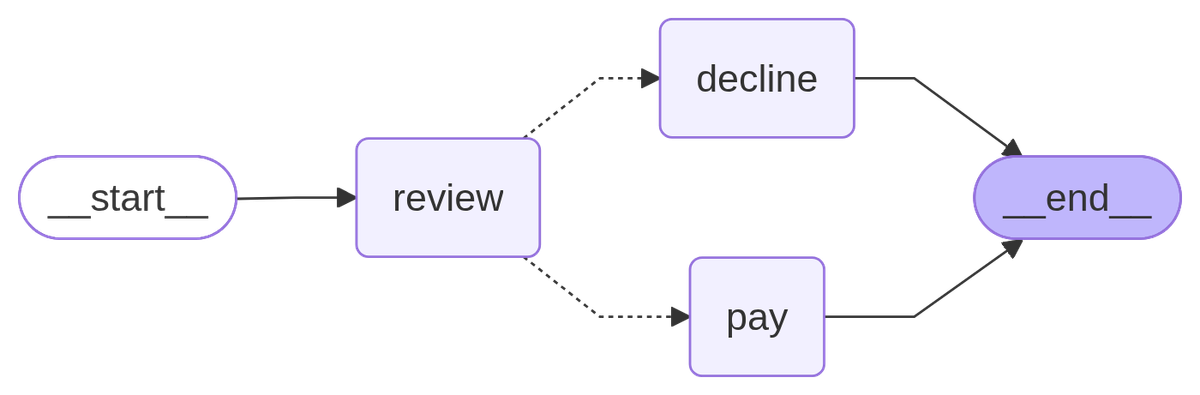
app.get_graph().draw_mermaid_png(). It needs an internet connection, because the picture is rendered by the mermaid.ink service.I didn't add any edges out of review, but LangGraph read the return annotation Command[Literal["pay", "decline"]] and drew both routes. Remove the annotation and the graph still runs the same, but the drawing shows review going straight to the end with pay and decline left unconnected. A plain conditional edge from the approval node works too. I prefer Command here because the state update and the route sit right next to the decision that caused them.
Step 4: Restart the process and resume anyway
The in memory saver forgets everything when the process exits. That's fine for tests and useless for an approval that might sit overnight. The SQLite saver writes the paused run to a file. Install it first with pip install langgraph-checkpoint-sqlite. SqliteSaver.from_conn_string is a context manager that opens the file and closes it when the with block ends. This version takes a command line switch, so you can watch two separate processes do the work.
# approvals.py
import sys
from typing import TypedDict
from langgraph.graph import StateGraph, START, END
from langgraph.checkpoint.sqlite import SqliteSaver
from langgraph.types import interrupt, Command

class State(TypedDict, total=False):
    order_id: str
    decision: str
    status: str

def approval(state):
    return {"decision": interrupt({"question": "Approve this refund?",
                                   "order_id": state["order_id"]})}

def pay(state):
    return {"status": "refunded" if state["decision"] == "approve" else "declined"}

def build(saver):
    graph = StateGraph(State)
    graph.add_node("approval", approval)
    graph.add_node("pay", pay)
    graph.add_edge(START, "approval")
    graph.add_edge("approval", "pay")
    graph.add_edge("pay", END)
    return graph.compile(checkpointer=saver)

if __name__ == "__main__":
    if len(sys.argv) < 2:
        sys.exit("usage: python approvals.py start | resume ANSWER")
    config = {"configurable": {"thread_id": "refund-A1"}}
    with SqliteSaver.from_conn_string("approvals.db") as saver:
        app = build(saver)
        if sys.argv[1] == "start":
            result = app.invoke({"order_id": "A1"}, config=config)
            print("paused:", result["__interrupt__"][0].value["question"])
        else:
            if not app.get_state(config).next:
                sys.exit("nothing to resume: run 'start' first")
            print("waiting at:", app.get_state(config).next)
            result = app.invoke(Command(resume=sys.argv[2]), config=config)
            print("final:", result["status"])
python approvals.py start
python approvals.py resume approvepaused: Approve this refund?
waiting at: ('approval',)
final: refundedBetween those two commands the first process had exited. The file on disk, about 20 KB, held the paused run, and a brand new interpreter picked it up and finished the refund. The run stays in approvals.db until you delete the file, so remove it before you repeat the experiment. For production, use a database saver such as Postgres. I cover that setup in my LangGraph tutorial, and the persistence docs explain checkpointers in general.
Step 5: Keep interrupt counts and order fixed
A node can ask several questions, and LangGraph matches each resume value to an interrupt by position. That makes the number and order of interrupt calls in a node a contract. Here are three ways to break it, plus the right way to ask again.
Two questions in one node
# step5a.py
from typing import TypedDict
from langgraph.graph import StateGraph, START, END
from langgraph.checkpoint.memory import InMemorySaver
from langgraph.types import interrupt, Command

class State(TypedDict, total=False):
    name: str
    city: str

runs = []

def collect(state):
    runs.append(1)
    name = interrupt("Name?")
    city = interrupt("City?")
    return {"name": name, "city": city}

graph = StateGraph(State)
graph.add_node("collect", collect)
graph.add_edge(START, "collect")
graph.add_edge("collect", END)
app = graph.compile(checkpointer=InMemorySaver())
config = {"configurable": {"thread_id": "form-1"}}

print(app.invoke({}, config=config)["__interrupt__"][0].value)
print(app.invoke(Command(resume="Ana"), config=config)["__interrupt__"][0].value)
result = app.invoke(Command(resume="Lisbon"), config=config)
print(result["name"], result["city"], "| node ran", len(runs), "times")
Name?
City?
Ana Lisbon | node ran 3 timesThe node ran three times for two questions: once at the start, then once per answer. Each restart replays the earlier answers from the saved list, so nobody is asked the same thing twice.
A condition that changes between runs
Anything that can differ on the second pass causes this: a model's output, the current time, a random number or a database read feeding an if. Compute such a value in an earlier node and keep it in state, so the node reads the same thing both times.
This is the easiest rule to break by accident. If an if around an interrupt gives a different result on the second execution, the positions shift. Here the condition reads a settings flag that someone switches on while the run is paused.
# step5b.py
from typing import TypedDict
from langgraph.graph import StateGraph, START, END
from langgraph.checkpoint.memory import InMemorySaver
from langgraph.types import interrupt, Command

class State(TypedDict, total=False):
    name: str
    age: str
    city: str

settings = {"ask_age": False}      # a feature flag someone can flip while a run is paused

def collect(state):
    name = interrupt("Name?")
    age = interrupt("Age?") if settings["ask_age"] else "n/a"
    city = interrupt("City?")
    return {"name": name, "age": age, "city": city}

graph = StateGraph(State)
graph.add_node("collect", collect)
graph.add_edge(START, "collect")
graph.add_edge("collect", END)
app = graph.compile(checkpointer=InMemorySaver())
config = {"configurable": {"thread_id": "form-2"}}

def step(payload):
    result = app.invoke(payload, config=config)
    asked = result["__interrupt__"][0].value if "__interrupt__" in result else None
    return result, asked

result, asked = step({});                   print("asked:", asked)
result, asked = step(Command(resume="Ana"));   print("asked:", asked)
settings["ask_age"] = True                  # the flag is switched on while the run waits
result, asked = step(Command(resume="Lisbon")); print("asked:", asked)
result, asked = step(Command(resume="Porto"))
print({key: result[key] for key in ("name", "age", "city")})
asked: Name?
asked: City?
asked: City?
{'name': 'Ana', 'age': 'Lisbon', 'city': 'Porto'}Look at the third line. Once the flag was on, the node took the age branch, so the person's "Lisbon" was saved as the age. Then they were asked for the city again, and nothing raised an error. Keep the number and order of interrupts in a node fixed, or split the questions into separate nodes.
A try/except that approves everything
interrupt() pauses by raising an exception, and the first line of output shows its type, GraphInterrupt. A bare except Exception around the call catches the pause.
# step5c.py
from typing import TypedDict
from langgraph.graph import StateGraph, START, END
from langgraph.checkpoint.memory import InMemorySaver
from langgraph.types import interrupt

class State(TypedDict, total=False):
    decision: str
    status: str

def approval(state):
    try:
        decision = interrupt("Approve this refund?")
    except Exception as error:
        print("caught:", type(error).__name__)
        decision = "approve"          # a "safe default" that now approves everything
    return {"decision": decision}

def pay(state):
    return {"status": "refunded" if state["decision"] == "approve" else "declined"}

graph = StateGraph(State)
graph.add_node("approval", approval)
graph.add_node("pay", pay)
graph.add_edge(START, "approval")
graph.add_edge("approval", "pay")
graph.add_edge("pay", END)
app = graph.compile(checkpointer=InMemorySaver())

config = {"configurable": {"thread_id": "refund-B7"}}
result = app.invoke({}, config=config)
print("paused:", "__interrupt__" in result, "| status:", result["status"])
caught: GraphInterrupt
paused: False | status: refundedNo pause, no person, and the refund went out. The "safe default" in the except block turned the approval gate into an automatic yes. Catch specific exception types only, or keep error handling away from the interrupt line.
Asking again until the answer is valid
The docs advise against a while True loop around interrupt(), because the number of interrupts would change between executions. Loop through the graph instead, with a conditional edge that routes back to the asking node.
# step5d.py
from typing import TypedDict
from langgraph.graph import StateGraph, START, END
from langgraph.checkpoint.memory import InMemorySaver
from langgraph.types import interrupt, Command

class State(TypedDict, total=False):
    qty: int
    tries: int

def ask(state):
    answer = interrupt({"question": "Quantity (1 to 10)?", "tries": state.get("tries", 0)})
    qty = int(answer) if str(answer).isdigit() else -1      # anything non numeric counts as invalid
    return {"qty": qty, "tries": state.get("tries", 0) + 1}

def check(state):
    return "ok" if 1 <= state["qty"] <= 10 else "again"

graph = StateGraph(State)
graph.add_node("ask", ask)
graph.add_node("done", lambda state: {})
graph.add_edge(START, "ask")
graph.add_conditional_edges("ask", check, {"ok": "done", "again": "ask"})
graph.add_edge("done", END)
app = graph.compile(checkpointer=InMemorySaver())
config = {"configurable": {"thread_id": "order-9"}}

result = app.invoke({}, config=config)
print("asked:", result["__interrupt__"][0].value)
result = app.invoke(Command(resume="99"), config=config)
print("asked:", result["__interrupt__"][0].value)
result = app.invoke(Command(resume="4"), config=config)
print("qty", result["qty"], "after", result["tries"], "tries")
asked: {'question': 'Quantity (1 to 10)?', 'tries': 0}
asked: {'question': 'Quantity (1 to 10)?', 'tries': 1}
qty 4 after 2 triesEach pass is a fresh node execution with exactly one interrupt, so the position rule holds.
Step 6: Resolve several approvals at once
Two edges out of START make two branches run in parallel. When both call interrupt(), the run pauses on both, and each pending interrupt has its own id. Both branches also write to the same answers key, which needs a reducer, here Annotated[list, operator.add], that appends instead of overwriting. Without it LangGraph raises InvalidUpdateError and says the key can receive only one value per step.
# step6.py
import operator
from typing import Annotated, TypedDict
from langgraph.graph import StateGraph, START, END
from langgraph.checkpoint.memory import InMemorySaver
from langgraph.types import interrupt, Command

class State(TypedDict, total=False):
    answers: Annotated[list, operator.add]

def ask_a(state):
    return {"answers": [{"item": "A", "answer": interrupt("Approve A?")}]}

def ask_b(state):
    return {"answers": [{"item": "B", "answer": interrupt("Approve B?")}]}

graph = StateGraph(State)
graph.add_node("a", ask_a)
graph.add_node("b", ask_b)
graph.add_edge(START, "a")
graph.add_edge(START, "b")
graph.add_edge("a", END)
graph.add_edge("b", END)
app = graph.compile(checkpointer=InMemorySaver())
config = {"configurable": {"thread_id": "batch-1"}}

result = app.invoke({"answers": []}, config=config)
pending = result["__interrupt__"]
print("pending:", sorted(item.value for item in pending))

# resume only A, addressed by its interrupt id
first = next(item for item in pending if item.value == "Approve A?")
result = app.invoke(Command(resume={first.id: "yes"}), config=config)
print("still pending:", [item.value for item in result["__interrupt__"]], "| answers:", result["answers"])

# resume the other one
second = result["__interrupt__"][0]
result = app.invoke(Command(resume={second.id: "no"}), config=config)
print("final answers:", sorted(result["answers"], key=lambda a: a["item"]))

# resume several interrupts in one call, mapping every id to its answer
config = {"configurable": {"thread_id": "batch-2"}}
pending = app.invoke({"answers": []}, config=config)["__interrupt__"]
result = app.invoke(Command(resume={item.id: "yes" for item in pending}), config=config)
print("resumed both at once:", sorted(a["item"] + "=" + a["answer"] for a in result["answers"]))
pending: ['Approve A?', 'Approve B?']
still pending: ['Approve B?'] | answers: [{'item': 'A', 'answer': 'yes'}]
final answers: [{'item': 'A', 'answer': 'yes'}, {'item': 'B', 'answer': 'no'}]
resumed both at once: ['A=yes', 'B=yes']Answering A leaves B waiting, and a dictionary with every id resumes everything in one call. One thing I ran into while writing this: my first version stored each answer as a tuple, and after the checkpoint round trip they came back as lists, which broke my sort (an observation from my own run, not something the docs say). Keep checkpointed state to plain dictionaries, lists and strings.
Step 7: Wire it to your app
A real approval usually follows a model step, and it should record who approved. This graph has three nodes: extract reads the refund amount out of the customer's message, approval pauses for a person, and pay acts on the answer. The model here is a scripted placeholder that returns 30, so the example runs without a key. Three plain functions wrap the graph: request_approval starts one, pending lists what's waiting, and decide records the decision. decide checks .next before it resumes, which means a second click or a mistyped thread id does nothing. Any answer other than "approve" declines, which is the safe default.
# approvals_api.py
import itertools
import uuid
from typing import TypedDict
from langchain_core.language_models.fake_chat_models import GenericFakeChatModel
from langchain_core.messages import AIMessage
from langgraph.graph import StateGraph, START, END
from langgraph.checkpoint.memory import InMemorySaver
from langgraph.types import interrupt, Command

# a stand in for a real model call that reads the amount out of the customer's message
llm = GenericFakeChatModel(messages=itertools.cycle([AIMessage(content="30")]))

class State(TypedDict, total=False):
    order_id: str
    text: str
    amount: int
    decision: str
    approved_by: str
    status: str

def extract(state):                                  # the LLM step
    return {"amount": int(llm.invoke(state["text"]).content)}

def approval(state):                                 # the person's step
    answer = interrupt({"order_id": state["order_id"], "amount": state["amount"]})
    return {"decision": answer["decision"], "approved_by": answer["approver"]}

def pay(state):
    return {"status": "refunded" if state["decision"] == "approve" else "declined"}

graph = StateGraph(State)
graph.add_node("extract", extract)
graph.add_node("approval", approval)
graph.add_node("pay", pay)
graph.add_edge(START, "extract")
graph.add_edge("extract", "approval")
graph.add_edge("approval", "pay")
graph.add_edge("pay", END)
app = graph.compile(checkpointer=InMemorySaver())   # a test setup: see the note below

def request_approval(order_id, text):
    thread_id = f"refund-{uuid.uuid4().hex[:8]}"     # store this next to the order in your database
    config = {"configurable": {"thread_id": thread_id}}
    app.invoke({"order_id": order_id, "text": text}, config=config)
    return thread_id

def pending(thread_id):
    state = app.get_state({"configurable": {"thread_id": thread_id}})
    return [item.value for task in state.tasks for item in task.interrupts]

def decide(thread_id, decision, approver):
    config = {"configurable": {"thread_id": thread_id}}
    if not app.get_state(config).next:               # nothing is waiting on this thread
        return {"ok": False, "reason": "nothing pending (finished, or no such thread)"}
    result = app.invoke(Command(resume={"decision": decision, "approver": approver}), config=config)
    return {"ok": True, "status": result.get("status", "still waiting"), "approved_by": approver}

if __name__ == "__main__":
    thread_id = request_approval("A1", "Please refund 30 dollars for order A1")
    print("pending:", pending(thread_id))
    print("first click:", decide(thread_id, "approve", "ana"))
    print("second click:", decide(thread_id, "approve", "ana"))
    print("typo in thread id:", decide("refund-typo", "approve", "ana"))
pending: [{'order_id': 'A1', 'amount': 30}]
first click: {'ok': True, 'status': 'refunded', 'approved_by': 'ana'}
second click: {'ok': False, 'reason': 'nothing pending (finished, or no such thread)'}
typo in thread id: {'ok': False, 'reason': 'nothing pending (finished, or no such thread)'}Now put those functions behind an endpoint. This is FastAPI, but any framework works the same way, because each route is one call into the functions above. The test client lets you try it without starting a server.
# api.py
from fastapi import FastAPI, HTTPException
from pydantic import BaseModel
from approvals_api import request_approval, pending, decide

api = FastAPI()

class Refund(BaseModel):
    order_id: str
    text: str

class Decision(BaseModel):
    decision: str
    approver: str        # in a real app, take this from your auth layer, not from the request body

@api.post("/refunds")
def create_refund(body: Refund):
    return {"thread_id": request_approval(body.order_id, body.text)}

@api.get("/refunds/{thread_id}/pending")
def get_pending(thread_id: str):
    return {"pending": pending(thread_id)}

@api.post("/refunds/{thread_id}/decision")
def post_decision(thread_id: str, body: Decision):
    outcome = decide(thread_id, body.decision, body.approver)
    if not outcome["ok"]:
        raise HTTPException(status_code=409, detail=outcome["reason"])
    return outcome
# api_demo.py
from fastapi.testclient import TestClient
from api import api
client = TestClient(api)
thread_id = client.post("/refunds", json={"order_id": "A1", "text": "Refund 30 dollars"}).json()["thread_id"]
print("pending:", client.get(f"/refunds/{thread_id}/pending").json())
body = {"decision": "approve", "approver": "ana"}
first = client.post(f"/refunds/{thread_id}/decision", json=body)
print("first click:", first.status_code, first.json())
second = client.post(f"/refunds/{thread_id}/decision", json=body)
print("second click:", second.status_code, second.json())pending: {'pending': [{'order_id': 'A1', 'amount': 30}]}
first click: 200 {'ok': True, 'status': 'refunded', 'approved_by': 'ana'}
second click: 409 {'detail': 'nothing pending (finished, or no such thread)'}The second click became a 409 with a clear reason instead of a second payment. Store the thread_id next to the order in your own database, because it's the only handle you get back to the paused run. You only need the interrupt id when several interrupts are pending, as in Step 6. LangGraph resumes for whoever calls it with a valid thread id and never checks who is answering. The demo takes approver from the request body so it stays short, but in a real app it should come from your login session, never from the body, and the endpoint must check that person is allowed to approve. Expiring stale approvals is also your job, because nothing here times out on its own.
The sketch uses the in memory saver so it runs anywhere, which makes it a test setup. With more than one worker process, use a shared database saver such as Postgres. The guard also covers sequential clicks, not two requests that arrive at the same instant, so make decisions for one thread run one at a time in your own code.
Step 8: Test approvals without a person
An approval flow is easy to test because the pause is just a return value. Build a fresh saver for each test, check what the graph asked, then resume with each answer.
# test_approval.py
from typing import TypedDict
from langgraph.graph import StateGraph, START, END
from langgraph.checkpoint.memory import InMemorySaver
from langgraph.types import interrupt, Command

class State(TypedDict, total=False):
    decision: str
    status: str

def ask(state):
    return {"decision": interrupt("Approve?")}

def done(state):
    return {"status": "done:" + state["decision"]}

def build():
    graph = StateGraph(State)
    graph.add_node("ask", ask)
    graph.add_node("done", done)
    graph.add_edge(START, "ask")
    graph.add_edge("ask", "done")
    graph.add_edge("done", END)
    return graph.compile(checkpointer=InMemorySaver())   # a fresh saver per test

def run_flow(decision):
    app = build()
    config = {"configurable": {"thread_id": "test-" + decision}}
    first = app.invoke({}, config=config)
    assert first["__interrupt__"][0].value == "Approve?"
    return app.invoke(Command(resume=decision), config=config)

def test_yes():
    assert run_flow("yes")["status"] == "done:yes"

def test_no():
    assert run_flow("no")["status"] == "done:no"

if __name__ == "__main__":
    test_yes()
    test_no()
    print("both tests passed")
both tests passedThat test needs no person and no network. Run it with pytest or directly with python. In your own project, put graph construction in a function like build() and import it, so the test runs your real graph with a fresh saver.
LangGraph human in the loop when you use create_agent
Everything above works on any graph. If your agent comes from LangChain's create_agent, you may not need to write the interrupt yourself. The middleware docs say HumanInTheLoopMiddleware issues an interrupt that halts execution and saves state through LangGraph's persistence layer, so it's the same mechanism wrapped around tool calls. It needs pip install langchain==1.4.3 as well. The script below runs the three decisions that matter, approve, edit and reject (the docs list a fourth, respond), with a scripted stand in for the model.
# middleware_demo.py
from langchain.agents import create_agent
from langchain.agents.middleware import HumanInTheLoopMiddleware
from langchain_core.language_models.fake_chat_models import GenericFakeChatModel
from langchain_core.messages import AIMessage
from langchain_core.tools import tool
from langgraph.checkpoint.memory import InMemorySaver
from langgraph.types import Command

class ScriptedModel(GenericFakeChatModel):      # a stand in for a real model, so no API key
    def bind_tools(self, tools, **kwargs):
        return self

@tool
def refund(order_id: str) -> str:
    """Refund an order."""
    return f"Refunded {order_id}"

def make_agent():
    ask = AIMessage(content="", tool_calls=[{"name": "refund", "args": {"order_id": "A1"}, "id": "call_1"}])
    return create_agent(
        model=ScriptedModel(messages=iter([ask, AIMessage(content="Done.")])),
        tools=[refund],
        middleware=[HumanInTheLoopMiddleware(interrupt_on={"refund": True})],
        checkpointer=InMemorySaver(),
    )

decisions = {
    "approve": {"type": "approve"},
    "edit": {"type": "edit", "edited_action": {"name": "refund", "args": {"order_id": "A2"}}},
    "reject": {"type": "reject", "message": "Refunds need a manager."},
}

for name, decision in decisions.items():
    agent = make_agent()
    config = {"configurable": {"thread_id": name}}
    first = agent.invoke({"messages": [{"role": "user", "content": "Refund order A1"}]}, config=config)
    asked = first["__interrupt__"][0].value["action_requests"][0]
    result = agent.invoke(Command(resume={"decisions": [decision]}), config=config)
    tool_said = " | ".join([m.content for m in result["messages"] if m.type == "tool"][0].splitlines())
    print(f"{name}: asked to run {asked['name']} {asked['args']} -> {tool_said}")
approve: asked to run refund {'order_id': 'A1'} -> Refunded A1
edit: asked to run refund {'order_id': 'A1'} -> Note: a human reviewer replaced this tool call before it ran. The call recorded in your message is the one you produced, not the one that executed. This was intentional and authorized. Do not re-issue your original call. Executed instead: refund with arguments {"order_id": "A2"}. | | Tool response: | Refunded A2
reject: asked to run refund {'order_id': 'A1'} -> User rejected the tool call for `refund` with reason: Refunds need a manager.On the edit, the tool ran with the person's arguments, and the message above shows the middleware telling the model that a human replaced its call and that it must not reissue the original. You can instead keep the tool plain and put the question inside it, because a tool can call interrupt() itself:
# tool_interrupt.py
from langchain.agents import create_agent
from langchain_core.language_models.fake_chat_models import GenericFakeChatModel
from langchain_core.messages import AIMessage
from langchain_core.tools import tool
from langgraph.checkpoint.memory import InMemorySaver
from langgraph.types import Command, interrupt

class ScriptedModel(GenericFakeChatModel):      # a stand in for a real model, so no API key
    def bind_tools(self, tools, **kwargs):
        return self

@tool
def refund(order_id: str) -> str:
    """Refund an order once a person approves it."""
    answer = interrupt({"question": "Approve this refund?", "order_id": order_id})
    return f"Refunded {order_id}" if answer == "approve" else "Refund declined"

ask = AIMessage(content="", tool_calls=[{"name": "refund", "args": {"order_id": "A1"}, "id": "call_1"}])
agent = create_agent(
    model=ScriptedModel(messages=iter([ask, AIMessage(content="Done.")])),
    tools=[refund],
    checkpointer=InMemorySaver(),
)

config = {"configurable": {"thread_id": "ticket-7"}}
first = agent.invoke({"messages": [{"role": "user", "content": "Refund order A1"}]}, config=config)
print("paused with:", first["__interrupt__"][0].value)
result = agent.invoke(Command(resume="approve"), config=config)
print([m.content for m in result["messages"] if m.type == "tool"][0])
paused with: {'question': 'Approve this refund?', 'order_id': 'A1'}
Refunded A1The restart rule from Step 2 applies here too. In a quick check, a line placed above interrupt() inside a tool ran twice, once before the pause and once after the resume. For a visual run through the middleware, LangChain's own walkthrough shows approve, edit and reject on an email assistant.

Hand written interrupts earn their place when the approval isn't a tool call, when you want routing like Step 3, or when the question isn't a yes or no. I also ran this middleware in my post on LangChain vs LangGraph.
| Approach | Use it when | Pauses at |
|---|---|---|
HumanInTheLoopMiddleware | A create_agent agent needs sign off on specific tool calls | Before the chosen tool runs |
interrupt() inside a tool | The tool itself should ask, and you want the question in the tool's code | The line where you call it |
interrupt() inside a node | The approval isn't a tool call, or you route on the answer (Steps 1 to 3) | The line where you call it |
interrupt_before or interrupt_after | You're stepping through a graph while debugging | A fixed node, set at compile time |
Static breakpoints are for debugging
interrupt_before and interrupt_after pause at fixed nodes, and the docs say static interrupts are not recommended for human in the loop workflows. Treat them as a debugging tool for stepping through a graph, and use interrupt() for approvals.
Troubleshooting
Most errors below came from this script, so you can reproduce them yourself. Its numbered comments line up with the first headings, and the last one, a graph that never paused, comes from Step 5.
# errors.py
from typing import TypedDict
from langgraph.graph import StateGraph, START, END
from langgraph.checkpoint.memory import InMemorySaver
from langgraph.types import Command, interrupt

class State(TypedDict, total=False):
    decision: str

def ask(state):
    return {"decision": interrupt("Approve?")}

def build(checkpointer=None):
    graph = StateGraph(State)
    graph.add_node("ask", ask)
    graph.add_edge(START, "ask")
    graph.add_edge("ask", END)
    return graph.compile(checkpointer=checkpointer)

def show(label, error):
    print(f"{label}: {type(error).__name__}: {str(error).splitlines()[0][:130]}")

# 1. resume without a checkpointer (the first call still pauses)
app = build()
config = {"configurable": {"thread_id": "t1"}}
print("no checkpointer, first call paused:", "__interrupt__" in app.invoke({}, config=config))
try:
    app.invoke(Command(resume="yes"), config=config)
except Exception as error:
    show("no checkpointer, resume", error)

# 2. no thread id
try:
    build(InMemorySaver()).invoke({})
except Exception as error:
    show("no thread id", error)

# 3. a thread id that never ran: no error, a new run pauses
app = build(InMemorySaver())
result = app.invoke(Command(resume="yes"), config={"configurable": {"thread_id": "typo"}})
print("unknown thread id: paused again =", "__interrupt__" in result)

# 4. resume a thread that already finished
config = {"configurable": {"thread_id": "done"}}
app.invoke({}, config=config)
app.invoke(Command(resume="yes"), config=config)
again = app.invoke(Command(resume="yes"), config=config)
print("finished thread: decision =", again["decision"], "| pending =", app.get_state(config).next)

# 5. a function inside the payload
def bad(state):
    return {"decision": interrupt({"check": lambda value: value})}

graph = StateGraph(State)
graph.add_node("ask", bad)
graph.add_edge(START, "ask")
graph.add_edge("ask", END)
try:
    graph.compile(checkpointer=InMemorySaver()).invoke({}, config={"configurable": {"thread_id": "t5"}})
except Exception as error:
    show("function in payload", error)

# 6. two parallel branches writing one key without a reducer
class Shared(TypedDict, total=False):
    answers: list

graph = StateGraph(Shared)
graph.add_node("a", lambda state: {"answers": ["A"]})
graph.add_node("b", lambda state: {"answers": ["B"]})
graph.add_edge(START, "a")
graph.add_edge(START, "b")
graph.add_edge("a", END)
graph.add_edge("b", END)
try:
    graph.compile().invoke({"answers": []})
except Exception as error:
    show("no reducer", error)
no checkpointer, first call paused: True
no checkpointer, resume: RuntimeError: Cannot use Command(resume=...) without checkpointer
no thread id: ValueError: Checkpointer requires one or more of the following 'configurable' keys: thread_id, checkpoint_ns, checkpoint_id
unknown thread id: paused again = True
finished thread: decision = yes | pending = ()
function in payload: TypeError: Type is not msgpack serializable: Interrupt
no reducer: InvalidUpdateError: At key 'answers': Can receive only one value per step. Use an Annotated key to handle multiple values.RuntimeError: Cannot use Command(resume=...) without checkpointer
Compile the graph with a checkpointer. The trap is that the first call still pauses without one, so you only find out when you try to resume.
ValueError: Checkpointer requires one or more of the following 'configurable' keys
The full message lists thread_id, checkpoint_ns and checkpoint_id. You called the graph without a config. Pass {"configurable": {"thread_id": "..."}} on every call.
My approval did nothing after the resume
Check the thread id. Resuming a thread id that had never run raised no error. It started a fresh run and paused at the first interrupt, so the answer went nowhere. Look at app.get_state(config).next before you resume, as decide does in Step 7.
The person clicked Approve twice
Resuming a thread that had already finished returned the earlier final state, and the graph didn't pause again. Guard on .next anyway before you rely on that for anything involving money.
TypeError: Type is not msgpack serializable: Interrupt
I got this with the in memory saver when the payload contained a function. The message names Interrupt instead of your function, which makes it confusing to read. Pass only values that serialize cleanly: strings, numbers, lists and dictionaries of those.
InvalidUpdateError: Can receive only one value per step
Two parallel branches wrote the same key and the key has no reducer. Declare it as Annotated[list, operator.add], as in Step 6.
The graph never paused
Look for a bare except around the interrupt call, as in Step 5. It's the one case I found where the pause disappears entirely.
Related guides
Studio lets you inspect and pause a live run while you build, and my guide to setting up LangGraph Studio shows the setup. The interrupts docs also point to LangSmith for debugging them. If you're on CrewAI instead, its Flows have a @human_feedback decorator that pauses a flow to collect feedback from a person, which I cover in my CrewAI Flows guide.
If you want a hand wiring approvals like this into your own system, that's the kind of work I do: see how I build AI agents.
Frequently asked questions
What does interrupt() do in LangGraph?
It pauses the current node, saves the run through the checkpointer and returns your payload to the caller under __interrupt__. When the caller resumes with Command(resume=value), interrupt() returns that value and the node carries on. It's the building block for human in the loop in LangGraph.
How do I resume a LangGraph run after an interrupt?
Call the graph again with the same thread_id and pass Command(resume=your_answer) as the input. The answer becomes the return value of interrupt() inside the node. If several interrupts are pending at once, pass a dictionary that maps each interrupt id to its answer.
Do I need a checkpointer for human in the loop in LangGraph?
Yes. The run has to be saved somewhere while it waits. Without a checkpointer the first call still pauses, but resuming raises a RuntimeError saying Command(resume=...) can't be used without one. Use the in memory saver for tests and a SQLite or database saver anywhere a person might answer later.
What is the difference between interrupt() and interrupt_before?
The interrupt() function pauses inside a node, at the exact point you choose, and can carry a payload and take an answer. The interrupt_before and interrupt_after options pause at fixed nodes when you compile the graph and resume with no input. The docs recommend the function for approvals and keep the static options for debugging.
Can I resume an interrupted LangGraph run after the process restarts?
Yes, if the checkpointer stores data outside the process. In Step 4 one Python process paused an approval and exited, and a new process resumed it from a SQLite file and finished the refund. The in memory saver can't do this, because its data disappears with the process.
Can one LangGraph node ask more than one question?
Yes, but each answer is matched to its interrupt by position, so the calls must happen in the same order every time the node runs. A condition that changes between runs shifts the positions, and in Step 5 it saved a city as an age. Split the questions into separate nodes if the number can vary.
Published
October 6, 2026
Category
AI Agents
Jahanzaib Ahmed
AI Systems Engineer & Founder
AI Systems Engineer with 126 production systems shipped. I run AgenticMode AI (AI agents, RAG systems, voice AI) and ECOM PANDA (ecommerce agency). I build AI that works in the real world for businesses across home services, healthcare, ecommerce, SaaS, and real estate.
Related articles

How to Choose Between LangChain and LangGraph for a Python Agent
Five scripts, tested on LangChain 1.4 and LangGraph 1.2, show when to use create_agent, when to write a StateGraph and how to combine them in one agent.
How toAI AgentsLangChain
How to Inspect LangGraph Deep Agents: What create_deep_agent Adds
See what LangGraph deep agents add to a graph, tested offline on deepagents 0.7.22: the default tools, files in state, subagents, approvals, and the planning tool that is now opt in.
How toAI AgentsLangGraph
How to Run LangGraph Examples With Real Output
Seven small LangGraph examples that run offline on 1.2.14: routing, a loop with a limit, Send, human approval, an agent with tools, a subgraph with streaming, and Command with memory, with real output.
How toAI AgentsLangGraph