How to Set Up the LangGraph Checkpointer on Postgres With a Connection Pool
Set up the LangGraph checkpointer on Postgres with a checked connection pool, resume a paused graph from a new process, reproduce five early errors, and delete old threads. Every script ran on LangGraph 1.2.14.


Table of Contents
I killed every Postgres session under a LangGraph checkpointer. A single connection kept failing, a plain connection pool failed on two calls and then recovered, and a pool created with check=ConnectionPool.check_connection never failed. I ran each pool setup three times and the single connection once. This guide builds that setup with PostgresSaver.
It also resumes a paused graph from a second process, reproduces the setup mistakes that bite first (three causes, two of them silent), and deletes old threads. Every script ran on LangGraph 1.2.14 against Postgres 17, and you do not need a model key, because the graph has no LLM in it.
Before you start
- I used Python 3.13, Docker, and port 5432 on localhost. I ran
langgraph1.2.14,langgraph-checkpoint-postgres3.1.2,psycopg3.3.6 withpsycopg-pool3.3.3, and Postgres 17.11. Pin the versions, because Step 6 depends on table internals. - Save the four scripts in one folder, because they import
app.py, and run them in order on one fresh database. The later outputs only match if the earlier steps ran once.pitfalls.pymakes and drops its own scratch database calledfresh. - The graph is the refund approval graph from my LangGraph human in the loop guide, with SQLite swapped for Postgres. Its
interrupt()call pauses the graph and waits for an answer. - A checkpointer saves the graph state after every step, keyed by a
thread_id. If that is new, read the LangGraph glossary entry and the LangGraph tutorial first. - Statements marked "in the source" come from reading the installed 3.1.2 package, not from a script.
Step 1: Start Postgres and install the packages
Start a Postgres container and create a virtual environment. The password is a throwaway, and binding the port to 127.0.0.1 makes the database reachable only from this machine. For anything real, read credentials from environment variables and add sslmode to the connection string.
docker run -d --name langgraph-pg -e POSTGRES_PASSWORD=postgres -e POSTGRES_DB=langgraph -p 127.0.0.1:5432:5432 postgres:17

python3 -m venv venv
source venv/bin/activate
pip install "langgraph==1.2.14" "langgraph-checkpoint-postgres==3.1.2" "psycopg[binary,pool]==3.3.6" "psycopg-pool==3.3.3"
langgraph-checkpoint-postgres holds PostgresSaver, and psycopg is the driver underneath, with its pool extra providing ConnectionPool. Give Postgres a few seconds to start, then check it over TCP. The next step fails with a connection error while Postgres is still starting, and if a local Postgres already uses port 5432 you need to stop it or change both ports.
docker exec langgraph-pg pg_isready -h 127.0.0.1 -U postgresKeep the virtual environment active in the terminal where you run the scripts. To start over later, drop and recreate the database.
docker exec langgraph-pg psql -U postgres -c "drop database langgraph with (force)" -c "create database langgraph"Step 2: Copy one file with a LangGraph checkpointer and a checked pool
This is the file to copy. It builds a connection pool, hands it to PostgresSaver, compiles the refund graph with that saver, and takes a command: setup, start or resume.
# app.py
import sys
from importlib.metadata import version
from typing import TypedDict

from psycopg.rows import dict_row
from psycopg_pool import ConnectionPool
from langgraph.checkpoint.postgres import PostgresSaver
from langgraph.graph import StateGraph, START, END
from langgraph.types import Command, interrupt

DB_URI = "postgresql://postgres:postgres@localhost:5432/langgraph"


def make_pool(check=True):
    return ConnectionPool(
        DB_URI,
        min_size=1,
        max_size=3,
        # test a connection before handing it out, and replace it if it is dead
        check=ConnectionPool.check_connection if check else None,
        kwargs={
            "autocommit": True,      # every statement commits at once
            "row_factory": dict_row, # the docs ask for it; the queries below use it
        },
        open=True,
    )


class State(TypedDict, total=False):
    order_id: str
    decision: str
    status: str


def approval(state):
    return {"decision": interrupt({"question": "Approve this refund?",
                                   "order_id": state["order_id"]})}


def pay(state):
    return {"status": "refunded" if state["decision"] == "approve" else "declined"}


def build(saver):
    graph = StateGraph(State)
    graph.add_node("approval", approval)
    graph.add_node("pay", pay)
    graph.add_edge(START, "approval")
    graph.add_edge("approval", "pay")
    graph.add_edge("pay", END)
    return graph.compile(checkpointer=saver)


if __name__ == "__main__":
    if len(sys.argv) < 2:
        sys.exit("usage: python app.py setup | start | resume ANSWER")
    pool = make_pool()
    saver = PostgresSaver(pool)
    app = build(saver)
    config = {"configurable": {"thread_id": "refund-A1"}}
    if sys.argv[1] == "setup":
        saver.setup()   # creates the tables and applies new migrations; run it from a deploy step
        with pool.connection() as conn:
            tables = conn.execute(
                "select table_name from information_schema.tables "
                "where table_schema = 'public' order by table_name"
            ).fetchall()
            server = conn.execute("show server_version").fetchone()["server_version"]
        print("langgraph", version("langgraph"),
              "| checkpoint-postgres", version("langgraph-checkpoint-postgres"),
              "| psycopg", version("psycopg"), "| Postgres", server.split()[0])
        print("tables:", [t["table_name"] for t in tables])
    elif sys.argv[1] == "start":
        result = app.invoke({"order_id": "A1"}, config=config)
        print("paused:", result["__interrupt__"][0].value["question"])
    else:
        if len(sys.argv) < 3:
            sys.exit("usage: python app.py resume ANSWER")
        print("waiting at:", app.get_state(config).next)
        result = app.invoke(Command(resume=sys.argv[2]), config=config)
        print("final:", result["status"])
    pool.close()
python app.py setuplanggraph 1.2.14 | checkpoint-postgres 3.1.2 | psycopg 3.3.6 | Postgres 17.11
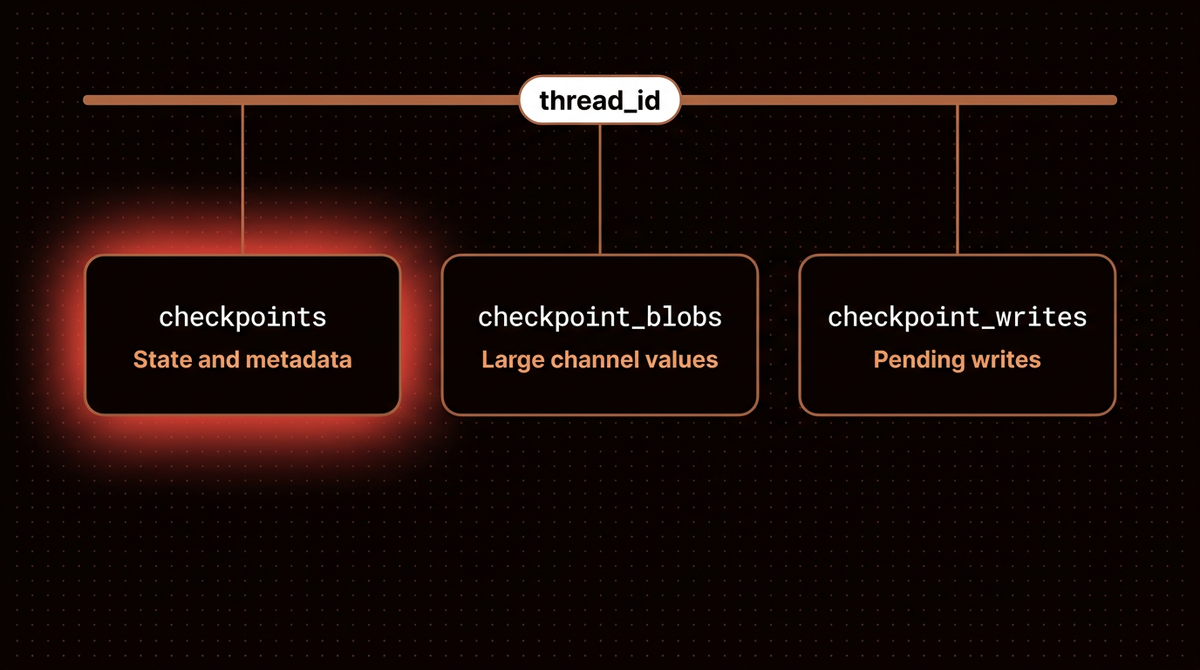
tables: ['checkpoint_blobs', 'checkpoint_migrations', 'checkpoint_writes', 'checkpoints']The saver does not create its own tables, so you call setup() on a new database. The PostgresSaver reference says it must be called the first time you use the checkpointer. In the source of 3.1.2 it also applies any migrations newer than the stored version, so run it again after you upgrade the package, and from a deploy step rather than a request handler. It created four tables, and the figure shows how the three data tables relate.
The pool has three settings. The checkpointer reference asks for autocommit=True and row_factory=dict_row on any connection you build yourself. The saver sets its own row factory on each cursor in the source, so here dict_row only serves my own queries. Step 5 shows what goes wrong without autocommit. The third setting, check, is the subject of Step 4. The psycopg pool documentation describes it as testing a connection before it is handed out.
The check argument of make_pool() exists only so Step 4 can build an unchecked pool for comparison, and your own app would always pass the check. To use this in your own app, keep make_pool() and PostgresSaver(pool), compile your graph with graph.compile(checkpointer=saver), and pass a thread_id in the config of every call. Use one thread id per conversation or job, for example a UUID that you store next to your own record of it. The persistence docs advise keeping ids under 255 characters.
Step 3: Pause the graph and resume it from a new process
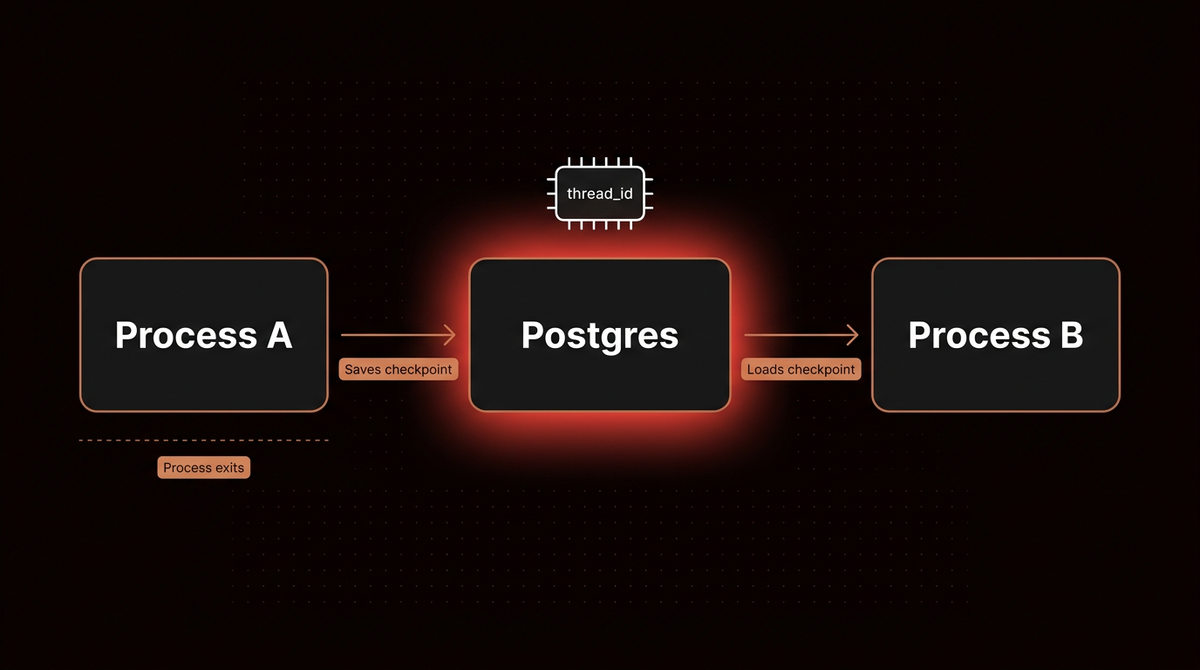
The refund graph stops in the middle: one node asks for approval with interrupt(), and the next one pays or declines. The first command starts it and it pauses, then the process exits. The second command is a new process that has never seen the order.
python app.py start
python app.py resume approve
paused: Approve this refund?
waiting at: ('approval',)
final: refundedinterrupt() pauses the approval node, and its argument is what start prints as the question. resume approve passes Command(resume="approve"), and that value becomes what interrupt() returns inside the node, so pay sees the decision approve. Both commands use the thread id refund-A1, and that id is the only link between the two processes.
The second process printed waiting at: ('approval',) before it did anything else, and it only knew that because the checkpoint came back from Postgres under the same thread_id.

Step 4: Kill the connections and see what keeps working
This script makes one normal call, terminates every other session on the database with pg_terminate_backend, then makes five more calls. That is one way a connection drops. It compares three setups: a single connection from PostgresSaver.from_conn_string(), a pool with no extra options, and the pool from Step 2 with its check. It runs each pool setup three times and prints the pool size just before the kill. Because it terminates every other session, run it only on a throwaway database.
# reconnect.py
import psycopg
from langgraph.checkpoint.postgres import PostgresSaver
from app import DB_URI, build, make_pool

ADMIN = "postgresql://postgres:postgres@localhost:5432/postgres"
CALLS = 5


def kill_every_other_session():
    """Terminate every other session on the langgraph database."""
    with psycopg.connect(ADMIN, autocommit=True) as admin:
        admin.execute(
            "select pg_terminate_backend(pid) from pg_stat_activity "
            "where datname = 'langgraph' and pid <> pg_backend_pid()"
        )


def attempt(app, thread_id):
    try:
        app.invoke({"order_id": "R1"}, {"configurable": {"thread_id": thread_id}})
        return "ok"
    except Exception as e:
        return type(e).__name__


def calls_after_kill(app, name):
    attempt(app, f"{name}-warmup")          # one normal call first
    kill_every_other_session()
    return [attempt(app, f"{name}-{i}") for i in range(CALLS)]


with PostgresSaver.from_conn_string(DB_URI) as saver:
    results = calls_after_kill(build(saver), "single")
print("single connection:", results)

for check in (False, True):
    for run in (1, 2, 3):
        pool = make_pool(check=check)
        app = build(PostgresSaver(pool))
        attempt(app, f"pool-{check}-{run}-warmup")
        size = pool.get_stats()["pool_size"]
        kill_every_other_session()
        results = [attempt(app, f"pool-{check}-{run}-{i}") for i in range(CALLS)]
        label = "pool with check" if check else "pool, no check"
        print(f"{label}, run {run}: pool_size {size} before the kill, calls after: {results}")
        pool.close()
python reconnect.pysingle connection: ['AdminShutdown', 'OperationalError', 'OperationalError', 'OperationalError', 'OperationalError']
pool, no check, run 1: pool_size 2 before the kill, calls after: ['AdminShutdown', 'AdminShutdown', 'ok', 'ok', 'ok']
pool, no check, run 2: pool_size 2 before the kill, calls after: ['AdminShutdown', 'AdminShutdown', 'ok', 'ok', 'ok']
pool, no check, run 3: pool_size 2 before the kill, calls after: ['AdminShutdown', 'AdminShutdown', 'ok', 'ok', 'ok']
pool with check, run 1: pool_size 2 before the kill, calls after: ['ok', 'ok', 'ok', 'ok', 'ok']
pool with check, run 2: pool_size 2 before the kill, calls after: ['ok', 'ok', 'ok', 'ok', 'ok']
pool with check, run 3: pool_size 2 before the kill, calls after: ['ok', 'ok', 'ok', 'ok', 'ok']| Setup | The five calls after the kill |
|---|---|
| Single connection | Failed every time: AdminShutdown, then OperationalError four times |
| Pool, no check (3 runs) | Failed twice, then healed: AdminShutdown twice, then ok three times |
| Pool with check (3 runs) | ok on all five calls |
AdminShutdown is the error Postgres sends when an administrator terminates a session, and OperationalError is psycopg's general error for a connection that is no longer usable. The single connection never recovered, because nothing replaces it.
The unchecked pool failed exactly twice in every run, and the output shows why: the pool held two connections before the kill, and the kill terminated every session, so both were dead. The two comes from how a pool grows. In psycopg_pool 3.3.3, getconn() adds one connection whenever the pool is below max_size, so my earlier calls had grown it from one to two. An unchecked pool fails once for each live connection it holds, up to max_size, so yours may fail a different number of times. The psycopg pool documentation says a pool can serve a connection in a broken state unless you ask it to check, and that a broken connection is discarded when it comes back. So each failed call used up one dead connection, and the third call got a fresh one. With check=ConnectionPool.check_connection the pool tested each connection before handing it out and replaced the dead ones, so none of my calls failed. In psycopg_pool 3.3.3, check_connection runs an empty query on the connection, and I did not measure what that costs.
So a pool replaces dead connections on its own, but without the check the first requests after a drop are the ones that fail. I tested recovery, not speed. In the source of 3.1.2, each database call takes a lock on the saver, so concurrent requests that share one saver take turns at the database. That means the pool here buys reconnection, not concurrency, and I used a pool of up to 3 for that reason. The from_conn_string() helper also sets prepare_threshold=0, which the pool leaves at psycopg's default. That matters behind a pooler such as PgBouncer, where psycopg's prepared statements page says to check support first, and I did not test it. I did not test a kill during a statement in the middle of an invoke, which a check cannot rescue. In a web server, create the pool once at startup and close it at shutdown. For a script or a job that runs and exits, the single connection from from_conn_string() is simpler, and that is my opinion, not something I tested.
Step 5: Five setup failures with three causes, two of them silent
These are five failures I reproduced against a fresh database. Cases 1 and 2 are API misuse, and cases 3 to 5 all come from a connection without autocommit. Case 1 is the snippet on the persistence docs troubleshooting page, which shows checkpointer = PostgresSaver.from_conn_string(...) followed by checkpointer.setup().
# pitfalls.py
import psycopg
from langgraph.checkpoint.postgres import PostgresSaver
from app import build

ADMIN = "postgresql://postgres:postgres@localhost:5432/postgres"
FRESH = "postgresql://postgres:postgres@localhost:5432/fresh"
config = {"configurable": {"thread_id": "x"}}

with psycopg.connect(ADMIN, autocommit=True) as admin:
    admin.execute("drop database if exists fresh")
    admin.execute("create database fresh")


def first_line(e):
    return type(e).__name__ + " | " + str(e).splitlines()[0]


print("1. setup() on the bare result of from_conn_string()")
try:
    PostgresSaver.from_conn_string(FRESH).setup()
except AttributeError as e:
    print("  ", first_line(e))

print("2. invoke before setup()")
try:
    with PostgresSaver.from_conn_string(FRESH) as saver:
        build(saver).invoke({"order_id": "1"}, config)
except Exception as e:
    print("  ", first_line(e))

print("3. setup() on a connection without autocommit")
conn = psycopg.connect(FRESH)
try:
    PostgresSaver(conn).setup()
except Exception as e:
    print("  ", first_line(e))
finally:
    conn.close()

print("4. writing through a connection without autocommit")
with PostgresSaver.from_conn_string(FRESH) as saver:
    saver.setup()
conn = psycopg.connect(FRESH)
build(PostgresSaver(conn)).invoke({"order_id": "1"}, config)


def visible():
    with psycopg.connect(FRESH) as other:
        return other.execute("select count(*) from checkpoints").fetchone()[0]


print("   rows another connection can see, before commit:", visible())
conn.commit()
print("   rows another connection can see, after commit:", visible())
conn.close()

print("5. a process that closes before committing")
conn = psycopg.connect(FRESH)
build(PostgresSaver(conn)).invoke({"order_id": "2"}, {"configurable": {"thread_id": "lost"}})
conn.close()   # closing with an open transaction rolls it back
with psycopg.connect(FRESH) as other:
    n = other.execute("select count(*) from checkpoints where thread_id = 'lost'").fetchone()[0]
print("   rows saved for that thread:", n)
python pitfalls.py1. setup() on the bare result of from_conn_string()
AttributeError | '_GeneratorContextManager' object has no attribute 'setup'
2. invoke before setup()
UndefinedTable | relation "checkpoints" does not exist
3. setup() on a connection without autocommit
ActiveSqlTransaction | CREATE INDEX CONCURRENTLY cannot run inside a transaction block
4. writing through a connection without autocommit
rows another connection can see, before commit: 0
rows another connection can see, after commit: 2
5. a process that closes before committing
rows saved for that thread: 0- AttributeError on setup() (case 1).
from_conn_string()returns a context manager, meaning an object you open withwith. Writewith PostgresSaver.from_conn_string(uri) as saver:and callsetup()inside it, or build the saver from a pool as in Step 2. - relation "checkpoints" does not exist (case 2). You skipped
setup(). - CREATE INDEX CONCURRENTLY cannot run inside a transaction block (case 3). The reference page only warns that without autocommit
setup()"may not persist tables properly", and the concrete error I got is this one. Three of the ten migrations in 3.1.2 are concurrent index builds, which Postgres cannot run inside a transaction block, sosetup()needs an autocommit connection. That is why Step 2 setsautocommit=True. - Writes that never reach other connections (cases 4 and 5). On a connection without autocommit the writes succeed, other connections see nothing until it commits, and a process that closes before committing leaves zero rows. No error is raised. The 2 rows after the commit in case 4 are the two checkpoints of one paused run, which only became visible once the commit happened.
Step 6: Delete old threads
Checkpoints accumulate. The persistence troubleshooting notes suggest a cron job that deletes checkpoints older than a number of days, but they do not show how. This script creates three throwaway threads, deletes one with the saver's own method, then expires another by age with SQL I wrote, dry run first.
# expire.py
import psycopg
from langgraph.checkpoint.postgres import PostgresSaver
from app import DB_URI, build, make_pool

TABLES = ("checkpoint_writes", "checkpoint_blobs", "checkpoints")


def rows(conn, thread_id):
    return {t: conn.execute(f"select count(*) from {t} where thread_id = %s", (thread_id,)).fetchone()[0]
            for t in TABLES}


def expire(days, dry_run):
    with psycopg.connect(DB_URI) as conn:      # one transaction, committed on exit
        stale = [row[0] for row in conn.execute(
            "select thread_id from checkpoints group by thread_id "
            "having max((checkpoint->>'ts')::timestamptz) < now() - make_interval(days => %s)",
            (days,),
        )]
        if dry_run:
            return stale
        for table in TABLES:
            conn.execute(f"delete from {table} where thread_id = any(%s)", (stale,))
    return stale


pool = make_pool()
saver = PostgresSaver(pool)
app = build(saver)
for name in ("tmp-1", "tmp-2", "tmp-3"):
    app.invoke({"order_id": name}, {"configurable": {"thread_id": name}})

print("1. delete_thread")
with psycopg.connect(DB_URI) as conn:
    print("   tmp-1 before:", rows(conn, "tmp-1"))
saver.delete_thread("tmp-1")
with psycopg.connect(DB_URI) as conn:
    print("   tmp-1 after: ", rows(conn, "tmp-1"))
try:
    saver.prune(["tmp-2"])
except NotImplementedError:
    print("   prune -> NotImplementedError")

print("2. expire by age")
with psycopg.connect(DB_URI) as conn:
    conn.execute(
        "update checkpoints set checkpoint = jsonb_set(checkpoint, '{ts}', "
        "to_jsonb((now() - interval '40 days')::text)) where thread_id = 'tmp-2'"
    )
print("   tmp-2 now looks 40 days old")
print("   dry run, would expire:", expire(30, dry_run=True))
print("   expired:", expire(30, dry_run=False))
with psycopg.connect(DB_URI) as conn:
    print("   tmp-3 still stored:", rows(conn, "tmp-3")["checkpoints"] > 0)
pool.close()
python expire.py1. delete_thread
tmp-1 before: {'checkpoint_writes': 3, 'checkpoint_blobs': 1, 'checkpoints': 2}
tmp-1 after: {'checkpoint_writes': 0, 'checkpoint_blobs': 0, 'checkpoints': 0}
prune -> NotImplementedError
2. expire by age
tmp-2 now looks 40 days old
dry run, would expire: ['tmp-2']
expired: ['tmp-2']
tmp-3 still stored: Truedelete_thread() removed the thread from all three tables. prune() raises NotImplementedError on the Postgres saver in this release. In the source, copy_thread() and delete_for_runs() are also unimplemented in the base class and PostgresSaver does not override them, so expiry by age is your own SQL. The script runs its select and its three deletes in one transaction, but a thread that gets a new checkpoint between the select and the delete is still deleted. It expires any thread past the cutoff, including one paused at an approval for longer than that, so keep your own table of finished thread ids if that matters, and run it when those threads are idle. The SQL depends on the saver's own tables and on the ts field, the timestamp the saver writes into each checkpoint's JSON, so rerun this script after every upgrade. In a real job, drop the three throwaway threads and the backdating, keep the expire(30, ...) call, and run it from a scheduler.
Going further
To put this saver behind an approval flow with an API, continue with my LangGraph human in the loop guide, which uses the same refund graph. To step through a graph while you debug it, see my LangGraph Studio setup guide. For memory that spans threads, a checkpointer is not enough, and the LangGraph tutorial covers the store that does that.
What I did not test
- The async saver, and any pooler such as PgBouncer. If one sits in front of Postgres, read psycopg's prepared statements page first.
- Dropped connections other than
pg_terminate_backend, a connection that dies in the middle of an invoke, repeat runs, and throughput. - Python versions other than 3.13.
Frequently asked questions
How do I use PostgresSaver with a connection pool?
Create a ConnectionPool with autocommit=True, row_factory=dict_row and check=ConnectionPool.check_connection, pass it to PostgresSaver(pool), call setup() once, and compile your graph with that saver. Step 2 has the whole file.
Why does the Postgres checkpointer fail after the database drops a connection?
A single connection is not replaced, so in my test every later call failed. A pool holds several connections, and without a check it hands out dead ones until each has failed once and been discarded. In my test the pool held two, so it failed twice. A pool created with check=ConnectionPool.check_connection never failed in three runs.
How do I delete old LangGraph checkpoints?
Call delete_thread() for one thread, or write SQL that deletes stale threads from all three tables in one transaction, with a dry run first. In version 3.1.2, prune() raises NotImplementedError on the Postgres saver.
Do I need to call setup() every time my app starts?
No. Call it from a deploy step, once on a new database and again after you upgrade the package, because it creates the tables and applies new migrations. It needs an autocommit connection, as case 3 above shows, and it does not belong in a request handler.
If you want this wired into your own agent, see how I build AI agents. When you are done, docker rm -f langgraph-pg removes the container.
Published
October 7, 2026
Category
AI Agents
Jahanzaib Ahmed
AI Systems Engineer & Founder
AI Systems Engineer with 126 production systems shipped. I run AgenticMode AI (AI agents, RAG systems, voice AI) and ECOM PANDA (ecommerce agency). I build AI that works in the real world for businesses across home services, healthcare, ecommerce, SaaS, and real estate.
Related articles

How to Inspect LangGraph Deep Agents: What create_deep_agent Adds
See what LangGraph deep agents add to a graph, tested offline on deepagents 0.7.22: the default tools, files in state, subagents, approvals, and the planning tool that is now opt in.
How toAI AgentsLangGraph
How to Run LangGraph Examples With Real Output
Seven small LangGraph examples that run offline on 1.2.14: routing, a loop with a limit, Send, human approval, an agent with tools, a subgraph with streaming, and Command with memory, with real output.
How toAI AgentsLangGraph
How to Add Human Approval to a LangGraph Workflow and Resume It After a Restart
Add a human approval step to a LangGraph workflow with interrupt() and Command(resume=...). Eight tested steps, including a restart mid approval and four failure modes triggered on purpose.
How toAI AgentsLangGraph