How to Run LangGraph Examples With Real Output
Seven small LangGraph examples that run offline on 1.2.14: routing, a loop with a limit, Send, human approval, an agent with tools, a subgraph with streaming, and Command with memory, with real output.


Table of Contents
The LangGraph docs say the default recursion limit is 1000 steps. On version 1.2.14 a loop of 10,006 steps ran with no configuration and a loop of 10,007 raised an error.
That is one of seven small LangGraph examples below that run offline: routing, a loop with a limit, parallel branches, human approval, an agent that calls tools, a subgraph with streaming, and Command with memory. The official examples folder on GitHub says it is "retained purely for archival purposes and is no longer updated", so each script here runs on its own, needs no API key, and has its output pasted unedited.
Setup for these LangGraph examples
- I used Python 3.13 and
pip install "langgraph==1.2.14", which also installslangchain_core, the package Step 5 imports. Save each script as its own file and run it withpython file_name.py. Do Step 1 first, because it introducesSTART,END, nodes andinvoke, then take the others in any order. Python 3.10 or newer should do, but I only ran 3.13. - To run everything at once, save the seven scripts in one folder and use
for f in ex*.py; do python $f; done. - Step 5 first uses a fake model that replays two scripted messages, so it runs offline, and then repeats the example with a real model, which needs an Anthropic key. Everything else needs no key.
- The folder I quoted is the LangGraph examples README. It points readers to the LangGraph docs, which is where maintained examples now live.
- Two topics here have longer guides of mine. Step 4 is the smallest form of my LangGraph human in the loop guide, and the LangGraph tutorial covers state and memory.
- The two graph pictures come from
app.get_graph().draw_mermaid_png(), which calls a web service by default.draw_mermaid()returns the same graph as text and works offline.
Which example to open:
| You need to | Use | Step |
|---|---|---|
| Choose the next step at runtime | A conditional edge | 1 |
| Repeat until a condition holds, with a safety cap | A loop, a reducer and recursion_limit | 2 |
| Start one run per item in a list | Send | 3 |
| Wait for a person | interrupt() and a checkpointer | 4 |
| Wire an agent that calls tools | A model node and a tools node in a loop | 5 |
| Keep a big workflow in pieces, and watch it run | A subgraph and stream() | 6 |
| Route and update state in one node, and remember a conversation | Command and a thread id | 7 |
Step 1: Route a request with a conditional edge
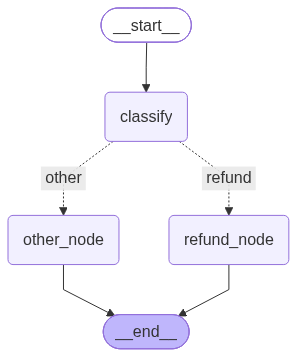
The first example sends a message down one of two paths. A graph starts from a state, here a dictionary with three keys. START and END are LangGraph's markers for where a run begins and finishes. Each node is a function that receives the state and returns only the keys it wants to change, and LangGraph merges that into the state. The classify node sets route, and add_conditional_edges reads it to pick the next node.
# ex1_routing.py
from typing import TypedDict
from langgraph.graph import StateGraph, START, END


class State(TypedDict):
    text: str
    route: str
    answer: str


def classify(state: State):
    return {"route": "refund" if "refund" in state["text"].lower() else "other"}


def refund_node(state: State):
    return {"answer": "sending to the refund queue"}


def other_node(state: State):
    return {"answer": "sending to general support"}


graph = StateGraph(State)
graph.add_node("classify", classify)
graph.add_node("refund_node", refund_node)
graph.add_node("other_node", other_node)
graph.add_edge(START, "classify")
graph.add_conditional_edges(
    "classify",
    lambda state: state["route"],                      # returns the name of the next route
    {"refund": "refund_node", "other": "other_node"},  # route name to node name
)
graph.add_edge("refund_node", END)
graph.add_edge("other_node", END)
app = graph.compile()

for text in ("I want a refund for order 12", "Where is my parcel?"):
    print(text, "->", app.invoke({"text": text})["answer"])
python ex1_routing.pyI want a refund for order 12 -> sending to the refund queue
Where is my parcel? -> sending to general supportThe third argument of add_conditional_edges maps what your function returns to a node name, and the figure shows those names on the dotted lines. Use it when a node's output decides the next node. A routing function can also return the next node's name directly, and the Command example in Step 7 does that from inside a node. The graph API how to guide shows more branching variants once this one is clear.
Step 2: Loop until done, and cap a runaway
A loop is a conditional edge that points back at an earlier node. This graph adds 1 to a counter until it reaches a target. The counter is declared as Annotated[int, operator.add], a reducer, which tells LangGraph to add each update to the saved value instead of replacing it. The script runs a loop of 3, tries three caps, and then runs with no cap configured at all.
# ex2_loop.py
import operator
import os
from typing import Annotated, TypedDict
from langgraph.errors import GraphRecursionError
from langgraph.graph import StateGraph, START, END


class State(TypedDict):
    count: Annotated[int, operator.add]    # a reducer: each update is added to the total


def step(state: State):
    return {"count": 1}


def counting_graph(target):
    graph = StateGraph(State)
    graph.add_node("step", step)
    graph.add_edge(START, "step")
    graph.add_conditional_edges(
        "step", lambda state: "step" if state["count"] < target else END
    )
    return graph.compile()


print("a loop of 3:", counting_graph(3).invoke({"count": 0})["count"])

for limit in (2, 3, 4):                                  # how big must the cap be?
    try:
        result = counting_graph(3).invoke({"count": 0}, {"recursion_limit": limit})["count"]
        print(f"recursion_limit={limit} ->", result)
    except GraphRecursionError:
        print(f"recursion_limit={limit} -> GraphRecursionError")

print("LANGGRAPH_DEFAULT_RECURSION_LIMIT set:", "LANGGRAPH_DEFAULT_RECURSION_LIMIT" in os.environ)
for target in (10006, 10007):                            # no config at all
    try:
        print(f"{target} steps, no config ->", counting_graph(target).invoke({"count": 0})["count"])
    except GraphRecursionError:
        print(f"{target} steps, no config -> GraphRecursionError")
python ex2_loop.pya loop of 3: 3
recursion_limit=2 -> GraphRecursionError
recursion_limit=3 -> GraphRecursionError
recursion_limit=4 -> 3
LANGGRAPH_DEFAULT_RECURSION_LIMIT set: False
10006 steps, no config -> 10006
10007 steps, no config -> GraphRecursionErrorA recursion_limit in the run config stops a graph with GraphRecursionError once it runs too many steps, which protects you from an agent that never finishes. The limit counts super steps, and the rule I measured is that a graph needs a limit of one more than the number of steps its nodes take: a loop of 3 failed with a limit of 3 and worked with 4, and loops of 1, 2 and 5 followed the same pattern. The run's input takes a step of its own before the first node. Parallel branches, like the Send branches in Step 3, share one super step.
The default I measured is not the one the docs give. The graph API docs say that starting in version 1.0.6 the default is 1000 steps. On 1.2.14 the script shows a loop of 10,006 steps finishing and a loop of 10,007 raising the error, with the environment variable that overrides the default unset. That matches the installed source, in langgraph/_internal/_config.py, which defines the default as int(getenv("LANGGRAPH_DEFAULT_RECURSION_LIMIT", "10007")). I can't tell from here whether the docs or the code are the intended behavior, so check your own version. Either way, set an explicit limit on anything that loops.
Step 3: Start a run per topic with Send
Sometimes you do not know how many branches you need until runtime. Send handles that. The router below returns one Send per topic, and each one starts its own run of the summarise node with its own input. summarise receives exactly the dictionary inside its Send, with only a topic key, and not the whole graph state. The results come back into one list through a reducer. The script then builds the same graph without the reducer to show why it matters.
# ex3_parallel.py
import operator
from typing import Annotated, TypedDict
from langgraph.graph import StateGraph, START, END
from langgraph.types import Send


class State(TypedDict):
    topics: list[str]
    summaries: Annotated[list[str], operator.add]   # the reducer joins the parallel results


class NoReducer(TypedDict):
    topics: list[str]
    summaries: list[str]                            # same key, no reducer


def fan_out(state):
    # one run of summarise per topic, each with its own input
    return [Send("summarise", {"topic": topic}) for topic in state["topics"]]


def summarise(state: dict):
    return {"summaries": [f"summary of {state['topic']}"]}


def build(schema):
    graph = StateGraph(schema)
    graph.add_node("summarise", summarise)
    graph.add_conditional_edges(START, fan_out, ["summarise"])
    graph.add_edge("summarise", END)
    return graph.compile()


topics = ["pricing", "limits", "security"]
result = build(State).invoke({"topics": topics, "summaries": []})
print(sorted(result["summaries"]))

try:
    build(NoReducer).invoke({"topics": topics, "summaries": []})
except Exception as e:
    print(type(e).__name__ + ":", str(e).splitlines()[0])
python ex3_parallel.py['summary of limits', 'summary of pricing', 'summary of security']
InvalidUpdateError: At key 'summaries': Can receive only one value per step. Use an Annotated key to handle multiple values.I sort the list before printing because I am not relying on the order of the results. Send is about fanning out to a count you learn at runtime. This script does not measure whether the branches run at the same time, only that each topic gets its own run. Without the reducer, three results arriving at one key in the same step raise InvalidUpdateError, and the message tells you the fix: use an Annotated key.
Step 4: Pause for a human with interrupt
This is the refund approval graph from my other guide in its smallest form. The approval node calls interrupt(), which stops the run and hands a payload back to the caller. You continue it by invoking the graph again with Command(resume=...), and that value becomes what interrupt() returns inside the node. A checkpointer is the part of LangGraph that saves the state so the second call can find it, and the thread_id in the config is the name under which it saves.
# ex4_interrupt.py
from typing import TypedDict
from langgraph.checkpoint.memory import InMemorySaver
from langgraph.graph import StateGraph, START, END
from langgraph.types import Command, interrupt


class State(TypedDict, total=False):
    order_id: str
    decision: str
    status: str


starts = []                                  # one entry each time the approval node begins


def approval(state: State):
    starts.append(state["order_id"])
    return {"decision": interrupt({"question": "Approve this refund?", "order_id": state["order_id"]})}


def pay(state: State):
    return {"status": "refunded" if state["decision"] == "approve" else "declined"}


graph = StateGraph(State)
graph.add_node("approval", approval)
graph.add_node("pay", pay)
graph.add_edge(START, "approval")
graph.add_edge("approval", "pay")
graph.add_edge("pay", END)

# with a checkpointer the run pauses and can be resumed
app = graph.compile(checkpointer=InMemorySaver())
config = {"configurable": {"thread_id": "order-1"}}
paused = app.invoke({"order_id": "A1"}, config)
print("paused with:", paused["__interrupt__"][0].value["question"])
print("final:", app.invoke(Command(resume="approve"), config)["status"])
print("approval node started", len(starts), "times")

# without one the first call stops and returns an __interrupt__ entry, but nothing is saved
bare = graph.compile()
print("no checkpointer, first call returns:", list(bare.invoke({"order_id": "A2"})))
try:
    bare.invoke(Command(resume="approve"), config)
except RuntimeError as e:
    print("no checkpointer, resume ->", type(e).__name__ + ":", e)
python ex4_interrupt.pypaused with: Approve this refund?
final: refunded
approval node started 2 times
no checkpointer, first call returns: ['order_id', '__interrupt__']
no checkpointer, resume -> RuntimeError: Cannot use Command(resume=...) without checkpointerThe approval node started 2 times line shows the rerun. On resume, LangGraph runs the interrupted node again from its start, so anything you put before interrupt(), such as a payment call, would run twice. Put side effects after it. The final two lines show a graph compiled without a checkpointer. Its first call does not fail. It stops and returns an __interrupt__ entry, nothing is saved, and the resume raises a RuntimeError.
The InMemorySaver used here keeps state in the process, and the LangGraph persistence docs note that a saver that keeps state in memory loses everything when the process restarts. For an approval that has to survive a restart, use a database saver, as my human in the loop guide does.
Step 5: Wire an agent and tools loop with a fake model
An agent that calls tools is a loop between a model node and a tools node. The model either answers or asks for a tool, and tools_condition routes accordingly: a tool request goes to ToolNode, which runs the tool and sends the result back to the model, and an answer ends the run. To keep the example runnable without a key, the model is a fake that replays two messages in order. First it asks for the add tool, then it gives the final answer. Because it replays a fixed list, it works for one run only.
# ex5_tools.py
from langchain_core.language_models.fake_chat_models import GenericFakeChatModel
from langchain_core.messages import AIMessage
from langchain_core.tools import tool
from langgraph.graph import StateGraph, MessagesState, START, END
from langgraph.prebuilt import ToolNode, tools_condition


@tool
def add(a: int, b: int) -> int:
    """Add two numbers."""
    return a + b


# a scripted stand-in for a real model: first it asks for the tool, then it answers
model = GenericFakeChatModel(messages=iter([
    AIMessage(content="", tool_calls=[{"name": "add", "args": {"a": 2, "b": 3}, "id": "call-1"}]),
    AIMessage(content="2 plus 3 is 5"),
]))


def agent(state: MessagesState):
    return {"messages": [model.invoke(state["messages"])]}


graph = StateGraph(MessagesState)
graph.add_node("agent", agent)
graph.add_node("tools", ToolNode([add]))
graph.add_edge(START, "agent")
graph.add_conditional_edges("agent", tools_condition)   # tool calls go to "tools", otherwise END
graph.add_edge("tools", "agent")
app = graph.compile()

result = app.invoke({"messages": [("user", "what is 2 plus 3?")]})
for message in result["messages"]:
    print(type(message).__name__ + ":", message.content or message.tool_calls[0]["name"])
python ex5_tools.pyHumanMessage: what is 2 plus 3?
AIMessage: add
ToolMessage: 5
AIMessage: 2 plus 3 is 5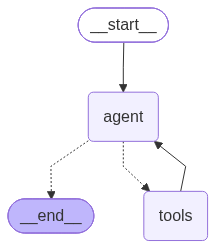
The four messages show the loop. A HumanMessage is the user's question. The first AIMessage carries a tool call, which is why the script prints the tool's name instead of text. The ToolMessage is the tool's result, 5, and the last AIMessage is the answer. That answer text is scripted, so it does not depend on the tool result. The scripted run only proves that tools_condition reads the tool call on the message and sends it to ToolNode. The next script swaps in a real model, Claude Sonnet 5.5 through the Anthropic API, and only the agent node changes. It needs pip install langchain langchain-anthropic and an ANTHROPIC_API_KEY in your environment. I named the file real_ex5.py so the ex*.py loop above skips it.
# real_ex5.py
from langchain.chat_models import init_chat_model
from langchain_core.tools import tool
from langgraph.graph import StateGraph, MessagesState, START
from langgraph.prebuilt import ToolNode, tools_condition


@tool
def add(a: int, b: int) -> int:
    """Add two numbers."""
    return a + b


model = init_chat_model("anthropic:claude-sonnet-5-5").bind_tools([add])


def agent(state: MessagesState):
    return {"messages": [model.invoke(state["messages"])]}


graph = StateGraph(MessagesState)
graph.add_node("agent", agent)
graph.add_node("tools", ToolNode([add]))
graph.add_edge(START, "agent")
graph.add_conditional_edges("agent", tools_condition)
graph.add_edge("tools", "agent")
app = graph.compile()

result = app.invoke({"messages": [("user", "what is 1234 plus 8765?")]})
for message in result["messages"]:
    if message.type == "ai" and message.tool_calls:
        print("AIMessage: tool call", message.tool_calls[0]["name"], message.tool_calls[0]["args"])
    else:
        print(type(message).__name__ + ":", message.content)
Two things I hit while running it. Setting temperature=0 raised ValueError: temperature is not supported for claude-sonnet-5-5 at non-default values, so I left it out. And the model id is the provider's current alias, so check it before you copy it.
This is the output of one live run on 1.2.14 with langchain 1.4.3 and langchain-anthropic 1.7.5. The wording of a real model's answer can change from run to run, so unlike the other outputs here this one is not replayed, and yours may differ.
HumanMessage: what is 1234 plus 8765?
AIMessage: tool call add {'a': 1234, 'b': 8765}
ToolMessage: 9999
AIMessage: 1234 plus 8765 is **9999**.
The model chose the arguments itself, and the tool returned 9999 for 1234 plus 8765. The installed create_react_agent prebuilt is documented as deprecated in favor of create_agent from langchain.agents, which builds this same loop for you, and the LangGraph quickstart builds a similar agent with a real model.
Step 6: Stream the steps, including a subgraph
A compiled graph can itself be a node in another graph. The outer graph below has one node, format, and that node is an inner graph that cleans a string and then converts it to upper case. Both graphs use the same state with one key, text, which is how the value passes into the inner graph and back out. The script streams the run twice with stream_mode="updates", which yields what each node changed.
# ex6_subgraph_stream.py
from typing import TypedDict
from langgraph.graph import StateGraph, START, END


class State(TypedDict):
    text: str


def clean(state: State):
    return {"text": state["text"].strip()}


def shout(state: State):
    return {"text": state["text"].upper()}


inner = StateGraph(State)                 # a small graph with two nodes
inner.add_node("clean", clean)
inner.add_node("shout", shout)
inner.add_edge(START, "clean")
inner.add_edge("clean", "shout")
inner.add_edge("shout", END)

outer = StateGraph(State)                 # the compiled inner graph is used as one node
outer.add_node("format", inner.compile())
outer.add_edge(START, "format")
outer.add_edge("format", END)
app = outer.compile()

print("outer graph only:")
for update in app.stream({"text": "  hello  "}, stream_mode="updates"):
    print(" ", update)

print("with subgraphs=True:")
for namespace, update in app.stream({"text": "  hello  "}, stream_mode="updates", subgraphs=True):
    print(" ", namespace[0].split(":")[0] if namespace else "(outer)", update)
python ex6_subgraph_stream.pyouter graph only:
{'format': {'text': 'HELLO'}}
with subgraphs=True:
format {'clean': {'text': 'hello'}}
format {'shout': {'text': 'HELLO'}}
(outer) {'format': {'text': 'HELLO'}}The first stream shows only the outer node, so the whole inner graph looks like a single step. Adding subgraphs=True makes the stream also yield the inner updates, together with a namespace that names the subgraph. The real namespace looks like format: followed by an id, and the script prints only the part before the colon.
Step 7: Route with Command and remember a conversation
A node can return Command to update the state and name the next node in one move, so no conditional edge is needed. Its return type, Command[Literal["urgent", "normal"]], does not affect routing, which works without it, as the last line of output shows. The docs call the annotation necessary for graph rendering, and the two edge lists at the bottom of the output show what that means: it tells LangGraph which nodes this node may go to, and without it the drawn graph has only an edge to the end, none to urgent or normal. The second feature is memory across calls. With a checkpointer, a second invoke on the same thread_id starts from the saved state, and a new thread id starts empty. The state extends MessagesState, whose messages list uses the add_messages reducer, a cousin of the reducer in Step 2 that appends and turns the tuples into message objects.
# ex7_command_memory.py
from typing import Literal
from langgraph.checkpoint.memory import InMemorySaver
from langgraph.graph import StateGraph, MessagesState, START, END
from langgraph.types import Command


class State(MessagesState):                    # MessagesState has a messages list with the add_messages reducer
    seen: int


def triage(state: State) -> Command[Literal["urgent", "normal"]]:
    # one node picks the next node and updates the state, so no conditional edge is needed
    last = state["messages"][-1].content
    return Command(update={"seen": len(state["messages"])},
                   goto="urgent" if "asap" in last else "normal")


def urgent(state: State):
    return {"messages": [("ai", "reply: escalated")]}


def normal(state: State):
    return {"messages": [("ai", "reply: queued")]}


def triage_plain(state: State):                # the same node with no return type annotation
    return triage(state)


def build(triage_node, checkpointer=None):
    graph = StateGraph(State)
    graph.add_node("triage", triage_node)
    graph.add_node("urgent", urgent)
    graph.add_node("normal", normal)
    graph.add_edge(START, "triage")
    graph.add_edge("urgent", END)
    graph.add_edge("normal", END)
    return graph.compile(checkpointer=checkpointer)


def texts(result):
    return [message.content for message in result["messages"]]


app = build(triage, InMemorySaver())

alice = {"configurable": {"thread_id": "alice"}}
print(texts(app.invoke({"messages": [("user", "fix this asap")]}, alice)))
print(texts(app.invoke({"messages": [("user", "thanks")]}, alice)))      # same thread: history is kept
print(texts(app.invoke({"messages": [("user", "hello")]}, {"configurable": {"thread_id": "bob"}})))

# the Literal annotation does not change routing, but it changes the drawn graph
for name, node in (("with Literal", triage), ("without", triage_plain)):
    edges = sorted(e.target for e in build(node).get_graph().edges if e.source == "triage")
    print(f"edges out of triage, {name}:", edges)

plain = build(triage_plain)                    # routing is the same without the annotation
print("without Literal, still routed:", texts(plain.invoke({"messages": [("user", "fix this asap")]})))
python ex7_command_memory.py['fix this asap', 'reply: escalated']
['fix this asap', 'reply: escalated', 'thanks', 'reply: queued']
['hello', 'reply: queued']
edges out of triage, with Literal: ['normal', 'urgent']
edges out of triage, without: ['__end__']
without Literal, still routed: ['fix this asap', 'reply: escalated']The first call goes to urgent because the text contains "asap", and the second call on the same thread still holds the earlier two messages. The thread named bob sees only its own, and the two edge lists below compare the drawn graph with and without the annotation. The saver here is InMemorySaver, so the history disappears when the process ends, as Step 4 noted.
Errors and gotchas
- GraphRecursionError. The run took more steps than the limit allows. Step 2 triggers it with limits of 2 and 3. Raise the limit if the loop is legitimate, or fix the exit condition if it is not.
- InvalidUpdateError: Can receive only one value per step. Several nodes or branches wrote to one key in the same step. Declare the key with
Annotatedand a reducer, as Step 3 does. - RuntimeError: Cannot use Command(resume=...) without checkpointer. You tried to resume a graph compiled without a checkpointer. Pass one to
compile(checkpointer=...)and use the samethread_idin both calls, as Step 4 does. - tools_condition goes to a node named "tools". It returns that exact string, so register the
ToolNodeunder that name as Step 5 does, or write your own routing function. - Streaming hides the nodes inside a subgraph. Pass
subgraphs=Truetostream(), as Step 6 shows.
What I did not test
- Any provider other than Anthropic, and more than one real model run.
- The async API, other Python versions, and LangGraph versions other than 1.2.14.
- Subgraphs whose state differs from the parent's, and anything that needs a database or a hosted service.
Going further
Next reads: the LangGraph Studio setup guide to step through a graph like these, LangChain versus LangGraph if you are deciding whether you need LangGraph, and the LangGraph tutorial for a longer build with memory and approval.
Frequently asked questions
Where are the official LangGraph examples now?
The examples folder in the LangGraph repository says it is retained purely for archival purposes and is no longer updated. New examples, tutorials and guides are published in the LangGraph documentation, so start from its overview page and the quickstart.
Do LangGraph examples need an API key?
Only when a node calls a model that needs one. The graph engine itself runs locally. The seven examples here need no key, and the tool calling example uses a fake model so you can see the wiring offline. The optional real model script in Step 5 needs an Anthropic key.
What is the default recursion limit in LangGraph?
The docs say 1000 steps since version 1.0.6. On 1.2.14 a loop of 10,006 steps ran with no configuration and 10,007 raised GraphRecursionError, and the source sets 10007. Set recursion_limit in the run config yourself, and remember the limit must exceed the number of passes: a loop of 3 needed 4.
How do I pause a LangGraph run for human approval?
Call interrupt() inside a node, compile the graph with a checkpointer, and resume with Command(resume=...) and the same thread_id. The interrupted node runs again from its start on resume, so put side effects after the call.
I build agents like these on request, and my agents page lists what I take on.
Published
October 7, 2026
Category
AI Agents
Jahanzaib Ahmed
AI Systems Engineer & Founder
AI Systems Engineer with 126 production systems shipped. I run AgenticMode AI (AI agents, RAG systems, voice AI) and ECOM PANDA (ecommerce agency). I build AI that works in the real world for businesses across home services, healthcare, ecommerce, SaaS, and real estate.
Related articles
How to Inspect LangGraph Deep Agents: What create_deep_agent Adds
See what LangGraph deep agents add to a graph, tested offline on deepagents 0.7.22: the default tools, files in state, subagents, approvals, and the planning tool that is now opt in.
How toAI AgentsLangGraph
How to Set Up the LangGraph Checkpointer on Postgres With a Connection Pool
Set up the LangGraph checkpointer on Postgres with a checked connection pool, resume a paused graph from a new process, reproduce five early errors, and delete old threads. Every script ran on LangGraph 1.2.14.
How toAI AgentsLangGraph
How to Add Human Approval to a LangGraph Workflow and Resume It After a Restart
Add a human approval step to a LangGraph workflow with interrupt() and Command(resume=...). Eight tested steps, including a restart mid approval and four failure modes triggered on purpose.
How toAI AgentsLangGraph