How to Choose Between LangChain and LangGraph for a Python Agent
Five scripts, tested on LangChain 1.4 and LangGraph 1.2, show when to use create_agent, when to write a StateGraph and how to combine them in one agent.


Table of Contents
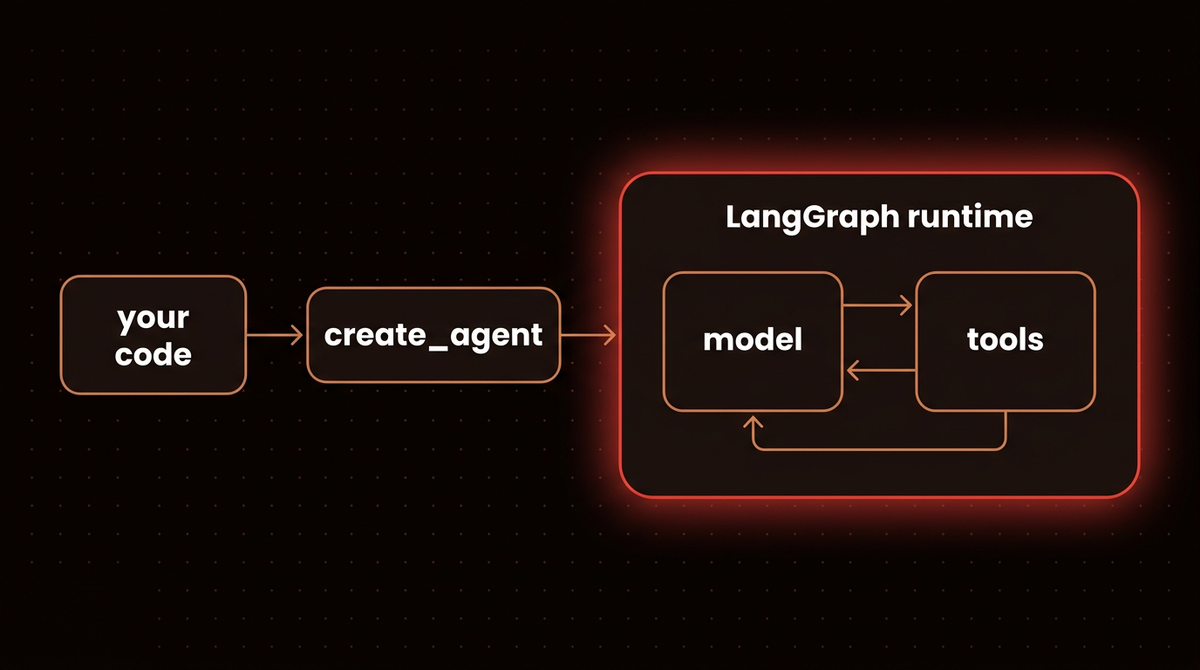
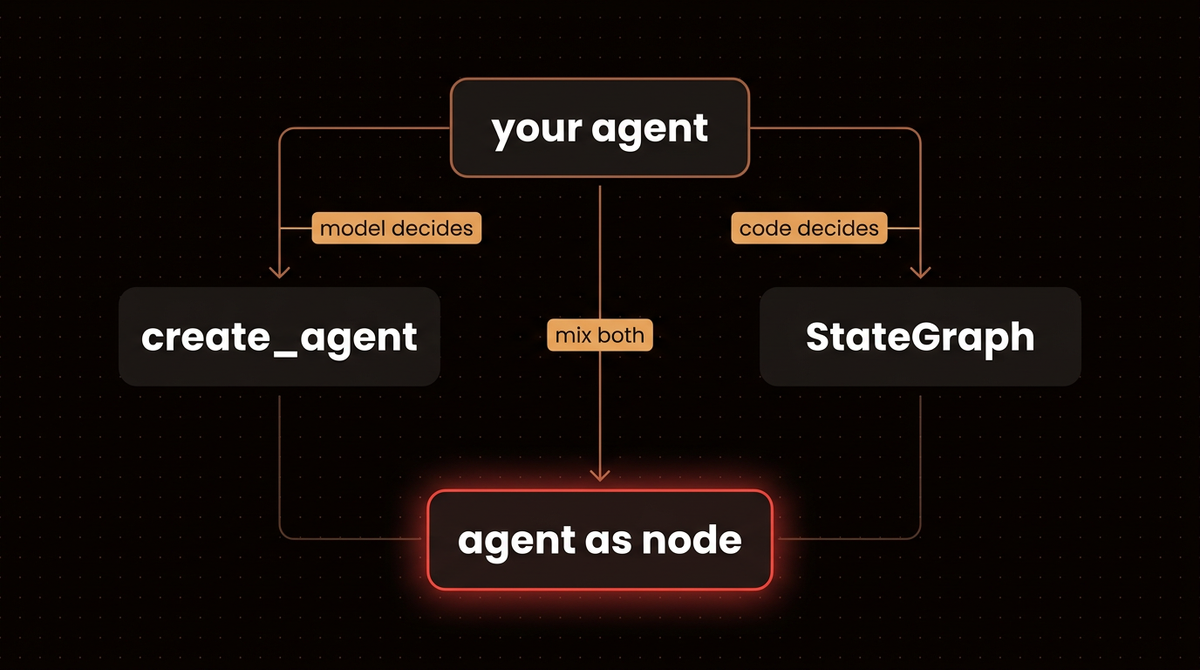
In LangChain 1.4.3, create_agent returns a LangGraph graph. I printed it on October 6, 2026: the type is CompiledStateGraph, with a model node and a tools node. So in LangChain vs LangGraph, the practical split is who picks the next step. If the model does, use create_agent. If your code does, write a LangGraph StateGraph. If both do, put the agent inside the graph.
Five short scripts below show each case, for Python developers picking a framework. They replay a scripted model, so they cost nothing and need no API key. That also means they test the wiring (routing and approvals), not how a real model behaves. My rule of thumb: if I can write down the sequence and the branches before the model runs, I write a graph. If the number and order of steps depends on what the model finds, I use create_agent.
Before you start
- Python 3.10 or newer, which is what langchain and langgraph declare on PyPI. I ran everything on Python 3.13.
- A virtual environment and one install:
python -m venv .venv, activate it (source .venv/bin/activateon macOS and Linux,.venv\Scripts\activateon Windows), thenpip install langchain==1.4.3 langgraph==1.2.13. Pinning matters because my output and error messages are from those versions, and newer ones may differ. Installinglangchainalone also pulls inlanggraphas a dependency, whichpip show langchainconfirms on the line that starts with Requires. - The versions I tested: langchain 1.4.3, langgraph 1.2.13 and langchain-core 1.6.6.
- One shared file. Save the block below as
helpers.py. It defines the scripted model, which replays its replies in a loop so you can run a script more than once, and two tools. Save each later snippet as its own file (step1.pyand so on) in the same folder and run it withpython step1.py.
# helpers.py: shared by every step below
import itertools
from langchain_core.language_models.fake_chat_models import GenericFakeChatModel
from langchain_core.messages import AIMessage
from langchain_core.tools import tool

class ScriptedModel(GenericFakeChatModel):
    """A stand in model that replays fixed replies in a loop, so no API key is needed."""
    def bind_tools(self, tools, **kwargs):   # lets create_agent attach tools to the stand in
        return self

def scripted(*replies):
    return ScriptedModel(messages=itertools.cycle(replies))

def say(text):
    return AIMessage(content=text)

def tool_call(name, **args):   # a scripted reply that asks for a tool
    return AIMessage(content="", tool_calls=[{"name": name, "args": args, "id": "call_1"}])

@tool
def lookup_order(order_id: str) -> str:
    """Look up an order by id."""   # the docstring is the description the model sees
    return f"Order {order_id}: shipped"

@tool
def refund(order_id: str) -> str:
    """Refund an order."""
    return f"Refunded {order_id}"
Step 1: Check what create_agent returns
Guides written for older versions describe LangChain as chains plus AgentExecutor. In 1.4.3 AgentExecutor no longer imports, and the agent API is create_agent. The LangChain docs call create_agent "a minimal, highly configurable harness," and the LangGraph docs describe LangGraph as a low level orchestration framework and runtime for long running, stateful agents. LangChain's own August 6, 2026 post puts the split in one line: LangGraph is an agent runtime, LangChain is an agent framework, and Deep Agents is an agent harness.
I checked rather than trusting the docs. This builds the smallest possible agent and asks what it is.
from helpers import scripted, lookup_order
from langchain.agents import create_agent

agent = create_agent(model=scripted(), tools=[lookup_order])   # no replies needed, we never run it
print(type(agent))
print(list(agent.get_graph().nodes))
That printed this:
<class 'langgraph.graph.state.CompiledStateGraph'>
['__start__', 'model', 'tools', '__end__']
The model node calls the LLM, the tools node runs whatever tool the model asked for, and the loop repeats until the model stops asking. That graph comes from LangGraph, so a LangChain agent gets its checkpointing and interrupts, which Step 3 tests. Middleware, meaning functions that run at fixed points around the model and tool calls, adds nodes to it: with the approval middleware from Step 3 I saw a fifth node, HumanInTheLoopMiddleware.after_model.
| LangChain | LangGraph | |
|---|---|---|
| Package | langchain | langgraph |
| Latest release on Oct 6, 2026 | 1.4.3 (Sep 28) | 1.2.13 (Oct 5) |
| What you write | a model, tools, a prompt, middleware | state, nodes, edges |
| Needs the other? | Yes, it requires langgraph | Only langchain-core |
Release dates come from PyPI for langchain and langgraph, read on October 6, 2026. The dependencies come from pip show in my test environment.
Warning: Older tutorials import create_react_agent from langgraph.prebuilt or AgentExecutor from langchain.agents. In the versions I tested, the first is documented as deprecated in favor of create_agent, and the second no longer imports at all. A tutorial that uses either one predates the current design.
Chains still work. Pipe style chains, the prompt | model syntax known as LCEL, still work in 1.4.3 and live in langchain-core, which I checked by running one. They suit a fixed sequence of calls with no loop. If you must run old AgentExecutor code unchanged, it imports from the separate langchain-classic package, whose AgentExecutor import I also tested. For new work, use create_agent.

Step 2: Write a tool loop with create_agent
If you can describe the job as "here is a goal and a set of tools, keep going until it is done," write it with create_agent. A support agent that looks up orders, a docs bot that searches a vector store and an assistant that files tickets are all the same loop with different tools.
from helpers import scripted, say, tool_call, lookup_order
from langchain.agents import create_agent

agent = create_agent(
    model=scripted(tool_call("lookup_order", order_id="A1"), say("Order A1 has shipped.")),
    tools=[lookup_order],
    system_prompt="You answer order questions. Use the tool, never guess.",
)

result = agent.invoke({"messages": [{"role": "user", "content": "Where is order A1?"}]})
print(result["messages"][-1].content)
print(len(result["messages"]))
Order A1 has shipped.
4The thread holds four messages: the question, the tool call, the tool result and the final answer. To use a real model, replace the model=scripted(...) argument with a model string such as "anthropic:claude-haiku-4-5", run pip install langchain-anthropic, set ANTHROPIC_API_KEY and remove scripted, say and tool_call from the import line (lookup_order stays). I didn't run a live model for this post, so that swap is the one part of the code I haven't exercised.
Deep Agents is the third option. I haven't tested it for this post, so this paragraph is LangChain's guidance. Its August post says to start with create_deep_agent if you are building or reworking an agent, because LangChain uses it for its internal agents, and to pick create_agent when you want less built in context management and finer control over the loop. For the choices in this guide, create_agent is the clearer place to start because you can see every part of the loop.
Step 3: Add approvals and memory to that agent
The LangGraph docs list human in the loop and memory among its central benefits, and a human in the loop approval takes no graph code. create_agent accepts checkpointer, store, interrupt_before, interrupt_after and a middleware list. Those are the parameters I read off its signature in 1.4.3.
from helpers import scripted, say, tool_call, refund
from langchain.agents import create_agent
from langchain.agents.middleware import HumanInTheLoopMiddleware
from langgraph.checkpoint.memory import InMemorySaver
from langgraph.types import Command

agent = create_agent(
    model=scripted(tool_call("refund", order_id="A1"), say("Refund issued.")),
    tools=[refund],
    middleware=[HumanInTheLoopMiddleware(interrupt_on={"refund": True})],
    checkpointer=InMemorySaver(),
)

config = {"configurable": {"thread_id": "ticket-42"}}
result = agent.invoke(
    {"messages": [{"role": "user", "content": "Refund order A1"}]},
    config=config,
)

# The agent has paused. Show a person what it wants to do.
pending = result["__interrupt__"][0].value["action_requests"][0]
print(pending["name"], pending["args"])

# The person approves, and the same thread continues
result = agent.invoke(Command(resume={"decisions": [{"type": "approve"}]}), config=config)
print(result["messages"][-1].content)
refund {'order_id': 'A1'}
Refund issued.interrupt_on names the tools that need a person, and True means interrupt with the default settings. (interrupt_before and interrupt_after are the older static breakpoints that pause at fixed nodes, while the middleware pauses on a specific tool call.) The checkpointer is where the paused run is saved. The thread_id ties your calls to one saved conversation. __interrupt__ is the key that appears in the result when the agent has paused, and its payload has two parts: action_requests, which hold the tool name and arguments to show, and review_configs, which list the decisions allowed for each tool. Command(resume=...) sends the person's decision back. The middleware docs say to send one decision per pending action, in the same order, and list four decision types: approve, edit, reject and respond.
The model still picks every step here. The middleware only decides whether a tool call it picked may run. When I sent {"type": "reject", "message": "..."} instead, the tool didn't run. The model received a tool message saying the user rejected the call, with my reason attached.
Before you ship this, swap InMemorySaver for a database backed saver, because memory is lost on restart. A checkpointer also covers one thread only. Facts that should survive across conversations belong in a store. My LangGraph tutorial covers both, including the Postgres saver and a cross thread memory store.
Note: The current docs add version="v2" to their invoke calls. That returns a GraphOutput object with .value and .interrupts instead of a plain dictionary. I tested both on 1.2.13. The examples here use the default, which returns a dictionary with an __interrupt__ key.
Step 4: Move to a StateGraph when your code picks the next step
Some jobs have branches and retries you can write down in advance. In LangGraph, state is a shared dictionary, nodes are functions that update it, and edges say which node runs next. A conditional edge picks the next node by calling your function, and it can point back at an earlier node, which makes a loop. The LangGraph docs say it lets you mix deterministic, hand coded steps with LLM driven steps in one graph, and LangChain's post says to reach for it when your agent does not fit a standard loop.
Here is a refund pipeline. A model extracts the amount, a plain rule decides what happens, and a bad extraction gets up to three tries before a person takes over. That retry limit is a business rule, so it lives in your code and not in a prompt.
from typing import TypedDict
from langgraph.graph import StateGraph, START, END
from helpers import scripted, say

# stand in for a real extraction call; the first reply is unusable, so the graph retries
llm = scripted(say("not sure"), say("30"), say("120"))

class Request(TypedDict, total=False):   # total=False: keys may be missing at the start
    text: str
    amount: int
    tries: int
    status: str

def extract(state):   # the LLM step: pull the refund amount out of the message
    reply = llm.invoke(state["text"]).content
    return {"tries": state.get("tries", 0) + 1,
            "amount": int(reply) if reply.isdigit() else -1}

def route(state):     # plain Python applies the rules and returns a route name
    if state["amount"] < 0:
        return "retry" if state["tries"] < 3 else "review"
    return "approve" if state["amount"] <= 50 else "review"

def approve(state): return {"status": "refund issued"}
def review(state):  return {"status": "sent to a human"}

graph = StateGraph(Request)
graph.add_node("extract", extract)
graph.add_node("approve", approve)
graph.add_node("review", review)
graph.add_edge(START, "extract")      # START and END mark the entry and exit
# the dictionary maps each route name that route() can return to the node to run next
graph.add_conditional_edges("extract", route, {"retry": "extract", "approve": "approve", "review": "review"})
graph.add_edge("approve", END)
graph.add_edge("review", END)
app = graph.compile()

for text in ["I would like a refund of 30 dollars", "I would like a refund of 120 dollars"]:
    out = app.invoke({"text": text})
    print(out["status"], "| model calls:", out["tries"])
refund issued | model calls: 2
sent to a human | model calls: 1The first request went round the loop once: the unusable reply sent it back to extract, the second reply read 30, and the rule approved it. The second request read 120 on its first call and went to a person. The scripted model answers by call order, whatever text it receives, so this run shows the control flow and says nothing about real extraction quality. The retry cap would work the same way with a live model. If you want to watch a graph like this execute while you build, my guide to setting up LangGraph Studio covers that.
Step 5: Put the agent inside the graph when you need both
One system can use both. Because create_agent returns a compiled graph, you can add it to a StateGraph as a node. It works because the agent and the graph share a messages key. MessagesState merges messages by id, so the messages the agent returns are not duplicated in the parent. Your code triages, and only the cases that need judgment reach the agent.
from langgraph.graph import StateGraph, MessagesState, START, END
from langchain.agents import create_agent
from langchain_core.messages import AIMessage
from helpers import scripted, say, tool_call, lookup_order

class State(MessagesState):
    priority: str

sub_agent = create_agent(
    model=scripted(tool_call("lookup_order", order_id="A1"), say("Order A1 has shipped.")),
    tools=[lookup_order],
)

def triage(state):
    urgent = "urgent" in state["messages"][-1].content.lower()
    return {"priority": "high" if urgent else "normal"}

def route(state):
    return "agent" if state["priority"] == "high" else "template"

def template(state):
    return {"messages": [AIMessage(content="Standard reply sent.")]}

graph = StateGraph(State)
graph.add_node("triage", triage)
graph.add_node("agent", sub_agent)        # a LangChain agent as one node
graph.add_node("template", template)
graph.add_edge(START, "triage")
graph.add_conditional_edges("triage", route, {"agent": "agent", "template": "template"})
graph.add_edge("agent", END)
graph.add_edge("template", END)
support = graph.compile()

for text in ["URGENT: where is my order?", "Hello, general question"]:
    out = support.invoke({"messages": [{"role": "user", "content": text}]})
    print(out["priority"], "|", len(out["messages"]), "messages |", out["messages"][-1].content)
high | 4 messages | Order A1 has shipped.
normal | 2 messages | Standard reply sent.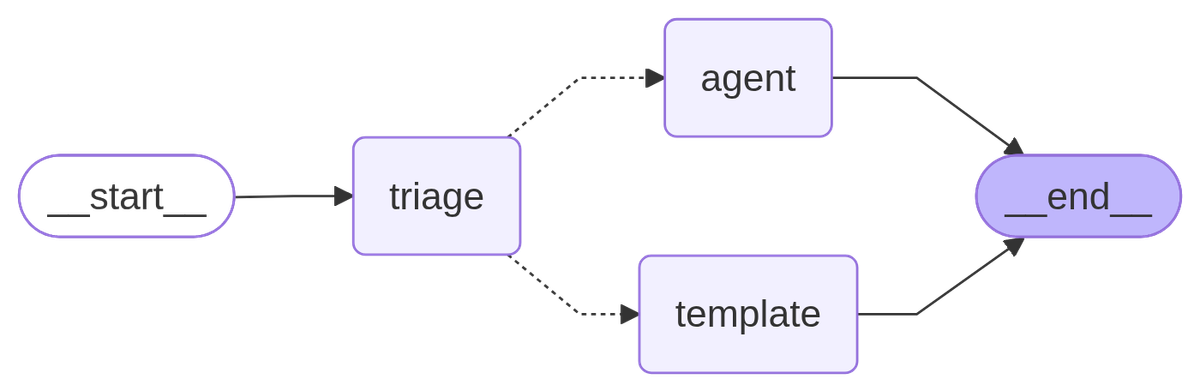
The urgent message went to the agent, which looked up the order, so its thread has four messages. The other took the template branch, which is plain Python, so it cost no model call and left two. To draw a compiled graph yourself, call support.get_graph().draw_mermaid_png(). That sends the diagram text to the mermaid.ink service, so it needs an internet connection.
LangChain vs LangGraph at a glance
| What you need | Use |
|---|---|
| A model that calls tools until the job is done | create_agent |
| The same, with a person approving risky tools | create_agent plus HumanInTheLoopMiddleware and a checkpointer |
| A long, open ended task that needs summarization and subagents | create_deep_agent, which LangChain suggests starting with when you build or rework an agent |
| Fixed steps with an LLM call in some of them | A LangGraph StateGraph |
| Your own routing before or after an agent | A StateGraph with create_agent as a node |
| Traces and evals across all of the above | LangSmith |
Middleware lets your code step in at fixed hooks around the model and the tools, like the approval gate in Step 3, while the model still drives the loop. A StateGraph lets your code own the route. LangChain's post draws the line there: when the built in hooks are not enough, LangGraph is the escape hatch for building a completely custom graph. The test from the top of this guide is the quick version of that line: a sequence and branches you can write down in advance belong in a graph, and steps that depend on what the model finds belong in the agent loop. In my view you leave create_agent plus middleware when you need a step that always runs whatever the model says, a retry loop with your own limit, or a fixed route between several agents. If the whole job is two or three model calls in a fixed order with no loop, I skip both and write plain functions, or a pipe chain. These tests cover wiring with a scripted model, so treat the rule as a heuristic. My post on when to use AI agents vs automation goes through that last case.
Troubleshooting
ImportError: cannot import name 'AgentExecutor' from 'langchain.agents'
In 1.4.3, AgentExecutor is no longer exported from langchain.agents, and tutorials written for older versions still use it. Replace the executor setup with create_agent, or run pip install langchain-classic and import it from langchain_classic.agents if you need the old code unchanged. The same goes for tutorials built on create_react_agent, whose docstring in langgraph-prebuilt 1.1.0 says it is deprecated in favor of create_agent.
RuntimeError: Cannot use Command(resume=...) without checkpointer
The agent paused, but nothing was saved to resume from. Pass checkpointer=InMemorySaver() (or a database saver) and call invoke again with the same thread_id. The trap is that the first call pauses normally even without a checkpointer, so the mistake only shows up when you try to resume.
TypeError: 'bool' object is not subscriptable on resume
You passed Command(resume=True). The human in the loop middleware expects a dictionary: {"decisions": [{"type": "approve"}]}, with one decision per pending action, in order.
The agent paused and nothing else happens
The first invoke returns early, and the work only continues when you call it again with a Command. Check for "__interrupt__" in result after every call.
Going further
LangChain's docs say LangSmith traces, debugs and evaluates agents built with any of these libraries. If you are weighing other frameworks, I covered CrewAI Flows the same way, with the code tested against the current release.
If you would rather have an agent like this built and monitored for you, that is what I do: see how I build AI agents.
Frequently asked questions
Should I learn LangChain or LangGraph first?
Learn LangChain's create_agent first. The LangGraph docs themselves recommend LangChain agents if you are just getting started with agents or want a higher level abstraction, and since create_agent runs on LangGraph, you pick up state, checkpoints and interrupts along the way. LangChain also suggests Deep Agents for new open ended agents, which I haven't tested. Learn StateGraph when your code needs to choose the next step.
Is LangGraph still relevant?
Yes, because it is the runtime under every LangChain agent. LangChain 1.4.3 requires it, so every create_agent agent is a LangGraph graph. It also ships often: six releases from July 6 to October 5, 2026 (1.2.8 through 1.2.13), according to its PyPI history.
Is LangGraph owned by LangChain?
Yes, in practice. Both live in the langchain-ai GitHub organization and share one documentation site run by LangChain, and they are separate packages on PyPI. langchain depends on langgraph, but langgraph does not need langchain.
What is the difference between LangChain, LangGraph and LangSmith?
LangChain is the agent framework: create_agent, models, tools and middleware. LangGraph is the runtime underneath it for stateful, long running workflows. LangSmith is LangChain's observability product for tracing, debugging and evaluating agents built with any of them.
Do I need LangChain to use LangGraph?
No. The LangGraph docs say you do not need LangChain to use LangGraph, although their examples use LangChain components for models and tools. Your nodes can be plain Python functions, as in the pipeline in Step 4, although LangGraph itself depends on langchain-core under the hood.
Where does RAG fit in?
RAG is a pattern you build with either library: a tool or node that searches your documents and hands the results to the model. A docs question bot is a fine create_agent job with a search tool, while a pipeline with fixed retrieval and grading steps suits a graph.
Published
October 6, 2026
Category
AI Agents
Jahanzaib Ahmed
AI Systems Engineer & Founder
AI Systems Engineer with 126 production systems shipped. I run AgenticMode AI (AI agents, RAG systems, voice AI) and ECOM PANDA (ecommerce agency). I build AI that works in the real world for businesses across home services, healthcare, ecommerce, SaaS, and real estate.
Related articles

LangGraph Tutorial: How I Build Production AI Agents With It
A hands-on LangGraph tutorial covering state schemas, nodes, edges, checkpointing, human-in-the-loop patterns, streaming, and real production cost data from 23 deployed systems.
GuideImplementationLangGraph
How to Set Up LangGraph Studio and Debug an Agent on Your Own Machine
A tested walkthrough of LangGraph Studio in its current browser form: install the CLI, run langgraph dev, fix the Chrome and Safari connection errors, then inspect, fork and pause a live agent run.
How toAI AgentsLangGraph
Every AI Agent I Build Has Memory. Here Is the Exact Architecture I Use.
Most AI agents forget everything the moment a conversation ends. Here is the memory architecture I use across 126 production deployments, with real code for LangGraph, Mem0, Redis, and Zep.
GuideChatbots & RAGAI Agents