How I Build Production Multi-Agent Systems With CrewAI Flows
A practitioner guide to production multi agent systems with CrewAI Flows: state, routing, timeouts, monitoring, memory and persistence, with every example run on crewai 1.15.27.

Explore with AI

Table of Contents
A CrewAI Flow is a Python class that orchestrates Crews and direct LLM calls inside an event driven engine. Three decorators cover almost every production workflow: @start, @listen and @router, with typed state held in a Pydantic model. That combination gives you sequencing, state and error recovery without taking on the graph complexity LangGraph asks for, and CrewAI's own write up reports one customer migration that ended with 14x less code than the graph based system it replaced. That is a vendor figure I have not reproduced, so read it as a ceiling.
Two practices decide whether a deployment survives. Structured Pydantic state is always worth the extra setup, because it is what makes debugging and persistence tractable later. And gradual autonomy, starting at 100% human review and reducing it only as the system earns trust, is the single clearest difference between systems still running a year on and ones switched off after a week. CrewAI reports about 2 billion agentic executions over the 12 months to January 2026 and says 65% of the Fortune 500 use it. The package pulls about 2.4 million PyPI downloads a month as of October 2026.
I checked the code in this guide against CrewAI 1.15.23 on October 6, 2026 and ran the routing, state, and persistence examples against that release. Four snippets in the earlier version of this post did not work as written, and I have fixed them. I did not run the memory example, because it calls an LLM and an embedding model, so that one follows the 1.15.23 signatures and docs instead. On October 10, 2026 I ran those examples again on 1.15.27, the current release, and they worked unchanged. The monitoring section now also covers timeouts, metrics, state tracking and triggers, with every example tested on 1.15.27.
A CrewAI Flow is a Python class that orchestrates CrewAI Crews and direct LLM calls inside an event driven execution engine. You decorate methods with @start, @listen and @router to control what runs when, and hold typed state in a Pydantic model between steps. Crews supply the intelligence. Flows supply the control flow, branching, persistence and error recovery that production needs.
Last year I rebuilt a client's entire content pipeline three times. The first version was a single LangGraph graph with 14 nodes, and every time we needed to add a new step, I spent two days re-threading state through the whole thing. The second version was a set of independent Python scripts that had no memory of each other. The third version, which is still running today, uses CrewAI Flows. It took me four days to build what the LangGraph version took three weeks to produce, and my client went from reviewing every single output to running it fully autonomously after about 200 executions.
CrewAI Flows is the production architecture for multi-agent systems that most tutorials skip past. Everyone shows you how to build a Crew. Almost nobody explains how to orchestrate multiple Crews together with state persistence, conditional routing, and gradual autonomy. This guide covers what I've learned across real deployments, not toy examples.
What is a CrewAI Flow?
If you've used CrewAI before, you know what a Crew is: a team of agents, each with a role and tools, working through a set of tasks to produce an output. That's the intelligence layer. But a Crew is stateless by default. Run it today and run it tomorrow and it doesn't remember anything from the first run. It also has no concept of branching logic or error recovery at the orchestration level.
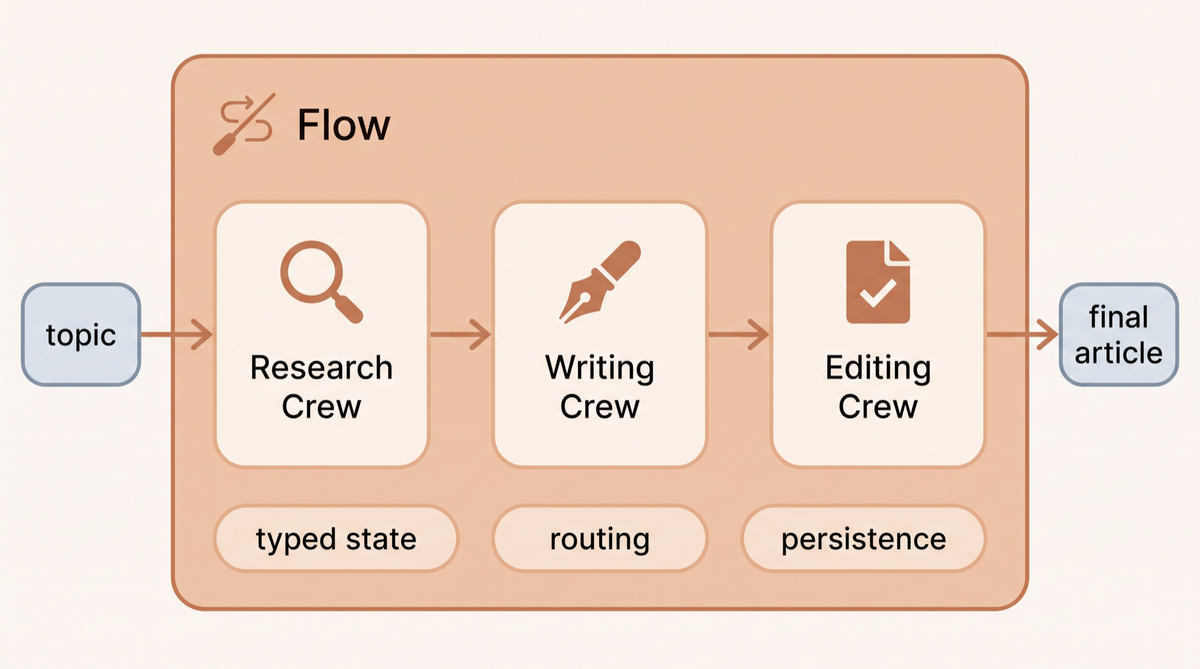
Flows solve this. A Flow is a Python class that wraps your Crews and direct LLM calls inside an event-driven execution engine. You define methods, decorate them with @start, @listen, or @router, and CrewAI handles the execution order, state threading, and persistence. Think of the Crew as the worker and the Flow as the manager who knows what order work gets done, what to do when something fails, and what happened last time.
The distinction matters in practice. I've had clients who got halfway through building with Crews alone, hit the state management wall, and concluded that CrewAI wasn't production-ready. It is. They just stopped one layer short.
What is the difference between CrewAI Flows and Crews?
A Crew is the intelligence layer: a team of agents with roles and tools working through tasks to produce an output. A Flow is the orchestration layer that decides which Crew runs, in what order, under what conditions, and what happens when one fails. Crews are stateless between runs. Flows hold typed state and persist it.
You do not choose one instead of the other. In every production system I have shipped, Flows wrap Crews.
| Dimension | Crew | Flow |
|---|---|---|
| Job | Get work done by agents | Decide what runs and when |
| State between runs | Stateless by default | Typed Pydantic state, persistable |
| Branching | Sequential or hierarchical process | Conditional routing via @router |
| Error recovery | Task level retries | Orchestration level, resume from last step |
| Human in the loop | Not built in at the orchestration level | @human_feedback at any step |
| Use it when | One coherent job for a team of agents | Multiple Crews, branching, or anything long running |
The practical rule: if your system is one job done by a team of agents, a Crew is enough. The moment you need a second Crew, a branch, or a run that survives a restart, you need a Flow.
What are the four building blocks of CrewAI?
Before the Flow itself, you need to understand the four primitives that make it up. I've seen people skip this and spend days debugging things that become obvious once you understand what each piece owns.
Agents
An Agent is an AI entity with a role, a goal, a backstory, and optionally a set of tools. The role and backstory aren't just documentation. They get injected into the system prompt and directly affect how the LLM behaves. I've found that more specific backstories produce more consistent outputs. "You are a financial analyst who has spent 15 years reading SEC filings" gets better results from GPT-4o than "You are a helpful AI assistant who analyzes financial data."
from crewai import Agent
from crewai_tools import SerperDevTool

researcher = Agent(
    role="Market Research Specialist",
    goal="Find accurate, recent data about {topic} from reliable sources",
    backstory="""You've spent 12 years in market research, reading analyst reports
    and primary sources before writing a single sentence. You only cite data
    you can trace back to a primary source.""",
    tools=[SerperDevTool()],
    verbose=False,
    max_iter=3  # prevent runaway tool calls in production
)
The max_iter parameter is something I always set in production. Left unset, it falls back to 25 iterations in CrewAI 1.15.27 (the agents docs table says 20), and an agent stuck in a tool call loop can burn through tokens for minutes before it hits that ceiling. I set it between 3 and 5 for most tasks.
Tasks
A Task assigns specific work to an agent with a description, expected output, and an optional output file or Pydantic model for structured output. The expected_output field matters more than most examples show. The more specific you are about what the output should look like, the fewer post-processing steps you need downstream.
from crewai import Task
from pydantic import BaseModel

class ResearchOutput(BaseModel):
    summary: str
    key_stats: list[str]
    sources: list[str]
    confidence: float

research_task = Task(
    description="Research the current state of {topic} and compile key findings",
    expected_output="A structured research report with summary, 5-10 key statistics with sources, and confidence score",
    agent=researcher,
    output_pydantic=ResearchOutput  # structured output for downstream tasks
)
Crews
A Crew ties agents and tasks together into an executable unit. The process parameter controls how tasks execute. Process.sequential runs tasks one at a time in order. Process.hierarchical adds a manager agent that delegates and reviews work. I use sequential for most workflows because it's predictable and debuggable. Hierarchical is useful when you genuinely want the model to reason about task assignment.
from crewai import Crew, Process

research_crew = Crew(
    agents=[researcher, analyst],
    tasks=[research_task, analysis_task],
    process=Process.sequential,
    verbose=False,
    memory=True  # turns on the crew's own memory
)
Flows
The Flow class is where everything comes together. It's a Python class where methods are the workflow steps, decorators control execution order, and self.state carries data between steps. The entire flow state gets a unique UUID automatically, which is essential for tracing and debugging in production.
How do you build your first production Flow?
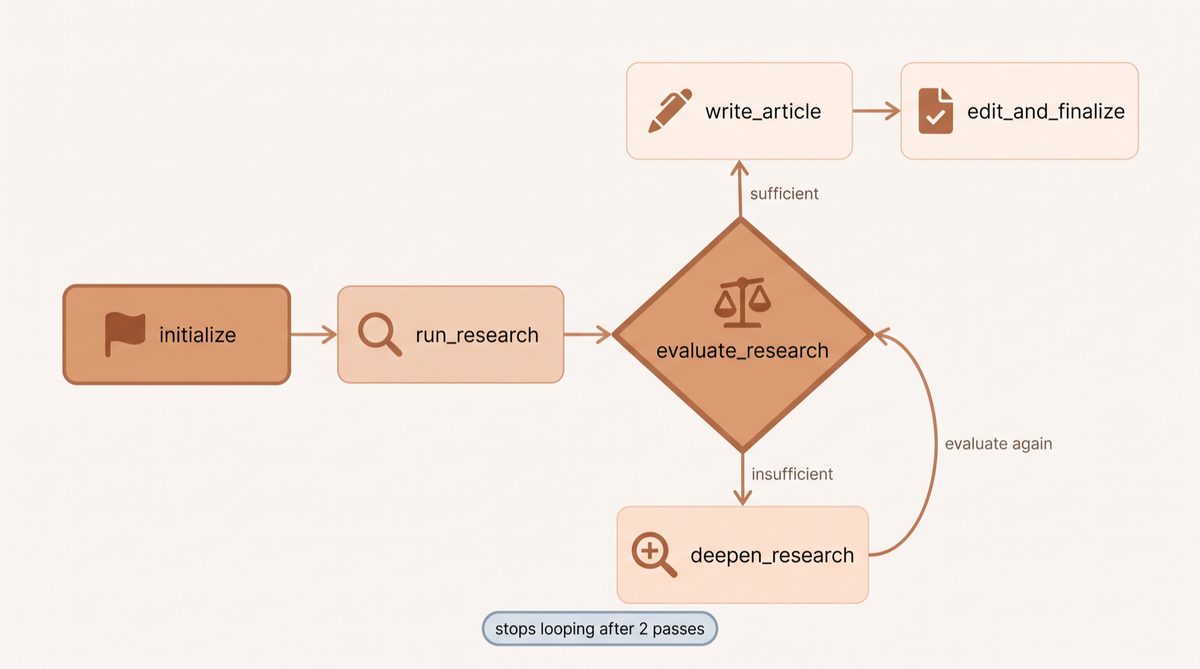
Here's a real pattern I use for client content pipelines. The flow takes a topic, runs a research crew, evaluates whether the research is sufficient, and either proceeds to writing or loops back to deepen the research.
from crewai.flow.flow import Flow, listen, start, router, or_
from pydantic import BaseModel
from typing import Optional

class ContentFlowState(BaseModel):
    topic: str = ""
    research: Optional[dict] = None
    research_quality: str = ""  # "sufficient" or "insufficient"
    draft: str = ""
    final_article: str = ""
    iteration: int = 0

class ContentProductionFlow(Flow[ContentFlowState]):

    @start()
    def initialize(self):
        """Entry point - set up the topic"""
        print(f"Starting content flow for: {self.state.topic}")
        return self.state.topic

    @listen(initialize)
    def run_research(self, topic: str):
        """Run the research crew"""
        result = ResearchCrew().crew().kickoff(inputs={"topic": topic})
        self.state.research = result.pydantic.model_dump()
        return result

    @router(or_("run_research", "deepen_research"))
    def evaluate_research(self, research_result):
        """Check if research quality is sufficient"""
        self.state.iteration += 1

        # Simple quality gate - check if we have enough sources
        sources = self.state.research.get("sources", [])
        confidence = self.state.research.get("confidence", 0)

        if len(sources) >= 5 and confidence >= 0.7:
            self.state.research_quality = "sufficient"
            return "sufficient"
        elif self.state.iteration >= 2:
            # Don't loop forever - move forward after 2 tries
            self.state.research_quality = "sufficient"
            return "sufficient"
        else:
            self.state.research_quality = "insufficient"
            return "insufficient"

    @listen("sufficient")
    def write_article(self):
        """Write the article based on research"""
        result = WritingCrew().crew().kickoff(
            inputs={"research": self.state.research, "topic": self.state.topic}
        )
        self.state.draft = result.raw
        return result.raw

    @listen("insufficient")
    def deepen_research(self):
        """Research wasn't good enough - try again with more focused query"""
        result = DeepResearchCrew().crew().kickoff(
            inputs={"topic": self.state.topic, "gaps": "need more primary sources"}
        )
        self.state.research = result.pydantic.model_dump()
        return result

    @listen(write_article)
    def edit_and_finalize(self, draft: str):
        """Final edit pass"""
        result = EditingCrew().crew().kickoff(
            inputs={"draft": draft, "requirements": "factual, specific, no buzzwords"}
        )
        self.state.final_article = result.raw
        return result.raw

# Running the flow
flow = ContentProductionFlow()
result = flow.kickoff(inputs={"topic": "AI agent deployment patterns"})
print(result)
The or_ on the router is what makes the loop real. It fires after run_research and again after deepen_research, so weak research is deepened and then checked a second time before writing starts. Without it, the flow stops after deepen_research and never reaches write_article, which is how the first version of this example behaved.
This looks like more code than a simple Crew, and it is. But this code handles four things a plain Crew doesn't: quality gates that can loop back, state that persists across all steps, clear entry and exit points, and a clean audit trail through self.state. When something goes wrong in production, you know exactly where.
How do you manage state with Pydantic models?
CrewAI Flows support two state modes. Unstructured state uses a plain dictionary. Structured state uses a Pydantic BaseModel. I've tried both approaches across multiple client projects, and I always end up migrating dictionary-based flows to Pydantic models eventually.
The difference shows up in three places. First, type errors. With dictionary state, you can write self.state['reserach'] (typo) and your flow happily continues with a missing key until something downstream breaks in a confusing way. With Pydantic, that's a validation error at the start. Second, persistence. When you add the @persist decorator for SQLite-backed state recovery, Pydantic models serialize cleanly. Nested dicts sometimes don't. Third, IDE support. I use VS Code and auto-complete on self.state.research_quality saves real time.
Here's how I structure state for a typical client workflow:
from pydantic import BaseModel, Field
from typing import Optional, List
from datetime import datetime

class WorkflowState(BaseModel):
    # Input
    job_id: str = ""
    input_data: dict = Field(default_factory=dict)

    # Progress tracking
    stage: str = "init"  # init -> research -> processing -> review -> complete
    started_at: Optional[datetime] = None
    iteration_count: int = 0

    # Outputs per stage
    research_output: Optional[dict] = None
    processed_output: Optional[dict] = None
    review_notes: List[str] = Field(default_factory=list)
    final_output: Optional[str] = None

    # Error handling
    errors: List[str] = Field(default_factory=list)
    requires_human_review: bool = False
The stage field is useful for monitoring in production dashboards. The errors list and requires_human_review flag support the gradual autonomy pattern I cover below. Every time a step fails or produces low-confidence output, you append to errors instead of raising an exception, and set requires_human_review to true.
How does conditional routing work in CrewAI Flows?
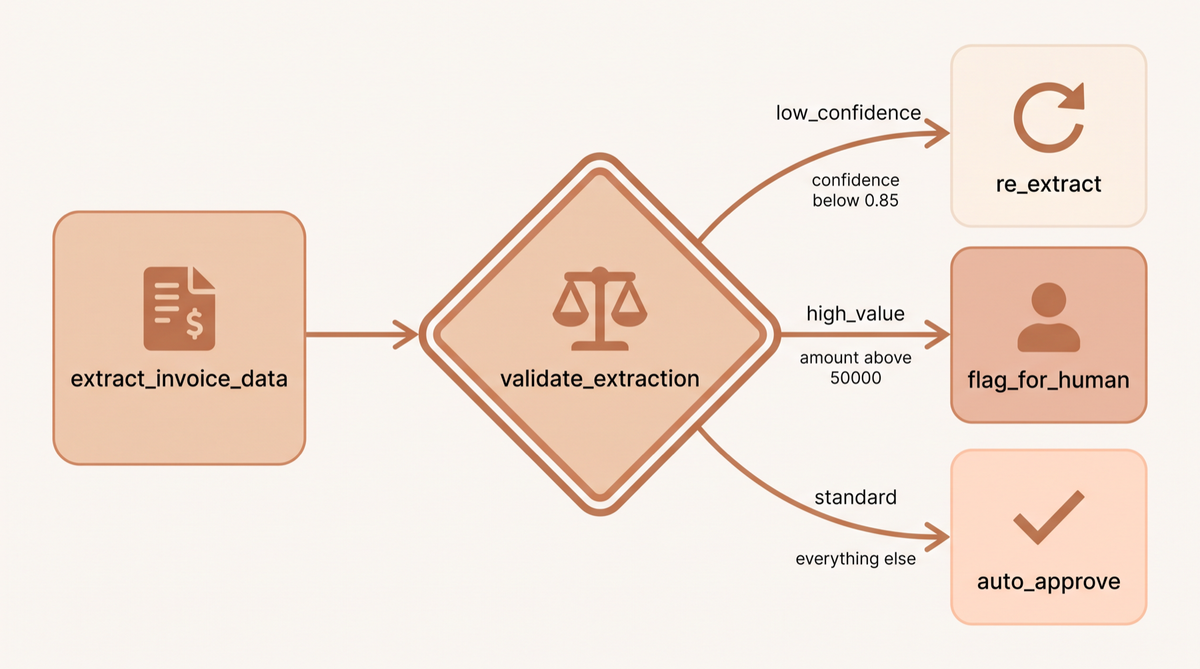
The @router decorator is where Flows go from linear sequences to intelligent pipelines. A router method returns a string, and that string routes execution to whichever @listen method is registered for that string. This is how you implement approval gates, quality checks, and decision branches.
class InvoiceProcessingFlow(Flow[InvoiceState]):

    @start()
    def extract_invoice_data(self):
        result = ExtractionCrew().crew().kickoff(
            inputs={"invoice": self.state.raw_invoice}
        )
        self.state.extracted = result.pydantic.model_dump()
        return result

    @router(extract_invoice_data)
    def validate_extraction(self, result):
        confidence = self.state.extracted.get("confidence", 0)
        amount = self.state.extracted.get("total_amount", 0)

        if confidence < 0.85:
            return "low_confidence"
        elif amount > 50000:  # high-value invoices always need human review
            return "high_value"
        else:
            return "standard"

    @listen("standard")
    def auto_approve(self):
        self.state.approval_status = "approved"
        self.state.requires_human_review = False
        return "auto_approved"

    @listen("high_value")
    def flag_for_human(self):
        self.state.approval_status = "pending_human"
        self.state.requires_human_review = True
        return "queued_for_review"

    @listen("low_confidence")
    def re_extract(self):
        # Try a different extraction approach
        result = FallbackExtractionCrew().crew().kickoff(
            inputs={"invoice": self.state.raw_invoice, "use_ocr": True}
        )
        self.state.extracted = result.pydantic.model_dump()
        self.state.iteration_count += 1
        return result
This pattern maps exactly to how a finance team already works. Low confidence extractions go to a different queue. High-value invoices always get a human. Standard cases process automatically. I built a version of this for a logistics client last quarter, and it got to 73% fully autonomous processing within the first month.
What is gradual autonomy, and why does it matter?
Here's the thing that actually makes or breaks production AI deployments. It's not the framework. It's how you transition from human-supervised to autonomous operation.
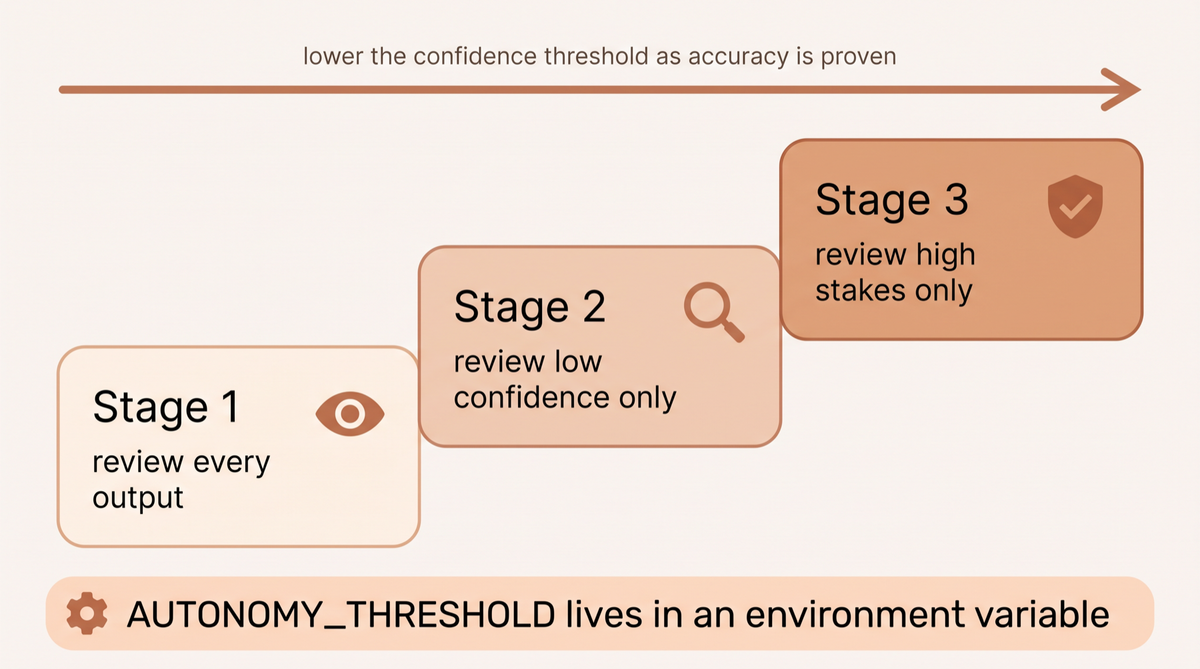
CrewAI published lessons from about 2 billion executions, and the teams with the biggest outcomes did not start with full autonomy. They started with 100% human review and worked down. I call that gradual autonomy. You start with every output going through human review. You track the accuracy rate per output type. As you reach acceptable accuracy thresholds, you remove human review from those specific branches. You never flip a switch from 0% to 100% autonomous overnight.
I build this directly into the Flow state. Every output has a requires_human_review flag. The router checks a confidence threshold that starts high, so almost everything gets reviewed, and lowers as the deployment proves itself. Here's the pattern:
class ProductionFlow(Flow[WorkflowState]):

    # This threshold starts at 0.95 and decreases over time as
    # you verify accuracy in your monitoring dashboard
    AUTONOMY_THRESHOLD = float(os.getenv("AUTONOMY_THRESHOLD", "0.95"))

    @router(process_output)
    def route_for_review(self, result):
        confidence = result.get("confidence", 0)
        output_type = result.get("type", "standard")

        # Always review certain high-stakes outputs regardless of confidence
        if output_type in ["contract", "financial_report", "customer_communication"]:
            if confidence < self.AUTONOMY_THRESHOLD:
                return "human_review"

        # Standard outputs at high confidence go autonomous
        if confidence >= self.AUTONOMY_THRESHOLD:
            return "auto_process"
        else:
            return "human_review"
I expose AUTONOMY_THRESHOLD as an environment variable so the client or their ops team can adjust it without code changes. When they're comfortable with the output quality, they lower the threshold. If they see a regression, they raise it. This gives non-technical stakeholders meaningful control over the system's autonomy level.
How does memory work across Flow runs?
CrewAI rebuilt its memory system in 2025, replacing separate short-term, long-term, and entity memory types with a unified Memory class. The important distinction for production use is the difference between state (ephemeral within a run) and memory (persists across runs).
State carries data from step to step within one execution. Memory carries knowledge across executions. For most client workflows I build, both matter. The state tracks what happened in this run. The memory tracks what the system has learned across all runs.
class SalesOutreachFlow(Flow[OutreachState]):

    @start()
    def research_prospect(self):
        # Ask memory what we already know about this company from earlier runs
        matches = self.recall(f"What do we know about {self.state.company_name}?", limit=3)
        previous_context = "\n".join(m.record.content for m in matches)

        result = ProspectResearchCrew().crew().kickoff(
            inputs={
                "company": self.state.company_name,
                "previous_context": previous_context or "No prior contact"
            }
        )

        # Save the new research so future runs can recall it
        self.remember(
            f"Research on {self.state.company_name}: {result.raw}",
            scope=f"/prospects/{self.state.company_name}",
            metadata={"type": "research", "date": datetime.now().isoformat()}
        )

        self.state.prospect_research = result.raw
        return result

    @listen(research_prospect)
    def personalize_outreach(self, research):
        # Earlier replies from this company are in memory too
        replies = self.recall(f"How has {self.state.company_name} responded to our emails?", limit=3)
        response_history = "\n".join(m.record.content for m in replies)

        result = PersonalizationCrew().crew().kickoff(
            inputs={
                "research": self.state.prospect_research,
                "response_history": response_history or "No prior responses",
                "prospect_name": self.state.contact_name
            }
        )

        self.state.personalized_email = result.raw
        return result.raw
Memory is semantic, so you ask it questions in plain language and get back ranked matches, each with the stored text under match.record.content. You do not fetch by a key. The memory system uses an LLM to analyze content when saving, which means it infers context and categories without you having to manage a taxonomy manually. It also supports adaptive recall that blends semantic similarity with recency and importance scores. In practice this means the system gets better at retrieving relevant context over time without any manual tuning.
How does state persistence survive crashes and cold starts?
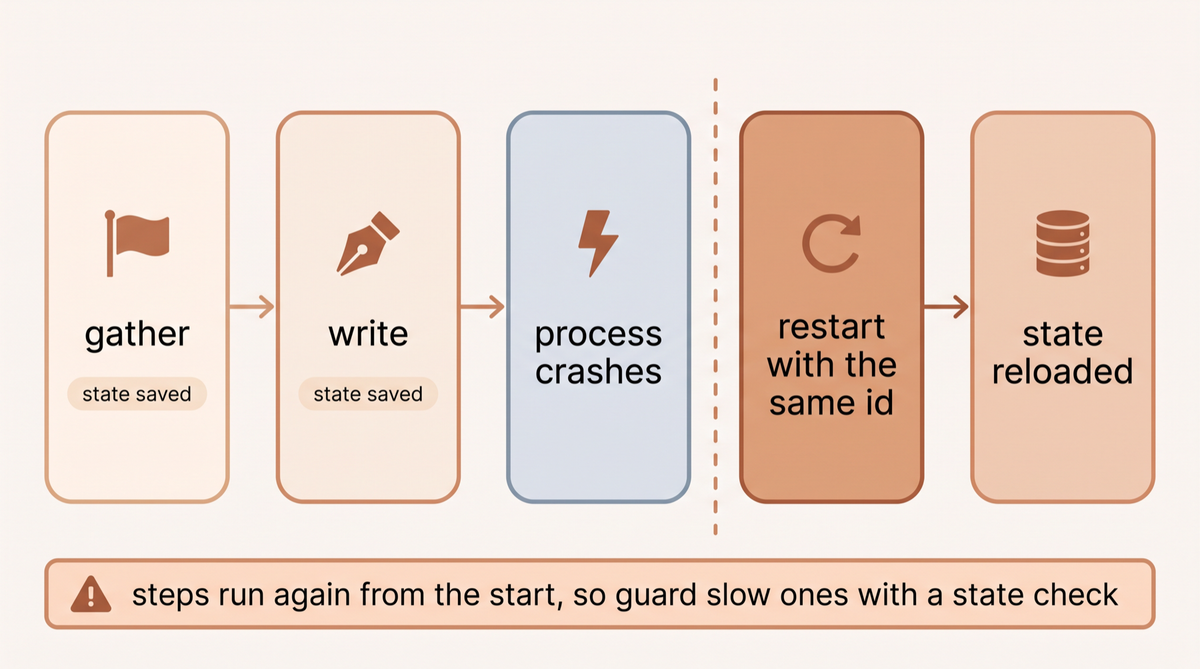
One of my non-negotiables for production flows is state persistence. If a flow crashes mid-execution, its progress should survive the restart. CrewAI supports this through the @persist decorator, which uses SQLite by default (SQLiteFlowPersistence). There is no built in PostgreSQL class, so for multi-instance deployments you write a small backend by subclassing FlowPersistence and filling in three methods.
from crewai.flow.persistence import persist

@persist  # SQLite by default, state saved after each step
class ReportGenerationFlow(Flow[ReportState]):
    pass
For a shared database, implement the same three methods against your own table. This skeleton ran against CrewAI 1.15.23 with a dictionary standing in for the database, so swap the dictionary calls for your SQL:
import json
from typing import Any
from pydantic import BaseModel
from crewai.flow.persistence import FlowPersistence, persist

DB = {}  # stand-in for a flow_states table: flow_uuid -> latest state as JSON

class MyDatabasePersistence(FlowPersistence):
    def init_db(self) -> None:
        pass  # CREATE TABLE IF NOT EXISTS flow_states ...

    def save_state(self, flow_uuid: str, method_name: str, state_data: dict[str, Any] | BaseModel) -> None:
        data = state_data.model_dump() if isinstance(state_data, BaseModel) else state_data
        DB[flow_uuid] = json.dumps(data)  # an UPSERT in a real database

    def load_state(self, flow_uuid: str) -> dict[str, Any] | None:
        raw = DB.get(flow_uuid)
        return json.loads(raw) if raw else None

@persist(MyDatabasePersistence())
class ReportGenerationFlow(Flow[ReportState]):
    pass
State is written after every step. To reload it after a restart, pass the saved id: flow.kickoff(inputs={"id": saved_id}). Be precise about what that does. The state comes back, but the flow's methods run again from @start. In my test the counter continued from its saved value while every step executed a second time. So guard slow or expensive steps with a check on state, such as returning early when self.state.research is already filled. To start a new run from an old run's state without extending its history, use kickoff(restore_from_state_id=saved_id). I store these ids in my client's job queue so a retry reloads state automatically.
Two updates as of October 2026. CrewAI's docs now mark the inputs={"id": ...} form as deprecated in favor of restore_from_state_id, which arrived in 1.14.5 and forks the run under a new state id instead of resuming the old one. The old form still reloaded state in my 1.15.27 test, but plan the move. And if you want a restart to skip the steps that already finished, CrewAI's checkpointing does that. I show it under state tracking in the monitoring section below.
CrewAI vs LangGraph: which should you use?
I've written elsewhere about building production AI agents with LangGraph, so I'll give you the unfiltered comparison rather than a sales pitch for either.
LangGraph is the better choice when you have highly complex conditional logic with many parallel branches, need fine-grained control over individual state transitions, or are building systems where the graph structure itself is the core abstraction. Its checkpointing and streaming support are more mature. The developer experience for complex graphs is better because LangGraph Studio lets you inspect, fork, and pause a live run.
CrewAI Flows is the better choice when your workflow maps naturally to roles and tasks, you want to move quickly from prototype to production, and you don't want to spend half your development time on framework boilerplate. CrewAI's blog cites one customer whose migration off a graph based implementation came out at 14x less code. That is a vendor reported figure from an internal assessment, not a benchmark. I've had a similar experience in direction, if not in size. The Flows decorator syntax is also more readable to non-engineers, which matters when you're explaining the system to a client or a product manager.
The honest framing is this: most production enterprise workflows are not actually that complex at the graph level. They have 4-7 stages with 2-3 branching conditions. CrewAI Flows handles this elegantly. LangGraph shows its value when you're building something closer to a general-purpose agent runtime than a specific business workflow. If you're unsure which fits your use case, read my post on when to use AI agents vs automation. Sometimes neither is the right tool.
CrewAI reports about 2 billion agentic executions in the 12 months to January 2026, and says the teams with the biggest outcomes did not start with full autonomy. They started with 100% human review and worked down. crewai.com states that 65% of the Fortune 500 use it. As of October 6, 2026 the package is at version 1.15.23 with about 2.4 million PyPI downloads in the last 30 days (pypistats) and 59,376 GitHub stars (GitHub). Source for the study: CrewAI Blog.
What does a real CrewAI deployment look like?
Here's a condensed version of a lead enrichment pipeline I've deployed for a few B2B clients. It takes a company name and contact email, researches the company, enriches the contact record, scores the lead, and routes high-value leads to an immediate follow-up queue while queuing others for standard sequences.
class LeadEnrichmentFlow(Flow[LeadState]):

    @start()
    def receive_lead(self):
        return self.state.contact_email

    # A @start method cannot route on a returned label, so validation is a @router
    @router(receive_lead)
    def validate_lead(self):
        # Basic validation before burning API credits
        if not self.state.company_name or not self.state.contact_email:
            self.state.errors.append("Missing required fields")
            return "invalid"
        return "valid"

    @listen("invalid")
    def reject_lead(self):
        self.state.stage = "rejected"

    @listen("valid")
    def enrich_company(self):
        result = CompanyResearchCrew().crew().kickoff(
            inputs={"company": self.state.company_name}
        )
        self.state.company_data = result.pydantic.model_dump()
        return result

    @listen(enrich_company)
    def enrich_contact(self, company_result):
        result = ContactResearchCrew().crew().kickoff(
            inputs={
                "email": self.state.contact_email,
                "company_context": self.state.company_data
            }
        )
        self.state.contact_data = result.pydantic.model_dump()
        return result

    @listen(enrich_contact)
    def score_lead(self, contact_result):
        # Score based on company and contact signals
        score = self._calculate_score(
            self.state.company_data,
            self.state.contact_data
        )
        self.state.lead_score = score
        return score

    @router(score_lead)
    def route_by_score(self, score: float):
        if score >= 0.8:
            return "hot_lead"
        elif score >= 0.5:
            return "warm_lead"
        else:
            return "cold_lead"

    @listen("hot_lead")
    def fast_track_outreach(self):
        # Generate personalized email and add to priority queue
        PersonalizedOutreachCrew().crew().kickoff(
            inputs={"lead_data": self.state.model_dump(), "priority": "high"}
        )
        self.state.stage = "complete"

    @listen("warm_lead")
    def standard_sequence(self):
        # Add to standard nurture sequence
        self.state.stage = "nurture_queue"

    @listen("cold_lead")
    def archive_lead(self):
        # Store for future review but don't take immediate action
        self.state.stage = "archived"

    def _calculate_score(self, company_data: dict, contact_data: dict) -> float:
        # Your scoring logic here
        score = 0.0
        if company_data.get("employee_count", 0) > 50:
            score += 0.2
        if company_data.get("annual_revenue", 0) > 5_000_000:
            score += 0.3
        if contact_data.get("is_decision_maker", False):
            score += 0.3
        if contact_data.get("tech_stack_match", False):
            score += 0.2
        return score
This runs as a scheduled flow triggered by new CRM entries. It handles 200 to 500 leads per day with no human involvement for cold and warm leads. Hot leads get a human-reviewed email draft queued within minutes of the prospect entering the CRM. If you want to see what kinds of businesses benefit most from this type of automation, the AI readiness assessment is a good starting point.
How do you debug and monitor Flows in production?
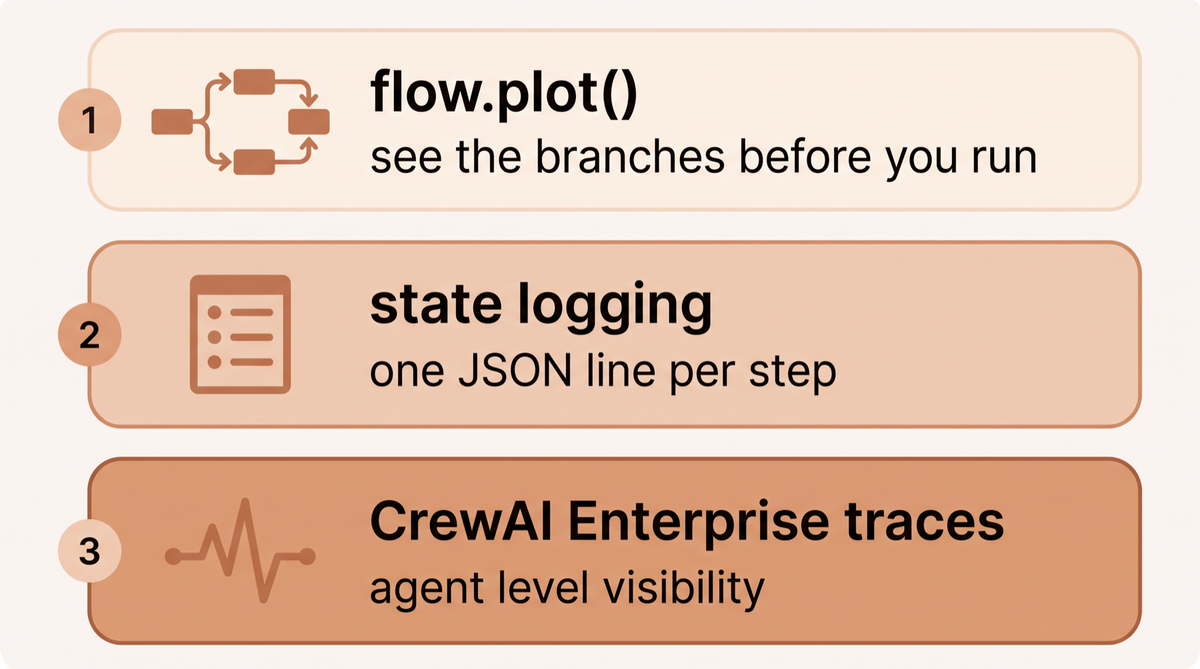
The debugging workflow I use for CrewAI Flows has three layers. First, local visualization. Call flow.plot() before running anything in production and you get an interactive HTML diagram of the entire execution graph. This catches routing logic errors before they hit your API budget.
Second, state logging. I add a simple decorator to every step method that logs the state to a structured JSON log. This gives me a complete audit trail of every flow execution without needing a dedicated observability tool.
import functools
import json
import logging

def log_step(func):
    @functools.wraps(func)
    def wrapper(self, *args, **kwargs):
        logging.info(json.dumps({
            "flow_id": self.state.job_id,
            "step": func.__name__,
            "stage": self.state.stage,
            "errors": self.state.errors
        }))
        result = func(self, *args, **kwargs)
        logging.info(json.dumps({
            "flow_id": self.state.job_id,
            "step": f"{func.__name__}_complete",
            "stage": self.state.stage
        }))
        return result
    return wrapper
Third, CrewAI's hosted tracing, on the platform the current docs call CrewAI AMP. If you're running high volume production workloads, it gives you trace level visibility into agent decisions, task timelines, tool usage, LLM calls and token usage. I don't use it for every client, but for workflows handling significant volumes or high value decisions, the visibility is worth the cost.
The four subsections below go deeper on timeouts, metrics, state tracking and triggers. Every example was tested on crewai 1.15.27 on October 10, 2026, offline, with a stub LLM or a sleep standing in for model calls. The output under each one is what the script printed.
Timeouts and runaway protection
CrewAI 1.15.27 has no timeout setting on a Flow or on a single Flow method. Apart from one loop guard on the Flow, the limits live one level down, on agents, tasks and the LLM client. These are the main ones, with defaults read from the installed classes:
| Setting | Set on | Default in 1.15.27 | What it limits |
|---|---|---|---|
max_method_calls | Flow | 100 | Times one method may run in a single execution before CrewAI raises RecursionError, a guard against endless router loops. It is in the source but not in the docs |
max_iter | Agent | 25 | Reasoning and tool call iterations before the agent must give its best answer |
max_execution_time | Agent | None, so no limit | Seconds before a task counts as timed out. The TimeoutError is raised once the agent's thread finishes, as shown below |
max_retry_limit | Agent | 2 | Retries after an error. A TimeoutError is raised straight away and is not retried |
max_rpm | Agent or Crew | None | LLM requests per minute. A crew level value overrides its agents |
guardrail_max_retries | Task | 3 | How many times the agent may retry after a task guardrail rejects its output |
timeout, max_retries | LLM | Not set, and 2 on the OpenAI provider | Seconds and retries for a single LLM request, passed through to the provider SDK |
max_execution_time is the closest thing to a step timeout, and it has a catch. On the synchronous path CrewAI runs the agent in a worker thread and waits on it with a deadline, but the TimeoutError only reaches you once the agent's work in that thread has finished. In this test the LLM takes 4 seconds and the limit is 1 second:
import time
from crewai import Agent, BaseLLM, Crew, Task

class SlowLLM(BaseLLM):  # offline stand in for a provider that takes 4 seconds to answer
    def call(self, messages, **kwargs):
        time.sleep(4)
        return "Thought: done\nFinal Answer: one line summary"

agent = Agent(role="Researcher", goal="Summarize the topic", backstory="Test agent.",
              llm=SlowLLM(model="slow-stub"), max_execution_time=1, max_iter=3)
task = Task(description="Summarize the topic", expected_output="One line", agent=agent)

started = time.perf_counter()
try:
    Crew(agents=[agent], tasks=[task]).kickoff()
except TimeoutError as e:
    print(f"TimeoutError after {time.perf_counter() - started:.1f}s: {e}")
TimeoutError after 4.0s: Task 'Summarize the topic' execution timed out after 1 seconds. Consider increasing max_execution_time or optimizing the task.The error is correct, but it arrived 3 seconds late, and nothing stops the agent at the deadline. In a second test, where the stub asked for a tool three times before answering, the error came after 6.1 seconds and four LLM calls, and the finished answer was thrown away. A provider call that hangs holds the agent for as long as it hangs, and with no timeout set the OpenAI client falls back to its own default of 600 seconds, which it retries twice by default when a request times out. So pair max_execution_time with a low max_iter, timeouts inside your tools, and a request timeout on the LLM itself, for example LLM(model="openai/gpt-4o-mini", timeout=30, max_retries=2). I confirmed 1.15.27 accepts both values and hands them to the OpenAI client.
For a deadline on a whole Flow run, wrap kickoff_async() in asyncio.wait_for. Catch asyncio.TimeoutError, which also works on Python 3.10, where it is not yet the same class as TimeoutError:
import asyncio
import time
from crewai.flow.flow import Flow, listen, start

class EnrichFlow(Flow):
    @start()
    def call_slow_api(self):
        time.sleep(3)  # a hung tool call or a slow crew
        print("call_slow_api finished anyway")
        return "data"

    @listen(call_slow_api)
    def write_report(self, data):
        print("write_report ran")

async def run_with_deadline(seconds: float):
    flow = EnrichFlow(suppress_flow_events=True)  # quiet console for this demo
    started = time.perf_counter()
    try:
        return await asyncio.wait_for(flow.kickoff_async(), timeout=seconds)
    except asyncio.TimeoutError:  # plain TimeoutError only matches on Python 3.11+
        print(f"deadline hit after {time.perf_counter() - started:.1f}s, run abandoned")
        return None

async def main():
    await run_with_deadline(1)
    await asyncio.sleep(3)  # long enough for the abandoned step to finish in its thread
    print("done waiting")

asyncio.run(main())
deadline hit after 1.0s, run abandoned
call_slow_api finished anyway
done waitingThe deadline fires on time and write_report never runs. The step that was already running still finishes in its worker thread, because Python cannot kill a thread. Give the tool or client inside a slow step its own timeout, and make the step safe to run twice, so an abandoned run does no damage when your retry starts a new one.
Monitoring and metrics with event listeners
Every Flow emits events on CrewAI's event bus: FlowStartedEvent, MethodExecutionStartedEvent, MethodExecutionFinishedEvent, MethodExecutionFailedEvent and FlowFinishedEvent, with crew, task, agent, tool and LLM events underneath. A BaseEventListener subclass turns them into step timing and failure logs without touching the Flow. This one writes a JSON line per step:
import json
import time
from crewai.events import (
    BaseEventListener,
    MethodExecutionFailedEvent,
    MethodExecutionFinishedEvent,
    MethodExecutionStartedEvent,
)
from crewai.flow.flow import Flow, listen, start

class StepMonitor(BaseEventListener):
    """One JSON line per Flow step: name, status, duration. Ship these to your log stack."""

    def __init__(self):
        self.started = {}
        super().__init__()

    def setup_listeners(self, bus):
        @bus.on(MethodExecutionStartedEvent)
        def on_start(source, event):
            self.started[(source.flow_id, event.method_name)] = time.perf_counter()

        @bus.on(MethodExecutionFinishedEvent)
        def on_finish(source, event):
            self._log(source, event, "ok")

        @bus.on(MethodExecutionFailedEvent)
        def on_fail(source, event):
            self._log(source, event, "failed", error=repr(event.error))

    def _log(self, source, event, status, **extra):
        took = time.perf_counter() - self.started.pop((source.flow_id, event.method_name))
        print(json.dumps({"flow": event.flow_name, "step": event.method_name,
                          "status": status, "seconds": round(took, 1), **extra}))

monitor = StepMonitor()  # instantiating registers the handlers

class InvoiceFlow(Flow):
    @start()
    def extract(self):
        time.sleep(0.5)  # stands in for a crew call

    @listen(extract)
    def post_to_ledger(self):
        time.sleep(0.2)
        raise ConnectionError("ledger API unreachable")

try:
    InvoiceFlow().kickoff()
except ConnectionError:
    pass
{"flow": "InvoiceFlow", "step": "extract", "status": "ok", "seconds": 0.5}
{"flow": "InvoiceFlow", "step": "post_to_ledger", "status": "failed", "seconds": 0.2, "error": "ConnectionError('ledger API unreachable')"}CrewAI also prints its own progress panels and a log line for the failure, which I trimmed from the output above. Two details matter here. Read the run id from source.flow_id, which works for both dictionary and Pydantic state, whereas source.state.id fails on a dictionary. And suppress_flow_events=True quiets those console panels by stopping the method events themselves, so a listener like this one goes silent when it is set.
For token metrics, read flow.usage_metrics after a run. It sums every LLM call in the last kickoff that reports token usage, including every Crew the Flow ran, calls inside agent tools and direct LLM.call() calls, broken into prompt, completion, cached and reasoning tokens plus a count of successful requests. CrewAI's Flows docs warn that flow.kickoff().token_usage is not the same thing: it only covers the last Crew. In my stub test the property summed both calls of a two Crew Flow. Log it once per run next to the run id.
For hosted traces, pass tracing=True to a Crew or Flow, or set CREWAI_TRACING_ENABLED=true, then authenticate with crewai login. Traces land in CrewAI AMP at app.crewai.com, which has a free account tier, according to the tracing docs. If you already run an observability stack, the observability overview lists integrations including Langfuse, Arize Phoenix, MLflow, Opik and Weave, and Datadog has its own integration page. Separately from tracing, CrewAI sends anonymous usage telemetry by default, and CREWAI_DISABLE_TELEMETRY=true turns it off.
Tracking state through a run
Every run gets a UUID in self.state.id, also exposed as flow.flow_id, and it stays the same in every method. Use it as the correlation id in your logs, job queue and traces. Two places record how state changes during the run. MethodExecutionFinishedEvent carries a serialized copy of the state after each method, so the listener above can log a snapshot per step. And with @persist on the default SQLite backend, every completed method adds a row keyed by that id, which gives you the full history after the fact:
import json
import sqlite3
from crewai.flow.flow import Flow, listen, start
from crewai.flow.persistence import SQLiteFlowPersistence, persist
from pydantic import BaseModel

class OrderState(BaseModel):
    stage: str = "new"
    total: float = 0.0

@persist(SQLiteFlowPersistence("flow_states.db"))
class OrderFlow(Flow[OrderState]):
    @start()
    def price_order(self):
        self.state.total = 120.0
        self.state.stage = "priced"

    @listen(price_order)
    def approve(self):
        self.state.stage = "approved"

flow = OrderFlow(suppress_flow_events=True)
flow.kickoff()

# One row per completed step, keyed by the run's state id
rows = sqlite3.connect("flow_states.db").execute(
    "SELECT method_name, state_json FROM flow_states WHERE flow_uuid = ? ORDER BY id",
    (flow.state.id,),
)
for method, state_json in rows:
    state = json.loads(state_json)
    print(f"{method:<12} stage={state['stage']:<9} total={state['total']}")

latest = SQLiteFlowPersistence("flow_states.db").load_state(flow.state.id)
print("latest snapshot:", latest["stage"], "| same id as the run:", latest["id"] == flow.state.id)
price_order stage=priced total=120.0
approve stage=approved total=120.0
latest snapshot: approved | same id as the run: Trueload_state() is the public API and returns only the latest snapshot. The flow_states table layout is an implementation detail of 1.15.27, so treat the SQL query as a debugging tool, not a contract.
Persistence reloads state, but as I showed earlier, a reloaded run executes every method again from @start. CrewAI's checkpointing resumes past the steps that already finished instead. It is driven by events, so with the method_execution_finished trigger used here it writes nothing when suppress_flow_events is on:
import glob
import os
import shutil
from crewai import CheckpointConfig
from crewai.flow.flow import Flow, listen, start

shutil.rmtree("./flow_cp", ignore_errors=True)  # clean slate for the demo
LEDGER = {"up": False}  # flipped below to simulate the outage clearing

class ReportFlow(Flow):
    @start()
    def research(self):
        print("research ran")
        return "notes"

    @listen(research)
    def write(self, notes):
        if not LEDGER["up"]:
            raise ConnectionError("ledger API down")
        print(f"write ran with {notes}")
        return "report"

cp = CheckpointConfig(location="./flow_cp", on_events=["method_execution_finished"])
try:
    ReportFlow(checkpoint=cp).kickoff()
except ConnectionError as e:
    print("first run failed:", e)

LEDGER["up"] = True
latest = max(glob.glob("./flow_cp/**/*.json", recursive=True), key=os.path.getmtime)
result = ReportFlow(checkpoint=cp).kickoff(from_checkpoint=CheckpointConfig(restore_from=latest))
print("resumed result:", result)
research ran
first run failed: ledger API down
write ran with notes
resumed result: reportThat output is trimmed of CrewAI's console panels and log lines again. research ran once. On resume, CrewAI restored its saved output and went straight to write, which is the behavior @persist alone does not give you.
How triggers pass control between methods
Every Flow is wired by five primitives, and the rules are short:
@start()runs when you call kickoff. If a Flow has several, all of them run, and CrewAI's docs note they often run in parallel.@listen(method)runs when that method finishes and receives its return value as an argument.@listen("name")takes a string that matches a method name or a router label.@router(method)runs like a listener, but its return value is a label that triggers every@listen("label")method. A@startmethod's return value does not act as a label, which is why the lead enrichment flow puts a router straight afterreceive_lead.and_(a, b)fires once all of the listed methods have finished.or_(a, b)fires when any of them finishes. With two parallel starts, anor_listener ran once in my test, not twice. In a loop it fires again on each pass, which is what makes the quality loop in the content flow work.
import time
from crewai.flow.flow import Flow, and_, listen, or_, router, start

class TriggerDemo(Flow):
    @start()
    def load_crm(self):
        time.sleep(0.1)
        print("start    load_crm")

    @start()
    def load_web(self):
        time.sleep(0.3)
        print("start    load_web")

    @listen(and_(load_crm, load_web))
    def merge(self):
        print("and_     merge, once both starts are done")
        return 0.9

    @router(merge)
    def score(self, value):
        return "hot" if value >= 0.8 else "cold"

    @listen("hot")
    def fast_track(self):
        print("label    fast_track, because score returned 'hot'")

    @listen("cold")
    def nurture(self):
        print("label    nurture")

    @listen(or_(fast_track, nurture))
    def notify(self):
        print("or_      notify, after whichever branch ran")

TriggerDemo(suppress_flow_events=True).kickoff()
start load_crm
start load_web
and_ merge, once both starts are done
label fast_track, because score returned 'hot'
or_ notify, after whichever branch ranWhat are the most common CrewAI mistakes?
After deploying these systems for clients in ecommerce, B2B SaaS, and logistics, here are the mistakes I see most often and how to avoid them.
Not setting max_iter on agents. An agent in a tool-call loop can run for five minutes and cost $15 before anything catches it. Set max_iter=3 unless you have a specific reason for more.
Using dict state instead of Pydantic models. Dictionary state is faster to write and painful to maintain. You'll spend more time debugging key errors than the Pydantic setup saves you.
Forgetting to handle the "invalid" branch. Every router needs to handle the failure case. I've seen flows where the "invalid" listener was never defined, causing silent failures when validation checks returned "invalid".
Not adding iteration limits to loop-back routes. The deepen_research example earlier shows this: always increment a counter and break out of the loop after a maximum number of retries. Infinite loops are a real risk with router-based recursion.
Blocking the thread with synchronous crew kickoffs. If you're processing multiple leads or documents concurrently, use kickoff_async() and asyncio to run flows in parallel. Synchronous execution is fine for single items but becomes a throughput bottleneck at any meaningful scale.
If you're evaluating whether a system like this fits your business, I'd start with the AI agent readiness assessment to understand where agent complexity is actually warranted versus where simpler automation would serve you better. And if you want to talk through a specific deployment, the contact page is the right starting point.
CrewAI Flows quick reference
The decorators and calls used throughout this guide, in one place. Checked against CrewAI 1.15.23 on October 6, 2026, and again against 1.15.27 on October 10, 2026. If you are reading this much later, check the official docs before relying on it.
| Decorator or call | What it does |
|---|---|
@start | Marks the entry point of the Flow. Runs first when you call kickoff. |
@listen | Runs a method when the method it listens to completes. This is how you chain steps. |
@router | Returns a route name to branch execution conditionally. |
or_() and and_() | Trigger a listener when any (or_) or all (and_) of the listed methods finish. |
@persist | Saves Flow state after each step so a restarted run can reload it. SQLite by default, with a FlowPersistence interface for your own database. |
@human_feedback | Pauses at a step to collect human feedback and, with emit, routes on the outcome. Needs CrewAI 1.8.0 or newer. |
kickoff() | Runs the Flow synchronously. |
kickoff_async() | Runs the Flow asynchronously. Pair with asyncio.gather() for parallel Crews. |
flow.usage_metrics | Token usage summed over every LLM call in the last kickoff, including all Crews, agent tools and direct LLM calls. |
CheckpointConfig | Writes event driven checkpoints. kickoff(from_checkpoint=...) resumes past the steps that already finished. |
flow.plot() | Renders the Flow as an HTML diagram so you can see the branches before running it. Opens in your browser by default, pass show=False to skip that. |
BaseModel | Pydantic model that types your Flow state. Worth it every time. |
Process.sequential | Crew process where tasks run in order. |
Process.hierarchical | Crew process where a manager agent delegates to workers. |
CrewAI Flows questions
What is the difference between CrewAI Flows and CrewAI Crews?
A Crew is a team of agents that executes a set of tasks. It's stateless by default and runs once to completion. A Flow wraps Crews inside an event-driven orchestration layer that handles state persistence, conditional routing, and multi-crew coordination. Think of the Crew as the worker and the Flow as the process manager.
When should I use CrewAI Flows instead of LangGraph?
Use CrewAI Flows when your workflow maps naturally to roles and tasks, you want to move quickly, and your conditional logic isn't extremely complex. LangGraph is worth the additional setup when you need fine-grained control over individual state transitions, have many parallel branches, or are building something that functions more like a general-purpose agent runtime than a specific business process.
Does CrewAI Flows support human-in-the-loop?
Yes. The @human_feedback decorator, available from CrewAI 1.8.0, pauses a step to collect feedback from a person. With its emit option, an LLM maps their free text reply to one of your named outcomes, such as approved, rejected, or needs_revision, and the matching @listen method runs. That gives you approval workflows and review gates without custom plumbing.
How does state persistence work in CrewAI Flows?
Applying the @persist decorator to your Flow class saves state automatically. By default it uses SQLite, which is fine for single-instance deployments. For multi-instance production deployments you implement the FlowPersistence interface for your own database. State is written after each step completes, and passing the saved id to kickoff reloads it. The flow's methods run again from the start, so guard slow steps with a state check.
Can CrewAI Flows run asynchronously?
Yes. Use kickoff_async() instead of kickoff() to run flows asynchronously. This is important for high-throughput workloads where you need to process many items concurrently. You can use asyncio.gather() to run multiple flow instances in parallel.
What LLM providers work with CrewAI?
CrewAI supports the major providers, including OpenAI, Anthropic (Claude), Google Gemini, AWS Bedrock, Azure OpenAI, Groq, and Ollama for local models. Major providers use native SDK integrations that you install as extras, such as crewai[openai]. Other providers go through LiteLLM, which is an optional extra installed with crewai[litellm]. You configure the model per agent using the llm parameter or set a default at the Crew level.
How do I visualize a CrewAI Flow before running it?
Call flow.plot() on your flow instance to generate an interactive HTML diagram showing all steps, listeners, and routing logic. This is extremely useful for catching logical errors before they hit your API budget. The diagram updates automatically as you modify the flow code.
Is CrewAI suitable for enterprise production deployments?
Yes. CrewAI says 65% of the Fortune 500 use it (crewai.com, October 2026) and reported about 2 billion agentic executions in the 12 months to January 2026. Their enterprise platform adds observability, access controls, deployment management, and dedicated support. That said, the open-source framework is production-capable on its own for most use cases when you follow the patterns around state persistence, error handling, and gradual autonomy.
Last updated
October 10, 2026
Category
Implementation
Jahanzaib Ahmed
AI Systems Engineer & Founder
AI Systems Engineer with 126 production systems shipped. I run AgenticMode AI (AI agents, RAG systems, voice AI) and ECOM PANDA (ecommerce agency). I build AI that works in the real world for businesses across home services, healthcare, ecommerce, SaaS, and real estate.
Want this built for your business? See Workflow Automation, or browse the free tools and guides.
Related articles
Pydantic AI Tutorial: How I Build Type-Safe AI Agents That Actually Work in Production
A production Pydantic AI tutorial refreshed for V2: structured output, dependency injection, async, AWS Bedrock, human approval, testing and a booking agent, with every offline example run on 2.55.0 and its real output shown.
GuideImplementationPydantic AI
LangGraph Tutorial: How I Build Production AI Agents With It
A hands on LangGraph tutorial covering state schemas, nodes, edges, checkpointing, human in the loop patterns, streaming, and real production cost data from 23 deployed systems.
GuideImplementationLangGraph
How to Use Pydantic AI Output Types Now That result_type Is Gone
What replaced result_type and result.data in Pydantic AI, tested on three releases, plus what tool, native and prompted output actually send to OpenAI and Claude, with runnable code and real output.
How toAI AgentsPydantic AI