How to Build an n8n RAG Workflow That Stays Correct When Documents Change
Build a two part n8n RAG workflow on Postgres and pgvector: an upload form that replaces old copies instead of duplicating them, and a chat agent that answers only from your documents and names its source.

Table of Contents
Upload the same handbook twice and most n8n RAG builds now hold two refund policies, and the chat quotes whichever one it finds first. This guide builds an n8n RAG workflow that avoids that: it takes a document through a form, stores it in Postgres with pgvector, and answers questions about it in a chat window, citing which document each answer came from.
It takes about an hour if you already run n8n. Embedding a 200 page handbook costs well under one cent. It is for people who have built a few n8n workflows and now want a support bot or internal knowledge assistant.
Quick start builds stop at "it answered one question." I care about what happens on day two: the same handbook uploaded again with one policy changed, a teammate switching the embedding model, a server restart. So this build differs from the usual demo in two places. Every upload deletes the old copy of that document before inserting the new one. And the vector table is created by you, with the right dimensions and an index, instead of by whatever the node guesses on its first run.
If retrieval augmented generation is new to you, my plain English guide to RAG covers the idea. This post is the build.
Before you start
- n8n, cloud or self hosted, on a current 2.x release. I wrote every step against the current n8n docs.
- A Postgres database with the pgvector extension available. Any managed Postgres that offers pgvector works, or a local Docker container. You need a user that can create tables, and ideally one that can run
CREATE EXTENSIONonce. - An OpenAI API key for embeddings, plus a chat model credential (OpenAI, Anthropic or any chat model node n8n supports).
- A few test documents: PDFs or text files you know well enough to judge the answers.
- Skills: you can add nodes, connect sub nodes and read an execution log. You can paste SQL into a database console.
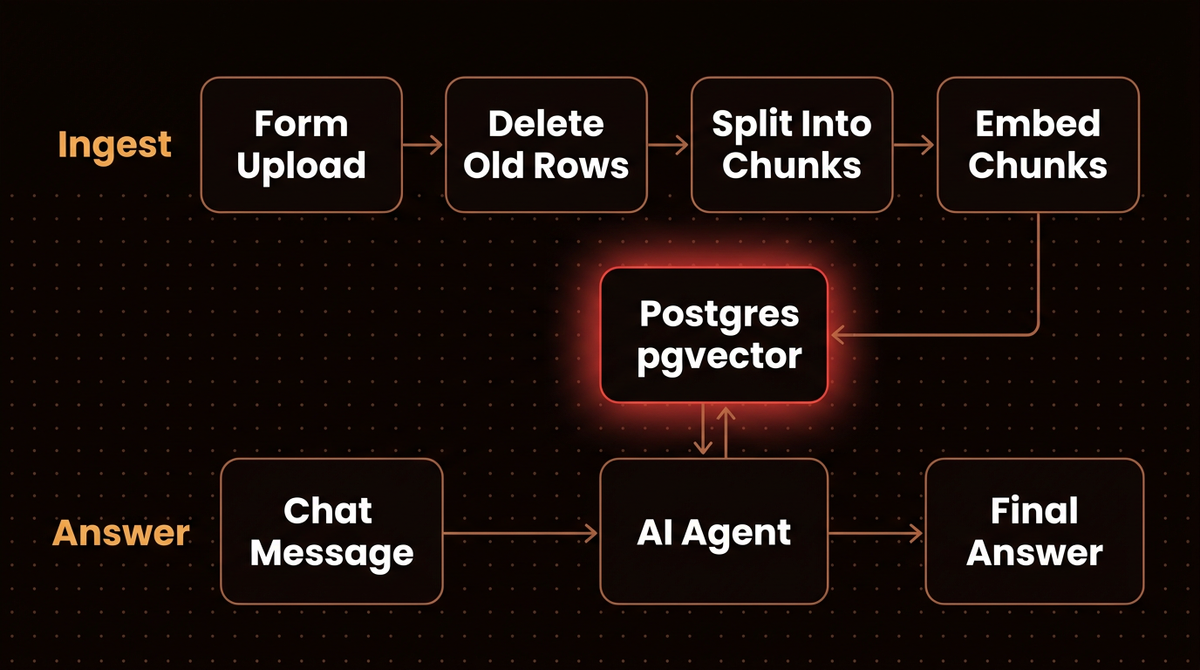
The whole thing is two workflows sharing one table. Here is the shape of what you are about to build.
Step 1: Pick the embedding model and its dimensions first
Change this later and you embed everything again, so decide it now. An embedding model turns each chunk of text into a list of numbers, and the length of that list is fixed per model. According to OpenAI's embeddings guide, text-embedding-3-small returns 1536 numbers by default and text-embedding-3-large returns 3072, and both accept a dimensions parameter to shorten the output.
Three numbers make me default to text-embedding-3-small at 1536:
The 2,000 limit is the one that matters. A 3072 dimension vector stores fine, but pgvector's HNSW index on the vector type tops out at 2,000 dimensions, so a table full of text-embedding-3-large output at full size gets no fast index unless you switch to halfvec or shorten the vectors. For a few thousand pages, the small model at 1536 is cheaper and indexable. Pick once, write it down, and use the same model and dimensions in every embeddings node you add later.
The Embeddings OpenAI node in n8n has a Dimensions option (256, 512, 1024, 1536 or 3072, default 1536) under Add Option. It arrived in n8n 1.69.0, as the closing note on this n8n community thread records.
Step 2: Create the vector table yourself
The PGVector Vector Store node will create a table called n8n_vectors on first use if none exists, with the columns id, text, metadata and embedding. I still create it by hand, because then I choose the dimension, add the indexes, and know exactly what is in production. Run this in your database console:
CREATE EXTENSION IF NOT EXISTS vector;

CREATE TABLE IF NOT EXISTS n8n_vectors (
  id uuid NOT NULL DEFAULT gen_random_uuid() PRIMARY KEY,
  text text,
  metadata jsonb,
  embedding vector(1536)
);

-- fast similarity search with cosine distance
CREATE INDEX IF NOT EXISTS n8n_vectors_embedding_idx
  ON n8n_vectors USING hnsw (embedding vector_cosine_ops);

-- fast lookups when deleting a document's old chunks
CREATE INDEX IF NOT EXISTS n8n_vectors_doc_id_idx
  ON n8n_vectors ((metadata->>'doc_id'));
The column names match the node's defaults, and vector_cosine_ops matches its default Distance Strategy of cosine. If you rename anything, set the same names under Options > Column Names in every PGVector node.
Now add a Postgres credential in n8n (Credentials > Create credential > Postgres) with host, database, user, password, port and SSL mode. One catch from the Postgres credential docs: the Agent node does not support SSH tunnels, so the database must be reachable directly from n8n.
What you should see: SELECT count(*) FROM n8n_vectors; returns 0.
Step 3: Build the upload form
Create a new workflow called RAG ingest and add an n8n Form Trigger. Under Form Elements, add two fields:
- Document ID. Element Type Text, Field Name
doc_id, required. This is a short, stable name such asemployee-handbook. The same ID on a later upload means "replace this document." - File. Element Type File, Field Name
file, required.
The Field Name is the key downstream nodes see in the trigger's output, so {{ $json.doc_id }} will hold the ID. Set Authentication to n8n User Auth or Basic Auth before you publish, unless you want strangers writing to your knowledge base.
Step 4: Delete the old copy before every insert
Most demos skip this. Without it, answers drift as soon as a document changes. Insert Documents only adds rows. Upload the handbook twice and every chunk exists twice; change a refund policy and upload again, and the agent now retrieves the old and new policy side by side and may quote either one.
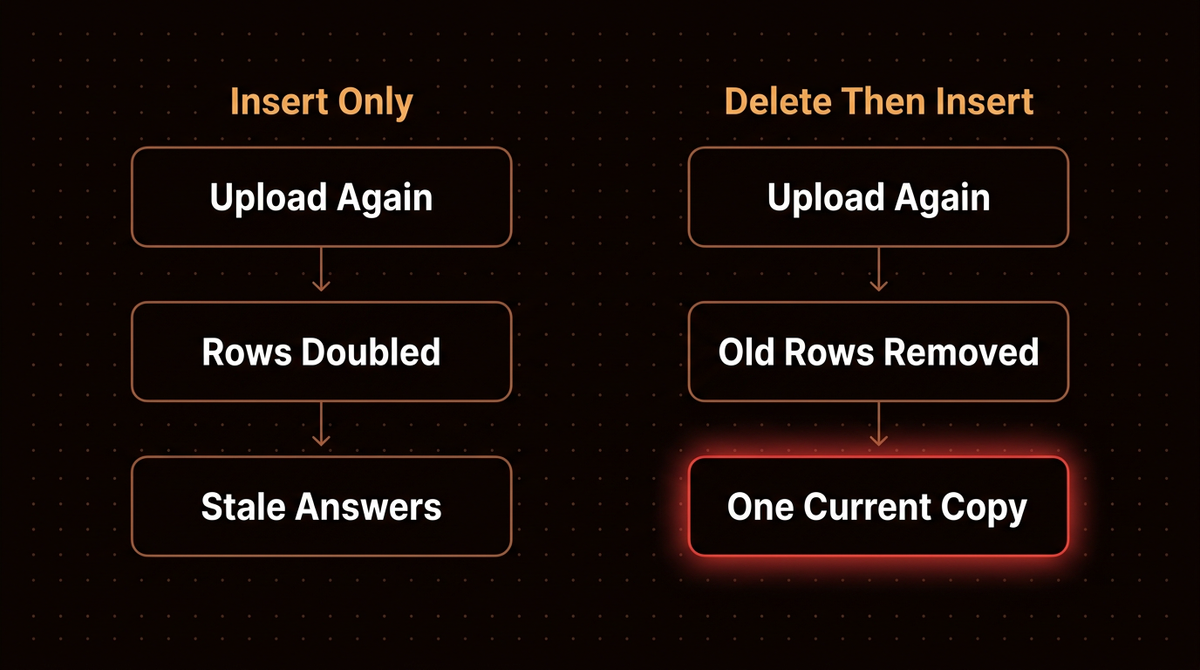
The fix is to tag every chunk with its doc_id and delete by that tag first. After the Form Trigger, add a Postgres node with operation Execute Query:
WITH removed AS (
  DELETE FROM n8n_vectors
  WHERE metadata->>'doc_id' = $1
  RETURNING 1
)
SELECT count(*) AS deleted_rows FROM removed;
Under Options > Query Parameters, which takes a comma separated list, enter the single value {{ $json.doc_id }}; it fills $1. The Postgres node docs describe this $1 placeholder pattern, which keeps the ID out of the SQL string. I wrap the delete in a SELECT count(*) on purpose: the node then returns exactly one row whether it removed anything or not, so the next node always gets an item, and deleted_rows tells you in the execution log how many old chunks went.
There is one wiring problem. The Postgres node outputs deleted_rows, not your uploaded file. So add a Merge node:
- Connect the Form Trigger to Merge input 1 as well as to the Postgres node.
- Connect the Postgres node to Merge input 2.
- Set Mode to Choose Branch and choose Input 1 Data as the output.
According to the Merge node docs, Choose Branch always waits until data from both inputs is available and then passes the chosen input through unchanged. So the file only moves on after the delete finished, and because input 1 passes through untouched, {{ $json.doc_id }} still resolves in the next node.
Step 5: Split, embed and insert the document
After the Merge node, add a Postgres PGVector Store node and set:
- Operation Mode: Insert Documents
- Table Name:
n8n_vectors - Options > Skip Table Initialization: on, since you created the table in Step 2
Then connect its two sub nodes:
- Embeddings OpenAI. Model text-embedding-3-small, Dimensions 1536.
- Default Data Loader. Type of Data Binary, Mode Load All Input Data, Data Format Automatically Detect by MIME Type. Load All Input Data reads the uploaded file from the incoming item, so you do not need to type its binary property name. Under Options > Metadata, add a property named
doc_idwith value{{ $json.doc_id }}.
On chunking: the loader's Simple text splitting uses the Recursive Character Text Splitter with chunks of 1,000 characters and 200 characters of overlap, per the Default Data Loader docs. For prose documents I leave that alone at first. Short FAQ entries or policy clauses do better with smaller chunks; switch Text Splitting to Custom, connect a Recursive Character Text Splitter, and try 600 characters with 100 overlap. Change one thing at a time and rerun your Step 8 questions. My chunking glossary entry explains the trade off in more depth.
The cost here is tiny. As a rough working figure, assume a dense page is around 500 tokens; a 200 page handbook is then about 100,000 tokens, and the 200 character overlap re-embeds roughly a quarter of the text again, so call it 125,000 tokens. At $0.02 per million, that is $0.0025 per full upload. So reupload freely.
Warning: the same Default Data Loader docs note that in sub nodes an expression always resolves to the first input item. Upload one file per form submission, and after your first real run check the metadata with SELECT DISTINCT metadata->>'doc_id' FROM n8n_vectors; before trusting it.
What you should see: click Execute Workflow and the test form opens in a new browser tab; upload a PDF with ID employee-handbook, and the run ends green. SELECT count(*) FROM n8n_vectors WHERE metadata->>'doc_id' = 'employee-handbook'; returns a few dozen rows for a typical handbook. Upload the same file again: the Postgres node reports that many deleted_rows, and the count stays the same instead of doubling.
Step 6: Build the chat workflow
Create a second workflow called RAG chat. Add a Chat Trigger, then an AI Agent connected to it, and give the agent three sub nodes:
- Chat Model. Any chat model node you have a credential for.
- Memory. Simple Memory is fine to start; it lets follow up questions such as "and for contractors?" make sense.
- Tool. A Postgres PGVector Store node in Retrieve Documents (As Tool for AI Agent) mode, with its own Embeddings OpenAI sub node set to exactly the same model and dimensions as Step 5.
Configure the tool carefully, because the agent decides whether to search based on these words alone:
- Name:
company_handbook. Stick to letters, numbers and underscores; other characters can break the tool call withInvalid 'tools[0].function.name'. - Description: "Search the company handbook and policy documents. Use this for any question about leave, expenses, refunds, security or internal process."
- Table Name:
n8n_vectors, Limit: 4, and turn on Include Metadata so the agent can see each chunk'sdoc_id.
Then open the AI Agent's Options > System Message and set the rules. Mine reads roughly like this:
You answer questions about company documents.
Always search company_handbook before answering.
Answer only from the returned chunks. If they do not contain
the answer, say you could not find it in the documents.
End every answer with the doc_id of each chunk you used.
That line grounds each answer in a named source: a reader knows which document to open, and you can spot wrong answers faster during testing.
Step 7: Ask your first questions
Open the chat panel on the canvas and ask something only your document can answer. Open the execution and select the AI Agent node: you should see a call to company_handbook, four chunks with their metadata, and an answer that ends with the document ID. If the chunks show no doc_id, Include Metadata is off in the tool or the metadata was never written in Step 5. If the agent answered without calling the tool, its description is too vague or the system message is not firm enough. Fix that before anything else.
The video below walks through the same PGVector setup with a hosted Postgres provider, which helps if you have not connected n8n to Postgres before.
Step 8: Test with questions it should refuse
Before anyone else uses the chat, I write ten questions in a spreadsheet with the answer I expect. Seven should be answerable from the documents, including two whose answer sits in a table or a footnote. Three should be unanswerable, such as a policy you know is not covered. A good build answers the seven correctly with the right document ID and refuses the three. Wrong answers on answerable questions usually mean chunking or a missing document; invented answers on the unanswerable ones mean the system message needs tightening, or you need fewer, better chunks.
Rerun the same ten after every change. Once all ten pass, turn on Make Chat Publicly Available in the Chat Trigger, choose Hosted Chat or Embedded Chat, and pick an Authentication mode. The Chat Trigger docs warn that every message runs the workflow once, so a ten message conversation uses ten executions of your plan's allowance.
Simple Vector Store or Postgres: which to use
The Simple Vector Store needs no setup, and for a first ten minute experiment that is fine. It is not where a real knowledge base should live.
| Question | Simple Vector Store | Postgres PGVector |
|---|---|---|
| Survives an n8n restart? | No, data lives in memory | Yes, it is a database table |
| Who can read it? | Any user of the instance who knows the memory key | Whoever has the database credential |
| Size limit on n8n Cloud | 100MB and a 7 day idle TTL by default | Your database's limits |
| Delete one document's chunks | No delete mode; Insert can only wipe the whole key first | One SQL statement |
The first three rows come from the Simple Vector Store docs, which recommend it for development only. If you already run Qdrant, Pinecone or Supabase, the same pattern applies; my vector database comparison covers how they differ in production.
Troubleshooting your n8n RAG workflow
"different vector dimensions", for example 1536 and 768. The embeddings node that wrote the rows and the one searching them disagree on model or dimensions, or the column was created at another size. It appears as error 22000 in this community thread. Set both Embeddings OpenAI nodes to the same model and Dimensions. If you really changed models, empty the table and ingest everything again.
Permission denied when the PGVector node runs for the first time. Unless told otherwise, the node tries to create the vector extension and the table. On many managed databases only an admin role can create extensions. Run Step 2's SQL as an admin once, then turn on Skip Table Initialization in every PGVector node.
The agent ran fine yesterday and knows nothing today. You are still on the Simple Vector Store, and n8n restarted or cleaned it up. Move to Postgres.
Invalid 'tools[0].function.name'. The tool name contains a character the model API rejects. Rename it using only letters, numbers and underscores.
Answers mix an old and a new version of a policy. Chunks from an earlier upload are still in the table, often from before you added the doc_id metadata. Find them with SELECT count(*) FROM n8n_vectors WHERE metadata->>'doc_id' IS NULL;, delete them, and ingest those files again with an ID.
Going further
Ingest from a folder instead of a form. Swap the Form Trigger for a Google Drive trigger and use the file's own ID as doc_id; the delete step then handles edited files. Deleted files need a separate scheduled cleanup.
Rerank before answering. The PGVector node has a Rerank Results option, listed on the same node page linked in Step 2, that takes a reranker such as Reranker Cohere. When retrieval brings back four chunks and only one is relevant, reranking is the next lever I pull, before touching chunk size again.
Save model spend. Put the Vector Store Question Answer Tool between the agent and the store and give that tool a cheaper model, so it summarizes chunks before the expensive model writes the answer. Worth it once the chat sees real traffic.
When not to use this. If your questions need exact numbers across many rows ("total refunds by region last quarter"), a vector search is the wrong tool; give the agent a SQL query tool instead. If the agent has to reason across retrieved results and take actions, read my agentic RAG production guide. And if your n8n setup is growing past two workflows, split shared steps into a sub workflow so ingest logic lives in one place.
If you would rather have a document assistant like this built, tested and monitored for you, that is the work I do: you can see how I build AI agents, or look at a docs RAG chatbot I shipped.
Frequently asked questions
Can I build an n8n RAG workflow without Postgres?
Yes. The Simple Vector Store needs no setup and works for testing, but n8n recommends it for development only: its data disappears when n8n restarts and any user of the instance can read it. For anything people rely on, use a persistent store such as Postgres with pgvector, Qdrant, Pinecone or Supabase.
Which embedding model should I use in n8n?
Start with OpenAI's text-embedding-3-small at 1536 dimensions. It costs $0.02 per million tokens, and pgvector can index 1536 dimension vectors with HNSW. Use the identical model and dimensions in the insert and chat workflows; a mismatch makes every search fail.
How do I update a document without creating duplicates?
Give every document a stable ID, store it in each chunk's metadata through the Default Data Loader, and run a Postgres delete on that ID before each insert. The Insert Documents operation only adds rows, so without the delete every new upload stacks a second copy next to the old one.
How much does an n8n RAG workflow cost to run?
Embedding is the cheap part: a 200 page document comes to roughly a quarter of a cent with text-embedding-3-small. The real costs are the chat model's tokens per answer, your database hosting, and n8n executions, since every chat message runs the workflow once and counts against your plan's allowance.
Why does my n8n AI agent ignore the vector store?
The agent chooses tools from their name and description, so a vague description such as "documents" often gets skipped. Describe exactly which questions the tool answers, and say in the system message that it must search before answering. Then check the execution log to confirm the tool was actually called.
Published
October 22, 2026
Category
Chatbots & RAG
Jahanzaib Ahmed
AI Systems Engineer & Founder
AI Systems Engineer with 126 production systems shipped. I run AgenticMode AI (AI agents, RAG systems, voice AI) and ECOM PANDA (ecommerce agency). I build AI that works in the real world for businesses across home services, healthcare, ecommerce, SaaS, and real estate.
Want this built for your business? See n8n Consultant, or browse the free tools and guides.
Related articles
How to Choose an AI Agent Platform for Automating Merchant Tasks
A buyer's guide for Shopify merchants: which tasks to automate, which type of AI agent platform fits each, what they cost in October 2026, and how to start small.
How toIndustry GuidesEcommerce
How to Use an n8n Workflow Template Without Inheriting Someone Else's Setup
Pull any n8n workflow template from the public library, audit its JSON for leftover IDs, emails and pinned data, import and test it on your own account, then share a clean template of your own.
How toImplementationn8n
How to Build an n8n Sub Workflow and Handle What Goes Wrong
Build an n8n sub workflow step by step, then see what the parent really receives when it fails, returns nothing or gets the wrong type. Every step tested on n8n 2.43.4.
How toImplementationn8n