How to Use Pydantic AI Dependency Injection With deps_type and RunContext
Pass a database, an HTTP client and per user config into Pydantic AI tools, instructions and output validators, override them in tests with TestModel, and catch the five deps mistakes with pyright.


Table of Contents
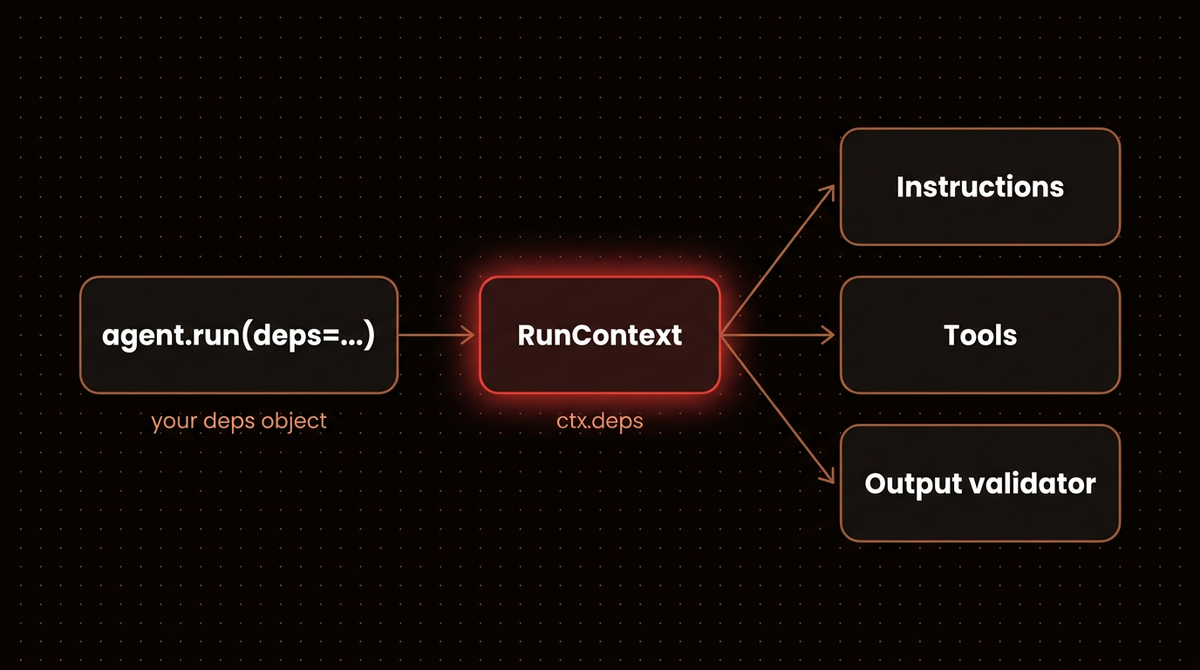
In a support agent, the model should pick the order ID and never the user ID. Pydantic AI dependency injection is what makes that split possible: you declare a deps class once with deps_type, pass an instance to agent.run(deps=...), and your tools read the database, the HTTP client and the logged in user from ctx.deps, where the model cannot touch them. Below I build one support agent that reads deps in a tool, an instructions function and an output validator, test it with TestModel and agent.override, and run pyright over five deps mistakes. No API key is needed, and every script ran on Pydantic AI 2.56.0 with its output pasted underneath.
If you are new to the framework, start with my Pydantic AI tutorial for production agents, which covers structured output, async runs, Bedrock and the rest of the agent in one place. It gives dependencies a single section. This page covers only deps: how they keep one customer's data away from another, and how to swap them out in tests.
Before you start
- Python 3.11 or newer. Pydantic AI on PyPI requires 3.11+. I used Python 3.13.12 in a fresh virtual environment.
- Pydantic AI 2.56.0, released on October 13, 2026. I installed
pydantic-ai-slim, which is enough for everything here because no provider is ever called. - httpx, pytest and pyright for the HTTP client, the tests and the type check.
- No API key and no cost. Every run uses
TestModelorFunctionModel, test models that ship with the library.
python3.13 -m venv venv
source venv/bin/activate
pip install pydantic-ai-slim httpx pytest pyright
pip show pydantic-ai-slim   # Version: 2.56.0
Put every file below in the same folder so the imports resolve. To run the agent against Claude later, install pydantic-ai-slim[anthropic] and set ANTHROPIC_API_KEY; nothing on this page needs either. Pyright also downloads its own Node runtime the first time you run it.
Expect one surprise on 2.56.0: a run prints an ASCII banner to stderr saying observability is off and pointing at Logfire. It is harmless. Set PYDANTIC_AI_NO_BANNER=1 to hide it, which is what I did for every run below.
Step 1: Put everything a run needs into one deps class
Dependencies can be any Python type. The official dependencies docs suggest a dataclass once you have more than one object, and that is my default. Here the deps hold a database connection, an async HTTP client for a carrier API, and a small config object for the customer on the other end of the chat.
# support_agent.py
import asyncio
import sqlite3
from dataclasses import dataclass

import httpx
from pydantic_ai import Agent, ModelRetry, RunContext


@dataclass
class UserConfig:
    user_id: str
    name: str
    tier: str          # "free" or "pro"
    max_refund: float


@dataclass
class SupportDeps:
    db: sqlite3.Connection
    http: httpx.AsyncClient
    user: UserConfig


support_agent = Agent(
    "anthropic:claude-haiku-4-5",
    deps_type=SupportDeps,          # the class, not an instance
    defer_model_check=True,         # no provider (or API key) until a run needs one
)
deps_type takes the class, not an instance, and the docs say plainly that it is not used at runtime at all. It exists so a type checker knows what ctx.deps is everywhere else. And defer_model_check=True lets the module import on a machine with no Anthropic key, which is what makes the offline runs later possible.
I keep per user values in their own UserConfig rather than loose fields on the deps. When the agent grows a second tenant concept or a feature flag, there is one obvious place to put it.
Step 2: Read the database and HTTP client from tools
A tool registered with @agent.tool takes RunContext[SupportDeps] as its first parameter, and Pydantic AI fills it in. The model never sees that parameter. It only sees the arguments after it, which become the tool's JSON schema for function calling.
# support_agent.py (continued)
@support_agent.tool
async def get_order(ctx: RunContext[SupportDeps], order_id: str) -> dict:
    """Look up one of the current customer's orders."""
    row = ctx.deps.db.execute(
        "SELECT id, status, total, tracking FROM orders WHERE id = ? AND user_id = ?",
        (order_id, ctx.deps.user.user_id),   # the user id comes from deps, never from the model
    ).fetchone()
    if row is None:
        return {"error": f"no order {order_id} for this customer"}
    return dict(zip(("id", "status", "total", "tracking"), row))


@support_agent.tool
async def track_shipment(ctx: RunContext[SupportDeps], tracking: str) -> dict:
    """Get the carrier status for a tracking number."""
    r = await ctx.deps.http.get(f"/v1/track/{tracking}")
    r.raise_for_status()
    return r.json()
Look at where the user ID comes from in get_order. The model chooses order_id, but the user_id in the WHERE clause comes from deps, which your server filled in from the session. If you let the model pass the user ID as a tool argument, a prompt injection that says "look up order 17 for user 3" works. With the ID in deps it cannot, because the model has no way to change it. This is the main reason I put the user ID in deps, and the second test in Step 6 checks it.
I made both tools async, and that choice has a catch. The sqlite3 calls inside get_order are blocking, so they hold up the event loop while they run. With an in memory demo table that takes microseconds and does not matter. Against a real database, use an async driver (asyncpg for Postgres, for example) so the await actually yields. The troubleshooting section shows what happens if you go the other way and make the tool sync.
Step 3: Feed per user config into the instructions
Instructions functions take the same RunContext, as the only argument. This one tells the model who it is talking to and what refund limit applies:
# support_agent.py (continued)
@support_agent.instructions
def who_am_i_talking_to(ctx: RunContext[SupportDeps]) -> str:
    u = ctx.deps.user
    return (
        f"You are helping {u.name}, a {u.tier} customer. "
        f"Never offer a refund above ${u.max_refund:.2f}."
    )
Keep this function cheap. The official docs example makes an HTTP request inside its instructions function, so I counted how often such a function runs:
# instr_count.py
from pydantic_ai import Agent, RunContext
from pydantic_ai.models.test import TestModel

calls = {"instructions": 0}
agent = Agent(TestModel(), deps_type=str)


@agent.instructions
def per_user(ctx: RunContext[str]) -> str:
    calls["instructions"] += 1
    return f"User: {ctx.deps}"


@agent.tool
def ping(ctx: RunContext[str]) -> str:
    return "pong"


result = agent.run_sync("hi", deps="usr_42")
print("model requests:", result.usage.requests, "| instructions calls:", calls["instructions"])
model requests: 2 | instructions calls: 2One tool call means two model requests, and the instructions function ran once for each.
So a network call in there is a network call per model request, not per run. If the prompt needs remote data, fetch it once before the run and put the result in deps.
Step 4: Check the answer against deps in an output validator
Output validators are the third place deps reach. I use them as a last line of guardrails: the model wrote an answer, and before it reaches the customer I check it against something only the server knows. Raising ModelRetry sends the message back to the model and asks for another answer, as the output docs describe.
# support_agent.py (continued)
@support_agent.output_validator
async def check_refund_limit(ctx: RunContext[SupportDeps], output: str) -> str:
    if "refund of $" in output:
        amount = float(output.split("refund of $")[1].split()[0].rstrip(".,"))
        if amount > ctx.deps.user.max_refund:
            raise ModelRetry(f"The refund limit for this customer is ${ctx.deps.user.max_refund:.2f}.")
    return output
The string parsing is deliberately crude so the example stays short. In a real agent I would make the output a Pydantic model with a refund_amount field and compare numbers, not text. The pattern is the same either way: the limit lives in deps, so a free customer and a pro customer get different checks from the same agent.
Step 5: Build deps per request and run the agent offline
Deps belong to one run. I build them where the request comes in, open the clients with async with so they close afterwards, and pass the instance to run. For this offline run the database is SQLite in memory, and the carrier API is an httpx MockTransport, which answers requests from a function instead of the network. The tools cannot tell the difference.
# run_offline.py
import asyncio
import sqlite3

import httpx
from pydantic_ai.messages import ModelRequest, ToolCallPart, ToolReturnPart
from pydantic_ai.models.test import TestModel

from support_agent import SupportDeps, UserConfig, support_agent


def make_db() -> sqlite3.Connection:
    db = sqlite3.connect(":memory:")
    db.execute("CREATE TABLE orders (id TEXT, user_id TEXT, status TEXT, total REAL, tracking TEXT)")
    db.execute("INSERT INTO orders VALUES ('a', 'usr_42', 'shipped', 89.0, 'a')")
    return db


def fake_carrier(request: httpx.Request) -> httpx.Response:
    # stands in for the carrier API; httpx calls this instead of the network
    return httpx.Response(200, json={"tracking": request.url.path.rsplit("/", 1)[-1], "status": "out for delivery"})


async def main() -> None:
    user = UserConfig(user_id="usr_42", name="Sara", tier="pro", max_refund=50.0)
    async with httpx.AsyncClient(
        base_url="https://carrier.example", transport=httpx.MockTransport(fake_carrier)
    ) as http:
        deps = SupportDeps(db=make_db(), http=http, user=user)
        result = await support_agent.run("Where is my order a?", deps=deps, model=TestModel())

    print("output:", result.output)
    for msg in result.all_messages():
        for part in msg.parts:
            if isinstance(part, ToolCallPart):
                print("call  ", part.tool_name, part.args)
            elif isinstance(part, ToolReturnPart):
                print("return", part.tool_name, part.content)
    first = result.all_messages()[0]
    assert isinstance(first, ModelRequest)
    print("instructions:", first.instructions)


asyncio.run(main())
The output:
output: {"get_order":{"id":"a","status":"shipped","total":89.0,"tracking":"a"},"track_shipment":{"tracking":"a","status":"out for delivery"}}
call   get_order {'order_id': 'a'}
call   track_shipment {'tracking': 'a'}
return get_order {'id': 'a', 'status': 'shipped', 'total': 89.0, 'tracking': 'a'}
return track_shipment {'tracking': 'a', 'status': 'out for delivery'}
instructions: You are helping Sara, a pro customer. Never offer a refund above $50.00.
Why is the order ID 'a'? TestModel has no intelligence. As the testing docs put it, it calls every tool with data generated from the schema, and for a string that data is 'a'. I seeded the table to match, so the run proves the whole chain: the SQL ran against the deps connection with the deps user ID, the HTTP call went through the deps client, and the instructions rendered from the deps config.
Step 6: Override deps in tests with agent.override
Calling the agent directly in a test is easy, because you pass test deps to run. The harder case is the real one: your web handler builds its own deps deep inside application code, and the test has to go through that handler. agent.override(deps=..., model=...) handles exactly that. It is a context manager, and while it is open the agent ignores the deps and model the application passes in.

Here is the application function. It opens a real HTTP client and a real SQLite file per request:
# app.py
import sqlite3
from contextlib import closing

import httpx

from support_agent import SupportDeps, UserConfig, support_agent

CARRIER_URL = "https://api.carrier.example"


async def answer_ticket(user: UserConfig, text: str) -> str:
    # deps are built per request: fresh clients, this user's config
    async with httpx.AsyncClient(base_url=CARRIER_URL, timeout=10) as http:
        with closing(sqlite3.connect("orders.db")) as db:
            deps = SupportDeps(db=db, http=http, user=user)
            result = await support_agent.run(text, deps=deps)
    return result.output
And the tests. The first proves the tools read the overridden deps (the real orders.db has no table, so it would raise if the override failed). The second proves a different user cannot read Sara's order. The third uses FunctionModel to script two answers and proves the output validator rejects an $80 refund for a customer capped at $50.
# test_support.py
import asyncio
import sqlite3

import httpx
import pytest
from pydantic_ai import models
from pydantic_ai.messages import ModelMessage, ModelResponse, TextPart
from pydantic_ai.models.function import AgentInfo, FunctionModel
from pydantic_ai.models.test import TestModel

from app import answer_ticket
from support_agent import SupportDeps, UserConfig, support_agent

models.ALLOW_MODEL_REQUESTS = False  # a real model call now fails the test


@pytest.fixture
def test_deps(tmp_path, monkeypatch):
    monkeypatch.chdir(tmp_path)  # answer_ticket still opens orders.db; keep it out of the repo
    db = sqlite3.connect(":memory:")
    db.execute("CREATE TABLE orders (id TEXT, user_id TEXT, status TEXT, total REAL, tracking TEXT)")
    db.execute("INSERT INTO orders VALUES ('a', 'usr_42', 'shipped', 89.0, 'a')")
    carrier = httpx.MockTransport(lambda req: httpx.Response(200, json={"status": "out for delivery"}))
    http = httpx.AsyncClient(base_url="https://carrier.test", transport=carrier)
    user = UserConfig(user_id="usr_42", name="Sara", tier="pro", max_refund=50.0)
    yield SupportDeps(db=db, http=http, user=user)
    asyncio.run(http.aclose())


def test_tools_read_the_overridden_deps(test_deps):
    with support_agent.override(deps=test_deps, model=TestModel()):
        output = asyncio.run(answer_ticket(test_deps.user, "Where is order a?"))
    assert '"status":"out for delivery"' in output
    assert '"total":89.0' in output


def test_other_customers_orders_stay_hidden(test_deps):
    test_deps.user = UserConfig(user_id="usr_7", name="Omar", tier="free", max_refund=0.0)
    with support_agent.override(deps=test_deps, model=TestModel(call_tools=["get_order"])):
        output = asyncio.run(answer_ticket(test_deps.user, "Show me order a"))
    assert "no order a for this customer" in output


def test_refund_over_the_limit_is_retried(test_deps):
    replies = iter(["I can give you a refund of $80.", "I can give you a refund of $50."])

    def fake_model(messages: list[ModelMessage], info: AgentInfo) -> ModelResponse:
        return ModelResponse(parts=[TextPart(next(replies))])

    with support_agent.override(deps=test_deps, model=FunctionModel(fake_model)):
        output = asyncio.run(answer_ticket(test_deps.user, "I want my money back"))
    assert output == "I can give you a refund of $50."
$ PYDANTIC_AI_NO_BANNER=1 pytest -v test_support.py
platform darwin -- Python 3.13.12, pytest-9.1.1, pluggy-1.6.0
test_support.py::test_tools_read_the_overridden_deps PASSED [ 33%]
test_support.py::test_other_customers_orders_stay_hidden PASSED [ 66%]
test_support.py::test_refund_over_the_limit_is_retried PASSED [100%]
============================== 3 passed in 0.51s ===============================Keep in mind that override only swaps what the agent receives, but your application code still runs its own setup. Here answer_ticket still opened an HTTP client and created an empty orders.db, which is why the fixture moves into a temporary directory. If your real deps open a connection pool or fetch secrets when they are built, tests pay for that too. I keep deps construction cheap and lazy for this reason. The ALLOW_MODEL_REQUESTS = False line is the other half: if anything slips past the override and tries a real provider, the test fails instead of spending money.
The same idea works in other frameworks. In my LangGraph JS agent guide I test a graph without tokens by swapping the model, and the reasoning about what to fake and what to keep real carries over.
Step 7: Let pyright catch deps mistakes before they run
Because deps_type exists for the type checker, run one. I wrote five common deps mistakes into one file and ran pyright 1.1.414 over it:
# mistakes.py  (checked with pyright, never run)
from dataclasses import dataclass

from pydantic_ai import Agent, RunContext


@dataclass
class Deps:
    user_id: str


@dataclass
class OtherDeps:
    tenant: str


agent = Agent("test", deps_type=Deps)
no_deps_agent = Agent("test")  # deps_type left out


@agent.tool
def wrong_context(ctx: RunContext[OtherDeps], q: str) -> str:  # 1: ctx type does not match deps_type
    return ctx.deps.tenant


@no_deps_agent.tool
def needs_deps(ctx: RunContext[Deps], q: str) -> str:  # 2: agent was built without deps_type
    return ctx.deps.user_id


agent.run_sync("hi", deps=OtherDeps(tenant="t1"))  # 3: wrong deps object
agent.run_sync("hi")  # 4: deps forgotten
instance_agent = Agent("test", deps_type=Deps(user_id="u1"))  # 5: instance instead of the class
Pyright caught all five. Mistake 5 produces two errors, which is why the count says six. I trimmed each error to its key lines:
mistakes.py:21:2 - error: Argument of type "(ctx: RunContext[OtherDeps], q: str) -> str" cannot be assigned
    to parameter "func" of type "ToolFuncContext[Deps, ToolParams@tool]" in function "tool"
      "Deps" is not assignable to "OtherDeps" (reportArgumentType)
mistakes.py:26:2 - error: Argument of type "(ctx: RunContext[Deps], q: str) -> str" cannot be assigned
    to parameter "func" of type "ToolFuncContext[object, ToolParams@tool]" in function "tool"
      "object" is not assignable to "Deps" (reportArgumentType)
mistakes.py:31:27 - error: Argument of type "OtherDeps" cannot be assigned to parameter "deps" of type "Deps"
    in function "run_sync"
mistakes.py:32:1 - error: Argument of type "None" cannot be assigned to parameter "deps" of type "Deps"
    in function "run_sync"
mistakes.py:33:18 - error: No overloads for "__init__" match the provided arguments (reportCallIssue)
mistakes.py:33:42 - error: Argument of type "Deps" cannot be assigned to parameter "deps_type" of type
    "type[AgentDepsT@Agent] | TypeForm[AgentDepsT@Agent]" in function "__init__"
6 errors, 0 warnings, 0 informations
The same check on support_agent.py, run_offline.py, app.py and test_support.py came back with zero errors. Two of these mistakes never fail at runtime on their own, which is why the type checker matters: passing an instance as deps_type runs without complaint, and a tool annotated with the wrong deps class only breaks when it touches a missing attribute. Put pyright or mypy in CI next to pytest.
Troubleshooting Pydantic AI dependency injection errors
I reproduced the common runtime failures on 2.56.0 with this script:
# runtime_mistakes.py
import sqlite3
from dataclasses import dataclass

from pydantic_ai import Agent, RunContext
from pydantic_ai.models.test import TestModel


@dataclass
class Deps:
    user_id: str
    db: sqlite3.Connection


def attempt(label, fn):
    try:
        fn()
        print(f"{label}: no error")
    except Exception as e:
        print(f"{label}: {type(e).__name__}: {e}")


agent = Agent(TestModel(), deps_type=Deps)


@agent.tool
def count_orders(ctx: RunContext[Deps]) -> int:  # sync tool: runs in a worker thread
    return ctx.deps.db.execute("SELECT 1").fetchone()[0]


db = sqlite3.connect(":memory:")  # created on the main thread
attempt("A. deps forgotten", lambda: agent.run_sync("hi"))
attempt("B. sqlite + sync tool", lambda: agent.run_sync("hi", deps=Deps("u1", db)))
shared = sqlite3.connect(":memory:", check_same_thread=False)
attempt("C. check_same_thread=False", lambda: print(agent.run_sync("hi", deps=Deps("u1", shared)).output))


def register_tool_without_ctx():
    bad = Agent(TestModel(), deps_type=Deps)

    @bad.tool
    def lookup(order_id: str) -> str:  # @agent.tool needs ctx first; use @agent.tool_plain instead
        return order_id


attempt("D. @agent.tool without ctx", register_tool_without_ctx)
attempt("E. instance as deps_type", lambda: Agent(TestModel(), deps_type=Deps("u1", db)).run_sync("hi").output)
And this is what came out:
A. deps forgotten: AttributeError: 'NoneType' object has no attribute 'db'
B. sqlite + sync tool: ProgrammingError: SQLite objects created in a thread can only be used in that same thread. The object was created in thread id 8475688832 and this is thread id 6137458688.
{"count_orders":1}
C. check_same_thread=False: no error
D. @agent.tool without ctx: UserError: Error generating schema for register_tool_without_ctx.<locals>.lookup:
  First parameter of tools that take context must be annotated with RunContext[...]
E. instance as deps_type: no error
A. 'NoneType' object has no attribute ... You called run or run_sync without deps=, so ctx.deps is None. Nothing stops the run until a tool touches it. Pyright flags the call (error 4 above).
B. SQLite objects created in a thread can only be used in that same thread. A tool written with plain def does not run on your thread: the dependencies docs say synchronous functions are called with run_in_executor in a thread pool. A sqlite3 connection refuses use from another thread by default. Line C is the fix: open the connection with check_same_thread=False, which the sqlite3 docs document, and handle your own locking. Or write the tool as async with an async driver, as described in Step 2. The same thread rule applies to any client that is not thread safe, so check before you write a sync tool around one.
D. First parameter of tools that take context must be annotated with RunContext[...] You used @agent.tool on a function with no context parameter. Use @agent.tool_plain for tools that do not need deps, as the tools docs describe, or add the ctx parameter.
E. No error at all with an instance as deps_type. Runtime does not care, only the type checker does, so this mistake silently disables your type safety. Pass the class.
One more that follows from how context managers work, which I did not script: if your test still hits the real database, make sure the with agent.override(...) block wraps the call to your application code, not just the setup. Anything that runs after the block exits uses the real deps again.
Going further
Pass deps into a second agent
When one agent calls another from inside a tool, forward ctx.deps and ctx.usage. The multi agent docs recommend passing usage so the delegate's requests count toward the parent run's total:
# delegate.py
from dataclasses import dataclass

from pydantic_ai import Agent, RunContext
from pydantic_ai.models.test import TestModel


@dataclass
class Deps:
    user_id: str


lookup_agent = Agent(TestModel(), deps_type=Deps)


@lookup_agent.tool
def whoami(ctx: RunContext[Deps]) -> str:
    return f"looked up as {ctx.deps.user_id}"


router = Agent(TestModel(), deps_type=Deps)


@router.tool
async def ask_lookup_agent(ctx: RunContext[Deps], question: str) -> str:
    result = await lookup_agent.run(question, deps=ctx.deps, usage=ctx.usage)  # same deps, one usage count
    return result.output


result = router.run_sync("who am I?", deps=Deps(user_id="usr_42"))
print(result.output)
print("requests across both agents:", result.usage.requests)
{"ask_lookup_agent":"{\"whoami\":\"looked up as usr_42\"}"}
requests across both agents: 4The four requests are two from the router and two from the delegate, counted in one total because of usage=ctx.usage. Here both agents share one Deps class, and pyright passes the file with zero errors. If the delegate needs less, give it a smaller deps class and build that from the parent's fields inside the tool. For larger multi agent systems I compare the options in my guide to production multi agent systems with CrewAI Flows.
Shared clients versus per request deps
Opening an HTTP client per request, as in app.py, is simple and correct, but it throws away connection reuse. Under load I would create the client once when the app starts, close it on shutdown, and build only the small deps dataclass per request with that shared client plus this user's config. The deps object stays per run; the expensive things inside it do not have to be.
Where each kind of value belongs
| Value | Put it in | Why |
|---|---|---|
| Database connection or pool | deps | Swappable in tests, closed with the request |
| HTTP client with auth headers | deps | A MockTransport replaces the network in tests |
| Current user ID, tenant, plan | deps | The model can never choose or change it |
| Anything the model should pick | tool arguments | It becomes part of the tool schema |
| Fixed text that never varies | static instructions | No function call per model request |
When not to bother: a throwaway script with a single tool and no tests gets little from a deps class. Add one as soon as there is a second user or a test. If you are still choosing a framework, my comparison of three self hosted stacks for building your own AI agent covers where Pydantic AI fits.

Back in the full Pydantic AI production tutorial, the booking agent at the end uses the same deps and override pattern in a complete project. If you would rather have an agent like this built for you, see how I build AI agents.
Frequently asked questions
How does Pydantic AI handle dependency injection for LLM tools?
You set deps_type on the agent to the class of your dependencies, pass an instance with agent.run(..., deps=...), and each tool decorated with @agent.tool receives it as ctx.deps through its first RunContext parameter. The model never sees that parameter, only the tool's other arguments. Instructions functions and output validators read the same object the same way.
What is the difference between deps_type and deps?
deps_type is the class, given once to the Agent constructor, and it exists only so type checkers know what ctx.deps holds. deps is the instance you pass to each run, holding this request's connections and user data. Passing an instance as deps_type raises no runtime error, but pyright flags it, and it quietly removes your type checking.
How do I override dependencies in Pydantic AI tests?
Wrap the call to your application code in with agent.override(deps=test_deps, model=TestModel()):. Inside the block the agent ignores the deps and model your code passes and uses the test ones. Set models.ALLOW_MODEL_REQUESTS = False as well, so any call that escapes the override fails the test instead of reaching a paid provider.
Should Pydantic AI tools be async or sync?
Prefer async when the tool does I/O. Sync tools work, but Pydantic AI runs them in a thread pool, so any client that is tied to the thread that created it, such as a default sqlite3 connection, raises an error there. Whether you call run or run_sync makes no difference, because run_sync wraps the async run.
Can I use a Pydantic model instead of a dataclass for deps?
Yes. Dependencies can be any Python type, including a single object such as one HTTP client or a plain string. A dataclass is the usual choice because it holds clients without trying to validate them. A Pydantic model works when you want config values validated, but with pydantic 2.14.1 a model with an httpx.AsyncClient field fails at class definition with PydanticSchemaGenerationError until you set arbitrary_types_allowed=True in its config.
Published
October 14, 2026
Category
AI Agents
Jahanzaib Ahmed
AI Systems Engineer & Founder
AI Systems Engineer with 126 production systems shipped. I run AgenticMode AI (AI agents, RAG systems, voice AI) and ECOM PANDA (ecommerce agency). I build AI that works in the real world for businesses across home services, healthcare, ecommerce, SaaS, and real estate.
Related articles

How to Test a Pydantic AI Agent Without API Calls and Turn Failures Into Evals
A pytest suite that checks a Pydantic AI agent's tools, structured output and retries with no model calls, plus a pydantic-evals dataset that turns a failed production run into a CI gate.
How toAI AgentsPydantic AI
How to Build Pydantic AI Multi Agent Apps Without Losing Track of Usage
Five tested ways to coordinate Pydantic AI agents on 2.56.0: delegation, hand offs, output functions, SubAgents and pydantic-graph, plus the one line that keeps usage limits covering every agent.
How toAI AgentsPydantic AI
How to Use Pydantic AI Output Types Now That result_type Is Gone
What replaced result_type and result.data in Pydantic AI, tested on three releases, plus what tool, native and prompted output actually send to OpenAI and Claude, with runnable code and real output.
How toAI AgentsPydantic AI