How to Build a LangGraph Supervisor Agent Now That langgraph-supervisor Is Archived
The langgraph-supervisor package was archived in September 2026. Here is how to build and migrate a supervisor with create_agent, tested end to end, including the setup that silently loses approvals.


Table of Contents
If you build a LangGraph supervisor with create_supervisor today, you are building on a package its own maintainers stopped looking after. This guide moves a two worker supervisor to the pattern LangChain now recommends, runs it, and shows the one setup mistake that makes an approval pause vanish without an error. Following along needs no API key, because the tests use a scripted stand in model. It is written for Python developers who already have a LangGraph supervisor or are about to start one.
The langgraph-supervisor repository was archived on September 20, 2026 and is now read only. LangChain's own migration page says the package is no longer actively maintained and points to the subagents pattern instead. When I searched "langgraph supervisor" the results I opened still taught create_supervisor, and one only footnoted the change.
Before you start
- Python (I ran 3.11.14).
- These exact versions, which are what I ran everything on:
langchain 1.4.3,langgraph 1.2.14. The old package, if you want to reproduce the "before" run, islanggraph-supervisor 0.0.31, whose latest PyPI release was uploaded on November 19, 2025. - A model API key is optional. I tested with a scripted model so the routing is deterministic, and I say below what that does and does not prove.
- Basic familiarity with LangGraph state and tools. Put Steps 2 to 4 in one file, next to
fake.pyfrom Step 1. Ifcreate_agentis new to you, read how to choose between LangChain and LangGraph first.
Note: Every code block and every printed output here came from a script I ran in this session. Where I could not test something with a real model, the text says so.
Step 1: Run the old supervisor and count what it puts in your history
You need a baseline. Install the pinned versions in a fresh virtual environment (skip langgraph-supervisor if you only want the new pattern):
python3 -m venv .venv
source .venv/bin/activate
pip install langchain==1.4.3 langgraph==1.2.14 langgraph-supervisor==0.0.31
To test without an API key I wrote a tiny fake chat model. It is a BaseChatModel that hands the message list to a function you write and returns whatever that function says. Save it as fake.py. The scripts in Steps 2 to 8 import it, and the Step 1 script is a separate file, because its worker_rule and sup_rule have different signatures from the ones later:
from typing import Any, Callable
from langchain_core.language_models.chat_models import BaseChatModel
from langchain_core.messages import AIMessage
from langchain_core.outputs import ChatGeneration, ChatResult


class RuleModel(BaseChatModel):
    """A deterministic stand in for an LLM."""
    rule: Callable[[list], AIMessage]

    @property
    def _llm_type(self) -> str:
        return "rule-model"

    def bind_tools(self, tools: Any, **kwargs: Any):
        return self

    def _generate(self, messages, stop=None, run_manager=None, **kwargs: Any) -> ChatResult:
        return ChatResult(generations=[ChatGeneration(message=self.rule(messages))])


def call(name: str, args: dict, cid: str) -> AIMessage:
    return AIMessage(content="", tool_calls=[{"name": name, "args": args, "id": cid}])
Now the old style supervisor, copied in shape from the package's own quickstart. The supervisor hands the question to research_expert, which searches, answers, and hands back:
from langchain_core.messages import AIMessage, ToolMessage
from langgraph.prebuilt import create_react_agent
from langgraph_supervisor import create_supervisor
from fake import RuleModel, call

def add(a: float, b: float) -> float:
    """Add two numbers."""
    return a + b

def web_search(query: str) -> str:
    """Search the web."""
    return "Meta 67317, Apple 164000"

def worker_rule(msgs):
    got = [m for m in msgs if isinstance(m, ToolMessage) and m.name == "web_search"]
    if got:
        return AIMessage(content=f"done: {got[-1].content}")
    return call("web_search", {"query": "headcount"}, "w1")

def sup_rule(msgs):
    if isinstance(msgs[-1], ToolMessage):
        return AIMessage(content="final answer from supervisor")
    return call("transfer_to_research_expert", {}, "s1")

research = create_react_agent(model=RuleModel(rule=worker_rule), tools=[web_search], name="research_expert")
math_agent = create_react_agent(model=RuleModel(rule=worker_rule), tools=[add], name="math_expert")
app = create_supervisor([research, math_agent], model=RuleModel(rule=sup_rule)).compile()
out = app.invoke({"messages": [{"role": "user", "content": "combined headcount?"}]})
This is what the message history looked like when I ran it:
HumanMessage None | combined headcount?
AIMessage supervisor | (tool call: transfer_to_research_expert)
ToolMessage transfer_to_research_expert | Successfully transferred to research_expert
AIMessage research_expert | done: Meta 67317, Apple 164000
AIMessage research_expert | (tool call: transfer_back_to_supervisor)
ToolMessage transfer_back_to_supervisor | Successfully transferred back to supervisor
AIMessage supervisor | final answer from supervisor
Seven messages for one delegation, and four of them are handoff bookkeeping. The create_supervisor reference explains why: add_handoff_messages defaults to True, which adds an (AIMessage, ToolMessage) pair at every handoff.
The run also printed three LangGraphDeprecatedSinceV10 warnings. The message reads: "create_react_agent has been moved to langchain.agents. Please update your import to from langchain.agents import create_agent. Deprecated in LangGraph V1.0 to be removed in V2.0." One of the three came from inside the supervisor package itself, so you cannot silence it by editing your own imports. That is the practical reason to migrate rather than wait.
Step 2: Build the workers with create_agent and no checkpointer
The replacement for a worker node is a plain agent from langchain.agents. Two rules matter from the start, and the second one is where people get hurt, so I will come back to it with proof in Step 6:
- Use
create_agent, notcreate_react_agent. It is the current factory and the one the migration guide uses. - Do not pass
checkpointer=to a worker. Leave it off so the worker inherits the supervisor's at runtime.
from langchain.agents import create_agent
from langchain.tools import tool
from langgraph.types import interrupt

@tool
def web_search(query: str) -> str:
    """Search the web."""
    return "Meta 67317, Apple 164000"

@tool
def refund(order_id: str) -> str:
    """Refund an order after a person approves it."""
    answer = interrupt({"action": "refund", "order_id": order_id})
    return f"refund {order_id}: {answer}"

from langchain_core.messages import AIMessage, ToolMessage
from fake import RuleModel, call

def worker_rule(tool_name, args):
    def rule(msgs):
        got = [m for m in msgs if isinstance(m, ToolMessage) and m.name == tool_name]
        if got:
            return AIMessage(content=f"done: {got[-1].content}")
        return call(tool_name, args, "w1")
    return rule

research_model = RuleModel(rule=worker_rule("web_search", {"query": "headcount"}))
billing_model = RuleModel(rule=worker_rule("refund", {"order_id": "A-17"}))

research_agent = create_agent(model=research_model, tools=[web_search])
billing_agent = create_agent(model=billing_model, tools=[refund])
Each scripted worker calls its tool once, then answers with what the tool returned. The headcount strings are made up test data, not facts. In your project the models are whatever chat model you already use. The refund tool calls interrupt() on purpose, because an approval gate inside a worker is the case that breaks.
Step 3: Wrap each worker as a tool
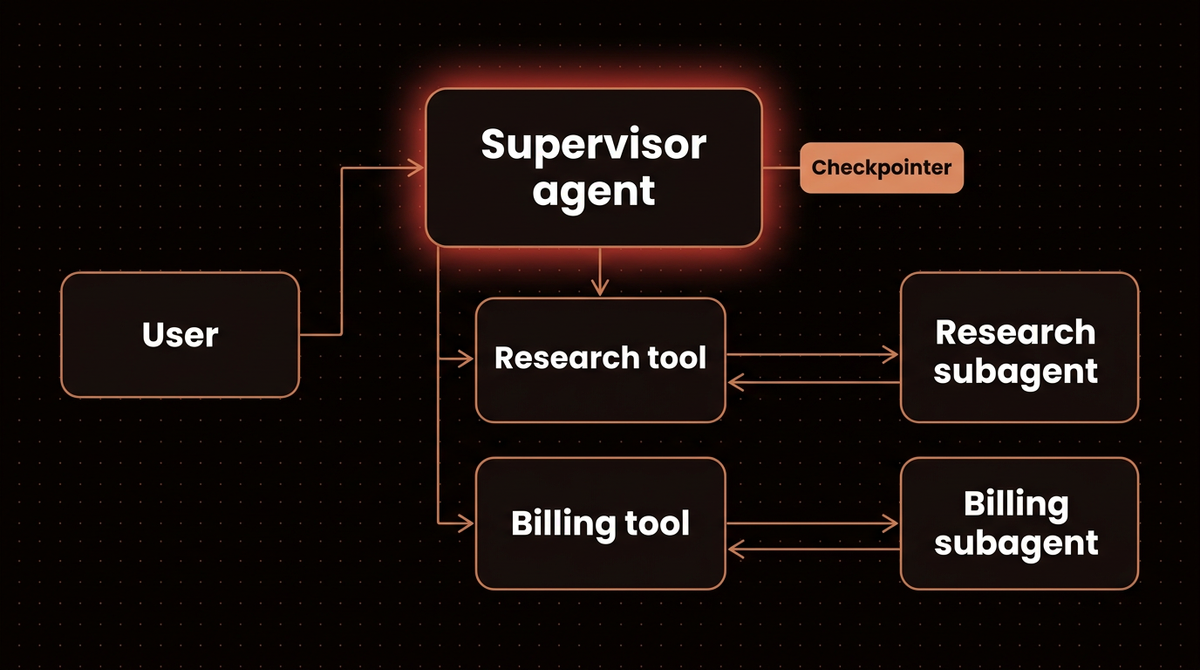
This is the whole idea of the subagents pattern. A supervisor no longer routes to graph nodes. It calls tools, and each tool happens to run an agent. The subagents documentation says the subagent's final message is returned as the tool result.
@tool("research_expert", description="Research expert for current events and web lookups.")
def call_research(query: str) -> str:
    result = research_agent.invoke({"messages": [{"role": "user", "content": query}]})
    return result["messages"][-1].content

@tool("billing_expert", description="Billing expert for refunds.")
def call_billing(query: str) -> str:
    result = billing_agent.invoke({"messages": [{"role": "user", "content": query}]})
    return result["messages"][-1].content
The tool name and description are the routing logic now. The supervisor model picks a worker by reading those two strings, so write each description to say what the worker does and what it does not. "Billing expert for refunds" beats "Helper two".
Step 4: Build the supervisor and give it the only checkpointer
The scripted supervisor sends anything mentioning a refund to billing, sends everything else to research, and answers once a tool has returned:
from langgraph.checkpoint.memory import InMemorySaver

def sup_rule(msgs):
    human = [m for m in msgs if m.type == "human"][-1].content
    tool_msgs = [m for m in msgs if isinstance(m, ToolMessage)]
    if tool_msgs:
        return AIMessage(content=f"final: {tool_msgs[-1].content}")
    return call("billing_expert" if "refund" in human else "research_expert", {"query": human}, "s1")

supervisor_model = RuleModel(rule=sup_rule)

supervisor = create_agent(
    model=supervisor_model,
    tools=[call_research, call_billing],
    system_prompt="Route research to research_expert and refunds to billing_expert.",
    checkpointer=InMemorySaver(),
)

cfg = {"configurable": {"thread_id": "t1"}}
out = supervisor.invoke(
    {"messages": [{"role": "user", "content": "combined headcount?"}]}, cfg
)
Swap InMemorySaver for a database backed saver in production; the supervisor is still the only place a checkpointer goes. And always pass a thread_id. Without one the graph cannot checkpoint, so it cannot pause and resume.
The history from the same delegation now:
HumanMessage None | combined headcount?
AIMessage None | (tool call: research_expert)
ToolMessage research_expert | done: Meta 67317, Apple 164000
AIMessage None | final: done: Meta 67317, Apple 164000
Four messages instead of seven. The handoff pairs are gone because there is no handoff, only a tool call. With a real model the supervisor may make more calls than my scripted one did, so treat the 7 versus 4 as the structural difference, not a benchmark.
Step 5: Control what the supervisor sees from a worker
The old package had output_mode, with last_message (the default) or full_history. In the new pattern you decide inside the tool wrapper, and the wrapper above already gives you last_message behavior. For the full_history equivalent, return a digest:
@tool("research_expert", description="Research expert for current events and web lookups.")
def call_research_full(query: str) -> str:
    result = research_agent.invoke({"messages": [{"role": "user", "content": query}]})
    return "\n".join(f"{m.type}: {m.content}" for m in result["messages"] if m.content)
To use it, put call_research_full in the supervisor's tools list in place of call_research. Called directly, it printed:
human: headcount
tool: Meta 67317, Apple 164000
ai: done: Meta 67317, Apple 164000
I keep the default. A supervisor that reads every worker's full transcript pays for it in context on every later turn, which defeats the context isolation the docs name as the main reason to use subagents. Send the full history only for a worker whose intermediate steps the supervisor genuinely needs, such as a data lookup it must cross check.
Step 6: Check that an approval pause survives two layers
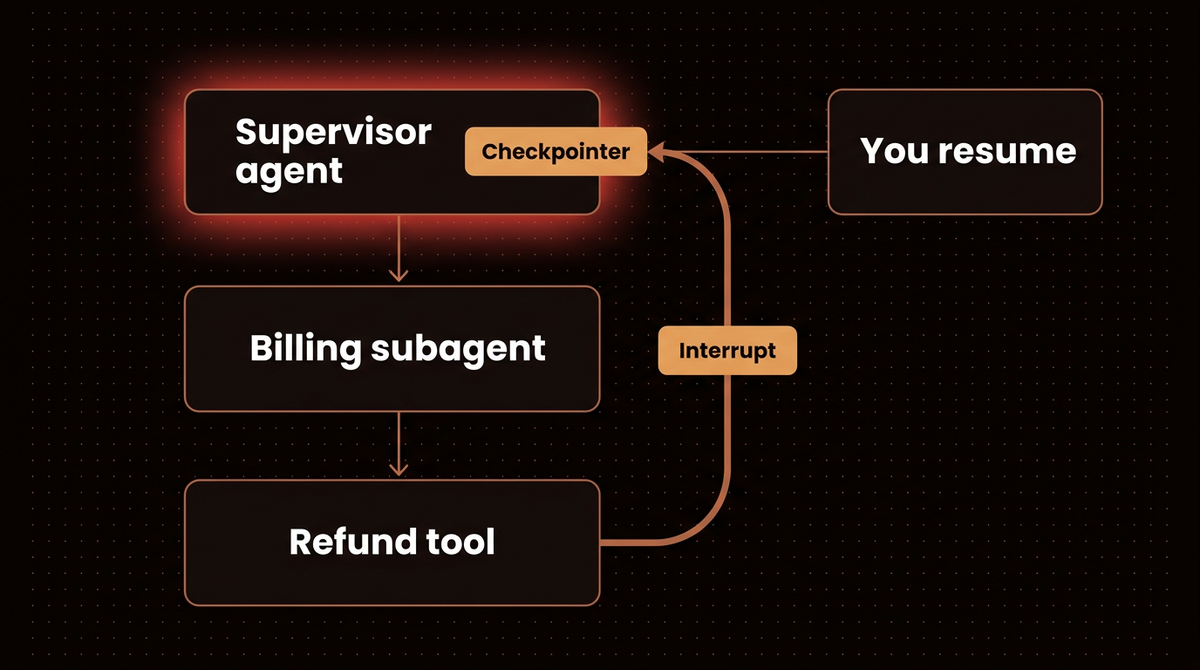
Now the part that can lose an approval. The refund tool pauses with interrupt() inside the billing worker, which sits inside a tool, which sits inside the supervisor. Does the pause reach you?
from langgraph.types import Command

cfg = {"configurable": {"thread_id": "t2"}}
out = supervisor.invoke({"messages": [{"role": "user", "content": "refund order A-17"}]}, cfg)
print("interrupt:", out.get("__interrupt__"))

out = supervisor.invoke(Command(resume="approved"), cfg)
print("resumed last:", out["messages"][-1].content)
interrupt: [Interrupt(value={'action': 'refund', 'order_id': 'A-17'}, id='377deb387b0195aa92b5c35dcf6c6439', response_schema=None)]
resumed last: final: done: refund A-17: approvedIt works. The migration page promises exactly this: an interrupt inside a subagent tool "propagates up through tool wrapped create_agent layers to the outermost graph", and your callback can resume with Command(resume=result). The subgraphs documentation adds that interrupts propagate to the top level graph regardless of nesting. If you want the longer version of approvals, including restart safety, I wrote it up in how to add human approval to a LangGraph workflow.
Step 7: Reproduce the silent failure so you recognize it
Now break rule two on purpose. Same billing worker, but this time it gets its own checkpointer, which is a natural thing to do when you want each worker to "remember":
inner = create_agent(model=billing_model, tools=[refund], checkpointer=InMemorySaver())

@tool("billing_expert", description="Billing expert for refunds.")
def call_billing2(query: str) -> str:
    r = inner.invoke({"messages": [{"role": "user", "content": query}]},
                     {"configurable": {"thread_id": "inner-1"}})
    return r["messages"][-1].content

sup = create_agent(model=supervisor_model, tools=[call_research, call_billing2],
                   checkpointer=InMemorySaver())
cfg = {"configurable": {"thread_id": "t9"}}
out = sup.invoke({"messages": [{"role": "user", "content": "refund order A-17"}]}, cfg)
print("interrupt surfaced:", bool(out.get("__interrupt__")))
print("last message:", repr(out["messages"][-1].content))
interrupt surfaced: False
last message: 'final: 'Calling invoke on a graph that pauses returns normally instead of raising, which is why nothing failed loudly. No exception was raised and no interrupt surfaced. The supervisor finished with an empty answer. The worker paused inside its own checkpointed run, so its last message was the model's tool call with no text, and the wrapper returned that empty string as the "result". Peeking at the worker's state shows where the refund went:
snap = inner.get_state({"configurable": {"thread_id": "inner-1"}})
print("inner next:", snap.next, "| pending interrupts:", len(snap.interrupts))
out2 = sup.invoke(Command(resume="approved"), cfg)
print("outer resume ->", repr(out2["messages"][-1].content))
inner next: ('tools',) | pending interrupts: 1
outer resume -> 'final: 'The approval is stranded in the worker's private thread. Resuming the outer thread does nothing, because the outer graph never knew a pause happened. A real refund would sit unapproved with nothing in the logs.
Warning: If a supervisor ever returns an empty or oddly short answer from a worker that has an approval step, check get_state(...).next on that worker before you debug the prompt. A non empty next with a pending interrupt means a worker owns a checkpointer it should not have.
The subgraphs page describes the safe default: each call starts fresh and inherits the parent's checkpointer, which is what you get when the worker has none.
Step 8: Test routing and parallel calls with no API key
The scripted model is useful here. A supervisor can issue two tool calls in one turn, and the subagents documentation says the main agent can invoke multiple subagents in a single turn. I scripted a supervisor that calls research and billing together:
def parallel_rule(msgs):
    if any(isinstance(m, ToolMessage) for m in msgs):
        names = [m.name for m in msgs if isinstance(m, ToolMessage)]
        return AIMessage(content="ran: " + ", ".join(names))
    return AIMessage(content="", tool_calls=[
        {"name": "research_expert", "args": {"query": "headcount"}, "id": "p1"},
        {"name": "billing_expert", "args": {"query": "refund order A-17"}, "id": "p2"},
    ])

sup = create_agent(model=RuleModel(rule=parallel_rule),
                   tools=[call_research, call_billing], checkpointer=InMemorySaver())
cfg = {"configurable": {"thread_id": "par"}}
out = sup.invoke({"messages": [{"role": "user", "content": "do both"}]}, cfg)
print("interrupts:", [i.value for i in out.get("__interrupt__", [])])
print("results so far:", [(m.name, m.content) for m in out["messages"] if isinstance(m, ToolMessage)])
out = sup.invoke(Command(resume="approved"), cfg)
print("after resume:", out["messages"][-1].content)
interrupts: [{'action': 'refund', 'order_id': 'A-17'}]
results so far: [('research_expert', 'done: Meta 67317, Apple 164000')]
after resume: ran: research_expert, billing_expertBoth workers started in the same turn. The research result was kept, the refund waited for a person, and after the resume the supervisor finished with both results. One slow approval does not throw away the answers that are already done.
What this does not prove: the routing here was scripted, so it says nothing about whether a real model picks the right worker. For that, run your own prompts against your own model and read the tool calls. A tracing view helps, and setting up LangGraph Studio covers one.
LangGraph supervisor: the old package versus subagents
| Need | langgraph-supervisor | Subagents pattern |
|---|---|---|
| Worker definition | Agent compiled as a graph node | create_agent wrapped in an @tool |
| Routing | Generated transfer_to_* handoff tools | Your tool names and descriptions |
| History control | output_mode | Whatever the wrapper returns |
| Nested teams | Supervisor of supervisors | Flatten, or wrap a middle agent as a tool |
| Messages for one delegation (my run) | 7 | 4 |
| Maintenance | Repository archived September 20, 2026 | Documented in LangChain's current docs |
Troubleshooting
The supervisor returns an empty string after a worker should have paused
A worker has its own checkpointer=. Remove it, compile only the outermost agent with a checkpointer, and pass a thread_id. Step 7 is the reproduction.
The deprecation warning about create_react_agent will not go away
If langgraph-supervisor is still installed and imported, the package itself calls create_react_agent, so the warning comes from inside it. It disappears when you stop importing create_supervisor.
The supervisor picks the wrong worker
The routing text is your tool descriptions, so make each one say what the worker does and what it does not. If two descriptions overlap, a model will split its choices between them. Fix the descriptions before you touch the system prompt.
Going further
Nested teams. The migration page gives two options. Flatten to a single supervisor with one tool per leaf agent, which is the simplest when workers are independent. Or wrap a middle tier agent (itself a create_agent with its own subagent tools) as a tool on the top supervisor. Flatten first, and nest only when a group of workers really needs its own coordinator.
When a plain StateGraph is better. The same page says to use a custom StateGraph when you need to mix fixed steps with agentic ones, or need static subgraph discovery, checkpoint namespaces per tier, or shared state keys between levels. If your "supervisor" is really a fixed pipeline with one model call in the middle, you do not need an agent loop at all. The LangGraph production tutorial shows that shape.
When not to use a supervisor. The subagents documentation recommends a single agent for simpler cases with just a few tools. I would add a cost argument: every supervisor turn is a model call before any worker does anything, so a supervisor over two tools that one agent could hold is overhead. Teams of agents also fail in ways single agents do not; Anthropic's research on multi agent failure modes is worth reading before you add a third worker. If you are still deciding between stacks, three self hosted agent stacks compared covers the choice.
The concepts behind all this have glossary entries if you want the short version: the supervisor pattern and multi agent systems. I build these for clients; see how I build AI agents.
Frequently asked questions
Is langgraph-supervisor deprecated?
The repository was archived on September 20, 2026 and is read only, and LangChain's migration guide states the package is no longer actively maintained. It still installs from PyPI and my test run worked, but it depends on a deprecated function. New projects should start on the subagents pattern.
What replaces create_supervisor?
A create_agent supervisor whose tools are your worker agents, each wrapped in an @tool function that calls the worker and returns its final message. LangChain's docs call this the subagents pattern. Routing comes from tool names and descriptions instead of generated handoff tools.
Can a supervisor call several subagents at once?
Yes. The subagents documentation says the main agent can invoke multiple subagents in a single turn. In my test, a scripted supervisor called a research worker and a billing worker together, kept the finished research result while the refund waited for approval, and completed both after the resume.
Do subagents need their own checkpointer?
No, and giving them one can hide pauses. Compile only the outermost agent with a checkpointer and pass a thread_id. In my reproduction, a worker with its own checkpointer swallowed an approval interrupt: the supervisor returned an empty answer and the pending approval sat in the worker's private thread.
How do I keep the old full_history behavior?
Return a digest of the worker's whole message list from the tool wrapper instead of only the last message. The default last message behavior keeps the supervisor's context small, so only send full history when the supervisor must see a worker's intermediate steps.
Published
October 7, 2026
Category
AI Agents
Jahanzaib Ahmed
AI Systems Engineer & Founder
AI Systems Engineer with 126 production systems shipped. I run AgenticMode AI (AI agents, RAG systems, voice AI) and ECOM PANDA (ecommerce agency). I build AI that works in the real world for businesses across home services, healthcare, ecommerce, SaaS, and real estate.
Related articles
How to Inspect LangGraph Deep Agents: What create_deep_agent Adds
See what LangGraph deep agents add to a graph, tested offline on deepagents 0.7.22: the default tools, files in state, subagents, approvals, and the planning tool that is now opt in.
How toAI AgentsLangGraph
How to Run LangGraph Examples With Real Output
Seven small LangGraph examples that run offline on 1.2.14: routing, a loop with a limit, Send, human approval, an agent with tools, a subgraph with streaming, and Command with memory, with real output.
How toAI AgentsLangGraph
How to Set Up the LangGraph Checkpointer on Postgres With a Connection Pool
Set up the LangGraph checkpointer on Postgres with a checked connection pool, resume a paused graph from a new process, reproduce five early errors, and delete old threads. Every script ran on LangGraph 1.2.14.
How toAI AgentsLangGraph