How to Pick Dify or n8n by Who Edits the Agent, and Call Dify From n8n
Pick Dify when non developers edit the agent and n8n when it must start from triggers and write into other systems. Six steps on license, pricing, hosting, triggers and the HTTP call between them.

Table of Contents
Pick Dify when the people editing the agent are not developers. Pick n8n when the agent has to start from a webhook or a schedule and write into other systems. Dify runs the AI product, n8n runs the process around it. When a project needs both, they connect over plain HTTP, and I show the exact call. The six steps below follow the order I would decide in, with prices, license terms and docs read on Oct 23, 2026.
Dify vs n8n
Dify: modified Apache 2.0n8n: Sustainable Use License
- Dify Cloud from $590 per workspace per year (Professional)
- n8n Cloud from 20 euros a month billed annually, counted per finished execution
- Dify self hosted 2 CPU cores and 4 GiB RAM minimum, 7 core services and 8 dependent components
- n8n footprint 495.1 MiB idle after 30 seconds (my one measurement, 2.43.4); n8n's Compose guide lists 4 GB with the Assistant sandbox
- Connect them n8n HTTP Request node into Dify's /workflows/run endpoint
Checked on Oct 23, 2026 against both pricing pages, both GitHub repositories (latest releases: Dify 1.17.1, n8n 2.44.6) and the docs linked below.
This is the deep dive on one pair from my three way comparison, Flowise vs Dify vs n8n, which also covers the Flowise shutdown. Here I stay with the two tools that are still shipping, whether you searched n8n vs dify, dify or n8n, or n8n vs dify for AI agents. The other pairs are in Flowise vs n8n and Dify vs Flowise.
Two limits on what follows. I started n8n 2.43.4 in Docker once on Oct 23, 2026 (arm64, 4 GiB Docker VM), so its footprint is one run on an empty instance, not a load test. I did not run Dify, so its figures come from its docs, pricing page and repository. I have not run the two together on a client project either, so Step 6 is built from the docs and I mark what I did not test.
Before you start, have a Dify workspace (Dify Cloud or your own install), an n8n instance, and a model provider key. A chatflow is Dify's conversational app type, a knowledge base is the documents an app searches, an execution is one full n8n workflow run, and a trigger event is a Dify run started by a schedule, webhook or integration.
Dify vs n8n in one rule
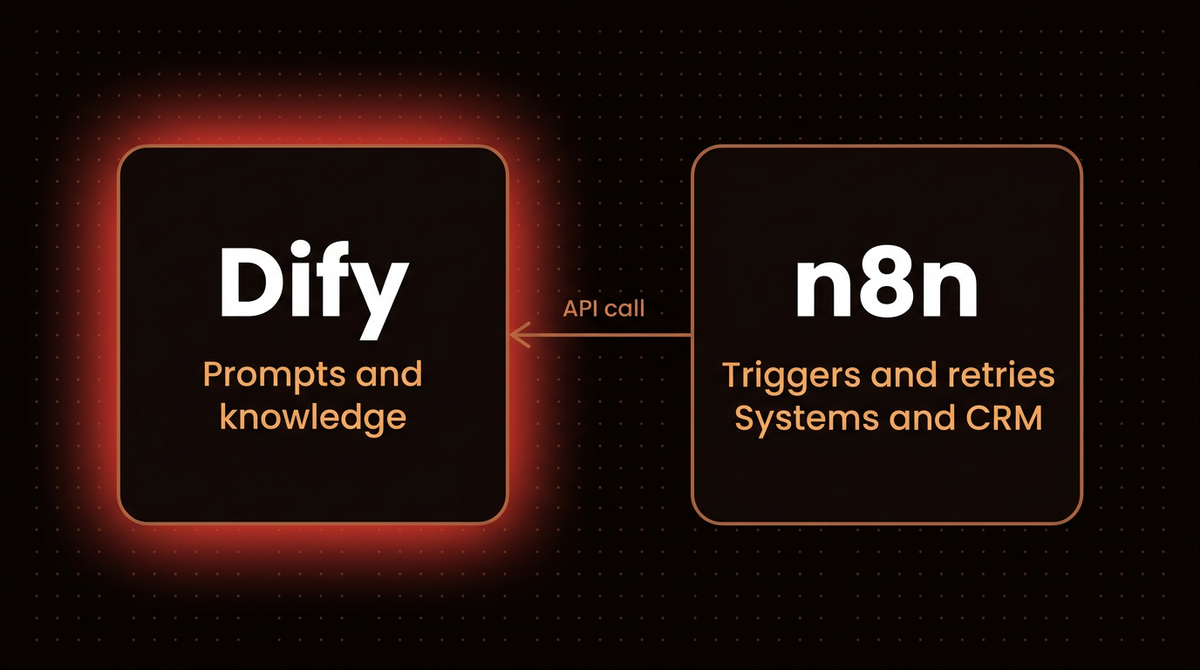
Dify is built around the AI app. You build a chatflow, workflow or agent, attach a knowledge base, publish it, and every published app doubles as a REST API that you call with an app key. n8n is built around the process. Its HTTP Request node calls any app or service with a REST API, and its pricing page lists agents, MCP and AI nodes on every cloud plan.
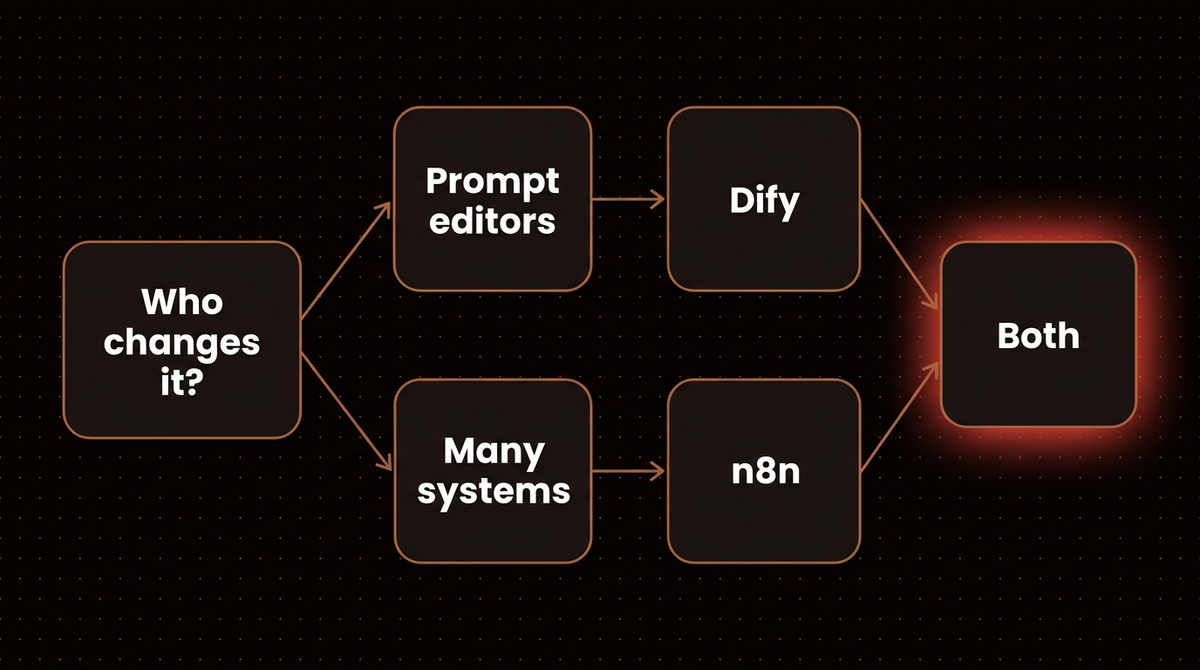
Ask which kind of change comes next. A prompt, a retrieval setting, a document set or a model swap is an AI side change. A trigger, a field mapping, a retry or the CRM record to update is a process side change.
Step 1: Decide who changes the agent after launch
My first question: when the answer is wrong at 4 pm on a Friday, who opens the tool? If it is a support lead or an operations person who edits documents and rewrites instructions, put the agent in Dify. Its Studio and Knowledge sections are where those people work, and the app publishes as a web app, an embed or an API.
If it is a developer who thinks in nodes, data and error branches, put it in n8n, next to the triggers and connectors it depends on, as in my n8n AI agent guide. If you are unsure an agent is needed at all, read when to use AI agents vs automation first.
Step 2: Check the license before you take client work
Both tools are free to self host, and both have a license clause that matters if you work for clients. This is my reading, and I am not a lawyer, so email the vendor on anything borderline.
| Question | Dify | n8n |
|---|---|---|
| License | Modified Apache 2.0 with two extra conditions | Sustainable Use License, source available |
| One install for many customers | Not without written authorization: one tenant is one workspace | Not as a service where clients build workflows; clients may receive results if they cannot create or edit workflows |
| What you must keep | The logo and copyright in the web frontend | License and copyright notices; files marked .ee. need an Enterprise license |
Sources: Dify LICENSE, n8n license FAQ and n8n LICENSE.md.
My decision rule for client work is one install per client, on the client's own account or servers, so neither the Dify multi tenant clause nor the n8n hosted service limit applies. Charging for setup, maintenance and consultancy is fine under both. Avoid one shared install where many outside customers log in and build. n8n's FAQ also rules out letting external end users build their own workflows through your product, including via an API, MCP or an AI agent.
Step 3: Compare what each price actually counts
The cloud plans count different things, so a headline price comparison misleads. Dify charges per workspace per year and caps people, apps and knowledge. n8n charges per month and caps finished workflow executions, with unlimited steps in each.

| Plan | Price | What caps you |
|---|---|---|
| Dify Sandbox | Free | 200 message credits, 1 member, 5 apps, 50 knowledge documents, 3,000 trigger events, an API rate limit of 5,000 a month |
| Dify Professional | $590 per workspace a year | 5,000 message credits a month, 3 members, 50 apps, 500 knowledge documents, 20,000 trigger events a month |
| Dify Team | $1,590 per workspace a year | 10,000 message credits a month, 50 members, 200 apps, 1,000 knowledge documents, unlimited trigger events |
| n8n Starter | 20 euros a month, billed annually | 2,500 executions, 5 concurrent, 1 shared project |
| n8n Pro | 50 euros a month, billed annually | 10,000 executions, up to 50 concurrent, 3 shared projects |
| n8n Business | 667 euros a month, billed annually | 40,000 executions, self hosted only, SSO and LDAP, queue mode |
Sources: dify.ai/pricing and n8n.io/pricing, read Oct 23, 2026. Dify Enterprise and n8n Enterprise are custom quotes.
Dify Professional is $590 divided by 12, about $49.17 a month for 3 members. n8n Pro is 50 euros times 12, 600 euros a year for 120,000 executions (10,000 times 12), or 0.005 euros per execution if you use every one. The currencies differ, so compare the shape and not the totals.
Headcount pushes you up Dify's plans, and run volume pushes you up n8n's. For example, a knowledge tool that 40 people edit hits Dify's Team plan on headcount before any volume limit, and a lead scoring flow that runs 30,000 times a month passes Pro's 10,000 executions and lands on Business, which is self hosted only. One limit is easy to miss: Dify's Sandbox plan lists an API rate limit of 5,000 a month, which an n8n workflow calling a Dify app could use up, while Professional and Team list none. Dify's message credits are for trying hosted models, and you can switch to your own API key afterwards, so model costs sit outside both plans. My AI agent cost calculator covers that part.
Step 4: Size the server you will actually run
Dify's Docker Compose guide lists 2 CPU cores and 4 GiB of RAM as the minimum, and tells Mac users to give the Docker VM 8 GiB. The compose file starts 7 core services plus 8 dependent components, including Postgres, Redis, Weaviate and two sandboxes. That is a lot of moving parts to patch and back up.
n8n's own Docker Compose guide also asks for at least 4 GB of RAM and 2 vCPUs, but that setup includes the sandbox stack for n8n Assistant, which runs Docker in Docker. The plain image is lighter at idle. I ran docker.n8n.io/n8nio/n8n:2.43.4 with one docker run, polled /healthz until it answered 200 (4.6 seconds), waited 30 seconds, then read docker stats --no-stream: 495.1 MiB of memory and 0.84% CPU, on the default SQLite database with no workflows and no assistant sandbox. A documented minimum and an idle reading are different things, and neither is a load test.
Dify alone is documented at 4 GiB, so I would not add n8n to that machine. Give Dify its own host, or use Dify Cloud and self host only n8n, the split I would price first for a small team.
Step 5: Check triggers and human approval
| Need | Dify | n8n |
|---|---|---|
| Run on a timetable | Schedule trigger, at most one per workflow | Schedule Trigger node for fixed intervals and times; the workflow must be published |
| Start from an HTTP call | Webhook trigger, with a configurable response sent back when the run is triggered | Webhook node with separate test and production URLs and a choice of when to respond |
| Which apps can use triggers | Workflow apps only, not chatflows or agents | Any workflow |
| Pause for a person | Human Input node with a form by web app or email; web app delivery is not available in trigger started runs | Human review on an AI Agent's tool calls through chat, Slack, Teams, Gmail and other channels |
Sources: Dify triggers, Dify Human Input, n8n Schedule Trigger and n8n human in the loop for tools.
n8n gates an action the agent chooses: the workflow pauses before a specific tool runs and the reviewer approves or denies it. Dify's node pauses a point in a flow that you drew, and a person fills in a form. A draft a human edits fits Dify's form. An agent that might send an email or change a record on its own judgment fits n8n's tool level review. More on the idea in my entry on human in the loop.
Step 6: Connect n8n to a Dify app, and back
I found no native Dify node on n8n's integrations pages, so the connection is HTTP on both sides, and both routes are in the vendors' docs. I would start with n8n calling Dify, where n8n owns the trigger and the CRM and Dify owns the answer. It is the safer default when you need the result back, because Dify's Run Workflow endpoint returns the outputs in blocking mode (the call waits), while a Dify webhook trigger sends a response you configure when the run starts.
- Publish a Workflow app in Dify and create its API key. Dify's Run Workflow endpoint needs a published workflow. The key is created from inside the app and scoped to it. In the workflow's User Input node, add a custom input field and note its variable name (I use
querybelow). - Add an HTTP Request node in n8n. Method POST, URL
https://api.dify.ai/v1/workflows/runon Dify Cloud, or your own API base URL when self hosted. Turn on Send Body, set Body Content Type to JSON, set Specify Body to Using JSON, and paste the body below. - Add the key as a credential. In the node's Authentication setting choose Generic Credential Type, then Header Auth, with the name
Authorizationand the valueBearer YOUR_APP_KEY. Call Dify from a backend like this, never browser code. - Read the answer. The blocking response nests the results under
data.outputs, so a later node can use an expression such as{{ $json.data.outputs.result }}, whereresultis an output variable your workflow defines (Dify's example response uses that name).
{
  "inputs": { "query": "Score this lead: ..." },
  "response_mode": "blocking",
  "user": "n8n-lead-scoring"
}
The query key must match your input variable. Keep the user value stable per source, because Dify uses it to scope files and to resume runs. If several workflows call Dify, put the call in one n8n sub workflow so the credential, timeout and error handling live in one place.
The other direction takes three steps.
- Add a Webhook node in n8n. Set the method to POST, set Respond to When Last Node Finishes if Dify needs the result back, and publish the workflow to get the production URL. The test URL only listens while you test in the editor.
- Call it from Dify. Add an HTTP Request node with method POST and the production URL. Choose API key authentication of type Bearer or Custom to match your webhook. Send a JSON body that uses variables from earlier nodes in double curly braces.
- Lock the webhook down. Require authentication on the Webhook node, and add an IP allowlist if Dify has a fixed address.
If a call fails, check four things first: the Dify workflow is published, the user value is consistent, the blocking call finishes inside the 100 second Cloudflare timeout noted on the Run Workflow page, and the Sandbox rate limit of 5,000 a month has not run out.
Warning: If the Dify workflow contains a Human Input node, the run pauses, and Dify exposes separate endpoints to fetch the form, submit it and resume the event stream. I have not tested how a blocking call behaves across a pause. For flows with approval I would use streaming mode and the documented resume endpoints, and test that path before launch.
Which one for which job
| Job | Pick | Why |
|---|---|---|
| Support bot over product docs that support staff retune weekly | Dify | Knowledge base and prompts are edited in the studio, then published as an app or API |
| Lead scoring that starts on a new CRM record and writes the score back | n8n | Trigger, connectors and retries are the product; the model call is one node |
| Website chat that creates a ticket in another system after the conversation | Both | Dify owns chat and knowledge, n8n gets the result by webhook and creates the ticket |
| One install serving many outside customers | Neither, yet | Dify needs written authorization for multi tenant use, n8n bars hosting where clients build |
If you would rather have this split designed and monitored for you, that is the work I do: see how I build AI agents.
Frequently asked questions
Is Dify better than n8n for AI agents?
Dify wins when non developers need to change prompts, documents and agent behavior. n8n wins when the agent connects to many systems, starts from triggers and retries on failure. I would pick on who changes it and what it connects to, and use both if the answers differ.
Can n8n call Dify?
Yes, over HTTP. Publish a Workflow app in Dify, create its app API key, and call the /workflows/run endpoint from n8n's HTTP Request node with a Bearer Authorization header. In blocking mode the response returns when the run finishes.
Can Dify call n8n?
Yes. A Dify workflow's HTTP Request node can post to an n8n Webhook node's production URL. Set the webhook to respond when the last node finishes if Dify needs the result back, and restrict it with authentication.
Can I host Dify or n8n for my clients?
Check first. Dify forbids a multi tenant environment without written authorization, where one tenant is one workspace. n8n allows automations for clients on your instance if clients cannot create or edit them, but not hosting it as a service where clients build workflows. My rule is one install per client.
Published
October 23, 2026
Category
Implementation
Jahanzaib Ahmed
AI Systems Engineer & Founder
AI Systems Engineer with 126 production systems shipped. I run AgenticMode AI (AI agents, RAG systems, voice AI) and ECOM PANDA (ecommerce agency). I build AI that works in the real world for businesses across home services, healthcare, ecommerce, SaaS, and real estate.
Want this built for your business? See n8n Consultant, or browse the free tools and guides.
Related articles
Flowise vs Dify vs n8n in 2026: Flowise Is Archived, So Which AI Agent Builder Now?
Flowise was wound down and archived in 2026. A tested comparison of Flowise, Dify and n8n for AI agents with current licences, prices, triggers, a migration map and my pick for each case.
ComparisonImplementationFlowise
How to Connect Claude to n8n's MCP Server Without Exposing Every Workflow
Connect Claude to n8n's own MCP server, then scope what it can see, test workflows with pinned data before any live run, and add a narrow MCP Server Trigger endpoint, checked on n8n 2.42.5.
How toAI Agentsn8n
n8n vs Zapier in 2026: After 126 Production Systems, Here Is My Honest Verdict
A practitioner comparison of n8n and Zapier in 2026 with verified pricing, a clear decision framework, and two real client deployment stories.
ComparisonTrends & Insightsn8n