How to Run LangGraph Sessions for Many Users on One Checkpointer
Per user and per conversation sessions in LangGraph: thread ids with an owner check, memory across sessions in the store, listing and resuming, expiry and deletion, and the race when two messages hit one thread.


Table of Contents
LangGraph stores a conversation under a thread_id and stops there; LangGraph session management, meaning which thread a request runs on, who may open it and when it ends, is code you write. This guide builds that layer for many users on one graph, with one checkpointer and one store, then lists, resumes, expires and deletes sessions, and stops two messages on the same thread from silently dropping a turn. It costs nothing because a stub stands in for the model, and every output below comes from my run on langgraph 1.2.15.
If you are new to state, nodes and checkpointers, start with my LangGraph tutorial for production agents, which covers the graph model this page assumes. This one starts when a second user arrives.
Before you start
- Python 3.10 or newer; I ran 3.13.12 in a fresh virtual environment. If
python3.13is not on your machine, use the Python you have. - langgraph 1.2.15, released on PyPI on October 12, 2026, which pulls in langgraph-checkpoint 4.3.0 and langchain-core 1.6.10.
- No API key and no database. The checkpointer is
InMemorySaver, the store isInMemoryStore, and a deterministic function plays the model. - Basic comfort with
StateGraphandMessagesState. TheRuntime[Context]argument and thecontext=keyword used below belong to the LangGraph 1.x API, so older tutorials that pass the user id inconfigurablewill look different.
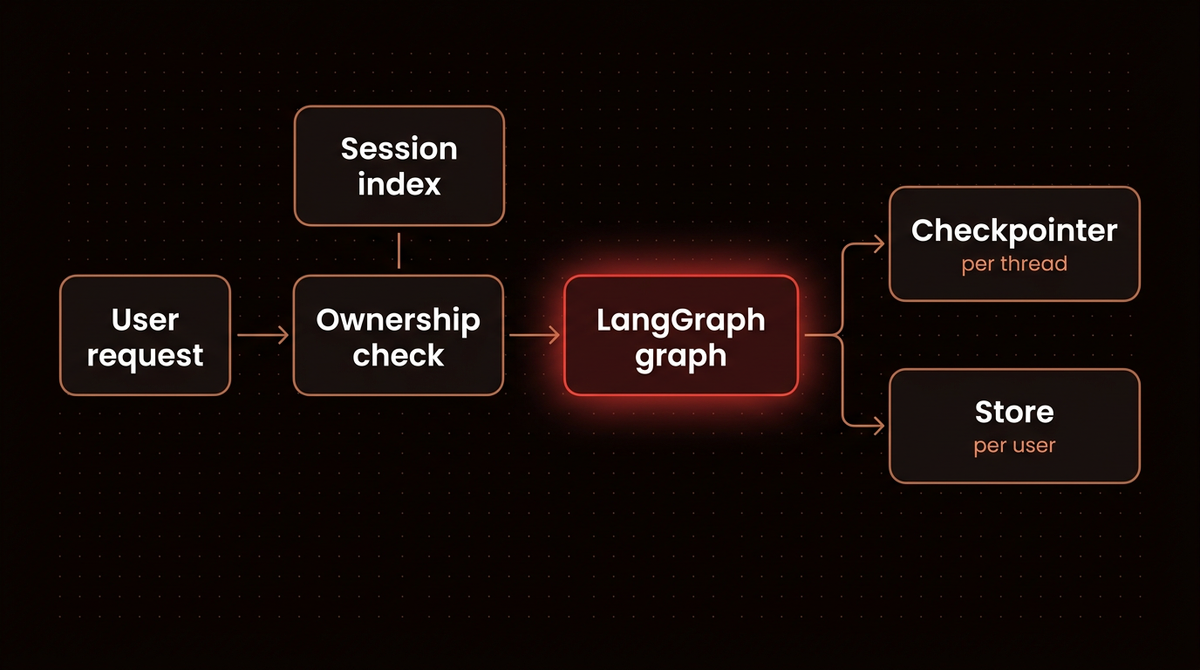
Two LangGraph pieces do the work, and the persistence docs draw the line between them clearly. A checkpointer saves graph state per thread, which is your short term memory: one conversation. A store holds data across threads, which is long term memory: what you know about a user no matter which conversation they are in. Session management is the glue you write around both.
Step 1: Install LangGraph and pin the versions
Pin the release. The checkpoint metadata behavior in Step 8 lives in langgraph-checkpoint, and I only vouch for what I ran.
python3.13 -m venv .venv
source .venv/bin/activate
pip install "langgraph==1.2.15"
Everything from Step 2 to Step 8 goes into one file, sessions.py, in the order shown. Run it with python sessions.py. Thread ids are random UUIDs, so the ids in your output will differ from mine. The first line confirms the versions:
langgraph 1.2.15 | checkpoint 4.3.0Step 2: Build one graph that serves every user
Do not compile a graph or create a checkpointer per user or per request. You need exactly one of each per process. The graph is stateless code; the thread and the user arrive with each call. The user id travels in the runtime context, so a node can reach the store under that user's namespace without the id ever touching graph state.
# sessions.py: per user and per conversation sessions in LangGraph
import asyncio
import time
import uuid
from dataclasses import dataclass
from importlib.metadata import version

from langchain_core.messages import AIMessage
from langgraph.checkpoint.memory import InMemorySaver
from langgraph.graph import START, MessagesState, StateGraph
from langgraph.runtime import Runtime
from langgraph.store.memory import InMemoryStore

print("langgraph", version("langgraph"), "| checkpoint", version("langgraph-checkpoint"))

# ---- Step 2: one graph, one checkpointer, one store, for every user ----

@dataclass
class Context:
    user_id: str


MODEL_LATENCY = 0.2  # seconds; makes the race in Step 7 visible


def fake_model(memories: list[str], messages) -> AIMessage:
    """Stands in for a chat model: deterministic, no API key, no cost."""
    time.sleep(MODEL_LATENCY)
    turn = sum(1 for m in messages if m.type == "human")
    known = "; ".join(memories) or "nothing yet"
    return AIMessage(content=f"turn {turn} | you said {messages[-1].content!r} | I know: {known}")


def chat(state: MessagesState, runtime: Runtime[Context]):
    memories_ns = ("users", runtime.context.user_id, "memories")
    text = state["messages"][-1].content
    if text.lower().startswith("remember "):
        runtime.store.put(memories_ns, str(uuid.uuid4()), {"fact": text[len("remember "):]})
    memories = [item.value["fact"] for item in runtime.store.search(memories_ns, limit=50)]
    return {"messages": [fake_model(memories, state["messages"])]}


checkpointer = InMemorySaver()
store = InMemoryStore()
builder = StateGraph(MessagesState, context_schema=Context)
builder.add_node("chat", chat)
builder.add_edge(START, "chat")
graph = builder.compile(checkpointer=checkpointer, store=store)
The stub reports the turn number and what it knows about the user. That turns every printed line into a test: if the turn count resets, the thread was lost; if Bob's reply mentions Alice's facts, isolation failed. Swap fake_model for a real chat model call once the session layer behaves.
Step 3: Give each conversation its own thread_id and an owner
A thread is one conversation. LangGraph keys every checkpoint on thread_id and has no idea who the thread belongs to. So the app keeps a session index: one store item per thread under ("sessions", user_id), holding a title and timestamps. Every request checks that index before it touches the graph.
# ---- Step 3: a session index and an ownership check ----

SESSIONS = "sessions"  # store namespace ("sessions", user_id), one item per thread


def new_session(user_id: str, title: str) -> str:
    thread_id = str(uuid.uuid4())
    now = time.time()
    store.put((SESSIONS, user_id), thread_id, {"title": title, "created": now, "last_active": now})
    return thread_id


def owned(user_id: str, thread_id: str):
    item = store.get((SESSIONS, user_id), thread_id)
    if item is None:
        raise PermissionError(f"{user_id} does not own thread {thread_id[:8]}")
    return item


def run_config(user_id: str, thread_id: str) -> dict:
    return {"configurable": {"thread_id": thread_id}, "metadata": {"user_id": user_id}}


def touch(user_id: str, thread_id: str, item) -> None:
    store.put((SESSIONS, user_id), thread_id, {**item.value, "last_active": time.time()})


def send(user_id: str, thread_id: str, text: str) -> str:
    item = owned(user_id, thread_id)
    out = graph.invoke(
        {"messages": [{"role": "user", "content": text}]},
        run_config(user_id, thread_id),
        context=Context(user_id=user_id),
    )
    touch(user_id, thread_id, item)
    return out["messages"][-1].content


print("\n== Step 3: two users, one checkpointer")
a1 = new_session("alice", "Refund question")
b1 = new_session("bob", "Shipping delay")
print("alice:", send("alice", a1, "hi, my order is late"))
print("bob:  ", send("bob", b1, "hello"))
print("alice:", send("alice", a1, "it was order 1182"))
try:
    send("bob", a1, "show me alice's chat")
except PermissionError as e:
    print("bob on alice's thread ->", e)
print("checkpoint metadata:", checkpointer.get_tuple(run_config("alice", a1)).metadata)
What I got:
== Step 3: two users, one checkpointer
alice: turn 1 | you said 'hi, my order is late' | I know: nothing yet
bob:   turn 1 | you said 'hello' | I know: nothing yet
alice: turn 2 | you said 'it was order 1182' | I know: nothing yet
bob on alice's thread -> bob does not own thread 4748657a
checkpoint metadata: {'source': 'loop', 'step': 4, 'parents': {}, 'user_id': 'alice'}
Alice's second message ran as turn 2 while Bob's interleaved call stayed at turn 1, so one checkpointer kept both conversations apart. Bob guessing Alice's thread id got a PermissionError, not her transcript. Without that check, LangGraph would have happily appended Bob's message to Alice's conversation. And the user_id passed under metadata was copied onto the checkpoint, which Step 5 uses.
Three thread_id schemes, and what each costs:
| thread_id scheme | What happens | Use it when |
|---|---|---|
| The user id itself | Every conversation a user ever has piles into one thread and one ever growing message list | A single assistant per user with no "new chat" button, and you trim history yourself |
user_id plus a session suffix | Readable, and ownership can be parsed from the id, but the id leaks the user id into logs and URLs | Internal tools where ids never reach a browser |
| Random UUID plus an owner record | Unguessable, short, and ownership lives in your index where you can check and revoke it | Anything user facing; this is what the script does |
Whatever you pick, keep it short. The persistence docs advise keeping thread_id values under 255 characters for the Postgres savers and using a UUID or a hash for deterministic ids. The docs blame a limited length column, but in the langgraph-checkpoint-postgres 3.2.0 migrations thread_id is TEXT, so treat 255 as advice rather than a schema limit. A UUID is 36.
Step 4: Keep what outlives a session in the store
A new thread starts with an empty message list. That's what you want for a fresh conversation, and it is also why a new chat looks like amnesia. Facts about the user go in the store, under a namespace that starts with their id. The chat node from Step 2 already writes there whenever a message starts with "remember".
# ---- Step 4: memory that outlives a session ----

print("\n== Step 4: cross session memory in the store")
print("alice:", send("alice", a1, "remember I prefer email over phone"))
a2 = new_session("alice", "New order")
print("alice (new thread):", send("alice", a2, "hi again"))
b2 = new_session("bob", "Returns")
print("bob (new thread):  ", send("bob", b2, "hi again"))
== Step 4: cross session memory in the store
alice: turn 3 | you said 'remember I prefer email over phone' | I know: I prefer email over phone
alice (new thread): turn 1 | you said 'hi again' | I know: I prefer email over phone
bob (new thread): turn 1 | you said 'hi again' | I know: nothing yetAlice's new thread starts at turn 1 yet already knows her preference, and Bob's new thread knows nothing. The namespace did the isolation: ("users", "alice", "memories") and ("users", "bob", "memories") never overlap. One trap from the stores docs: search matches by prefix, so ("users", "alice") also returns anything under deeper namespaces such as ("users", "alice", "preferences"). Put the user id early in the tuple and search with the full namespace you mean.
What to save and how to extract it from a conversation is a bigger topic than sessions. I cover the memory types and failure modes in my AI agent memory architecture guide. For a longer walkthrough of the store API, this CampusX lecture is clear on namespaces:

Step 5: List a user's sessions and resume one
A chat sidebar needs "show my conversations, newest first". The session index answers that with one store search. get_state on each thread fills in the message count and the last line, and resuming is nothing more than calling the graph with the old thread_id again.
# ---- Step 5: list a user's sessions and resume one ----


def list_sessions(user_id: str) -> list[tuple]:
    items = store.search((SESSIONS, user_id), limit=100)
    rows = []
    for item in sorted(items, key=lambda i: i.value["last_active"], reverse=True):
        snap = graph.get_state({"configurable": {"thread_id": item.key}})
        messages = snap.values.get("messages", [])
        last = messages[-1].content[:28] if messages else ""
        rows.append((item.key[:8], item.value["title"], len(messages), last))
    return rows


print("\n== Step 5: list and resume")
for row in list_sessions("alice"):
    print("  ", row)
print("resume a1:", send("alice", a1, "any update on the refund?"))
seen = list(checkpointer.list(None, filter={"user_id": "alice"}))
print("checkpointer.list filter: tuples scanned for alice =", len(seen),
      "| distinct threads =", len({t.config["configurable"]["thread_id"] for t in seen}))
== Step 5: list and resume
('946f9bd7', 'New order', 2, "turn 1 | you said 'hi again'")
('4748657a', 'Refund question', 6, "turn 3 | you said 'remember ")
resume a1: turn 4 | you said 'any update on the refund?' | I know: I prefer email over phone
checkpointer.list filter: tuples scanned for alice = 15 | distinct threads = 2The resumed thread picked up at turn 4 with all six earlier messages behind it. The last line shows why I keep a separate index instead of asking the checkpointer. Filtering the checkpointer by the user_id metadata does work, but it returns every checkpoint, three per turn here, so 15 rows to find 2 threads. In the Postgres saver source (langgraph-checkpoint-postgres 3.2.0) that filter is a JSONB containment query, and no index in its migrations covers the metadata column, so a filter without a thread id scans the table. That is acceptable in an admin script and too slow for a sidebar that loads on every page view.
Sort in your own code. The store docs note that InMemoryStore returns items in insertion order while PostgresStore returns the most recently updated first, and that results past limit are dropped with no warning.
Step 6: Expire idle sessions and delete a user's data
Checkpoints pile up forever unless you remove them. Two jobs cover it: expire sessions idle past a cutoff, and remove everything about a user when they ask to be forgotten. The checkpointer method that matters is delete_thread, documented on the memory page as deleting all checkpoints for a thread.
# ---- Step 6: expire idle sessions and forget a user ----


def checkpoints(thread_id: str) -> int:
    return len(list(checkpointer.list({"configurable": {"thread_id": thread_id}})))


def end_session(user_id: str, thread_id: str) -> None:
    owned(user_id, thread_id)
    checkpointer.delete_thread(thread_id)
    store.delete((SESSIONS, user_id), thread_id)


def expire_idle(max_idle_seconds: float, now: float) -> list[tuple]:
    expired = []
    for ns in store.list_namespaces(prefix=(SESSIONS,)):
        user_id = ns[1]
        for item in store.search(ns, limit=1000):
            if now - item.value["last_active"] > max_idle_seconds:
                end_session(user_id, item.key)
                expired.append((user_id, item.key[:8]))
    return expired


def forget_user(user_id: str) -> int:
    removed = 0
    for prefix in ((SESSIONS, user_id), ("users", user_id)):
        while batch := store.search(prefix, limit=100):
            for item in batch:
                if item.namespace[0] == SESSIONS:
                    checkpointer.delete_thread(item.key)
                store.delete(item.namespace, item.key)
                removed += 1
    return removed


print("\n== Step 6: expire and delete")
print("bob b1 checkpoints before:", checkpoints(b1))
store.put((SESSIONS, "bob"), b1, {**owned("bob", b1).value, "last_active": time.time() - 31 * 86400})
print("expired:", expire_idle(30 * 86400, now=time.time()))
print("bob b1 checkpoints after:", checkpoints(b1))
print("bob sessions left:", [r[:2] for r in list_sessions("bob")])
print("forget alice, items removed:", forget_user("alice"))
print("alice a1 checkpoints:", checkpoints(a1), "| alice memories:",
      store.search(("users", "alice", "memories")))
try:
    store.put(("users", "bob", "memories"), "x", {"fact": "temp"}, ttl=60)
except NotImplementedError as e:
    print("InMemoryStore ttl ->", e)
The script backdates Bob's first session by 31 days so the 30 day expiry has something to catch:
== Step 6: expire and delete
bob b1 checkpoints before: 3
expired: [('bob', '3d7a6db9')]
bob b1 checkpoints after: 0
bob sessions left: [('70361ac9', 'Returns')]
forget alice, items removed: 3
alice a1 checkpoints: 0 | alice memories: []
InMemoryStore ttl -> TTL is not supported by InMemoryStore. Use a store implementation that supports TTL or set ttl=None.
Only the idle session went; Bob's newer one survived. Forgetting Alice removed her two sessions, their checkpoints and her one memory. Note the while batch := loop in forget_user: because search truncates at limit without telling you, a single search with a big limit can leave data behind for a heavy user. Deleting in pages until the search comes back empty can't.
The last line matters if you planned to let TTLs do this. InMemoryStore raises on ttl, so the in memory setup needs a sweep like expire_idle. And TTLs only ever touch the store. The checkpointer has no expiry (PostgresSaver 3.2.0 does add prune(..., strategy="keep_latest") to trim old checkpoints, but nothing runs it for you), so threads still need delete_thread or your own cleanup job.
Warning: an idle cutoff also expires a thread that is paused waiting for a human approval. If you pause runs with interrupt(), skip threads whose get_state shows pending tasks, or give them a longer cutoff. My LangGraph human in the loop guide shows how those paused threads look.
Step 7: Stop two requests from forking one thread
Users double text. They hit send, then send a correction before the first reply lands, or a mobile client retries. In open source LangGraph nothing serializes those calls. The double texting docs list four strategies (enqueue, reject, interrupt, rollback) and say plainly that this is a LangSmith Deployment feature, not available in the open source framework. So I tested what actually happens.
# ---- Step 7: two requests on the same thread at once ----

_locks: dict[str, asyncio.Lock] = {}


async def asend(user_id: str, thread_id: str, text: str, lock: bool = True) -> str:
    item = owned(user_id, thread_id)

    async def run():
        out = await graph.ainvoke(
            {"messages": [{"role": "user", "content": text}]},
            run_config(user_id, thread_id),
            context=Context(user_id=user_id),
        )
        touch(user_id, thread_id, item)
        return out["messages"][-1].content

    if not lock:
        return await run()
    async with _locks.setdefault(thread_id, asyncio.Lock()):
        return await run()


async def double_text(lock: bool) -> None:
    tid = new_session("carol", f"race lock={lock}")
    await asend("carol", tid, "first", lock)
    await asyncio.gather(asend("carol", tid, "A", lock), asend("carol", tid, "B", lock))
    final = graph.get_state({"configurable": {"thread_id": tid}}).values["messages"]
    print(f"lock={lock}: {len(final)} messages in the latest checkpoint")
    for m in final:
        print(f"   {m.type:>5}: {m.content}")


print("\n== Step 7: double texting")
asyncio.run(double_text(lock=False))
asyncio.run(double_text(lock=True))
== Step 7: double texting
lock=False: 4 messages in the latest checkpoint
human: first
ai: turn 1 | you said 'first' | I know: nothing yet
human: A
ai: turn 2 | you said 'A' | I know: nothing yet
lock=True: 6 messages in the latest checkpoint
human: first
ai: turn 1 | you said 'first' | I know: nothing yet
human: A
ai: turn 2 | you said 'A' | I know: nothing yet
human: B
ai: turn 3 | you said 'B' | I know: nothing yetWithout the lock, message B and its reply are gone from the thread, and both calls still returned a reply to their caller. The result also isn't stable. I ran the whole script 20 times (slow, since every run waits on the stub's sleeps):
for i in $(seq 1 20); do python sessions.py | grep "lock="; done | sort | uniq -c 7 lock=False: 4 messages in the latest checkpoint
13 lock=False: 5 messages in the latest checkpoint
20 lock=True: 6 messages in the latest checkpoint| Outcome in the latest checkpoint | Without the lock | With the lock |
|---|---|---|
| 4 messages: turn B lost completely | 7 of 20 | 0 of 20 |
| 5 messages: both questions kept, reply to A lost | 13 of 20 | 0 of 20 |
| 6 messages: both turns kept | 0 of 20 | 20 of 20 |
Which of the two failures you get is close to a coin flip: other batches of 20 split 9 and 11, 8 and 12, and 10 and 10, so read 7 and 13 as one sample, not a rate. What held in every batch is that no unlocked run kept both turns. To see why, I printed get_state_history for unlocked races (race_history.py, a short script that imports sessions.py and repeats the race). In every attempt the pattern was the same: A saved its question first, then A's reply and B's question were both written as children of that one checkpoint, two branches at the same step. Trimmed from one attempt that kept 5 messages, newest first:
step  6 loop  id 913a parent 1002 ['first', 'turn 1', 'A', 'B', 'turn 3']
step  4 loop  id 56d3 parent 7e17 ['first', 'turn 1', 'A', 'turn 2']
step  5 loop  id 1002 parent b84c ['first', 'turn 1', 'A', 'B']
step  4 input id b84c parent 7e17 ['first', 'turn 1', 'A']
step  3 loop  id 7e17 parent df08 ['first', 'turn 1', 'A']
Checkpoints 56d3 and b84c share parent 7e17. Whichever branch holds the newest checkpoint becomes the thread's state. When B's branch wins, A's reply drops out (5 messages); when A's branch wins, B's whole turn drops out (4 messages). Both branches stay in the history, which is why nothing errors, but the conversation the user sees next has a hole in it. One more caveat: the stub blocks with time.sleep. A real async model changes the timing; both runs would still read the same parent checkpoint, so I expect the same fork, but I only ran the stub.
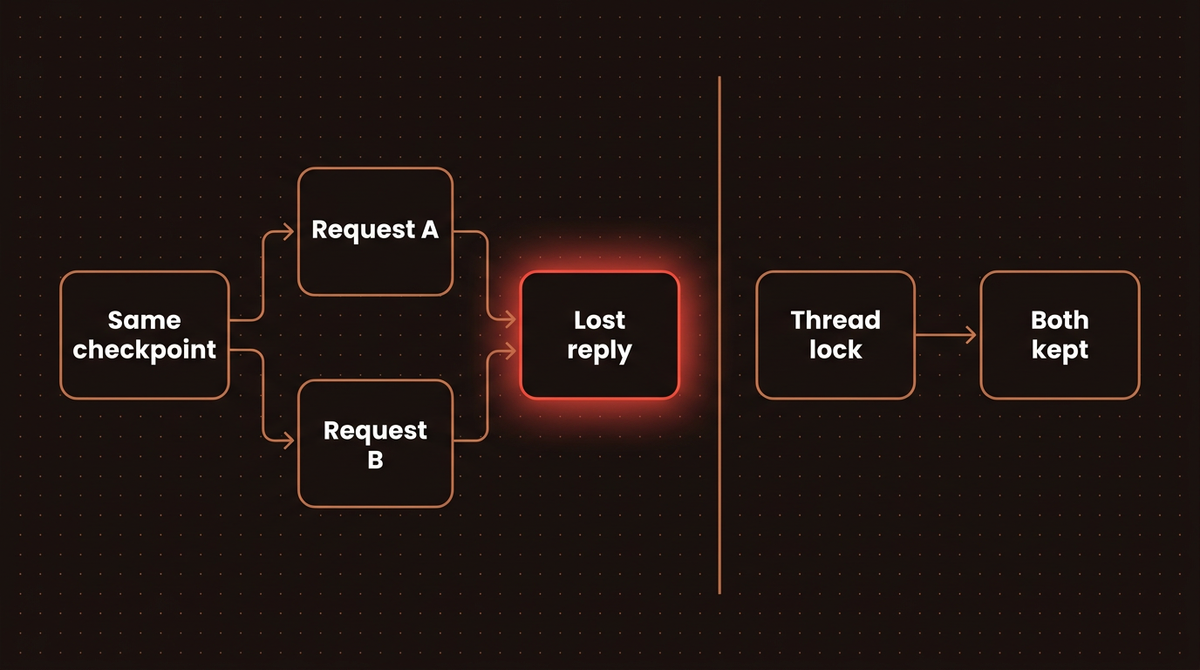
The per thread asyncio.Lock turns the race into a queue, which is the enqueue strategy by hand. It only works inside one process. With several workers, the lock has to live where the checkpoints live; on Postgres the obvious candidate is a transaction scoped advisory lock keyed on a hash of the thread id. I have not tested that version, so treat it as a design note. The other route is the Agent Server, which gives you the four built in strategies; my LangGraph CLI guide runs one locally in Docker.
Step 8: Keep secrets out of checkpoint metadata
Step 3 showed user_id landing on the checkpoint. Any plain value in configurable gets the same treatment. The last block of the script passes an API key through configurable:
# ---- Step 8: what lands in checkpoint metadata ----

print("\n== Metadata check")
leak = new_session("dave", "metadata")
graph.invoke(
    {"messages": [{"role": "user", "content": "hi"}]},
    {"configurable": {"thread_id": leak, "api_key": "sk-test-not-real"}},
    context=Context(user_id="dave"),
)
print(checkpointer.get_tuple({"configurable": {"thread_id": leak}}).metadata)
== Metadata check
{'source': 'loop', 'step': 1, 'parents': {}, 'api_key': 'sk-test-not-real'}The key was saved with the checkpoint. In langgraph-checkpoint's base module, get_checkpoint_metadata copies every string, number and boolean from both config["metadata"] and config["configurable"], skipping only keys that start with a double underscore and a short list of LangGraph's own keys. The Postgres saver writes that same metadata into a JSONB column, so a key passed this way is written in plain JSON into the metadata of every checkpoint that run saves. Pass secrets and clients through the runtime context instead, and keep configurable for ids. I checked the in memory saver for that: a marker string passed only as context appeared nowhere in its stored checkpoints, writes or blobs (context_check.py). I did not repeat that check on Postgres, but the source explains it: context travels under a configurable key that starts with a double underscore, which the shared metadata function skips for every saver.
LangGraph session management on Postgres
The session layer above does not change. Swap two constructors and everything in Steps 3 to 8 runs the same way, with these differences:
- Checkpointer.
PostgresSaverreplacesInMemorySaver, anddelete_threadclears the thread from all three of its tables. Pool setup,setup(), dropped connections and an SQL job for age based expiry are in my LangGraph checkpointer on Postgres guide, so I will not repeat them here. - Store and TTL.
PostgresStoresupports TTL where the in memory store refused it. Per the PostgresStore source code, thettlconfig takesdefault_ttlin minutes andrefresh_on_read, and the docstring says you must callstart_ttl_sweeper()yourself, or expired items are never deleted. Memories can expire this way; checkpoints still cannot. - Session index. Keep it in the store, or better, in a table of your own with an index on
user_idandlast_active, because the checkpointer's metadata filter scans. - Concurrency. An in process lock stops protecting you the moment you run two workers. Move the lock into the database or route a thread's requests to one worker.
Troubleshooting
A user sees another user's conversation
Something resolved the thread id from client input without checking ownership. Every path that takes a thread_id from a request (send, list, delete, resume after an interrupt) must go through a check like owned() first. A random UUID makes guessing hard, but ids leak through logs, shared links and browser history.
The agent forgets everything when a user starts a new chat
That's the checkpointer doing its job: a new thread starts empty. Move anything that should survive into the store under a user namespace, as in Step 4, and read it at the start of the node.
NotImplementedError: TTL is not supported by InMemoryStore
Drop the ttl argument in development and run a sweep like expire_idle, or move to a store that reports supports_ttl as true, such as PostgresStore.
A message vanished from a conversation with no error
Two runs hit the same thread at once (Step 7). Look at get_state_history for that thread: you will find two checkpoints at the same step with the same parent, as in the history above. Add a per thread lock or a queue in front of the graph.
Listing sessions gets slower as usage grows
You are probably filtering the checkpointer by metadata. Read from a session index keyed by user instead, and paginate it.
Going further
The pieces here are deliberately plain: a store namespace as the index, a dict of locks, a sweep function. At a few thousand active sessions, I would move the index into its own Postgres table and run the expiry as a scheduled job, still calling delete_thread per thread so LangGraph's own tables stay consistent. Long threads are the other cost: every turn reloads the full message list, so a session that never ends gets slower and more expensive per turn. Trim or summarize inside the node, or start a new thread and carry the summary over through the store.
This setup is the wrong call when you deploy on the Agent Server. There, threads, metadata search and double texting strategies come with the platform, and a hand rolled index would duplicate it. For debugging any of this locally, my LangGraph Studio setup guide lets you step through a thread's checkpoints visually.
If you would rather have this built and monitored for you, see how I build AI agents.
Frequently asked questions
How do I manage sessions for multiple users in LangGraph?
Compile one graph with one checkpointer and one store, then give every conversation its own thread_id. Keep a session index that maps each user to their thread ids and check it before every call. Put per user facts in the store under a namespace that starts with the user id, and pass that id through the runtime context.
Should the LangGraph thread_id include the user id?
Not for anything user facing. A random UUID per conversation is unguessable and short, and ownership belongs in your own index where you can check and revoke it. Using the user id as the thread id merges every conversation that user has into one ever growing thread.
How do I list all threads for a user in LangGraph?
Open source LangGraph has no thread listing per user. You can filter checkpointer.list by a user_id passed in config metadata, but it returns every checkpoint and scans on Postgres. A session index in the store or your own table, keyed by user, is the faster and cleaner option.
How do I delete or expire a LangGraph session?
Call checkpointer.delete_thread(thread_id) to remove its checkpoints, then delete the thread from your session index. For expiry, run a scheduled sweep over the index by last activity. Store TTLs only cover store items, and InMemoryStore rejects them, so checkpoints always need explicit deletion.
What happens if two messages hit the same LangGraph thread at once?
In open source LangGraph both runs branch from the same checkpoint and one turn drops out of the latest state, with no error. In 20 unlocked runs of my test, none kept both turns. Serialize requests per thread with a lock or a queue, or use the Agent Server's double texting strategies.
Published
October 14, 2026
Category
AI Agents
Jahanzaib Ahmed
AI Systems Engineer & Founder
AI Systems Engineer with 126 production systems shipped. I run AgenticMode AI (AI agents, RAG systems, voice AI) and ECOM PANDA (ecommerce agency). I build AI that works in the real world for businesses across home services, healthcare, ecommerce, SaaS, and real estate.
Related articles

How to Set Up the LangGraph Checkpointer on Postgres With a Connection Pool
Set up the LangGraph checkpointer on Postgres with a checked connection pool, resume a paused graph from a new process, reproduce five early errors, and delete old threads. Every script ran on LangGraph 1.2.14.
How toAI AgentsLangGraph
How to Monitor a LangGraph Agent: Logs, Token Cost, Traces and Alerts
A runnable LangGraph monitoring setup on langgraph 1.2.15: JSON logs for every node, token usage and cost per run, OpenTelemetry traces with no account, and alerts for runaway loops.
How toAI AgentsLangGraph
How to Use the LangGraph CLI to Build and Run an Agent Server in Docker
Every LangGraph CLI command run for real on version 0.4.33, from langgraph new to a Docker image, plus the two traps the docs skip: a build that copies your .env file and a Python 3.11 default base image.
How toAI AgentsLangGraph