Every AI Agent I Build Has Memory. Here Is the Exact Architecture I Use.
Most AI agents forget everything the moment a conversation ends. Here is the memory architecture I use across 126 production deployments, with real code for LangGraph, Mem0, Redis and pgvector, an order history example and the Mem0 2.x API changes.

Table of Contents
AI agent memory is the layer that lets an agent carry information between turns and between runs. A production memory architecture has four parts: short term context inside the current conversation, long term facts about the user or account, episodic records of what happened on previous runs, and semantic knowledge retrieved from your own documents. Without it, every run starts from zero.
A client called me six months into our engagement. Their AI customer support agent had been live since October. It handled thousands of conversations per day. And it was driving people insane.
Why? Because every single conversation started from zero. A customer who had called three times about the same billing issue would explain the whole thing again. The agent had no idea who they were. No memory of the previous conversations. No context about their account history. Just a blank slate, every time.
That call cost me two weeks of emergency work and nearly cost us the client. The agent was technically correct, technically fast, and technically useless for anyone who had ever spoken to it before.
Since then, every AI agent I build has persistent memory built in from day one. Not as an afterthought. Not bolted on after launch. Designed in from the first line of code.
In this guide I will show you exactly how I do it. The four memory types every production agent needs. The actual stack I use. Real Python code. And the five failure modes that will bite you if you skip steps.
Why do most AI agents have no memory at all?
Every large language model call is stateless. When you send a message to Claude, GPT, or any other model, it processes your input and returns a response. Then it forgets everything. There is no persistent state. No connection between one call and the next.
This is by design. It makes models easier to scale, easier to deploy, and easier to reason about. But it creates a fundamental problem for AI agents that need to serve real users across real sessions.
The naive fix is to stuff the entire conversation history into the context window on every call. And this works, right up until it doesn't. Context windows have limits. Long conversations hit those limits. And even before you hit the limit, you are paying for every token in that history window on every single call. A 100-turn conversation with a 50-token average per turn costs you 5,000 tokens just to maintain state before the model processes your new message.
More importantly, context stuffing conflates very different types of memory. What the user said three messages ago is different from what they told you six months ago. And both of those are different from the business rules the agent needs to apply consistently. Treating all of it as "conversation history" is a recipe for confused, expensive, and unreliable agents.
What are the four types of AI agent memory?
I think about agent memory the same way cognitive scientists think about human memory. There are four distinct types, and conflating them causes most of the memory bugs I have seen in production.
Working Memory (In-Context)
Working memory is everything in the current context window. The messages exchanged so far this session. The current task state. The intermediate results of tool calls. It is temporary by definition. It disappears when the session ends.
For most agent tasks, working memory is all you need. A single-turn question-answering agent, a one-shot code generator, a simple form-filling workflow. These do not need to remember anything beyond the current conversation.
The implementation is trivial: pass the message history as part of your prompt. LangGraph handles this automatically with its state graph. The challenge is managing what you keep and what you drop as conversations get long.
Episodic Memory
Episodic memory stores specific past events. What happened in previous sessions. Which tasks the agent completed for this user. What errors occurred. What feedback the user gave.
This is the memory type my billing support agent was missing. "User called three times about the same invoice" is episodic memory. It is specific, time-stamped, and tied to a particular user and event sequence.
Episodic memory is usually stored as compressed summaries or structured records in a database. You retrieve it based on relevance to the current context, not just recency.
Semantic Memory
Semantic memory stores facts and general knowledge. User preferences. Product information. Business rules. Things that are true independent of any specific event.
"This user prefers email over SMS for notifications" is semantic memory. "Our refund policy is 30 days" is semantic memory. These facts do not change based on recent events. They persist and apply broadly.
Vector databases are the standard storage layer for semantic memory because you retrieve it through similarity search. You embed the user's query, find the most relevant stored facts, and inject them into the context.
Procedural Memory
Procedural memory governs how the agent behaves. Which tools to call in which order. How to escalate certain types of requests. What tone to use with different customer segments.
Most people do not think of this as memory at all. It lives in the system prompt, in the tool definitions, in the agent's workflow configuration. But it is memory in the cognitive science sense: knowledge about how to do things, not just what things are.
In practice, procedural memory is the hardest to update dynamically. Changing an agent's behavior mid-deployment requires careful prompt engineering and testing. I treat it as the most stable layer of the memory stack.
What does a production AI agent memory architecture look like?
Here is the actual architecture I deploy across my client work. Different use cases call for different combinations, but this is the full stack.
Layer 1: LangGraph Checkpointing for Working Memory
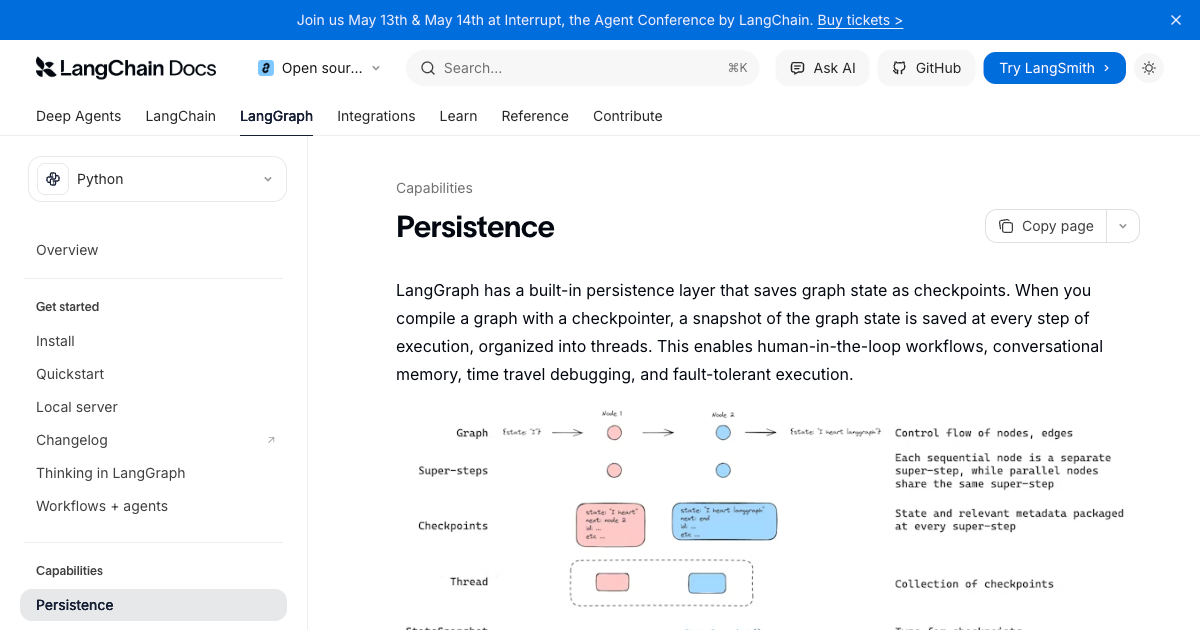
For any agent that needs to maintain state across multiple steps within a single session, LangGraph's built-in checkpointing is my first choice. It handles the state management automatically. You define your state schema, and LangGraph takes care of persisting it between node executions.
The basic setup looks like this:
from langgraph.graph import StateGraph, END
from langgraph.checkpoint.memory import InMemorySaver
from langchain_anthropic import ChatAnthropic
from langchain_core.messages import HumanMessage, BaseMessage
from typing import TypedDict, List, Annotated
import operator

llm = ChatAnthropic(model="claude-haiku-5-5")

class AgentState(TypedDict):
    messages: Annotated[List[BaseMessage], operator.add]
    user_id: str
    session_context: dict

checkpointer = InMemorySaver()

def call_model(state: AgentState):
    messages = state["messages"]
    response = llm.invoke(messages)
    return {"messages": [response]}

workflow = StateGraph(AgentState)
workflow.add_node("agent", call_model)
workflow.set_entry_point("agent")
workflow.add_edge("agent", END)

graph = workflow.compile(checkpointer=checkpointer)

# Each thread_id maintains its own state
config = {"configurable": {"thread_id": "user-123-session-456"}}
result = graph.invoke(
    {"messages": [HumanMessage(content="Hello")], "user_id": "user-123"},
    config=config
)
That thread_id is what lets a conversation continue. Call the graph again with the same thread_id and the checkpointer reloads the saved messages, so the agent picks up exactly where it stopped, and with a database backed checkpointer that still works after a restart. A new thread_id starts a fresh conversation. Checkpoints belong to one thread, so anything the agent should know across threads, such as a customer's orders or preferences, goes in a store. The order history example further down shows both together.
For production deployments I replace InMemorySaver (still importable as MemorySaver, the name older tutorials use) with PostgresSaver from the langgraph-checkpoint-postgres package or RedisSaver from langgraph-checkpoint-redis. Run checkpointer.setup() once to create the tables or indexes, install psycopg[binary,pool] for Postgres, and use Redis 8 or Redis Stack for RedisSaver because it needs the RedisJSON and RediSearch modules (checked against the LangGraph memory docs and the langgraph-checkpoint-redis README, October 11, 2026). In memory checkpointing is fine for development and single instance deployments. It breaks immediately when you have multiple Lambda instances running. I cover the Postgres setup step by step in my LangGraph Postgres checkpointer guide.
Layer 2: Mem0 for Long-Term Semantic and Episodic Memory
For persistent memory that survives across sessions, I use Mem0. It is purpose-built for AI agent memory and handles the extraction, storage, and retrieval of semantic facts and episodic summaries automatically.
What I like about Mem0 is that you do not need to manually decide what to remember. You pass the conversation to Mem0, and it extracts the relevant facts using an LLM. Those facts get stored as embeddings in a vector database. On subsequent calls, you retrieve relevant memories by querying with the current context.
from mem0 import Memory
from langchain_anthropic import ChatAnthropic

# Memory() defaults to OpenAI (gpt-5-mini for extraction plus OpenAI embeddings) and
# needs OPENAI_API_KEY. Use Memory.from_config({...}) for another LLM, embedder or vector store.
memory = Memory()
llm = ChatAnthropic(model="claude-haiku-5-5")

def run_agent_with_memory(user_message: str, user_id: str) -> str:
    # Retrieve relevant memories for this user (entity IDs go inside filters)
    relevant_memories = memory.search(
        user_message, filters={"user_id": user_id}, top_k=5
    )

    # Format memories as context
    memory_context = "\n".join([
        f"- {m['memory']}"
        for m in relevant_memories.get("results", [])
    ])

    # Build prompt with memory context
    system_prompt = f"""You are a helpful assistant.

    What you know about this user:
    {memory_context if memory_context else 'No previous interactions.'}

    Respond naturally, incorporating what you know."""

    messages = [
        {"role": "system", "content": system_prompt},
        {"role": "user", "content": user_message}
    ]

    response = llm.invoke(messages)

    # Store this interaction as new memory
    memory.add(
        [{"role": "user", "content": user_message},
         {"role": "assistant", "content": response.content}],
        user_id=user_id
    )

    return response.content

# Usage
response = run_agent_with_memory(
    "I prefer concise answers, no more than three sentences",
    user_id="user-123"
)
# Next call will remember this preference automatically
Mem0 changed its API and its extraction model in April 2026 (the 2.x releases of the mem0ai package), and the snippets above follow the new shape. Entity IDs now go inside filters for search() and get_all(), and a top level user_id= argument now raises a ValueError. top_k replaces limit, and a leftover limit=5 is silently ignored, so you would get the default of 20 results. The defaults are now top_k=20 and threshold=0.1, so set your own. Extraction is also add only: one LLM call per add(), with no update or delete of existing memories, which means memories accumulate and nothing is overwritten (Mem0 migration guide, checked October 11, 2026).
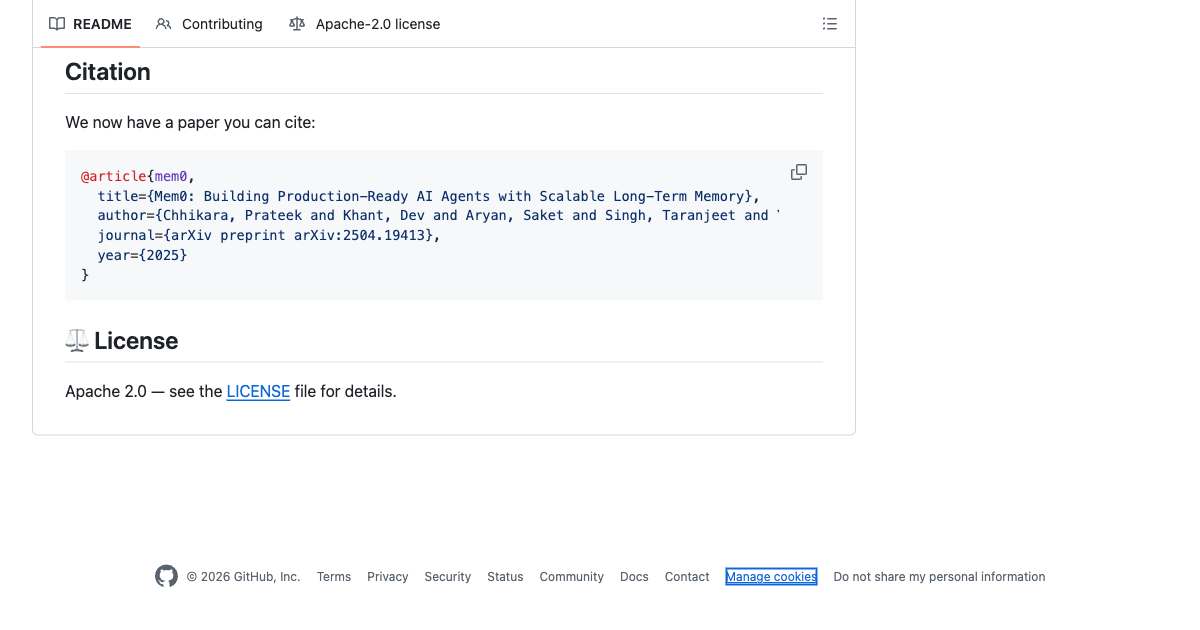
Mem0's own benchmark paper (arXiv, April 2025) reports a 26% relative improvement in the LLM as a Judge score over OpenAI's memory feature on the LoCoMo benchmark, and the April 2026 algorithm update reports 92.5 on LoCoMo and 94.4 on LongMemEval for the managed platform, with the caveat that open source users should expect directionally similar gains, not identical numbers. In my own testing across client deployments, the improvement is most pronounced for preference-based personalization where the agent needs to adapt to individual users rather than just recall facts. The repository had about 67,000 GitHub stars on October 11, 2026, so the screenshot below shows an earlier count.
Layer 3: Redis for High-Speed Session Context
Between LangGraph checkpointing (which handles agent state) and Mem0 (which handles long-term facts), I need a fast cache for session-level data that is not part of the agent's state graph. Things like: the current user's account details fetched from the CRM, the products they are browsing, the documents open in their workspace.
Redis is the answer here. Sub-millisecond reads. Automatic expiry with TTL. And Redis 8 and Redis Stack include vector search if you need it for fast in session retrieval.
import redis
import json
from datetime import timedelta

client = redis.Redis(host='localhost', port=6379, decode_responses=True)

def get_session_context(session_id: str) -> dict:
    data = client.get(f"session:{session_id}")
    return json.loads(data) if data else {}

def update_session_context(session_id: str, updates: dict) -> None:
    existing = get_session_context(session_id)
    existing.update(updates)
    client.set(
        f"session:{session_id}",
        json.dumps(existing),
        ex=timedelta(hours=4),  # 4-hour session TTL
    )

def store_agent_interaction(user_id: str, interaction: dict) -> None:
    key = f"history:{user_id}"
    client.lpush(key, json.dumps(interaction))
    client.ltrim(key, 0, 19)  # Keep last 20 interactions
    client.expire(key, timedelta(days=30))  # 30-day TTL
Layer 4: Zep for Time-Aware Memory Graphs
For use cases where the temporal dimension of memory matters, I use Zep. The key feature is that Zep treats memory as a knowledge graph with time stamps and relationship tracking, not just a flat vector store. You can query not just "what does this user prefer" but also "how have this user's preferences changed over the past 90 days."
This is particularly valuable for long-running relationships. A sales assistant that has been working with a prospect for six months. A personal finance advisor tracking spending patterns. A coaching assistant monitoring behavior change over time.
One change since I first wrote this: Zep is now a managed service. The self hosted Zep Community Edition is deprecated and unsupported, and the open source engine behind Zep is Graphiti. Zep Cloud is credit based: a free tier with 10,000 credits a month, Flex at $125 a month with 50,000 credits, and Flex Plus at $375 a month with 200,000 credits, with SOC 2 Type II and HIPAA on Enterprise and a deployment option in your own VPC (Zep pricing and the Zep repository, checked October 11, 2026).
Vector, key value or graph: which memory store should you use?
The choice of storage layer depends on how you need to retrieve your memories. Here is the decision logic I use.
| Storage Type | Best For | Latency | Cost | Examples |
|---|---|---|---|---|
| In-context (array) | Short conversations, single session | Zero (already in prompt) | Pay per token | LangGraph InMemorySaver |
| Key-value store | User preferences, session state, structured facts | Under 1ms | Very low | Redis, DynamoDB |
| Vector database | Semantic search, unstructured facts, similarity retrieval | 10-50ms | Low to medium | Pinecone, Qdrant, pgvector |
| Graph database | Relationship tracking, temporal changes, complex entity connections | 50-200ms | Medium to high | Neo4j, Zep, FalkorDB |
| Relational database | Structured records, audit logs, analytics | 5-20ms | Low | PostgreSQL, Supabase |
The latency and cost columns are rough planning ranges, not vendor benchmarks, and they move with network distance and index size.
Most production agents I build use two or three layers in combination. The in-context layer always. A key-value store for fast session state. And either a vector database or Mem0 (which abstracts the vector store behind a clean API) for long-term semantic memory.
Graph databases become relevant once you have complex entity relationships and need to track how those relationships change over time. I have used Zep with Neo4j for two enterprise deployments where the relationship complexity justified the added operational overhead.
Which vector databases work with LangChain for agent memory?
Pinecone, Qdrant, Chroma, Weaviate and Postgres with pgvector each have a LangChain integration package: langchain-pinecone, langchain-qdrant, langchain-chroma, langchain-weaviate and langchain-postgres. They share one interface, add_documents and similarity_search with a metadata filter, and that filter is where per user isolation lives. This is the pgvector version, using PGVectorStore from langchain-postgres:
from langchain_core.documents import Document
from langchain_openai import OpenAIEmbeddings
from langchain_postgres import Column, PGEngine, PGVectorStore

embeddings = OpenAIEmbeddings(model="text-embedding-3-small")  # 1536 dimensions

engine = PGEngine.from_connection_string(
    url="postgresql+psycopg://user:password@localhost:5432/agent"
)
engine.init_vectorstore_table(
    table_name="agent_memory",
    vector_size=1536,
    metadata_columns=[Column("user_id", "TEXT")],
)
store = PGVectorStore.create_sync(
    engine=engine,
    table_name="agent_memory",
    embedding_service=embeddings,
    metadata_columns=["user_id"],
)
store.add_documents([
    Document(page_content="Order 1002: desk lamp, shipped", metadata={"user_id": "cust-42"}),
    Document(page_content="Order 9: keyboard, delivered", metadata={"user_id": "cust-7"}),
])

# The filter is what keeps one customer's memory out of another customer's prompt
hits = store.similarity_search("where is my lamp", k=3, filter={"user_id": "cust-42"})
If your memory already lives in LangGraph, you may not need a separate vector store at all. InMemoryStore and PostgresStore accept an index with an embedding model and its dimensions, after which store.search(namespace, query=...) does semantic search over whatever you put in the namespace. My default is pgvector when Postgres is already in the stack, because one database then holds the checkpoints, the store and the vectors. For Pinecone, Qdrant, Weaviate and Chroma prices, latency and the point where single node Postgres stops being enough, see my vector database comparison for AI agents.
What are the most common agent memory failure modes?
Every guide tells you how to add memory. Very few tell you how memory breaks in production. Here is what I have learned from shipping 126 systems.
1. Stale Memory Poisoning
Memory that was accurate when stored becomes wrong over time. A user's job title changes. A product gets discontinued. A policy gets updated. Your agent is confidently citing information from six months ago as current fact.
The fix: add a stored_at timestamp to every memory record. Mem0 already returns created_at and updated_at on every result, so read those instead of adding your own. Build retrieval logic that weights recency. For facts with known expiry (product pricing, policy details), set explicit TTL fields and check them before injecting memories into context. I treat any fact older than 90 days as potentially stale and flag it in the system prompt rather than asserting it as current.
2. Context Stuffing
Naive memory implementations retrieve too much. The top 20 results. Everything from the past year. All the user's preferences. This explodes your context window, slows response time, and degrades answer quality because the model is trying to reconcile dozens of weakly relevant facts.
The fix: be aggressive with retrieval limits. I typically retrieve 3 to 5 memories maximum. Use a reranker if you have more candidates. And separate high-confidence facts (stored explicitly) from soft preferences (retrieved by similarity), using different injection strategies for each.
3. Multi-Agent Memory Conflicts
When multiple agents share the same memory store, you get write conflicts. Agent A stores "user prefers formal communication." Agent B, working on a different task, stores "user requested casual tone today." Now you have two contradictory facts with no resolution mechanism.
The fix: namespace your memories by agent type and use case. Give each agent type its own memory scope. Build a reconciliation layer to detect and resolve contradictions rather than letting them accumulate. Mem0's April 2026 algorithm is add only, so it will not overwrite the older fact for you; both stay, and you pick the newest by timestamp at read time.
4. Memory Retrieval Drift
This is the failure mode I see most often and talk about least. As your memory store grows, retrieval quality degrades because the embedding model that indexed your memories and the embedding model you use for retrieval queries may drift apart over time. Especially if you switch embedding providers or update model versions.
The fix: version your embeddings. Store which embedding model and version generated each memory. When you upgrade models, re-embed your stored memories. This is operationally annoying but critical. I have seen agents where retrieval precision dropped from 87% to 52% after an embedding model update that nobody flagged.
5. Privacy Violations via Memory Leakage
Memory systems that do not enforce proper user isolation will eventually leak one user's data to another. This is especially dangerous in multi-tenant deployments where a single agent serves thousands of users. A bug in the user ID lookup, a missing filter clause in the vector query, and suddenly User B's private financial details are being surfaced in User A's conversation.
The fix: always pass user_id as a mandatory filter parameter in every memory retrieval call. Never retrieve from the global namespace. Audit your vector database queries to confirm the user ID filter is applied at the storage layer, not just in your application code. Mem0 pushes you toward this pattern: search() requires at least one of user_id, agent_id or run_id in its filters and raises a ValueError without one.
Which AI agent memory tool should you use?
| Tool | Best For | Handles Extraction | Time-Aware | Self-Hosted |
|---|---|---|---|---|
| LangGraph Checkpointer | Within-session state, multi-step workflows | No | No | Yes |
| Mem0 | Long-term semantic and episodic memory | Yes (LLM-based) | Partial | Yes, open source (graph memory is Platform only) |
| Zep | Time-aware memory graphs, long relationships | Yes | Yes | Open source Graphiti, or Enterprise in your VPC (Community Edition deprecated) |
| Redis | Fast session state, structured facts, low latency | No | With TTL | Yes |
| pgvector | Semantic memory when you already have PostgreSQL | No | No | Yes |
I mark all five as production ready.
My default recommendation for most production agent projects: start with LangGraph checkpointing plus Mem0. That covers working memory and long-term semantic memory without operational complexity. Add Redis for session-level caching when response latency starts to matter. Introduce Zep only when your use case genuinely requires temporal reasoning about relationship changes.
If you want to see how this memory architecture connects to broader agent design patterns, read my guide on building AI agents that work in production and my LangGraph tutorial for the full graph-based agent workflow.
How do you give an AI agent memory of past interactions?
Here is the initialization pattern I use at the start of every agent session. It pulls from all three active memory layers and assembles a context object the agent uses throughout the conversation.
import asyncio
from mem0 import Memory
import redis
import json

memory_client = Memory()
redis_client = redis.Redis(host='localhost', port=6379, decode_responses=True)

async def initialize_agent_context(user_id: str, session_id: str, current_query: str) -> dict:
    """Pull relevant context from all memory layers before the first LLM call."""

    # Layer 1: Fast session context from Redis (under 1ms)
    session_data = redis_client.get(f"session:{session_id}")
    session_context = json.loads(session_data) if session_data else {}

    # Layer 2: Long-term memories from Mem0
    mem0_results = memory_client.search(
        query=current_query,
        filters={"user_id": user_id},
        top_k=5,        # Never more than 5 at initialization
        threshold=0.7,  # Only high-confidence retrievals
    )
    long_term_memories = [m["memory"] for m in mem0_results.get("results", [])]

    return {
        "user_id": user_id,
        "session_id": session_id,
        "session_context": session_context,
        "long_term_memories": long_term_memories,
        "memory_initialized": True
    }

def format_memory_for_prompt(context: dict) -> str:
    """Format retrieved memories for injection into system prompt."""
    parts = []

    if context["session_context"]:
        parts.append("Current session context:")
        for key, value in context["session_context"].items():
            parts.append(f"  - {key}: {value}")

    if context["long_term_memories"]:
        parts.append("What I know about this user from past interactions:")
        for memory in context["long_term_memories"]:
            parts.append(f"  - {memory}")

    return "\n".join(parts) if parts else "No prior context for this user."
This runs before the first LLM call in every session. The Redis read takes under a millisecond. The Mem0 search is slower because it embeds the query first, and Mem0 reports a p50 latency of 0.88 to 1.09 seconds for its single pass retrieval in its April 2026 benchmark table (managed platform, top_200 retrieval budget), so budget hundreds of milliseconds to about a second, not tens of milliseconds, and run it once per session rather than once per turn. That is an acceptable price for an agent that actually remembers who it is talking to.
You can assess whether your current automation approach is ready for this kind of agent sophistication using the AI Readiness Assessment, which will tell you exactly where memory architecture fits in your current stack. And if you want to see the decision framework I use to choose between simple automation and full agent deployments, read when to use AI agents vs automation.
Order history example: continue a conversation with a thread id and a store
The question I hear most is how to build an agent that remembers a customer's order history. Two pieces do the work. A thread_id continues the conversation: the checkpointer reloads the earlier messages whenever you call the graph with the same one. A store holds what outlives any single thread, here one namespace per customer containing their orders, which the node reads at the start of every turn. Your order system stays the source of truth, and the store is the copy your sync job keeps fresh.
from dataclasses import dataclass
from langchain_anthropic import ChatAnthropic
from langgraph.checkpoint.memory import InMemorySaver
from langgraph.graph import StateGraph, MessagesState, START
from langgraph.runtime import Runtime
from langgraph.store.memory import InMemoryStore

llm = ChatAnthropic(model="claude-haiku-5-5")

@dataclass
class Context:
    customer_id: str

def support_agent(state: MessagesState, runtime: Runtime[Context]):
    # One namespace per customer, so a read can never cross into another customer's data
    namespace = ("orders", runtime.context.customer_id)
    orders = runtime.store.search(namespace, limit=5)
    history = "\n".join(
        f"{o.key}: {o.value['item']}, {o.value['status']}" for o in orders
    )
    system = f"You are a support agent. This customer's orders:\n{history or 'none on file'}"
    reply = llm.invoke([("system", system)] + state["messages"])
    return {"messages": [reply]}

store = InMemoryStore()  # PostgresStore in production
store.put(("orders", "cust-42"), "ord-1001", {"item": "Standing desk", "status": "delivered"})
store.put(("orders", "cust-42"), "ord-1002", {"item": "Desk lamp", "status": "shipped"})

builder = StateGraph(MessagesState, context_schema=Context)
builder.add_node("support_agent", support_agent)
builder.add_edge(START, "support_agent")
graph = builder.compile(checkpointer=InMemorySaver(), store=store)  # PostgresSaver in production

ctx = Context(customer_id="cust-42")
thread = {"configurable": {"thread_id": "cust-42-support"}}

graph.invoke({"messages": [{"role": "user", "content": "Where is my desk lamp?"}]}, thread, context=ctx)

# Later, even from another process when the checkpointer is Postgres: same thread_id, conversation continues
result = graph.invoke({"messages": [{"role": "user", "content": "And when will it arrive?"}]}, thread, context=ctx)
The second call carries the first exchange in its history and still sees both orders, so "when will it arrive" resolves to the desk lamp without the customer repeating anything. A call for a different customer builds a different namespace from that customer's id, so it reads only their orders and starts its own thread. In production, swap InMemorySaver for PostgresSaver and InMemoryStore for PostgresStore (call setup() on each once), pass the customer id through the context rather than trusting it from the message text, and give the store an index if you want semantic search over a long order list.
Which enterprise use cases actually need agent memory?
Memory is not free, so the honest answer is that plenty of agents do not need it. The test I apply is simple: does the right answer on this run depend on something that happened on a previous run? If no, skip it and save the latency and the storage.
These are the shapes where memory earns its cost, drawn from the systems I have shipped:
- Support and service desks. A caller who has already explained their problem twice should not explain it a third time. Episodic memory of prior tickets is the difference between an agent that feels useful and one that feels like a phone tree.
- Healthcare and clinical intake. Intake agents need long term facts about the patient and episodic memory of prior visits. This is also the setting where memory drift is most dangerous, so retention rules and redaction matter more than raw recall.
- Legal and professional services. Matter context spans months. Semantic memory over the firm's own documents plus long term facts about the matter is what stops the agent contradicting an earlier position.
- Sales and revenue teams. The value is entirely in what happened before: last touch, objections raised, pricing already quoted. An agent without episodic memory here is worse than a CRM note.
- Internal knowledge and operations. Semantic memory over policy docs is usually enough. Most internal agents need retrieval, not personalization, and teams routinely overbuild this one.
The pattern across all of them: personalization and continuity need memory, lookup does not. If your agent answers the same question the same way for every user, you want retrieval, not a memory layer.
How much does AI agent memory cost in production?
Memory is not free. Here is the rough cost breakdown for a production deployment serving 10,000 active users with 5 interactions per user per week, which is about 216,667 interactions a month with one memory extraction and one search per interaction (prices checked October 11, 2026, arithmetic in a script):
- Mem0 cloud: Pro is $249 per month with 500,000 add requests and 50,000 retrieval requests (Mem0 pricing). The adds fit, but 216,667 searches is 4.33 times the retrieval allowance, so this volume needs an Enterprise quote, which is not published. Starter is $19 per month and Hobby is free, both with much smaller limits. Self hosted via the open source version eliminates the platform fee but adds infrastructure cost.
- Redis: Redis Cloud Essentials starts at $5 per month for 250 MB (Redis pricing) and cost grows with memory.
- Embedding costs: If you are embedding memories before storage (required for vector search), this adds API cost. text-embedding-3-small is $0.02 per million tokens (OpenAI pricing). At about 50 tokens per memory and one memory per interaction, that is 10.8 million tokens and roughly $0.22 per month. Negligible.
- Retrieval LLM cost: Mem0 uses an LLM to extract memories from conversations. Each extraction call adds roughly 500 to 1,000 input tokens plus about 150 output tokens (my planning figures, and the new extraction also passes related existing memories into the prompt, so treat them as a floor). On Claude Haiku 5.5 ($0.10 input and $0.50 output per million tokens, Anthropic pricing) that is $27 to $38 per month at this volume. On gpt-5-mini, Mem0's default extraction model ($0.25 input and $2.00 output per million tokens), it is $92 to $119.
- Zep Cloud: Flex is $125 per month with 50,000 credits and Flex Plus is $375 with 200,000 credits. I have not converted interactions to credits, so treat these as plan prices, not a total.
Self hosted Mem0 with Redis Essentials comes to roughly $32 to $124 per month in variable cost at this volume, before the vector store and server hosting, which I have not priced here. For a B2B SaaS product or enterprise deployment, that is trivial compared to the value delivered by personalized, context-aware agents. For the whole agent rather than only the memory layer, the AI agent cost calculator takes the model, volume and hosting inputs.
What is the difference between AI agent memory and RAG?
RAG (retrieval-augmented generation) retrieves information from a static knowledge base to answer questions. Agent memory is about remembering information about users, past interactions, and evolving context across sessions. RAG is about what the agent knows. Memory is about what the agent remembers about you specifically. Production agents often need both: RAG for product and policy knowledge, memory for user-specific personalization and session continuity. I cover the retrieval side in my agentic RAG production guide.
Can I add memory to an existing AI agent without rebuilding it?
Yes, but with caveats. You can add Mem0 as a wrapper around almost any existing agent with minimal code changes: retrieve memories before the LLM call, inject them into the system prompt, and store new memories after the response. LangGraph checkpointing, however, requires building your agent as a state graph from the start. Retrofitting it to an existing non-LangGraph agent is technically possible but usually means a partial rewrite.
How do you prevent an AI agent from remembering sensitive information it should not store?
Define explicit memory policies before you start. Sensitive categories like payment details, health information, and authentication credentials should never be stored in the memory layer. Implement a filtering step between conversation capture and memory storage that strips PII and sensitive data before it reaches Mem0 or your vector store. Mem0 supports custom extraction instructions (the custom_instructions config key, called custom_fact_extraction_prompt before the April 2026 release) that can explicitly exclude certain categories of information. Test this filtering regularly with adversarial inputs.
How many memories should an agent retrieve per call?
Three to five is almost always the right answer. Retrieving more than five memories increases context cost, slows response time, and adds noise that degrades answer quality. Use a similarity threshold (I use 0.70 with Mem0, passed as threshold=0.7 to search()) so you only retrieve memories that are genuinely relevant to the current query. Mem0's own defaults are top_k=20 and threshold=0.1, so set both. A well-designed retrieval prompt and good memory extraction quality matter far more than retrieval quantity.
What happens to agent memory when a user asks to be forgotten?
This is a GDPR and privacy compliance question as much as a technical one. Mem0 provides a memory.delete_all(user_id=user_id) method that removes all memories for a given user. Redis keys can be deleted by pattern. LangGraph checkpoints can be purged by thread ID with checkpointer.delete_thread(thread_id), and items in a LangGraph store with store.delete(namespace, key). You need to identify every storage layer your agent uses and implement a complete deletion flow across all of them. Test this flow regularly. Missing even one storage layer in your deletion flow creates compliance risk.
Does agent memory work for multi-agent systems where different agents serve the same user?
Yes, but you need a shared memory layer with proper namespacing. Each agent type writes to its own memory namespace but can read from others with appropriate permissions. Mem0 handles this with its agent_id and user_id parameters. The key design decision is whether agents share a single memory pool or maintain separate pools with a synchronization layer. For most use cases, a shared pool with namespace scoping is the right answer.
Is Mem0 better than building your own memory system with LangChain and a vector database?
For most teams, yes. Mem0 handles memory extraction (using an LLM to decide what is worth remembering) and structured retrieval, now with semantic, keyword and entity matching fused together, in ways that are genuinely hard to build correctly from scratch. One thing it no longer does is merge new facts into old ones, because extraction became add only in April 2026, so contradiction handling is yours to build. The main reason to build your own is if you need deep control over the extraction logic or have specific compliance requirements around where data is stored. For teams without a dedicated ML engineer, Mem0 saves weeks of engineering work.
How do you handle memory in voice AI agents where conversations move faster?
Voice agents have stricter latency requirements. Memory retrieval needs to complete in under 100 milliseconds to avoid perceptible delays. This means Redis for session state (under 1ms) and pre-cached memories loaded at session start rather than retrieved mid-conversation. I load the top 3 most relevant memories at session initialization and do not retrieve more during the call unless the conversation takes an unexpected turn. For voice agents, I lean more heavily on Redis and structured key-value storage than on vector similarity search.
Mem0's benchmark paper (arXiv, April 2025) shows a 26% relative improvement in LLM as a Judge score over OpenAI's memory feature on LoCoMo. Research on Agentic Context Engineering (arXiv, 2025) reports +10.6% on agent benchmarks over strong baselines by evolving contexts, including agent memory. IBM's AI agent memory overview provides foundational definitions used in this article. Sources: Mem0 GitHub 2026, IBM Think: What Is AI Agent Memory 2026, Redis AI Agent Memory Architecture 2026.
Last updated
October 11, 2026
Category
Chatbots & RAG
Jahanzaib Ahmed
AI Systems Engineer & Founder
AI Systems Engineer with 126 production systems shipped. I run AgenticMode AI (AI agents, RAG systems, voice AI) and ECOM PANDA (ecommerce agency). I build AI that works in the real world for businesses across home services, healthcare, ecommerce, SaaS, and real estate.
Want this built for your business? See AI Assistant Development, or browse the free tools and guides.
Related articles
How to Run LangGraph Sessions for Many Users on One Checkpointer
Per user and per conversation sessions in LangGraph: thread ids with an owner check, memory across sessions in the store, listing and resuming, expiry and deletion, and the race when two messages hit one thread.
How toAI AgentsLangGraph
LangGraph Tutorial: How I Build Production AI Agents With It
A hands on LangGraph tutorial covering state schemas, nodes, edges, checkpointing, human in the loop patterns, streaming, and real production cost data from 23 deployed systems.
GuideImplementationLangGraph
How to Monitor a LangGraph Agent: Logs, Token Cost, Traces and Alerts
A runnable LangGraph monitoring setup on langgraph 1.2.15: JSON logs for every node, token usage and cost per run, OpenTelemetry traces with no account, and alerts for runaway loops.
How toAI AgentsLangGraph