How to Connect Linear to Claude Code With MCP
Connect Linear to Claude Code with the current MCP endpoint, sign in with OAuth or an API key, keep it read only, and fix the common connection errors.

Explore with AI

Table of Contents
Most guides to the Linear MCP server in Claude Code still show a command Linear has since deprecated. This one uses the current endpoint, then covers the read only option, signing in without a browser for scripts, and what to do when the connection says it needs authentication. It is for developers who already use Claude Code and track their work in Linear. I found no separate charge for the server in Linear's docs.
Before you start
- Claude Code installed and signed in. I ran the add, get, list and project scope commands below on version 2.1.296. I did not sign in to a real Linear workspace, so the sign in steps and the prompts in Step 5 follow the docs and are not something I watched happen.
- A Linear workspace where you can sign in. The server acts as you, so it sees what your account sees.
- A project folder to run the commands in. Where you run them matters, because the default scope is tied to the folder.
- A few minutes. Nothing here installs a package, because Linear hosts the server and Claude Code only needs its address.
If you have never added an MCP server before, read How to Add MCP Servers to Claude Code With claude mcp add first. It covers the command in general, and this guide only covers what is specific to Linear. For the background, the MCP glossary entry explains the protocol in two paragraphs.
Step 1: Choose the Linear MCP endpoint and access level
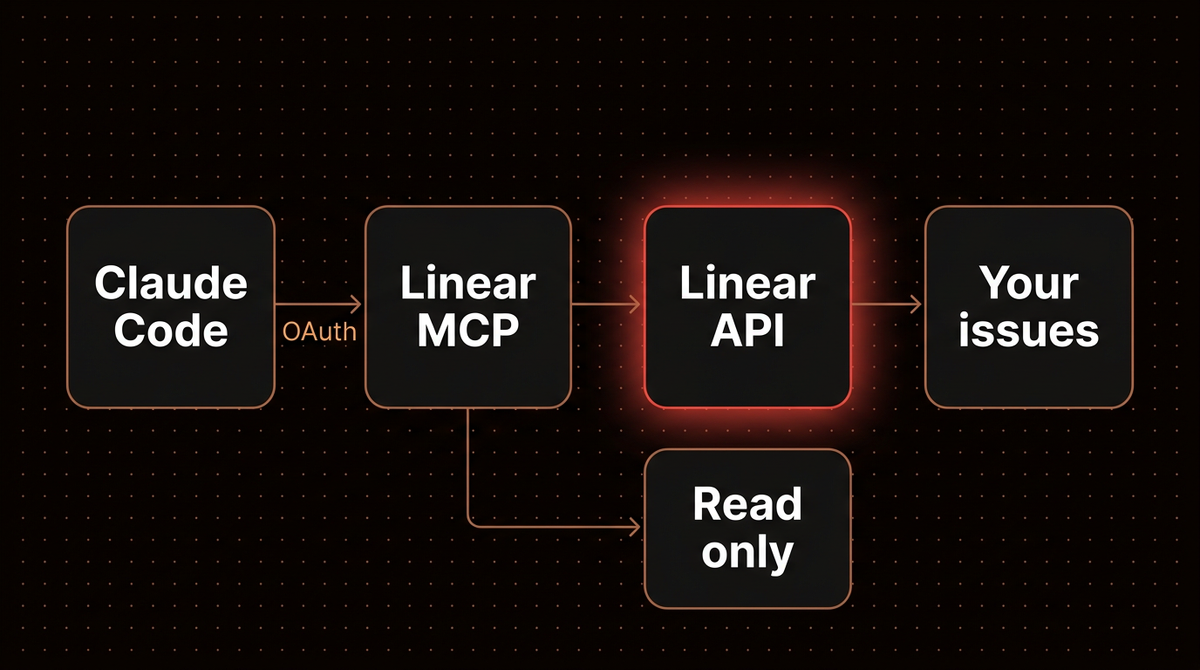
Linear hosts the MCP server itself, so there is nothing to run locally. According to Linear's MCP documentation, the primary transport is Streamable HTTP at https://mcp.linear.app/mcp, and that address gives read and write access by default. For read only access there are two routes: connect to https://mcp.linear.app/mcp/readonly, or use the normal address and request only the read OAuth scope.
Warning: Linear's May 2025 launch post still shows claude mcp add --transport sse linear-server https://mcp.linear.app/sse, and many tutorials copy it. Linear's current docs call the SSE address a deprecated fallback for clients that cannot do Streamable HTTP, and say new setups should use the /mcp address. Use the HTTP command in Step 2.
Pick the access level now, because it decides which command you run. My rule: start read only. Letting the agent create and edit issues is a second decision you can make after you have watched it read for a while.
| Option | Address | Sign in | Can change data |
|---|---|---|---|
| Read and write | /mcp | OAuth in the browser | Yes |
| Read only endpoint | /mcp/readonly | OAuth in the browser | No |
| API key header | /mcp | Bearer token in a header | Depends on the key |
Step 2: Add the server to Claude Code
Pick one of the two commands below, based on Step 1. Run it in your project folder. The first adds the full access server under the name linear-server, which matches the name Linear uses in its docs:
claude mcp add --transport http linear-server https://mcp.linear.app/mcpThe second is the read only version. Give it a name that says so. You will use that name in a permission rule in Step 6. Running both is fine, since they are separate entries:
claude mcp add --transport http linear-readonly https://mcp.linear.app/mcp/readonlyWhen I ran the first command, Claude Code printed Added HTTP MCP server linear-server with URL: https://mcp.linear.app/mcp to local config and named the file it changed, ~/.claude.json, with the project path. That confirms the entry was written. It does not confirm you are signed in.
Scope is worth a moment. Claude Code's MCP documentation lists three: local (the default, this project only, private to you), project (.mcp.json in the repo root, shared through version control) and user (all your projects). Add --scope project if the whole team should get the Linear server when they clone the repo. I did that with the read only server and it wrote this file:
{
  "mcpServers": {
    "linear-readonly": {
      "type": "http",
      "url": "https://mcp.linear.app/mcp/readonly"
    }
  }
}
That file holds no secret, which is why it is safe to commit. Each teammate signs in with their own Linear account.
Step 3: Sign in with /mcp
- Start a session. Run claude in the same folder.
- Open the server list. Type /mcp and press Enter.
- Select the Linear server and choose the option to authenticate. Your browser opens Linear's consent screen.
- Approve access for the workspace you want, then return to the terminal.
Linear's docs say the interactive flow uses OAuth 2.1 with dynamic client registration, which is why you never paste a client ID. I stopped before this point, so this is what the docs lead me to expect: the server listed as connected, with its tools underneath it. Select the server in /mcp to read the tool names. I am not listing them here because Linear says it keeps adding functionality, and a list copied today goes stale.
Project scoped servers add one extra step. Claude Code asks for approval before using servers from a .mcp.json file. When I checked my read only server before opening a session, claude mcp list showed it as pending approval and told me to run claude to approve it. The approval prompt appears in the session.
Step 4: Check the connection from the shell
You do not have to open a session to check state. Run:
claude mcp get linear-serverRight after adding the server and before signing in, mine printed Status: ! Needs authentication along with the scope, type and URL. Right after adding, this status is expected. After you sign in through /mcp, the same command should report a connected status. claude mcp list shows every server on one screen if you want to compare.
Check once more after you restart Claude Code, because that tells you whether the saved sign in survived. Claude Code stores the OAuth tokens it gets, and the docs say removing a remote server deletes them too, so removing and adding it again is a clean reset. My guide on removing an MCP server that keeps coming back covers the cases where it does not stick.
Step 5: Run read only prompts first
Start with reads. These are the prompts I would try first. On the read only server they cannot write to Linear, though issue text still reaches the model, which Step 6 deals with:
- Orient it. "List the teams in my Linear workspace and tell me which one I belong to." This proves the sign in reached the right workspace.
- Pull real work. "Show the issues assigned to me that are in progress, with their identifiers." You get the list without leaving the terminal.
- Use it for the task at hand. "Read issue ENG-123 and summarize what is being asked and what is still unclear. Do not change any code yet." Replace the identifier with a real one.
When it works, Claude should call a Linear tool and show the result inline. Linear also publishes example prompts for roadmap planning, standup notes and cycle summaries. Those include writes, so run them on the full access server and read what it proposes before it creates anything. The prompts in Linear's docs ask the model to show the proposed project and issues before creating them, and that habit is worth copying into your own prompts.

Step 6: Lock it down with the read only server and a permission rule
An issue tracker is full of text other people wrote: titles, descriptions, comments pasted from customers. When Claude reads that text it is reading untrusted input, and a hostile instruction hidden in an issue is a real prompt injection path. Two cheap controls reduce the risk. The first is the read only address from Step 1. It stops injected text from changing anything in Linear, though it does nothing about the model's other tools, such as your shell.
The second is a permission rule. In its default mode, Claude Code prompts on the first use of each tool, and the permissions documentation describes MCP rules as mcp__<server>__*, matching every tool from one server. Because the read only server cannot write, it is the one you can pre approve safely. Add this to .claude/settings.json in your project, or to .claude/settings.local.json if you do not want to commit it:
{
  "permissions": {
    "allow": ["mcp__linear-readonly__*"]
  }
}
Per the same permissions page, hyphens in the server name stay as they are, so linear-readonly works directly, while names with a dot or a space have those characters turned into underscores. Leave the full access server off the allow list so every write keeps prompting you. Rules are checked deny first, then ask, then allow, so a deny rule you add later always wins over this allow.
Tip: If you need writes sometimes, keep both entries in the project. Use the read only one for daily work and the full access one only when you want Claude to file or update issues.
Step 7: Use an API key when there is no browser
OAuth needs a person at a browser. Claude Code's docs say a claude -p run or an Agent SDK run has no /mcp panel, so it cannot start the sign in flow. For those you have two options. The first is to sign in once from an interactive session or with claude mcp login linear-server in your shell (the command has a --no-browser flag that prints the authorization URL, useful over SSH), then let the script reuse the saved tokens. The second is a token in a header. Linear's FAQ says the server accepts an OAuth token or an API key as Authorization: Bearer, and suggests a key with only the Read permission for read only use. Create the key in your Linear account settings and export it as LINEAR_API_KEY in your shell first:
claude mcp add --transport http linear-key https://mcp.linear.app/mcp \
  --header "Authorization: Bearer $LINEAR_API_KEY"
Two things I saw when I tested this with a made up token. First, a bad token fails loudly: claude mcp get showed Failed to connect with HTTP 401 and invalid_token, and added that the OAuth fallback is disabled once an Authorization header is set. Second, claude mcp get printed the header with the full token in the terminal. I tested a literal fake token, not the variable form, but your shell expands $LINEAR_API_KEY before Claude Code sees it, so I expect the real value to be what gets stored. Treat the config as a secret, and do not paste that command's output into a ticket or a chat.
Troubleshooting
It says Needs authentication after I added it
That is the expected state before sign in. Open /mcp in a session and authenticate. If you only use claude -p, run claude mcp login linear-server first.
I get an internal server error when connecting
Linear's FAQ says to clear saved auth info with rm -rf ~/.mcp-auth and try again, and to update Node if a client needs a newer version. That folder belongs to the mcp-remote bridge that Linear documents for clients without remote MCP support, so it matters mostly if you use Linear through such a client too.
The connection works but it is the wrong workspace
Linear says each workspace needs its own authentication context, because reconnecting does not switch workspaces inside an existing session. With mcp-remote it suggests separate MCP_REMOTE_CONFIG_DIR folders. In Claude Code, my untested suggestion is two server names, such as linear-work and linear-side, each authenticated on its own.
A 401 with invalid_token
The key or token is wrong, expired, or meant for a different endpoint. Remove the server, create a fresh key in Linear, and add it again. Do not keep the --header if you want the browser sign in back, because the header turns the OAuth fallback off.
Linear shows up twice in /mcp
Claude Code fetches claude.ai connectors itself, and their tools are named mcp__claude_ai_<server>__<tool>. If you also connected Linear in claude.ai, you may have two entries with different rules. Decide which one you want and remove or disable the other. For connectors in general, see How to Add a Custom MCP Connector to Claude.
A tool result is cut off or startup is slow
Per the MCP docs, Claude Code warns when a tool returns more than 10,000 tokens and caps output at 25,000 by default. You can raise the cap with MAX_MCP_OUTPUT_TOKENS=50000, and you can lengthen the startup wait with MCP_TIMEOUT=10000 claude, which sets ten seconds. Better than raising limits, ask for fewer issues: filter by team, status or assignee.
When this is not worth setting up
If your tickets drive automation rather than coding sessions, my write up on connecting Claude to n8n's MCP server shows how to limit what a server exposes, and the Playwright MCP setup shows the same caution applied to a browser. For how a server is built from the other side, see the MCP server guide.
Pasting is also fine in some cases: if you copy one issue into a session once a week, pasting it is faster than maintaining a connection. The server earns its place when you reach into Linear several times a day, or when you want Claude to read a ticket and its comments before it touches code. If you want this wired into a team workflow, I build and monitor AI agents for that.
Frequently asked questions
What is the Linear MCP server URL for Claude Code?
Use https://mcp.linear.app/mcp with the HTTP transport. Linear's documentation says this Streamable HTTP address is the primary endpoint and gives read and write access. The older /sse address still appears in older tutorials, but Linear now calls it a deprecated fallback for clients that cannot use Streamable HTTP.
How do I make the Linear connection read only?
Add the server with the address https://mcp.linear.app/mcp/readonly, which Linear says only ever exposes read tools. Alternatively use the normal address but request only the read OAuth scope, or authenticate with a Linear API key that has only the Read permission enabled. The first option is the simplest in Claude Code.
Can Claude Code use Linear without a browser sign in?
Yes, with a bearer token, according to Linear's FAQ. I only saw the failure case with a made up key, not a working one. Linear's server accepts an OAuth token or API key in the Authorization header, and Claude Code can send it with the --header flag on claude mcp add. A claude -p run cannot start the OAuth flow, so either sign in once beforehand with claude mcp login (add --no-browser over SSH to get a URL to open elsewhere) or use the header.
Does the Linear MCP server cost extra?
Linear's MCP documentation lists no separate charge for the server, and I did not find a pricing page for it. Your normal Linear plan and Claude plan apply. What you do spend is tokens, since every issue Claude reads goes into the context window, so filter your requests.
Should I commit the .mcp.json file?
Yes, if it holds only the server address, as the OAuth setup does. Each teammate signs in with their own account. Do not commit one that contains an Authorization header, because that stores a token in the repository history.
Published
November 21, 2026
Category
Implementation
Jahanzaib Ahmed
AI Systems Engineer & Founder
AI Systems Engineer with 126 production systems shipped. I run AgenticMode AI (AI agents, RAG systems, voice AI) and ECOM PANDA (ecommerce agency). I build AI that works in the real world for businesses across home services, healthcare, ecommerce, SaaS, and real estate.
Want this built for your business? See Workflow Automation, or browse the free tools and guides.
Related articles
How to Remove an MCP Server From Claude Code When It Keeps Coming Back
Claude Code lists the same MCP server in up to five places, so one remove command often leaves it running. Here is how to find every copy, remove it by scope and confirm it is gone.
How toImplementationClaude Code
How to Add MCP Servers to Claude Code With claude mcp add
Every way to run claude mcp add on the current Claude Code release: remote and local servers, JSON configs, scopes, sign in, and the real error text for the flag order mistakes that break most setups.
How toImplementationClaude CodeHow to Add a Custom MCP Connector to Claude
Add a remote MCP server to Claude as a custom connector, choose the right sign in option, and fix the Couldn't reach the MCP server error with a two minute check first.
How toImplementationClaude